
An RTX 5080 desktop is a serious investment, but the graphics card alone does not make two PCs equally good buys. CPU choice, cooling, storage, and upgrade access can change both your gaming experience and the long-term value.
These 10 systems cover gaming-focused Ryzen builds, Intel and AMD multitasking options, and desktops from both major brands and specialist builders. Use the comparisons below to narrow the field before checking current prices and exact configurations.
Best 10 Rtx 5080 Gaming PCs Picks for 2026
Gaming-First Pick
STORMCRAFT Phantom Ryzen 7 9800X3D

- RTX 5080 with Ryzen 7 9800X3D
- 32GB DDR5-6000 and 2TB Gen4 SSD
- 360mm AIO and Wi-Fi 7
Best For: Gaming-focused buyers who want a 2TB SSD
Onsite-Service Pick
Alienware Aurora Core Ultra 9 285

- RTX 5080 and Core Ultra 9 285
- AlienFX lighting and profile controls
- One-year basic onsite service
Best For: Buyers prioritizing onsite support and lighting controls
Long-Term Support Pick

- RTX 5080 and Ryzen 7 9800X3D
- 2TB Gen4 SSD and 360mm AIO
- Lifetime labor and technical support stated
Best For: Gamers who value long-term support
Multitasking Pick
- 12-core Ryzen 9 and RTX 5080
- 32GB DDR5-6000 and 2TB SSD
- Windows 11 Pro and Wi-Fi 7
Best For: Gaming buyers who also want a 12-core CPU
Best Showcase Build

- Ryzen 7 9800X3D and RTX 5080
- 32GB DDR5-6000; 2TB NVMe SSD
- Panoramic case with figure display
Best For: Gamers seeking a display-focused AMD build
Best Intel Option

- Core Ultra 7 270K Plus and RTX 5080
- 32GB DDR5-6000; 2TB NVMe SSD
- 360mm liquid cooler; 1000W PSU
Best For: Buyers wanting an Intel-based white tower
Best Ready-to-Play Package

- Ryzen 7 9800X3D and RTX 5080
- 32GB DDR5-6000; 2TB Gen4 SSD
- Keyboard and mouse included
Best For: Gamers wanting an AMD build with peripherals
Creator-Friendly Pick
HP OMEN 45L with Core Ultra 7 and RTX 5080

- 24-core Core Ultra 7 CPU
- RTX 5080 with 16GB GDDR7
- Confirm SSD and accessory details
Best For: Gaming alongside streaming and creative work
Best Heavy-Duty Pick
Skytech Azure 3 with Ryzen 7 9800X3D

- Ryzen 7 9800X3D and RTX 5080
- 32GB DDR5-6000 and 2TB SSD
- 360mm AIO; keyboard and mouse included
Best For: A gaming-focused, ready-to-use desktop
Connectivity Pick
HP OMEN Max 45L with Ryzen 7 9800X3D

- Ryzen 7 9800X3D and RTX 5080
- Multiple listed USB-C and USB-A ports
- Verify conflicting Wi-Fi specifications
Best For: Gaming with many wired peripherals
Gaming-First Pick – STORMCRAFT Phantom Ryzen 7 9800X3D
Among rtx 5080 gaming pcs, the STORMCRAFT Phantom pairs an RTX 5080 with a Ryzen 7 9800X3D, 32GB of DDR5-6000 memory, and a 2TB Gen4 SSD. It is a strong configuration for buyers who prioritize gaming hardware and ample storage.
Best For: Gamers seeking a 9800X3D and RTX 5080 with a roomy SSD.
Pros:
- Ryzen 7 9800X3D and RTX 5080 16GB pairing.
- 32GB DDR5-6000 and 2TB Gen4 NVMe SSD.
- 360mm liquid cooler, seven ARGB fans, and Wi-Fi 7.
- Listed coverage includes two years for parts and three years for labor.
Cons:
- 850W power supply may leave less upgrade headroom than a higher-wattage unit.
- RGB-heavy styling may not suit a subdued setup.
The Phantom makes sense if gaming-focused CPU choice and storage capacity matter more to you than a minimalist look. Check the listed warranty terms before purchasing.
Onsite-Service Pick – Alienware Aurora Core Ultra 9 285
The Alienware Aurora stands out among rtx 5080 gaming pcs for its Core Ultra 9 285, customizable AlienFX lighting, and one-year basic onsite service. This configuration includes 32GB of DDR5 memory and a 1TB SSD.
Best For: Buyers who value Alienware’s lighting controls and onsite warranty support.
Pros:
- RTX 5080 16GB graphics and Intel Core Ultra 9 285.
- Alienware Command Center offers lighting and performance-profile controls.
- One-year basic onsite service for eligible warranty issues.
Cons:
- 1TB SSD offers less included storage than the 2TB systems here.
- 240mm liquid cooling is described as optional, so confirm the selected configuration.
Choose the Aurora if its software ecosystem and onsite support are priorities. Verify the exact cooling specification before ordering, since the supplied notes do not establish that every configuration includes the optional liquid cooler.
Long-Term Support Pick – Ultra 50 V3 Ryzen 7 9800X3D
The Ultra 50 V3 joins the rtx 5080 gaming pcs lineup with a Ryzen 7 9800X3D, 32GB of DDR5-6000 memory, and a 2TB Gen4 NVMe SSD. Its stated two-year parts warranty and lifetime labor and technical support distinguish it for buyers weighing after-sale help.
Best For: Gamers who want a 9800X3D build with extended labor and technical support.
Pros:
- RTX 5080 16GB and Ryzen 7 9800X3D.
- 32GB DDR5-6000 and 2TB Gen4 SSD.
- 360mm AIO cooling and Wi-Fi 7.
- Stated two-year parts warranty with lifetime labor and technical support.
Cons:
- Parts coverage ends sooner than the stated labor support.
- 850W power supply may be a consideration for substantial future upgrades.
This is a practical option if you want high-end gaming components without giving up a clear support commitment. Review the full warranty conditions to understand what the lifetime coverage includes.
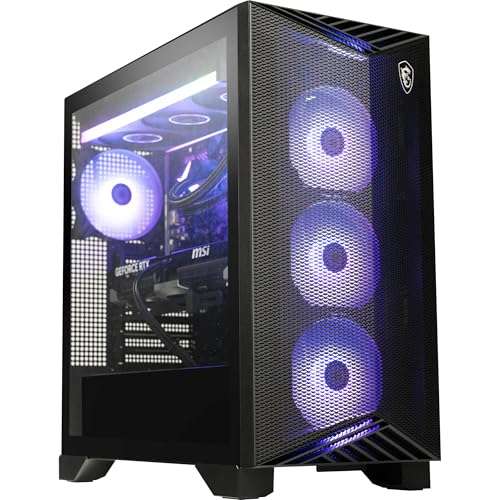
Multitasking Pick – MSI Aegis ZS Ryzen 9 9900X
For buyers comparing rtx 5080 gaming pcs with more CPU cores, the MSI Aegis ZS pairs its RTX 5080 with a 12-core Ryzen 9 9900X. It also includes 32GB of DDR5-6000, a 2TB NVMe SSD, and Windows 11 Pro.
Best For: Gamers who also want a 12-core CPU and Windows 11 Pro.
Pros:
- 12-core Ryzen 9 9900X and RTX 5080 16GB.
- 32GB DDR5-6000 and 2TB M.2 NVMe SSD.
- 360mm liquid cooling, Wi-Fi 7, and Bluetooth 5.3.
- Windows 11 Pro plus included keyboard and mouse.
Cons:
- At 37 pounds, it is a heavier tower to move.
- Supplied specifications conflict on GPU memory type: the title says GDDR7, while the details say GDDR6X.
The Aegis ZS is appealing if its extra CPU cores, connectivity, and Pro edition of Windows fit your needs. Confirm the graphics-card memory specification with the seller before buying.
Best Showcase Build – STORMCRAFT Valkyrie
Among RTX 5080 gaming PCs, the STORMCRAFT Valkyrie stands out for pairing a Ryzen 7 9800X3D with a panoramic glass case and a spotlighted, swappable figure display. Its 32GB of DDR5-6000 memory and 2TB NVMe SSD suit a substantial game library alongside streaming or creative work.
Best For: Gamers who want a high-spec AMD system with a display-focused case and room to expand memory.
Pros:
- Ryzen 7 9800X3D and RTX 5080 pairing suits demanding gaming.
- 360mm ARGB AIO, 850W 80 Plus Gold ATX 3.0 PSU, and GPU anti-sag bracket.
- Wi-Fi 6, Bluetooth, and a stated 3-year labor and 2-year parts warranty.
Cons:
- Display-stage action figure is not included.
- Large 17 x 13.3 x 18.4-inch case needs desk or floor space.
Choose the Valkyrie if its case design and longer stated coverage matter to you; check its dimensions before committing to a setup.
Best Intel Option – Thermaltake View u2780S-380
For shoppers comparing RTX 5080 gaming PCs with Intel processors, the Thermaltake View u2780S-380 combines a Core Ultra 7 270K Plus, 32GB of DDR5-6000 memory, and a 2TB NVMe SSD in a white tower. A 360mm closed-loop liquid cooler and 1000W power supply round out its listed hardware.
Best For: Buyers who prefer an Intel-based RTX 5080 desktop with a white case and a 1000W PSU.
Pros:
- Core Ultra 7 270K Plus and RTX 5080 with 16GB of GDDR7 graphics memory.
- 360mm liquid cooling and a 1000W power supply.
- Front Type-C USB, two USB 3.0 ports, and separate headphone and microphone connections.
Cons:
- Listed warranty is one year.
- Included accessories list RGB lighting, not a keyboard or mouse.
This is the Intel alternative in the group, particularly if you value its specified power supply and front-panel connections. Plan separately for input devices if needed.
Best Ready-to-Play Package – Skytech Tempest
The Skytech Tempest is a straightforward pick among RTX 5080 gaming PCs if you want a Ryzen 7 9800X3D build with a keyboard and mouse included. It also lists 32GB of DDR5-6000 memory, a 2TB Gen4 NVMe SSD, and a white case with a 360mm ARGB liquid cooler.
Best For: Gamers who want a white AMD prebuilt with included input devices and a stated no-bloatware Windows installation.
Pros:
- Ryzen 7 9800X3D paired with an RTX 5080 featuring 16GB of GDDR7 memory.
- 2TB Gen4 NVMe SSD and 32GB DDR5-6000 RAM.
- Includes a gaming keyboard and mouse, plus lifetime technical support.
Cons:
- RTX 5080 card brand may vary.
- Listed Wi-Fi 5 trails the Valkyrie’s Wi-Fi 6; stated maximum RAM capacity is 32GB.
The Tempest covers the core gaming hardware and basic peripherals in one purchase. Check the listed wireless standard and memory limit if future upgrades are a priority.
Creator-Friendly Pick – HP OMEN 45L with Core Ultra 7 and RTX 5080
Among rtx 5080 gaming pcs, this HP OMEN 45L configuration is worth considering if you also edit video or work with demanding creative apps. It pairs an RTX 5080 with a 24-core Intel Core Ultra 7 270K Plus, 32GB of DDR5 memory, and a listed 2TB NVMe SSD.
Best For: Gamers who want a desktop for multitasking, streaming, and content creation.
Pros:
- RTX 5080 with 16GB of GDDR7 memory and a liquid-cooled Intel processor.
- 32GB DDR5 memory and a listed 2TB SSD provide room for games and projects.
- Windows 11 Pro, Wi-Fi 6E, and a 1200W Gold PSU.
Cons:
- The listing conflicts on SSD capacity: the title and bullets say 2TB, while the details say 1TB.
- Accessory information conflicts: the bullets say keyboard and mouse are not included, while the details list them.
The specifications make this a flexible gaming-and-creation option, but confirm storage capacity and included accessories before ordering.
Best Heavy-Duty Pick – Skytech Azure 3 with Ryzen 7 9800X3D
If you are comparing rtx 5080 gaming pcs primarily for gaming, the Skytech Azure 3 pairs its RTX 5080 with a Ryzen 7 9800X3D. Its 32GB of DDR5-6000 memory, 2TB NVMe SSD, and 360mm liquid CPU cooler round out a gaming-focused configuration.
Best For: Buyers prioritizing a Ryzen 7 9800X3D and RTX 5080 pairing in a ready-to-use desktop.
Pros:
- Ryzen 7 9800X3D and RTX 5080 with 16GB of GDDR7 memory.
- 32GB DDR5-6000 memory, 2TB NVMe SSD, and 360mm AIO CPU cooler.
- Includes a gaming keyboard and mouse, plus a one-year parts-and-labor warranty.
Cons:
- Wireless connectivity is listed as 802.11ac Wi-Fi.
- The graphics card brand and ports beyond the promised outputs may vary.
This is a strong fit on paper for a gaming-first build; check the final port configuration if you have a specific monitor or peripheral setup.
Connectivity Pick – HP OMEN Max 45L with Ryzen 7 9800X3D
For shoppers comparing rtx 5080 gaming pcs with plenty of peripheral connections, this HP OMEN Max 45L configuration lists several front and rear USB ports, including USB-C. It combines an RTX 5080, Ryzen 7 9800X3D, 32GB of DDR5 memory, and a 2TB Gen4 SSD.
Best For: Gamers who want a Ryzen 7 9800X3D system with numerous listed USB connections and included peripherals.
Pros:
- RTX 5080 with 16GB GDDR7 memory and Ryzen 7 9800X3D processor.
- 2TB Gen4 SSD, 1200W Platinum PSU, and Windows 11 Pro.
- Multiple listed USB-C and USB-A ports; wired RGB keyboard and mouse included.
Cons:
- Listed DDR5 memory speed is 4800 MHz.
- The title says Wi-Fi 7, but the bullets specify Wi-Fi 6E/802.11ax; verify the installed wireless hardware.
The port selection and included accessories add practical appeal, while the conflicting wireless specifications are worth checking before purchase.
How We Picked These Rtx 5080 Gaming PCs
We focused on desktops listed with an RTX 5080, then compared their stated processors, memory, storage, cooling, power supplies, and connectivity. We also considered how clearly each listing describes its components and whether the chassis appears practical to maintain or upgrade. Specifications can change between retailer configurations, so confirm the exact GPU, CPU, PSU, warranty, and included accessories before buying. These are specification-based buying considerations, not claims of hands-on benchmark testing.
Quick Comparison: Where to Start
For a primarily gaming-focused build, start with the Ryzen 7 9800X3D systems from STORMCRAFT, Skytech, Ultra 50 V3, and HP. If gaming shares time with demanding productivity work, compare the MSI Aegis ZS with Ryzen 9 9900X against the Intel-based Alienware Aurora and Thermaltake View. The HP OMEN Max 45L stands out on paper for its listed 1200W Platinum PSU, while the Ultra 50 V3 and Skytech Azure 3 explicitly list 850W Gold units. Compare final prices, warranty terms, and case accessibility before treating any one specification as a deciding factor.
Key Buying Factors for Rtx 5080 Gaming PCs
CPU and Your Actual Workload
The Ryzen 7 9800X3D is an appealing choice when high-frame-rate gaming is the priority. Higher-core-count alternatives, including the Ryzen 9 9900X and Intel Core Ultra options here, may make more sense if you also render, compile, or run other heavily threaded tasks. At 4K, graphics settings often matter more than small CPU differences; at lower resolutions and very high refresh rates, CPU choice can become more noticeable.
Cooling, Power, and Upgrade Access
Look beyond a listing that simply says “liquid cooled.” Check radiator size if disclosed, case airflow, fan placement, and whether standard replacement parts will fit. PSU wattage and efficiency are useful details, but build quality and available GPU power connections matter too. If you expect to upgrade later, verify motherboard slots, drive bays, case clearance, and whether the system uses proprietary components.
Memory, Storage, and Total Cost
All 10 listed configurations advertise 32GB of RAM and a 2TB SSD, a sensible starting point for a premium gaming desktop. Check memory speed and whether the RAM uses two modules, along with open storage slots. Factor in the monitor, peripherals, shipping, support, and return policy; the cheapest sticker price is not always the lowest-risk purchase.
Who Should Buy Which Rtx 5080 Gaming PCs?
Choose a Ryzen 7 9800X3D configuration if gaming is your main goal, then decide between builders based on price, cooling details, and support. Consider the MSI Ryzen 9 or an Intel Core Ultra desktop if your workload extends well beyond games. If a clearly specified PSU is important to you, compare the HP OMEN Max 45L, Ultra 50 V3, and Skytech Azure 3—but verify the current listing. Pick the machine whose complete configuration and ownership terms suit you, not just the one with the flashiest case.
