
An RTX 5080 desktop can be a strong starting point for high-refresh-rate gaming and demanding 4K titles, but the graphics card alone does not determine the best buy. CPU choice, cooling, storage, and the parts you can upgrade later all matter.
These six prebuilt systems span gaming-focused AMD chips and high-end Intel options. Use the comparisons below to narrow the field before checking current prices and full specifications.
Best 6 Rtx 5080 Deskbuilds Picks for 2026
Gaming-First Pick
STORMCRAFT Phantom Ryzen 7 9800X3D

- Ryzen 7 9800X3D and RTX 5080
- 32GB DDR5-6000 and 2TB Gen4 SSD
- 360mm liquid cooling and seven ARGB fans
Best For: Gaming-focused buyers who want ample storage
Brand-Support Pick
Alienware Aurora Core Ultra 9 285

- Core Ultra 9 285 and RTX 5080
- 32GB DDR5 and 1TB SSD
- One-year onsite service
Best For: Buyers prioritizing Dell support and system controls
Multitasking Pick
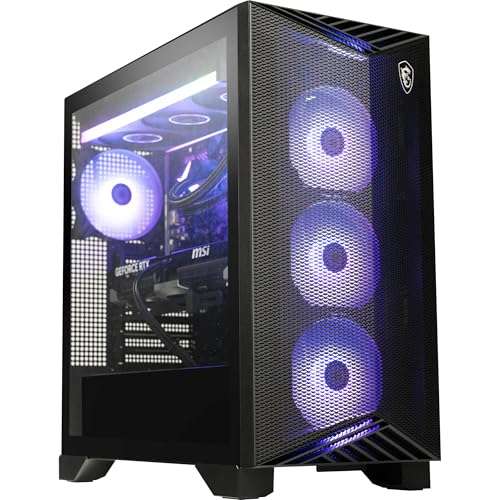
- 12-core Ryzen 9 9900X and RTX 5080
- 32GB DDR5-6000 and 2TB SSD
- Windows 11 Pro and Wi-Fi 7
Best For: Buyers wanting a 12-core system with Windows 11 Pro
Best Overall Gaming Pick

- RTX 5080 and Ryzen 7 9800X3D
- 2TB SSD and 32GB DDR5-6000
- 360mm AIO and 5-gigabit LAN
Best For: Gamers prioritizing CPU performance and built-in storage
Best Showcase Tower

- RTX 5080 and Core i9-14900KF
- Front and side tempered glass
- 360mm liquid cooling
Best For: Buyers seeking a white glass-panel Intel build
Best Peripheral Bundle

- RTX 5080 and Ryzen 7 7800X3D
- Includes gaming keyboard and mouse
- 360mm AIO and 850W Gold PSU
Best For: Gamers who want included peripherals
Gaming-First Pick – STORMCRAFT Phantom Ryzen 7 9800X3D
Among rtx 5080 deskbuilds, the STORMCRAFT Phantom pairs a Ryzen 7 9800X3D with an RTX 5080, 32GB of DDR5-6000 memory, and a 2TB Gen4 SSD. It is a practical choice if you want a gaming-focused configuration with plenty of storage out of the box.
Best For: Gamers who want a Ryzen 7 9800X3D and RTX 5080 pairing without selecting individual components.
Pros:
- 32GB DDR5-6000 memory and a 2TB NVMe Gen4 SSD.
- 360mm liquid cooler, seven adjustable ARGB fans, and an 850W Gold-certified power supply.
- Listed coverage includes two years on parts and three years on labor.
Cons:
- Windows 11 Home may not suit buyers who specifically need Pro.
- The listed one-year shipping coverage is shorter than the parts and labor coverage.
Choose this Phantom if its CPU, storage, and cooling package match your priorities; check its physical dimensions against your desk space before ordering.
Brand-Support Pick – Alienware Aurora Core Ultra 9 285
The Alienware Aurora is an option among rtx 5080 deskbuilds for buyers who value Dell’s onsite service and integrated system controls. This configuration lists an Intel Core Ultra 9 285, RTX 5080, 32GB DDR5 memory, and a 1TB SSD in a basalt-black chassis.
Best For: Buyers who want an RTX 5080 desktop with Alienware Command Center and one-year onsite service.
Pros:
- RTX 5080 with 16GB of GDDR7 memory.
- Alienware Command Center provides lighting controls and selectable performance modes.
- One-year onsite service covers eligible hardware issues that cannot be resolved remotely.
Cons:
- The 1TB SSD offers less listed storage than the 2TB options in this roundup.
- The product notes describe the 240mm liquid-cooling heat exchanger as optional; confirm the exact cooling configuration before purchase.
The Aurora makes the most sense if its service arrangement and software controls matter to you. Verify the cooling specification on the listing rather than assuming the optional feature is included.
Multitasking Pick – MSI Aegis ZS Ryzen 9 9900X
For shoppers comparing rtx 5080 deskbuilds, the MSI Aegis ZS combines a 12-core Ryzen 9 9900X with an RTX 5080, 32GB DDR5-6000 memory, and a 2TB NVMe SSD. Windows 11 Pro, Wi-Fi 7, and included input devices round out the listed package.
Best For: Buyers seeking a 12-core RTX 5080 desktop with Windows 11 Pro and 2TB of storage.
Pros:
- 12-core Ryzen 9 9900X and 32GB DDR5-6000 memory.
- 2TB NVMe SSD and 360mm liquid cooling.
- Windows 11 Pro, Wi-Fi 7, and included keyboard and mouse.
Cons:
- At a listed 37 pounds, it is a substantial tower to move.
- The notes conflict on graphics memory type: a bullet lists the RTX 5080 with 16GB, while the details specify GDDR6X. Verify the exact card specification with the seller.
The Aegis ZS stands out for its 12-core CPU and Pro operating system. Confirm the graphics-card details before buying, especially if the memory specification matters to your decision.
Best Overall Gaming Pick – ZOTAC MEK Ryzen 7 9800X3D
For shoppers comparing rtx 5080 deskbuilds, the ZOTAC MEK pairs an RTX 5080 16GB with a gaming-focused Ryzen 7 9800X3D. Its 2TB SSD and Windows 11 Pro make it a well-equipped, ready-to-use tower.
Best For: Gamers who want a 9800X3D and more built-in storage without assembling a PC.
Pros:
- 32GB DDR5-6000 memory and a 2TB NVMe SSD.
- 360mm AIO cooling, Wi-Fi 6E, and 5-gigabit LAN.
- One-year complete-system warranty and three-year GPU warranty.
Cons:
- Keyboard and mouse are not included.
- Return shipping after warranty service is available only to U.S. addresses.
This is the strongest fit here if the 9800X3D, 2TB of storage, and faster wired networking matter more than bundled peripherals.
Best Showcase Tower – Thermaltake View i1480S-380
Among rtx 5080 deskbuilds, the Thermaltake View i1480S-380 stands out for its white case with front and side tempered-glass panels. It combines an Intel Core i9-14900KF, RTX 5080, and 360mm liquid cooler.
Best For: Buyers who want a glass-panel display build with a Core i9 processor.
Pros:
- Core i9-14900KF and 32GB DDR5-6000 memory.
- 360mm closed-loop liquid cooling.
- Front USB-C and two USB 3.0 ports.
Cons:
- 1TB SSD offers less included storage than the ZOTAC MEK.
- Product notes list a one-year warranty.
Choose this model for its panoramic case and Intel configuration; check whether 1TB is enough space for your game library.
Best Peripheral Bundle – Skytech Azure 3 Plus
The Skytech Azure 3 Plus is an option for rtx 5080 deskbuilds shoppers who want a Ryzen 7 7800X3D and included gaming peripherals. Its white tempered-glass tower houses an RTX 5080 16GB, 32GB DDR5-6000, and a 1TB Gen4 NVMe SSD.
Best For: Gamers who want a 7800X3D system with a keyboard and mouse in the box.
Pros:
- Ryzen 7 7800X3D paired with an RTX 5080 16GB.
- 360mm ARGB liquid cooler and 850W Gold ATX 3 power supply.
- Includes a gaming keyboard and mouse, plus a one-year parts-and-labor warranty.
Cons:
- Included SSD is 1TB.
- Graphics-card brand and ports beyond the promised outputs may vary.
This is a practical bundle if you need peripherals, but confirm the exact connections if your monitor setup requires more than the promised HDMI and DisplayPort outputs.
How We Picked These Rtx 5080 Deskbuilds
We focused on prebuilts listing an RTX 5080 and compared their stated processors, memory, storage, cooling, and connectivity. We also considered how each configuration fits different needs: gaming first, gaming plus heavier work, or a simpler ready-to-use setup. The listed specifications do not establish real-world frame rates, noise levels, or build quality, so check independent testing and the exact retailer configuration before buying.
Quick Comparison
For a gaming-first shortlist, start with the STORMCRAFT Phantom and ZOTAC MEK, both listed with a Ryzen 7 9800X3D, or the Skytech Azure 3 Plus with a Ryzen 7 7800X3D. The MSI Aegis ZS pairs its RTX 5080 with a Ryzen 9 9900X and lists liquid cooling, Wi-Fi 7, and included peripherals. The Alienware Aurora lists an Intel Core Ultra 9 285, while the Thermaltake LCGS View i1480S-380 lists a Core i9-14900KF. Compare the exact CPU model, included parts, and final price rather than treating these as interchangeable RTX 5080 systems.
Key Buying Factors for Rtx 5080 Deskbuilds
CPU and Your Actual Workload
For games where CPU performance matters, the Ryzen 7 9800X3D and 7800X3D systems are sensible starting points. If you also render, compile, or run other heavily threaded applications, compare the Ryzen 9 and Intel configurations against benchmarks for your specific software. At 4K, the GPU often has more influence on gaming performance, so avoid paying a large CPU premium without a clear use for it.
Memory, Storage, and Connectivity
Most listings here specify 32GB of RAM, which is a practical amount for gaming and multitasking; verify the memory configuration on the model you order. STORMCRAFT and MSI list 2TB SSDs, while Skytech lists a 1TB SSD. Consider the size of your game library and whether adding a second drive will be easy. Check the ports, wired networking, and Wi-Fi standard you need rather than assuming every desktop offers the same connections.
Cooling, Power, and Upgrade Room
Look for clear details on the CPU cooler, case airflow, power supply, and physical space for future upgrades. MSI explicitly lists liquid cooling, but a cooling label alone cannot tell you how quiet or effective a complete system will be. Confirm the warranty terms and whether opening the case or replacing parts affects support. Also verify the final listing includes the exact RTX 5080 configuration advertised.
Who Should Buy Which Rtx 5080 Deskbuilds?
Choose a 9800X3D-based STORMCRAFT or ZOTAC if gaming is your priority and its price and specifications suit you. Consider the Skytech for a 7800X3D option if 1TB of included storage meets your needs. Put the MSI higher on your list if its stated 2TB SSD, Wi-Fi 7, and keyboard-and-mouse bundle are useful. Compare the Alienware and Thermaltake if you prefer their Intel configurations, but weigh the complete system—not the processor name alone—against the alternatives.
