
If you’re looking to enhance productivity in your workspace, robotic arms can be a game-changer. These tools offer precision and versatility, transforming how you approach desk manufacturing tasks. With various options available, ranging from educational kits to advanced models, there’s something to suit your needs. Let’s explore the top picks that could revolutionize your workflow and help you achieve more with less effort.
ELEPHANT ROBOTICS mechArm270 M5 Robotic Arm

If you’re a hobbyist, educator, or researcher looking for an affordable yet powerful robotic arm, the ELEPHANT ROBOTICS mechArm270 M5 is an excellent choice. This open-source, 6-axis robotic arm boasts a compact, lightweight design, making it easy to integrate into your workspace. With a 270mm working radius and a 250g payload, it’s perfect for various applications. The industrial-grade structure enhances your learning experience, while compatibility with Arduino and ROS/MoveIt provides vast programming potential. Powered by high-performance servo motors, the mechArm270 M5 delivers precise motion, making it an ideal tool for robotics research and hands-on STEM education.
Best For: Hobbyists, educators, and researchers seeking an affordable yet powerful robotic arm for hands-on learning and development.
Pros:
- Open-source design allows for extensive customization and compatibility with Arduino and ROS/MoveIt.
- Compact and lightweight structure makes it easy to integrate into various workspaces.
- Six-axis motion powered by high-performance servo motors ensures smooth and precise movements.
Cons:
- Limited payload capacity of 250g may restrict certain applications.
- May require a learning curve for those unfamiliar with programming and robotics.
- Not suitable for heavy industrial tasks due to its lightweight design.
Waveshare Robotic Arm Kit (ESP32, 4-DOF)
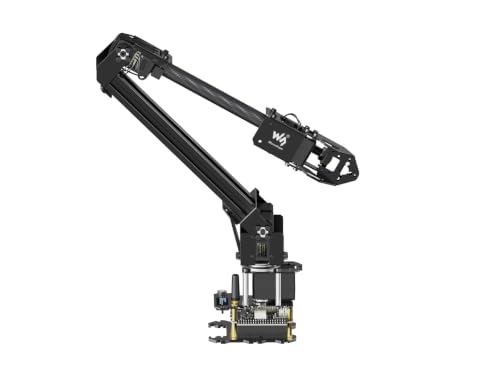
The Waveshare Robotic Arm Kit (ESP32, 4-DOF) is an ideal choice for educators and hobbyists looking to explore robotics with a user-friendly design. Weighing less than 850g, it features high-torque serial bus servo motors and a 360° omnidirectional base, providing a 1-meter diameter workspace. You’ll appreciate the rich tutorials and a cross-platform web application for easy control. The kit supports customizable End of Arm Tooling, making it perfect for innovative projects. With open-source codes available, you can engage in secondary development. Just keep in mind the potential safety concerns and document issues reported by some users.
Best For: Educators and hobbyists interested in exploring robotics with a user-friendly and customizable design.
Pros:
- High-torque serial bus servo motors provide robust performance.
- Supports wireless control and customizable End of Arm Tooling for innovative applications.
- Rich educational resources including graphic and video tutorials for easy setup.
Cons:
- Some users report issues with documentation and customer support response times.
- Missing parts have been reported, affecting the overall experience.
- Potential safety concerns with fast movements; not recommended for young children.
Hiwonder-xArm1S 6DOF Robotic Arm for Arduino
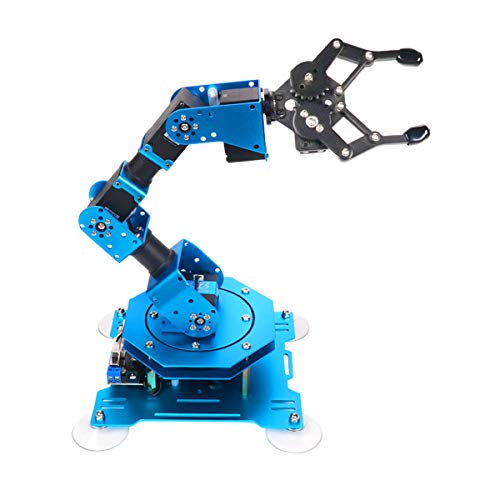
Designed for enthusiasts aged 14 and up, the Hiwonder-xArm1S 6DOF Robotic Arm is an excellent choice for budding roboticists and educators alike. This robust, full-metal arm features six degrees of freedom, allowing you to tackle various tasks with ease. You can control it via PC, a mobile app, or even a PS2 controller. With high-torque servos and a payload capacity of 500g, it’s perfect for small automation projects. Assembly is quick, although you might encounter minor documentation issues. Overall, it’s a strong performer for creative projects, making it a great addition to your toolkit.
Best For: The Hiwonder-xArm1S 6DOF Robotic Arm is best for robotics enthusiasts aged 14 and up who are interested in automation and creative projects.
Pros:
- Strong and accurate performance suitable for small automation tasks.
- Easy assembly with organized packaging and spare parts included.
- Versatile control options through PC, mobile app, and PS2 controller.
Cons:
- Minor bugs in assembly documentation can cause confusion.
- Initial Bluetooth connection issues reported by some users.
- Not recommended for very young children due to fragility.
Robotic Arm Kit 6DOF with PC Software Control

For hobbyists, students, and engineers enthusiastic to explore robotics, the LeArm Robotic Arm Kit with 6DOF and PC software control offers an exceptional entry point. Featuring six high-quality digital servos, it supports remote-control grasping and custom actions. Its durable design includes metal brackets and high-torque servos, ensuring stability. You can easily program it using standard pulse-width signals, compatible with Raspberry Pi and Arduino for custom projects. Users appreciate the straightforward assembly and responsive customer support. While some minor performance issues exist, with adjustments, this kit serves as a solid foundation for your robotic exploration and creativity.
Best For: Hobbyists, students, and engineers looking to explore and create innovative robotics projects.
Pros:
- High-quality construction with durable metal brackets and industrial-grade bearings for stability.
- Easy programming with compatibility for Raspberry Pi and Arduino, allowing for custom software development.
- Responsive customer support from the manufacturer, LewanSoul, along with extensive instructional materials.
Cons:
- Some users reported minor assembly issues, such as needing longer screws and confusion regarding connections.
- Performance issues have been noted, including servo malfunctions and connection problems.
- The wrist servo’s plastic shaft may fail under stress, indicating a potential need for metal upgrades.
Robotic Arm for Arduino Coding Programming (6DOF STEM Educational Kit)
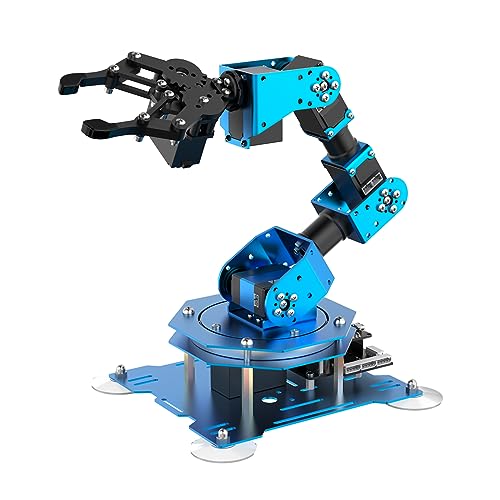
If you’re looking to immerse yourself in the world of robotics and coding, the Hiwonder-xArm1S 6DOF STEM Educational Kit is perfect for you. This high-quality robotic arm features six intelligent servos, enabling you to grasp and transport objects weighing up to 500g. With multiple control methods, like PC, phone app, and wireless options, you can explore innovative programming ideas. The user-friendly interface allows for easy action editing, making customization a breeze. Assemble it right out of the box for immediate use in your projects. Engage with bionic robotics and release your creativity with this versatile learning tool!
Best For: Individuals interested in robotics education, coding, and hands-on learning experiences.
Pros:
- High precision with 6 intelligent servos that allow for effective grasping and transportation of objects.
- Multiple control options (PC, phone app, mouse, PS2) for enhanced user engagement and creativity.
- User-friendly action editing interface that simplifies customization and experimentation.
Cons:
- Limited payload capacity of 500g may not suit projects requiring heavier object manipulation.
- Requires programming knowledge to fully utilize its features, which may be challenging for beginners.
- Assembly not required, which may limit the hands-on experience in building the robotic arm for some users.
OWI Inc Robotic Arm Edge Wireless Remote Control Interface

The OWI Inc Robotic Arm Edge Wireless Remote Control Interface is perfect for budding engineers and tech enthusiasts aged 13 and up. This innovative device offers a wireless experience, letting you control the arm with a five-switch remote. You’ll enjoy impressive motion capabilities, including a 120-degree wrist movement and a 270-degree base rotation. With a vertical reach of 15 inches and the ability to lift 100 grams, it’s a powerful tool for educational play. Plus, assembling the arm enhances your manual dexterity, making it a fun project. Just grab some batteries, and you’re ready to explore the world of robotics!
Best For: Budding engineers and tech enthusiasts aged 13 and up who are interested in exploring robotics.
Pros:
- Wireless remote control enhances user experience and freedom of movement.
- Impressive motion capabilities with a wide range of motion for various tasks.
- Educational value through assembly, promoting manual dexterity and problem-solving skills.
Cons:
- Requires batteries that are not included, which may add to the initial cost.
- Weight limit of 100 grams may restrict the types of objects it can manipulate.
- Assembly required could be challenging for some users, potentially deterring younger or less experienced builders.
Robotic Arm Kit MaxArm for Arduino and Python Programming

MaxArm stands out as an excellent choice for tech enthusiasts and budding programmers enthusiastic to immerse themselves in the world of robotics. This open-source robotic arm kit supports both Arduino and Python programming, making it versatile for various skill levels. Weighing just 4.16 pounds, it features smart servos for precision and multiple control options, including Bluetooth and WiFi. While it offers a hands-on STEM educational experience, you might find programming for live control a bit tricky without sufficient code samples. Overall, it’s a solid investment for anyone looking to dive deep into robotics and automation.
Best For: Tech enthusiasts and aspiring programmers eager to explore robotics through hands-on learning.
Pros:
- Versatile Programming Options: Supports both Arduino and Python, catering to various skill levels.
- Precision and Control: Features smart servos for high accuracy and multiple control methods including Bluetooth and WiFi.
- Educational Value: Provides a strong foundation in STEM education with hands-on experience in robotics.
Cons:
- Programming Complexity: Can be challenging to program for live control without adequate code samples.
- Limited Documentation: Users may find the instructions and available code samples lacking, which can hinder usability.
- Not Suitable for Beginners: May be overwhelming for non-technical users due to its complexity.
Smart Robot Arm Building Kit for Arduino & ESP32-C3
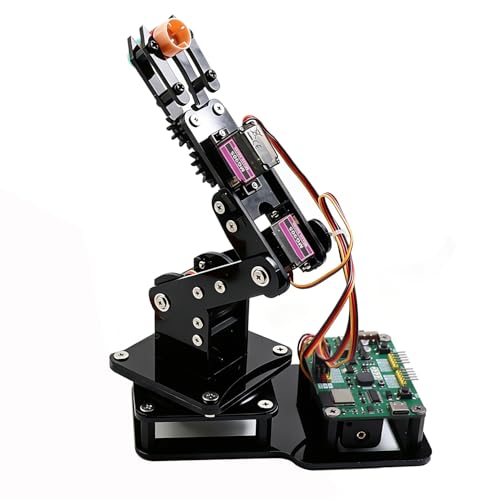
Designed for beginners and hobbyists, the Smart Robot Arm Building Kit for Arduino & ESP32-C3 offers an engaging introduction to robotics and programming. This compact kit features four mg90s servos for diverse motion and a claw for picking up lightweight items. You’ll appreciate the ease of assembly, guided by clear tutorials. Switching control modes between the joystick and web app is simple, enhancing your hands-on experience. With Arduino programming resources included, you’ll deepen your understanding of robotics. While most users praise its organization and assembly, some modifications may be needed for ideal performance. Overall, it’s a fantastic learning tool!
Best For: Beginners, hobbyists, and those interested in STEM education looking for an engaging introduction to robotics and programming.
Pros:
- Clear instructions and easy assembly make it accessible for all skill levels.
- Offers hands-on experience with joystick and web app control modes.
- Includes Arduino programming resources for deeper learning and understanding of robotics.
Cons:
- Some users report occasional erratic motion that may require modifications.
- May need a 18650 battery for operation, which is not included.
- Instructions are only available in English, possibly requiring translation for non-English speakers.
Freenove Robot Arm Kit for Raspberry Pi

For those looking to immerse themselves in robotics with a hands-on approach, the Freenove Robot Arm Kit for Raspberry Pi stands out as an excellent choice. Weighing 4.63 pounds, this durable all-metal arm offers clamping and drawing modes, allowing you to create custom designs. While assembly is required, the step-by-step guide and complete Python code guarantee a smooth process. Compatible with multiple Raspberry Pi models, it supports wireless control via smartphones or computers. With positive user reviews highlighting its precision and sturdy construction, this kit is perfect for enhancing your robotics skills and productivity.
Best For: Robotics enthusiasts and programmers looking to enhance their skills with a hands-on, customizable experience.
Pros:
- High-quality all-metal construction ensures durability and stability during operation.
- Supports multiple Raspberry Pi models, providing versatility for users with different devices.
- Comprehensive documentation and free technical support make assembly and programming accessible.
Cons:
- Assembly can take a few hours, which may be a challenge for beginners.
- Some users reported issues with LED functionality specifically on the Raspberry Pi 5.
- Software compatibility issues noted with macOS, potentially limiting some users.
Robotic Arm with Arduino 5DOF/Axis Educational Kit

The Robotic Arm with Arduino 5DOF/Axis Educational Kit stands out as an ideal choice for anyone enthusiastic to explore the world of robotics and programming, particularly students aged 16 and up. Weighing just 2.44 pounds and measuring 5 x 13 x 8 inches, it’s compact yet powerful. Built on the Atmega328 platform, it supports Arduino programming, allowing for customization. With high-precision digital servos and multiple expansion ports, you can integrate various sensors. While some users find the tutorials lacking depth, many educators praise it for fostering creativity in STEM. Overall, it’s a robust kit that enhances learning in robotics and engineering.
Best For: The Robotic Arm with Arduino 5DOF/Axis Educational Kit is best for students aged 16 and up who are interested in learning about robotics and programming.
Pros:
- High-quality construction with robust hardware components.
- Supports Arduino programming, allowing for customization and development.
- Encourages creativity and curiosity in STEM education, making it suitable for both beginners and experienced hobbyists.
Cons:
- Some users find the tutorials lacking depth, which may challenge those without advanced Arduino knowledge.
- Mixed reviews on software usability, with difficulties reported in programming and functionality.
- Issues with component compatibility and assembly instructions, indicating a need for better guidance for novice users.
Factors to Consider When Choosing Robotic Arms for Deskmanufacturing
When choosing robotic arms for desk manufacturing, you need to contemplate several key factors. Think about the payload capacity you’ll require, the control methods available, and how complex the assembly process might be. Also, pay attention to programming compatibility and the potential educational value these arms can offer.
Payload Capacity Requirements
Selecting the right robotic arm for desk manufacturing hinges on understanding its payload capacity, which determines how much weight the arm can safely lift and manipulate. Higher payload capacities, like 500g or more, expand your ability to handle various materials and components, enhancing your manufacturing versatility. Make sure the arm’s capacity aligns with your project needs to prevent damage or inefficiencies if the weight exceeds its limits. Additionally, consider the arm’s design and materials; stronger constructions typically offer higher payload capacities and durability. Finally, factor in the working radius, as it can affect the effective payload when reaching for materials or tools at different distances. Choosing wisely here can greatly boost your productivity.
Control Method Options
Choosing the right control method for your robotic arm is essential for optimizing its performance in desk manufacturing. You’ll find various options like PC, mobile apps, joysticks, and wireless controllers, so you can pick what suits your needs best. If customization is important, look for arms with open-source programming capabilities that support languages like Python and Arduino. Wireless control can enhance your experience by letting you operate from a distance, which is great for educational or experimental use. Additionally, some robotic arms offer different control modes, including manual, semi-automatic, and fully automated, giving you flexibility for various tasks. Consider these factors to guarantee you choose the right control method for your projects.
Assembly Complexity Level
Understanding the assembly complexity of robotic arms is essential for ensuring a smooth setup process in desk manufacturing. Some kits require advanced technical skills, while others offer straightforward assembly with clear instructional videos and organized parts. If you prefer immediate functionality, consider pre-assembled options that minimize the assembly burden. The quality of assembly instructions, including video tutorials and step-by-step guides, greatly affects your experience. Look for kits that provide spare parts and tools to help if you encounter minor issues. Keep in mind that overall assembly time can range from a few hours to several days, depending on the design’s complexity and your familiarity with robotic components. Choose wisely to enhance your productivity!
Programming Compatibility Features
Once you’ve tackled the assembly complexity of robotic arms, the next step is to evaluate their programming compatibility features. Look for models that support open-source programming, as this gives you flexibility and customization options, especially with platforms like Arduino and Raspberry Pi. Check if they’re compatible with popular ecosystems like ROS or MoveIt, which can simplify advanced programming. The availability of tutorials and documentation is essential too; extensive resources can ease your learning curve considerably. Also, consider the control methods offered, such as mobile apps or PC interfaces, as these affect your user experience. Finally, verify the arm has features for action editing and customization, allowing you to create specific movements tailored to your projects.
Educational Value Potential
When exploring robotic arms for desk manufacturing, it is crucial to evaluate their educational value potential. Many of these arms feature open-source programming, giving you the chance to customize applications and deepen your coding skills. With extensive documentation and tutorials, they cater to both beginners and advanced users, promoting a smoother learning curve. Assembling and programming these robotic arms offers hands-on experience that fosters critical thinking and creativity. They also support various control methods like PC, mobile apps, and wireless controllers, helping you grasp different programming paradigms. Additionally, integrating sensors and supporting multiple programming languages encourages interdisciplinary learning, connecting engineering, computer science, and mathematics in an engaging way. This makes them an excellent choice for educational purposes.
Size and Mobility Considerations
Selecting the right robotic arm for desk manufacturing involves careful consideration of size and mobility factors. Start by evaluating the working radius; some arms operate effectively within a compact 270mm, while others offer a larger 1-meter diameter. Mobility is also vital—lighter models under 1kg are easier to handle, especially in tight spaces. Pay attention to payload capacity, as some arms can lift up to 500g, which is fundamental for various tasks. Additionally, consider the arm’s design; features like a 360° omnidirectional base enhance flexibility and allow you to work from multiple angles without repositioning. Finally, verify the arm’s dimensions fit your workspace; larger models may require more vertical clearance than compact designs.
