
When it comes to data protection and convenience, choosing the right RAID system with hot swap bays is essential. These systems let you replace or add drives without any downtime, greatly improving your workflow. With various options available, each designed for different needs and environments, you’ll want to know what features to prioritize. Let’s explore the top contenders that could elevate your data management strategy.
SABRENT 10-Bay USB 3.2 Gen 2 SATA Docking Station for HDD/SSD

The SABRENT 10-Bay USB 3.2 Gen 2 SATA Docking Station is perfect for content creators and professionals who need to manage large volumes of data efficiently. You can connect up to ten 3.5” SATA drives through a single USB-C port, with each drive recognized individually. The individual power control lets you turn drives on or off as needed, which is great for backups. With USB 3.2 Gen 2 speeds reaching up to 10 Gbps, transferring large files is a breeze. Plus, the tray-less design and cooling fans guarantee your drives stay safe and cool during use.
Best For: Content creators and professionals who require efficient management of large data volumes.
Pros:
- Individual Power Control: Each drive can be powered on or off separately, optimizing energy use and enhancing backup workflows.
- High-Speed Transfer: USB 3.2 Gen 2 supports transfer speeds up to 10 Gbps, making it ideal for handling large files quickly.
- Tool-Free Hot-Swap Design: Easy insertion and removal of drives without tools, ensuring convenience and efficiency during use.
Cons:
- No RAID Support: Direct-attached storage means no RAID configurations, which may limit redundancy options for data protection.
- Limited to 3.5” Drives: The docking station only accommodates 3.5” SATA drives, excluding compatibility with smaller 2.5” SSDs.
- Cooling Fan Noise: The dual cooling fans may produce noise that could be distracting in quieter environments.
TERRAMASTER D4-320 External Hard Drive Enclosure (4bay USB 3.2 Gen2)

For users seeking a versatile and efficient storage solution, the TERRAMASTER D4-320 External Hard Drive Enclosure stands out with its hot-swappable design. It supports four SATA III HDDs, letting you achieve impressive combined read/write speeds of up to 1,016 MB/s. With USB 3.2 Gen2, you can connect easily and enjoy data transmission speeds of 10Gbps. Plus, its tool-free tray design makes swapping drives a breeze. The intelligent fan guarantees efficient heat dissipation while keeping noise levels low. Compatible with MAC, Windows, and Linux, this enclosure is perfect for anyone needing reliable, high-capacity storage without the hassle.
Best For: Users looking for a high-capacity, efficient, and versatile external storage solution that supports multiple hard drives without the need for complex setup.
Pros:
- High-speed data transmission with USB 3.2 Gen2, achieving speeds up to 10Gbps.
- Tool-free hard drive tray design allows for easy installation and removal of drives.
- Hot-swappable feature enables drive replacement without powering off the device.
Cons:
- Lacks RAID function, limiting advanced data management options.
- Maximum individual HDD capacity may require careful planning for larger storage needs.
- The intelligent fan, while efficient, may still generate some noise during operation.
RackChoice Internal Hard Drive Enclosure for 5x SATA/SAS Hard Drives

Designed for system administrators and tech enthusiasts, the RackChoice Internal Hard Drive Enclosure offers a seamless way to manage multiple hard drives without downtime. This enclosure converts three 5.25″ bays into a hot-swappable interface for five 2.5” or 3.5” SATA/SAS drives. With support for SATA I/II and SATA III, you can enjoy data transfer rates up to 6 Gbps. The durable metal construction and an 80mm cooling fan guarantee effective heat dissipation. Remember, you’ll need a RAID card for configurations like RAID 0, 1, 5, 6, or 10, and two MOLEX connectors for power supply.
Best For: System administrators and tech enthusiasts looking for an efficient way to manage multiple hard drives in a rack environment.
Pros:
- Hot-swappable interface allows for easy drive management without system downtime.
- Supports high data transfer rates of up to 6 Gbps for fast performance.
- Durable metal construction and cooling fan ensure effective heat dissipation.
Cons:
- Requires a RAID card for RAID configurations, which may add to overall setup costs.
- Power supply is not included, necessitating additional components (2x MOLEX connectors).
- Limited to three 5.25″ bays, which may restrict installation options in some systems.
Syba 5 Bay Tool Less SATA III RAID HDD External USB 3.0 Enclosure

Looking for a reliable way to manage multiple hard drives? The Syba 5 Bay Tool Less SATA III RAID HDD External USB 3.0 Enclosure is an excellent choice. Supporting up to five drives, you can achieve a massive 120TB of storage. With hot-swappable trays, you can easily insert or remove drives without any tools. The USB 3.0 interface delivers transfer rates of up to 5 Gb/s, ensuring fast data access. Plus, various RAID configurations—like RAID 0, RAID 1, and RAID 5—provide flexibility for your storage needs. It’s compatible with Windows, Mac OS X, and Linux, making it versatile for all users.
Best For: Users who need a high-capacity, versatile storage solution for managing multiple hard drives efficiently.
Pros:
- Hot-swappable design allows for easy insertion and removal of drives without tools.
- Supports various RAID configurations, providing flexibility for different data protection and performance needs.
- High transfer speeds with USB 3.0 interface, ensuring quick access to data.
Cons:
- Requires additional setup for eSATA interface to access multiple HDDs simultaneously.
- Limited to SATA drives, which may not accommodate other types of hard drives.
- Power supply may be insufficient for some high-performance drives under heavy load.
SanDisk Professional G-RAID Shuttle 8-Bay Thunderbolt 3 RAID Array (160TB)
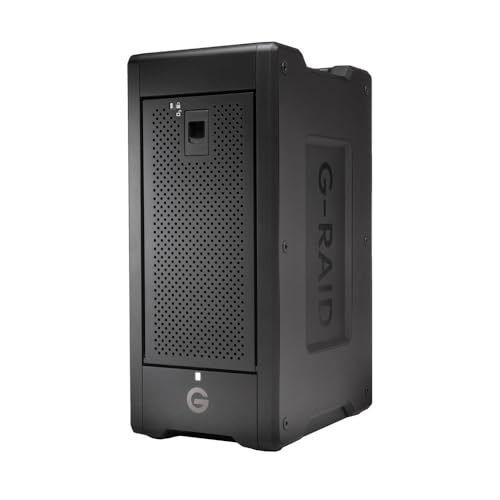
The SanDisk Professional G-RAID Shuttle 8-Bay Thunderbolt 3 RAID Array, with its impressive 160TB capacity, is a powerhouse for creative professionals who demand high performance and reliability. With read speeds up to 1900MB/s and write speeds reaching 2000MB/s, it supports multi-stream 4K, 8K, and VR editing seamlessly. The dual Thunderbolt 3 ports allow you to daisy-chain up to five additional devices, enhancing your workflow. You’ll appreciate the flexibility of built-in RAID 5 and options for RAID 0, 1, 6, and more. Plus, its removable enterprise-class Ultrastar hard drives guarantee enhanced reliability for your mission-critical footage.
Best For: Creative professionals and teams needing high-capacity, high-speed storage solutions for multi-stream 4K, 8K, and VR editing.
Pros:
- High data transfer rates with read speeds up to 1900MB/s and write speeds up to 2000MB/s enhance workflow efficiency.
- Versatile RAID configurations provide flexibility to meet different data protection needs.
- Dual Thunderbolt 3 ports allow for daisy-chaining multiple devices, simplifying connections.
Cons:
- The price point may be high for casual users or those with lower storage needs.
- The large physical size may not be ideal for on-the-go use or small workspaces.
- Requires some technical knowledge to set up and configure RAID options effectively.
Yottamaster 5 Bay RAID Hard Drive Enclosure
![Yottamaster 5 Bay RAID Hard Drive Enclosure, 150W Aluminum USB3.0 RAID HDD Enclosure for 3.5 & 2.5 Inch SATA HDD/SSD, Support 120TB(5x24TB) Direct Attached Storage DAS RAID1/5/10/JBOD/CLONE [FS5RU3]](https://m.media-amazon.com/images/I/41ulUJlSWJL._SL500_.jpg)
For professionals in video editing or data-intensive fields, the Yottamaster 5 Bay RAID Hard Drive Enclosure stands out as an exceptional choice due to its robust support for up to 120TB of storage. You’ll appreciate its compatibility with both 2.5 and 3.5-inch SATA HDDs/SSDs, making it versatile for various tasks. With multiple RAID modes, including RAID 0 and 1, you can easily manage large media files. The aluminum construction guarantees effective heat dissipation, while the built-in fan keeps everything cool. Plus, the USB 3.0 interface offers a speedy 5Gbps transfer rate, enhancing your workflow efficiency.
Best For: Professionals in video editing, data-intensive fields, and corporate data storage who require extensive and flexible storage solutions.
Pros:
- Versatile Compatibility: Supports both 2.5 and 3.5-inch SATA HDDs/SSDs, accommodating a wide range of storage needs.
- Multiple RAID Modes: Offers various RAID configurations, allowing users to manage data effectively and ensure redundancy.
- Efficient Cooling System: Built-in low-noise fan and aluminum construction enhance heat dissipation, maintaining optimal performance during intensive use.
Cons:
- Initial Setup Complexity: May require technical knowledge for optimal RAID configuration and installation.
- Limited Warranty Options: Warranty information is only accessible through Amazon, which might not provide direct support.
- Higher Price Point: Compared to single-bay enclosures, the multi-bay setup can be more expensive, which may not suit all budgets.
HPE MSA 2060 16Gb Fibre Channel SFF Storage

Designed with IT generalists in mind, the HPE MSA 2060 16Gb Fibre Channel SFF Storage offers an intuitive Storage Management Utility that simplifies storage management tasks. With impressive performance of up to 395,000 IOPS, it accelerates your applications efficiently. You can scale effortlessly, supporting up to 24 drives for limitless expansion. Choose between hybrid or flash storage configurations from day one. Its virtualized snapshot technology guarantees easy data protection and instant recovery, while automated tiering dynamically optimizes data placement. The rack-mountable design makes installation and maintenance a breeze, making it a practical choice for your data center needs.
Best For: IT generalists and data center managers looking for a scalable and high-performance SAN storage solution.
Pros:
- High performance with up to 395,000 IOPS for application acceleration.
- Supports up to 24 drives for extensive scalability and storage options.
- Intuitive management interface makes it easy for IT generalists to operate and maintain.
Cons:
- Weight of 61.1 lbs may require additional support for installation and rack mounting.
- Specific warranty details are not provided, which might concern some buyers.
- Limited information on return policy specifics beyond the 30-day window.
LaCie 2big Dock RAID 16TB External HDD

Creatives and professionals seeking reliable, high-capacity storage will find the LaCie 2big Dock RAID 16TB External HDD an excellent choice. With speeds reaching up to 550MB/s, it’s perfect for laptop-focused workflows. You’ll appreciate its dual Thunderbolt 3 ports and USB4 compatible hub, making connectivity a breeze. Plus, the hot-swappable IronWolf Pro drives guarantee enhanced reliability and long-term performance. Configuring your RAID 0/1 is simple with the step-by-step wizard, allowing you to optimize for speed or redundancy. For added peace of mind, it comes with a limited warranty and Rescue Data Recovery Services, safeguarding your valuable data.
Best For: Creatives and professionals looking for high-capacity, reliable storage solutions for their laptop-focused workflows.
Pros:
- Fast data transfer speeds of up to 550MB/s enhance productivity.
- Versatile connectivity options with dual Thunderbolt 3 ports and additional card slots.
- Hot-swappable IronWolf Pro drives provide enhanced reliability and long-term performance.
Cons:
- Higher price point compared to standard external hard drives.
- Limited storage capacity options may not meet the needs of all users.
- Some users may find the RAID configuration process challenging without prior experience.
Rosewill Internal Hard Drive Enclosure (RSV-SATA-Cage-34)

The Rosewill Internal Hard Drive Enclosure (RSV-SATA-Cage-34) stands out as an excellent choice for anyone needing efficient storage solutions without sacrificing space. It converts three 5.25-inch bays into four 3.5-inch or 2.5-inch SATA HDD trays, maximizing your setup. With hot-swap capability for SATA I, II, and III, you can easily replace drives without downtime. The rugged steel and ABS design guarantees durability, while the rear 120mm exhaust fan provides ideal cooling for your drives. Whether you’re using it with compatible Rosewill models or standalone, this enclosure delivers reliability and convenience for all your storage needs.
Best For: Those seeking an efficient and space-saving solution for managing multiple SATA or SAS hard drives in a compact form factor.
Pros:
- Hot-swap capability allows for easy drive replacements without the need to power down the system.
- Durable construction with steel and ABS materials ensures long-lasting performance.
- Effective cooling system featuring a 120mm exhaust fan maintains optimal temperatures for HDDs.
Cons:
- Limited to four drives, which may not suffice for users with extensive storage needs.
- Compatibility primarily with Rosewill models may restrict usage in other setups.
- Installation requires adequate space in the chassis, which could be a constraint in smaller cases.
Seagate IronWolf 12TB NAS Internal Hard Drive (ST12000VNZ008)
For those managing multi-user NAS environments, the Seagate IronWolf 12TB NAS Internal Hard Drive (ST12000VNZ008) stands out as an ideal choice. With a 7200 RPM speed and a 256MB cache, it delivers excellent performance, achieving a data transfer rate of 6Gbps. Designed for up to 8-bay systems, it guarantees reduced wear and minimal noise, making it perfect for both business and personal use. The IronWolf Health Management system keeps you informed about drive health, while the five-year warranty and Seagate Rescue Data Recovery Services provide peace of mind. Customers love it, rating it 4.5 out of 5 stars!
Best For: Multi-user NAS environments requiring high-capacity storage and reliable performance.
Pros:
- High capacity of 12TB, ideal for extensive data storage needs.
- Optimized for NAS with reduced wear, low noise, and minimal vibration.
- IronWolf Health Management system for proactive monitoring of drive health.
Cons:
- 7200 RPM speed may not be sufficient for ultra-high-performance applications.
- Higher price point compared to standard desktop hard drives.
- Weight of 1.4 pounds may be heavier than expected for some setups.
Factors to Consider When Choosing Raid Systems With Hot Swap Bays
When you’re choosing RAID systems with hot swap bays, several key factors come into play. You’ll want to take into account storage capacity options, RAID configuration flexibility, and the effectiveness of the hot swap functionality. Additionally, pay attention to the connectivity interfaces available and the cooling system’s efficiency to guarantee peak performance.
Storage Capacity Options
Choosing the right RAID system with hot swap bays involves several key factors, especially regarding storage capacity. First, check the maximum storage capacity it supports; systems can handle individual drives up to 30TB or total capacities exceeding 120TB. Next, evaluate the number of bays available, as configurations typically range from 4 to 10, directly impacting your overall storage potential. Look for systems that support multiple drive formats, like 2.5” and 3.5” SATA HDDs/SSDs, to maximize compatibility. Additionally, consider RAID configurations that allow for combining multiple drives, boosting usable storage while guaranteeing redundancy. Finally, verify the design enables easy drive replacement or upgrades, essential for maintaining and expanding your storage capacity efficiently.
RAID Configuration Flexibility
While selecting a RAID system with hot swap bays, it’s essential to evaluate the flexibility of RAID configurations available. You’ll want options like RAID 0, 1, 5, 6, and 10, which balance performance, redundancy, and storage capacity based on your specific needs. Look for systems that let you easily adjust configurations to accommodate changes in workload or storage demands over time. Additionally, consider the option to implement JBOD (Just a Bunch Of Disks), allowing you to use each drive independently and optimize storage without being locked into a specific RAID setup. This flexibility is especially beneficial if your data growth rates are high, enabling seamless upgrades or expansions of your storage capacity without significant downtime.
Hot Swap Functionality
Selecting a RAID system with hot swap bays means considering how hot swap functionality can streamline your operations. This feature lets you replace or add hard drives without shutting down the system, reducing downtime and enhancing workflow efficiency. In RAID systems, hot swapping enables continuous data access and redundancy without interrupting your tasks. Look for bays with locking mechanisms to avoid accidental disconnections, guaranteeing data integrity during operation. Most hot swap systems support various RAID configurations, so you can maintain performance while managing multiple drives effectively. Additionally, verify that proper cooling mechanisms are in place to prevent overheating during drive insertion and removal, which boosts the longevity and reliability of your drives.
Connectivity Interfaces Available
When evaluating RAID systems with hot swap bays, understanding the available connectivity interfaces is essential for optimizing performance. You’ll find options like USB 3.0, 3.1, 3.2, and Thunderbolt, each offering different data transfer speeds—USB 3.2 supports up to 10 Gbps, while Thunderbolt can reach 40 Gbps. USB Type-C interfaces are also popular for their versatility, allowing compatibility with various protocols and enhancing data transfer capabilities. Some systems include eSATA connections, which can deliver faster rates but may need extra hardware. Plus, modern RAID enclosures often support backward compatibility with older USB versions, ensuring seamless integration with your existing devices. Choosing the right interface can greatly impact your workflow, especially in data-intensive tasks.
Cooling System Efficiency
Cooling system efficiency is vital for maintaining the performance and reliability of RAID systems with hot swap bays, especially during high-demand operations. Overheating can lead to drive failure and data loss, so look for enclosures featuring multiple fans or effective ventilation designs that promote ideal airflow. A well-designed cooling system not only keeps temperatures in check but can also reduce noise levels—some models operate at a whisper-quiet 21 dB(A). Materials like aluminum alloy can enhance heat dissipation, further supporting your drives’ longevity. Regularly monitoring temperature levels is essential, as excessive heat can shorten hard drive lifespan and impact overall performance. Intelligent cooling solutions, thus, should be a top priority when selecting a RAID system.
Build Quality Durability
Maintaining effective temperature control is only part of the equation; build quality durability plays a significant role in the performance and longevity of RAID systems with hot swap bays. When choosing a system, look for robust materials like aluminum or steel that resist wear and guarantee effective heat dissipation. A solid cooling system—complete with built-in fans and ventilation holes—is essential for preventing overheating. Additionally, a sturdy design with locking mechanisms for drive trays enhances durability by avoiding accidental disconnections. Consider the weight and size of the enclosure; a heavier, well-constructed unit is less likely to tip during handling. Finally, systems that allow easy access to components make upgrades safer, contributing to overall durability.
Compatibility With Devices
Choosing a RAID system with hot swap bays requires careful consideration of compatibility with your existing devices, as mismatches can lead to performance issues or operational failures. First, verify the RAID system supports the same hard drive interface, like SATA or SAS, as your current drives. Check the operating system compatibility too, since specific drivers may be needed for Windows, macOS, or Linux. Confirm that the RAID configuration options align with your usage goals, whether you seek redundancy, performance, or both. Evaluate the physical dimensions and form factor to fit your setup, confirming it works with your available rack space or desktop. Finally, consider the hot-swap capability, as not all devices support this feature, which enhances workflow efficiency.
Performance Specifications Considerations
When evaluating RAID systems with hot swap bays, it is vital to focus on performance specifications that directly impact your workflow. First, check the maximum data transfer rate, ideally around 10 Gbps with USB 3.2 Gen 2 technology, to enhance data transfer efficiency. Look for systems that support high-capacity drives, with options reaching up to 30TB, guaranteeing you can scale as needed. Adequate read and write speeds are essential; some models provide read speeds up to 1900MB/s and write speeds up to 2000MB/s, perfect for demanding tasks like video editing. Additionally, evaluate compatibility with various RAID configurations and guarantee effective cooling features, like built-in fans, to maintain performance and reliability during heavy loads.
