
If you need storage that is fast, expandable, and easy to service, RAID enclosures with hot-swap bays are a smart upgrade.
Below, we focus on the 2026 models that balance performance, cooling, portability, and bay count for different workflows.
Best 10 Raid Storage Enclosures with Hot Swap Bays Picks for 2026
Best for Easy Hot-Swap RAID
TERRAMASTER D2-320 2-Bay USB RAID Enclosure

- USB 3.2 Gen 2 10Gbps direct-attached storage
- Supports RAID 0, RAID 1, JBOD, and Single
- Tool-free trays with push-lock drive retention
Best For: Users who want fast, easy-to-swap local RAID storage in a compact 2-bay DAS.
Best for 2.5" Drive Density
ICY DOCK MB326SP-B 6-Bay Hot Swap Enclosure
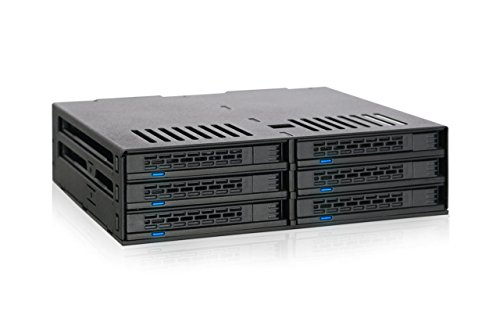
- Holds 6 x 2.5" SATA drives in one 5.25" bay
- Tool-less, hot-swappable drive access
- Dual 40mm fans with HIGH/LOW/AUTO control
Best For: Compact RAID or SSD builds that need maximum 2.5" drive density in a single bay.
Best Hot-Swap DAS
TERRAMASTER D4-320 4-Bay USB-C Enclosure

- 4-bay direct-attached storage with hot-swap trays
- Up to 10Gbps USB 3.2 Gen2 performance
- Quiet, tool-free design for easy drive changes
Best For: Users who want a simple, fast 4-bay enclosure for local storage expansion.
Best for Direct-Attached Hot Swap
SABRENT 5-Bay USB 3.2 Gen 2 Dock

- Five tray-less hot-swap bays
- Individual power switches per drive
- 10Gbps USB-C with active cooling
Best For: Creators and backup users who want five independently controlled hot-swap bays without RAID.
Best 4-Bay Internal Cage
Rosewill 3-to-4 Hot-Swap Enclosure

- Converts 3 x 5.25-inch bays into 4 hot-swap drive slots
- Supports SATA I/II/III and SAS 6Gbps drives
- Rear 120mm fan support helps with cooling
Best For: Internal NAS or RAID-style builds that need front-access hot-swap bays in an existing tower case.
Best for Hot-Swap Desktop DAS
CENMATE 4-Bay 10Gbps Enclosure

- Hot-swappable bays for quick drive changes
- 10Gbps USB 3.2 Gen 2 desktop DAS
- Supports 2.5-inch and 3.5-inch SATA drives
Best For: Users who need fast, easy-to-swap external SATA storage without RAID or NAS features.
Best Tool-Free 4-Bay DAS
CENMATE Aluminum 4-Bay USB 3.0 Enclosure
- Tool-free hot-swappable bays for fast drive changes
- Aluminum body with fan for added cooling support
- Supports 2.5-inch/3.5-inch SATA HDDs and SSDs
Best For: People who want a simple, hot-swappable 4-bay desktop enclosure without RAID.
Best for Easy Expansion
CENMATE 2-Bay Hot-Swap Enclosure

- Hot-swappable dual bays for fast drive changes
- Tool-free setup for 2.5-inch and 3.5-inch SATA drives
- USB 3.0 and daisy-chain expansion for flexible DAS use
Best For: Users who want simple hot-swappable external storage without RAID complexity.
Best for Fast Hot-Swap DAS
CENMATE 3-Bay 10Gbps Enclosure

- 10Gbps USB 3.2 Gen 2 transfer speeds
- Tool-free hot-swappable bays
- Aluminum build with active cooling fan
Best For: Users who want a fast, easy-to-swap multi-bay DAS enclosure without RAID features.
Best for Hot-Swap DAS Speed
CENMATE 2-Bay 10Gbps Aluminum Enclosure

- 10Gbps USB 3.2 Gen 2 transfer speed
- Tool-free hot-swappable dual-bay design
- Supports 2.5-inch/3.5-inch SATA HDDs and SSDs
Best For: People who want a fast, easy-to-use dual-bay DAS with hot-swap convenience.
Best for Easy Hot-Swap RAID – TERRAMASTER D2-320 2-Bay USB RAID Enclosure
If you want one of the more practical raid storage enclosures with hot swap bays for a desktop workflow, the TerraMaster D2-320 is built around fast USB 3.2 Gen 2 connectivity, hardware RAID modes, and tool-free drive access. It’s a DAS rather than a NAS, so it’s a better fit when you want direct-attached speed and simple local expansion.
Best For: Creators, editors, and power users who want fast, easy-to-swap local RAID storage without moving up to a full NAS.
Pros:
- USB 3.2 Gen 2 10Gbps connection supports strong real-world transfer speeds.
- Hardware RAID 0, RAID 1, JBOD, and Single modes add flexible storage options.
- Tool-free trays and push-lock design make drive swapping quick and convenient.
- Quiet, temperature-controlled fan helps manage heat during longer workloads.
Cons:
- Only two bays, so expansion is limited.
- It is a DAS, not a networked NAS, so it won’t share storage over Ethernet.
- Performance depends on the drives you install and the host system’s USB support.
For buyers comparing raid storage enclosures with hot swap bays, this model stands out for straightforward setup, strong USB performance, and mirrored RAID 1 protection in a compact 2-bay design.
Best for 2.5" Drive Density – ICY DOCK MB326SP-B 6-Bay Hot Swap Enclosure
If you need one of the most compact raid storage enclosures with hot swap bays for 2.5" SATA drives, the ICY DOCK ExpressCage MB326SP-B is built to pack six SSDs or HDDs into a single 5.25" bay. It focuses on fast drive changes, tool-less installation, and active cooling, making it a practical fit for dense storage builds.
Best For: Builders who want a space-saving 6-bay hot-swap cage for SSDs or 2.5" HDDs in a standard 5.25" slot.
Pros:
- Fits six 2.5" SATA drives in one 5.25" bay
- Tool-less, hot-swappable trays make drive changes quick
- Dual 40mm fans help keep multiple drives cooled
- Supports 5mm, 7mm, and 9.5mm drive heights
Cons:
- Limited to 2.5" drives, so it is not for 3.5" HDDs
- Small fans may be louder than larger cooling solutions
- Requires two 15-pin SATA power connections
For compact RAID or high-speed SSD arrays, this enclosure stands out among raid storage enclosures with hot swap bays because it prioritizes density, easy swapping, and cooling in a straightforward internal cage design.
Best Hot-Swap DAS – TERRAMASTER D4-320 4-Bay USB-C Enclosure
If you want one of the more practical raid storage enclosures with hot swap bays for a fast, simple direct-attached setup, the TerraMaster D4-320 is a strong fit. It is a 4-bay DAS rather than a NAS, so it’s aimed at users who want high-speed local storage, easy drive changes, and broad OS compatibility without the complexity of network-based RAID.
Best For: Creators, power users, and small-office buyers who want a quiet, tool-free 4-bay enclosure for fast local storage expansion.
Pros:
- USB 3.2 Gen2 with up to 10Gbps and strong real-world transfer speeds
- Hot-swappable, tool-free drive trays make upgrades and swaps easy
- Works with Mac, Windows, and Linux with plug-and-play setup
- Quiet cooling design with temperature-controlled fan and damping materials
Cons:
- No RAID function, so it’s not ideal if you specifically need hardware RAID
- Diskless enclosure only, so drives add to the total cost
- Best speeds depend on the drives and host connection you use
For buyers comparing raid storage enclosures with hot swap bays, the D4-320 stands out more for straightforward, high-speed DAS storage than for RAID features. That makes it a smart choice if you value easy drive access, solid capacity, and plug-and-play convenience over built-in array management.
Best for Direct-Attached Hot Swap – SABRENT 5-Bay USB 3.2 Gen 2 Dock
If you want one of the most practical raid storage enclosures with hot swap bays for simple, fast drive access, the SABRENT DS-SC5B is built around direct-attached storage rather than RAID. It gives each 3.5″ SATA drive its own connection, making it a straightforward choice for backups, media shuttling, and archive workflows.
Best For: Creators, IT users, and home backup setups that need five individually controlled hot-swap bays without RAID complexity.
Pros:
- Five tray-less hot-swap bays for quick drive changes
- Individual power switches and LEDs for each drive
- 10Gbps USB 3.2 Gen 2 performance over USB-C
- Aluminum enclosure with a built-in 120mm cooling fan
Cons:
- No RAID support, so it is not for mirrored or striped arrays
- The fan can be audible during operation
- Designed for 3.5″ SATA drives, not a universal multi-form-factor dock
For buyers comparing raid storage enclosures with hot swap bays, this SABRENT stands out more for speed, flexibility, and easy drive access than for RAID features. It is a solid fit when you want independent bays and simple day-to-day handling instead of an array-based setup.
Best 4-Bay Internal Cage – Rosewill 3-to-4 Hot-Swap Enclosure
If you want to add front-accessible drive slots without replacing your whole case, this Rosewill cage is a practical fit for raid storage enclosures with hot swap bays. It converts three 5.25-inch bays into four hot-swap 3.5-inch or 2.5-inch drive bays, with support for SATA I/II/III and SAS 6Gbps drives.
Best For: Builders who need a compact, internal hot-swap solution for a home NAS, media server, or RAID-style storage setup.
Pros:
- Fits four drives in a 3 x 5.25-inch bay footprint
- Hot-swap support makes drive changes faster and easier
- Works with SATA and SAS drives for flexible storage builds
- Rear 120mm fan support helps keep multiple drives cool
Cons:
- Requires the right 5.25-inch bay space in your case
- SAS support is limited to 6Gbps
- More of an internal expansion cage than a full RAID chassis
For buyers comparing raid storage enclosures with hot swap bays, this Rosewill option stands out for density and straightforward drive access. It is a strong value if you already have a compatible tower case and want to add flexible, swap-friendly storage without a bigger enclosure.
Best for Hot-Swap Desktop DAS – CENMATE 4-Bay 10Gbps Enclosure
If you want one of the more practical raid storage enclosures with hot swap bays for a desktop DAS setup, this CENMATE 4-bay enclosure is built around speed, simple drive changes, and broad compatibility. It is not a RAID box or NAS, but it does offer tool-free, hot-swappable access for 2.5-inch and 3.5-inch SATA drives over USB 3.2 Gen 2.
Best For: Users who need a no-fuss external multi-drive enclosure for fast, hot-swappable SATA storage without moving to a full RAID or NAS system.
Pros:
- 10Gbps USB 3.2 Gen 2 connection supports fast transfers for multi-drive DAS use
- Hot-swappable, tool-free bays make drive changes quick and convenient
- Works with both 2.5-inch and 3.5-inch SATA HDDs and SSDs
- Aluminum body and fan help with cooling during heavier use
Cons:
- No RAID functionality, so it is not ideal if you specifically need array management
- Fan noise may bother users who want a very quiet setup
- Performance depends heavily on the drives and host system you use
For buyers comparing raid storage enclosures with hot swap bays, this model stands out as a straightforward external storage solution rather than a true RAID appliance. It makes the most sense if you value easy drive swaps, USB simplicity, and decent cooling in a compact desktop enclosure.
Best Tool-Free 4-Bay DAS – CENMATE Aluminum 4-Bay USB 3.0 Enclosure
If you want a simple desktop expansion option, this CENMATE unit stands out among raid storage enclosures with hot swap bays because it lets you swap drives quickly without opening the chassis. It is a DAS enclosure, not a RAID/NAS box, so it is best for straightforward external storage, backups, and large media libraries.
Best For: Users who need a hot-swappable, tool-free 4-bay enclosure for easy drive access and plug-and-play storage.
Pros:
- Tool-free, hot-swappable bays make drive changes quick and convenient.
- Aluminum housing plus a built-in fan helps with cooling during long sessions.
- Supports 2.5-inch and 3.5-inch SATA HDDs and SSDs up to 80TB total.
- USB 3.0 with UASP support offers solid everyday transfer speeds.
Cons:
- No RAID or NAS features, so it is not for redundancy or network sharing.
- Fan noise may be noticeable if you want a very quiet setup.
- Performance depends on the connected drive and host system.
For buyers comparing raid storage enclosures with hot swap bays, this is a practical choice when you value easy drive access over advanced RAID management. It is a good fit for simple multi-drive storage, but not for users who need built-in array control.
Best for Easy Expansion – CENMATE 2-Bay Hot-Swap Enclosure
If you want one of the more practical raid storage enclosures with hot swap bays for straightforward external storage, this CENMATE 2-bay enclosure is a solid pick. It supports 2.5-inch and 3.5-inch SATA drives, offers tool-free installation, and lets you swap drives without shutting the unit down, making it useful for quick drive changes and portable DAS setups.
Best For: Users who need a simple dual-bay enclosure for hot-swappable SATA drives, backup workflows, and easy expansion without the complexity of RAID.
Pros:
- Hot-swappable bays make drive changes fast and convenient.
- Tool-free trays simplify setup for both HDDs and SSDs.
- USB 3.0 performance and daisy-chain expansion add flexibility.
- Aluminum body and built-in fan help manage drive temperatures.
Cons:
- No RAID function, so it is not for mirrored or striped storage.
- Fan noise may be noticeable in very quiet workspaces.
- Best suited to basic DAS use rather than advanced network storage.
This enclosure stands out if you mainly want accessible, hot-swappable external storage rather than a full RAID appliance. Among raid storage enclosures with hot swap bays, it is a good fit for users who value simplicity, quick access, and plug-and-play expansion.
Best for Fast Hot-Swap DAS – CENMATE 3-Bay 10Gbps Enclosure
If you want one of the more practical raid storage enclosures with hot swap bays for everyday direct-attached storage, this CENMATE 3-bay unit is built around speed, easy drive changes, and broad compatibility. It is a DAS enclosure rather than a RAID or NAS box, so it suits users who want quick external storage without the complexity of array management.
Best For: Creators, small-office users, and home labs that want a hot-swappable multi-bay USB-C/USB-A storage enclosure for fast, simple drive access.
Pros:
- 10Gbps USB 3.2 Gen 2 interface for fast transfers with HDDs or SSDs
- Hot-swappable, tool-free bays make drive changes quick and convenient
- Aluminum body plus built-in fan helps keep multiple drives cooler
- Works with 2.5-inch and 3.5-inch SATA HDDs and SSDs
Cons:
- Not a RAID enclosure, so it won’t create mirrored or striped arrays
- Fan noise may bother users who need an ultra-quiet setup
- Daisy-chain expansion adds flexibility, but it is still a DAS-first design
For buyers comparing raid storage enclosures with hot swap bays, this model stands out more for speed and convenience than for redundancy features. It’s a solid pick if you mainly need easy drive swapping, solid cooling, and a simple plug-and-play workflow.
Best for Hot-Swap DAS Speed – CENMATE 2-Bay 10Gbps Aluminum Enclosure
If you want one of the more practical raid storage enclosures with hot swap bays for everyday file handling, the CENMATE 2-bay DAS is a strong fit. It gives you fast USB 3.2 Gen 2 performance, tool-free drive access, and support for both 2.5-inch and 3.5-inch SATA drives, making it easy to rotate or replace disks without shutting everything down.
Best For: Users who need a simple, hot-swappable dual-bay enclosure for fast external storage, backups, and drive changes without the complexity of RAID.
Pros:
- 10Gbps USB 3.2 Gen 2 connection for fast transfers
- Hot-swappable, tool-free dual-bay design for quick drive changes
- Supports 2.5-inch and 3.5-inch SATA HDDs and SSDs up to 20TB each
- Aluminum body plus fan helps manage heat during longer use
Cons:
- Not a RAID enclosure, so it won’t provide RAID redundancy or performance modes
- Fan noise may be noticeable in quiet workspaces
- DAS setup is less flexible than a true NAS for network sharing
For buyers comparing raid storage enclosures with hot swap bays, this model stands out more for speed and convenience than for array management. It makes sense if you want a reliable two-drive external dock-style enclosure and do not need built-in RAID features.
How We Picked the Best Raid Storage Enclosures with Hot Swap Bays
We prioritized Raid Storage Enclosures with Hot Swap Bays that offer practical capacity, reliable cooling, straightforward drive access, and current USB connectivity. We also looked for a mix of desktop DAS units and internal cage-style options so buyers can match the enclosure to their setup.
Important factors included bay count, support for common RAID modes, tool-less or tray-less access, compatibility with 2.5-inch and 3.5-inch drives, and the presence of active cooling for sustained transfers.
Quick Comparison
Think in terms of use case first: 2-bay models are best for simple mirrored backups or compact workstations, 3- to 4-bay enclosures suit growing media libraries and project storage, and 5- to 6-bay options make more sense for heavier multi-disk workloads. Internal hot-swap cages are a better fit if you are building into a desktop or server chassis.
Key Buying Factors for Raid Storage Enclosures with Hot Swap Bays
RAID Mode Support
Check whether the enclosure supports RAID 0, RAID 1, JBOD, or single-disk mode. For most buyers, RAID 1 offers redundancy, while RAID 0 favors speed but increases risk. JBOD is useful when you want each drive to remain separate.
Drive Size and Interface Compatibility
Some enclosures are optimized for 3.5-inch HDDs, while others support both 2.5-inch and 3.5-inch SATA SSDs and hard drives. Make sure the enclosure matches the drives you already own or plan to buy.
Cooling and Noise
Multi-bay enclosures should include active cooling, especially for RAID arrays or long transfer sessions. Larger fans often move more air at lower noise, while compact designs may trade silence for tighter dimensions.
Connection Speed
USB 3.2 Gen 2 10Gbps models are a strong choice for most users because they reduce bottlenecks during backups and video editing. If your workflow is lighter, USB 3.0 can still be adequate.
Tool-Free Access and Serviceability
Hot-swap designs save time when replacing a failed drive or rotating project disks. Tray-less or tool-less bays are especially helpful if you manage drives frequently.
Who Should Buy Which Raid Storage Enclosures with Hot Swap Bays?
Choose a 2-bay enclosure if you want a compact backup target for home or office use. Choose 3- to 4-bay Raid Storage Enclosures with Hot Swap Bays if you need a better balance of capacity, flexibility, and desk-friendly size. Choose 5- or 6-bay models if you expect your storage needs to grow or you work with large media files, multiple backups, or larger RAID sets.
If you are building into a tower or rack-style system, an internal hot-swap cage is often the most efficient option. If you want the simplest setup, a USB-connected DAS enclosure will usually be easier to install and move between machines.
