
Video editing demands fast, reliable storage that can keep up with large camera files, proxies, and project backups. The right RAID enclosure can improve transfer performance, simplify media management, and reduce the risk of workflow bottlenecks.
Below, we focus on practical options for different editing setups, from compact dual-bay units to high-capacity multi-bay enclosures built for more demanding timelines and collaborative projects.
Best 10 Raid Storage Enclosures for Video Editors Picks for 2026
Best for Hardware RAID Performance
TERRAMASTER D8-332 Thunderbolt 3 8-Bay RAID
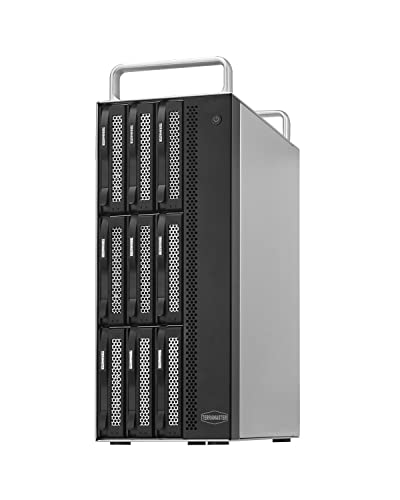
- True hardware RAID controller for stable performance
- Thunderbolt 3 speeds up to 1600MB/s in RAID 0
- 8 bays with strong cooling for pro editing setups
Best For: Editors who need high-speed, hardware-based RAID storage for large video projects and multi-drive capacity.
Best for 3.5-Inch HDD Arrays

- 4 RAID modes for speed, backup, or expansion
- Up to 48TB total capacity with dual 3.5-inch HDDs
- Fan-cooled aluminum design with 10Gbps USB-C
Best For: Editors who want a two-drive 3.5-inch RAID enclosure for media storage, backups, and larger project archives.
Best High-Capacity Expandable RAID
OWC ThunderBay 8 Thunderbolt 40Gb/s

- Eight bays for large RAID arrays and mixed drive types
- Dual Thunderbolt ports for daisy-chaining extra gear
- Plug-and-play setup with included cable and quick-swap trays
Best For: Editors building a scalable, high-capacity RAID setup for growing projects.
Best for Massive Media Libraries

- 24 bays for very large media archives and RAID builds
- Supports SATA and SAS drives for flexible storage planning
- Dual 800W power suits more demanding studio setups
Best For: Studios and editors who need a high-capacity local DAS with major expansion room.
Best for Small-Rig RAID Capacity

- 8-bay support for 2.5-inch and 3.5-inch SATA drives
- Multiple RAID modes including RAID0, RAID5, and clone
- Active cooling helps with sustained desktop workloads
Best For: Editors who want a high-capacity external RAID box with flexible drive and mode options.
Best Multi-Bay RAID

- 4 bays with up to 80TB total storage
- 8 RAID modes for flexible performance or redundancy
- USB-C/USB 3.0 and eSATA for easy direct connection
Best For: Editors who want a compact DAS enclosure with RAID flexibility and simple plug-and-play setup.
Best for Large HDD Expansion

- 4 RAID modes for backup or speed-focused setups
- Up to 44TB total capacity with 3.5" drives
- Cooling fan and aluminum body help manage heat
Best For: Editors needing a simple desktop RAID enclosure for large-capacity HDD storage and backups.
Best for Basic RAID Flexibility

- RAID 0, RAID 1, JBOD, and Normal modes
- Tool-free aluminum build with cooling fan
- Supports 2.5-inch and 3.5-inch SATA drives
Best For: Editors who want a straightforward dual-bay enclosure for working drives, mirrored backups, or simple expansion.
Best for Simple Two-Bay RAID

- RAID 0/1, JBOD, and PM modes for editing and backup workflows
- Fan-cooled aluminum enclosure helps with long transfer sessions
- Up to 48TB total capacity with 2.5-inch and 3.5-inch SATA support
Best For: Editors who want an affordable two-bay RAID enclosure for backups and active project storage.
Best for Hardware RAID Performance – TERRAMASTER D8-332 Thunderbolt 3 8-Bay RAID
If you want one of the more serious raid storage enclosures for video editors, the TERRAMASTER D8-332 stands out for its true hardware RAID controller, Thunderbolt 3 connectivity, and 8-bay layout built for high-capacity media work. It’s a strong fit for editors handling multi-stream HD or 4K timelines who need fast, reliable shared storage without moving into enterprise-priced systems.
Best For: Editors who need high-speed, hardware-based RAID storage for large video projects and multi-drive capacity.
Pros:
- Dedicated hardware RAID chip for stable RAID 0/1/5/10/JBOD performance
- Thunderbolt 3 dual-port design supports fast transfers and daisy-chaining
- Up to 1600MB/s in RAID 0 and strong RAID 5 performance for editing workflows
- Metal chassis with smart cooling helps handle long studio sessions
Cons:
- Diskless, so you’ll need to buy drives separately
- Requires Thunderbolt 3 or 4; it does not work over USB
- Large capacity comes with a bigger upfront cost once populated
For editors comparing raid storage enclosures for video editors, this model is appealing if you value hardware RAID, fast Thunderbolt throughput, and room to scale. It’s less about portability and more about dependable performance for demanding post-production work.
Best for 3.5-Inch HDD Arrays – MAIWO Dual Bay RAID Enclosure
If you need one of the more practical raid storage enclosures for video editors, this MAIWO dual-bay unit is built around 3.5-inch SATA hard drives and gives you flexible RAID 0, RAID 1, JBOD, and Normal modes. It’s a solid fit for editors who want affordable bulk storage, simple mirroring for backup, or a faster striped array for working media.
Best For: Editors who want a two-drive 3.5-inch RAID enclosure for media storage, backups, and larger project archives.
Pros:
- Supports 4 RAID modes for speed, redundancy, or expanded storage
- Up to 48TB total capacity with 24TB per drive support
- 10Gbps USB 3.1 Gen2 connection with UASP acceleration
- Built-in fan and aluminum housing help manage heat
Cons:
- Designed for 3.5-inch HDDs, so 2.5-inch drives need adapters
- Mechanical drives won’t come close to the interface’s maximum speed
- Not a compact SSD-focused solution for ultra-portable editing rigs
For editors building a cost-effective archive or scratch-storage setup, this MAIWO enclosure offers useful RAID flexibility without adding unnecessary complexity. Among raid storage enclosures for video editors, it stands out most for large-capacity HDD workflows rather than high-end SSD performance.
Best High-Capacity Expandable RAID – OWC ThunderBay 8 Thunderbolt 40Gb/s
For editors who need serious storage growth, the OWC ThunderBay 8 is one of the most flexible raid storage enclosures for video editors, offering eight universal drive bays, dual Thunderbolt ports, and easy daisy-chaining for larger workflows. It is designed for plug-and-play use, so you can get a RAID setup running quickly without extra drivers.
Best For: Video editors who want an expandable, high-capacity RAID enclosure with broad drive compatibility and simple setup.
Pros:
- Eight universal bays support both 2.5-inch and 3.5-inch SSDs/HDDs
- Dual Thunderbolt 3 ports make it easy to daisy-chain devices
- Plug-and-play design with included Thunderbolt cable and quick-swap trays
Cons:
- Drives are not included, so total cost can rise quickly
- Bulky eight-bay design takes more desk space than smaller enclosures
Overall, this is a strong pick if you want one of the most expandable raid storage enclosures for video editors and expect your storage needs to grow over time. Its mix of capacity, compatibility, and easy expansion makes it a practical workstation hub.
Best for Massive Media Libraries – MAIWO 24-Bay RAID Enclosure
If you need one of the largest raid storage enclosures for video editors, the MAIWO 24-bay DAS is built for high-capacity post-production workflows that outgrow desktop setups. Its support for 2.5-inch and 3.5-inch SATA drives plus 12Gbps SAS drives makes it a flexible pick for editors managing camera originals, proxies, and long-term project archives.
Best For: Editors, studios, and content teams that need very large, expandable local storage for multi-drive RAID arrays.
Pros:
- 24-bay design delivers massive expansion potential for shared editing libraries and archives
- Supports both SATA and SAS drives, giving you more options for performance and capacity planning
- Dual 800W power setup adds redundancy for a more serious workstation or studio environment
- SFF-8644 and 12Gbps RAID expansion support suit advanced storage builds
Cons:
- Much larger and more complex than most single-editor desktop RAID enclosures
- Requires multiple drives and careful configuration to get the most value
- Likely overkill for solo creators with lighter storage needs
This is a niche choice, but it stands out when capacity and scalability matter more than simplicity. For teams comparing raid storage enclosures for video editors, the MAIWO makes sense if you want room to grow into a serious multi-drive system.
Best for Small-Rig RAID Capacity – CENMATE 8-Bay RAID Enclosure
If you want a desktop-scale expansion box for raid storage enclosures for video editors, this CENMATE 8-bay unit packs a lot of flexibility into a single enclosure. It supports 2.5-inch and 3.5-inch SATA HDDs/SSDs, includes multiple RAID options, and uses active cooling to help keep a multi-drive workflow more stable during long transfers and renders.
Best For: Editors who need a high-capacity external RAID enclosure for shared project files, backups, or working drives on a compact desktop setup.
Pros:
- 8-bay design with support for 2.5-inch and 3.5-inch SATA drives
- Multiple RAID modes, including RAID0, RAID5, and cloning options
- Active aluminum-and-fan cooling for better sustained performance
- USB 3.0 connection with up to 5Gbps theoretical throughput
Cons:
- RAID setup is data-destructive, so backups are required first
- Mode switching and drive placement rules add setup complexity
- Fan noise may be noticeable in quiet editing spaces
For editors comparing raid storage enclosures for video editors, this is a feature-heavy choice that prioritizes capacity and RAID flexibility over simplicity. It makes the most sense if you’re comfortable managing drive ordering, backups, and RAID mode changes to get a large, affordable external storage pool.
Best for Fast 2-Bay RAID – MAIWO Dual Bay SATA RAID Enclosure
If you want a flexible desktop option among raid storage enclosures for video editors, the MAIWO Dual Bay SATA RAID Enclosure is built around speed, redundancy, and simple drive management. Its RAID 0/1, JBOD, and NORMAL modes make it easy to match a project workflow, whether you need faster scratch storage or safer backup copies.
Best For: Editors who want a compact dual-bay enclosure for fast media storage, backup, and everyday workstation use.
Pros:
- Supports RAID 0, RAID 1, JBOD, and NORMAL for flexible editing workflows
- 5Gbps connection helps move large video files quickly
- Smart temperature-controlled fan helps keep drives cooler under load
- Independent power supply adds stability during long transfers and renders
Cons:
- Built for 3.5-inch drives; 2.5-inch drives need a separate mounting bracket
- 5Gbps is solid, but not as fast as newer high-end interfaces for pro studios
For editors building a practical secondary storage setup, this MAIWO unit offers a strong mix of configurability and cooling without getting overly complex. It stands out in raid storage enclosures for video editors who need affordable RAID flexibility for day-to-day projects.
Best Multi-Bay RAID – CENMATE 4-Bay RAID Enclosure
If you want a desktop-style storage box with real RAID flexibility, this CENMATE unit is a practical pick among raid storage enclosures for video editors. It combines four bays, up to 80TB of capacity, and USB/eSATA connectivity, so it can serve as a simple shared scratch-disk or archive setup for heavier media projects.
Best For: Editors who need a compact 4-bay DAS enclosure with multiple RAID options and straightforward plug-and-play connectivity.
Pros:
- Supports 8 RAID modes, including RAID 0, 1, 3, 5, and 10
- Fits 2.5-inch and 3.5-inch SATA HDDs/SSDs with up to 80TB total capacity
- USB 3.0, USB-C, and eSATA connections give it flexible compatibility
- Aluminum build plus active cooling helps keep multi-drive setups stable
Cons:
- Fan noise may bother users who want a very quiet workspace
- RAID switching requires manual steps and can cause data loss if handled poorly
- It is DAS-only, so it is not a NAS for network sharing
For editors who need capacity, redundancy options, and a straightforward direct-attach box, this enclosure covers the core needs without adding network complexity. It makes sense for raid storage enclosures for video editors who want a budget-conscious multi-bay workstation companion rather than a full NAS.
Best for Large HDD Expansion – MAIWO 2-Bay RAID Enclosure
If you need one of the more straightforward raid storage enclosures for video editors, the MAIWO dual-bay enclosure is built around capacity, redundancy, and easy USB 3.0 connectivity. It supports two 3.5″ SATA drives for up to 44TB total, and its four RAID modes make it flexible for either safer backup workflows or faster working storage.
Best For: Editors who want a simple, high-capacity 2-bay RAID enclosure for archiving, backup, or active media storage.
Pros:
- Supports RAID 0, RAID 1, JBOD, and Normal modes
- Up to 44TB total capacity with 3.5″ SATA HDDs
- Built-in cooling fan and aluminum housing for better heat control
- 48W power supply helps keep drives running steadily
Cons:
- Works with 3.5″ SATA HDDs only, not SSDs
- Mechanical drive speeds may fall short of the USB 3.0 ceiling
- Bulkier than compact portable enclosures
For video editors who prioritize storage expansion and configurable RAID over portability, this MAIWO unit is a practical pick. It is especially appealing if you want a budget-friendly desktop option among raid storage enclosures for video editors without giving up basic cooling and mode flexibility.
Best for Basic RAID Flexibility – CENMATE 2-Bay RAID Enclosure
If you want one of the more practical raid storage enclosures for video editors, this CENMATE 2-bay enclosure gives you RAID 0, RAID 1, JBOD, and Normal modes in a tool-free aluminum design. It supports 2.5-inch and 3.5-inch SATA HDDs and SSDs, so it works well for fast project drives, mirrored backups, or a simple expanded workspace.
Best For: Editors who want a straightforward dual-bay enclosure for working drives, mirrored storage, or a compact backup setup.
Pros:
- 4 RAID modes give you flexible options for speed, redundancy, or simple storage expansion
- Aluminum body with built-in fan helps manage heat during longer editing sessions
- Tool-free bay design makes drive swaps fast and convenient
- USB 3.0 with USB A/C cables included for broad compatibility
Cons:
- Fan noise may bother users who need a very quiet desk setup
- Mac users get no RAID software support, so setup is less flexible there
- Not ideal if you need a large multi-drive expansion system
For editors who need an affordable two-drive chassis with real RAID options, this is a solid utility pick rather than a high-end workstation enclosure. It covers the core needs many raid storage enclosures for video editors are bought for: speed, mirroring, and simple external storage in one compact unit.
Best for Simple Two-Bay RAID – MAIWO Dual Bay RAID Enclosure
If you want a straightforward, fan-cooled option among raid storage enclosures for video editors, this MAIWO two-bay enclosure is built for fast external editing, mirrored backups, and flexible RAID setups without a lot of complexity. Its USB 3.0 connection, aluminum body, and support for 2.5-inch and 3.5-inch SATA drives make it a practical desktop companion for media projects.
Best For: Editors who need a simple dual-drive RAID enclosure for backups, proxy media, or a small active project drive.
Pros:
- Supports RAID 0, RAID 1, JBOD, and PM for different editing and backup workflows
- Built-in cooling fan plus aluminum housing helps manage heat during long transfers
- Works with 2.5-inch and 3.5-inch SATA HDDs/SSDs for flexible drive reuse
- Up to 48TB capacity gives plenty of room for large video libraries
Cons:
- USB 3.0 5Gbps is solid, but not as fast as newer USB-C or Thunderbolt enclosures
- 2.5-inch drives need an additional mounting bracket
- RAID mode changes require care, so drive setup is less beginner-proof than single-bay options
As a budget-conscious desktop RAID box, it covers the essentials well: cooling, capacity, and flexible modes. For editors comparing raid storage enclosures for video editors, this one makes sense when you want simple two-drive storage without paying for pro-level interfaces.
How We Picked Raid Storage Enclosures for Video Editors
We prioritized enclosures that make sense for editing workflows: sustained transfer performance, RAID flexibility, drive compatibility, cooling, build quality, and connection options that fit modern desktop and laptop setups. For Raid Storage Enclosures for Video Editors, the goal is not just raw capacity; it is dependable throughput during ingest, playback, cache use, and archive transfers.
We also looked for practical features such as tool-free drive access, temperature-managed fans, and support for common SATA HDDs and SSDs. Enclosures with wider compatibility are often easier to integrate into existing post-production rigs.
Quick Comparison: Which Type Fits Your Workflow?
Dual-bay enclosures are usually best for solo editors who want a simple speed-and-safety setup for active projects. Four-bay models add more room for larger libraries and more flexible RAID levels. Eight-bay and larger options are better for editors handling 4K/6K/8K media, shared project storage, or larger archive pools.
If you edit on a laptop or move between workstations, prioritize USB-C or Thunderbolt connectivity. If you stay on a desktop and need long-term expansion, higher-bay external DAS-style units may offer better scaling.
Key Buying Factors
Connection Speed
Thunderbolt generally offers the best performance for editing and scrubbing large files, while USB 3.x is often enough for smaller projects, backups, and proxy-heavy workflows.
RAID Mode Support
Look for RAID 0 if you want speed, RAID 1 for redundancy, and JBOD if you prefer to manage drives independently. Some enclosures also include a normal mode for non-RAID use.
Drive Type and Capacity
Check whether the enclosure supports 2.5-inch SSDs, 3.5-inch HDDs, or both. Capacity matters, but so does matching the drive type to the job: SSDs for faster active projects, HDDs for larger archives.
Thermals and Noise
Good airflow matters in long edit sessions. A cooling fan and aluminum chassis can help keep drives stable under load, especially in larger multi-bay systems.
Expandability and Ease of Use
Tool-free trays, clear status indicators, and easy RAID setup can save time when you are swapping drives or rebuilding storage between projects.
Who Should Buy Which Raid Storage Enclosures for Video Editors?
If you are a solo creator or freelance editor, a compact dual-bay enclosure is often the most practical choice. If you work with frequent 4K footage, choose a four-bay model for more breathing room. If your projects are larger, you collaborate with others, or you want a serious media library, step up to an eight-bay or larger enclosure.
In short, choose the smallest enclosure that still meets your current and near-future storage needs. The best Raid Storage Enclosures for Video Editors balance speed, reliability, and capacity without adding unnecessary complexity to your workflow.
