
A rackmount PDU makes it easier to power servers, network gear, and AV equipment without leaving loose power strips behind the cabinet. But the right choice depends on more than how many outlets fit across a 1U panel.
These 10 options cover basic distribution, surge protection, and metered power. Use the guide below to match the unit to your circuit, plugs, equipment, and installation space.
Best 10 Rackmount Power Distribution Units Picks for 2026
Basic Power Pick
CyberPower CPS1215RM 10-Outlet PDU
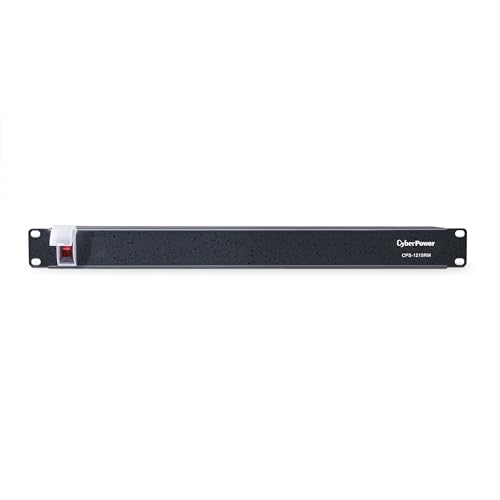
- Ten rear NEMA 5-15R outlets
- 15-foot cord; vertical or horizontal mounting
- No surge suppression
Best For: Basic power distribution in network closets
High-Protection Pick
Tripp Lite DRS-1215 14-Outlet Surge Protector

- 14 outlets: six front, eight rear
- 3000-joule surge protection
- 15A breaker and diagnostic LEDs
Best For: Racks needing surge protection and front-access outlets
Most Connections
Pyle PCO865 19-Outlet Rackmount PDU

- 19 AC outlets plus four USB ports
- 16 rear outlets accommodate adapters
- 15-foot cord and 15A breaker
Best For: High outlet counts with USB power
Balanced Surge Pick
CyberPower CPS1215RMS 12-Outlet Protector
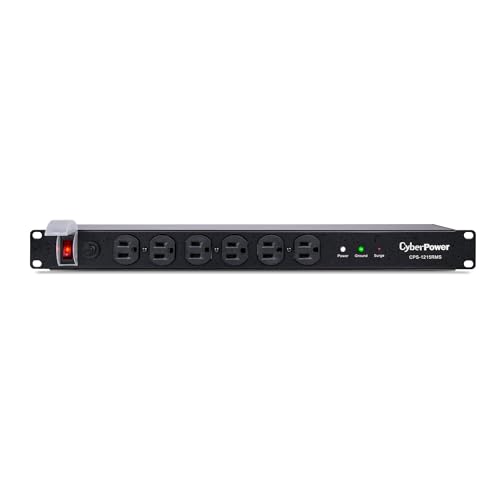
- Six front and six rear outlets
- 1800-joule surge protection
- 15-foot cord; flexible mounting
Best For: Network racks needing balanced outlet access
Most Outlets

- 19 AC outlets: 16 rear, three front
- Four USB charging ports
- Built-in 12A circuit breaker
Best For: Outlet-heavy AV or network racks
Surge-Protection Pick
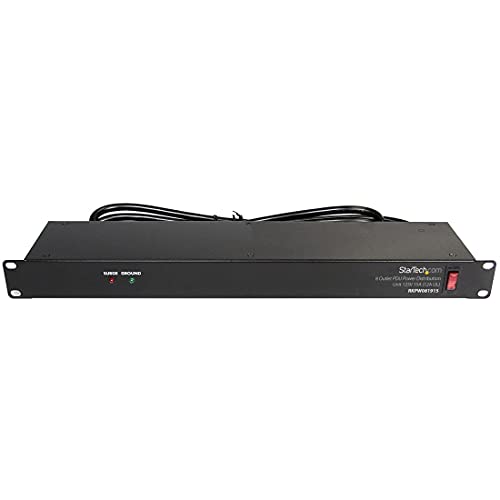
- Eight outlets rated for 120V/15A
- Ground and surge-status LEDs
- Six-foot cord and steel chassis
Best For: Racks needing visible surge-protection status
Individual Outlet Control

- 10 independently switched outlets
- 15A rating and circuit breaker
- Six-foot cord and cord-retention tray
Best For: Racks needing per-device power control
Best for Load Monitoring
Tripp Lite PDUMH20 Metered 20A PDU

- Two-digit load meter
- 12 outlets in 1U
- 16A continuous-use limit
Best For: 120V racks needing local load monitoring
Best with Surge Protection

- Eight NEMA 5-15R outlets
- Surge protection with status LEDs
- UL-listed, 12A capacity
Best For: Network racks needing surge protection and status indicators
Best No-Frills Outlet Count

- 13 outlets, front and rear
- Switch-free with 15A breaker
- 15-foot cord; five-year warranty
Best For: Racks needing many standard outlets without a power switch
Basic Power Pick – CyberPower CPS1215RM 10-Outlet PDU
CyberPower CPS1215RM Basic PDU | 100-125V/15A, 10 Outlets, 15ft Power Cord, 1U Rackmount
Check Price On AmazonFor shoppers comparing rackmount power distribution units, the CyberPower CPS1215RM is a straightforward 100–125V, 15A option with ten rear NEMA 5-15R outlets. Its 15-foot cord helps reach a wall outlet without changing rack placement.
Best For: Network closets that need basic rack power distribution without surge suppression.
Pros:
- Ten rear outlets keep connected plugs behind the rack.
- Supports vertical or horizontal installation.
- Metal housing and cord retention tray suit rack use.
Cons:
- Does not provide surge suppression.
- No front-facing outlets are listed.
Choose this model when outlet placement and a long cord matter more than built-in surge protection.
High-Protection Pick – Tripp Lite DRS-1215 14-Outlet Surge Protector
Among rackmount power distribution units with surge protection, the Eaton Tripp Lite DRS-1215 offers 14 outlets split between the front and rear. Its 1U design, 15-foot cord, and 3000-joule surge rating make it a practical choice for racks housing network or A/V gear.
Best For: Racks that need accessible front outlets and built-in surge protection.
Pros:
- Six front and eight rear NEMA 5-15R outlets.
- 3000-joule surge protection and up to 80 dB of EMI/RFI filtering.
- Resettable 15A circuit breaker and diagnostic LEDs.
Cons:
- Toolless 0U vertical installation requires an optional bracket sold separately.
The front/rear outlet mix is useful when some connections change frequently, while the rear outlets serve equipment that stays plugged in.
Most Connections – Pyle PCO865 19-Outlet Rackmount PDU
If outlet count drives your search for rackmount power distribution units, the Pyle PCO865 provides 19 AC outlets plus four USB ports in a 1U, 19-inch rack design. Three outlets face front, while 16 rear-facing outlets accommodate a larger group of connected devices.
Best For: Racks with many AC-powered devices and a need for convenient USB power.
Pros:
- 19 AC outlets and four USB ports.
- Rear outlets are spaced to accommodate AC adapters and transformers.
- 15-foot cord and built-in 15A circuit breaker.
Cons:
- Only three AC outlets face the front.
- Its 7.1-pound listed weight is higher than the other products in this roundup.
Check your plug sizes and preferred access points before choosing it: most of its AC capacity sits at the back.
Balanced Surge Pick – CyberPower CPS1215RMS 12-Outlet Protector
CyberPower CPS1215RMS Surge Protector | 120V/15A, 12 Outlets, 15 ft Power Cord, 1U Rackmount
Check Price On AmazonThe CyberPower CPS1215RMS gives buyers comparing rackmount power distribution units a 12-outlet option with surge protection. Its six front and six rear NEMA 5-15R outlets balance easy access with connections behind the rack.
Best For: Network closets or VoIP setups that need front and rear outlets with surge protection.
Pros:
- Six front and six rear outlets.
- 1800-joule surge protection and a 15-foot cord.
- Vertical or horizontal installation, metal housing, and cord retention tray.
Cons:
- Fewer outlets than the 14- and 19-outlet models in this roundup.
This is a sensible middle ground when you want accessible outlets and surge protection without prioritizing the highest outlet count.
Most Outlets – Tecmojo 1U 19-Outlet PDU
If you need to connect many devices in one rack unit, this Tecmojo model is a high-outlet-count option among rackmount power distribution units. It fits a standard 19-inch rack and places 16 outlets on the rear and three on the front.
Best For: Crowded AV or network racks that need plenty of AC outlets plus USB charging.
Pros:
- 19 outlets provide a mix of rear- and front-facing access.
- Four USB ports add charging options without occupying AC outlets.
- Metal housing and a built-in 12A circuit breaker.
Cons:
- Its 12A maximum current requires attention when connecting many devices.
- No independent outlet switches are listed.
The outlet layout is the main draw, but the total load still needs to stay within the unit’s 12A rating.
Surge-Protection Pick – StarTech 8-Outlet 1U PDU
For buyers comparing rackmount power distribution units with stated surge protection, this StarTech model combines eight 120V outlets with a 15A rating. Its 1U horizontal chassis fits 19-inch racks at least four inches deep.
Best For: Network racks that need eight outlets, surge-status indicators, and a six-foot cord.
Pros:
- LED indicators show ground and surge-protection status.
- Built-in circuit breaker with a reset switch.
- Steel chassis and a six-foot power cord.
Cons:
- Eight outlets may be insufficient for a densely populated rack.
- No per-outlet switching is listed.
This is a practical choice when visible protection status matters more than maximizing the outlet count.
Individual Outlet Control – CENTROPOWER 10-Outlet 1U PDU
Among rackmount power distribution units, this CENTROPOWER model stands out for giving each of its 10 NEMA 5-15R outlets an independent LED-illuminated switch. It mounts horizontally in a 19-inch rack at least four inches deep and includes a six-foot cord.
Best For: Rack setups where individual devices need convenient on/off control.
Pros:
- Independent switches let you control each outlet separately.
- Built-in circuit breaker and reset switch provide overload protection.
- Metal housing and a cord-retention tray support tidy installation.
Cons:
- The 15A rating applies to the unit as a whole, not to every outlet simultaneously.
- Individual switches add controls that could be bumped during rack work.
Choose this one for per-device switching; plan the combined load before filling all 10 outlets.
Best for Load Monitoring – Tripp Lite PDUMH20 Metered 20A PDU
Among rackmount power distribution units, the Tripp Lite PDUMH20 is a practical choice when you need to see how much current your rack is drawing. Its two-digit meter continuously displays the load in amps, while 12 outlets fit into a 1U rackmount design.
Best For: 120V racks that need at-a-glance load monitoring and 12 outlets.
Pros:
- Built-in meter displays the PDU load in amps.
- 12 NEMA 5-15/20R outlets and a 15-foot input cord.
- Includes an L5-20P to 5-20P plug adapter.
Cons:
- Its 20A rating is agency-derated to 16A for continuous use.
- The meter provides a local visual reading rather than a stated remote-monitoring feature.
Choose this model if checking rack load locally matters more than remote management; plan continuous loads around the stated 16A limit.
Best with Surge Protection – Tecmojo 1U 8-Outlet PDU
The Tecmojo 1U model suits buyers comparing rackmount power distribution units who want surge protection and clear status indicators in a compact 19-inch rack strip. It supplies eight NEMA 5-15R outlets with a listed 12A capacity.
Best For: Network or office racks that need eight outlets, surge protection, and visible status indicators.
Pros:
- Power, earth, and lightning-protection LED indicators.
- UL-listed design with surge protection.
- Compact 1U horizontal profile and six-foot cord.
Cons:
- 12A capacity is lower than the other PDUs in this roundup.
- Six-foot cord offers less reach than the 15-foot cords on the other two models.
This is a good fit when protection and visible status take priority over outlet count or a longer input cord.
Best No-Frills Outlet Count – Eaton Tripp Lite PDU1215
If you want straightforward rackmount power distribution units without a power switch, the Eaton Tripp Lite PDU1215 offers 13 outlets: 12 at the rear and one at the front. Its 1U design, 15-foot cord, and 15A circuit breaker make it a practical option for a crowded network rack.
Best For: Racks needing plenty of standard outlets and switch-free power distribution.
Pros:
- 13 NEMA 5-15R outlets, including one front-facing outlet.
- Switch-free design helps avoid accidental shutoff.
- 15A circuit breaker and movable mounting flanges.
- Five-year limited manufacturer’s warranty.
Cons:
- No load meter is listed.
- Uses standard NEMA 5-15R outlets rather than 5-20R outlets.
Pick the PDU1215 for outlet count and flexible mounting, including horizontal 1U installation; look elsewhere if a built-in load readout is essential.
How We Picked These Rackmount Power Distribution Units
We chose options that cover common 1U rack needs rather than treating every PDU as interchangeable. The selection includes basic distribution units, surge-protected models, and a metered option, with different outlet counts, cord lengths, and input plugs. We also considered practical listing details such as circuit breakers, LED indicators, and stated certifications where available. Check the current manufacturer specifications before ordering; product titles alone may not establish every electrical rating or protection feature.
Quick Comparison: Which Type Fits Your Rack?
- Basic PDUs: Good for distributing power from an existing UPS or protected circuit when you do not need surge suppression in the PDU itself.
- Surge-protected units: Worth considering for compatible equipment where built-in surge protection is part of your power plan. Verify protection specifications rather than assuming every rack power strip provides them.
- High-outlet-count models: Useful for racks with many low-draw devices, provided the combined load stays within the PDU and branch-circuit limits.
- Metered PDUs: Helpful when you want a visible load reading to manage circuit headroom as equipment changes.
Key Buying Factors for Rackmount Power Distribution Units
Match the Input Plug and Circuit
Start with the receptacle feeding the rack. A 15A plug and a locking 20A plug are not interchangeable, and an adapter is not a substitute for a properly rated circuit. Confirm voltage, input plug, breaker rating, and the continuous-load requirements that apply to your installation. The outlet count does not increase the power available from the input.
Check Outlet Layout and Plug Fit
Count the devices you need to connect now, then leave room for reasonable growth. Check whether outlets face forward or backward and whether bulky power bricks block adjacent sockets. Compare the PDU’s receptacle types with your equipment plugs; do not assume a 20A-rated input means every outlet accepts a 20A plug.
Plan for Protection, Visibility, and Fit
A basic PDU distributes power; it does not necessarily provide surge protection, backup power, or load monitoring. If those features matter, confirm they are specified for the exact model. Measure available 1U space and mounting depth, account for plug clearance, and choose a cord length that reaches the supply without leaving excess cable in the rack.
Who Should Buy Which Rackmount Power Distribution Units?
Choose a straightforward 15A basic model, such as the CyberPower CPS1215RM or Eaton Tripp Lite PDU1215, if your priority is organized distribution and your upstream power setup already meets your protection needs. Look at the surge-labeled CyberPower, StarTech, Eaton Tripp Lite, or Tecmojo options if built-in surge protection is on your checklist, after verifying their specifications. Consider a 19-outlet Pyle or Tecmojo unit for many low-power connections, but calculate the total load first. For a compatible 20A circuit where load visibility matters, the Tripp Lite metered model is the more relevant choice. If your rack needs battery backup, select a suitable UPS separately; a PDU alone will not keep equipment running during an outage.
