
If you want a quieter desk setup, the case matters more than most people think. The right chassis can soften fan noise, improve airflow, and keep a work PC feeling polished instead of distracting.
These quiet pc cases for office builds were chosen for low-noise potential, practical layouts, and features that make everyday office systems easier to live with.
Best 10 Quiet PC Cases for Office Builds Picks for 2026
Best for Silence-First Office Builds

- Thick insulation helps keep office noise low
- Swappable panels support quiet or airflow-focused setups
- Three included fans and fan controller add practical value
Best For: Office workers and builders who want a quiet mid-tower with flexible cooling options.
Best for Compact Airflow Builds

- Compact 26.3L chassis with support for mATX and ITX boards
- Mesh panels and 360mm AIO support favor cooler, quieter tuning
- Wood front panel adds a clean, office-friendly aesthetic
Best For: Compact office systems that need strong airflow, flexible cooling, and a minimalist look.
Best for Airflow-Conscious Offices
be quiet! Pure Base 501 Airflow

- Two included 140mm PWM fans for quiet cooling
- Minimalist design fits professional office setups
- Modern front USB-C and flexible cooling support
Best For: Office and workstation builds that prioritize quiet airflow, a clean look, and easy everyday usability.
Best for Tight Desk Spaces
Fractal Design Core 1100 Mini Tower Case
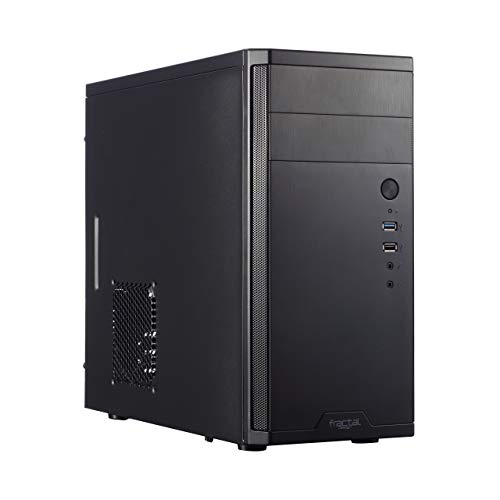
- Compact mATX footprint for small office setups
- Includes a silent 120mm fan for quieter operation
- Easy-access front I/O and flexible drive mounting
Best For: Compact office PCs and small mATX builds where desk space and low noise both matter.
Best for Showpiece Office Builds
Lian Li V100 ATX Mid-Tower Case

- 4 pre-installed PWM fans simplify setup and keep airflow strong.
- Supports up to 420mm GPUs and 360mm radiators.
- Tool-less panels and back-connect support make building easier.
Best For: Office builds that want strong airflow, easy assembly, and a polished display look.
Best for Flexible Office Builds

- Modular I/O panel with multiple placement options
- Compact mATX case with good component clearance
- Strong airflow and dust filtering for easy upkeep
Best For: Office builders who want a compact, flexible case with easy cooling and upgrade room.
Best for High-Airflow Office Towers
NZXT H5 Flow 2024 Compact ATX Case

- Includes two quiet 120mm fans
- Mesh panels boost airflow and dust filtering
- Strong cable management for tidy builds
Best For: Office and workstation buyers who want a compact airflow-focused case with easy building and upgrade room.
Best for Budget-Friendly Airflow

- Mesh front with included rear fan supports steady airflow.
- Fits ATX, micro-ATX, and mini-ITX office builds.
- Includes a 5.25-inch bay for legacy drives or tools.
Best For: Budget office or workstation builds that need airflow, flexibility, and a classic drive bay.
Best Modular Quiet-Airflow Pick

- 3 pre-installed RS ARGB PWM fans
- Zero RPM mode helps at low loads
- Modular layout supports future upgrades
Best For: Office builders who want flexible cooling and quiet operation potential in a modern airflow case.
Best Airflow Option
DARKROCK EC2 Black ATX Mid Tower

- Mesh front panel supports stronger airflow for office-friendly cooling
- Up to 8 fans and a 360mm radiator give you plenty of upgrade room
- Type-C front I/O and dust filters add modern convenience and easier upkeep
Best For: Office and home workstation builders who want a budget-friendly airflow case with modern connectivity.
Best for Silence-First Office Builds – be quiet! Silent Base 802
If you want one of the more flexible quiet pc cases for office builds, the Silent Base 802 is built to balance low noise with practical airflow options. Its thick insulation mats, included Pure Wings 2 fans, and swappable top/front panels make it easy to tune the case for a quieter desktop without giving up all cooling headroom.
Best For: Offices, shared workspaces, and users who want a quiet mid-tower that can also adapt to hotter components.
Pros:
- Sound-insulated panels help reduce everyday system noise
- Interchangeable top and front covers let you choose silence or airflow
- Three pre-installed fans provide a solid starting point
- Modern front I/O includes USB 3.2 Gen. 2 Type-C and a fan controller
Cons:
- Heavier and bulkier than simpler office-focused cases
- Premium feature set may be more than needed for basic builds
For buyers comparing quiet pc cases for office builds, this one stands out because it does not force a permanent tradeoff between silence and airflow. It is a strong pick if you want a calmer workstation today and the flexibility to reconfigure the case later.
Best for Compact Airflow Builds – Lian Li A3 mATX Wood Case
If you want a small chassis that still leaves room for serious cooling, the Lian Li A3 is a strong fit for quiet pc cases for office builds where airflow and clean cable management matter. Its 26.3L footprint, mesh panels, and support for large radiators make it flexible for efficient, low-noise configurations.
Best For: Compact office PCs that need strong cooling headroom, a minimalist look, and hardware flexibility for future upgrades.
Pros:
- Supports mATX and ITX boards with graphics cards up to 415mm
- Mesh side and top panels help maintain steady airflow
- Fits 360mm AIOs and multiple fan layouts for quieter thermal tuning
- Wood front panel gives it a more polished office-friendly appearance
Cons:
- No fans included, so you’ll need to budget for your own cooling
- Open airflow design is better for cooling than for maximum sound damping
- Modular layout may take a little planning during the first build
For builders who prioritize compact size and thermal flexibility, this case is a smart choice, but it is not a traditional sound-dampened enclosure. In other words, it can work well among quiet pc cases for office builds if you pair it with efficient fans and a restrained component selection.
Best for Airflow-Conscious Offices – be quiet! Pure Base 501 Airflow
If you want one of the more practical quiet pc cases for office builds, the be quiet! Pure Base 501 Airflow is a strong fit thanks to its restrained look, included PWM fans, and layout aimed at steady cooling without unnecessary fuss. It balances low-noise airflow with enough room for modern components, making it a sensible pick for workstations that need to stay composed during long days.
Best For: Office PCs, creator workstations, and understated builds that need quiet cooling with a clean front-end setup.
Pros:
- Includes two 140mm Pure Wings 3 PWM fans for quiet, efficient airflow
- Minimalist black design suits professional office environments
- Supports strong cooling options, including larger radiator and fan layouts
- USB 3.2 Gen. 2 Type-C front I/O adds modern convenience
Cons:
- Airflow-focused design may not be as acoustically sealed as heavier silence cases
- Vertical GPU mounting may require an optional riser cable
For buyers comparing quiet pc cases for office builds, this case stands out for delivering a practical mix of airflow, noise control, and useful connectivity in a compact ATX form factor. It is especially appealing if you want a clean desktop presence without giving up cooling headroom.
Best for Tight Desk Spaces – Fractal Design Core 1100 Mini Tower Case
If you need one of the more compact quiet pc cases for office builds, the Fractal Design Core 1100 keeps the footprint small while still focusing on airflow and straightforward expandability. It is a practical mATX mini tower with a silent 120mm fan included, plus easy front I/O for everyday office use.
Best For: Compact office PCs, lightweight workstations, and builders who want a small mATX case with simple cooling.
Pros:
- Compact micro-ATX size fits easily under or beside a desk
- Included silent 120mm fan helps keep basic office systems quiet
- Front USB 3.0, USB 2.0, and audio ports are easy to reach
- Flexible drive bracket supports multiple 3.5″ and 2.5″ configurations
Cons:
- Only one fan is included, so hotter builds may need more cooling
- Mini tower layout limits expansion compared with larger cases
- Best suited to modest office hardware rather than high-end rigs
Overall, the Core 1100 is a sensible pick for quiet pc cases for office builds when you want a compact chassis, decent airflow, and a no-fuss design that stays out of the way.
Best for Showpiece Office Builds – Lian Li V100 ATX Mid-Tower Case
The Lian Li V100 is a smart pick for quiet pc cases for office builds if you want a clean-looking tower that prioritizes airflow and easy access. It ships with four PWM fans already installed, so you get a ready-to-build setup with decent cooling out of the box, though it is not a true silence-first chassis.
Best For: Office PCs that need a polished display-focused case with strong airflow and simple assembly.
Pros:
- Comes with 4 pre-installed 120mm PWM fans for immediate cooling.
- Supports large GPUs up to 420mm and 360mm radiators for flexible upgrades.
- Tool-less panels and back-connect motherboard support make building easier.
- Built-in ARGB strip and display platform add a clean showroom look.
Cons:
- ARGB lighting and glass styling are less subdued than a stealth office case.
- Included fans are reasonably quiet, but not optimized for near-silent operation.
For buyers comparing quiet pc cases for office builds, the V100 stands out more for convenience, airflow, and presentation than for pure acoustic isolation. If your office PC can handle a little lighting and you want an easy-to-build case with modern compatibility, it is an appealing middle ground.
Best for Flexible Office Builds – Cooler Master MasterBox Q300L
The Cooler Master MasterBox Q300L is a smart pick if you want one of the more adaptable quiet pc cases for office builds without giving up compact size. Its modular I/O panel, roomy micro-ATX layout, and strong airflow design make it easy to fit a practical work PC with room for future upgrades.
Best For: Office users who want a compact, easy-to-build case with flexible mounting options and solid cooling headroom.
Pros:
- Modular I/O panel can be moved to multiple positions for easier desk setup.
- Supports micro-ATX or Mini-ITX builds with good clearance for larger parts.
- Perforated panels and magnetic dust filters help keep airflow strong and maintenance simple.
- Includes a pre-installed 120mm fan and support for more cooling expansion.
Cons:
- Open mesh-style design is better for airflow than true noise isolation.
- Clear side panel may not suit buyers who prefer a fully understated office look.
For quiet pc cases for office builds, the Q300L is more about efficient cooling and layout flexibility than sound dampening. If your priority is a compact, practical office tower that stays easy to service and upgrade, it is a strong value choice.
Best for High-Airflow Office Towers – NZXT H5 Flow 2024 Compact ATX Case
The NZXT H5 Flow 2024 is a smart pick for quiet pc cases for office builds if your priority is steady cooling with a clean, compact footprint. Its mesh-heavy design and included fans help keep components running cool, while the cable management layout makes it easier to build a tidy, low-clutter workstation.
Best For: Users who want a compact ATX office or workstation case with strong airflow, easy cable routing, and room for future cooling upgrades.
Pros:
- Includes two 120mm Quiet Airflow fans for solid out-of-the-box ventilation
- High-airflow mesh panels and perforated PSU shroud improve GPU cooling
- Good radiator support for builders planning an AIO later
- Clean cable management channels, hooks, and straps simplify assembly
Cons:
- Not a true silence-focused case, so it may not suit ultra-quiet builds
- Additional intake fans may be needed for very demanding hardware
- Tempered glass and airflow-first design prioritize cooling over noise dampening
This case makes the most sense if you want one of the more practical quiet pc cases for office builds without sacrificing GPU cooling or upgrade flexibility. It is better suited to balanced, efficient work PCs than to fully sound-isolated systems.
Best for Budget-Friendly Airflow – Zalman T6 ATX Mid Tower Case
The Zalman T6 is a practical pick for buyers who want one of the quieter pc cases for office builds without spending much. Its mesh front, included rear fan, and flexible internal layout make it a straightforward choice for a work PC that still needs decent airflow and room for common storage and expansion options.
Best For: Budget office or workstation builds that need simple airflow, broad motherboard support, and a traditional 5.25-inch bay.
Pros:
- Mesh front and pre-installed 120mm rear fan help maintain steady airflow.
- Fits ATX, micro-ATX, and mini-ITX builds for flexible office setups.
- Includes a 5.25-inch external bay, which is useful for legacy optical drives or accessories.
- Steel chassis and black coating add durability for long-term workstation use.
Cons:
- Not the best choice if you want a heavily sound-dampened case.
- Will not fit ATX motherboards with side-facing SATA ports.
- Airflow-focused mesh design may let more fan noise escape than closed-panel cases.
For shoppers comparing quiet pc cases for office builds, the T6 makes sense when airflow and value matter more than premium noise isolation. It is a sensible, no-frills tower for everyday productivity systems and light workstation duty.
Best Modular Quiet-Airflow Pick – CORSAIR FRAME 4000D RS ARGB
If you want one of the more flexible quiet pc cases for office builds, the CORSAIR FRAME 4000D RS ARGB stands out for its modular design and strong stock cooling. The included RS ARGB fans support Zero RPM mode at low loads, while the high-airflow front panel helps keep temperatures under control without relying on loud fan speeds.
Best For: Office PCs that need a clean, configurable case with strong cooling headroom and the option to tune for quieter operation.
Pros:
- Three pre-installed RS ARGB PWM fans with Zero RPM support
- High-airflow front panel and flexible InfiniRail fan mounting
- Modular FRAME system makes future upgrades and changes easier
Cons:
- Not a fully sound-dampened case, so it relies on fan tuning for quietness
- ARGB styling may be unnecessary for understated office setups
For buyers comparing quiet pc cases for office builds, this model is a smart fit if you value low-noise potential plus upgrade flexibility more than padded sound insulation. It is better for keeping components cool efficiently than for blocking noise outright.
Best Airflow Option – DARKROCK EC2 Black ATX Mid Tower
The DARKROCK EC2 is a practical pick for buyers looking for quiet pc cases for office builds that still need strong cooling and modern I/O. Its mesh front, dust filtering, and support for multiple fans make it a sensible foundation for a low-maintenance workstation, while the tempered glass side panel keeps the look cleaner than a typical budget tower.
Best For: Office PCs and value-focused builders who want good airflow, Type-C support, and room for future upgrades.
Pros:
- Mesh front panel helps keep components cool without needing a flashy design
- Supports up to 8 x 120mm fans and a 360mm radiator for flexible cooling
- Type-C front-panel support adds modern connectivity for office setups
- Magnetic dust filters help reduce upkeep in everyday work environments
Cons:
- Only one pre-installed fan means most builds will need extra cooling added
- Tempered glass styling is more showy than some strictly utilitarian office cases
- Airflow-focused design may not be the quietest out of the box
Overall, the EC2 makes sense if you want one of the more flexible quiet pc cases for office builds without spending on a premium chassis. It prioritizes airflow, dust control, and upgrade room, so it should work well for a dependable daily driver that can be tuned for lower noise with the right fans.
How We Picked the Best Quiet PC Cases for Office Builds
For office-focused systems, we prioritized noise control, sensible airflow, build quality, dust management, and layout flexibility. A good office case should support quiet cooling without forcing you to run fans aggressively. We also considered ease of installation, front-panel connectivity, and whether the design suits compact or full-size workstations.
Quick Comparison
In general, the best options for Quiet PC Cases for Office Builds fall into three groups: sound-insulated cases for the lowest noise, airflow-first cases that stay cool at lower fan speeds, and compact micro-ATX models for smaller desks. If your priority is silence, look for dampening and enclosed panels. If you want a balanced long-term workstation, airflow and fan quality matter just as much.
Key Buying Factors for Quiet PC Cases for Office Builds
Noise Dampening Vs. Open Airflow
Sound-insulated cases can reduce direct fan and drive noise, but they may run warmer if airflow is restricted. Airflow cases can still be quiet when paired with larger, slower-spinning fans. Choose based on your components and how much heat your office PC will produce.
Fan Quality and Fan Count
Pre-installed fans are helpful, but their quality matters more than raw numbers. Larger PWM fans usually offer a better balance of airflow and noise than smaller high-speed units. For office use, controlled fan curves are essential.
Size and Desk Fit
Many buyers of Quiet PC Cases for Office Builds want a compact footprint. Micro-ATX and smaller mid-towers are often easier to place under or beside a desk, while full ATX cases give more room for silent cooling setups and future upgrades.
Dust Filters and Maintenance
Dust buildup can raise temperatures and increase fan noise over time. Magnetic or removable filters make routine cleaning easier, which helps the system stay quiet longer.
Who Should Buy Which Quiet PC Cases for Office Builds?
If you want the quietest possible office machine, choose a case with sound insulation and a restrained front panel design. If you need a balanced all-rounder for mixed work and heavier multitasking, an airflow-focused mid-tower is usually the safest pick. If desk space is tight, a compact micro-ATX chassis can deliver a smaller, cleaner setup without sacrificing basic cooling. For users who plan to upgrade frequently, pick a case with broad clearance, modern I/O, and enough fan support to keep noise low as hardware gets faster.
The best choice depends on your priorities, but the goal is always the same: a system that stays cool, stays unobtrusive, and fits the way you work.
