
Finding the right dock matters when you want a laptop setup that can drive four external displays without constant cable juggling. The best options for 2026 balance monitor support, charging power, and compatibility across Windows and Mac.
This roundup focuses on practical quad-display docks for different workflows, from office multitasking to content creation and trading desks.
Best 10 Quad Monitor Docking Stations for Laptops Picks for 2026
Best for Quad-Display Power Users
WAVLINK DisplayLink Quad Monitor Dock

- Quad-monitor support up to 5K/4K@60Hz
- 100W charging plus 2.5Gbps Ethernet
- 4 HDMI and 4 DisplayPort outputs
Best For: Users who need four external displays and broad laptop compatibility.
Best for Maximum Display Expansion
Targus USB-C Quad 4K Docking Station

- Drives up to four 4K displays or one 5K display
- Delivers up to 100W USB-C laptop charging
- Adds USB, Ethernet, audio, and legacy host support
Best For: Power users building a multi-monitor workstation with broad laptop compatibility.
Best for Heavy Multimonitor Workflows

- Four HDMI outputs with 4K 60Hz support
- 140W passthrough charging for your laptop
- DisplayLink setup suits many Windows/ChromeOS users
Best For: Power users who want a compact four-monitor dock with charging and basic USB peripheral support.
Best for Triple-Display Windows Setups
NOVOO 11-in-1 USB-C Docking Station

- Dual HDMI and VGA for flexible display options
- 11-in-1 hub adds Ethernet, card readers, and USB ports
- 100W PD passthrough for charging while docked
Best For: Windows users who want to add multiple displays and plenty of ports from one USB-C dock.
Best for Triple-Display Expansion
NOVOO 15-in-1 Triple Display Dock

- Dual HDMI plus DisplayPort outputs for flexible monitor setups
- 10Gbps USB-A/C ports for fast peripherals and storage
- SD/TF, Ethernet, and broad laptop compatibility
Best For: Users who want a feature-packed USB-C dock for multi-display productivity and wired networking.
Best for Quad Displays
Plugable Thunderbolt 4 Dock for 4 Monitors
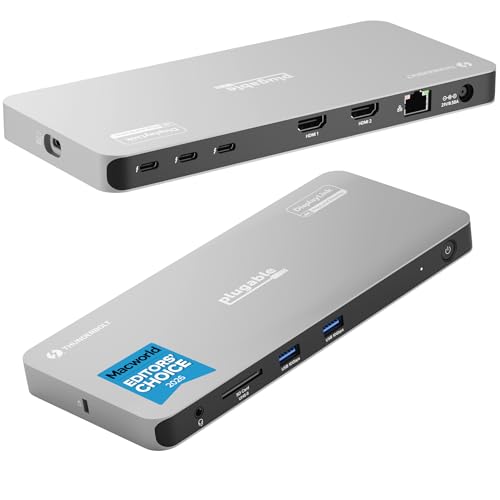
- Up to 4 displays with 2 HDMI and 2 Thunderbolt/USB-C outputs
- 100W charging plus 4x 40Gbps Thunderbolt ports
- Useful extras like Ethernet, SD slot, and broad OS support
Best For: Power users building a four-monitor laptop workstation with strong charging and expansion.
Best Simple Pick
TobenONE DisplayLink Docking Station 4 Monitors

- Runs up to 4 external monitors at 4K@60Hz
- 20-in-1 hub with HDMI, DP, USB, SD/microSD, Ethernet, and audio
- 150W adapter with up to 100W laptop charging
Best For: Power users who want a DisplayLink dock for a full four-monitor workstation.
Best for Quad-Display Power Users – WAVLINK DisplayLink Quad Monitor Dock
If you need one of the most expansive quad monitor docking stations for laptops, the WAVLINK DisplayLink dock stands out for high-resolution multi-display support, broad USB-C/Thunderbolt compatibility, and fast charging in a single desktop hub.
Best For: Power users who want to run four external monitors, especially in mixed Mac, Windows, and Chrome setups.
Pros:
- Supports quadruple monitors at up to 5K/4K@60Hz, depending on the display configuration.
- Works with Thunderbolt 3/4/5, USB-C, and a wide range of Mac, Windows, and Chrome devices.
- Includes 100W laptop charging, 2.5Gbps Ethernet, and an SD 4.0 card reader.
- Ships with 4 HDMI and 4 DisplayPort outputs for flexible desk setups.
Cons:
- Requires driver support, so setup is less plug-and-play than simpler USB-C docks.
- Best features are aimed at multi-monitor productivity, not compact travel use.
For buyers comparing quad monitor docking stations for laptops, this WAVLINK model is a strong fit when display count, resolution, and connectivity matter more than simplicity. It is especially compelling for workstation-style setups that need serious screen real estate.
Best for Maximum Display Expansion – Targus USB-C Quad 4K Docking Station
Targus USB-C Universal Quad 4K (QV4K) Docking Station with 100W Power Delivery, Black (DOCK570USZ)
Check Price On AmazonIf you need one of the most flexible quad monitor docking stations for laptops, the Targus QV4K is built for serious desk setups. It supports up to four 4K displays, delivers up to 100W charging, and adds the wired ports and legacy compatibility that make a workstation easier to live with.
Best For: Power users who want to drive multiple high-resolution monitors from a USB-C laptop while keeping peripherals and network connections on one dock.
Pros:
- Supports up to four 4K displays or a single 5K display for demanding multitasking setups.
- 100W Power Delivery helps keep compatible laptops charged through one cable.
- Includes plenty of ports: USB-A, USB-C, Gigabit Ethernet, and audio out.
- Works with many legacy laptops thanks to included tips and a USB-C to USB-A adapter.
Cons:
- Relies on DisplayLink-style docking, so setup may be less straightforward than simple plug-and-play docks.
- More than most users need if you only run one or two monitors.
This dock stands out in the quad monitor docking stations for laptops category because it prioritizes display count, broad compatibility, and practical office connectivity over compact simplicity. If your workflow depends on multiple screens, it’s a strong fit.
Best for Heavy Multimonitor Workflows – StarTech Quad HDMI 4K60 Dock
If you need one of the more capable quad monitor docking stations for laptops, this StarTech USB-C mini-dock is built for a true four-screen workspace. It turns a single USB-C connection into four HDMI outputs at up to 4K 60Hz, while also passing through up to 140W of charging and leaving room for a mouse or keyboard dongle.
Best For: IT teams, analysts, engineers, and power users who want a compact dock for high-density multitasking on Windows, ChromeOS, or supported macOS systems.
Pros:
- Drives four HDMI monitors at 4K 60Hz for serious desktop expansion.
- 140W USB-C power delivery passthrough helps keep laptops charged.
- USB-A port supports a keyboard, mouse, or wireless receiver.
- DisplayLink support simplifies deployments on many Windows and ChromeOS systems.
Cons:
- macOS requires manual DisplayLink driver installation.
- Only one USB-A port, so peripheral expansion is limited.
- Four-display setups may be more than most casual users need.
This is a strong pick if your priority is maximum screen real estate without giving up charging or basic peripheral support. Among quad monitor docking stations for laptops, it stands out for enterprise-friendly compatibility and a travel-ready footprint.
Best for Triple-Display Windows Setups – NOVOO 11-in-1 USB-C Docking Station
If you’re comparing quad monitor docking stations for laptops, this NOVOO dock is worth a look for users who need a lot of ports in one compact hub. It combines dual HDMI, VGA, Ethernet, SD/TF readers, and 100W USB-C pass-through charging, but its display support depends on your laptop and operating system.
Best For: Windows laptop users who want to run multiple external displays plus everyday peripherals from a single USB-C connection.
Pros:
- Dual HDMI plus VGA gives you flexible multi-monitor output for supported laptops.
- 11-in-1 layout adds Ethernet, card readers, and four USB ports for a fuller desk setup.
- 100W PD passthrough helps keep the laptop charged while using the dock.
- Good fit for offices where wired networking and accessory expansion matter.
Cons:
- macOS is limited to mirroring, so it is not a true extended-display solution on Macs.
- Getting the best monitor output may require a laptop with DP 1.4 support.
- Despite the roundup keyword, this is not a full quad-monitor dock for most users.
Overall, this is a practical expansion dock for people who need strong connectivity more than headline display count. If your goal is quad monitor docking stations for laptops, make sure your system supports the required video modes before buying.
Best for Mac Quad-Display Workstations – WAVLINK Pro Docking Station 4 Monitors
If you need one of the most capable quad monitor docking stations for laptops, this WAVLINK Pro dock is built for dense multitasking. It pushes four 4K HDMI displays through DisplayLink, while also adding fast networking, high-speed USB, and card readers in a single aluminum hub.
Best For: Mac and Windows users who want a serious multi-display workstation for coding, trading, editing, or spreadsheet-heavy workflows.
Pros:
- Supports up to four 4K@60Hz HDMI monitors for expansive desktop setups
- Includes 2.5G Ethernet, 10Gbps USB ports, and SD/TF 4.0 card readers
- 100W laptop charging with a 160W adapter included
- Works with macOS and Windows USB-C/Thunderbolt laptops
Cons:
- Requires DisplayLink driver installation
- Not the simplest plug-and-play option for users who want zero setup
- Best results depend on laptop and OS compatibility
For buyers comparing quad monitor docking stations for laptops, this model stands out for its combination of four-display output, strong connectivity, and included power delivery. It makes the most sense if you want a workstation dock that replaces several desk accessories at once.
Best for Triple-Display Expansion – NOVOO 15-in-1 Triple Display Dock
If you want one dock that can drive a busy workstation with plenty of ports, the NOVOO 15-in-1 is a strong option to consider in quad monitor docking stations for laptops shopping. It combines dual HDMI outputs, a DisplayPort, fast USB-A/USB-C data ports, SD/TF, and Ethernet, making it a practical hub for office and creator setups.
Best For: Users who want a feature-packed USB-C dock for multi-display productivity, fast transfers, and wired networking on MacBook or Windows laptops.
Pros:
- Dual HDMI plus DisplayPort support gives you flexible multi-monitor output options.
- Fast 10Gbps USB-A and USB-C ports are useful for high-speed peripherals and storage.
- Includes SD/TF card slots and 1Gbps Ethernet for a more complete desk setup.
- Wide compatibility with MacBook, Dell, HP, Lenovo, Surface, and more.
Cons:
- macOS display support is limited to mirror mode or a single extended screen.
- Needs a strong power adapter for the most stable multi-display performance.
For buyers comparing quad monitor docking stations for laptops, this NOVOO dock stands out more for its all-in-one port selection and triple-display flexibility than for true quad-screen support. It is a smart pick if you want a tidy, capable docking hub that can handle demanding daily workflows without a lot of extra accessories.
Best for Quad Displays – Plugable Thunderbolt 4 Dock for 4 Monitors
If you need one of the more capable quad monitor docking stations for laptops, this Plugable Thunderbolt 4 dock is built for serious multi-display work. It can drive up to four 4K screens on supported Windows and Mac systems, while also delivering fast 100W laptop charging and a useful mix of Thunderbolt, USB, Ethernet, and SD card connectivity.
Best For: Power users who want a high-end Thunderbolt dock for a four-monitor workstation with strong laptop charging.
Pros:
- Supports up to 4 displays, including 2 HDMI and 2 Thunderbolt/USB-C outputs
- 100W host charging and 4x 40Gbps Thunderbolt ports for flexible expansion
- Works with Windows, macOS, and ChromeOS on compatible USB-C, USB4, or Thunderbolt systems
- Includes extras like Gigabit Ethernet and an SD card slot
Cons:
- DisplayLink software is required for the HDMI video outputs
- Mac support varies by model, with some systems limited to fewer extended displays
- It may be more dock than casual users need
This is a strong pick if your priority is one of the most capable quad monitor docking stations for laptops and you want a dock that can handle both display-heavy workflows and day-to-day laptop charging.
Best for Maximum Screen Sprawl – TobenONE 4-Monitor DisplayLink Dock
If you need one of the most flexible quad monitor docking stations for laptops, the TobenONE DisplayLink dock is built for big-screen multitasking. It combines 4 HDMI outputs, broad USB-C/USB-A expansion, and 100W laptop charging in a single desk hub, making it a strong fit for users who want to run multiple displays without juggling adapters.
Best For: Windows or Mac users who want a high-port-count dock for a multi-monitor workstation, especially those connecting several peripherals alongside displays.
Pros:
- 4 HDMI outputs with support for up to 4 external displays on Windows
- 18-in-1 design adds USB, Ethernet, SD/microSD, and audio in one unit
- Up to 100W charging helps keep compatible laptops powered through the dock
- DisplayLink support makes it useful for complex multi-monitor setups
Cons:
- Mac support is limited versus Windows, with display-output restrictions
- Requires the latest DisplayLink driver for full functionality
- Not compatible with Linux/Unix systems
For shoppers comparing quad monitor docking stations for laptops, this TobenONE model stands out for sheer connectivity and screen expansion rather than compact simplicity. It is best when your priority is turning a USB-C or Thunderbolt laptop into a full desktop command center.
Best for Windows Quad-Display – WAVLINK Quad Monitors Docking Station
If you need one of the more capable quad monitor docking stations for laptops, this WAVLINK model is built for Windows users who want multiple external displays, wired peripherals, and laptop charging from a single USB-C connection. It supports dual DP, HDMI, and VGA outputs, making it a flexible fit for trading desks, coding setups, and office workstations.
Best For: Windows laptop users who want a flexible quad-display dock with strong video output options and built-in charging.
Pros:
- Supports quad-monitor expansion with dual DP, HDMI, and VGA ports
- Includes 100W input and up to 95W laptop charging support
- Three USB-A 2.0 ports work well for wireless mouse and keyboard receivers
- Can reach up to 8K on a single DP output with compatible hardware
Cons:
- Windows computers only; not compatible with macOS
- Full resolution and monitor count depend on laptop GPU and USB-C video support
- Does not include a charger, so a 100W adapter is required
This is a strong pick if you want one of the more versatile quad monitor docking stations for laptops and your machine supports the needed video and power standards. It is best suited to users who prioritize display flexibility over plug-and-play universal compatibility.
Best Simple Pick – TobenONE DisplayLink Docking Station 4 Monitors
If you need one of the most flexible quad monitor docking stations for laptops, this TobenONE unit is built for serious multitasking. It combines 4 HDMI and 4 DP outputs with a 20-port hub, making it a strong fit for multi-screen workstations, content creation, and busy office setups.
Best For: Users who want a DisplayLink dock that can run up to 4 external monitors while also handling lots of USB, storage, and network connections.
Pros:
- Supports up to 4 external displays at 4K@60Hz
- Huge 20-in-1 layout with HDMI, DP, USB, SD/microSD, Ethernet, and audio
- 150W power supply with up to 100W laptop charging
- Works with Windows, MacBook, Mac mini, Chrome OS, and USB-C/Thunderbolt systems
Cons:
- Requires DisplayLink driver installation before use
- HDCP is not supported
- M1 MacBooks are limited to 3 extended displays
For buyers comparing quad monitor docking stations for laptops, this TobenONE model stands out because it prioritizes display count and broad port expansion over compactness. It is a practical choice when your desk setup demands both multi-monitor output and a full docking hub in one device.
How We Picked These Quad Monitor Docking Stations for Laptops
We prioritized real-world usefulness: supported display count, video output types, charging wattage, host connection standard, and operating system compatibility. For quad-monitor use, the dock must do more than add ports; it needs stable display routing, enough bandwidth, and the right protocol support for your laptop.
We also looked for models that make sense for common setups, including Thunderbolt and USB-C laptops, MacBook systems that may rely on DisplayLink for extended multi-monitor support, and Windows machines that benefit from broader native video options.
Quick Comparison: What Matters Most
Not all Quad Monitor Docking Stations for Laptops are built for the same job. Some prioritize maximum display flexibility, while others focus on higher charging power or fewer adapter headaches. A good quick comparison starts with these questions: How many monitors do you actually need? Do you need 4K at 60Hz on every display? Is USB-C enough, or do you need Thunderbolt for maximum bandwidth? Will you use the dock with a Mac, Windows PC, or both?
If your setup includes mixed peripherals, pay attention to Ethernet speed, USB data rates, SD card support, and audio connections as well. Those extras can matter just as much as display outputs in a permanent workstation.
Key Buying Factors for Quad Monitor Docking Stations for Laptops
Display Technology
DisplayPort, HDMI, and DisplayLink all have different strengths. Native Thunderbolt and USB4 docks can deliver excellent performance, while DisplayLink helps many laptops, especially Macs, extend to more monitors than the laptop would otherwise support.
Resolution and Refresh Rate
Check whether the dock can handle 4K at 60Hz on all outputs or only on certain combinations. If you work with spreadsheets, design tools, or multiple browser windows, 4K/60 is a strong baseline for clarity and smoothness.
Power Delivery
Charging wattage matters if you want a single-cable setup. Many laptops are fine with 85W to 100W, but some high-performance systems benefit from higher passthrough power.
Compatibility
Mac and Windows support can vary significantly. Before buying, confirm whether your machine supports multi-display output natively or needs DisplayLink software to unlock the full monitor count.
Ports for Peripherals
Beyond display outputs, look for the right mix of USB-A, USB-C, Ethernet, and storage-card slots. A dock should simplify your desk, not create another set of dongles.
Who Should Buy Which Quad Monitor Docking Stations for Laptops?
Buy a Thunderbolt-based dock if you want the cleanest high-bandwidth setup and own a compatible Windows laptop or newer Mac that plays well with the dock’s display method. Choose a DisplayLink model if your priority is flexible multi-monitor support across different laptops, especially when you need reliable quad-display output on a MacBook.
If you only need basic productivity and don’t require four simultaneous external displays every day, a lower-cost USB-C dock may be enough. But for power users building a true workstation, the best Quad Monitor Docking Stations for Laptops are the ones that match your exact OS, display, and charging needs—not just the highest port count.
