
A 4K PTZ camera can give a studio more shot options without adding a camera operator at every position. The right choice depends less on headline resolution than on how the camera fits your switcher, network, lighting, and shooting distance.
These 10 models span compact 12x options, longer-reaching 20x and 30x cameras, and a range of NDI, SDI, HDMI, and USB connections. Use the buying guide below to narrow the field around your actual production workflow.
Best 10 Ptz Cameras 4K for Studios Picks for 2026
Flexible Production Pick
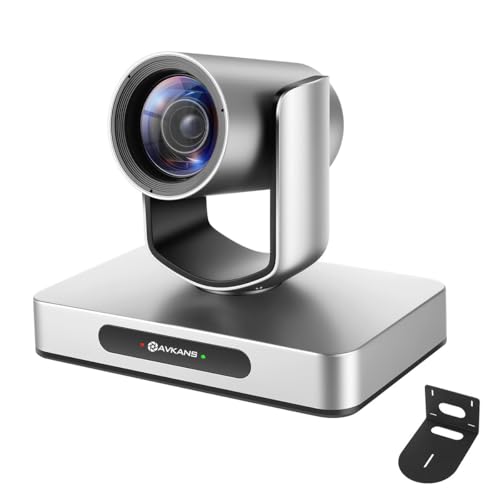
- 4K/30fps with 12x zoom
- Licensed NDI plus HDMI, SDI, and USB
- Adjustable single-person tracking
Best For: Studios mixing IP and SDI workflows around one presenter
Long-Reach Studio Pick

- 20x optical zoom and 60° wide view
- Three simultaneous 4K outputs
- Built-in NDI, PoE, and 255 presets
Best For: Larger rooms needing tight shots and flexible 4K routing
4K60 Tracking Pick

- 4K/60fps over HDMI, NDI HX3, and USB
- 20x optical zoom
- Configurable AI auto-tracking
Best For: Live studios wanting smooth 4K output and automated framing
Fixed-Angle Companion

- Dedicated fixed-camera role
- SDI, HDMI, USB, IP, and NDI HX2
- Compact design with 12x zoom
Best For: Adding a stable 4K angle to an existing multicamera studio
Best for Virtual Production
FoMaKo 4K60 FreeD Broadcast PTZ

- FreeD data for virtual sets
- 12G-SDI and HDMI at 4K60
- 20x optical zoom with AI tracking
Best For: Broadcast studios and AR/VR productions
Best for NDI Studio Streaming

- Certified NDI HX3; license included
- Adjustable Gen 3 AI tracking
- 20x optical zoom; HDMI 4K30
Best For: NDI-based multicamera studios
Best for Hybrid Studio Setups

- HDMI and USB output at 4K30
- 1080p60 SDI plus IP output
- AI tracking, auto-framing, and tally
Best For: Studios mixing USB, SDI, and IP workflows
Best for 4K60 Production
FoMaKo K630N 30x NDI PTZ Camera

- 4K60 via NDI HX3, HDMI, USB, and LAN
- 30x optical zoom with adjustable AI tracking
- SDI output tops out at 1080p60
Best For: 4K60 studio workflows with distant subjects
Best for Flexible Mounting
FoMaKo K20NS 20x NDI PTZ Camera

- 4K30 HDMI with 20x optical zoom
- NDI HX3 and Gen 3 AI auto-tracking
- PoE plus wall and ceiling mount hardware
Best For: Fixed multi-camera installations using 4K30 HDMI
Best for HDMI and USB 4K

- 4K30 through HDMI and USB
- 20x zoom with presenter tracking
- IP and NDI streams max out at 1080p
Best For: Local 4K capture with 1080p network feeds
Flexible Production Pick – AVKANS 4K 12x AI-Tracking PTZ
For buyers comparing ptz cameras 4k for studios, this AVKANS model combines 4K/30fps capture, 12x zoom, and presenter tracking with a broad set of production outputs.
Best For: Studios that need NDI and SDI alongside HDMI and USB, especially for a single moving presenter.
Pros:
- Licensed NDI and PoE support simplify network-based setups.
- HDMI, SDI, USB, and NDI outputs accommodate different production workflows.
- Tracking area, sensitivity, speed, and mode can be adjusted.
Cons:
- Tracking is limited to one person and is not intended for fast-running subjects.
- 4K capture tops out at 30fps.
Its strongest advantage is connection flexibility: SDI offers a locking connection for longer cable runs, while NDI suits software-based switching. Choose it for controlled presenter movement rather than fast action.
Long-Reach Studio Pick – Prisual 4K30 20x NDI PTZ
Among ptz cameras 4k for studios, the Prisual stands out when the camera must move from a 60° room view to a tight shot using its 20x optical zoom. Its 1/1.8-inch sensor captures 4K at up to 30fps.
Best For: Larger studio or event spaces that need long optical reach and simultaneous 4K outputs.
Pros:
- 20x optical zoom pairs with a 60° wide view.
- HDMI, USB 3.0, and LAN can output 4K simultaneously.
- Built-in NDI, PoE, and up to 255 presets support repeatable IP productions.
Cons:
- Maximum stated 4K frame rate is 30fps.
- The listed output set does not include SDI.
This is a practical choice when reframing distant subjects matters more than 4K/60fps or an SDI connection. Its simultaneous outputs also give a crew options for switching, conferencing, and network video.
4K60 Tracking Pick – FoMaKo K600N 20x NDI PTZ
For studios prioritizing smooth 4K motion, the FoMaKo K600N is one of the ptz cameras 4k for studios here with stated 4K/60fps output over HDMI, NDI HX3, and USB 3.0. It also combines 20x optical zoom with configurable AI tracking.
Best For: Live studios that want 4K/60fps production and automatic tracking of an on-camera subject.
Pros:
- Supports 4K/60fps through HDMI, NDI HX3, and USB 3.0.
- 20x optical zoom helps frame subjects across larger spaces.
- Tracking modes, sensitivity, subject position, and lost-target behavior are adjustable.
Cons:
- Its 3G-SDI output is limited to 1080p/60fps, not 4K.
- Tracking settings may require tuning for the production space.
The K600N is the stronger fit when 4K frame rate and automated framing take priority. Check your switcher’s input requirements carefully if SDI is central to the studio, since that connection does not carry its stated 4K/60fps output.
Fixed-Angle Companion – PTZOptics Studio 4K 12x
When comparing ptz cameras 4k for studios, note that the PTZOptics Studio 4K is described as a fixed-camera companion to PTZ multicamera setups, rather than another remotely panning camera. Its compact design, 12x zoom, and native NDI HX2 make it useful for a dedicated angle.
Best For: Studios adding a consistent 4K shot alongside existing PTZOptics Move SE or Move 4K cameras.
Pros:
- SDI, HDMI, USB, and IP outputs offer multiple integration paths.
- Native NDI HX2 supports IP video workflows.
- Compact design and mounting options suit a discreet, continuously operated camera position.
Cons:
- Presented as a fixed-camera option, so it is not a substitute for motorized PTZ movement.
- 12x zoom offers less reach than the 20x models in this roundup.
Pick this model to fill a stable camera position while other cameras handle moving shots. Its value is the mix of familiar studio connections and an unobtrusive fixed-angle role, not automated reframing.
Best for Virtual Production – FoMaKo 4K60 FreeD Broadcast PTZ
Among ptz cameras 4k for studios, this FoMaKo model is the specialist pick for productions that need 4K60 over 12G-SDI and FreeD camera-position data for virtual sets. Its 20x optical zoom and AI auto-tracking also suit live presenter coverage.
Best For: Broadcast studios and virtual productions using SDI infrastructure or AR/VR sets.
Pros:
- FreeD sends PTZ and lens data over IP for virtual-production workflows.
- 12G-SDI and HDMI support 4K60 output; NDI HX3 and SRT add IP options.
- 20x optical zoom, AI tracking, and a quiet belt-drive motor support studio operation.
Cons:
- USB output is limited to 4K30 rather than 4K60.
- Its broadcast and virtual-production features may be more than a basic USB setup needs.
Choose this one when FreeD integration or a single-cable 4K60 SDI feed matters most. Check the output specifications against your switcher and recording workflow before buying.
Best for NDI Studio Streaming – FoMaKo K20UH 4K PTZ
For buyers comparing ptz cameras 4k for studios built around IP production, the FoMaKo K20UH offers NDI HX3 certification, an included NDI license, and 20x optical zoom. Its adjustable Gen 3 AI tracking is useful when presenters move between marks.
Best For: Studios, classrooms, and worship spaces running NDI-based multicamera streams.
Pros:
- Certified NDI HX3 support with an included license and PoE support.
- Tracking modes, sensitivity, subject size, and lost-target behavior are adjustable.
- HDMI 2.0 outputs 4K30 or uncompressed 1080p60.
Cons:
- HDMI tops out at 4K30, not 4K60.
- The supplied specifications do not list an SDI output.
This is a practical fit when NDI, flexible tracking, and straightforward mounting matter more than a 4K60 or SDI feed. Confirm that its HDMI frame-rate options match your production format.
Best for Hybrid Studio Setups – Tenveo 4K NDI PTZ
The Tenveo is a flexible option among ptz cameras 4k for studios that need both computer-friendly USB and conventional video connections. It provides 4K30 through HDMI and USB 3.0, alongside 1080p60 SDI, presenter tracking, and auto-framing.
Best For: Hybrid streaming studios that mix USB conferencing with HDMI, SDI, or IP production.
Pros:
- Simultaneous HDMI, USB 3.0, 3G-SDI, and IP video outputs.
- AI presenter tracking and auto-framing cover different shooting needs.
- PoE, tally lights, and up to 255 presets help with multicamera operation.
Cons:
- 3G-SDI is limited to 1080p60, and NDI output is specified at 1080p30.
- NDI output does not transmit audio.
- The stated optimal focusing distance is at least 2.5 m (8.2 ft).
Pick the Tenveo when connection variety is the priority. If your studio requires 4K over SDI or embedded audio in its NDI feed, its listed output limits are important to plan around.
Best for 4K60 Production – FoMaKo K630N 30x NDI PTZ Camera
For buyers comparing ptz cameras 4k for studios, the FoMaKo K630N offers 4K at 60 fps over NDI HX3, HDMI, USB 3.0, and LAN, plus a 30x optical zoom for framing subjects across larger spaces.
Best For: Studios and live-event spaces needing 4K60 output, long optical reach, and automated presenter tracking.
Pros:
- 4K60 output via NDI HX3, HDMI, USB 3.0, and LAN.
- 30x optical zoom and adjustable Gen 3 AI tracking.
- PoE support, browser control, and an LCD showing the IP address.
Cons:
- 3G-SDI output is limited to 1080p60.
- Its many tracking and output settings may require setup time.
Choose this model when 4K60 network production and distant framing matter most; plan around the lower-resolution SDI feed if your switcher relies on SDI.
Best for Flexible Mounting – FoMaKo K20NS 20x NDI PTZ Camera
Among ptz cameras 4k for studios, the FoMaKo K20NS is a practical choice for installations that need 20x optical zoom, NDI HX3 connectivity, and mounting options for a desk, tripod, wall, or ceiling. Its HDMI output supports up to 4K30.
Best For: Small studios, classrooms, or worship spaces building a multi-camera setup around 4K30 HDMI and NDI connectivity.
Pros:
- 20x optical zoom and configurable Gen 3 AI auto-tracking.
- NDI HX3 certification and compatibility with software including OBS and vMix.
- PoE, browser control, and included wall and ceiling mounting hardware.
Cons:
- HDMI 4K output is limited to 30 fps; 60 fps is available at 1080p.
- The supplied specifications do not establish 4K output over every connection.
The K20NS suits a fixed studio installation that benefits from flexible placement and automated tracking. Confirm the output resolution required by your switcher or network workflow before buying.
Best for HDMI and USB 4K – TONGVEO 20x NDI PTZ Camera
If you are shopping for ptz cameras 4k for studios, the TONGVEO 20x is worth considering when your 4K feed will run through HDMI or USB. Both support up to 4K30, while its IP and NDI streams top out at 1080p.
Best For: Studios that capture or switch in 4K over HDMI or USB but can use 1080p for network streaming.
Pros:
- 4K30 output over HDMI and USB with 20x optical zoom.
- Presenter tracking and auto-framing modes.
- SDI output, PoE support, and browser-based control.
Cons:
- IP and NDI output are limited to 1080p, not 4K.
- AI tracking follows one person at a time and is not intended for high-speed motion.
This is a stronger fit for local 4K capture than for a 4K-over-NDI studio. Its SDI connection adds routing flexibility, but buyers should verify the resolution needed on each output.
How We Picked the Best Ptz Cameras 4K for Studios
We compared the listed specifications for resolution and frame rate, optical zoom, video outputs, power options, and tracking features. We also considered how those features serve common studio setups, from a single-camera streaming desk to a multi-camera control room. A listed port or format does not guarantee that every output supports the same resolution and frame rate simultaneously; check the manufacturer’s current documentation before buying.
Quick Comparison: Match the Camera to the Setup
Start with shooting distance and signal path. A compact 12x camera can suit a smaller studio where subjects stay relatively close. The many 20x models offer more framing flexibility across a room, while the 30x FoMaKo K630N is worth considering when the camera must cover a longer throw. For production wiring, prioritize HDMI or SDI when feeding a compatible switcher directly, USB for a supported computer-based workflow, and NDI when your network and software are set up for IP video.
Frame rate matters if your program runs at 4K60: the FoMaKo models specifically listed with 4K60 deserve a closer look, while a 4K30 model may be sufficient for interviews, presentations, and other less motion-heavy shows. Confirm the frame rate available on the exact output you plan to use.
Key Buying Factors for Ptz Cameras 4K for Studios
Outputs and Network Capacity
Map each camera to its destination before comparing features. SDI can be useful for a conventional video switcher; HDMI may simplify shorter runs; USB can suit direct computer capture. NDI workflows require compatible software and adequate network capacity. NDI, NDI HX2, and NDI HX3 are not interchangeable labels, so verify what your receiver accepts. Check whether PoE or PoE+ power matches your switch or injector, too.
Lens, Tracking, and Control
Choose optical zoom based on the widest and tightest shots you need from the planned mounting point. More zoom will not make a cramped room wider. AI auto-tracking may help with a moving presenter, but check whether its framing behavior suits your show; preset-based moves may be more predictable for a seated panel. Confirm controller, software, and protocol compatibility if one operator will run multiple cameras.
Picture and Installation
Studio lighting, exposure control, and color matching can matter as much as resolution, especially in a multi-camera cut. Check mounting hardware, cable runs, latency, and whether all required connections can operate together. Budget for network gear, controllers, and any capture or switching equipment the camera does not include.
Who Should Buy Which Ptz Cameras 4K for Studios?
For a small studio, begin with a 12x model and verify that its outputs cover your setup. For a flexible mid-size room, compare the 20x options by required connection and frame rate rather than brand alone. For a distant stage position, assess the 30x K630N against your available light and framing needs. If 4K60, SDI integration, or automated tracking is essential, shortlist only models that explicitly support that requirement on the output and in the operating mode you intend to use.
