
A ceiling-mounted projector can make presentations, video calls, training sessions, and shared workspaces feel more polished while keeping valuable desk space clear. The right mount also helps maintain a stable image and a comfortable viewing angle.
These 10 projector ceiling mounts for remote work cover a range of office layouts, projector weights, ceiling types, and installation preferences. Use the guide below to narrow the list by adjustability, clearance, load capacity, and everyday convenience.
Best 10 Projector Ceiling Mounts for Remote Work Picks for 2026
Best for High Ceilings
VIVO MOUNT-VP03W Extending Mount

- Extends 33.5–58 inches
- Supports up to 29.7 pounds
- Adjustable tilt, swivel, and rotation
Best For: High or pitched ceilings in offices and home theaters
Best Low-Profile Pick

- Sits about 5 inches from ceiling
- Supports projectors under 30 pounds
- Offers 360° rotation and angle adjustment
Best For: Compact home office and conference-room installations
Best for Lightweight Projectors

- Supports up to 5.5 pounds
- 9–15-inch telescoping pole
- 360° rotation and 90° tilt
Best For: Small projectors with a centered 1/4-inch thread
Best Heavy-Duty Option

- Supports up to 77 pounds
- Quick-release head preserves alignment
- Integrated cable management
Best For: Permanent commercial or full-size projector installations
Best Full-Motion Pick
Universal Extendable Projector Ceiling Mount
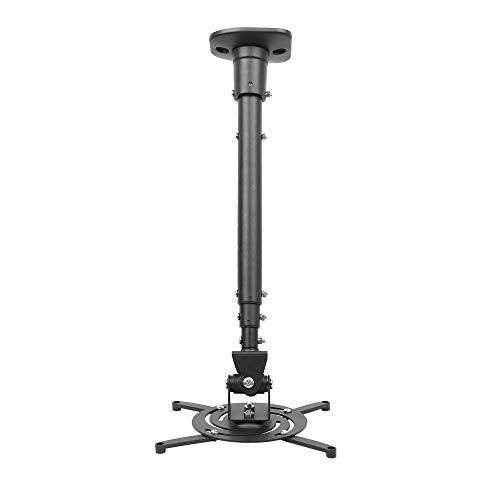
- 30-pound maximum load
- 25° tilt, 90° swivel, and 360° rotation
- Extends up to 43.6 inches
Best For: Flexible home-office projector positioning
Best Drop-Ceiling Option
Amer Mounts Suspended Projector Mount

- Fits a 2-by-2-foot drop ceiling
- Multiple alignment mounting holes
- Lightweight reinforced steel plate
Best For: Offices with compatible suspended ceilings
Best Height Range
suptek Adjustable Projector Ceiling Mount

- 30.7–49.21-inch height range
- Works with flat or sloped ceilings
- 90° tilt and 360° swivel
Best For: Variable-height or sloped-ceiling workspaces
Best Hidden Motorized Lift
Electric Retractable Projector Ceiling Mount
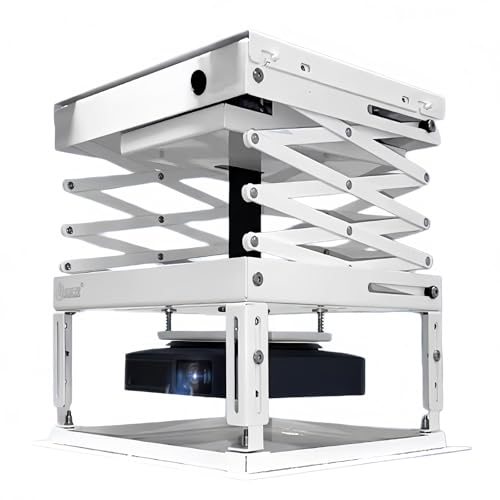
- Hidden retractable design with wireless remote
- 39-inch travel distance and 22-pound capacity
- Low-noise motor with synchronized operation
Best For: Neat, automated home-office and conference-room setups
Best Versatile Heavy-Duty Mount
Mount-It! Adjustable Projector Mount

- Supports ceiling and wall configurations
- 40-pound capacity with full-motion adjustment
- Built-in cable management and lifetime warranty
Best For: Flexible office installations on solid walls or ceilings
Best Adjustable Budget-Style Bracket
Tonalee Projector Wall or Ceiling Mount

- Supports flush, ceiling-arm, and wall installation
- Up to 30 degrees of tilt and swivel
- Extendable height and included installation hardware
Best For: Adjustable office setups using standard projectors on solid surfaces
Best for High Ceilings – VIVO MOUNT-VP03W Extending Mount
For remote work setups with high or pitched ceilings, the VIVO MOUNT-VP03W is a flexible choice among projector ceiling mounts for remote work. Its long telescoping extension and broad adjustment range make it easier to position a projector precisely over a conference table or presentation area.
Best For: Offices, conference rooms, classrooms, or home theaters with high or sloped ceilings.
Pros:
- Extends from 33.5 to 58 inches from the ceiling.
- Supports projectors up to 29.7 pounds.
- Offers ±15° tilt, ±15° swivel, and 360° rotation.
- Uses quick-release hooks for easier installation and removal.
Cons:
- Not compatible with several listed Epson, Mitsubishi, and LG models.
- Requires projector mounting holes spaced 5.25 to 12.5 inches with arms.
This mount is a strong fit when ceiling height and positioning flexibility matter most. Confirm the projector model and mounting-hole spacing before purchasing.
Best Low-Profile Pick – XINLEI PR14W Ceiling Mount
The XINLEI PR14W keeps a projector close to the ceiling, making it a practical option for remote work rooms where headroom and a clean installation matter. It works with many projectors under 30 pounds and provides adjustment for flat or sloped ceilings.
Best For: Home offices, conference rooms, and other spaces needing a compact, low-profile mount.
Pros:
- Holds the projector approximately 5 inches from the ceiling.
- Supports projectors under 30 pounds.
- Provides ±15° tilt, ±20° swivel, and 360° rotation.
- Includes hardware and instructions with quick-release hooks.
Cons:
- Requires four projector mounting holes.
- Projector mounting holes must measure 2.83 to 11.42 inches apart.
Choose this model when a tidy, close-to-ceiling installation is more important than a long drop. Measure the projector’s mounting pattern before ordering.
Best for Lightweight Projectors – Aurzen Adjustable Mount
The Aurzen Adjustable Mount is designed for smaller projectors and straightforward office installations. Among projector ceiling mounts for remote work, it stands out for its centered 1/4-inch thread requirement, 9-to-15-inch telescoping pole, and broad rotation and tilt range.
Best For: Lightweight projectors weighing up to 5.5 pounds on solid wood, brick, or concrete ceilings.
Pros:
- Supports 360° rotation and 90° vertical tilt.
- Telescopes from 9 to 15 inches.
- Includes the base, pole, screw kit, expansion anchors, and manual.
- Supports compatible ceiling-mounted projectors up to 2.5 kilograms.
Cons:
- Only supports projectors with a centered 1/4-inch thread.
- Not compatible with the Aurzen D1 MAX.
- Ceiling capacity is limited to 5.5 pounds, and wall capacity is 1 kilogram.
This is a focused option for compact projectors rather than full-size presentation hardware. Verify the centered thread and projector weight, and install only on an appropriate solid surface.
Best Heavy-Duty Option – Mount-It! PRO MI-20147
For permanent remote work conference rooms and professional presentation spaces, the Mount-It! PRO MI-20147 provides a heavy-duty installation platform. Its 77-pound capacity, articulating arm, quick-release head, and integrated cable management suit full-size projectors and frequent servicing.
Best For: Commercial classrooms, boardrooms, conference rooms, and permanent home theater installations using full-size projectors.
Pros:
- Supports projector equipment up to 77 pounds.
- Provides ±20° tilt, ±8° swivel, and ±180° rotation at the joint.
- Quick-release head allows removal and reinstallation without losing alignment.
- Integrated cable management routes power and signal cables through the arm.
Cons:
- Not designed for mini projectors.
- Its heavy-duty commercial focus may be more than needed for a small home office.
This mount is the most suitable choice here for large projectors and installations that require dependable service access. It is best considered when a permanent, professional-grade setup justifies the heavier construction.
Best Full-Motion Pick – Universal Extendable Projector Ceiling Mount
For remote work setups that need flexible screen positioning, this projector ceiling mount combines broad compatibility with full-motion adjustment. Its extendable arm suits flat-ceiling installations and can position a projector up to 43.6 inches from the ceiling.
Best For: Home offices and shared workspaces where viewing angles and projector placement change frequently.
Pros:
- Supports projectors with mounting-hole spacing up to 12.1 inches and a maximum weight of 30 pounds.
- Tilts 25 degrees, swivels 90 degrees, and rotates 360 degrees for flexible alignment.
- Pre-assembled design includes quick-release hooks and installation hardware.
Cons:
- Designed for flat ceilings rather than sloped-ceiling installation.
- The long extendable arm may require extra care to minimize shaking; the manufacturer advises tightening specific screws.
Choose this model if adjustability is the priority. Its range of motion and long extension can help accommodate different desk layouts, though careful tightening is important for a stable remote-work presentation.
Best Drop-Ceiling Option – Amer Mounts Suspended Projector Mount
This drop-ceiling projector mount is designed for suspended ceiling grids, making it a practical choice for offices with a 2-by-2-foot ceiling layout. Its reinforced steel plate and multiple mounting holes help support alignment for remote presentations.
Best For: Office-based remote work areas with compatible 2-by-2-foot drop ceilings.
Pros:
- Designed specifically for a 2-by-2-foot suspended drop ceiling.
- Multiple mounting holes help with projector alignment.
- Reinforced steel plate provides a lightweight, heat-dissipating mounting surface.
Cons:
- It is intended for drop-ceiling installation rather than a standard flat ceiling.
- Its listed maximum load is 13.61 kg, so projector compatibility should be checked before installation.
This kit makes the most sense when your workspace already has a compatible suspended ceiling. The dedicated drop-in design can simplify placement, but it is less versatile for other ceiling types.
Best Height Range – suptek Adjustable Projector Ceiling Mount
For remote work spaces with varying ceiling heights, this adjustable projector ceiling mount offers an extension range from 30.7 to 49.21 inches. It supports flat, sloped, or wall installation, provided the projector uses a three-hole or four-hole mounting pattern.
Best For: Home offices or workspaces that need substantial height adjustment or sloped-ceiling compatibility.
Pros:
- Adjusts from 30.7 to 49.21 inches for different installation conditions.
- Supports flat-ceiling, sloped-ceiling, and wall installation.
- Offers 90-degree tilt and 360-degree pan/swivel adjustment.
Cons:
- Not suitable for single-hole projector installations.
- Compatible projectors must have mounting holes under 12 inches apart and weigh under 30 pounds.
This is a strong fit when installation height and ceiling type are the main concerns. Verify the projector’s mounting pattern first, since the three-hole or four-hole requirement limits compatibility.
Best Hidden Motorized Lift – Electric Retractable Projector Ceiling Mount
If you want projector ceiling mounts for remote work that keep equipment out of sight between presentations, this electric lift offers a convenient solution. Its remote-controlled, retractable design lowers the projector when needed and conceals it afterward, while the low-noise motor helps minimize disruption during meetings.
Best For: Home offices, conference rooms, and presentation spaces that benefit from a clean ceiling and automated projector positioning.
Pros:
- Retracts the projector into a hidden position when not in use.
- Wireless remote control and synchronized operation support convenient automation.
- Supports projectors up to 22 pounds with a 39-inch travel distance.
- Includes installation hardware and a low-noise motor.
Cons:
- Its 22-pound capacity is lower than some fixed universal mounts.
- Ceiling installation and motorized wiring may require more planning than a basic bracket.
This is a strong choice when concealment and remote operation matter more than maximum load capacity. Verify your projector’s size and mounting requirements before installation.
Best Versatile Heavy-Duty Mount – Mount-It! Adjustable Projector Mount
For projector ceiling mounts for remote work, flexibility can make screen alignment much easier. This Mount-It! model supports flush-ceiling, telescoping-ceiling, and wall-mounted configurations, with adjustable positioning and built-in cable management for a more organized office installation.
Best For: Business offices, training rooms, and home workspaces needing a configurable mount for different ceiling or wall layouts.
Pros:
- Offers flush ceiling, telescoping ceiling, and wall-mount installation options.
- Supports projectors up to 40 pounds.
- Provides tilt, swivel, and 360-degree rotation adjustments.
- Includes integrated cable management and a lifetime warranty.
Cons:
- Requires a solid ceiling or wall and is not intended for vaulted ceilings or drywall.
- Projector mounting-hole spacing must be between 8.85 and 12.44 inches.
This is the most adaptable option of the group, especially if you may change between wall and ceiling placement. Check the projector’s mounting pattern and the structure where the bracket will be installed.
Best Adjustable Budget-Style Bracket – Tonalee Projector Wall or Ceiling Mount
This Tonalee bracket is a practical option for projector ceiling mounts for remote work when you need adjustable placement without a motorized lift. It supports flush, telescoping-ceiling, and wall installations, with extendable arms and tilt and swivel adjustment for aligning the image in a home or office.
Best For: Standard-size projectors used in offices or home workspaces with solid mounting surfaces.
Pros:
- Supports flush ceiling, telescoping ceiling, and wall installation.
- Adjusts from 16.9 to 25.6 inches from the ceiling and 13.8 to 22.5 inches from the wall.
- Provides up to 30 degrees of tilt and swivel adjustment.
- Steel construction and included hardware support a straightforward installation.
Cons:
- Not compatible with mini projectors.
- Requires a hard, solid wall or ceiling; it does not support vaulted ceilings or regular drywall.
- The supplied specifications list a 2.5-pound maximum capacity, so confirm suitability carefully for your projector.
This mount offers useful positioning range for a conventional projector, but its compatibility requirements deserve close attention. Confirm the projector’s screw-hole pattern, weight, and the strength of the installation surface before buying.
How We Picked These Projector Ceiling Mounts for Remote Work
We focused on mounts that suit home offices, conference rooms, hybrid-work setups, and multipurpose spaces. The selection includes universal designs, low-profile brackets, adjustable drop mounts, heavy-duty models, wall-or-ceiling options, drop-ceiling kits, and a retractable lift. We compared the practical features that affect installation and daily use: stated weight capacity, adjustment range, mounting flexibility, projector compatibility, and suitability for flat or sloped ceilings.
Always confirm the manufacturer’s specifications and measure your projector before buying. Universal compatibility does not mean every mount fits every mounting-hole pattern or projector body.
Quick Comparison
- Best for a compact installation: Low-profile universal mounts and flush-mount options.
- Best for heavier projectors: Mount-It! PRO Heavy Duty Projector Ceiling Mount.
- Best for drop ceilings: Amer Mounts AMRDCP100KIT.
- Best for sloped ceilings: The suptek adjustable mount.
- Best for concealed storage: The electric retractable projector lift.
- Best for flexible positioning: Full-motion and rotating universal mounts.
Key Buying Factors for Projector Ceiling Mounts for Remote Work
Weight Capacity and Mounting Pattern
Check the projector’s installed weight, including any accessories, against the mount’s rated capacity. Then compare the bracket’s adjustable arms with the projector’s mounting points. A generous weight rating is useful, but a secure, correctly aligned fit matters just as much.
Ceiling Type and Clearance
Flat ceilings typically work with most universal brackets, while sloped ceilings may require a mount designed to compensate for the angle. Drop ceilings need a properly supported installation kit rather than relying on ceiling tiles alone. Measure the distance from the ceiling to the lens and screen before choosing a fixed, extending, or retractable model.
Adjustment and Image Alignment
Tilt, swivel, rotation, and height adjustment make it easier to align the image without moving the projector. For remote work, precise alignment is especially valuable when the projector is used for presentations or shared displays. Locking hardware can help prevent gradual movement over time.
Cable Routing and Access
Plan HDMI, power, and control-cable paths before installation. A mount that leaves ports accessible can simplify troubleshooting and equipment changes. Retractable lifts may provide a cleaner appearance, but they generally require more space, structural support, and careful cable management.
Who Should Buy Which Projector Ceiling Mounts for Remote Work?
Choose a low-profile or flush option if you want a discreet setup in a smaller office. Select an extending or full-motion mount when screen alignment and flexible seating positions are priorities. A heavy-duty model is the safer choice for larger projectors, while a drop-ceiling kit is appropriate for suspended-grid installations. If the room serves multiple purposes and appearance matters, an electric lift can hide the projector when it is not in use.
Before installation, locate a suitable structural support point, verify the hardware, test the projector’s throw distance, and leave enough room for ventilation and maintenance. Professional installation is worth considering for heavy equipment, high ceilings, or any setup where the ceiling structure is uncertain.
