
A well-placed projector can make presentations, video calls, training sessions, and entertainment more comfortable—but the wrong mount can create alignment problems and clutter. The best projector ceiling mounts for home offices keep your setup secure while making it easier to position the image precisely.
This roundup compares 10 adjustable and universal options, including low-profile brackets, extendable mounts, wall-and-ceiling designs, and models with trays or cable-management features. Pay close attention to projector compatibility, ceiling structure, adjustment range, and the mount’s stated weight limit before buying.
Best 10 Projector Ceiling Mounts for Home Offices Picks for 2026
Best Adjustable Fit
VIVO White Adjustable Ceiling Projector Mount

- Supports up to 30 pounds
- ±15° tilt and swivel with 360° rotation
- Low-profile 6-inch ceiling clearance
Best For: Compatible home office projectors needing flexible positioning
Best Low-Profile Value
XINLEI PR14W Universal Projector Mount

- Supports projectors under 30 pounds
- Only about 5 inches from the ceiling
- Compatible with flat or sloped ceilings
Best For: Compact home office installations with four-hole projectors
Best for Threaded Mini Projectors
Aurzen Adjustable Ceiling Mount

- 360° rotation and 90° tilt
- Telescopes from 9 to 15 inches
- Supports up to 5.5 pounds
Best For: Lightweight projectors with a centered 1/4-inch thread
Best Heavy-Duty Low Profile
SCREEN PRO Universal Ceiling Mount

- Adjustable arms reach 3.7 to 19 inches
- ±30° swivel with 360° rotation
- About 4.72 inches from the ceiling
Best For: Multi-hole projectors needing broad arm adjustment
Flexible Solid-Wall Pick
Adjustable 3-in-1 Projector Mount

- Flush, telescoping-ceiling, and wall installation options
- 16.9–25.6-inch ceiling height adjustment
- Requires a solid wall or flat ceiling; not for mini projectors
Best For: Home offices with compatible projectors and solid mounting surfaces
Heavy-Duty Office Option

- 44-pound stated capacity with reinforced steel construction
- Flush, extension-pole, and wall-mount configurations
- Includes drilling template and cable management
Best For: Heavier projectors installed on studs, concrete, or flat ceilings
Tray-Style Versatility Pick
Salange Adjustable Projector Mount

- 360-degree tray rotation and 0–90-degree tilt
- 11.8–21.1-inch height adjustment
- 30-pound tray supports projectors and other AV devices
Best For: Multi-device home offices seeking flexible tray positioning
Best All-Around Flexibility

- Supports up to 33 pounds
- Three ceiling or wall installation options
- 30° tilt, 30° swivel, and 360° rotation
Best For: Flexible home-office setups with heavier projectors
Best for Extended Drop
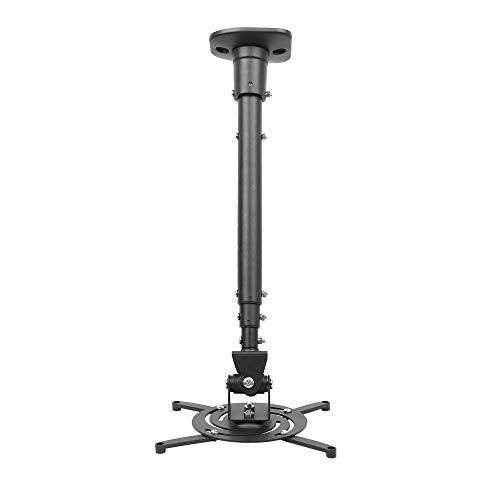
- Extends up to 43.6 inches
- Supports up to 30 pounds
- Pre-assembled with quick-release hooks
Best For: High-ceiling offices needing extra projector drop
Best Low-Profile White Design

- Compact 6-to-9-inch height range
- White aluminum construction
- Supports projectors up to 15 pounds
Best For: Light projectors and clean, low-profile office setups
Best Adjustable Fit – VIVO White Adjustable Ceiling Projector Mount
For projector ceiling mounts for home offices, the VIVO MOUNT-VP01W is a practical option when you want broad compatibility, a low installation profile, and flexible positioning. Its steel construction supports up to 30 pounds, provided your projector’s mounting-hole spacing matches the listed requirements.
Best For: Home office or media-room users who need a sturdy, white, highly adjustable mount for a compatible projector.
Pros:
- Supports projectors weighing up to 30 pounds.
- Offers ±15° tilt, ±15° swivel, and 360° rotation.
- Holds the projector about 6 inches from the ceiling.
- Includes hardware and quick-release attachment hooks.
Cons:
- Compatibility depends on the projector’s mounting-hole spacing.
- It is not compatible with several listed Epson, Mitsubishi, and LG models.
- Extension arms must be removed for mini projectors.
Check your projector’s mounting pattern before ordering. If it fits, the VIVO combines useful adjustment range and solid weight capacity in a compact ceiling mount.
Best Low-Profile Value – XINLEI PR14W Universal Projector Mount
The XINLEI PR14W is a low-profile choice among projector ceiling mounts for home offices. Its cold-rolled steel frame supports projectors under 30 pounds and allows installation on regular concrete, brick, or wood-stud ceilings when properly secured.
Best For: Home office users looking for a compact white mount with broad adjustment for a compatible projector.
Pros:
- Supports projectors weighing less than 30 pounds.
- Provides ±15° tilt, ±20° swivel, and 360° rotation.
- Works with flat or sloped ceilings.
- Projects only about 5 inches from the ceiling and includes installation hardware.
Cons:
- Requires four mounting holes on the projector.
- Mounting-hole spacing must fall between 2.83 and 11.42 inches.
- Ceiling hardware and support conditions still need to be verified before installation.
The PR14W is worth considering when ceiling clearance matters and your projector matches its four-hole compatibility requirements. Measure first to avoid a fit problem.
Best for Threaded Mini Projectors – Aurzen Adjustable Ceiling Mount
For projector ceiling mounts for home offices, the Aurzen mount stands out for its telescoping height adjustment and wide motion range. It is designed for lightweight projectors with a centered 1/4-inch thread, so compatibility should be confirmed carefully before purchase.
Best For: Lightweight home office or home theater projectors with a centered 1/4-inch mounting thread.
Pros:
- Offers 360° rotation and up to 90° vertical tilt.
- Telescopes from 9 to 15 inches for flexible projector height.
- Supports up to 5.5 pounds for ceiling installations.
- Includes the ceiling base, telescoping pole, screws, anchors, and manual.
Cons:
- Limited to projectors weighing 5.5 pounds or less.
- Requires a centered 1/4-inch thread.
- Not compatible with Aurzen D1 MAX or projectors using off-center, M6, M8, or non-threaded holes.
This mount is a better fit for lightweight, thread-compatible projectors than larger steel-arm models. Its telescoping pole is useful when a fixed short drop would not provide the desired image position.
Best Heavy-Duty Low Profile – SCREEN PRO Universal Ceiling Mount
The SCREEN PRO mount is a strong candidate among projector ceiling mounts for home offices when you want generous arm adjustment and a close-to-ceiling design. Its steel frame is rated for projectors up to 33 pounds, but the product details also list a 22-pound maximum, so verify the applicable rating before installation.
Best For: Users who need wide mounting-arm adjustment and a slim white mount for a compatible multi-hole projector.
Pros:
- Adjustable arms extend from 3.7 to 19 inches.
- Provides ±10° tilt, ±30° swivel, and 360° rotation.
- Positions the projector about 4.72 inches from the ceiling.
- Includes quick-release hardware and installation instructions.
Cons:
- Not compatible with projectors that have only one mounting hole.
- Compatibility depends on the projector’s hole spacing, threaded interface, and weight.
- The supplied notes list both a 33-pound claim and a 22-pound maximum, requiring confirmation.
Measure the projector’s mounting pattern and confirm the weight limit before buying. If those specifications align, the SCREEN PRO offers especially broad arm reach in a space-saving design.
Flexible Solid-Wall Pick – Adjustable 3-in-1 Projector Mount
For home offices that need flexible placement, this projector ceiling mount supports flush-ceiling, telescoping-arm ceiling, and wall installation. Its steel construction, adjustable height, and broad tilt and swivel range make it useful when alignment matters, provided you have a suitable solid wall or flat ceiling.
Best For: Home offices with solid-wall or flat-ceiling mounting surfaces and projectors using compatible 3- or 4-hole mounting patterns.
Pros:
- Three installation configurations: flush ceiling, telescoping ceiling, or wall mounting.
- Adjustable height ranges from 16.9 to 25.6 inches from the ceiling and 13.8 to 22.5 inches from the wall.
- Offers up to 30-degree tilt and 30-degree swivel adjustment.
- Steel construction supports projectors up to 40 pounds according to the supplied product notes.
Cons:
- Not suitable for vaulted ceilings or regular drywall.
- Requires a hard, solid installation surface and a projector with compatible screw holes.
- Not compatible with mini projectors.
This is a practical choice when your office setup needs both ceiling and wall-mount flexibility. Confirm the mounting surface and projector hole pattern before ordering, since compatibility depends on those requirements.
Heavy-Duty Office Option – 44 lb 3-in-1 Projector Mount
This projector ceiling mount is designed for heavier home-office or presentation projectors, with a stated 44-pound capacity and three installation modes. Its extension range, modest tilt and swivel adjustment, and included drilling template support a more structured installation on wood studs, concrete, or flat ceilings.
Best For: Home offices using heavier projectors that need a sturdy mount with ceiling, wall, or flush-mount flexibility.
Pros:
- Supports projectors up to 44 pounds according to the supplied notes.
- Works as a flush ceiling mount, extendable ceiling arm, or wall bracket.
- Fits wood studs, concrete walls, and flat ceilings.
- Includes hardware, drilling template, instructions, and built-in cable management.
Cons:
- Its tilt range is limited to plus or minus 15 degrees, with plus or minus 8 degrees of swivel.
- Projector mounting patterns must fall between 8.85 and 12.44 inches.
- The supplied details list the mounting type as wall mount, so verify the intended ceiling configuration before purchase.
Among these projector ceiling mounts for home offices, this model stands out for its higher stated load capacity and installation flexibility. Check your projector’s weight, mounting-hole spacing, and ceiling construction to confirm a proper fit.
Tray-Style Versatility Pick – Salange Adjustable Projector Mount
For a home office that uses more than one type of AV device, this projector ceiling mount uses a large rotatable tray rather than a conventional arm-only design. It offers 360-degree tray rotation, 0-to-90-degree tilt, adjustable height, and concealed cable management for a tidy workspace.
Best For: Offices needing a broad tray that can hold compatible projectors or other AV equipment, including mini projectors and consoles.
Pros:
- 360-degree rotatable tray and 0-to-90-degree tilt provide flexible positioning.
- Height adjusts from 11.8 to 21.1 inches.
- Large 13.78-by-11.5-inch tray supports up to 30 pounds according to the supplied notes.
- Supports recessed, telescopic-arm, and wall installation with concealed cable management.
Cons:
- Its stated 30-pound capacity is lower than the 44-pound capacity of the PEGZONE model.
- The tray design may require securing the device with screws through the tray’s ventilation holes.
- Installation is specified for wood studs, concrete, and flat ceilings, not vaulted ceilings.
This Salange mount is especially adaptable when your office setup includes a mini projector or other supported AV equipment. Its tray and wide tilt range simplify positioning, while the cable-management channel helps preserve a clean look.
Best All-Around Flexibility – JOY worker Universal Mount
For home offices needing adaptable projector ceiling mounts, the JOY worker model offers three installation choices: flush ceiling, telescoping-arm ceiling, or wall mounting. Its adjustable length and broad movement range make it practical for changing room layouts and viewing positions.
Best For: Home offices that need flexible ceiling or wall installation and support for heavier projectors.
Pros:
- Supports projectors up to 33 pounds with a heavy-duty steel construction.
- Adjusts from 5.5 to 25.2 inches in length.
- Offers 30-degree tilt, 30-degree swivel, and 360-degree rotation.
- Works with flat or sloped ceilings and mounting holes spaced up to 12.5 inches apart.
Cons:
- Its 4.5-pound steel construction may be more mount than smaller projectors require.
- Projector compatibility depends on rear mounting holes being spaced 12.5 inches or less apart.
This is a strong choice when installation flexibility and load capacity matter more than having the smallest possible mount. The quick-release button and included hardware also support a more convenient setup.
Best for Extended Drop – DYNAVISTA Full Motion Mount
The DYNAVISTA is one of the more versatile projector ceiling mounts for home offices when screen height requires a substantial drop. Its extendable arm reaches up to 43.6 inches and collapses to several shorter configurations for different ceiling heights.
Best For: Home offices with high ceilings or layouts that require an extended projector drop.
Pros:
- Extends up to 43.6 inches, collapses to 23 inches with the arm, or 8.9 inches without it.
- Supports up to 30 pounds and fits mounting holes spaced up to 12.1 inches apart.
- Provides 25-degree upward and downward tilt, 90-degree swivel, and 360-degree rotation.
- Arrives pre-assembled with quick-release hooks and installation hardware.
Cons:
- The supplied specifications list use on flat ceilings only.
- The long extension may require careful screw tightening to help prevent shaking.
Choose this model when placement distance is the main challenge. It delivers substantial height adjustment, though users should follow the tightening guidance and verify the projector’s mounting-hole spacing before installation.
Best Low-Profile White Design – Jomard Adjustable Mount
The Jomard mount suits home offices looking for a compact, understated option among projector ceiling mounts. Its white aluminum body, 6-to-9-inch height adjustment, and wall-mount capability make it easy to coordinate with a clean office setup.
Best For: Smaller projectors and tidy home-office installations where a white, low-profile appearance is preferred.
Pros:
- Adjusts from 6 to 9 inches for a relatively compact ceiling installation.
- Supports 360-degree rotation and vertical adjustment of plus or minus 15 degrees.
- Uses high-grade aluminum and supports projectors up to 15 pounds.
- Offers both ceiling- and wall-mount installation options.
Cons:
- Its 15-pound capacity is lower than the other listed mounts.
- Its vertical adjustment range is limited to plus or minus 15 degrees.
- The supplied notes do not specify a mounting-hole spacing range.
This mount is best for lighter projectors and offices where appearance and a short drop are priorities. Confirm your projector’s weight and mounting pattern before choosing it.
How We Picked the Best Projector Ceiling Mounts for Home Offices
We focused on mounts suited to typical home-office projectors, prioritizing universal compatibility, stable construction, useful adjustment controls, and flexible installation. The selection includes low-profile designs for cleaner rooms, extendable models for higher or sloped ceilings, and wall-or-ceiling brackets for offices where ceiling installation is impractical.
We also considered published weight limits, rotation and tilt adjustment, arm flexibility, cable management, and whether the design supports simpler alignment after installation. Because projector mounting hardware varies widely, confirm the manufacturer’s dimensions and mounting pattern before purchase.
Quick Comparison
| Mount style | Best for | What to check |
|---|---|---|
| Low-profile ceiling mount | Standard-height ceilings and tidy installations | Clearance, projector depth, and adjustment range |
| Adjustable or extendable mount | High ceilings or precise image positioning | Extension length and locking stability |
| Wall-and-ceiling bracket | Rooms without a convenient ceiling joist | Wall strength and installation orientation |
| Tray-style mount | Projectors or devices with unusual mounting patterns | Tray dimensions, lip height, and cable access |
Key Buying Factors for Projector Ceiling Mounts for Home Offices
Compatibility and Weight Capacity
Universal arms should reach your projector’s mounting holes without blocking vents, ports, or controls. Choose a mount with a weight rating comfortably above the projector’s actual weight rather than relying on the exact maximum. A tray can help with nonstandard designs, but verify that it holds the unit securely.
Adjustment and Image Alignment
Look for independent tilt, swivel, rotation, and height controls. These adjustments are especially useful when the ceiling fixture cannot be installed perfectly square to the screen. Locking knobs or firm joints matter more than a long feature list because they help prevent image drift over time.
Ceiling Structure and Installation
Fasten the mount to a joist, structural blocking, or an appropriate reinforced surface—not just drywall. Measure the throw distance, ceiling height, projector clearance, and screen position before drilling. If using a wall mount, confirm that the wall can support both the bracket and the projector during movement.
Cable Routing and Clearance
Check whether the mount leaves enough room for power, HDMI, network, and audio cables. A neat cable path reduces strain on connectors and makes maintenance easier. Also preserve airflow around the projector to avoid heat buildup.
Who Should Buy Which Projector Ceiling Mounts for Home Offices?
Choose a low-profile model if you have a conventional ceiling and want the cleanest appearance. An extendable or height-adjustable mount is better for tall ceilings, larger rooms, or installations requiring careful screen alignment. Consider a wall-or-ceiling design if joist placement makes overhead installation difficult. A tray-style option is worth considering for compact projectors with unusual hole patterns or for users who value broad device compatibility.
For any of these Projector Ceiling Mounts for Home Offices, measure first, check the hardware supplied, and use suitable anchors for your ceiling type. Professional installation is sensible for heavier projectors, high ceilings, or uncertain structural conditions.
