
Choosing among professional OLED reference monitors means balancing accurate color, HDR performance, resolution, connectivity, and refresh rate. OLED panels can deliver exceptional contrast, but the right model depends on your workflow and room conditions.
This roundup compares 10 standout displays for professional creative work, video production, gaming-adjacent workflows, and high-resolution productivity.
Best 10 Professional OLED Reference Monitors Picks for 2026
Best Color Accuracy

- 4K RGB OLED with true 10-bit color
- E < 1 accuracy and hardware calibration
- Includes X-Rite calibrator and five-year warranty
Best For: Color-critical photo and video editing
Best All-in-One Workspace

- 31.6-inch 4K QD-OLED with 99% DCI-P3
- 120Hz refresh and 0.03ms response time
- USB-C power delivery and built-in speakers
Best For: Hybrid creative and desktop work
Best High-Refresh Reference Display

- 4K QD-OLED with 240Hz refresh
- 1000-nit peak brightness and HDR support
- Wide gamut, E < 1 accuracy, and Thunderbolt 4
Best For: HDR production and smooth high-frame-rate workflows
Best for Gaming and Content Creation

- 4K glossy OLED with up to 165Hz
- Dual mode reaches 330Hz at Full HD
- 0.03ms response with G-SYNC and FreeSync
Best For: Gaming-focused creators needing fast OLED performance
SDI-Ready Flagship

- 31.5-inch 4K QD-OLED with 240Hz and 1000-nit peak brightness
- Dual 12G-SDI for real-time 4K playback
- True 10-bit color and Delta E below 1
Best For: Broadcast, color grading, and high-end video production
High-Speed QHD OLED

- 27-inch QHD QD-OLED display with 240Hz refresh
- 0.03ms response time for fast motion
- HDR400 True Black and G-SYNC compatibility
Best For: Gaming and mixed gaming/photo-video use
Creator-Focused 4K OLED

- 26.5-inch 4K QD-OLED with 120Hz refresh
- Calman Verified with Delta E below 1.5
- USB-C with 96W power delivery and Auto KVM
Best For: Photo and video editing with laptops or Macs
Best 4K Workflow Pick
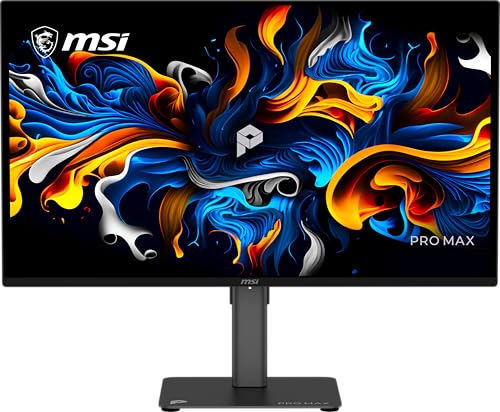
- 27-inch 4K QD-OLED display
- Delta E less than 2 accuracy
- USB-C, HDMI, and DisplayPort
Best For: Creative professionals needing 4K detail
Best Color Accuracy – ASUS ProArt PA27DCE-K
The ASUS ProArt PA27DCE-K is a strong choice among professional OLED reference monitors for color-critical photo and video work. Its 4K RGB OLED panel combines true 10-bit color, 99% DCI-P3 coverage, a 1,000,000:1 contrast ratio, and reported E < 1 color accuracy.
Best For: Creators who prioritize accurate SDR and HDR color, hardware calibration, and a complete professional package.
Pros:
- 4K HDR RGB OLED panel with deep blacks and 99% DCI-P3 coverage
- E < 1 color performance with ASUS ProArt Hardware Calibration
- USB-C supports DisplayPort, data, and up to 80W power delivery
- Includes an X-Rite i1 Display Pro calibrator and five-year warranty coverage
Cons:
- 60Hz refresh rate is less suited to high-frame-rate work or gaming
- 27-inch screen may feel limited for large timelines and multi-window workflows
With calibration hardware, a pre-calibration report, HDR10 and HLG support, and flexible positioning, this is a particularly practical reference display for disciplined color-managed workflows.
Best All-in-One Workspace – Dell 32 Plus 4K QD-OLED
The Dell 32 Plus 4K QD-OLED is a versatile option for buyers who want professional OLED reference monitors with strong visual performance and built-in desktop conveniences. Its 31.6-inch 4K QD-OLED panel offers 99% DCI-P3 coverage, Dolby Vision, DisplayHDR True Black 400, and a 120Hz refresh rate.
Best For: Professionals who want a large, smooth 4K OLED display with one-cable USB-C connectivity, speakers, and ergonomic adjustment.
Pros:
- 4K QD-OLED display with 1,500,000:1 contrast and 99% DCI-P3 coverage
- 120Hz refresh rate and 0.03ms response time support smooth motion
- USB-C provides up to 90W power delivery for a tidy laptop setup
- Built-in five-speaker spatial audio system and adjustable stand
Cons:
- Does not list the dedicated hardware calibration features included with the ASUS ProArt models
- One-year Advanced Exchange and Premium Panel Exchange warranty is shorter than some alternatives
This Dell is less narrowly focused on reference calibration and more on a polished, flexible workstation experience. It fits users who value OLED contrast, high refresh, audio, and convenient connectivity in one display.
Best High-Refresh Reference Display – ASUS ProArt PA32UCDM
The ASUS ProArt PA32UCDM pairs reference-oriented color features with an unusually fast 240Hz refresh rate. For professional OLED reference monitors, it stands out with a 31.5-inch 4K QD-OLED panel, 1000-nit peak brightness, true 10-bit color, and coverage of 100% sRGB, 99% DCI-P3, and BT.2020.
Best For: Video professionals and creators who need accurate HDR-capable color alongside exceptionally smooth motion.
Pros:
- 31.5-inch 4K QD-OLED panel with 240Hz refresh and 0.1ms response time
- 1000-nit peak brightness and DisplayHDR True Black 400 support
- Wide gamut coverage with true 10-bit color and E < 1 accuracy
- Thunderbolt 4 connectivity, Calman Ready support, and five-year warranty coverage
Cons:
- Professional features and high refresh rate may exceed the needs of basic office workflows
- Supplied connectivity details emphasize HDMI and Thunderbolt rather than a broad range of video inputs
Its combination of wide-gamut accuracy, HDR support, and 240Hz performance makes the PA32UCDM the most performance-oriented ProArt option here. It is especially compelling when smooth playback or interactive work matters as much as color control.
Best for Gaming and Content Creation – LG UltraGear 32GX850A-B
The LG UltraGear 32GX850A-B is a gaming-first OLED that can also serve content creators who want a sharp 4K picture and fast motion. Its 32-inch glossy OLED panel offers 4K resolution, up to 165Hz at native resolution, 330Hz in Full HD dual mode, and up to 98.5% DCI-P3 coverage.
Best For: Gamers and creators who want OLED contrast, high refresh rates, adaptive sync, and flexible stand adjustments.
Pros:
- 32-inch 4K UHD glossy OLED display with 1,500,000:1 contrast
- Dual-mode operation supports 4K at 165Hz or Full HD at 330Hz
- 0.03ms response time with G-SYNC compatibility and FreeSync Premium Pro
- Micro Lens Array+ brightness improvements and height, tilt, swivel, and pivot adjustment
Cons:
- Gaming-oriented features make it less specialized for reference calibration than the ProArt displays
- Glossy finish may be less suitable for brightly lit, reflection-prone studios
- Color gamut is listed at up to 98.5% DCI-P3 rather than the broader coverage of the PA32UCDM
The LG is the better fit when responsiveness and gaming flexibility are central requirements. For strict color-reference work, its gaming focus and glossy screen make the dedicated ProArt models more purpose-built.
SDI-Ready Flagship – ASUS ProArt PA32USD
The ASUS ProArt Display PA32USD is a strong choice among professional OLED reference monitors for creators who need 4K detail, wide-gamut color, HDR support, and broadcast-friendly connectivity. Its 31.5-inch QD-OLED panel combines 240Hz performance with dual 12G-SDI inputs for real-time 4K playback.
Best For: Video professionals, colorists, and production teams needing SDI connectivity, accurate color, and flexible studio integration.
Pros:
- 4K QD-OLED panel with 1000-nit peak brightness, 240Hz refresh rate, and 0.1ms response time.
- Dual 12G-SDI inputs support uncompressed 4K at 60Hz and compatibility with 6G and 3G Level A & B.
- True 10-bit color, 100% sRGB, 99% DCI-P3, BT. 2020 coverage, and reported Delta E below 1.
- Wide connectivity, including dual Thunderbolt 4 with 96W power delivery, HDMI 2.1, and DisplayPort 2.1.
Cons:
- Its professional feature set and 20-pound weight may be more than a general office user needs.
- High-end connectivity and OLED performance typically make it a substantial investment.
With dual stand options, a monitor hood, hardware calibration, and support for Dolby Vision, HLG, and HDR10, the PA32USD is built for demanding workflows rather than casual viewing. It is the most production-oriented option in this roundup.
High-Speed QHD OLED – AOC Q27GAZD
The AOC Q27GAZD brings QD-OLED contrast and fast gaming performance to a more compact 27-inch format. While it is positioned primarily as a gaming display, its HDR True Black support and broad color coverage make it a practical option for creators seeking professional OLED reference monitors for mixed entertainment and editing use.
Best For: Gamers and hybrid users who want high-refresh OLED performance with enough color range for photo and video editing.
Pros:
- QHD 2560 × 1440 resolution on a 27-inch QD-OLED panel.
- 240Hz refresh rate and 0.03ms GTG response time support exceptionally fluid motion.
- HDR400 True Black and a 1,500,000:1 contrast ratio deliver deep blacks and strong image contrast.
- Adaptive-Sync and G-SYNC compatibility help reduce tearing and stuttering.
Cons:
- It lacks the 4K resolution and specialized SDI, Thunderbolt, and calibration features of the ASUS ProArt models.
- Its glossy finish may not suit every brightly lit editing environment.
The Q27GAZD is best understood as a performance-first OLED monitor rather than a dedicated reference display. Choose it when smooth gaming and immersive contrast matter more than broadcast I/O or advanced color-management tools.
Creator-Focused 4K OLED – ASUS ProArt PA279CDV
The ASUS ProArt PA279CDV is a well-rounded option for creators who want a 4K QD-OLED workspace without stepping up to a larger broadcast monitor. It combines 120Hz performance, factory calibration, wide-gamut color, and USB-C connectivity, making it one of the more versatile professional OLED reference monitors for desk-based creative work.
Best For: Photo and video editors, Mac users, and laptop-based creators who need accurate 4K color and one-cable connectivity.
Pros:
- 26.5-inch 4K QD-OLED panel with 120Hz refresh rate and 0.1ms GTG response time.
- Factory-calibrated, Calman Verified performance with Delta E below 1.5.
- True 10-bit color, 100% sRGB, 99% DCI-P3, and BT. 2020 coverage.
- USB-C provides up to 96W power delivery, while Auto KVM simplifies switching between two computers.
Cons:
- Its listed 240-nit brightness is substantially lower than the 1000-nit peak specification cited for HDR highlights.
- It does not include the PA32USD’s professional 12G-SDI inputs.
- The three-year warranty is shorter than the PA32USD’s extended five-year coverage.
With ergonomic adjustment, Mac-optimized color temperature, DisplayPort daisy chaining, and a built-in USB hub, the PA279CDV fits neatly into modern creative workstations. It is the most balanced pick here for everyday editing and laptop-centered production.
Best Value OLED – Samsung Odyssey OLED G5
The Samsung Odyssey OLED G5 is a practical entry point for shoppers comparing professional OLED reference monitors for photo and video editing alongside gaming. Its 27-inch QHD QD-OLED panel combines Pantone validation, HDR10, a matte glare-reducing finish, and a 180Hz refresh rate.
Best For: Hybrid desktop setups that prioritize accurate color, fast motion, and a compact 27-inch format.
Pros:
- QD-OLED panel with QHD resolution and a 1,000,000:1 contrast ratio.
- Pantone Validated reproduction of more than 2,100 colors.
- 180Hz refresh rate, 0.03ms response time, and FreeSync/G-Sync compatibility.
- OLED Safeguard thermal modulation and matte Glare Free technology.
Cons:
- QHD resolution provides less workspace than a 4K professional monitor.
- Connectivity is limited to one HDMI and one DisplayPort input.
- Its gaming-focused feature set may be more than needed for editing-only workflows.
The G5 is a sensible choice when you want OLED contrast and color validation without moving to a larger 4K display. It is especially appealing for mixed creative and gaming use, though dedicated 4K production work may benefit from a higher-resolution model.
Best 4K Workflow Pick – MSI PRO MAX 271UPX12G
The MSI PRO MAX 271UPX12G is a strong candidate for professional OLED reference monitors when sharp 4K detail and color consistency matter. Its 27-inch QD-OLED panel offers 3840×2160 resolution, Delta E less than 2 accuracy, DisplayHDR True Black certification, and USB-C connectivity.
Best For: Content creators, designers, and professionals who need a compact 4K display with flexible device connections.
Pros:
- 4K UHD QD-OLED panel delivers detailed imagery and deep contrast.
- Delta E less than 2 color accuracy supports precision-oriented creative work.
- USB-C, HDMI, and DisplayPort connectivity suit modern multi-device setups.
- Height adjustment, swivel, tilt, eye-care features, and built-in speakers add workstation convenience.
Cons:
- Its 120Hz refresh rate is lower than the gaming-focused alternatives here.
- At 20 pounds, it is comparatively heavy for a 27-inch monitor.
- The supplied specifications list only one USB port.
The PRO MAX is the most productivity-oriented option in this group, balancing 4K sharpness with measured color accuracy and ergonomic flexibility. Choose it when editing and desk connectivity take priority over extreme refresh rates.
Best Large-Format Performance – ASUS ROG XG32UCWMG
The ASUS ROG XG32UCWMG combines a large 4K OLED workspace with performance features that appeal to demanding creative and gaming users. For shoppers evaluating professional OLED reference monitors, its 32-inch TrueBlack Glossy panel, true 10-bit color, 99% DCI-P3 coverage, and Delta E less than 2 specification stand out.
Best For: Photo and video editors who also want a large, high-refresh display for gaming and entertainment.
Pros:
- 32-inch 4K panel supports detailed editing and a spacious workspace.
- True 10-bit color, 99% DCI-P3 gamut, and Delta E less than 2 suit color-sensitive work.
- Dual mode enables 4K at 240Hz or Full HD at 480Hz.
- HDMI 2.1, DisplayPort 1.4 with DSC, USB-C, and burn-in coverage are included.
Cons:
- The glossy finish can show reflections in bright rooms.
- Its large 32-inch footprint may require more desk space.
- The extensive gaming feature set may be unnecessary for strictly reference-focused work.
The XG32UCWMG is the performance leader for users who want professional color specifications without giving up high-refresh gaming. Its glossy surface rewards controlled lighting, while the OLED Care Pro proximity sensor and included burn-in coverage add useful protection for long-term ownership.
How We Picked These Professional OLED Reference Monitors
We focused on displays with OLED or QD-OLED panels, high resolution, wide-gamut color, HDR capability, and features relevant to professional image and video work. We also considered refresh rate, response time, connectivity, calibration support, ergonomic flexibility, and whether each monitor is better suited to reference work, hybrid creation, or gaming.
Specifications can vary by region and firmware, so confirm the manufacturer’s latest data before buying—particularly for peak brightness, color modes, USB-C power delivery, calibration features, and adaptive-sync support.
Quick Comparison
| Best For | What to Prioritize |
|---|---|
| Color grading and HDR mastering | Accurate factory modes, HDR standards, uniformity, and calibration controls |
| Photo editing and design | 4K resolution, wide gamut, strong SDR accuracy, and USB-C connectivity |
| Professional gaming and content creation | High refresh rate, low response time, adaptive sync, and OLED motion clarity |
| Mac-based workflows | USB-C input, reliable wake behavior, power delivery, and macOS compatibility |
| General premium productivity | Text clarity, screen size, brightness control, ports, and ergonomic adjustment |
Key Buying Factors for Professional OLED Reference Monitors
Resolution, Size, and Viewing Distance
4K resolution is the practical baseline for a 27- or 32-inch professional display. A 27-inch panel offers higher pixel density and a compact desk footprint, while 32 inches gives editing timelines and creative applications more room. QHD models can still make sense for gaming-focused setups, but they provide less workspace and detail for high-resolution production.
Color Accuracy and HDR
Look for coverage of the color spaces your work actually uses, such as sRGB, DCI-P3, and Adobe RGB, along with credible factory calibration or Calman verification. HDR support alone does not guarantee reference performance. Check the available HDR modes, black-level behavior, peak brightness, tone mapping, and whether the display provides the controls required for your delivery standard.
Connectivity and Calibration
USB-C can simplify a laptop setup by combining video, data, and charging, but verify its power-delivery rating. HDMI and DisplayPort are important for desktops, consoles, and multi-device workflows. Hardware calibration support, preset locking, uniformity compensation, and an included calibration report can matter more than an impressive contrast specification.
OLED-Specific Practicalities
OLED delivers superb blacks and fast response, but static interface elements can create image-retention risk over time. Use screen savers, pixel-refresh routines, brightness management, and operating-system settings designed for OLED. Glossy coatings may improve perceived contrast but can be distracting in bright rooms.
Who Should Buy Which Professional OLED Reference Monitors?
Choose a color-focused ProArt or similarly calibrated 4K OLED when grading, retouching, design, or HDR evaluation is the priority. Select a 32-inch 4K high-refresh model if you want one display for creative work and serious gaming. A 27-inch QHD QD-OLED is a better fit for competitive gaming and smaller desks, while a 27-inch 4K USB-C model suits photographers, designers, and Mac users who value sharpness and a clean workstation.
Before ordering, match the monitor to your room, computer outputs, color-management workflow, and daily static-content exposure. The best professional OLED reference monitor is not necessarily the brightest or fastest model; it is the one whose accuracy, connectivity, and operating limits fit the way you work.
