
If you need a compact desktop that can keep up with live broadcasting, editing, chat tools, and capture software at once, the right mini PC can make streaming simpler and quieter.
This roundup of professional mini PCs for streaming focuses on practical performance, connectivity, thermals, and value so you can choose a system that fits your setup without overbuying.
Best 10 Professional Mini PCs for Streaming Picks for 2026
Home-Office Streamer Pick
Getorli Ryzen 5 Triple-Display Mini PC

- Ryzen 5 3501U with 4 cores and 8 threads
- 16GB RAM, 512GB SSD, and upgrade options
- Triple-display output with WiFi 6 and BT 5.3
Best For: Home offices, streaming, and compact setups
Balanced Performance Pick

- Ryzen 7 6800H with 8 cores and 16 threads
- 16GB LPDDR5 and 512GB NVMe SSD
- Triple 4K output with dual LAN and WiFi 6
Best For: Streaming, multitasking, and compact workstations
Premium Creator Pick
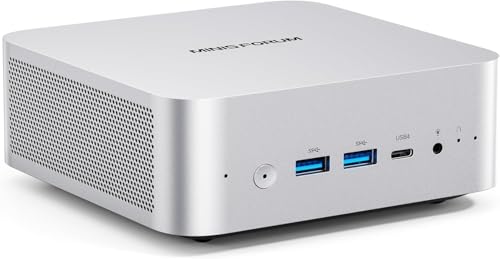
- Ryzen 7 255 with 32GB DDR5 RAM
- Dual PCIe 4.0 M.2 slots and USB4 support
- Wi-Fi 7, 2.5G LAN, and 4-screen display support
Best For: High-end streaming setups and content work
Budget-Friendly Streaming Starter

- Ryzen 5 3501U with 4 cores/8 threads
- 8GB RAM and 256GB SSD for everyday use
- Triple-display support with WiFi 6 and BT 5.3
Best For: Light streaming and home office setups
High-Performance Creator Pick

- Ryzen 7 6800H with stable 45W TDP
- 16GB DDR5 RAM and 1TB PCIe 4.0 SSD
- USB4 plus support for four 4K displays
Best For: Creators and streamers needing stronger multitasking
Entry-Level Triple-Display Value
Ryzen 5 3501U Mini PC for Home Office

- Ryzen 5 3501U with up to 3.7GHz
- 16GB RAM and 512GB NVMe SSD
- Triple 4K display support with WiFi 6
Best For: Budget streaming and compact home office setups
High-Performance Streaming Hub

- Ryzen 5 7640HS with Radeon 760M graphics
- 16GB DDR5 RAM and 1TB SSD
- Dual 2.5GbE LAN plus USB4 triple-display support
Best For: Fast streaming, multitasking, and flexible media-center use
Premium Multitasking Pick

- Ryzen 7 7735HS with 8 cores and 16 threads
- 16GB LPDDR5 RAM and 512GB SSD
- Triple 4K display support with 2.5GbE LAN
Best For: Power users needing strong multitasking and streaming performance
Home-Office Streamer Pick – Getorli Ryzen 5 Triple-Display Mini PC
If you want a practical mini PC for streaming, the Getorli Ryzen 5 model focuses on everyday responsiveness rather than flashy extras. The Ryzen 5 3501U, 16GB of RAM, and 512GB NVMe SSD make it a solid fit for media playback, light multitasking, and a tidy home desk setup.
Best For: Home offices, streaming, and compact setups that need triple-display support.
Pros:
- Ryzen 5 3501U with 4 cores and 8 threads for responsive daily use
- 16GB RAM and 512GB PCIe NVMe SSD with room for upgrades
- Dual HDMI plus USB-C support up to three displays
- WiFi 6, Bluetooth 5.3, and Gigabit Ethernet for flexible connectivity
Cons:
- Integrated Radeon Vega 8 is best for light graphics use
- Not aimed at heavy gaming or demanding creator workloads
Overall, this is a straightforward pick if you need a space-saving desktop for streaming and general productivity. The triple-display support and upgrade options give it useful flexibility without adding complexity.
Always-On Reliability Pick – GEEKOM iX12 Fanless Mini PC
For professional mini PCs for streaming in always-on environments, the GEEKOM iX12 stands out for reliability and quiet operation. Its fanless metal chassis, Intel N95 processor, and DDR5 memory are designed more for stable 24/7 deployment than for high-end media workloads.
Best For: 24/7 streaming-related duties, edge deployments, and quiet business or industrial use.
Pros:
- Fanless design with full-metal chassis for silent, dust-resistant operation
- Intel N95, DDR5 4800MHz memory, and Windows pre-installed
- Built for 24/7 reliability with enterprise-focused stability testing
- Four 2.5G ports and 5G failover support for continuous connectivity
Cons:
- 8GB RAM and 256GB SSD are modest for more demanding use
- Best suited to light workloads rather than performance-heavy streaming rigs
This model makes sense when uptime, quiet operation, and network resilience matter more than raw speed. If your streaming setup needs a dependable machine that can stay on all day, it fits that brief well.
Balanced Performance Pick – Glorlin Ryzen 7 6800H Mini PC
If you want professional mini PCs for streaming with more headroom, the Glorlin Ryzen 7 6800H offers a stronger balance of speed and display flexibility. With an 8-core Ryzen 7, 16GB LPDDR5 memory, and Radeon 680M graphics, it is better positioned for multitasking, media work, and light gaming than entry-level mini PCs.
Best For: Streaming, multitasking, and compact workstations with triple 4K displays.
Pros:
- Ryzen 7 6800H with 8 cores and 16 threads for smoother multitasking
- 16GB LPDDR5 memory and 512GB NVMe SSD for quick response
- Radeon 680M graphics handle media playback and light gaming
- Triple 4K display support plus dual LAN and WiFi 6
Cons:
- Memory is not described as user-upgradable in the supplied notes
- Still an integrated-graphics system, so it is not a heavy gaming PC
This is a good middle-ground option if your streaming setup also needs strong everyday performance. The triple-display output and solid networking make it especially practical for busy desks.
Premium Creator Pick – MINISFORUM AI X1-255 Mini PC
For users shopping professional mini PCs for streaming with a premium feature set, the MINISFORUM AI X1-255 is the most capable option here. It combines a Ryzen 7 255 processor, 32GB of DDR5 RAM, and broad display and connectivity support, making it a strong fit for demanding multitasking and media workflows.
Best For: High-end streaming setups, content work, and multitasking with advanced connectivity.
Pros:
- Ryzen 7 255 with 8 cores and 16 threads for heavy multitasking
- 32GB DDR5 RAM and dual PCIe 4.0 M.2 slots for expansion
- USB4, HDMI, DP, and 4-screen display support for flexible setups
- Wi-Fi 7, 2.5G LAN, dual speakers, and dual DMIC for modern connectivity
Cons:
- Higher-end feature set may be more than basic streaming needs require
- OCuLink and some advanced functions depend on compatible accessories and setup
If you want a mini PC that leaves room for growth, this one is the most future-ready of the group. The combination of fast memory, strong I/O, and advanced networking makes it well suited to more ambitious streaming work.
Budget-Friendly Streaming Starter – Glorlin Ryzen 5 Mini PC
If you want professional mini PCs for streaming without overbuying, this Glorlin mini PC is a practical entry point. Its Ryzen 5 3501U, 8GB RAM, and 256GB SSD are aimed at everyday computing, video calls, and smooth startup, while triple-display support helps you build a tidy multi-screen setup.
Best For: Light streaming setups, home office use, and users who want a compact, easy-to-place mini PC with multiple display outputs.
Pros:
- Ryzen 5 3501U with 4 cores and 8 threads for routine streaming-related tasks
- 8GB DDR4 RAM plus 256GB SSD for quick boot times and responsive basic use
- Supports dual or triple displays through HDMI and USB-C
- WiFi 6, Bluetooth 5.3, Ethernet, and multiple USB ports for easy connectivity
Cons:
- 8GB RAM is modest for heavier multitasking
- Storage is limited to 256GB out of the box
- Designed for light office and streaming use rather than demanding workloads
Overall, this is a clean-value choice if your priority is a compact desktop for simple streaming support, browsing, and office work. It delivers the convenience and display flexibility many buyers want, but it is best matched to lighter workloads.
High-Performance Creator Pick – GEEKOM A6 Ryzen 7 Mini PC
For buyers comparing professional mini PCs for streaming, the GEEKOM A6 stands out with desktop-class headroom. The Ryzen 7 6800H runs at a stable 45W TDP, paired with 16GB DDR5 RAM and a 1TB PCIe 4.0 SSD, so it is built for heavier multitasking, quieter operation, and demanding workflows.
Best For: Streamers, creators, and business users who want stronger performance, better graphics, and room to expand.
Pros:
- Ryzen 7 6800H with a 45W TDP for stronger sustained performance
- 16GB DDR5 RAM and 1TB PCIe Gen4 SSD for fast multitasking and storage
- Radeon 680M graphics support smoother creative and video workloads
- USB4, dual HDMI, and support for up to four 4K displays
Cons:
- More powerful than many light-use mini PCs, so it may be more than basic users need
- Feature set is geared toward demanding work, which can make it a pricier fit
- Advanced capabilities are best used when your workflow actually needs them
This is the most capable option in the group if you want a mini PC that can comfortably handle intensive multitasking and connected workstation setups. It makes sense when streaming is part of a broader creator or business workload.
Balanced Quad-Display Option – KAMRUI Pinova P2 Mini PC
The KAMRUI Pinova P2 is a smart middle-ground pick among professional mini PCs for streaming. Its Ryzen 7330U, 16GB RAM, and triple 4K display support give it enough flexibility for multitasking, media, and connected workstations, while the compact design keeps it easy to place or carry.
Best For: Users who want efficient performance, triple-display output, and a compact mini PC for mixed home or business use.
Pros:
- Ryzen 7330U with 4 cores, 8 threads, and up to 4.3GHz
- 16GB RAM and 256GB SSD with two storage expansion slots
- Triple 4K@60Hz output via HDMI, DP, and USB-C
- Compact chassis with included VESA mount and quiet cooling
Cons:
- Base 256GB storage may feel small for media-heavy users
- LPDDR4X memory is not the same as user-upgradable desktop RAM
- Best suited to efficient productivity rather than top-end performance
As a streaming-friendly mini PC, this model is attractive when you want a compact system that still handles modern display setups well. It is especially appealing for users who value quiet operation, efficient power use, and flexible connectivity.
Entry-Level Triple-Display Value – Ryzen 5 3501U Mini PC for Home Office
If you want professional mini PCs for streaming without overpaying, this Glorlin model focuses on the essentials: quiet operation, WiFi 6, and support for three 4K displays. Its Ryzen 5 3501U processor, 16GB of RAM, and 512GB NVMe SSD make it a practical choice for everyday media streaming, web browsing, and light multitasking.
Best For: Budget-conscious users who need a compact, quiet mini PC for streaming, home office work, and a multi-monitor setup.
Pros:
- Ryzen 5 3501U delivers up to 3.7GHz performance for daily computing and smooth media streaming
- 16GB DDR4 RAM and 512GB NVMe SSD help with multitasking and faster boot times
- Supports three 4K displays through HDMI and Type-C output
- WiFi 6, Bluetooth 5.3, and a compact, quiet design fit a clean desk setup
Cons:
- Less powerful than newer Ryzen HS-based mini PCs
- Best suited to streaming and office use rather than heavier creation workloads
This is a straightforward, space-saving mini desktop for people who mainly need reliable streaming and everyday productivity. The triple-display support and quiet build give it strong value for a simple home media or office station.
High-Performance Streaming Hub – Ryzen 5 7640HS Mini PC
For professional mini PCs for streaming that need more headroom, the GMKtec M6 Ultra stands out with a Ryzen 5 7640HS, Radeon 760M graphics, and fast DDR5 memory. It is built for multitasking, media center use, and stable online work, while USB4, triple-display support, and dual 2.5GbE LAN make it especially versatile.
Best For: Users who want a fast mini PC for streaming, multitasking, and a flexible media or workstation setup.
Pros:
- Ryzen 5 7640HS and Radeon 760M graphics offer strong everyday performance
- 16GB DDR5 RAM and 1TB SSD provide quick boot and app loading
- Triple-display support with HDMI, DisplayPort, and USB4
- Dual 2.5GbE LAN and WiFi 6E support fast, stable connectivity
Cons:
- More performance-focused than a basic streaming-only box, so it may be overkill for simple use
- The listing includes only one HDMI port, so some setups may rely on mixed outputs
This model is a strong fit if you want a compact system that can handle streaming, office tasks, and broader productivity without feeling limited. The dual LAN ports and USB4 output add real flexibility for advanced desk or media-center builds.
Premium Multitasking Pick – Ryzen 7 7735HS Mini PC
If you need professional mini PCs for streaming with extra power for heavier multitasking, the KAMRUI Ryzen 7 7735HS model is the most performance-oriented option here. Its 8-core, 16-thread processor, LPDDR5 memory, and triple 4K display support make it well suited to users who want a compact system that can stay responsive under sustained workloads.
Best For: Power users who want a compact mini PC for streaming, content work, and demanding multitasking.
Pros:
- Ryzen 7 7735HS offers 8 cores, 16 threads, and up to 4.75GHz speeds
- 16GB LPDDR5 memory and 512GB SSD support fast, efficient daily performance
- Triple 4K display support helps with multitasking and media use
- 2.5GbE LAN, WiFi 6, and Bluetooth 5.2 provide strong connectivity options
Cons:
- More power-focused than entry-level streaming needs may require
- Uses a compact design, so expansion is useful but still more limited than a full desktop
This is the best choice in the group for users who want both streaming-friendly features and stronger CPU headroom. It balances performance, display support, and connectivity in a compact body that is built for sustained use.
How We Picked the Best Professional Mini PCs for Streaming
We prioritized processor strength, memory headroom, storage speed, display support, wireless stability, and port flexibility. For Professional Mini PCs for Streaming, the best choices are the ones that handle OBS, browser tabs, overlays, alerts, and background apps without stutter while also staying compact and efficient.
We also looked for models that make sense in real streaming workflows, including multi-monitor setups, capture-device connections, and longer live sessions where noise and heat matter.
Quick Comparison
In this group, Ryzen 7 and higher-wattage mobile chips generally offer the best balance for multitasking and encoding-adjacent workloads, while lower-power Intel N95 systems are better suited to lighter streaming or simple broadcast stations. Systems with 16GB of RAM are the practical baseline, and 32GB is preferable if you run a heavy browser stack, production tools, or dual-PC-style workflows from one machine.
Fast NVMe SSDs help with launch times and local recording, and multiple display outputs are especially useful if you keep your chat, controls, and content preview separated.
Key Buying Factors for Professional Mini PCs for Streaming
CPU and Real-World Multitasking
Streaming is not just about raw clock speed. Look for modern 6-core or 8-core processors with strong sustained performance, because live production often involves OBS, Discord, plugin stacks, and web dashboards running together.
RAM and Storage
For most creators, 16GB is the minimum comfortable choice. If you edit locally, keep many apps open, or want extra breathing room for future software growth, 32GB is better. A 512GB SSD is workable, but 1TB gives more space for recordings, assets, and caches.
Ports, Displays, and Capture Gear
Multiple video outputs can simplify a streamer’s workspace, especially if you use a dedicated preview monitor and a second screen for management tools. USB4, USB-C video support, and dual LAN can also be helpful for flexible setups and more reliable networking.
Thermals and Noise
Fanless systems are silent, but they may not be ideal for sustained heavy loads. If you stream for hours at a time, prioritize cooling design and real-world stability over peak spec sheets alone.
Who Should Buy Which Professional Mini PCs for Streaming?
Choose a lower-cost, lower-power mini PC if you stream casually, host meetings, or need a secondary machine for overlays and control tasks. Go with a stronger Ryzen 7 or similar class model if you want one compact system to handle streaming, multitasking, and light editing together.
If your workflow includes multiple displays, local recording, or frequent multitasking, the better-equipped Professional Mini PCs for Streaming are worth the extra investment. They are easier to live with, more future-proof, and less likely to become the bottleneck in your setup.
