
Choosing the right streaming rig can make the difference between a clean live show and a lag-filled mess. The best professional live streaming computers balance CPU power, GPU encoding, RAM, storage speed, and quiet cooling.
Below, you’ll find options that fit different creator workflows, from compact mini PCs to full desktop builds for demanding multi-scene broadcasts, game capture, and production-level streaming.
Best 10 Professional Live Streaming Computers Picks for 2026
Performance-Focused Pick
Ryzen 7 RTX 5060 Prebuilt Tower

- 8-core Ryzen 7 for streaming and multitasking
- RTX 5060 8GB for 1080p/1440p performance
- 1TB NVMe SSD, WiFi 6, and 6 RGB fans
Best For: Streamers and creators who want a ready-to-use desktop
Compact Power Pick

- Core i9-13900HK with 14 cores and 20 threads
- 32GB DDR5 plus 1TB PCIe 4.0 SSD
- WiFi 6E, 2.5G LAN, and dual 4K display support
Best For: Small setups that still need strong streaming performance
Pro Webcam Pick
Tiny 2 Lite AI Tracking 4K Webcam

- 4K video with a 1/2-inch CMOS sensor
- Custom tracking modes and preset positions
- Gesture control with simple plug-and-play setup
Best For: Users who want smart webcam control for live video
Flagship Compact Power
ROG GR70 Ryzen 9 Mini PC for Streaming

- Ryzen 9 9955HX with RTX 5070 Mobile
- 32GB DDR5 RAM and 2TB NVMe SSD
- Wi‑Fi 7, BT 5.4, and quiet triple-fan cooling
Best For: High-end streamers who need compact power
Budget Streamer Tower
Ryzen 7 RTX 3050 Live Streaming PC

- Ryzen 7 4700LE with 8 cores/16 threads
- RTX 3050 8GB and 16GB DDR4 RAM
- 512GB NVMe SSD plus six RGB cooling fans
Best For: Entry-level streaming and everyday multitasking
Ultra-Compact Creator Rig
ROG NUC 2025 for Live Streaming

- Intel Core Ultra 9 Series 2 processor
- RTX 5070 Mobile with 32GB DDR5 RAM
- 2TB SSD, Thunderbolt 4, and quiet triple-fan cooling
Best For: Creators wanting premium power in a tiny chassis
Ultra-Compact AI Workhorse

- Intel Core Ultra 9 185H with 16 cores and 22 threads.
- Intel Arc graphics, AV1 decoding, and support for up to four displays.
- Dual USB4, Wi-Fi 7, dual 2.5G LAN, and 1TB SSD with upgrade headroom.
Best For: Compact streaming setups that need modern connectivity and light AI features.
Shoebox-Size Powerhouse
Cooler Master NR2 Pro Mini ITX PC
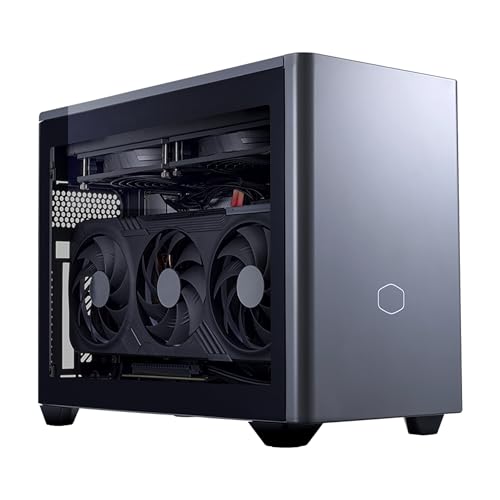
- Ryzen 7 9800X3D and RTX 5070 Ti 16GB for high-end performance.
- 32GB DDR5 6000MHz RAM plus 2TB Gen4 NVMe SSD.
- 18.25L Mini-ITX build with 280mm AIO and 850W Gold PSU.
Best For: High-performance streaming, gaming, and editing in a compact chassis.
Liquid-Cooled Creator Tower
Thermaltake LCGS View u2870TS-380

- Intel Core Ultra 9 285K paired with an RTX 5070 Ti.
- 32GB DDR5 6400MT/s and 2TB NVMe M.2 storage.
- 360mm closed-loop liquid cooling in a full tower case.
Best For: A dedicated streaming and editing desktop with strong cooling.
Performance-Focused Pick – Ryzen 7 RTX 5060 Prebuilt Tower
If you want professional live streaming computers that can handle gaming, streaming, and editing at the same time, this prebuilt Ryzen 7 tower is built for that kind of workload. The 8-core, 16-thread processor, RTX 5060 graphics, and 16GB RAM make it a practical choice for creators who need smooth day-to-day performance without building a system from scratch.
Best For: Streamers, gamers, and content creators who want a ready-to-use desktop for multitasking.
Pros:
- Ryzen 7 4700LE with 8 cores and 16 threads supports gaming, live streaming, and rendering.
- GeForce RTX 5060 8GB is positioned for smooth 1080p/1440p gameplay and creator workflows.
- 1TB NVMe SSD and 16GB DDR4 help reduce boot and loading times.
- 6 RGB cooling fans, WiFi 6, and a 650W PSU support long sessions and stable operation.
Cons:
- Runs DOS, so you may need to set up your preferred operating system.
- 16GB memory is solid, but heavy production users may still want more later.
Overall, this is a straightforward option for buyers who want a capable streaming and gaming desktop with strong core specs and easy expansion potential. It stands out most when you need a plug-and-play tower for mixed creator workloads.
Camera Upgrade Pick – Dual-Camera AI PTZ 4K Webcam Kit
For professional live streaming computers that need a serious camera upgrade, this EMEET PIXY kit adds AI tracking, PTZ movement, and 4K capture to a desktop setup. It is designed for creators who move around on camera, teach live, or need flexible framing for product demos, fitness, and meetings.
Best For: Streamers, educators, and presenters who need automated framing and clear 4K video.
Pros:
- Dual-camera AI system combines a 4K main camera with an auxiliary AI camera for autofocus and exposure optimization.
- PTZ movement with 310° pan and 180° tilt helps keep moving subjects centered.
- Included adjustable tripod supports flexible portrait or landscape angles.
- 3-mic array offers multiple sound modes for live streams, podcasts, and recordings.
Cons:
- 4K is limited to 30 fps, while 1080p reaches 60 fps.
- Some advanced functions are controlled through EMEET STUDIO software.
This is a strong pick when camera quality matters as much as computer performance, especially for anyone who switches between teaching, showing products, and live hosting. The tracking tools and tripod make it more adaptable than a basic webcam.
Compact Power Pick – Mini i9 RTX 4060 Desktop
If you want professional live streaming computers in a compact form factor, this TOPGRO mini PC packs high-end parts into a small desktop. The Core i9-13900HK, RTX 4060, 32GB DDR5, and 1TB PCIe 4.0 SSD give it the kind of responsiveness creators need for streaming, multitasking, and content work.
Best For: Buyers who want a small but powerful desktop for streaming, gaming, and creator tasks.
Pros:
- Core i9-13900HK offers 14 cores and 20 threads for demanding workloads.
- RTX 4060 mobile graphics supports gaming and professional applications.
- 32GB DDR5 and 1TB PCIe 4.0 SSD provide fast multitasking and storage.
- WiFi 6E, Bluetooth 5.3, and 2.5G LAN give strong connectivity options.
Cons:
- Uses a mobile-class RTX 4060 rather than a full desktop GPU.
- Mini-PC design may not suit buyers who want a larger upgrade-friendly tower.
This model makes sense if desk space is limited but you still need a serious machine for live production. It balances speed, connectivity, and dual-monitor support in a compact package.
Pro Webcam Pick – Tiny 2 Lite AI Tracking 4K Webcam
When you are building professional live streaming computers, the webcam can be just as important as the desktop itself. The OBSBOT Tiny 2 Lite adds 4K image quality, AI tracking, and preset controls for creators who want a more polished camera setup for streaming, meetings, teaching, or recorded content.
Best For: Creators and professionals who need easy 4K framing and tracking for live video.
Pros:
- 4K resolution with a 1/2-inch CMOS sensor supports sharp, professional-looking video.
- Multiple tracking modes let you customize upper-body and hand tracking.
- Preset positions can store different camera angles and AI tracking settings.
- Gesture control and plug-and-play setup keep operation simple.
Cons:
- Whiteboard mode and voice control were streamlined out in this version.
- Best features depend on compatible Windows or Mac systems and supported software tools.
For users who want a camera that behaves more like a smart production tool than a basic webcam, this is a practical upgrade. It is especially useful if you move between multiple shot types and want fast adjustments without manual fuss.
Flagship Compact Power – ROG GR70 Ryzen 9 Mini PC for Streaming
If you want a compact option for professional live streaming computers, the ROG GR70 stands out for combining a Ryzen 9 9955HX, RTX 5070 Mobile graphics, and 32GB of DDR5 memory in a mini PC chassis. It is built for demanding gaming and multimedia workloads, with Wi-Fi 7, Bluetooth 5.4, and extensive I/O that help keep a streaming setup connected and flexible.
Best For: Streamers who want high-end performance in a small, desk-friendly system.
Pros:
- AMD Ryzen 9 9955HX and NVIDIA GeForce RTX 5070 Mobile for strong performance
- 32GB DDR5 RAM and 2TB NVMe SSD provide a fast, roomy base for streaming and multitasking
- Wi-Fi 7, Bluetooth 5.4, and broad port selection support modern creator setups
- Triple-fan QuietFlow cooling is designed to stay cool and quiet under load
Cons:
- Mini PC format may limit upgrade flexibility compared with larger towers
- Memory maximum is listed at 48GB, so expansion headroom is not unlimited
The GR70 is the most premium-feeling option here, and its small footprint is a major advantage for creators with limited desk space. If you need a powerful streaming machine that also keeps your setup tidy, this is the strongest fit of the group.
Budget Streamer Tower – Ryzen 7 RTX 3050 Live Streaming PC
For buyers comparing professional live streaming computers on a tighter budget, this Ryzen 7 and RTX 3050 desktop offers a straightforward path into streaming and multitasking. It pairs an 8-core, 16-thread processor with 16GB of DDR4 memory and a 512GB NVMe SSD, giving you the core specs needed for gaming, streaming, and everyday work.
Best For: Entry-level streamers and general users who want a capable all-in-one tower.
Pros:
- Ryzen 7 4700LE provides 8 cores and 16 threads for multitasking
- RTX 3050 8GB adds dedicated graphics support for gaming and streaming
- 16GB DDR4 RAM and 512GB NVMe SSD offer a solid baseline
- Six RGB cooling fans help with heat management during long sessions
Cons:
- Runs DOS out of the box, so you will need to handle the operating system side yourself
- 512GB storage may fill up quickly with games, recordings, and media
- Less headroom than higher-tier systems for heavier creator workloads
This Qehi tower is best viewed as a practical starter choice rather than a premium creator rig. It covers the basics well for streamers who want dedicated graphics, wired and wireless connectivity, and a simple desktop form factor.
Ultra-Compact Creator Rig – ROG NUC 2025 for Live Streaming
The ROG NUC (2025) is a strong pick if you want professional live streaming computers in a very small footprint without giving up high-end parts. It combines an Intel Core Ultra 9 Series 2 processor, RTX 5070 Mobile graphics, 32GB of DDR5 memory, and a 2TB NVMe SSD, plus Thunderbolt 4 and triple-fan cooling for a modern creator setup.
Best For: Streamers and creators who want premium performance in a 3L mini PC.
Pros:
- Intel Core Ultra 9 Series 2 platform is built for strong AI-driven performance
- RTX 5070 Mobile with DLSS support helps with demanding visuals
- 32GB DDR5 RAM and 2TB NVMe SSD are well suited to streaming workflows
- Thunderbolt 4 and quick-access upgrade design add flexibility
Cons:
- 3L mini PC format may be less expandable than a full tower
- Premium positioning likely places it above entry-level streaming options
As a compact creator machine, this ROG NUC balances size, speed, and convenience very well. If your setup needs a powerful system that can tuck away neatly while still supporting demanding stream sessions, it belongs on your shortlist.
Ultra-Compact AI Workhorse – GEEKOM GT13 MAX Mini PC
If you need a compact option among professional live streaming computers, the GEEKOM GT13 MAX is built around the Intel Core Ultra 9 185H and Intel Arc graphics, giving it a strong mix of CPU power, AV1 decoding, and multi-display support. Its quiet cooling, dual USB4, and dual 2.5G LAN make it a practical fit for streaming setups that also need reliable connectivity and easy placement on a desk or in a studio rack.
Best For: Streamers, creators, and remote teams who want a small PC with modern connectivity, AI features, and room for light local content workflows.
Pros:
- Intel Core Ultra 9 185H with 16 cores and 22 threads for demanding multitasking.
- Intel Arc graphics with AV1 decoding and support for up to four displays.
- Dual USB4, dual HDMI, Mini DP, Wi-Fi 7, Bluetooth 5.4, and dual 2.5G LAN.
- 1TB SSD, expandable memory up to 128GB, and storage up to 6TB.
Cons:
- Ships with 16GB RAM, which may be light for heavier production workloads.
- Integrated graphics are strong for a mini PC, but not aimed at top-tier gaming-class rendering.
- Some AI capabilities depend on compatible local workloads and supported software.
Overall, this mini PC stands out for streamers who want a small, well-connected system with AI-assisted features and solid day-to-day performance. It is especially appealing when desk space is tight but stability and expansion still matter.
Shoebox-Size Powerhouse – Cooler Master NR2 Pro Mini ITX PC
For buyers comparing professional live streaming computers that can also handle gaming and editing, the Cooler Master NR2 Pro brings desktop-class power in an 18.25L Mini-ITX build. With a Ryzen 7 9800X3D, GeForce RTX 5070 Ti, 32GB DDR5, and a 2TB Gen4 SSD, it is geared toward workloads where speed, smooth multitasking, and strong graphics performance matter.
Best For: Streamers, gamers, and content creators who want high-end performance in a compact Mini-ITX chassis.
Pros:
- AMD Ryzen 7 9800X3D paired with an NVIDIA GeForce RTX 5070 Ti 16GB.
- 32GB DDR5 6000MHz RAM and a 2TB Gen4 NVMe SSD for fast loading and storage.
- 280mm AIO cooling and an 850W 80+ Gold power supply for high-performance hardware.
- Built-in Wi-Fi, Bluetooth, USB-C, HDMI, and DisplayPort outputs.
Cons:
- Large power and cooling hardware make it less portable than a basic mini PC.
- Windows 11 Home is included, but there is no mention of a pro-grade OS version.
- At 28 pounds, it is compact in size but still substantial in weight.
This is a strong choice if your streaming setup also demands heavy gaming or video editing performance. It offers a much more powerful graphics and cooling package than typical small-form-factor systems.
Liquid-Cooled Creator Tower – Thermaltake LCGS View u2870TS-380
If you want professional live streaming computers with more headroom than a compact mini PC, the Thermaltake LCGS View u2870TS-380 delivers a full desktop tower built around Intel Core Ultra 9 285K and an RTX 5070 Ti. Its 360mm liquid cooling, 32GB of fast DDR5 memory, and 2TB NVMe storage make it a sensible choice for streaming, editing, and other demanding creator tasks.
Best For: Creators who want a liquid-cooled desktop with strong CPU and GPU performance for streaming and multitasking.
Pros:
- Intel Core Ultra 9 285K and NVIDIA GeForce RTX 5070 Ti for strong all-around performance.
- 32GB DDR5 6400MT/s RGB memory and 2TB NVMe M.2 storage.
- Closed-loop liquid cooling with a 360mm radiator for thermal management.
- WiFi, Windows 11, DisplayPort/HDMI, and USB Type-C connectivity.
Cons:
- Larger tower design is less space-saving than a mini PC.
- RGB styling may not suit users who prefer a plain workstation look.
- Built-in specs are strong, but the configuration is not presented as especially upgrade-focused.
As a creator-focused tower, this Thermaltake model is best when you want a ready-to-go system with high-end parts and strong cooling. It is a better fit for a dedicated streaming desk than for ultra-portable use.
How We Picked These Professional Live Streaming Computers
We focused on systems that can handle live encoding, browser-heavy control panels, scene switching, chat moderation, and recording at the same time. Strong processors, modern NVIDIA GPU support, at least 16GB of RAM, and fast NVMe storage were prioritized. Cooling, expansion potential, and overall value also mattered because streaming PCs need to stay responsive for long sessions.
Quick Comparison
Mini PCs are best if you want a compact footprint for a desk, studio, or travel setup. Full desktops usually offer better thermals, easier upgrades, and more headroom for gaming plus streaming. AI-powered cameras belong in a different part of the workflow: they improve framing, tracking, and presentation quality, but they do not replace the main streaming computer.
Key Buying Factors for Professional Live Streaming Computers
CPU and Encoder Support
A strong CPU helps with software encoding, multitasking, and background tasks. If you stream gameplay, choose a system that can pair a modern processor with a capable GPU encoder for smoother results and lower CPU load.
GPU and Resolution Goals
For 1080p streaming, midrange hardware is often enough. If you want higher-quality local recording, heavier effects, or gaming at higher frame rates while streaming, a stronger GPU becomes more important.
Memory and Storage
16GB RAM is the practical minimum, while 32GB is a better target for Professional Live Streaming Computers that run OBS, browser sources, Discord, plugins, and capture tools together. Fast NVMe SSDs help with loading scenes quickly and recording large files without stutter.
Thermals, Noise, and Stability
Long broadcasts punish weak cooling. Look for systems with proven airflow and quiet fan profiles so your stream stays stable and your microphone does not pick up unnecessary noise.
Connectivity and I/O
Enough USB ports, fast networking, and display outputs matter more than many buyers expect. If you use cameras, capture cards, audio interfaces, or control surfaces, make sure the system has room for all of them.
Who Should Buy Which Professional Live Streaming Computers?
Choose a compact mini PC if your priority is a clean desk, portability, or a dedicated streaming station. Pick a higher-end desktop if you also play demanding games, edit video, or want maximum upgrade flexibility. If you need better on-camera framing and subject tracking, add one of the AI PTZ cameras to your setup rather than overspending on the PC alone. Matching the machine to your streaming workload is the safest way to get smooth, dependable broadcasts.
