
Professional large format scanners make it easier to digitize oversized drawings, artwork, books, photographs, and business records without reducing detail or productivity. The right model depends on more than maximum resolution: scan size, media handling, speed, color accuracy, and workflow compatibility all matter.
This roundup compares 10 options across flatbed, sheetfed, wide-format, and overhead designs so you can match your workspace and scanning workload with the right equipment.
Best 10 Professional Large Format Scanners Picks for 2026
Best Sheetfed Workhorse

- 600 dpi optical resolution
- 30-bit color depth
- 120-sheet capacity
Best For: High-volume office document scanning
Best Extra-Wide Network Scanner
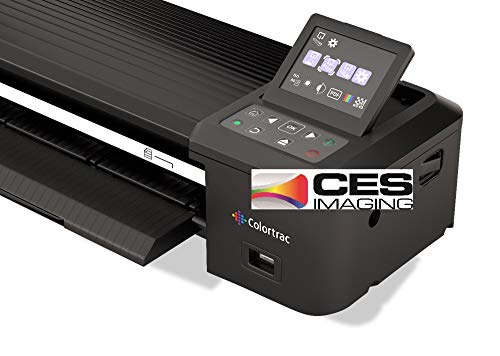
- 36-inch scanning width
- 600 dpi resolution
- Ethernet connectivity
Best For: Wide paper documents and shared workgroups
Best Flatbed for Photos and Artwork

- 2400 x 4800 dpi scanning
- 48-bit color depth
- Optional film scanning
Best For: Large photos, artwork, and archival media
Best Fast A3 Scanner

- Four-second A3 scans at 200 dpi
- Up to 2400 dpi resolution
- Frameless edge-to-edge scanning
Best For: Fast A3 documents, CAD drawings, and blueprints
Best A3 Flatbed Value

- 12-by-17-inch A3 scan area
- Batch scanning with OCR support
- TWAIN/WIA connectivity
Best For: Oversized documents, maps, drawings, and bound books
Best for Detailed Photo Scans

- 6400-dpi photo scanning
- 4.0 Dmax for shadow detail
- Dual-lens scanning system
Best For: High-detail photo digitization and archival imaging
Best Wide-Format Document Feeder
RICOH fi-7460 Wide-Format Scanner

- Wide feed for odd-shaped documents
- Duplex document scanning
- PaperStream workflow software
Best For: Business document batches and mixed media
Best with Extra Features

- A3 flatbed scanning up to 11.7 by 17 inches
- LED operation with no warm-up delay
- Includes OCR and one-touch workflow software
Best For: Libraries, schools, and small offices scanning A3 graphics and documents
Best Overhead A2 Scanner
VIISAN S21 Large Format Scanner

- Captures A2 documents, books, maps, and objects
- 26MP imaging with page-flattening software
- OCR exports to PDF, Word, Excel, EPUB, and text
Best For: Archives, researchers, and educators scanning bound or oversized materials
Best Office Wide-Format Scanner
Plustek S30 Wide-Format Scanner

- Handles documents up to 12 inches wide
- Automatic sizing and blank-page removal
- Supports fragile documents with carrier sheets
Best For: Busy offices scanning mixed-size documents, plans, and wide paperwork
Best Sheetfed Workhorse – Epson WorkForce DS-30000
For offices comparing professional large format scanners, the Epson WorkForce DS-30000 is a practical sheetfed option for processing large documents, cards, and other mixed media. Its 600 dpi optical resolution and 30-bit color depth support detailed, accurate scans, while the 120-sheet capacity helps reduce loading interruptions.
Best For: Offices scanning high volumes of large documents, cards, passports, and business paperwork.
Pros:
- Sheetfed design is well suited to large-document workflows.
- 600 dpi optical resolution supports detailed scans.
- 30-bit color depth helps preserve accurate color reproduction.
- 120-sheet standard capacity supports batch scanning.
Cons:
- USB connectivity may be less convenient for shared network workflows.
- The listed minimum system requirement is Windows 7, with no Mac support specified.
The DS-30000 emphasizes document throughput and flexible media handling rather than photo-specific features. It is a strong fit when an office needs a capable sheetfed scanner with substantial paper capacity.
Best Extra-Wide Network Scanner – Colortrac SmartLF 36
The Colortrac SmartLF 36-inch color scanner is designed for users who need genuinely wide-format scanning. With a 36-inch scanning width, 600 dpi resolution, Ethernet connectivity, and LED illumination, it is a practical candidate among professional large format scanners for oversized paper documents.
Best For: Workgroups scanning wide paper documents over an Ethernet-connected setup.
Pros:
- 36-inch width accommodates unusually wide documents.
- 600 dpi resolution supports detailed document capture.
- Ethernet connectivity can suit shared office environments.
- LED light source avoids the need for a warm-up period.
Cons:
- 31-pound weight makes it less portable than compact scanners.
- 24 bpp color depth is lower than some photo-focused alternatives.
- Media support is listed as paper, limiting the stated use case.
The SmartLF 36 stands out primarily for its exceptional width and network connection. Choose it when oversized paper documents are the priority and a dedicated wide-format device is justified.
Best Flatbed for Photos and Artwork – Epson Expression 13000XL
The Epson Expression 13000XL is a flatbed choice for professional large format scanners buyers who prioritize image quality. It accommodates reflective media up to 12.2 by 17.2 inches and combines 2400 x 4800 dpi scanning, 48-bit color, batch scanning, and photo-restoration tools for detailed archival and creative work.
Best For: Photographers, archives, designers, and studios digitizing photos, artwork, and other reflective originals.
Pros:
- Large flatbed area handles media up to 12.2 by 17.2 inches.
- 2400 x 4800 dpi resolution and 48-bit color support detailed scans.
- Easy Photo Fix provides one-touch color restoration and automatic dust removal.
- Optional Transparency Unit supports film scanning up to 12 by 16.5 inches.
Cons:
- The Transparency Unit is sold separately.
- At 31.5 pounds, it requires substantial workspace.
- USB connectivity may not suit networked scanning environments.
With its high resolution, CCD sensor, calibration software, and batch capability, the 13000XL is oriented toward image quality and preservation. It is less about rapid document feeding and more about carefully capturing oversized reflective originals.
Best Fast A3 Scanner – VIISAN VF3240 A3 Scanner
The VIISAN VF3240 is a versatile A3 flatbed option for buyers seeking professional large format scanners for CAD drawings, blueprints, business documents, and educational materials. It can scan A3 color documents in as little as four seconds at 200 dpi under specified conditions, while its 2400 dpi capability and 48-bit color support detailed output.
Best For: Offices, schools, and design users scanning A3 documents, blueprints, reports, and flat artwork.
Pros:
- Fastest stated A3 color scan speed is four seconds at 200 dpi.
- 2400 dpi resolution and 48-bit color support high-detail scans.
- Frameless glass enables edge-to-edge scanning of large materials.
- Works with Windows and macOS and includes a universal 100-240V adapter.
Cons:
- The four-second speed applies only under specified 200 dpi, A3 color conditions.
- Windows users achieve 1200 dpi for A3 through ViiScan software, while WIA is limited to 600 dpi.
- CIS technology is intended for flat materials, not 3D objects or other uneven items.
The VF3240 balances large-format capability with speed and simple controls, including auto-scan when the lid closes. Its resolution and operating-system limitations should be considered carefully, but it is a compelling A3 choice for routine flat-document digitization.
Best A3 Flatbed Value – Plustek OpticPro A320E
For buyers comparing professional large format scanners, the Plustek OpticPro A320E is a practical flatbed option with a 12-by-17-inch scan area. It is designed for A3 documents, maps, drawings, bound books, and other unusually sized materials, with batch scanning and OCR features that support everyday office workflows.
Best For: Offices, studios, and users who need an A3 flatbed for oversized or bound originals.
Pros:
- 12-by-17-inch scan area accommodates A3 pages, maps, drawings, and odd-shaped items.
- Doc Action supports scan-to-print, email, folders, FTP, and multiple file formats.
- Batch scanning and OCR can help create searchable PDFs and streamline document handling.
- TWAIN and WIA support, with listed compatibility for Windows, Mac, and Linux/SANE use.
Cons:
- Linux and SANE users are advised to confirm driver availability before purchase.
- Its flatbed design is better suited to individual or batch flatbed work than high-volume feeder scanning.
- Mac support is listed through macOS 13.x, so newer systems should be checked.
The A320E stands out when oversized originals and flexible file handling matter more than automated document feeding. Its A3 bed, batch tools, and OCR make it a capable general-purpose choice for professional large format scanning.
Best for Detailed Photo Scans – Epson Perfection V850 Pro
The Epson Perfection V850 Pro is a strong fit for professional large format scanners buyers whose priority is photo and film detail rather than oversized office documents. Its 6400-dpi resolution, dual-lens system, and 4.0 Dmax are aimed at capturing fine detail, tonal range, and shadow information.
Best For: Photographers and archival users digitizing photos or other originals where fine detail and tonal gradation are important.
Pros:
- 6400-dpi resolution supports detailed photo scanning.
- 4.0 Dmax is specified for smooth gradations and fine shadow detail.
- Dual-lens technology selects between two lenses for the intended scan result.
- Digital ICE is included for supported image-restoration workflows.
Cons:
- It is listed as a photo scanner, not an A3 or wide-format document scanner.
- The listed operating-system support is for older Windows and Mac versions.
- Its 10-sheet standard capacity is limited compared with higher-volume document scanners.
The V850 Pro is the specialized choice in this group. It makes the most sense when image quality, resolution, and tonal performance are more important than scanning large office paperwork or feeding documents continuously.
Best Wide-Format Document Feeder – RICOH fi-7460 Wide-Format Scanner
For professional large format scanners used in document-heavy environments, the RICOH fi-7460 emphasizes reliable feeding and wide-format handling. Its wider feed mechanism and gentle straight paper path are designed for large or odd-shaped documents, while duplex scanning, paper-handling technology, and workflow software support routine production work.
Best For: Businesses scanning mixed document batches, including large, odd-shaped, paper, receipt, photo, and ID-card media.
Pros:
- Wide feed mechanism handles large and odd-shaped documents.
- Straight paper path is designed to scan important documents safely and quickly.
- Duplex capability and paper-handling technologies help reduce jams and labor.
- PaperStream ClickScan supports simple destinations such as email, print, and folders, with TWAIN, ISIS, and Kofax VRS compatibility.
Cons:
- Its listed 300-dpi resolution is focused on document capture rather than high-resolution photo work.
- Windows 7 is the only operating-system requirement supplied in the specifications, so newer systems should be verified.
- The listed warranty is a three-month basic onsite warranty.
The fi-7460 is the workflow-oriented option here. Choose it when wide document feeding, duplex capture, and dependable paper handling are more valuable than flatbed versatility or photo-oriented resolution.
Best with Extra Features – Plustek OS1180
The Plustek OS1180 is a practical choice for anyone comparing professional large format scanners for A3 and tabloid documents, artwork, and graphics. Its flatbed design supports media up to 11.7 by 17 inches, while LED illumination avoids warm-up delays and helps reduce energy use.
Best For: Libraries, schools, small offices, and users digitizing A3 documents or graphics.
Pros:
- Scans A3 and tabloid-size media up to 297 by 431.8 mm.
- LED light source requires no warm-up and supports energy-conscious operation.
- One-touch buttons and bundled ABBYY OCR, PageManager, and DocAction software simplify workflows.
- 48-bit color and 16-bit grayscale capture support artwork and document scanning.
Cons:
- USB 2.0 is the listed connectivity option.
- Its flatbed design requires manually placing each sheet.
- The 9.5-pound, wide chassis needs dedicated desk space.
With 1200 dpi resolution and built-in shortcut controls, the OS1180 balances straightforward operation with useful image and OCR features. It is best suited to occasional or moderate A3 scanning rather than automated high-volume production.
Best Overhead A2 Scanner – VIISAN S21 Large Format Scanner
The VIISAN S21 stands out among professional large format scanners for oversized books, maps, manuscripts, and other materials that are awkward to place on a flatbed. Its adjustable overhead design captures up to A2 documents and combines image correction with OCR-oriented software.
Best For: Archives, educators, offices, and researchers scanning books, newspapers, maps, and three-dimensional objects.
Pros:
- Captures A2 media measuring up to 594 by 420 mm, with adjustable A2/A3 positioning.
- 26MP capture supports detailed still images, with software-enhanced resolution up to 600 dpi.
- Software can flatten curved pages, remove fingers, repair damaged edges, and split facing pages.
- OCR can convert scans into PDF, Word, Excel, EPUB, and text files.
Cons:
- Bundled OfficeCam software supports only x86/x64 Windows and macOS, not ARM-based devices.
- Glare-prone paper is not recommended, and built-in lights are not intended for bright environments.
- USB 2.0 is the listed hardware interface.
The S21 is more flexible than a conventional flatbed for bound or oversized materials, and its foldable hinge helps with storage and setup. Buyers should confirm computer architecture and available workspace before choosing it.
Best Office Wide-Format Scanner – Plustek S30 Wide-Format Scanner
The Plustek S30 is designed for offices that need professional large format scanners without dedicating space to a much larger production unit. It handles documents up to 12 inches wide, including tabloid, ledger, A3, blueprints, and engineering drawings, while automatic detection helps streamline mixed-size batches.
Best For: High-volume offices scanning mixed-size paperwork, plans, receipts, and fragile documents.
Pros:
- Scans documents up to 12 inches wide, including tabloid, ledger, and A3 media.
- Automatic paper detection identifies sizes, removes blank pages, and optimizes images during continuous scanning.
- Job-button software enables one-touch access to frequently used scanning tasks.
- Carrier-sheet support helps protect thin or fragile documents and combine oversized folded sheets into one image.
Cons:
- Its 600 dpi resolution is lower than the OS1180’s listed 1200 dpi.
- Windows 7 is the listed minimum system requirement, so newer compatibility should be verified.
- It is wider than a standard scanner, despite being designed to save space when stored upright.
The S30 is a strong office-oriented option when wide documents appear alongside everyday paperwork. Its automatic sizing and job-button workflow are particularly useful for recurring batches, while the carrier-sheet option adds flexibility for delicate originals.
How We Picked the Best Professional Large Format Scanners
We selected these scanners to cover the main professional use cases: oversized documents, CAD plans, artwork, archival photographs, books, and high-volume office records. We considered maximum scan area, optical resolution, duplex capability, advertised speed, document handling, color performance, software features, and overall suitability for business or studio environments.
Because no single scanner is ideal for every workflow, the list includes flatbed models for delicate originals, sheetfed and duplex scanners for productivity, wide-format units for drawings, and overhead scanners for bound or fragile material.
Quick Comparison
| Best For | Scanner Type | What to Prioritize |
|---|---|---|
| CAD plans and technical drawings | Wide-format or A3 flatbed | Large scan width, line accuracy, and reliable paper handling |
| Photos and artwork | Professional flatbed | Optical resolution, color depth, and dust or scratch correction |
| Office documents | Sheetfed or duplex | Throughput, automatic feeding, and document management software |
| Books and fragile originals | Overhead book scanner | Non-contact capture, page flattening, and distortion correction |
Key Buying Factors for Professional Large Format Scanners
Scan Size and Original Types
Confirm the scanner supports the largest originals you handle. A3 and tabloid models suit many office and design tasks, while 36-inch wide-format scanners are better for architectural plans, engineering drawings, and signage. Flatbeds are more versatile for thick or delicate media; sheetfed designs are faster for loose pages.
Resolution and Image Quality
Optical resolution matters more than interpolated resolution. For everyday documents and CAD drawings, moderate optical resolution is often sufficient. Photos, film, artwork, and archival work benefit from higher optical resolution, strong color depth, and features such as Digital ICE or other correction tools.
Speed, Feeding, and Duplex Scanning
High-volume offices should compare pages per minute, scan cycle time, feeder capacity, and duplex performance. A fast scanner is only efficient if it handles mixed paper sizes reliably and minimizes jams. Flatbeds typically trade speed for flexibility and image quality.
Software and Connectivity
Look for drivers and software that support your operating system, searchable PDFs, OCR, batch scanning, color management, and network or USB workflows. Professional users should also check whether the scanner integrates with existing document-management, CAD, or archival systems.
Workspace and Ownership Costs
Measure the available desk or floor space, including clearance for long originals and feeder access. Also account for replacement rollers, lamps or consumables, service availability, energy use, and the cost of maintaining color accuracy over time.
Who Should Buy Which Professional Large Format Scanners?
Choose a wide-format scanner if your priority is oversized technical documentation or plans. Choose a high-end flatbed if you scan artwork, photographs, film, or delicate originals and need maximum control over image quality. A sheetfed duplex model is the better fit for offices processing large batches of standard documents. For books, bound records, and materials that should not pass through rollers, an overhead A2 or A3 scanner is usually the safest choice.
Before buying, match the scanner’s maximum size and workflow speed to your busiest regular task—not just occasional oversized scans. That approach will help you avoid paying for unnecessary resolution or choosing a compact model that cannot handle your most important originals.
