
Choosing the right scanner can save hours of manual filing, improve document accuracy, and keep busy teams moving. The best professional document scanner systems combine speed, dependable paper handling, and easy workflow integration.
Below, you’ll find 10 standout options for home offices, small businesses, and high-volume environments, with a focus on real-world performance and value.
Best 10 Professional Document Scanner Systems Picks for 2026
Fast Office Duplex Pick
Epson WorkForce ES-400 II High-Speed Duplex Scanner

- 50-sheet ADF for batch scanning
- Duplex scans with OCR support
- ScanSmart software for cloud and email sharing
Best For: Small offices needing fast, practical desktop document scanning
Simple Personal Wi‑Fi Scanner
Fujitsu ScanSnap iX500 Deluxe Bundle Scanner

- 25ppm color scanning
- Two-sided document capture
- USB or Wi‑Fi to one computer
Best For: Single-user setups that value speed and easy connectivity
Wireless Desktop Scanning Upgrade
Epson WorkForce ES-580W Wireless Duplex Scanner

- 4.3-inch touchscreen with wireless scanning
- 100-sheet ADF for bigger jobs
- Saves to cloud, email, USB, or devices without a computer
Best For: Office users who want standalone wireless scanning and easy sharing
High-Volume Production Scanner
Canon DR-G1130 Image Formula Production Scanner
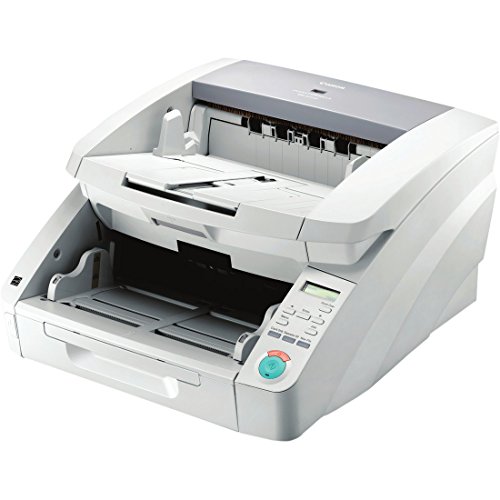
- Up to 130 pages per minute
- Handles many document sizes and media types
- Double-feed detection and prevention
Best For: Production teams that need maximum speed and versatile paper handling
Premium All-in-One
ScanSnap iX2500 Wireless or USB High-Speed Document Scanner, Black

- 45ppm duplex scanning with 100-sheet feeder
- Wi-Fi 6 and USB-C connectivity
- Touchscreen profiles and automatic file organization
Best For: Busy offices and heavy scanning workflows
Space-Saving Office Pick
Canon imageFORMULA DR-C225 II Office Document Scanner, Black

- Upright, space-saving design with cable organization
- Duplex scanning up to 25 ppm
- Direct cloud scanning and broad document support
Best For: Small offices with limited desk space
Ultra-Compact Workhorse
Epson Workforce ES-C220 Compact Document Scanner Duplex 20-pg ADF

- Saves 60% of desk space in a compact design
- 30 ppm duplex scanning with 20-page ADF
- OCR and automatic image cleanup features
Best For: Tight desks and light-office scanning
Network-Ready Office Scanner
RICOH fi-7300NX Network Enabled Scanner

- Wi‑Fi and Ethernet connectivity
- NX Manager supports cloud and on-premise destinations
- Paper handling aimed at fewer jams
Best For: Shared offices needing centralized, network-enabled scanning
Compact Wireless Desktop Scanner
ScanSnap iX1300 Wireless Document Scanner

- Fits small spaces and stays out of the way
- USB or Wi‑Fi scanning to devices and cloud
- Automatic cleanup with de-skew and blank page removal
Best For: Small desks and simple wireless scanning
High-Speed One-Touch Scanner
ScanSnap iX2400 High-Speed USB Scanner

- Up to 45 pages per minute
- 100-sheet feeder for larger batches
- USB connection for stable performance
Best For: Fast one-touch scanning with a high-capacity feeder
Fast Office Duplex Pick – Epson WorkForce ES-400 II High-Speed Duplex Scanner
If you’re comparing professional document scanner systems for a busy desk, the Epson WorkForce ES-400 II is built for fast, straightforward batch scanning. Its 50-sheet ADF, duplex capture, and ScanSmart software make it a practical fit for turning paper stacks into searchable, shareable files.
Best For: Small offices and home offices that need quick duplex scanning, OCR, and easy cloud sharing.
Pros:
- 50-sheet Auto Document Feeder handles stacks efficiently
- Duplex scanning with OCR for searchable PDFs and editable Word or Excel files
- ScanSmart software supports previewing, emailing, cloud uploads, and automatic file naming
- TWAIN driver helps it integrate with common document management workflows
Cons:
- Designed as a desktop scanner, so it is not meant for large production scanning
- Cloud and workflow features still depend on the connected software setup
Overall, the ES-400 II is a solid choice if you want a reliable office scanner that emphasizes speed, document cleanup, and simple file handling rather than advanced production features.
Simple Personal Wi‑Fi Scanner – Fujitsu ScanSnap iX500 Deluxe Bundle Scanner
For buyers shopping professional document scanner systems, the Fujitsu ScanSnap iX500 Deluxe Bundle focuses on fast personal scanning with simple connection options. It offers 25ppm color scanning, two-sided capture, and USB or Wi‑Fi support to a single computer, which makes it a convenient desktop option for everyday document digitizing.
Best For: Individual users who want a compact scanner with wireless or USB connection to one computer.
Pros:
- Blazing 25ppm color scanning for quick everyday use
- Two-sided scanning helps process duplex documents efficiently
- USB or Wi‑Fi connection adds flexibility for a single-computer setup
Cons:
- Connection is limited to a single computer
- No feeder capacity or advanced workflow features are listed in the supplied notes
The iX500 Deluxe is best viewed as a fast, simple scanner for personal or light office use, especially if you want straightforward duplex scanning without a more complex business setup.
Wireless Desktop Scanning Upgrade – Epson WorkForce ES-580W Wireless Duplex Scanner
The Epson WorkForce ES-580W is a strong fit if you want professional document scanner systems with wireless convenience built in. Its 4.3-inch touchscreen, 100-sheet ADF, and direct-to-cloud or USB saving make it a flexible desktop scanner for moving paperwork into digital workflows quickly.
Best For: Busy home offices and small teams that want wireless scanning without needing a computer.
Pros:
- Wireless scanning sends files to phone, tablet, computer, or cloud accounts
- 100-sheet ADF supports larger scan jobs in one go
- Can save directly to USB, email, or popular cloud services without a computer
- Up to 35 ppm with duplex Single-Step Technology
Cons:
- Still a desktop unit, so it is not a portable scanner
- Advanced sharing and file management depend on the chosen destination services
If wireless convenience matters, the ES-580W stands out as a well-rounded office scanner that combines speed, a large feeder, and flexible destination options for everyday document management.
High-Volume Production Scanner – Canon DR-G1130 Image Formula Production Scanner
Among professional document scanner systems, the Canon DR-G1130 is aimed at high-volume environments that need raw throughput and broad document handling. With speeds up to 130 pages per minute, support for many document types, and double-feed detection/prevention, it is built for demanding scanning workflows.
Best For: Production scanning teams that need very high speed and mixed-document handling.
Pros:
- Scans up to 130 pages per minute for very high throughput
- Handles business cards, ledger-sized pages, long documents, and thick or thin media
- Double-feed detection/prevention helps protect scan batches
Cons:
- Designed for production use, so it may be more scanner than casual users need
- Supplied notes focus on speed and handling, with few workflow extras listed
The DR-G1130 is the most production-oriented option here, making sense when speed and document versatility matter more than desktop convenience.
Premium All-in-One – ScanSnap iX2500 Wireless or USB High-Speed Document Scanner, Black
If you want professional document scanner systems that feel fast, modern, and easy to live with, the ScanSnap iX2500 stands out. It combines a 100-sheet feeder, 45ppm double-sided scanning, Wi-Fi 6, USB-C, and automatic file optimization in a compact desktop design.
Best For: Busy offices and power users who want a fast, highly connected scanner for documents, receipts, photos, and business cards.
Pros:
- 45ppm duplex scanning with a 100-sheet automatic document feeder
- Wi-Fi 6 plus USB-C connectivity for flexible setup options
- Touchscreen profiles and Quick Menu shortcuts for common workflows
- Automatic naming, sorting, and image optimization for different file types
Cons:
- Higher-end features may be more than basic home filing needs
- Some advanced functions depend on compatible software or devices
Overall, the iX2500 is built for users who scan often and value speed, convenience, and easy organization. Its mix of wireless access, strong feeder capacity, and built-in optimization makes it a very capable daily driver.
Space-Saving Office Pick – Canon imageFORMULA DR-C225 II Office Document Scanner, Black
For compact professional document scanner systems, the Canon imageFORMULA DR-C225 II is designed to disappear into a busy workspace while still delivering dependable duplex scanning. Its upright, top-feed/top-eject layout, 30-sheet feeder, and cloud scan support make it a practical office tool.
Best For: Small offices and shared workstations that need a slim scanner for everyday documents and cloud workflows.
Pros:
- Space-saving upright design with cable organization built in
- Duplex scanning up to 25 ppm with a 30-sheet automatic feeder
- Supports searchable PDF, JPG, and direct cloud scanning
- Handles receipts, cards, photos, long documents, and varied paper types
Cons:
- Lower feeder capacity than larger high-volume scanners
- USB-only connection limits placement flexibility
The DR-C225 II is a strong fit if desk space matters and your scanning jobs are steady rather than massive. It focuses on reliable office performance, broad document handling, and easy integration with common business workflows.
Ultra-Compact Workhorse – Epson Workforce ES-C220 Compact Document Scanner Duplex 20-pg ADF
If you need professional document scanner systems that fit into tight spaces, the Epson WorkForce ES-C220 is built around portability and desk efficiency. It saves space, scans both sides in one pass, and still includes a 20-page feeder plus useful image cleanup tools.
Best For: Home offices and light-business users who want a compact scanner for mixed document batches and occasional travel-friendly use.
Pros:
- Ultra-compact design that saves 60% of desk space
- Single-step duplex scanning up to 30 ppm / 60 ipm
- 20-page ADF handles batches of varying sizes
- Software features include OCR, file naming help, and image corrections
Cons:
- 20-page feeder is smaller than larger office models
- 300 dpi resolution is lower than some higher-end document scanners
The ES-C220 balances size and capability well for users who want a scanner that stays out of the way. Its compact footprint, duplex speed, and flexible scan path make it a smart choice for everyday paperwork without taking over the desk.
Network-Ready Office Scanner – RICOH fi-7300NX Network Enabled Scanner
RICOH fi-7300NX Professional Network Enabled Document Scanner | Large Color Touchscreen
Check Price On AmazonIf you’re comparing professional document scanner systems for a shared office or workgroup, the RICOH fi-7300NX is built around flexible placement and network access. Its Wi‑Fi and Ethernet connectivity let you scan without tying the unit to a single USB workstation, while NX Manager helps route scans to on-premise or cloud destinations.
Best For: Offices that want a network-enabled scanner with centralized control and PC-less deployment options.
Pros:
- Wi‑Fi or Ethernet connectivity supports flexible office placement.
- NX Manager can integrate scans with multiple on-premise or cloud destinations.
- PC-less deployment and web controls can reduce operational overhead.
- Paper handling technology is designed to reduce jams and labor costs.
Cons:
- Best suited to networked office workflows rather than simple single-user use.
- Advanced deployment features may be more than a basic home office needs.
Overall, this model stands out when you need a scanner that fits into a managed office environment instead of sitting beside one computer. Its color touch screen also makes day-to-day operation simpler for multiple users.
Compact Wireless Desktop Scanner – ScanSnap iX1300 Wireless Document Scanner
The ScanSnap iX1300 is a practical choice if you want one of the more compact professional document scanner systems for a small desk or mixed home-office setup. It supports USB or Wi‑Fi scanning, handles documents plus cards and photos, and uses automatic cleanup features to keep results consistent without much setup.
Best For: Small spaces and users who want simple duplex scanning with wireless flexibility.
Pros:
- Space-saving design fits easily on crowded desks.
- USB or Wi‑Fi connection supports scanning to computers, mobile devices, and cloud services.
- Automatic de-skew, color optimization, and blank page removal help produce clean scans.
- ScanSnap Home software helps manage documents, receipts, business cards, and photos.
Cons:
- Standard sheet capacity is 20, so it is less suited to larger batches.
- Its focus on simplicity may appeal less to users wanting heavier-duty office throughput.
In practice, the iX1300 is a convenience-first scanner that keeps setup and operation straightforward. It makes sense when desk space is tight but you still want wireless scanning and broad media support.
High-Speed One-Touch Scanner – ScanSnap iX2400 High-Speed USB Scanner
If speed and simplicity matter most, the ScanSnap iX2400 fits well among professional document scanner systems for busy personal or office use. It uses a stable wired USB connection, scans up to 45 pages per minute, and includes a 100-sheet feeder for handling larger stacks with less interruption.
Best For: Users who want fast, one-touch scanning with a high-capacity feeder and wired reliability.
Pros:
- Up to 45 pages per minute for quick batch scanning.
- 100-sheet feeder capacity reduces the need for frequent reloading.
- Stable USB connection supports consistent performance.
- Automatic cleanup features remove streaks, blank pages, and skew.
Cons:
- USB-only connectivity may limit placement flexibility.
- Not designed for wireless or networked scanning workflows.
The iX2400 is a strong pick when you want a fast scanner that stays easy to use. Its one-touch operation and high feeder capacity make it well suited to regular document capture without a complicated setup.
After reviewing the lineup, the biggest takeaway is simple: the best choice depends on how much you scan, what you scan, and how your team works. Some Professional Document Scanner Systems are built for portability and quick desktop use, while others are designed for networked offices or production-level throughput.
How We Picked the Best Professional Document Scanner Systems
We prioritized speed, duplex scanning, automatic document feeding, wireless or network connectivity, software/workflow convenience, and overall reliability. We also considered footprint, ease of setup, and whether a model makes sense for individual users, shared office teams, or heavier scanning environments.
Quick Comparison
For simple desktop scanning and compact workspaces, look toward smaller one-touch or wireless models. If you need team access, network-enabled systems are more practical. For large backlogs, production-class scanners are the better fit because they are built for higher duty cycles and faster batch processing.
Key Buying Factors for Professional Document Scanner Systems
Speed and Duty Cycle
Look at pages per minute, duplex speed, and recommended daily volume. A fast scanner helps, but only if it matches your actual workload without frequent jams or slowdowns.
Paper Handling and Feed Reliability
Automatic document feeders, mixed-size support, and strong jam recovery matter more than many buyers expect. Reliable feeding is essential if you scan invoices, contracts, receipts, or multi-page forms.
Connectivity and Workflow
USB is fine for one-user setups, but wireless and network-enabled options are better for shared spaces. If your team scans to email, cloud storage, or shared folders, check software compatibility before buying.
Size and Placement
Compact scanners fit small desks and front offices, while larger systems are better suited to dedicated scanning stations. Make sure the footprint works for your space and paper stack workflow.
Who Should Buy Which Professional Document Scanner Systems?
Choose a compact desktop model if you need fast, everyday digitizing for personal or small-office use. Pick a wireless or networked scanner if multiple people will use the device or if you want easier document routing. Go with a production-oriented model if your business processes large volumes and needs maximum uptime. In short, the best Professional Document Scanner Systems are the ones that match your volume, workspace, and workflow—not just the highest specs on paper.
