
Choosing the right document camera can make lessons clearer, demos smoother, and remote presentations more professional. The best models balance sharp image quality, easy setup, and flexible connections.
In this roundup, we focus on standout options for teachers, trainers, and presenters who need reliable performance in real-world use.
Best 10 Professional Document Cameras Picks for 2026
Editor’s Pick
IPEVO V4K 8MP USB Document Camera

- 8MP sensor captures up to 3264 x 2448
- Streams at up to 30 fps in Full HD
- Compatible with Mac, Windows, and Chromebook
Best For: Teachers and presenters who need a simple USB camera for live demos
High-Resolution Choice
JOYUSING V513 13MP Dual Mode Camera

- 13MP sensor captures up to 4160 x 3120
- HDMI/USB dual mode works with or without a computer
- Supports up to 4K streaming at 30 fps
Best For: Teachers and presenters who need flexible projection and recording options
Most Portable
OKIOCAM T-4K Compact 8MP Camera

- Compact design fits ledger-size pages and open books
- 8MP Sony sensor captures up to 3264 x 2448
- Works with Windows, Mac, iOS, Chrome, and interactive displays
Best For: Users who need a portable camera for books, large pages, and demos
Dual-Mode Performer
IPEVO VZ-R HDMI/USB 8MP Camera
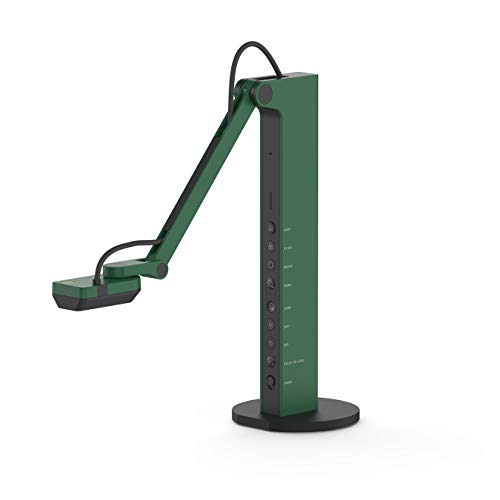
- HDMI and USB dual mode for flexible setups
- 8MP sensor captures up to 3264 x 2448 in USB mode
- Built-in LED light and webcam capability
Best For: Users who need one camera for projection, conferencing, and teaching
Premium 4K Classroom Capture
INSWAN INS-2 UHD 4K 13MP Document Camera

- 13MP sensor with 4K Ultra HD output
- A3 capture area with flexible multi-joint arm
- LED light, autofocus, and Documate software tools
Best For: Professional educators and art instructors showing large-format content
High-Zoom Interactive Presenter
Elmo TT-12G 4K Document Camera
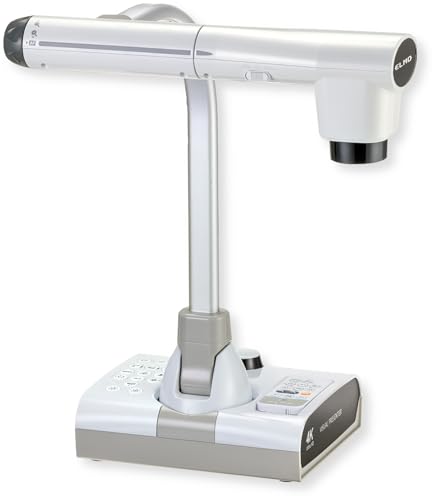
- 4K Ultra HD imaging with a 12MP sensor
- 192x total zoom for fine detail viewing
- HDMI, USB, VGA, and SD recording support
Best For: Teachers and presenters who need detailed visuals and broad connectivity
Compact Foldable Teaching Visualizer
4K USB Document Camera for Teacher

- 8MP capture with 2448P video at 30fps
- Foldable multi-joint design for portability
- Manual image reversal and 3-level LED brightness
Best For: Teachers and presenters who want a compact, adjustable visualizer
Portable Classroom Pick
OKIOCAM S-4K 8MP USB Document Camera

- 8MP Sony sensor with up to 3264 x 2448p UHD
- 30 fps streaming for smooth live demos
- OKIOPoint tracking and annotation software
Best For: Teachers who need a compact document camera for lessons and distance learning
Hybrid Teaching Choice
OKIOCAM S2-4K Ultra HD 8MP USB Document Camera

- 8MP sensor with up to 3264 x 2448 image capture
- 30 fps streaming and built-in mic for live use
- OKIOPoint tools plus wide platform compatibility
Best For: Hybrid classrooms and meetings that need a compact, durable document camera
Premium 4K Option
OKIOCAM S2 Pro 13-MP USB Document Camera

- 13MP sensor with true 4K UHD capture
- Built-in light helps in dim environments
- OKIOPoint and software for interactive presenting
Best For: Presenters who need a higher-resolution document camera for detailed demos
Editor’s Pick – IPEVO V4K 8MP USB Document Camera
If you want a dependable option among professional document cameras, the IPEVO V4K focuses on smooth live demo performance and strong image quality. Its 8MP sensor, fast focusing, and broad software compatibility make it a practical fit for teachers, remote presenters, and anyone who needs a straightforward USB setup.
Best For: Teachers and presenters who want a simple, high-resolution USB document camera for live demos and conferencing.
Pros:
- 8MP camera captures up to 3264 x 2448 for detailed images
- Up to 30 fps at Full HD for lag-free streaming
- Fast focusing helps when switching materials often
- Works with Mac, Windows, and Chromebook
Cons:
- USB-only design limits direct HDMI projection
- Highest-resolution streaming is slower than Full HD mode
- Best performance depends on meeting system requirements
The V4K is a strong pick if you value reliable day-to-day use over extra hardware features. It delivers the core tools most buyers need in a professional document camera without adding complexity.
High-Resolution Choice – JOYUSING V513 13MP Dual Mode Camera
The JOYUSING V513 is built for buyers who want more flexibility from professional document cameras. With HDMI and USB dual mode, a 13MP sensor, and support for use with or without a computer, it suits classrooms, projection setups, and recording workflows where versatility matters.
Best For: Teachers and presenters who need a dual-mode camera for projection, recording, and computer-free use.
Pros:
- 13MP camera captures up to 4160 x 3120 when connected to a PC
- HDMI and USB dual mode supports use with or without a computer
- Up to 4K streaming at 30 fps for smooth live output
- Large max shooting area handles A3-sized materials
Cons:
- Software setup requires downloading from Joyusing’s support site
- Bulkier than compact USB-only document cameras
- HDMI cable and power adapter details may require attention before setup
If you need a document camera that can move between classroom projection and computer-based use, the V513 offers a lot of flexibility. Its larger capture area and high-resolution imaging make it especially appealing for bigger documents and live demonstrations.
Most Portable – OKIOCAM T-4K Compact 8MP Camera
The OKIOCAM T-4K is a compact pick in the professional document cameras category, especially if you need to show ledger-size materials or both pages of an open book. It combines an 8MP Sony sensor, lag-free streaming, and broad software support in a highly portable design.
Best For: Users who want a compact, travel-friendly document camera for large pages, books, and classroom demos.
Pros:
- Compact design still captures ledger-size materials and open books
- 8MP Sony sensor delivers up to 3264 x 2448 resolution
- Lag-free streaming up to 30 fps in Full HD
- Compatible with Windows, Mac, iOS, Chrome, and interactive displays
Cons:
- Smaller footprint may not suit users who want a larger stand setup
- Maximum resolution streams at a lower frame rate than Full HD
- Software features depend on downloading the included app options
For buyers who prioritize portability without giving up strong image quality, the T-4K is easy to recommend. The included tools like OKIOPoint and annotation software add useful presentation control for teaching and remote work.
Dual-Mode Performer – IPEVO VZ-R HDMI/USB 8MP Camera
The IPEVO VZ-R is aimed at people who want professional document cameras that can work in more than one setup. Its HDMI and USB dual mode, built-in LED light, and webcam capability make it a versatile choice for live projection, conferencing, and teaching.
Best For: Users who want one camera for projector setups, USB computer use, and video calls.
Pros:
- HDMI and USB dual mode supports direct projection or computer connection
- 8MP sensor captures up to 3264 x 2448 in USB mode
- Built-in LED light helps in dim environments
- Can double as a webcam for video calls
Cons:
- HDMI cable and wall power adapter are not included
- Maximum HDMI mode resolution is lower than USB mode
- Heavier than compact USB-only document cameras
If you want a flexible document camera for both classrooms and office presentations, the VZ-R is a practical all-rounder. Its durable stand and tactile controls also make it a good fit for frequent daily use.
Premium 4K Classroom Capture – INSWAN INS-2 UHD 4K 13MP Document Camera
If you need professional document cameras for teaching, presentations, or artwork display, the INSWAN INS-2 is built for larger-format viewing and detailed image capture. Its 4K output, A3 coverage, and flexible arm make it a strong fit when clarity and positioning both matter.
Best For: Professional educators and art instructors who need to show large documents, artwork, two-page spreads, and big-screen presentations.
Pros:
- 13MP Sony sensor with 4K Ultra HD capture at 3840 x 2160 @ 30fps
- A3-sized capture area with a multi-joint arm for flexible positioning
- Built-in LED light, anti-glare sheet, autofocus, brightness control, and macro capability
- Documate software adds zoom, annotation, recording, scanning, OCR, and whiteboard tools
Cons:
- Designed around USB plug-and-play rather than standalone operation
- Best features depend on using the included Documate software
For classrooms and demo spaces that need a polished visualizer, this model stands out for its large capture area and presentation-focused feature set. It is especially useful when you need to show more than a standard page and still keep the image sharp.
High-Zoom Interactive Presenter – Elmo TT-12G 4K Document Camera
When you want professional document cameras that can handle detailed demonstrations, the Elmo TT-12G brings 4K imaging and very strong zoom into a classroom-ready design. It is geared toward users who need to show fine details clearly across both modern and legacy AV setups.
Best For: Teachers and presenters who need sharp 4K visuals, deep zoom, and flexible connectivity for classroom or distance learning use.
Pros:
- 4K Ultra HD imaging with a 12MP sensor for sharp presentation output
- 192x total zoom helps reveal fine details during demos
- HDMI, USB, and VGA outputs support modern and legacy devices
- Large 18.5 x 10.2-inch capture area, LED lighting, autofocus, and SD recording
Cons:
- More feature-rich than a basic plug-and-play classroom camera
- Wireless sharing is limited to Miracast-compatible displays
This is a strong option for users who value versatility and detail above all else. The combination of high zoom, broad connectivity, and recording support makes it well suited to structured lessons and live demonstrations.
Compact Foldable Teaching Visualizer – 4K USB Document Camera for Teacher
For buyers comparing professional document cameras on a budget-friendly, space-saving form factor, this foldable visualizer offers practical classroom and remote-teaching features. It focuses on plug-and-play use, adjustable brightness, and image control for everyday live demos.
Best For: Teachers and remote presenters who want a compact, foldable camera with adjustable brightness and wide device compatibility.
Pros:
- 8MP sensor with 2448P video capture at 30fps
- Foldable, multi-joint design saves space and stays portable
- Manual image reversal plus 3-level LED brightness adjustment
- Plug-and-play USB-C compatibility for Windows, macOS, and Chrome OS
Cons:
- Not as resolution-heavy as the 4K models in this roundup
- Feature set is simpler than higher-end classroom visualizers
This model makes sense if you want a straightforward teaching camera that is easy to carry and easy to set up. It does the essentials well, especially for live demo work where adjustable lighting and image orientation are helpful.
Portable Classroom Pick – OKIOCAM S-4K 8MP USB Document Camera
If you need a practical professional document camera for teachers, the OKIOCAM S-4K focuses on portability without giving up sharp image quality. Its 8MP Sony sensor, smooth 30 fps streaming, and support for live annotation tools make it a solid fit for lessons, demos, and hybrid teaching setups.
Best For: Teachers and presenters who want a compact, easy-to-carry document camera for classroom demos and distance learning.
Pros:
- 8MP Sony Exmor R sensor captures up to 3264 x 2448p UHD detail.
- Streams up to 30 fps in Full HD for lag-free presentations.
- Captures letter-size materials in landscape orientation despite its portable size.
- Includes OKIOPoint AI tracking plus software for annotation, zoom, recording, and snapshots.
Cons:
- Maximum frame rate drops to 15 fps at top resolution.
- Best suited to users who can work with a smaller portable viewing area.
Overall, the S-4K is a smart choice if your priority is a lightweight classroom camera with useful software features and reliable image quality. It balances convenience and capability well for everyday teaching use.
Hybrid Teaching Choice – OKIOCAM S2-4K Ultra HD 8MP USB Document Camera
The OKIOCAM S2-4K is aimed at professional document camera users who want a compact unit that still handles classroom and meeting demands well. It combines an 8MP Sony sensor, smooth 30 fps output, and a durable articulated arm with software tools for interactive teaching and remote presenting.
Best For: Hybrid classrooms, remote teaching, and office presentations that need strong image quality in a compact design.
Pros:
- 8MP Exmor R sensor delivers up to 3264 x 2448 resolution with clear detail.
- 30 fps streaming supports smooth presentations and web conferencing.
- Captures a 15.1 x 11.2 in area, including letter-size and near-Ledger documents.
- OKIOPoint tracking, annotation, zoom, recording, and PIP tools add presentation flexibility.
Cons:
- Still a compact camera, so users needing very large capture areas may want a bigger model.
- Feature-rich software may be more than casual users need.
This is a well-rounded pick if you want a document camera that performs cleanly in both classroom and virtual settings. It stands out for its low-light handling, durable build, and broad platform support.
Premium 4K Option – OKIOCAM S2 Pro 13-MP USB Document Camera
For buyers looking at professional document cameras with more headroom for detailed visuals, the OKIOCAM S2 Pro pushes into true 4K territory. Its 13MP sensor, integrated light, and 30 fps capture make it a strong fit for live demos, web conferences, and remote teaching where clarity matters.
Best For: Presenters who want a higher-resolution document camera for detailed classroom or conference use.
Pros:
- 13MP 4K UHD sensor captures true 4K up to 3840 x 2160.
- 30 fps output keeps live presentations smooth and professional.
- Built-in LED light helps when capturing in dimly lit locations.
- Includes OKIOPoint smart tracking plus software for presenting, annotating, and recording.
Cons:
- Bulb-free setup still depends on the built-in light for low-light use.
- Larger resolution and feature set may be more than basic users require.
The S2 Pro is the most capable option here if resolution is your top priority. It delivers a polished mix of image quality, speed, and classroom-friendly tools for users who need a more premium document camera.
How We Picked These Professional Document Cameras
We focused on image quality, resolution, sensor performance, autofocus behavior, lighting, connectivity, compatibility, and how well each unit supports everyday classroom or presentation workflows. We also looked at portability, recording options, and whether a model is better suited to a desk, teaching station, or hybrid setup.
Quick Comparison: What Matters Most
For fast decision-making, compare resolution first, then check whether you need USB-only convenience or HDMI/USB dual-mode flexibility. If you teach in varied lighting, built-in LEDs and stronger low-light performance matter more than extra software features. If you move between rooms, a lighter foldable model may be more useful than a heavier interactive unit.
Key Buying Factors for Professional Document Cameras
Resolution and Detail
Higher resolution helps with reading small text, showing diagrams, and preserving clarity during recording. For most buyers, 8MP is a solid baseline, while 12MP or 13MP models are better for more detailed materials and larger capture areas.
Connection Type and Compatibility
USB models are usually simplest for laptops and classrooms, while HDMI/USB dual-mode units offer more flexibility for projectors and presentation displays. Make sure the camera works cleanly with your operating system and meeting platform before buying.
Lighting, Focus, and Capture Area
Good autofocus, image inversion, and adjustable LED lighting reduce setup friction and improve readability. If you regularly show worksheets, books, or larger pages, check for A3 or near-ledger capture support.
Audio, Portability, and Workflow Features
Built-in microphones, smart pointers, and tracking tools can streamline remote teaching and live demos. Folding arms, compact bases, and quick setup matter most for users who travel or switch workspaces often.
Who Should Buy Which Professional Document Cameras?
Teachers who need easy daily use should prioritize plug-and-play USB models with good lighting. Presenters and trainers who switch between rooms or display systems may prefer HDMI/USB dual-mode options. If you need the cleanest text reproduction or the largest capture area, choose a higher-resolution model with stronger autofocus and broader coverage. For mobile users, the best Professional Document Cameras are the ones that combine portability with dependable software support and consistent image quality.
