
Choosing the right screen can make or break your signage. The best professional digital signage displays balance brightness, reliability, size, and ease of management so your content looks sharp all day.
Below, we focus on options that fit real business use cases, from storefront promotions and menu boards to kiosks and indoor wayfinding.
Best 10 Professional Digital Signage Displays Picks for 2026
Ultra HD Narrow-Bezel Choice
LG 49UH5F-H 49'' Digital Signage Display

- Ultra HD resolution for sharper content
- Non-glare coating helps limit reflections
- Slim depth and narrow bezel suit tidy installs
Best For: Retail, lobbies, and meeting spaces needing a polished screen
All-In-One Business Signage Pick
Samsung Business QB55R 55-inch 4K Display

- 55-inch 4K UHD panel with Crystal Color
- Built-in Wi-Fi and Bluetooth for wireless control
- Embedded media player and SoC simplify setup
Best For: Businesses wanting a large all-in-one signage display
Compact Media Player Option
Amazon Signage Stick 4K Media Player

- Auto-launches CMS in kiosk mode
- Easy setup with a free mobile app
- Wi-Fi 6E, 4K, and secure boot included
Best For: Businesses needing a compact CMS-ready signage player
Space-Saving Commercial Sign
Samsung 24″ Full HD Commercial Display

- Compact design fits small spaces
- Full HD resolution for everyday signage
- Built-in Wi-Fi and Samsung VXT support remote control
Best For: Entrances, offices, and other compact signage locations
Interactive Floor-Standing Display
65 inch 4K Touchscreen Digital Kiosk
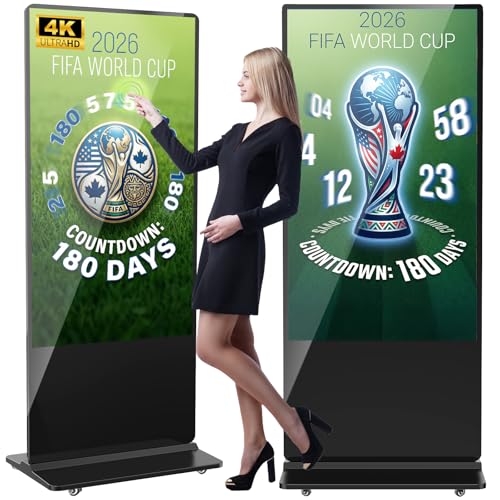
- 65-inch 4K IPS screen with 178° viewing angle
- Split-screen playback and Android-based control
- Wi-Fi, HDMI, USB, and free logo customization
Best For: Large interactive kiosks in lobbies, retail floors, and public venues
Countertop Menu Board
18.5" 700 Nits Digital Signage Display

- 700 nits brightness for commercial visibility
- Free lifetime Cloud CMS with remote scheduling
- Landscape or portrait desktop stand included
Best For: Countertops, checkout areas, and reception desks
Compact 4K Signage Player
OptiStick Android HDMI Signage Player

- 4K UHD HDMI stick for existing displays
- Remote management through OptiSigns portal or app
- Built-in Wi-Fi, Ethernet, apps, and templates
Best For: Businesses needing a compact player for existing screens
Portable Floor-Standing Signage
MWE 32 Inch Indoor Digital Signage Display Monitor

- 32-inch FHD IPS panel with 178° viewing angle
- USB/HDMI input and auto-loop playback
- Foldable, wheeled design for easy movement
Best For: Indoor retail, hospitality, and event promos
Interactive Wall-Mount Display
32 inch Wall Mount Digital Signage

- 10-point touch with FHD 1080p resolution
- AG anti-glare glass for brighter spaces
- Android 14 with 4GB RAM and 32GB storage
Best For: Interactive retail, office, and reception use
Split-Screen Floor Kiosk
JIYANG 32 Inch Indoor Digital Signage Display

- USB autoplay with looping and subtitle scrolling
- Split-screen modules for multi-window content
- Wheeled floor-standing design for indoor use
Best For: Indoor venues needing mobile, multi-window signage
Ultra HD Narrow-Bezel Choice – LG 49UH5F-H 49'' Digital Signage Display
If you need professional digital signage displays for a clean, high-impact installation, this LG 49UH5F-H is built around clarity and mounting flexibility. Its Ultra HD resolution, non-glare coating, slim depth, and 30° tilting installation make it a practical fit for controlled indoor environments where visibility and presentation matter.
Best For: Retail, lobbies, meeting spaces, and other installs that benefit from a sharp image and low-glare viewing.
Pros:
- Ultra HD resolution for detailed content playback
- Non-glare surface treatment helps reduce reflections
- 1/8.4 mm narrow bezel design supports a clean look
- Built-in speaker and broad connectivity, including HDMI, DP, DVI-D, USB, RS232C, RJ45, audio, and IR
Cons:
- 500 cd/m² brightness may be less suitable for very bright spaces
- 30° tilting installation is helpful, but it is still a display-first solution rather than a full signage system
Overall, this LG model is a solid option when your priority is a professional, polished display with flexible input support and an installation-friendly design. It is especially compelling for environments that want a slim look without sacrificing image detail.
All-In-One Business Signage Pick – Samsung Business QB55R 55-inch 4K Display
For buyers comparing professional digital signage displays, the Samsung QB55R stands out as a business-focused 55-inch 4K option with built-in connectivity and an embedded media player. It is designed for straightforward commercial use, with Slim design, Wi-Fi, Bluetooth, and SoC technology that simplify both installation and content delivery.
Best For: Businesses that want a large-format 4K signage display with integrated wireless features and an all-in-one setup.
Pros:
- 55-inch 4K UHD panel with Crystal Color for detailed visuals
- Built-in Wi-Fi and Bluetooth support content sharing and control
- System-on-chip technology and embedded media player reduce extra hardware needs
- Slim, elegant design helps with mounting and cable management
Cons:
- 350 nit brightness is moderate for a commercial display
- Some advanced room-kit and management features may only matter if your workflow uses them
This Samsung model makes sense if you want a simple commercial display that combines 4K image quality with embedded playback and wireless convenience. It is a practical choice for teams that prefer an integrated signage solution over a more modular setup.
Compact Media Player Option – Amazon Signage Stick 4K Media Player
When shopping for professional digital signage displays, the player behind the screen matters just as much as the panel itself. The Amazon Signage Stick is a compact 4K media player built for kiosk-mode operation, easy setup, and CMS compatibility, making it a practical add-on for businesses that want unattended signage without complicated deployment.
Best For: Businesses that need a small, secure, CMS-ready media player for digital signage rollouts.
Pros:
- Auto-launches your CMS in kiosk mode for unattended operation
- Easy setup with the free Amazon Signage app
- Supports leading CMS providers for flexible integration
- Wi-Fi 6E, 4K output, quad-core processor, and secure boot with encrypted storage
Cons:
- CMS subscription is required for use with supported providers
- It is a media player, not a complete display, so you still need a compatible screen
In a signage deployment, this stick is best viewed as the control layer for your content system. If you already have a compatible display and want a simple way to manage playback securely, it offers a strong mix of convenience and business-focused features.
Space-Saving Commercial Sign – Samsung 24″ Full HD Commercial Display
If your project calls for professional digital signage displays in a compact footprint, this Samsung 24-inch commercial model is built for efficient space use. Its Full HD resolution, Home UI, center IR, built-in Wi-Fi, and cloud-based Samsung VXT support make it a practical fit for smaller installations that still need business-ready control.
Best For: Entrances, exits, offices, and promotional areas where a compact commercial display is easier to place.
Pros:
- Compact design saves space in tight locations
- Full HD resolution handles standard signage content clearly
- Home UI and Favorites folder simplify navigation
- Built-in Wi-Fi, center IR, and cloud-based Samsung VXT improve remote control options
Cons:
- Full HD resolution is less detailed than 4K alternatives
- Smaller 24-inch size may not suit larger viewing distances
This Samsung display is a smart option when you need a smaller commercial screen that still feels purpose-built for signage. It is especially useful for focused messaging in places where wall space and viewing distance are limited.
Interactive Floor-Standing Display – 65 inch 4K Touchscreen Digital Kiosk
If you need professional digital signage displays for a lobby, retail floor, or high-traffic public space, this 65-inch floor-standing kiosk gives you a large 4K canvas with interactive touch support. It combines split-screen playback, Wi-Fi, HDMI, USB, and Android-based management so you can run ads, menus, and notices with more flexibility than a basic TV.
Best For: Businesses that want a large interactive kiosk for storefronts, airports, hospitals, restaurants, and reception areas.
Pros:
- 65-inch 4K IPS panel with 178° wide viewing angle for clearer public viewing.
- Supports split-screen playback for showing pictures and videos at the same time.
- Offers Wi-Fi, HDMI input, USB, and network connection for flexible content updates.
- Includes Android OS, built-in speakers, timing on/off, and free logo/poster customization.
Cons:
- Large floor-standing format may be more display than small counters or tight spaces need.
- Touch and non-touch versions are available, so buyers need to choose the right configuration.
- Best suited to businesses that can use a full kiosk setup rather than a simple wall display.
This model stands out when you want a bold, feature-rich signage solution that can handle both advertising and interactive use. The built-in playback options and commercial-focused design make it a strong fit for customer-facing environments.
Countertop Menu Board – 18.5" 700 Nits Digital Signage Display
This compact option is a practical pick for professional digital signage displays where countertop visibility matters most. The 18.5-inch screen is built for 24/7 business use, with 700 nits of brightness, Android 12, and built-in cloud CMS tools for remote content management.
Best For: Cafés, restaurants, salons, reception desks, and retail counters that need a bright desktop signage screen.
Pros:
- 700 nits brightness helps content stay visible in busy commercial settings.
- Free lifetime Cloud CMS supports remote uploads, playlists, scheduling, and split screens.
- Desktop stand supports both landscape and portrait orientations.
- Flexible connections include HDMI, LAN, TF card, USB 2.0, USB 3.0, and DC.
Cons:
- 18.5-inch 720P HD resolution is more modest than larger 4K signage options.
- Designed for countertop and desk use, so it is not a large-format display.
- Best suited to close-range viewing rather than wide-area advertising.
For businesses that want a reliable, easy-to-manage screen at the point of sale or reception, this model is a sensible fit. The included CMS and commercial brightness make it especially useful for updating promotions without printing new signs.
Compact 4K Signage Player – OptiStick Android HDMI Signage Player
If you already have screens and need a simple way to power professional digital signage displays, this OptiSigns player is built for that job. The stick-style Android device outputs 4K UHD over HDMI, adds Wi-Fi and Ethernet connectivity, and works with remote screen management through the OptiSigns platform.
Best For: Teams that want a compact signage player for existing displays and centralized remote management.
Pros:
- Compact HDMI stick design makes installation simple and hardware-light.
- Supports 4K UHD output with Wi-Fi and Ethernet for reliable streaming.
- Pre-installed OptiSigns player supports remote management from the portal or admin app.
- Access to 160+ apps and 5000+ templates helps speed up content creation.
Cons:
- Requires an OptiSigns subscription to use the platform, with paid plans for expanded features.
- Each device powers one screen, so scaling means adding more sticks.
- It is a media player, not a display, so you still need a compatible screen.
This is a strong choice when your priority is easy deployment and centralized control rather than buying a new screen. It works best for businesses already invested in digital signage software and looking for a compact playback device.
Portable Floor-Standing Signage – MWE 32 Inch Indoor Digital Signage Display Monitor
If you need professional digital signage displays for a busy storefront, lobby, or event space, this 32-inch MWE unit is built around simple playback and flexible placement. The FHD IPS panel, 178° viewing angle, and auto-loop media player make it practical for continuous promos, menus, and announcements without constant operator attention.
Best For: Retail, hospitality, and event teams that want a portable indoor signage screen with easy plug-and-play operation.
Pros:
- 32-inch FHD IPS screen with a wide 178° viewing angle for clear visibility.
- USB/HDMI input with automatic loop playback after startup for easy content display.
- CMS support for remote, real-time content updates.
- Foldable, movable design with built-in wheels for easier transport and setup.
Cons:
- Single HDMI port may be limiting if you need multiple wired sources.
- Best suited to indoor commercial use rather than high-end interactive applications.
This model stands out when portability and always-on scheduling matter more than advanced touch features. For businesses that want a straightforward indoor sign with remote content management and flexible placement, it offers a solid practical mix.
Interactive Wall-Mount Display – 32 inch Wall Mount Digital Signage
This 32-inch option is a strong fit if you want professional digital signage displays that can double as an interactive screen. With FHD resolution, 10-point touch, AG anti-glare glass, and Android 14, it is aimed at commercial spaces that need both visibility and hands-on control.
Best For: Reception areas, retail counters, offices, and other spaces that need an interactive wall-mounted display.
Pros:
- 1920 × 1080 FHD panel with 10-point PCAP capacitive touch.
- AG anti-glare glass helps reduce reflections in bright environments.
- Android system with 4GB RAM and 32GB storage for compatible apps and media.
- Wall mount support plus 400 × 200 mm VESA for flexible installation.
Cons:
- Heavier than a basic standalone monitor, so installation planning matters.
- Touch and Android features may be more than you need for simple looped advertising.
Overall, this display is best when your signage needs are interactive rather than purely promotional. The mix of touch input, wall-mount flexibility, and 24/7 operation makes it a practical commercial screen for customer-facing environments.
Split-Screen Floor Kiosk – JIYANG 32 Inch Indoor Digital Signage Display
For buyers comparing professional digital signage displays, this 32-inch floor-standing kiosk focuses on easy advertising playback and multi-window presentation. It combines plug-and-play USB use, split-screen layouts, timed operation, and a wheeled design for businesses that need a flexible indoor poster display.
Best For: Restaurants, malls, exhibition spaces, and indoor venues that want a mobile signage kiosk with split-screen capability.
Pros:
- Plug-and-play USB autoplay with automatic looping and subtitle scrolling.
- Built-in split-screen modules for displaying video and images in multiple windows.
- 1920 × 1080 screen with wide viewing angle and stable Open Cell technology.
- Floor-standing design with wheels for easier repositioning.
Cons:
- Focuses on playback and layout functions rather than touch interaction.
- Primarily designed for indoor use, so it is not a universal signage solution.
This is a good choice if you want a signage kiosk that can present more than one message at once. The split-screen tools and timed power features make it especially useful for businesses that rotate promotions or want a more dynamic poster-style display.
How We Picked the Best Professional Digital Signage Displays
We looked for Professional Digital Signage Displays that match common commercial needs: strong image quality, business-oriented features, flexible mounting or placement, and practical connectivity. We also favored models that make content updates simpler, whether through built-in Android systems, external media players, or CMS support.
Quick Comparison
If you need a straightforward commercial screen, larger 4K panels are a strong fit for retail floors, lobbies, and meeting spaces. Compact displays work better for menu boards, counters, and tight wall spaces. For interactive use, touchscreen kiosks and floor-standing units are the most versatile. If you already have a display and just need playback, a dedicated signage stick can be the most cost-effective upgrade.
Key Buying Factors for Professional Digital Signage Displays
Screen Size and Viewing Distance
Match the display size to how far viewers will stand from it. Bigger screens suit open spaces and high-traffic areas, while 18.5-inch to 32-inch models are often better for menus, checkout areas, and directional signage.
Brightness and Visibility
Brightness matters more than many buyers expect. Indoor signage in well-lit stores or windows should be bright enough to stay readable without glare. Anti-glare coatings, such as those found on some commercial panels, also help maintain clarity.
Resolution and Content Type
4K is ideal for image-heavy promotions, high-end retail, and polished brand presentation. Full HD can still be perfectly suitable for text-based menus, schedules, and informational screens, especially on smaller displays.
Management and Connectivity
Consider how you will update content. Built-in media playback, Android-based systems, Wi-Fi, Ethernet, HDMI, and CMS compatibility all affect workflow. For multi-location businesses, remote management can save significant time.
Form Factor and Installation
Wall-mount screens, kiosks, portable totems, and touchscreen units each serve different jobs. Choose the format that best fits your space, staffing, and audience interaction level.
Who Should Buy Which Professional Digital Signage Displays?
Retailers and hospitality businesses usually benefit from larger commercial displays with strong visuals and remote content control. Restaurants and cafes should prioritize compact, bright screens for menu boards. Schools, offices, and venues may want interactive kiosks or wall-mounted displays for wayfinding and announcements. If you need to add signage to an existing setup, a media player stick may be all you need.
In short, the best choice depends on where the screen will live, how often content changes, and whether you need simple playback or full commercial-grade management.
