
In 2025, the shift towards 8K display technology will redefine your work and gaming experience. With the rise of pro docks offering 8K HDMI output, you’ll find options that not only enhance visual quality but also boost productivity. As you explore the top choices, consider what features matter most to you. From power delivery to multi-display support, the right dock can transform your setup. Let’s take a closer look at the best options available.
Plugable Thunderbolt 4 Dock with 100W Charging (TBT4-UD5)
If you’re a creative professional or multitasker needing robust performance, the Plugable Thunderbolt 4 Dock (TBT4-UD5) is an excellent choice. With 100W charging and 13 high-performance ports, it supports dual 4K 60Hz HDMI displays or a single 8K display, enhancing your workflow. You’ll enjoy ultra-fast 40Gbps speeds and reliable Ethernet for stable internet. The dock’s compatibility with various laptops, including MacBook Pro (2021), makes it versatile. Users appreciate the multiple USB-A and USB-C ports for seamless connections. While some prefer rear port placement, the solid build guarantees durability, making it a dependable addition to your setup.
Best For: Creative professionals and multitaskers seeking robust performance and extensive connectivity options for their devices.
Pros:
- Supports dual 4K 60Hz HDMI displays or a single 8K display, enhancing multitasking capabilities.
- Provides ultra-fast 40Gbps data transfer speeds and reliable Ethernet for a stable internet connection.
- Includes multiple USB-A and USB-C ports, allowing seamless connections with various external devices.
Cons:
- Some users prefer rear port placement, as the front-mounted Thunderbolt port design can clutter the setup.
- Intermittent disconnections have been reported by some users, affecting reliability.
- Setup difficulties with monitor assignments can arise, particularly for users unfamiliar with multi-display configurations.
WAVLINK Thunderbolt 4 Hub (13-in-1)

The WAVLINK Thunderbolt 4 Hub (13-in-1) stands out as an ideal choice for creative professionals and tech enthusiasts who demand high-quality video output. With support for dual 4K displays or a single stunning 8K display, it’s perfect for maximizing your workspace. Compatible with both Windows and Mac, you can effortlessly extend or mirror your screens. The hub features true 40 Gbps Thunderbolt 4 ports, a 2.5G Ethernet port, and a lightning-fast SD/MicroSD card reader. Plus, the included 160W power adapter charges your laptop while you work, ensuring you stay powered up throughout the day.
Best For: Creative professionals and tech enthusiasts seeking high-quality video output and efficient connectivity options.
Pros:
- Supports dual 4K displays or a single 8K display, enhancing productivity and visual experience.
- True 40 Gbps Thunderbolt 4 ports provide fast data transfer and connectivity.
- 160W power adapter charges laptops up to 96W while in use, ensuring devices remain powered during work sessions.
Cons:
- Limited compatibility with base M1, M2, M3 Macs, which only support a single display.
- Relatively heavy at 2.2 pounds, making it less portable compared to other hubs.
- Higher price point compared to basic docking stations, which may not be justified for casual users.
USB C Video Docking Station with Dual Monitor Support
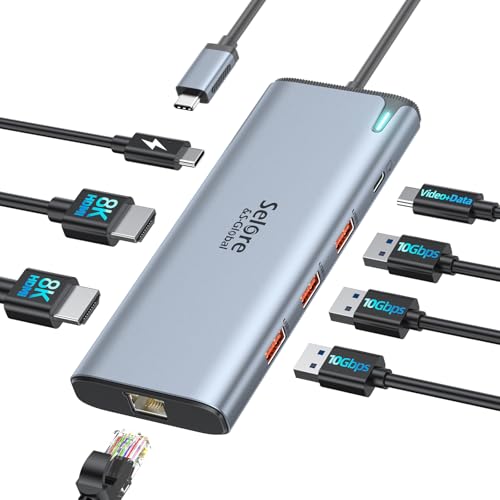
For professionals who demand high-resolution displays and efficient multitasking, the USB C Video Docking Station with Dual Monitor Support stands out as an exceptional choice. With two HDMI outputs, it supports dual 8K@60Hz displays, guaranteeing stunning visuals. Equipped with a powerful Intel JHL8140 chip, it offers 10Gbps data transfer through four USB ports, making file backups a breeze. Plus, with 100W Power Delivery, you can charge your laptop while working. Its compatibility with MacBook Pro/Air, Dell, and HP devices ensures versatility. Lightweight and compact, it’s the perfect solution for enhancing your workspace and productivity.
Best For: Professionals and creatives who require high-resolution dual monitors and fast data transfer for enhanced productivity.
Pros:
- Supports dual 8K@60Hz displays for exceptional visual clarity.
- Offers high-speed data transfer rates of up to 10Gbps through multiple USB ports.
- Provides 100W Power Delivery for simultaneous charging of laptops while in use.
Cons:
- Power adapter not included, requiring a compatible USB-C port for charging.
- May be less suitable for users with older devices lacking USB-C compatibility.
- Lightweight design may feel less durable compared to heavier docking stations.
Anker Prime TB5 Docking Station (14-in-1 Thunderbolt 5 Dock)

Designed for professionals who demand high performance and versatility, the Anker Prime TB5 Docking Station offers a remarkable 14-in-1 connectivity solution, making it ideal for users needing dual 8K display support. With a max transfer speed of 120Gbps and 140W charging, it efficiently powers your devices while handling large files—move 150GB in just 25 seconds! The cooling system prevents overheating, ensuring reliable performance. Although it has some limitations, like the SD card reader speed, its build quality and stylish design are well-received. With a 24-month warranty, this dock is a solid investment for your tech setup.
Best For: Professionals who require high-performance connectivity and dual 8K display support for their devices.
Pros:
- High transfer speeds of up to 120Gbps for efficient file management.
- Dual 8K display support, enhancing productivity with multiple monitors.
- Advanced cooling system prevents overheating, ensuring reliable performance.
Cons:
- Limited SD card reader speed (UHS-I) may not meet all users’ needs.
- Only one video output available at a time (HDMI or DisplayPort).
- Occasional issues with SD card functionality after sleep mode.
WAVLINK Pro Docking Station for 5 Monitors

If you’re a creative professional or a multitasker in need of extensive screen real estate, the WAVLINK Pro Docking Station is an exceptional choice. With support for five monitors using the DisplayLink DL7400 chipset, you can enjoy dual 8K displays at 60Hz or quad 4K displays. You’ll appreciate the connectivity options, including 2x DisplayPort 1.4, 2x HDMI 2.0, and five USB ports for fast data transfer. Plus, the 160W power adapter provides 100W charging for your laptop, keeping your devices powered. Experience high-speed performance with a 2.5G Ethernet connection for seamless streaming and efficient file management.
Best For: Creative professionals and multitaskers who require extensive screen real estate for enhanced productivity.
Pros:
- Supports dual 8K displays at 60Hz or quad 4K displays, ideal for multitasking.
- Includes multiple connectivity options (2x DisplayPort, 2x HDMI, 5 USB ports) for versatile setups.
- 160W power adapter provides 100W charging for laptops, ensuring devices stay powered during use.
Cons:
- Larger footprint may take up more desk space compared to single-monitor setups.
- Requires a compatible DisplayLink driver for optimal functionality, which may necessitate additional setup.
- High price point may not be suitable for casual users or those with basic needs.
USB C Docking Station Dual Monitor (15 in 1 Hub)
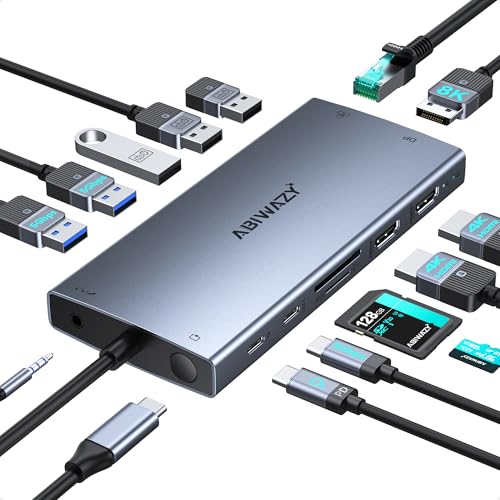
The USB C Docking Station Dual Monitor (15 in 1 Hub) stands out as an exceptional choice for professionals who demand high-resolution displays. You can effortlessly connect up to three monitors, with DisplayPort supporting 8K at 30Hz or dual 4K at 60Hz. With six USB ports, 100W Power Delivery for fast charging, and Ethernet for reliable internet, it’s perfect for multitasking. The screen switch button allows you to manage displays easily, while smart status lights guarantee compatibility with your laptop. Compact yet powerful, this hub is designed for seamless productivity, making it an essential tool for your workspace.
Best For: Professionals and multitaskers who require high-resolution displays and extensive connectivity options.
Pros:
- Supports up to three monitors with impressive display capabilities, including 8K and dual 4K resolutions.
- Offers multiple USB ports and fast charging with 100W Power Delivery, enhancing productivity.
- Compact design with a screen switch button for easy monitor management and smart status lights for compatibility indication.
Cons:
- Requires a charger with over 65W for optimal performance.
- May not be compatible with laptops lacking full-featured USB Type-C ports.
- Limited support for macOS in terms of extended display functionality.
UGREEN Revodok Pro 314 USB C Docking Station

With its impressive triple monitor support and robust 4K output capabilities, the UGREEN Revodok Pro 314 USB C Docking Station is ideal for professionals who rely on multiple displays for enhanced productivity. You’ll benefit from two HDMI ports at 4K@60Hz and a DisplayPort at 4K@120Hz. Plus, with a 140W power adapter, it charges your laptop up to 100W quickly. Enjoy lightning-fast data transfer with three 10Gbps and two 5Gbps ports, alongside a reliable gigabit Ethernet connection. Weighing just 3.45 pounds, this dock is a portable powerhouse, making it perfect for both office and home setups.
Best For: Professionals and power users who require robust multi-display support and fast data transfer for enhanced productivity.
Pros:
- Triple monitor support with two HDMI ports and one DisplayPort for versatile display configurations.
- High-speed data transfer capabilities with multiple 10Gbps and 5Gbps ports along with a gigabit Ethernet connection.
- Fast charging for laptops and devices, enhancing efficiency during work sessions.
Cons:
- Weight of 3.45 pounds may make it less portable compared to lighter docking stations.
- Limited compatibility primarily optimized for Windows laptops, which may restrict use with other operating systems.
- Price point may be higher compared to basic docking stations, reflecting its advanced features.
UGREEN Revodok Pro 210 Docking Station (10 in 1 USB C Dock)

For professionals seeking a versatile docking solution, the UGREEN Revodok Pro 210 Docking Station stands out with its dual HDMI ports, allowing you to connect two displays at up to 4K@60Hz or a single display at an impressive 8K@30Hz. This 10-in-1 USB-C dock offers a 100W power delivery port, ensuring your laptop stays charged while you work. With a Gigabit Ethernet port for high-speed internet and multiple USB ports for fast data transfer, it covers all your connectivity needs. Compatible with HP and Dell laptops, it’s a reliable choice for enhancing your workspace efficiency.
Best For: Professionals using HP and Dell laptops who need a versatile docking solution for enhanced connectivity and display options.
Pros:
- Supports dual displays up to 4K@60Hz or a single display up to 8K@30Hz for superior visual clarity.
- Includes a 100W power delivery port, allowing for efficient laptop charging while in use.
- Offers high-speed data transfer up to 5Gbps and features a Gigabit Ethernet port for reliable internet connectivity.
Cons:
- USB A and C ports do not support charging or video output, limiting their functionality.
- Compatibility is primarily focused on HP and Dell laptops, which may exclude other brands.
- Relatively limited warranty and return policy availability through Amazon.com.
USB C Docking Station 13 in 1 for Laptops

Ideal for professionals and creatives alike, the USB C Docking Station 13 in 1 offers a robust solution with its impressive ability to support four external monitors. You can connect dual 4K HDMI displays, an 8K DisplayPort, and a VGA monitor, enhancing your workspace. With ten 10Gbps USB ports and a Gigabit Ethernet connection, data transfer is lightning-fast. Plus, it provides 100W Power Delivery, ensuring your laptop stays charged during demanding tasks. Compatible with various brands like MacBook and Dell, this docking station is perfect for seamless productivity. Its compact design makes it easy to carry, weighing just 4.6 ounces.
Best For: Professionals and creatives seeking a versatile docking solution with extensive connectivity options for enhanced productivity.
Pros:
- Supports up to four external monitors, including dual 4K HDMI and an 8K DisplayPort, ideal for multitasking.
- Features high-speed data transfer with multiple 10Gbps USB ports and a Gigabit Ethernet connection.
- Provides 100W Power Delivery for uninterrupted charging, perfect for intensive tasks like gaming and design work.
Cons:
- macOS limitations prevent MST mode support, potentially restricting some users.
- Requires a power adapter exceeding 100W for optimal performance, which may necessitate additional purchases.
- The compact design may limit port spacing for larger connectors.
WAVLINK 11-in-1 USB C Laptop Docking Station

The WAVLINK 11-in-1 USB C Laptop Docking Station stands out for its impressive single 8K output capability, making it perfect for professionals who demand high-resolution displays for graphic design, video editing, or immersive gaming. With dual HDMI and a DisplayPort, you can easily connect multiple monitors. This dock supports a variety of devices, including MacBook and Windows laptops. You’ll appreciate the 125W power delivery, ensuring your laptop stays charged while using peripherals. Plus, with USB-C and USB-A ports, an SD card reader, and gigabit Ethernet, it truly enhances your workspace efficiency. Experience ultimate display quality with WAVLINK.
Best For: Professionals and creatives who require high-resolution displays and multiple monitor setups for tasks such as graphic design, video editing, or immersive gaming.
Pros:
- Supports impressive single 8K output or triple 4K display configurations.
- Includes a variety of ports, enhancing connectivity and workspace efficiency.
- Provides 125W power delivery, allowing laptops to charge while using peripherals.
Cons:
- Requires a compatible USB-C port that supports video output and charging for full functionality.
- macOS and iPadOS are limited to Single-Stream Transport mode, displaying the same content on all monitors.
- The maximum resolution and refresh rates may vary depending on the number of connected displays.
Factors to Consider When Choosing Pro Docks With 8K HDMI Output
When you’re choosing a pro dock with 8K HDMI output, consider key factors like resolution and refresh rates to guarantee a smooth viewing experience. You’ll also want to check the variety of ports available, power delivery specifications, and compatibility with your devices. Don’t forget to look at data transfer speeds, as they can greatly impact your overall productivity.
Resolution and Refresh Rates
Choosing a pro dock with 8K HDMI output involves considering both resolution and refresh rates, as these factors greatly affect your viewing experience. 8K resolution provides stunning detail at 7680 x 4320 pixels, which is four times that of 4K. To fully utilize this resolution, make sure your dock supports 8K@60Hz output, delivering smooth motion essential for video editing and gaming. Compatibility is vital; check that your devices can handle 8K, as it often requires specific graphics cards and HDMI 2.1 or DisplayPort 2.1 connections. Additionally, higher refresh rates, like 120Hz, enhance visual performance, especially for fast-paced content. Be cautious, as some docks may only support 8K at lower refresh rates, which may not suffice for dynamic applications.
Port Variety and Types
Maximizing your 8K HDMI output experience goes beyond just resolution and refresh rates; it’s also about the variety of ports available on your pro dock. Look for docks featuring HDMI, DisplayPort, USB-A, USB-C, and Ethernet ports to connect multiple devices seamlessly. Confirm the dock can support dual 4K@60Hz displays or a single 8K display, catering to your high-resolution multitasking needs. High-speed data transfer is essential, so opt for docks with Thunderbolt 4 or 5 ports that offer speeds between 40Gbps and 120Gbps for efficient file management. Additional features, like SD card readers and audio jacks, can further enhance your setup, making it versatile for various multimedia applications. Choose wisely to elevate your workflow.
Power Delivery Specifications
Understanding power delivery specifications is vital for guaranteeing your pro dock meets the charging needs of your devices. Look for docks that offer sufficient wattage, usually between 85W and 140W, to support laptops during intensive tasks like video editing or gaming. An ideal power delivery requirement guarantees your devices receive the power they need, preventing performance issues or battery drain. Many docks support Power Delivery (PD) protocols for faster charging and efficient power management. Be aware that some docking stations reserve a portion of their power output for auxiliary functions, so it’s important to choose one that matches or exceeds your laptop’s requirements. This way, you can enjoy uninterrupted operation while using your pro dock.
Compatibility With Devices
When selecting a pro dock with 8K HDMI output, verifying compatibility with your devices is essential for seamless performance. First, check that the dock supports your device’s operating system, as compatibility can differ between Windows and macOS, especially for multi-display features. Next, confirm the dock’s compatibility with your device’s USB-C or Thunderbolt version, as peak performance often requires Thunderbolt 4 or USB4. Additionally, verify that the dock can handle the number of displays you need, as some devices may limit this based on their chip architecture. Make sure the HDMI output supports 8K resolution at your desired refresh rate, and assess the power delivery specifications to verify your device stays charged during use.
Data Transfer Speeds
After ensuring your pro dock is compatible with your devices, the next key aspect to contemplate is data transfer speeds. In professional environments, where you frequently access or move large files, high transfer speeds are critical. Look for docks offering speeds up to 40Gbps through Thunderbolt interfaces, which can greatly improve efficiency. USB 3.1 and 3.2 ports, supporting up to 10Gbps, facilitate rapid file backups essential for multimedia tasks. Multiple 10Gbps USB ports allow you to connect various peripherals simultaneously without sacrificing speed, boosting your multitasking capabilities. Additionally, Ethernet ports with speeds up to 2.5Gbps provide stable internet connections for online collaboration. Efficient data transfer options, like SD card readers with 312MB/s speeds, are invaluable for managing high-resolution media.
Cooling and Design Features
Choosing the right pro dock with 8K HDMI output means considering cooling and design features that can greatly impact performance. Effective cooling systems, like advanced active cooling, are essential for preventing overheating during intensive tasks. Look for docks that allow adequate airflow; compact designs can trap heat, risking performance and device longevity. A well-constructed dock often uses materials that enhance thermal management, boosting reliability during prolonged use. Features such as ventilation grilles or raised bases promote airflow, reducing overheating risks linked to high power demands from 8K video output. Additionally, consider the weight and dimensions of the dock, as these elements affect portability and stability, ensuring best performance across various environments.
