
Choosing a premium webcam for streaming is about more than just 4K resolution. The right model should deliver sharp detail, reliable autofocus, natural color, and clean audio in real-world lighting.
In this roundup, we focus on webcams that make sense for streamers, creators, and professionals who want a polished on-camera look without a full camera setup.
Best 10 Premium Webcam for Streaming Picks for 2026
Flagship 4K PTZ
Insta360 Link 2 Pro for Streaming or Meetings

- 1/1.3-inch sensor for cleaner 4K and better low light
- AI tracking physically pans and tilts to follow you
- Beamforming dual mics and Stream Deck support
Best For: Creators who want tracking, strong image quality, and flexible controls
Studio 4K60 Pick
Elgato Facecam 4K with DSLR-Like Control

- 4K at 60 FPS with uncompressed video and HDR
- Sony STARVIS 2 sensor with Elgato Prime Lens
- 49mm lens filter support and Camera Hub control
Best For: Creators who want smooth 4K60 video and DSLR-style image tuning
Collaboration Streamer
Logitech MX Brio for 4K Streaming

- 4K/30 or 1080p/60 with AI-enhanced image quality
- Fine image controls plus dual beamforming mics
- Show Mode and built-in privacy cover
Best For: People who want one webcam for streaming, meetings, and desk sharing
Cinematic Control
YOLOLIV YoloCam S3 for 4K Streaming

- 1/1.3-inch sensor with uncompressed 4K/30 and 1080p/60
- Fast autofocus plus HDR and AI image tuning
- Manual DSLR-like controls and heat-dissipating aluminum body
Best For: Streamers who want detailed image control and long-session reliability
Ultra HD Creator Pick
Logitech Brio 4K Streaming Webcam

- Up to 4K at 30 fps with autofocus and 5x digital zoom
- RightLight 3 improves exposure in glare and backlight
- Dual mics and Windows Hello support add practical value
Best For: Creators and professionals who want sharp 4K video and flexible framing
PTZ Smart Tracking Pick

- 4K video with a 1/2-inch sensor and HDR
- AI Tracking pans and tilts to follow movement
- DeskView, Whiteboard, and gesture controls expand use
Best For: Streamers and presenters who want AI tracking and advanced framing
Value-Focused 4K Pick
EMEET NOVA 4K Streaming Webcam

- 4K at 30 fps with PDAF autofocus
- Dual mics capture voice clearly up to 8 feet away
- Plug-and-play USB use with a privacy cover
Best For: Buyers who want simple 4K streaming with privacy and easy setup
Stream-Ready 1080p Performance
Logitech StreamCam for Creators

- 1080p at 60 fps for smooth video
- Smart autofocus and premium glass lens
- Auto-framing plus Logitech Capture tools
Best For: Streamers and creators who want polished 1080p60 video
Flagship 4K Creator Pick
Insta360 Link 2C Pro for Streaming
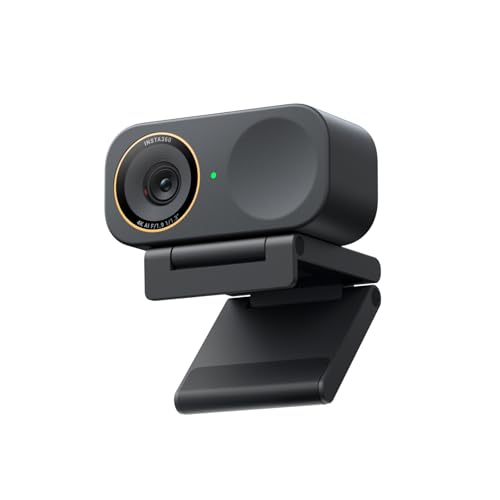
- 4K video with a 1/1.3-inch sensor
- Directional dual mics for clearer voice pickup
- Gesture control and Stream Deck integration
Best For: Streamers who want 4K video and creator workflow tools
Flexible 4K Streaming Choice
Insta360 Link 2C with AI Controls

- 4K HDR video with a 1/2-inch sensor
- PDAF autofocus and auto-framing
- AI noise-canceling mic and privacy switch
Best For: Streamers who want 4K quality and easy automation
Flagship 4K PTZ – Insta360 Link 2 Pro for Streaming or Meetings
If you want a premium webcam for streaming with more of a production-camera feel, the Insta360 Link 2 Pro is built to stand out. Its 1/1.3-inch sensor, 4K video, low-light performance, and physical AI tracking make it a strong pick when you need a webcam that keeps you framed and looking sharp.
Best For: Streamers and creators who want AI tracking, 4K detail, and flexible control for live content or meetings.
Pros:
- Large 1/1.3-inch sensor helps deliver cleaner 4K footage and better low-light results.
- Physical AI tracking pans and tilts to follow your movement around the room.
- Directional beamforming mics are designed to isolate your voice in busy spaces.
- Supports Stream Deck integration, gesture control, and specialized modes like DeskView and Whiteboard.
Cons:
- Not compatible with ARM-based Windows systems or Windows Hello Face Recognition.
- More feature-rich than a basic webcam, so casual users may not need all the controls.
The Link 2 Pro is one of the most versatile options here if you want a premium webcam for streaming that can also handle meetings, presentations, and desk-side content with confidence.
Studio 4K60 Pick – Elgato Facecam 4K with DSLR-Like Control
The Elgato Facecam 4K is aimed at streamers who want a premium webcam for streaming with fine control over the final look. With 4K60 capture, a Sony STARVIS 2 sensor, uncompressed video, and HDR support, it focuses on clean detail and a more camera-like image.
Best For: Streamers and creators who want 4K60 video, DSLR-style control, and lens filter support.
Pros:
- Captures 4K at 60 FPS for smooth, high-detail video.
- Sony STARVIS 2 sensor and Prime Lens technology are designed for sharp, vibrant image quality.
- Camera Hub software gives you detailed visual control.
- 49mm lens filter support adds extra creative flexibility.
Cons:
- Built more for controlled studio-style setups than simple plug-and-forget use.
- Some buyers may not need the extra creative features if they only want basic streaming.
If your priority is a polished studio look with room to tune the image, the Facecam 4K is a compelling premium choice for creators who want more than standard webcam output.
Collaboration Streamer – Logitech MX Brio for 4K Streaming
The Logitech MX Brio is a premium webcam for streaming when you also want strong collaboration features. It offers 4K at 30 fps or 1080p at 60 fps, AI-enhanced image quality, dual beamforming microphones, and software controls for adjusting the look of your shot.
Best For: Streamers and professionals who want a flexible 4K webcam with useful collaboration tools.
Pros:
- Delivers 4K/30 or 1080p/60 with a large-pixel sensor designed for sharper image quality.
- AI-enhanced processing improves face visibility in difficult light.
- Fine controls let you adjust ISO, shutter speed, tint, and vibrance.
- Show Mode and a built-in privacy cover add practical everyday utility.
Cons:
- 4K is limited to 30 fps rather than 60 fps.
- Its feature set is broad, so users focused only on streaming may not use every collaboration tool.
The MX Brio is a smart middle ground if you need one webcam for both streaming and work calls, with enough image control to fine-tune your on-camera look.
Cinematic Control – YOLOLIV YoloCam S3 for 4K Streaming
The YOLOLIV YoloCam S3 is built for creators who want a premium webcam for streaming with DSLR-like control and a strong focus on image tuning. Its 1/1.3-inch sensor, uncompressed 4K output, fast autofocus, HDR, and manual controls make it feel closer to a small camera than a basic webcam.
Best For: Streamers who want a camera-like look, manual control, and reliable 24/7 live use.
Pros:
- 1/1.3-inch sensor supports uncompressed 4K/30 and 1080p/60 video.
- Fast PDAF autofocus is designed to keep close-ups crisp and blur-free.
- Offers manual controls for contrast, sharpness, saturation, exposure, white balance, autofocus, and color grading.
- Aluminum body is designed to help dissipate heat for nonstop streaming.
Cons:
- Pro color grading is currently only available on Windows.
- 4K is limited to 30 fps rather than 60 fps.
For streamers who care about tuning every part of the image, the YoloCam S3 brings a lot of camera-style flexibility while staying practical for long sessions.
Ultra HD Creator Pick – Logitech Brio 4K Streaming Webcam
If you want a premium webcam for streaming that can also handle meetings and login security, the Logitech Brio brings a strong mix of 4K detail, flexible framing, and dependable low-light performance. It is a practical choice for creators who want crisp video, useful camera controls, and broad compatibility without a complicated setup.
Best For: Streamers and professionals who want 4K video, adjustable framing, and Windows Hello support.
Pros:
- Up to 4K at 30 fps with autofocus and 5x digital zoom for sharp, detailed video.
- RightLight 3 helps balance exposure and contrast in glare, backlight, or dim rooms.
- Three field-of-view presets make it easier to frame solo shots or wider scenes.
- Dual noise-canceling microphones help capture clear audio from up to 1.2 meters away.
Cons:
- Uses a fixed webcam design, so it cannot physically pan or tilt like a PTZ model.
- Advanced tweaks depend on the Logi Options+ app for full control.
- It is not the most feature-packed choice if you want automated tracking or special streaming modes.
Overall, the Brio is a strong all-around option if you value high-resolution image quality and simple, polished controls. It fits well for users who need a webcam that works across major platforms and can also double as a secure Windows login camera.
PTZ Smart Tracking Pick – Insta360 Link 2 4K Webcam
The Insta360 Link 2 is a premium webcam for streaming if you want a more dynamic camera that actively follows the action. Its 4K image, larger sensor, HDR support, and PTZ movement make it a standout for creators who move around on camera or want stronger presentation tools.
Best For: Streamers, presenters, and creators who want AI tracking, PTZ movement, and advanced framing tools.
Pros:
- 4K video with a 1/2-inch sensor, HDR, and better low-light performance.
- AI Tracking physically pans and tilts to keep you framed as you move.
- Phase Detection Auto Focus helps maintain crisp focus during streams.
- DeskView, Whiteboard, gesture control, and smartphone remote control add flexibility.
Cons:
- Not compatible with ARM-based Windows systems.
- Does not support Windows Hello Face Recognition.
- Advanced features may require the dedicated Link Controller software.
For streamers who want more than a basic fixed webcam, the Link 2 offers one of the most capable feature sets here. It is especially appealing if you need tracking, easy control, and specialized modes for demos or creative content.
Value-Focused 4K Pick – EMEET NOVA 4K Streaming Webcam
The EMEET NOVA is a practical premium webcam for streaming when you want 4K capability, clear audio, and simple plug-and-play use. It is designed for users who need a straightforward camera for live streaming, business calls, or general content creation with strong privacy features.
Best For: Buyers who want an easy-to-use 4K webcam with fixed framing and built-in privacy cover.
Pros:
- 4K resolution with a 30 fps CMOS sensor for detailed video capture.
- PDAF autofocus keeps subjects sharp within the supported focus range.
- Dual microphones capture voice clearly up to 8 feet away in quiet settings.
- Plug-and-play USB connectivity plus a physical privacy cover.
Cons:
- Video defaults to 1080p unless you switch to 4K in software or supported apps.
- Fixed 73° field of view does not adjust for different framing needs.
- No facial tracking or manual focus controls are included.
As a streamlined option, the NOVA fits users who want reliable 4K basics without extra complexity. It is a sensible pick if your priority is clear image quality, a secure privacy cover, and easy compatibility across common platforms.
Stream-Ready 1080p Performance – Logitech StreamCam for Creators
If you want a premium webcam for streaming that prioritizes smooth motion and easy creator-focused features, the Logitech StreamCam is built around that use case. It records in Full HD 1080p at 60 fps, uses a premium glass lens with smart autofocus, and includes auto-framing and intelligent exposure to help keep your on-camera look consistent.
Best For: Streamers and content creators who want reliable 1080p60 video, flexible mounting, and simple software control.
Pros:
- Full HD 1080p at 60 fps for smooth live streams and recordings
- Premium glass lens with smart autofocus for crisp image quality
- Auto-framing and intelligent exposure help keep framing and lighting balanced
- Works with OBS, XSplit, Streamlabs OBS, Teams, Zoom, and more
Cons:
- Maximum resolution is 1080p, not 4K
- Best features depend on Logitech Capture software
- USB-C connection may require the right port or adapter on older setups
Overall, the StreamCam is a strong pick if you value fluid 60 fps output and creator-friendly automation over chasing 4K specs. It’s especially practical for streamers who want a straightforward, polished webcam for everyday broadcasting and calls.
Flagship 4K Creator Pick – Insta360 Link 2C Pro for Streaming
The Insta360 Link 2C Pro is a premium webcam for streaming if you want stronger image quality and more control than a basic conferencing camera. Its 4K output, large 1/1.3-inch sensor, HDR support, low-light performance, directional noise-canceling mics, and auto-framing make it well suited to creator setups and busy workspaces.
Best For: Streamers who want 4K video, cleaner audio pickup, and advanced creator controls.
Pros:
- 4K video with a large 1/1.3-inch sensor for detailed image quality
- Directional dual mics help reduce background noise
- Auto-framing, gesture control, and smartphone remote control add convenience
- Stream Deck integration can speed up workflow for creators
Cons:
- Not currently compatible with ARM-based Windows systems
- Does not support Windows Hello Face Recognition
- Advanced features are most useful if you plan to customize settings in software
For creators who want a more premium webcam for streaming, the Link 2C Pro stands out for its 4K image quality and broad feature set. It’s a strong fit when you want better control over framing, audio, and scene-specific modes like DeskView or Whiteboard.
Flexible 4K Streaming Choice – Insta360 Link 2C with AI Controls
The Insta360 Link 2C is a premium webcam for streaming if you want 4K detail, automatic framing, and easy control in a compact package. It uses a 1/2-inch sensor, HDR, low-light performance, PDAF autofocus, and AI noise-canceling audio to handle both streams and video calls with a more polished result.
Best For: Streamers and multi-use users who want 4K quality, fast focus, and helpful automation.
Pros:
- 4K video with HDR and low-light support
- PDAF autofocus helps keep shots sharp and responsive
- AI noise-canceling mic improves clarity in busy spaces
- Auto-framing, gesture control, and privacy switch add everyday convenience
Cons:
- Not compatible with ARM-based Windows systems
- Does not support Windows Hello Face Recognition
- Some advanced modes are most useful when you use the Link Controller software
This model is a well-rounded choice if you want a premium webcam for streaming that also works well for meetings and general computer use. It gives you the core creator features many users want, while keeping setup and operation fairly simple.
How We Picked the Best Premium Webcam for Streaming
For this list of Premium Webcam for Streaming options, we prioritized image quality, autofocus performance, low-light handling, frame rate support, microphone quality, and software controls. We also looked at how well each webcam fits common creator workflows such as live streaming, video calls, desk setup flexibility, and multi-platform compatibility.
When possible, we favored models with larger sensors, strong HDR, and useful framing features like auto tracking or gesture control. Those extras can make a noticeable difference once you are on camera every day.
Quick Comparison
At a high level, the best choice depends on whether you want maximum video quality, better framing automation, or a more affordable upgrade. Some models lean toward DSLR-like control and advanced creator features, while others focus on simplicity and dependable all-around performance.
If you want the most polished studio look, consider the higher-end 4K models with larger sensors and stronger control options. If you mainly need a solid upgrade from a basic built-in camera, a well-tuned 1080p or entry 4K model may be enough.
Key Buying Factors for Premium Webcam for Streaming
Sensor and Video Quality
A larger sensor usually helps with detail, dynamic range, and low-light performance. For streaming, 4K can be useful for cropping and future-proofing, but only if the webcam also delivers good optics and processing.
Autofocus and Framing
Fast, reliable autofocus matters when you move during a stream. Auto framing, PTZ controls, and AI tracking are especially helpful for presenters, educators, and creators who shift positions or demonstrate products.
Lighting and HDR
HDR and strong auto light correction can improve contrast and skin tones in mixed lighting. If your room changes from day to night, this feature set can keep your stream looking consistent.
Audio and Software
Built-in mics are convenient, but most serious streamers will still prefer an external microphone. Even so, better onboard noise reduction can help in a pinch. Also check whether the webcam’s software offers manual exposure, white balance, filters, and scene controls.
Who Should Buy Which Premium Webcam for Streaming?
If you want the most balanced Premium Webcam for Streaming, choose a model with 4K video, strong autofocus, and dependable low-light performance. If you create lots of talking-head content, prioritize framing tools and a flexible mount. If you stream from a simple desk setup, a straightforward 4K webcam with good auto settings may be the best value.
For users upgrading from a laptop camera, any of these options should feel like a major jump. For creators aiming for a more cinematic look, focus on sensor size, lens quality, and software control first, then pay attention to extras like noise-canceling mics and HDR.
