
The best premium ultrawide editing monitors give creative professionals expansive timelines, sharp detail, and enough workspace to keep tools, previews, and source material visible at once. The right choice depends on more than screen size: resolution, panel technology, connectivity, ergonomics, and color performance all matter.
We selected 10 standout models ranging from high-resolution 5K2K displays and USB-C hub monitors to OLED screens built for demanding visual work and fast-paced hybrid workflows.
Best 10 Premium Ultrawide Editing Monitors Picks for 2026
Best High-Resolution Pick

- 39.7-inch curved 5K2K display
- 120Hz refresh rate with 5ms response
- USB-C, Thunderbolt, Ethernet, and USB hub
Best For: Editors needing maximum workspace and high pixel density
Best Value 5K Choice

- 34-inch 5120 x 2160 display at 120Hz
- Factory-calibrated Delta-E under 2
- 65W USB-C power delivery and HDR400
Best For: Photo, video, and design work with laptop connectivity
Best Mac-Friendly Hub

- 98% Display P3 and Delta-E under 2
- IPS Black panel with 2000:1 contrast
- Thunderbolt, Ethernet, USB, and built-in KVM
Best For: Mac-based creators and multi-device workstations
Best Super-Ultrawide Workspace

- 49-inch flat 32:9 5120 x 1440 display
- Mini LED, 1760 zones, and HDR1000
- 165Hz refresh with broad color coverage
Best For: Editors and multitaskers needing maximum horizontal space
Best Professional Hub Monitor
Dell UltraSharp 38-Inch IPS Black
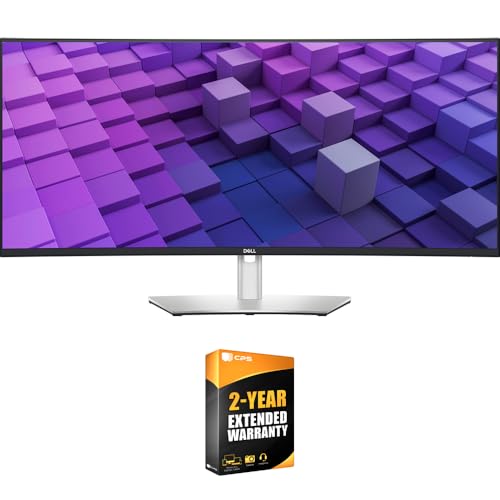
- 37.5-inch 3840x1600 curved IPS Black panel
- 98% DCI-P3 coverage with 2000:1 contrast
- 90W USB-C, Auto KVM, and 2.5GbE networking
Best For: Color-conscious professionals needing a connected multitasking workstation
Best OLED Editing-and-Gaming Hybrid

- 49-inch 5120x1440 QD-OLED display
- Deep blacks with 1,000,000:1 contrast
- 144Hz refresh and 0.03ms response time
Best For: Editors who also want an expansive high-refresh gaming display
Best High-Resolution Creative Display

- 40-inch 5120x2160 Nano IPS Black panel
- 99% DCI-P3 and DisplayHDR True Black 600
- 120Hz refresh with Thunderbolt 5 and 96W power
Best For: Creative professionals needing detailed editing space and advanced connectivity
Balanced Workspace Pick

- 34-inch 3440×1440 IPS workspace
- Up to 99% sRGB with HDR10
- USB-C with up to 96W charging
Best For: Multitasking and everyday creative work
Panoramic Productivity Choice

- 49-inch 5120×1440 Dual QHD canvas
- 1000R curve with 32:9 aspect ratio
- USB-C hub with 90W charging
Best For: Large editing timelines and multitasking
High-End OLED Hybrid

- 45-inch 5K2K OLED at 5120×2160
- Up to 98.5% DCI-P3 and True Black HDR
- 165Hz 5K2K or 330Hz WFHD modes
Best For: High-resolution creative work and gaming
Best High-Resolution Pick – Dell UltraSharp U4025QW
For demanding creative workflows, the Dell UltraSharp U4025QW is a premium ultrawide editing monitor built around a spacious 39.7-inch curved 5K2K display. Its 5120 x 2160 resolution, 21:9 aspect ratio, matte finish, and 120Hz refresh rate provide ample workspace for timelines, panels, and detailed image work.
Best For: Editors and multitaskers who want maximum horizontal workspace with unusually high resolution.
Pros:
- Large 39.7-inch curved screen with 5120 x 2160 resolution
- 120Hz refresh rate and 5ms response time
- USB-C, Thunderbolt, Ethernet, DisplayPort, HDMI, and an integrated USB hub
- 600-nit brightness, matte anti-glare finish, and adjustable stand
Cons:
- Large 41.9-pound footprint may require a sturdy desk
- Only one HDMI port
- Its premium size and resolution may be more than basic editing setups need
The U4025QW stands out when screen area and fine detail matter more than compactness. It is a strong premium ultrawide editing monitor for users who can accommodate its substantial desk footprint and want extensive connectivity.
Best Value 5K Choice – INNOCN 34C1U 5K Ultrawide
The INNOCN 34C1U delivers premium ultrawide editing monitor specifications in a more compact 34-inch format. Its 5120 x 2160 resolution, 120Hz refresh rate, factory-calibrated Delta-E under 2, and broad color coverage make it well suited to photo, video, and design work.
Best For: Creative professionals who want 5K ultrawide detail, accurate color, and laptop-friendly connectivity.
Pros:
- 5120 x 2160 resolution on a 34-inch 21:9 display
- Factory pre-calibrated color with Delta-E under 2
- 135% sRGB and 106% DCI-P3 coverage with HDR400 support
- 65W USB-C power delivery plus HDMI 2.1, DisplayPort, and USB ports
Cons:
- 350-nit brightness is lower than some premium HDR-focused displays
- One-year manufacturer warranty
- Flat screen may feel less immersive than a curved alternative
With strong resolution, color specifications, and one-cable USB-C laptop connectivity, the 34C1U is a practical choice for editing desks that need clarity without moving to a much larger monitor.
Best Mac-Friendly Hub – Dell UltraSharp U3426WER
The Dell UltraSharp U3426WER is a premium ultrawide editing monitor focused on color accuracy, connectivity, and workspace organization. Its 34.1-inch curved IPS display covers 98% of Display P3, is factory calibrated to Delta-E under 2, and includes Thunderbolt, Ethernet, USB, and built-in KVM functionality.
Best For: Mac users, creators, and professionals who need accurate color plus a convenient multi-device hub.
Pros:
- 98% Display P3 coverage with factory-calibrated Delta-E under 2
- IPS Black panel with a 2000:1 contrast ratio
- Thunderbolt connectivity, Ethernet, eight USB ports, and built-in KVM
- 120Hz refresh rate with height, swivel, and tilt adjustment
Cons:
- 3440 x 1440 resolution is lower than the 5K2K alternatives
- Only one HDMI port
- Designed primarily for business and desktop use rather than HDR-heavy work
The U3426WER favors a polished, connected workflow over maximum pixel density. It is especially compelling for creators who use a Mac or switch between two computers and value accurate Display P3 color.
Best Super-Ultrawide Workspace – INNOCN E49M1R 49-Inch
The INNOCN E49M1R is a premium ultrawide editing monitor for users who want a single seamless workspace instead of two separate displays. Its flat 49-inch 32:9 panel offers 5120 x 1440 resolution, 165Hz refresh, Mini LED backlighting, HDR1000, and factory-tested Delta-E under 2.
Best For: Timeline editors, color-focused designers, and multitaskers who need several full-size windows side by side.
Pros:
- 49-inch flat 32:9 display can replace two 27-inch QHD monitors
- Mini LED backlight with 1760 local dimming zones and 1000-nit peak brightness
- 100% sRGB, 95% DCI-P3, and 96% Adobe RGB coverage
- 165Hz refresh rate, 2ms response time, and FreeSync support
Cons:
- 5120 x 1440 resolution is less vertically expansive than 5K2K models
- Large 49-inch footprint requires substantial desk space
- One-year manufacturer warranty
The E49M1R prioritizes width, HDR impact, and multitasking flexibility. Its flat design can also appeal to editors and designers who prefer straight lines across a broad canvas, provided the desk can handle its size.
Best Professional Hub Monitor – Dell UltraSharp 38-Inch IPS Black
Dell U3824DW 37.5-Inch 21:9 USB-C Hub IPS LED Monitor | UltraSharp 37.5' : WQHD+Curved
Check Price On AmazonFor buyers seeking premium ultrawide editing monitors with practical office connectivity, the Dell U3824DW combines a spacious 37.5-inch curved WQHD+ display with strong color coverage and a built-in USB-C hub. Its 3840×1600 resolution, IPS Black panel, and 2300R curve provide a comfortable canvas for editing, multitasking, and long work sessions.
Best For: Editors and professionals who want an expansive color-focused display with one-cable laptop connectivity, networking, and KVM features.
Pros:
- 3840×1600 resolution on a large 21:9 curved IPS Black display.
- 100% sRGB and Rec.709 coverage plus 98% DCI-P3/Display P3 coverage.
- USB-C connectivity with up to 90W power delivery, Auto KVM, and 2.5GbE networking.
- Adjustable stand, ComfortView Plus, integrated speakers, and extensive ports.
Cons:
- 60Hz refresh rate is aimed at productivity and editing rather than high-refresh gaming.
- 300-nit brightness may be less suitable for especially bright rooms or demanding HDR work.
The Dell is a sensible workstation choice when connectivity and ergonomic productivity matter as much as screen area. It offers broad color coverage and useful office features, though its 60Hz refresh rate and WQHD+ resolution place it below the most demanding creative displays for motion work.
Best OLED Editing-and-Gaming Hybrid – Samsung Odyssey OLED G9
The Samsung Odyssey OLED G9 is one of the premium ultrawide editing monitors for users who want an unusually wide workspace alongside fast, fluid performance. Its 49-inch 32:9 QD-OLED panel delivers 5120×1440 resolution, deep blacks, and vivid color, while the 144Hz refresh rate also suits gaming and smooth timeline work.
Best For: Creative users who split time between photo or video editing, broad multitasking, and high-refresh gaming.
Pros:
- 49-inch 32:9 Dual QHD workspace with 110 pixels per inch.
- QD-OLED technology provides deep blacks, vivid colors, and a 1,000,000:1 contrast ratio.
- 144Hz refresh rate, 0.03ms response time, G-Sync compatibility, and FreeSync Premium Pro.
- Picture-in-picture supports multitasking without a second monitor.
Cons:
- The 5120×1440 resolution is wider but less vertically detailed than a 5K2K display.
- QD-OLED displays require burn-in precautions, although brightness detection and screen-saver features are included.
- Its gaming-oriented feature set may be more than needed for a strictly office-focused editing setup.
The OLED G9 is compelling for hybrid work because it pairs a massive, immersive canvas with genuinely fast response and refresh performance. Choose it when black-level impact and smooth motion are priorities, but consider a higher vertical-resolution monitor for detail-heavy production workflows.
Best High-Resolution Creative Display – LG UltraFine evo 40-Inch 5K2K
For buyers prioritizing detail and modern workstation connectivity, the LG UltraFine evo 40U990A stands out among premium ultrawide editing monitors. Its 40-inch 5K2K resolution supplies substantial horizontal and vertical workspace, while Nano IPS Black, 99% DCI-P3 coverage, DisplayHDR True Black 600, and a 120Hz refresh rate support demanding creative and multitasking workflows.
Best For: Video editors, content creators, and professionals who need high resolution, accurate color, smooth timeline movement, and a powerful single-cable setup.
Pros:
- 5120×2160 5K2K resolution provides unusually detailed ultrawide workspace.
- Nano IPS Black panel supports 1.07 billion colors and 99% DCI-P3 coverage.
- DisplayHDR True Black 600, 2000:1 contrast, and up to 450 nits brightness.
- Thunderbolt 5 offers up to 80Gbps data transfer and 96W power delivery, with KVM, Ethernet, and multiple inputs.
Cons:
- The large 40-inch format and curved design require substantial desk space.
- Its glossy screen finish can be less forgiving in rooms with strong reflections.
- Only one HDMI port is listed, so users with several HDMI sources may need additional connectivity planning.
The LG is the strongest fit for detail-intensive editing among these options, combining 5K2K sharpness with broad color coverage and fast refresh. Its premium connectivity and large footprint make it best suited to a dedicated creative workstation rather than a compact desk.
Balanced Workspace Pick – LG 34U650A-B
The LG 34U650A-B is a practical choice among premium ultrawide editing monitors for creators and multitaskers who want a manageable 34-inch footprint. Its 3440×1440 IPS panel, 21:9 layout, USB-C connectivity, and ergonomic stand support comfortable daily editing and productivity.
Best For: Multitasking, photo and video work, office workflows, and extended reading sessions.
Pros:
- 34-inch 3440×1440 IPS display provides generous workspace with consistent 178-degree viewing angles.
- Up to 99% sRGB coverage and HDR10 support offer balanced color for everyday creative work and media.
- USB-C supports display, data, and up to 96W laptop charging through one cable.
- Height, tilt, and swivel adjustments plus Reader Mode improve desk comfort.
Cons:
- 300-nit brightness and a 1000:1 contrast ratio are more suited to general editing than demanding HDR mastering.
- The 34-inch canvas is less expansive than larger 49-inch ultrawide alternatives.
Choose this LG when you want a clean, comfortable editing setup without overwhelming your desk. Its connectivity and screen-splitting features are especially useful for laptop-based workflows.
Panoramic Productivity Choice – Samsung 49-inch S95UA
The Samsung S95UA stands out among premium ultrawide editing monitors for users who want a dual-monitor-like workspace in one curved display. Its 49-inch 32:9 Dual QHD resolution, 1000R curve, USB-C hub, and 120Hz refresh rate make it well suited to broad editing timelines and simultaneous applications.
Best For: Video editors, designers, business users, and anyone replacing a two-monitor setup.
Pros:
- 5120×1440 Dual QHD resolution offers extensive horizontal room for timelines and side-by-side applications.
- 1000R curvature and 32:9 aspect ratio create an immersive panoramic workspace.
- USB-C provides up to 90W charging, while DisplayPort, HDMI, and USB ports support a flexible hub setup.
- 120Hz refresh rate, built-in speakers, and DisplayHDR 400 add versatility beyond editing.
Cons:
- The 45.18-inch-wide chassis requires substantial desk space.
- Its 72% listed color gamut may be less compelling for wide-gamut color-critical production.
This Samsung is the strongest productivity-oriented option for editors who value width and convenience over a compact setup. Confirm your desk dimensions and workflow software support before choosing its very wide 32:9 format.
High-End OLED Hybrid – LG UltraGear 45GX950A-B
The LG UltraGear 45GX950A-B is a performance-focused option among premium ultrawide editing monitors, combining a 45-inch 5K2K OLED panel with gaming-grade speed. Its 5120×2160 resolution, 125 PPI text clarity, wide DCI-P3 coverage, and deep OLED contrast make it appealing for detailed creative work as well as gaming.
Best For: Creators who want high-resolution editing detail and a premium gaming display in one setup.
Pros:
- 5K2K 5120×2160 resolution and 125 PPI provide a sharp, spacious canvas for work and play.
- OLED contrast, up to 98.5% DCI-P3 coverage, and DisplayHDR True Black 400 deliver vivid, high-impact imagery.
- USB-C supports 90W power delivery, alongside DisplayPort 2.1 and two HDMI 2.1 ports.
- Dual Mode supports 165Hz at 5K2K or 330Hz at WFHD for flexible performance.
Cons:
- The dramatic 800R curve may not suit every editing desk or straight-line layout.
- Its gaming-first feature set may be more than needed for purely office-focused editing.
This LG is the premium choice when image impact, resolution, and motion performance all matter. It is particularly compelling for hybrid creators who edit detailed content but also want exceptionally fast gaming responsiveness.
How We Picked the Best Premium Ultrawide Editing Monitors
We focused on displays that combine a wide aspect ratio with features useful for photo editing, video production, design, and professional multitasking. Resolution and pixel density were major considerations, especially for models with 5K2K or Dual QHD panels. We also weighed panel type, refresh rate, HDR support, connectivity, built-in speakers, USB hubs, stand adjustability, and compatibility with modern laptops and desktops.
Because editing needs vary, this list includes IPS, IPS Black, OLED, curved, and flat monitors. Some prioritize consistent productivity and connectivity, while others add gaming-oriented speed without sacrificing resolution.
Quick Comparison
| Priority | Look For | Best Fit |
|---|---|---|
| Maximum workspace and detail | 40-inch 5K2K resolution | High-resolution editing and complex timelines |
| Balanced productivity | 34-inch USB-C or Thunderbolt hub | Laptop-based creative work |
| Multi-app multitasking | 49-inch Dual QHD panel | Replacing two monitors |
| Deep blacks and fast response | OLED with HDR | Video, gaming, and contrast-sensitive work |
| Value-conscious ultrawide work | 34-inch WQHD IPS | General editing and office use |
Key Buying Factors for Premium Ultrawide Editing Monitors
Resolution and Pixel Density
For detailed photo and video work, 5K2K resolution offers substantially more vertical space and sharper text than standard ultrawide WQHD. Dual QHD 49-inch models provide excellent horizontal workspace, but their lower pixel density may be less suitable for fine image inspection.
Panel Technology and Color
IPS panels are often a dependable choice for consistent viewing angles and sustained productivity. IPS Black models can improve contrast, while OLED monitors deliver exceptional blacks, strong HDR impact, and very fast response. Check factory calibration, color-gamut coverage, and support for the color spaces your workflow actually uses.
Connectivity and Ergonomics
USB-C power delivery, Thunderbolt, KVM functionality, and integrated USB hubs can simplify a laptop-centered desk. Confirm the monitor supplies enough charging power for your computer. Also check height, tilt, swivel, VESA compatibility, and whether the stand fits your workspace.
Refresh Rate, HDR, and Burn-In Considerations
A higher refresh rate makes scrolling and timeline navigation smoother, even outside gaming. HDR support is useful only when brightness and contrast are sufficient to show meaningful highlights. OLED buyers should also consider static-interface usage, warranty coverage, and built-in pixel-care features.
Who Should Buy Which Premium Ultrawide Editing Monitors?
Choose a 40-inch 5K2K IPS or IPS Black model if you want the strongest balance of detail, vertical workspace, and reliable long-session productivity. A 34-inch 5K display is a compelling option for creators who need sharpness but have limited desk width.
Select a 49-inch Dual QHD monitor if replacing a dual-monitor setup is the priority. For editors who also play games or grade contrast-heavy footage, an OLED ultrawide offers the most dramatic image quality and fastest response, provided its maintenance requirements fit your routine.
Finally, a 34-inch WQHD IPS model makes sense for buyers who want an accessible ultrawide editing display for everyday creative work without paying for flagship resolution or premium connectivity.
