
Choosing the right label printer can streamline shipping, improve organization, and cut down on consumables. The best models balance speed, print quality, connectivity, and long-term reliability.
Below, we’ve rounded up 10 premium thermal label printers built for busy home offices, small businesses, and warehouse workflows.
Best 10 Premium Thermal Label Printers Picks for 2026
Commercial USB Pick
Rollo USB Shipping Label Printer

- 150mm/s direct thermal printing
- Windows and Mac USB compatibility
- Works with major ecommerce platforms
Best For: High-volume shippers who want fast USB label printing
Wireless Wide-Format Pick
Brother QL-1110NWB Thermal Label Printer

- Prints labels up to 4 inches wide
- Bluetooth, Ethernet, wireless, and USB support
- Barcode crop and Plug & Label features
Best For: Wide-format shipping and barcode labels with wireless connectivity
Bluetooth Budget Pick
Nelko Bluetooth Thermal Shipping Label Printer

- Bluetooth app printing for iOS and Android
- USB support for Windows, Mac, and Chrome OS
- 150 mm/s speed with 203 DPI output
Best For: Compact label printing with Bluetooth and USB flexibility
Renewed Premium Pick
Brother QL-1100 Wide Format Thermal Label Printer

- Prints labels up to 4 inches wide
- Plug & Label simplifies Windows setup
- USB host and SDK support for integration
Best For: Wide-format label printing at a desk or packing station
Wireless Shipping Specialist
Rollo Wireless Shipping Label Printer

- Wi‑Fi and USB label printing
- AirPrint plus broad marketplace support
- Fast 203 DPI direct thermal output
Best For: Wireless shipping label printing for multi-platform sellers
High-Detail Barcode Pro
Brother TD-4550DNWB Thermal Desktop Label Printer
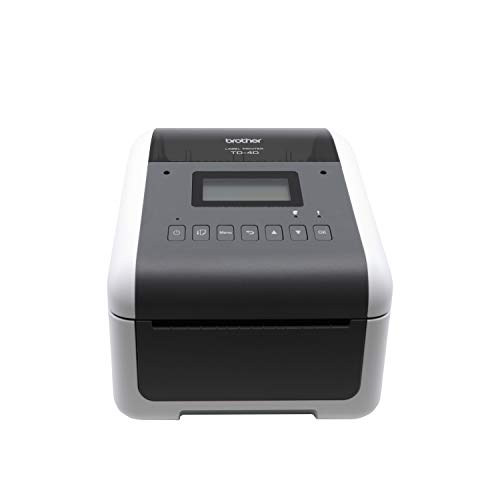
- 300 DPI for sharp text and barcodes
- Ethernet, USB, Bluetooth, and network support
- Designed for labels, tags, and receipts
Best For: Office and warehouse barcode labeling with crisp detail
Budget Wireless Labeler
JADENS Bluetooth Thermal Shipping Label Printer

- Bluetooth on Windows and Mac
- App printing for Android and iOS
- Works with fanfold and roll labels
Best For: Small businesses needing flexible, no-ink shipping labels
Compact Desk-Saving Shipping Printer
Bluetooth Shipping Label Printer with Built-in Label Bin

- Built-in compartment holds up to 250 4x6 labels
- Bluetooth and USB support across major systems
- 203 DPI thermal printing with auto-alignment
Best For: Small businesses and home sellers who want a compact, space-saving label printer.
Wireless Cross-Platform Label Printer
Phomemo 241BT 4x6 Shipping Printer

- Bluetooth printing for iOS and Android via Labelife
- USB support for Windows, Mac, Chrome OS, and Linux
- Thermal direct printing at up to 72 sheets per minute
Best For: Users who need a simple wireless label printer with broad device compatibility.
Precision-Focused Quiet Label Printer
MUNBYN Bluetooth Thermal Label Printer

- Supports label widths from 1.57 to 4.25 inches
- DAC auto-calibration helps reduce misalignment
- Quiet 60 dB operation for home or office use
Best For: Users who want a precise, quiet thermal printer for shipping and organization.
Commercial USB Pick – Rollo USB Shipping Label Printer
If you want premium thermal label printers for fast, everyday shipping, the Rollo USB is built around speed and wide platform support. It prints 4×6 shipping labels, warehouse labels, barcode labels, sticker labels, and more, while its direct thermal design helps avoid ink and toner costs.
Best For: Small businesses and high-volume shippers who want a simple USB setup and broad compatibility.
Pros:
- Prints at 150mm/s, or about one 4×6 label per second
- 203 DPI print head produces clear, scannable labels
- Works with Windows and Mac via USB
- Compatible with major platforms like ShipStation, Shippo, Amazon, Shopify, Etsy, and eBay
Cons:
- USB-only setup limits wireless flexibility
- Best suited to label printing rather than general document printing
For buyers focused on throughput and broad ecommerce support, the Rollo USB is a practical premium thermal label printer that stays centered on shipping and custom label workflows.
Wireless Wide-Format Pick – Brother QL-1110NWB Thermal Label Printer
Among premium thermal label printers, the Brother QL-1110NWB stands out if you need wider labels and flexible connectivity. It prints on labels up to 4 inches wide and supports Bluetooth, Ethernet, wireless, and USB, making it a strong fit for shared work areas and mobile workflows.
Best For: Businesses that need wide-format labels, wireless printing, and barcode-focused workflows.
Pros:
- Prints on labels up to 4 inches wide
- Supports Bluetooth, Ethernet, wireless, and USB connections
- Barcode crop function helps print UPCs and barcodes from templates
- Includes Plug & Label and SDK support for easier integration
Cons:
- Barcode crop function is Windows only
- Some advanced features depend on software and platform support
If label width and connectivity matter more than a basic desktop setup, the QL-1110NWB offers a very capable balance of speed, integration, and wide-format printing.
Bluetooth Budget Pick – Nelko Bluetooth Thermal Shipping Label Printer
If you’re comparing premium thermal label printers for a smaller space, the Nelko Bluetooth Thermal Shipping Label Printer is designed for flexible home or commercial use. It prints 4×6 shipping labels and other label sizes, and it supports both Bluetooth app printing and USB connections for desktop setups.
Best For: Budget-minded sellers who want Bluetooth convenience and compact label printing.
Pros:
- Bluetooth printing via the NELKO app for iOS and Android
- USB support for Windows, Mac OS, and Chrome OS
- Prints at 150 mm/s with 203 DPI clarity
- Works with fanfold and roll labels in multiple sizes
Cons:
- Mac OS is limited to USB printing
- Bluetooth printing requires using the app workflow
The Nelko is a strong pick when you want a compact, versatile label printer without giving up the core advantages of direct thermal output and platform compatibility.
Renewed Premium Pick – Brother QL-1100 Wide Format Thermal Label Printer
For buyers who want premium thermal label printers with wide-format output and a simpler Windows workflow, the Brother QL-1100 is a strong desktop option. It prints labels up to 4 inches wide, supports barcode cropping, and includes a Plug & Label feature that avoids full software installation on Windows PCs.
Best For: Packing stations and office desks that need wide labels and straightforward USB printing.
Pros:
- Prints on labels up to 4 inches wide
- Barcode crop function helps print UPCs and barcodes from templates
- Plug & Label feature works without installing software on Windows PCs
- Includes USB host interface and free SDK support
Cons:
- USB-only connectivity is less flexible than wireless models
- Some barcode tools are Windows only
This renewed premium Brother model is best for users who want a dependable, wide-format thermal printer and do not need wireless connectivity.
Wireless Shipping Specialist – Rollo Wireless Shipping Label Printer
If you want a premium thermal label printer for a fast-moving online shop, the Rollo Wireless is built around convenience and broad platform support. It prints 4×6 shipping labels over Wi‑Fi or USB, works with AirPrint for Apple devices, and supports major marketplaces and shipping tools without requiring ink or toner.
Best For: Sellers who want wireless label printing with wide compatibility and app-based shipping tools.
Pros:
- Wi‑Fi printing with AirPrint support for iPhone, iPad, and Mac
- Compatible with major platforms like Amazon, Shopify, Etsy, eBay, and ShipStation
- Fast direct thermal output at 150mm/s with 203 DPI clarity
- Can also make custom labels, barcodes, QR codes, and stickers
Cons:
- Prints in monochrome only, since it is a thermal printer
- Best suited to label sizes up to 4.1 inches wide
- Advanced shipping-app features may be more than casual users need
The Rollo Wireless stands out if you value speed, wireless flexibility, and broad software compatibility in one compact shipping printer. Its longer-rated print head life and included shipping app add extra appeal for businesses printing labels regularly.
High-Detail Barcode Pro – Brother TD-4550DNWB Thermal Desktop Label Printer
The Brother TD-4550DNWB is a premium thermal label printer aimed at users who need sharp detail and dependable throughput. With 300 DPI resolution, support for labels, tags, and receipts, and connectivity options that include Ethernet, USB, Bluetooth, and network use, it fits organized shipping and barcode workflows.
Best For: Offices and operations that need crisp barcode printing and flexible connectivity.
Pros:
- 300 DPI output for crisp small text and mini barcodes
- Supports Ethernet, USB, Bluetooth, and networkable connections
- Prints up to 6 ips for efficient label production
- Spindle-less drop-in design makes media changes easier
Cons:
- More office-focused than simple home shipping use
- Uses Brother label cartridges for this model
- Single-tray design is less flexible than multi-media systems
This Brother model is a strong choice when accuracy matters more than basic shipping speed. Its higher-resolution output and integration-friendly design make it a better fit for businesses with barcode, inventory, and receipt labeling needs.
Budget Wireless Labeler – JADENS Bluetooth Thermal Shipping Label Printer
The JADENS Bluetooth model is a practical premium thermal label printer for small businesses that want wireless convenience without ink or toner. It supports 4×6 shipping labels as well as smaller label sizes, works with fanfold or roll labels, and connects through Bluetooth on Windows and Mac or through the app on iOS and Android.
Best For: Small sellers who want a simple wireless shipping label printer with flexible label media support.
Pros:
- Wireless printing via Bluetooth for Windows and Mac
- App-based printing support for Android and iOS
- Works with fanfold and roll labels across multiple sizes
- Compatible with major platforms like Amazon, Shopify, eBay, and ShipStation
Cons:
- Mobile users must print through the Jadens printer app
- Requires label calibration when changing media
- 203 DPI output is solid, but not as sharp as 300 DPI models
JADENS is a straightforward option if you mainly need affordable, no-ink label printing with flexible device support. It is especially appealing for sellers who want easy setup, broad shipping-platform compatibility, and mixed label sizes.
Compact Desk-Saving Shipping Printer – Bluetooth Shipping Label Printer with Built-in Label Bin
If you want premium thermal label printers that make everyday shipping easier, this compact D450BT is built around space savings and flexible connectivity. Its built-in label bin holds an internal roll of up to 250 4×6 labels or rear-loaded folded labels, while Bluetooth and USB support make it practical for busy home offices and small businesses.
Best For: Sellers who need a compact 4×6 thermal label printer for shipping, labeling, and everyday organization.
Pros:
- Built-in label compartment supports internal roll paper up to 250 4×6 labels, reducing the need for extra holders
- Bluetooth printing works with Android, iOS, Windows, macOS, Linux, and ChromeOS
- Supports 1-4.6 inch label widths for shipping, barcode, product, and pricing labels
- Zero-ink thermal printing with 203 DPI clarity and auto-alignment to help reduce waste
Cons:
- Prints in monochrome only
- Best fit is for label tasks rather than general document printing
This model stands out if you value a clutter-free workspace and want one thermal label printer that can handle common shipping and organization jobs without extra accessories.
Wireless Cross-Platform Label Printer – Phomemo 241BT 4×6 Shipping Printer
Among premium thermal label printers, the Phomemo 241BT focuses on straightforward wireless printing and wide platform support. It works with Bluetooth for phones and tablets, and USB for computers, making it a practical pick for users who want a simple shipping-label setup across multiple devices.
Best For: Sellers who want a wireless 4×6 thermal label printer that works with phones, tablets, and computers.
Pros:
- Bluetooth printing for iOS and Android through the Labelife app
- USB support for Windows, Mac OS, Chrome OS, and Linux
- Supports labels from 1 to 4.6 inches wide for shipping, QR codes, barcodes, and forms
- Thermal direct printing means no ink or toner, with up to 72 sheets per minute
Cons:
- Requires the Labelife app or driver setup depending on the device
- Prints in black and white only
This printer is a solid choice if you want broad compatibility and fast monochrome label output without paying for ink or toner.
Precision-Focused Quiet Label Printer – MUNBYN Bluetooth Thermal Label Printer
If precision matters in your premium thermal label printers shortlist, the MUNBYN Bluetooth model is designed for clean output, low noise, and long-term efficiency. It supports a wide label range, auto-calibrates with DAC dynamic algorithm tech, and is built to minimize jams and misalignment for shipping and organization jobs.
Best For: Small businesses and home users who want a quiet, precise thermal label printer for shipping and inventory tasks.
Pros:
- Supports direct thermal labels from 1.57" to 4.25" wide
- DAC Dynamic Algorithm Tech auto-calibrates to reduce label misalignment
- Claims a near-zero jam rate and long lifespan for reduced waste and downtime
- Quiet 60 dB operation suits home offices and shared workspaces
Cons:
- Bluetooth indicator behavior on Mac/Windows may be less intuitive during stable connections
- Prints monochrome labels only
This is a strong option if you prioritize accuracy, quieter operation, and a broad label-size range over color printing or extra features.
How We Picked the Best Premium Thermal Label Printers
We focused on Premium Thermal Label Printers that offer dependable output, practical connectivity, and strong real-world usability. Priority went to models with consistent 4×6 shipping label performance, clear barcode printing, and features that support everyday business use such as USB, Bluetooth, Wi-Fi, or network connectivity.
We also considered print speed, media compatibility, setup simplicity, operating system support, and whether a printer is better suited to shipping, product labeling, or higher-volume desktop work.
Quick Comparison
For most buyers, the biggest split is between simple desktop shipping printers and more advanced office-grade units. Entry-level Bluetooth models are usually the easiest and most affordable way to print 4×6 labels. USB and Wi-Fi models are better if multiple devices need access or if you want a more permanent workstation setup. If you need broader label support, a wide-format or professional desktop model is often the smarter long-term choice.
Key Buying Factors for Premium Thermal Label Printers
Connectivity
Choose USB if you want a stable one-computer setup. Bluetooth works well for phones and tablets, while Wi-Fi is ideal for shared use across a small office. Network-ready printers are best when several team members need access.
Label Size and Media Support
Make sure the printer supports the label sizes you use most often. Many Premium Thermal Label Printers are optimized for 4×6 shipping labels, but some models also handle barcode, address, and specialty labels. If you print product labels or warehouse tags, check width limits carefully.
Speed and Duty Cycle
If you process orders daily, speed matters. A faster printer reduces bottlenecks during busy periods, and a stronger duty cycle can better handle repeated use without overheating or slowing down.
Software and Platform Compatibility
Look for compatibility with your shipping software, marketplace tools, and operating system. Reliable driver support and easy integration can save more time than extra hardware features.
Print Quality and Reliability
Thermal printers don’t use ink, so consistent heating and sharp output are essential. Crisp text and scannable barcodes should be non-negotiable, especially if you ship frequently or label inventory.
Who Should Buy Which Premium Thermal Label Printers?
If you’re a solo seller or home business, a straightforward Bluetooth or USB model is usually the best value. If you run a multi-user workspace or want fewer cable constraints, a Wi-Fi-capable printer is worth the upgrade. For higher-volume operations or broader label requirements, choose a more robust desktop model with better connectivity and wider media support. In short, the right premium thermal label printer should match both your current workload and the amount of growth you expect in the next year.
