
Premium tablet computers have become a smart middle ground between phones and laptops, giving you a bigger screen, better battery life, and enough power for everyday work and entertainment.
This roundup focuses on the most useful options for different buyers, from lightweight Android tablets to Windows-ready 2-in-1 picks and higher-end iPad-style models.
Best 10 Premium Tablet Computers Picks for 2026
Premium Everyday iPad
Apple iPad 11-inch, A16, 256GB, Wi-Fi

- A16 chip for responsive everyday performance
- 11-inch Liquid Retina display with all-day battery
- 12MP front and back cameras plus Wi-Fi 6
Best For: People who want a polished all-purpose iPad for work, media, and creativity
Budget Entertainment Tablet

- 10.1-inch 1080p Full HD display for streaming
- 25% faster performance and 13-hour battery
- Expandable storage up to 1 TB with microSD
Best For: Families and casual users who want a durable streaming and reading tablet
Family Multitasking Tablet
Samsung Galaxy Tab A11+, 8GB/256GB
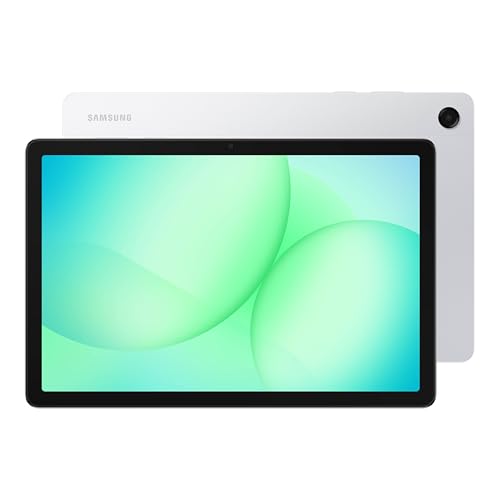
- 8GB RAM and 256GB storage for multitasking
- 11-inch 90Hz display for smooth viewing
- Quad speakers with Dolby Atmos
Best For: Families wanting a roomy shared tablet for streaming and everyday tasks
Windows Productivity Tablet
Microsoft Surface Pro 9, Core i7, 16GB/512GB

- Core i7, 16GB RAM, and 512GB SSD
- 13-inch PixelSense display with Windows 11 Pro
- Lightweight 1.94 lb design with long battery life
Best For: Professionals who need a portable Windows tablet for work and multitasking
Campus-Ready Value Pick
Lenovo Idea Tab 11" 2.5K Student Tablet with Pen

- 11" 2.5K IPS display with 90Hz refresh
- Includes Tab Pen and folio case
- Up to 12 hours of battery life
Best For: Students who want an Android tablet for study and streaming
Windows Flex Pick
Fusion5 10.1" Windows 11 Tablet PC with SSD

- 12GB RAM with 256GB SSD storage
- 10.1" Full HD IPS touchscreen
- 2-year warranty with accidental damage cover
Best For: People who want a compact Windows tablet for productivity
Premium Android Performer
Lenovo Idea Tab Pro 12.7" Student Tablet

- 12.7" 3K LCD display with JBL Dolby Atmos speakers
- Dimensity 8300 with Wi-Fi 6E
- Includes pen and folio case
Best For: Students and media users wanting a larger, faster Android tablet
Budget-friendly everyday Android
Samsung Galaxy Tab A11+ Plus 2026

- 11-inch 90Hz WUXGA display
- 6GB RAM, 128GB storage, Dimensity 7300
- 7040mAh battery with 4-speaker audio
Best For: Everyday streaming, browsing, and portable Wi‑Fi use
Student-friendly big-screen bundle

- 12.1-inch 2.5K 90Hz display
- Tab Pen and folio case included
- Light 1.2-pound design with quad speakers
Best For: Students and note-takers who want a ready-to-use large tablet
Large-screen AI multitasker
YLEEBG 12 Inch Android 16 Tablet

- 12-inch 2K 90Hz display
- 24GB RAM and 256GB storage
- Android 16 with Gemini AI and split-screen
Best For: Multitasking, streaming, and family-friendly everyday use
Premium Everyday iPad – Apple iPad 11-inch, A16, 256GB, Wi-Fi
For shoppers comparing premium tablet computers, this 11-inch iPad is a strong all-around pick for creating, staying connected, and getting everyday tasks done. The A16 chip, Liquid Retina display, fast Wi-Fi 6, and long battery life make it feel responsive whether you’re streaming, editing photos, or using apps across work and play.
Best For: Users who want a polished, fast, and versatile tablet for productivity, media, and creative use.
Pros:
- A16 chip delivers a fast, capable experience for apps, games, and editing.
- 11-inch Liquid Retina display is ideal for watching, drawing, and reading.
- 12MP Center Stage front camera and 12MP back camera support calls, selfies, and scans.
- Wi-Fi 6, USB-C, and all-day battery life add everyday convenience.
Cons:
- Apple Pencil and Magic Keyboard Folio are sold separately.
- Wi-Fi model only, so mobile data isn’t built in.
- Premium accessories can raise the total cost.
This iPad stands out if you want a familiar, premium tablet that balances speed, display quality, and app support. It is especially compelling for people who want one device that can handle both entertainment and light productivity well.
Budget Entertainment Tablet – Fire HD 10, 10.1-inch Full HD
Among premium tablet computers focused on value, the Fire HD 10 is built for relaxed streaming, reading, and casual gaming. Its 10.1-inch 1080p Full HD display, 25% faster performance than the previous generation, and 13-hour battery make it a practical entertainment tablet for home use and travel.
Best For: Families and entertainment-focused buyers who want a durable, affordable tablet for media and light everyday use.
Pros:
- 10.1-inch 1080p Full HD screen brings sharp color to shows and games.
- 25% faster than the previous generation for smoother streaming and browsing.
- 13-hour battery life supports long viewing sessions.
- Durable build and expandable storage up to 1 TB add flexibility.
Cons:
- Storage starts at 32 GB, so many users may want microSD expansion.
- Made for Amazon Stylus Pen is sold separately.
- Focused more on entertainment than premium productivity features.
This model makes sense if your priority is easy, dependable entertainment at home. It offers a good mix of screen quality, battery life, and family-friendly features without trying to be an all-out productivity tablet.
Family Multitasking Tablet – Samsung Galaxy Tab A11+, 8GB/256GB
If you want premium tablet computers with a large, fluid display and plenty of room for apps and files, the Galaxy Tab A11+ is built for day-to-day family use. It combines up to 8GB of memory, 256GB of storage, an 11-inch screen with up to 90Hz refresh, and quad speakers with Dolby Atmos for a smooth entertainment-and-multitasking experience.
Best For: Families who want a roomy tablet for streaming, browsing, gaming, and shared everyday use.
Pros:
- Up to 8GB RAM and 256GB storage help with multitasking and large files.
- 11-inch display with up to 90Hz refresh feels smooth and responsive.
- Quad speakers with Dolby Atmos deliver rich, immersive audio.
- Fast charging and long battery life support all-day use.
Cons:
- Product details focus on family and entertainment use rather than advanced productivity tools.
- Display is large, but the notes do not mention stylus support or keyboard accessories.
- Some buyers may want more detail on chipset-specific performance.
This is a well-rounded choice if your household wants one tablet for media, browsing, and multitasking. The combination of storage, memory, and audio makes it especially appealing for shared use.
Windows Productivity Tablet – Microsoft Surface Pro 9, Core i7, 16GB/512GB
For buyers comparing premium tablet computers with laptop-like power, the Surface Pro 9 is the most productivity-focused option here. Its 13-inch PixelSense display, Core i7 processor, 16GB of memory, Windows 11 Pro, and 512GB SSD are aimed at users who need a portable device that can handle serious work on the move.
Best For: Professionals and power users who want a lightweight Windows tablet for productivity and multitasking.
Pros:
- Core i7 processor and 16GB RAM support efficient multitasking.
- 13-inch PixelSense display offers a comfortable viewing experience.
- 512GB SSD and Windows 11 Pro suit work and file storage needs.
- 1.94 lb weight and 15.5-hour battery help with portability.
Cons:
- At this spec level, it is aimed more at work than simple media use.
- Accessories like keyboard and pen are not mentioned in the supplied notes.
- The 13-inch format may be larger than some tablet-first buyers want.
This Surface Pro 9 is the strongest pick if you want tablet portability without giving up Windows productivity. It is best suited to users who value performance, storage, and a full desktop-style operating system in a slim design.
Campus-Ready Value Pick – Lenovo Idea Tab 11" 2.5K Student Tablet with Pen
If you want premium tablet computers that lean toward schoolwork, note-taking, and everyday streaming, the Lenovo Idea Tab is built around that mix. Its 11-inch 2.5K IPS display, 90Hz refresh rate, included Tab Pen, and folio case make it a practical choice for students who want a single device for class and downtime.
Best For: Students who want a well-equipped Android tablet for studying, sketching, streaming, and lightweight multitasking.
Pros:
- 11" 2.5K IPS touchscreen with 90Hz refresh rate
- Includes Tab Pen and folio case for note-taking and portability
- 8GB memory and 256GB storage for apps, files, and media
- Up to 12 hours of battery life for long study days
Cons:
- Designed for student use rather than heavy desktop-style workloads
- Storage and performance are solid, but not positioned as pro-level workstation specs
Overall, this is a strong value-focused pick if you want a modern Android tablet with helpful study tools already included. The display, battery life, and pen support give it a practical edge for campus use.
Windows Flex Pick – Fusion5 10.1" Windows 11 Tablet PC with SSD
Among premium tablet computers, this Fusion5 model stands out for buyers who want a compact Windows device with laptop-like flexibility. It pairs a 10.1-inch Full HD IPS touchscreen with Windows 11 Home, 12GB RAM, and a 256GB SSD, making it a practical option for work, calls, and everyday productivity.
Best For: Buyers who want a Windows tablet with strong memory, SSD storage, and broad port selection.
Pros:
- 12GB RAM and 256GB SSD for responsive multitasking
- 10.1" Full HD IPS touchscreen with 500 nits brightness
- Includes USB-C, USB-A, micro HDMI, and headphone jack
- 2-year full warranty with accidental damage coverage
Cons:
- Docking keyboard is sold separately
- Smaller 10.1-inch screen may be less ideal for extended media or spreadsheet work
This Fusion5 tablet is best viewed as a compact Windows machine rather than a pure entertainment tablet. If you want a flexible, port-rich device with a full desktop operating system, it brings a lot to the table.
Premium Android Performer – Lenovo Idea Tab Pro 12.7" Student Tablet
If you’re comparing premium tablet computers for a bigger-screen experience, the Lenovo Idea Tab Pro is the most performance-forward option in this group. Its 12.7-inch 3K LCD display, MediaTek Dimensity 8300 processor, Wi-Fi 6E support, and included pen and folio case make it a compelling pick for study, streaming, and gaming.
Best For: Students and media users who want a larger Android tablet with fast performance and included accessories.
Pros:
- 12.7" 3K LCD display with quad JBL Dolby Atmos speakers
- MediaTek Dimensity 8300 chip with Wi-Fi 6E support
- Includes Tab Pen Plus and folio case
- 11 hours of video streaming battery life with 45W quick charge
Cons:
- Higher-spec focus may be more tablet than some casual users need
- 128GB storage is smaller than some competing options
For buyers who want a larger Android tablet with stronger performance and a richer media setup, this model is the most premium-feeling of the three. It balances battery life, display quality, and included accessories very well.
Budget-friendly everyday Android – Samsung Galaxy Tab A11+ Plus 2026
If you want premium tablet computers features without moving into a full flagship price tier, the Samsung Galaxy Tab A11+ Plus 2026 is built for everyday use. It pairs an 11-inch 90Hz display, Android 16, 6GB of RAM, and an octa-core 4nm processor with a large 7040mAh battery, making it a practical Wi‑Fi tablet for streaming, browsing, and light productivity.
Best For: Buyers who want a compact Wi‑Fi Android tablet for media, casual use, and all-day portability.
Pros:
- 11.0-inch WUXGA display with 90Hz refresh rate for smoother scrolling
- 6GB RAM and Dimensity 7300 (4nm) chip for everyday responsiveness
- Four Dolby Atmos stereo speakers for fuller media playback
- 7040mAh battery and included fast-charge cube for long sessions
Cons:
- Wi‑Fi only, with no SIM card slot or mobile network support
- International Latin American model with no warranty noted
- Includes a generic charger accessory rather than a Samsung-branded one
This is a strong pick if your priority is a straightforward Android tablet for entertainment and everyday tasks. It combines modern software, a large battery, and a smooth display, but the lack of cellular support and warranty limitation will matter to some shoppers.
Student-friendly big-screen bundle – Lenovo Idea Tab Plus
The Lenovo Idea Tab Plus is a compelling option for shoppers comparing premium tablet computers with a stronger focus on schoolwork and note-taking. Its 12.1-inch 2.5K 90Hz display, 8GB of memory, quad Dolby Atmos speakers, and included Tab Pen and folio case make it ready for study sessions, streaming, and light productivity right out of the box.
Best For: Students and productivity-minded buyers who want a large, lightweight Android tablet with pen support included.
Pros:
- 12.1-inch 2.5K display with 90Hz refresh and up to 800 nits brightness
- Includes Lenovo Tab Pen and folio case in the box
- Quad Dolby Atmos tuned speakers for better sound
- Lightweight 1.2-pound build with up to 13 hours of YouTube streaming
Cons:
- Processor is positioned for everyday use, not heavy workloads
- Storage is fixed at 128GB in this configuration
- Officially framed around learning and student use rather than advanced creative work
As a packaged tablet for notes, media, and basic multitasking, this Lenovo stands out for its included accessories and sharp large display. It is best viewed as a practical study companion rather than a performance-first tablet.
Large-screen AI multitasker – YLEEBG 12 Inch Android 16 Tablet
If you are shopping premium tablet computers for a bigger screen and more ambitious multitasking, the YLEEBG 12-inch Android 16 tablet aims squarely at that use case. It combines a 12-inch 2K 90Hz display, Gemini AI features, a Unisoc T615 processor, 24GB of RAM, and 256GB of storage, giving it a strong spec sheet for work, entertainment, and family use.
Best For: Buyers who want a large Android tablet for multitasking, media, and everyday productivity.
Pros:
- 12-inch 2K 90Hz display with Widevine L1 support for HD streaming
- 24GB RAM and 256GB storage, plus TF expansion up to 2TB
- Android 16 with Gemini AI, split-screen support, and parental controls
- 8000mAh battery, GPS, and stereo dual speakers for flexible use
Cons:
- Unisoc T615 chip is aimed at balanced performance rather than high-end gaming
- Notes emphasize Wi‑Fi use, so it is not a cellular-first tablet
- Software and feature list are broad, but the hardware focus is still mainstream
This tablet is most attractive if you want a spacious display, large memory headroom, and modern Android features in one package. Its strengths are versatility and screen size, with enough battery and storage to handle mixed daily use comfortably.
How We Picked These Premium Tablet Computers
We focused on screen quality, performance, storage, battery potential, software flexibility, and overall value. For Premium Tablet Computers, the best choice is usually the one that matches how you actually use it, not just the one with the highest specs.
We also looked at portability, accessory support, and whether each tablet is better suited to casual use, school, streaming, or productivity.
Quick Comparison
If you want the simplest breakdown: iPad-style tablets tend to offer the most polished app experience, Windows tablets are best for laptop-like work, and Android models usually provide the best mix of screen size, customization, and value.
Smaller 10- to 11-inch tablets are easier to carry and read on the go, while 12-inch-plus models are better for multitasking, note-taking, and split-screen use.
Key Buying Factors for Premium Tablet Computers
Performance and RAM
Choose enough processing power for your main tasks. For browsing, streaming, and light schoolwork, midrange chips are fine. For multitasking, creative apps, or desktop-style workflows, prioritize stronger processors and at least 8GB of memory where possible.
Display Size and Resolution
Display quality matters a lot on Premium Tablet Computers. A sharper panel improves reading, streaming, and editing, while higher refresh rates can make scrolling feel smoother. Larger screens help productivity, but they also add weight.
Storage and Expandability
Pick storage based on app use, offline media, and files. 128GB is a practical baseline for many users, while 256GB or more is better if you keep lots of downloads, photos, or work documents on-device.
Operating System and Ecosystem
The best software platform depends on your ecosystem. iPadOS is strong for apps and accessories, Windows is the most flexible for desktop-style tasks, and Android offers broad customization and easier value-oriented options.
Battery Life and Accessories
Look for tablets that can handle a full day away from the charger, especially if you use them for classes or travel. If you plan to type, draw, or take notes, check keyboard and stylus compatibility before you buy.
Who Should Buy Which Premium Tablet Computers?
Students should look for a balanced tablet with a sharp display, good battery life, and enough storage for notes and apps. Professionals are usually better served by Windows models or larger premium tablets with keyboard support. If you mainly stream, read, and browse, a lighter and more affordable Android or Fire tablet may be the smarter buy.
For most shoppers, the best Premium Tablet Computers are the ones that feel comfortable to hold, run your favorite apps smoothly, and match your workflow without forcing major compromises.
