
If you want faster typing, better feel, and a more satisfying workday, a premium mechanical keyboard for productivity can make a real difference. The best options balance comfort, quiet operation, and dependable connectivity without turning your desk into a gaming setup.
In this roundup, we focus on full-size and office-friendly keyboards that suit demanding daily work, whether you prioritize Mac support, wireless flexibility, hot-swap customization, or a quieter switch profile.
Best 10 Premium Mechanical Keyboard for Productivity Picks for 2026
Clicky Comfort
Logitech MX Mechanical for focused productivity

- Clicky low-profile switches with tactile feedback
- Smart backlighting and USB-C charging
- Pairs with up to 3 devices
Best For: Users who want a tactile, full-size productivity keyboard with multi-device switching
Quiet Power
Razer Pro Type Ultra for distraction-free work
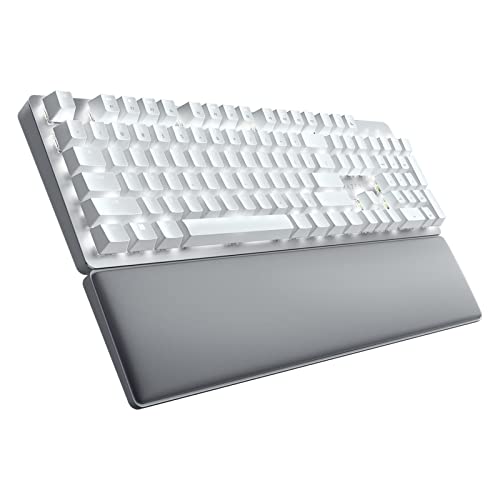
- Silent linear switches with sound dampening
- Ergonomic wrist rest for longer sessions
- Connects to up to 4 devices
Best For: Quiet office or WFH users who want comfort and customization
Magnetic Precision
Keychron K10 HE for advanced workflow control

- Adjustable Hall Effect magnetic switches
- Tri-mode wireless plus USB-C
- Deep key and macro customization
Best For: Power users who want precision tuning and advanced workflow control
Quiet Office Pick
Cherry KC 200 MX Wired Mechanical Office Keyboard

- Silent Red switches keep typing quiet
- Aluminum build adds a premium, durable feel
- Includes office shortcuts and full NKRO
Best For: Quiet, durable office typing without extra setup
Most Customizable
Keychron K10 Pro Wireless Custom Mechanical Keyboard

- QMK/VIA and macros for deep customization
- Hot-swappable and works wired or wireless
- Dampening materials help keep typing more peaceful
Best For: Power users who want a configurable full-size board
Classic Tactile Option
Das Keyboard 4 Professional for Mac

- Cherry MX Blue switches give crisp tactile feedback
- Includes a 2-port USB 3.0 hub and volume knob
- Full NKRO suits fast, accurate typing
Best For: Mac-focused typists who like a clicky, tactile board
Top Pick for Customization
Keychron K10 Max Full-Size Wireless Mechanical Keyboard

- QMK and web app remapping
- 2.4 GHz, Bluetooth, and wired modes
- Hot-swappable full-size 108-key layout
Best For: People who want a customizable full-size keyboard for work across multiple devices
Best Mac-Friendly Low-Profile Option
Satechi SM3 Full-Size Mechanical Keyboard

- Low-profile tactile brown switches
- Bluetooth, 2.4 GHz, and USB-C connectivity
- Mac shortcuts and up to four-device support
Best For: Mac and Windows users who want a slim, office-friendly mechanical keyboard
Quiet Office Upgrade
Kensington MK7500F QuietType Pro Mechanical Keyboard

- Silent mechanical keys with dampening
- Programmable keys and meeting controls
- Bluetooth, USB, and 2.4 GHz connectivity
Best For: Quiet workplaces and remote workers who need productivity-focused controls
Clicky Comfort – Logitech MX Mechanical for focused productivity
If you want a premium mechanical keyboard for productivity that feels familiar but stays efficient all day, the Logitech MX Mechanical is an easy fit. Its low-profile tactile clicky switches, smart backlighting, and multi-device support make it geared toward fast, comfortable typing on a wide range of systems.
Best For: People who want a clicky, low-profile mechanical keyboard with strong cross-device productivity features.
Pros:
- Clicky mechanical switches provide tactile feedback and an audible typing feel.
- Low-profile full-size layout is designed for more comfort and precision.
- Backlighting turns on automatically when your hands approach and adjusts to lighting conditions.
- Supports up to 3 devices across Bluetooth and Logi Bolt.
Cons:
- Clicky switches may be too loud for shared spaces.
- Battery life drops when backlighting is enabled.
Overall, this is a strong productivity-first mechanical keyboard if you want tactile feedback, easy device switching, and useful automation features without giving up a full-size layout.
Quiet Power – Razer Pro Type Ultra for distraction-free work
The Razer Pro Type Ultra is built for anyone shopping for a premium mechanical keyboard for productivity but who needs a quieter desk setup. Its silent linear switches, sound-dampening foam, wrist support, and programmable controls make it a practical choice for long typing sessions at work or home.
Best For: Professionals who want a quiet mechanical keyboard with strong ergonomics and multi-device flexibility.
Pros:
- Silent mechanical switches and foam help keep typing noise low.
- Includes a cushioned wrist rest for better long-session comfort.
- Connects and switches between up to 4 devices.
- Fully programmable keys and macros can speed up common tasks.
Cons:
- Linear switches may feel less tactile than clicky options.
- Wrist rest and extra features make it less minimal than some compact boards.
This model stands out if your top priorities are quiet operation, ergonomic support, and easy workflow customization in a wireless package.
Magnetic Precision – Keychron K10 HE for advanced workflow control
The Keychron K10 HE is a more advanced take on a premium mechanical keyboard for productivity, especially if you value customization and precision. Its Hall Effect magnetic switches, tri-mode connectivity, and web-based configurator give you deep control over actuation, macros, and rapid trigger behavior.
Best For: Power users who want a full-size wireless keyboard with adjustable magnetic switches and deep customization.
Pros:
- Hall Effect magnetic switches offer adjustable actuation from 0.2mm to 3.8mm.
- Tri-mode connectivity includes Bluetooth 5.2, 2.4 GHz wireless, and USB-C.
- Hot-swappable design makes switch replacement easier.
- Includes dedicated macOS and Windows support, with Linux remapping possible.
Cons:
- Advanced switch and software features may be more than casual users need.
- Full-size board with metal and wood frame is less compact for tight desks.
If you want a highly configurable productivity keyboard with modern magnetic switch tech, this Keychron is one of the most capable options here.
Compact Clicky – Logitech Alto Keys K98M for tidy desks
The Logitech Alto Keys K98M is a compact option for anyone seeking a premium mechanical keyboard for productivity without giving up a numpad. Its gasket mount, hot-swappable switches, white backlighting, and Action Keys make it a practical choice for a cleaner, more efficient workspace.
Best For: People who want a compact 98-key keyboard with a numpad, soft typing feel, and productivity shortcuts.
Pros:
- Gasket mount helps absorb vibrations for a smoother typing feel.
- 98-key layout keeps a numpad while saving space versus a full-size board.
- Hot-swappable Marble Switches add flexibility for future changes.
- Action Keys in Logi Options+ can be programmed for one-click access to tasks.
Cons:
- White backlighting only, with no RGB lighting options.
- Compact layout may take adjustment if you prefer a standard full-size board.
This is a smart middle ground for productivity users who want a refined typing feel, a smaller footprint, and programmable convenience in a wireless mechanical keyboard.
Quiet Office Pick – Cherry KC 200 MX Wired Mechanical Office Keyboard
If you want a premium mechanical keyboard for productivity with a cleaner office-friendly sound, the Cherry KC 200 MX keeps things focused. Its MX2A Silent Red switches deliver a smooth, linear feel with reduced noise, while the aluminum surface and laser-etched keycaps give it a sturdy, professional finish. It is a simple wired option, but it includes practical extras for everyday work.
Best For: Quiet typing in shared workspaces, especially for users who want a durable wired office keyboard with a premium feel.
Pros:
- MX2A Silent Red switches are smooth and quiet for office use
- Aluminum plate and metal enclosure add durability
- Full N-key rollover and anti-ghosting support accurate typing
- Handy shortcut keys for calculator and volume control
Cons:
- Wired USB-A only, so no wireless flexibility
- No programmable features or hot-swap support
- Noise reduction may appeal less to users who prefer tactile feedback
Overall, this is a straightforward productivity keyboard that prioritizes quiet operation, durability, and easy day-to-day use over customization.
Most Customizable – Keychron K10 Pro Wireless Custom Mechanical Keyboard
The Keychron K10 Pro is a strong premium mechanical keyboard for productivity if you want flexibility as much as typing comfort. It combines full-size layout convenience with QMK/VIA remapping, hot-swappable support, and wireless or wired connectivity. The dampening materials, PBT keycaps, and tactile brown switches are aimed at making long work sessions feel more refined.
Best For: Power users who want a customizable full-size keyboard for work across Mac, Windows, Linux, and multiple devices.
Pros:
- QMK/VIA support for remapping keys and macros
- Hot-swappable design works with many 3-pin and 5-pin MX switches
- Connects wirelessly to up to 3 devices via Bluetooth 5.1
- Sound-dampening foam and silicone pad help create a quieter typing feel
Cons:
- Key remapping works in wired mode only
- Full-size layout takes up more desk space
- Battery life depends on backlight brightness settings
For productivity users who value personalization, the K10 Pro stands out by blending workstation-friendly features with enough flexibility to adapt as your needs change.
Classic Tactile Option – Das Keyboard 4 Professional for Mac
The Das Keyboard 4 Professional for Mac is built for people who want a premium mechanical keyboard for productivity with a more tactile, classic typing feel. Cherry MX Blue switches provide clear tactile and audio feedback, while the aluminum top, detachable footbar, and dedicated media controls give it a polished desktop presence. It is designed around speed, precision, and a straightforward wired workflow.
Best For: Mac users and fast typists who prefer tactile feedback, a volume knob, and built-in USB hub convenience.
Pros:
- Cherry MX Blue switches deliver tactile and audible feedback
- 2-port USB 3.0 hub adds convenient connectivity
- Large volume knob and dedicated media controls improve daily use
- Full N-key rollover supports fast, accurate typing
Cons:
- Blue switches are louder than silent or linear alternatives
- Wired design only, with no wireless option
- Mac-focused layout may be less ideal for mixed-platform users
This is a productivity-focused mechanical keyboard for users who want a satisfying mechanical response and practical desktop features in one package.
Top Pick for Customization – Keychron K10 Max Full-Size Wireless Mechanical Keyboard
If you want a premium mechanical keyboard for productivity, the Keychron K10 Max stands out as a highly configurable full-size option that works across Mac, Windows, and Linux. Its 108-key layout, QMK support, and web-based remapping make it a strong fit for users who rely on shortcuts, macros, and a flexible workflow. The wireless setup also gives you the freedom to move between desk setups without giving up a fast response rate.
Best For: Professionals who want deep customization, full-size productivity keys, and multi-device wireless use.
Pros:
- QMK and Keychron Launcher support for key remapping and macros
- 2.4 GHz wireless with 1000 Hz polling, plus Bluetooth 5.1 for up to three devices
- Hot-swappable MX-compatible switches without soldering
- Double-shot PBT keycaps and acoustic foam for a more refined typing feel
Cons:
- Full-size 108-key layout takes up more desk space
- Linear red switches may not suit users who prefer tactile feedback
- RGB backlighting is present, but the keyboard is not focused on minimalist portability
This is the strongest all-around choice if you want productivity features first and customization second. It combines wireless versatility, full-size efficiency, and upgrade-friendly hardware in a package built for long-term use.
Best Mac-Friendly Low-Profile Option – Satechi SM3 Full-Size Mechanical Keyboard
The Satechi SM3 is a practical premium mechanical keyboard for productivity if you prefer a low-profile full-size board with Mac-friendly shortcuts. It offers 108 keys, tactile low-profile brown switches, and flexible connectivity through Bluetooth, 2.4 GHz, or USB-C. For desk setups where comfort, quieter typing, and easy device switching matter, this is a polished office-ready option.
Best For: Mac users and cross-platform workers who want a low-profile full-size keyboard with tactile feel and multi-device support.
Pros:
- Low-profile tactile brown switches for fast, comfortable typing
- Connects via Bluetooth, 2.4 GHz receiver, or wired USB-C
- Supports up to four devices simultaneously
- Aluminum construction with dedicated Mac shortcuts and removable keycaps
Cons:
- Single-color white backlighting only
- Low-profile design may not appeal to users who prefer taller mechanical keyboards
- Focused more on office productivity than advanced customization
The SM3 is a sensible pick if you want a refined typing experience without a bulky profile. It balances portability, compatibility, and everyday office comfort better than many full-size mechanical boards.
Quiet Office Upgrade – Kensington MK7500F QuietType Pro Mechanical Keyboard
If your priority is a premium mechanical keyboard for productivity in a shared or quiet workspace, the Kensington MK7500F QuietType Pro is built for that use case. It combines silent mechanical keys, sound dampening, and a full-size layout with useful office features like programmable keys and built-in meeting controls. With wired, Bluetooth, and 2.4 GHz connectivity, it is designed to fit into busy work setups without adding noise.
Best For: Quiet offices, frequent video calls, and users who want a full-size keyboard with advanced business features.
Pros:
- Silent mechanical switches with sound dampening pads
- Programmable keys, macros, and built-in meeting control keys
- Bluetooth, USB, and 2.4 GHz wireless connectivity
- Includes wrist rest and offers spill resistance plus long battery life
Cons:
- Heavier and larger than more minimalist productivity keyboards
- Advanced customization requires optional Kensington Konnect software
- Not the best choice if you want a flashy RGB-focused board
This is the most office-oriented option in the group, especially if silence matters as much as speed. It brings together comfort, security, and practical controls in a keyboard made for all-day professional use.
How We Picked the Best Premium Mechanical Keyboard for Productivity
We focused on keyboards that make sense for long office sessions, content work, coding, and general multitasking. That means solid build quality, comfortable key feel, useful layout choices, and features that improve real-world productivity rather than flashy extras.
We also gave extra weight to wireless reliability, low-noise switch options, Mac and Windows compatibility, programmable features, and practical extras like backlighting, media controls, and multi-device support.
Quick Comparison
For a Premium Mechanical Keyboard for Productivity, the main tradeoffs usually come down to feel, noise, and flexibility. Silent switches are best for shared spaces, clicky switches suit typists who want strong feedback, and hall effect or hot-swappable boards offer the most room to fine-tune actuation and future upgrades.
Full-size boards are ideal if you rely on a number pad, while more configurable models are better if you want to optimize shortcuts, macros, or switch preference over time.
Key Buying Factors for a Premium Mechanical Keyboard for Productivity
Switch Type and Noise
Choose silent linear switches if you work around others, tactile switches if you want a clear bump without much noise, and clicky switches only if audible feedback is a priority and your workspace allows it.
Connectivity and Workflow
Bluetooth is convenient for switching between devices, while 2.4GHz wireless is usually better for lower latency and a steadier connection. Wired mode is still useful for charging, reliability, and desk setups with a fixed main computer.
Layout and Ergonomics
Full-size layouts help accountants, analysts, and anyone using frequent number entry. If you type all day, look for features such as gasket mounting, adjustable feet, low-fatigue key profiles, and a stable chassis that reduces strain.
Customization and Software
Hot-swappable switches, programmable layers, and remapping support can extend the life of your keyboard and help you build a workflow that fits your tools. These features matter most for power users who live in shortcuts and macros.
Build Quality and Desk Fit
Aluminum tops, reinforced frames, and quality stabilizers usually translate into a more refined typing experience. If aesthetics matter, consider backlighting color, Mac keycaps, and the overall footprint on your desk.
Who Should Buy Which Premium Mechanical Keyboard for Productivity?
If you want the quietest setup for shared offices, prioritize silent switches and wireless flexibility. If you type heavily and want the most satisfying feel, choose a model with stronger tactile feedback or a more premium typing structure.
If you are a Mac user, pick a keyboard with native Mac support and shortcut-friendly software. If you want long-term versatility, a hot-swappable or highly programmable board is the smartest choice. For the broadest everyday use, a full-size Premium Mechanical Keyboard for Productivity remains the safest all-around pick.
