
Choosing the right streaming PC is about more than raw speed. For smooth broadcasts, you need strong CPU performance, a capable GPU, enough memory for multitasking, and storage that keeps projects moving fast.
This roundup of premium live streaming computers focuses on systems that can handle gameplay, overlays, capture software, chat tools, and editing without slowing down your workflow.
Best 10 Premium Live Streaming Computers Picks for 2026
Flagship Streamer Build
Skytech O11 Vision RTX 5070 Ti

- Ryzen 7 9850X3D CPU
- RTX 5070 Ti 16GB GPU
- 360mm AIO with 32GB DDR5 and 2TB SSD
Best For: High-end streamers and creators who want strong cooling and top-tier performance
Productivity-First Stream Desk

- Intel Ultra 7-265 processor
- RTX 5060 8GB graphics
- 32GB DDR5 with Thunderbolt 4
Best For: Streamers and professionals who need a versatile, well-connected desktop
Balanced Gaming Streamer
Skytech Azure 3 Ryzen 7 RTX 5070

- Ryzen 7 7700X CPU
- RTX 5070 12GB GPU
- 24GB DDR5 and 1TB Gen4 SSD
Best For: Gamers and streamers who want a balanced high-performance desktop
Compact Power Stream Box

- Ryzen 9 8945HX with 16 cores
- RTX 5060 8GB GDDR7
- Wi-Fi 7, 5GbE, quad 4K support
Best For: Creators who need a compact PC with high-end connectivity and multi-display output
High-Performance All-Rounder
Core i9-14900HX RTX 5060 Ti Desktop

- 24-core Intel Core i9 for multitasking
- RTX 5060 Ti supports ray tracing and DLSS 4.0
- 1TB NVMe SSD and WiFi 6 for quick, simple setup
Best For: Streamers and gamers who want one system for live broadcast and AAA play
Compact Pro Workstation
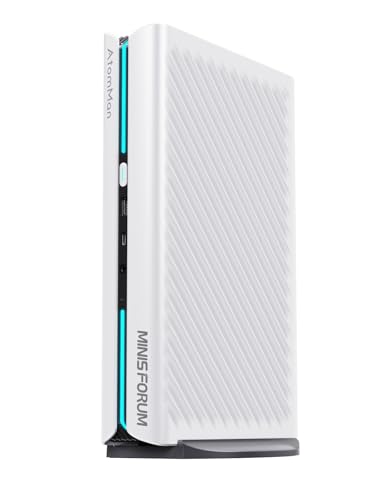
- Ryzen 9 8945HX offers 16 cores and 32 threads
- 32GB DDR5 RAM plus 1TB PCIe 4.0 SSD
- WiFi 7, 5G LAN, and four-display support
Best For: Creators and professionals who need compact performance for streaming and multitasking
Creator-Grade Powerhouse

- RTX 5070 Ti with 16GB GDDR7 for demanding visuals
- 32GB DDR5 RAM and 1TB SSD support multitasking
- 850W Gold PSU and 2-year warranty add confidence
Best For: Streamers and creators who prioritize GPU power, stability, and long-session use
Flagship Creator Tower
HP OMEN Max 45L Ryzen 7 Edition

- Ryzen 7 7700 and RTX 5060 Ti
- Liquid cooling with 1200W Platinum PSU
- 1TB Gen4 SSD, WiFi 6E, Windows 11 Pro
Best For: Streamers and creators needing a premium prebuilt with strong cooling and power headroom.
Balanced Streaming Rig

- Intel i5-14400F with RTX 5060 graphics
- 32GB DDR5 RAM and 1TB PCIe 4.0 SSD
- ARGB cooling plus 2-year warranty
Best For: Streamers and digital nomads who want a ready-to-go desktop with strong multitasking specs.
High-Core Creator Desktop

- 20-core Intel Core Ultra 7 265KF
- RTX 5060 Ti with liquid cooling
- Windows 11 Pro, USB-C, WiFi 6E
Best For: Creators who want a premium OMEN tower with a high-core Intel CPU and modern connectivity.
Flagship Streamer Build – Skytech O11 Vision RTX 5070 Ti
If you want premium live streaming computers that can also handle demanding games and editing, this Skytech build is aimed squarely at high-end performance. The Ryzen 7 9850X3D, RTX 5070 Ti 16GB, 32GB DDR5, and 2TB Gen4 SSD give you a fast, well-rounded platform for streaming, multitasking, and smooth 1440p play.
Best For: Streamers and creators who want a powerful, high-cooling desktop for gaming plus live production.
Pros:
- Ryzen 7 9850X3D and RTX 5070 Ti 16GB for strong gaming and stream performance
- 360mm AIO cooling helps keep temperatures under control during long sessions
- 32GB DDR5 RAM and 2TB Gen4 NVMe SSD support multitasking and fast loading
- O11 Vision case gives it a showcase-style look with included keyboard and mouse
Cons:
- Wi-Fi 5 is older than the newer wireless standards found on some rivals
- Blacklisted limitations on exact brand variation for the graphics card may matter to some buyers
This is the most outright premium option in the group, especially if you care about thermal headroom and high-end parts. It looks built for users who want a machine that can stay busy for hours without feeling underpowered.
Productivity-First Stream Desk – Dell Tower Plus EBT2250
For premium live streaming computers that lean more toward reliability and productivity, the Dell Tower Plus offers a strong mix of modern CPU power, RTX 5060 graphics, and broad connectivity. Its 32GB DDR5 memory, 1TB NVMe SSD, and Windows 11 Pro make it practical for stream setup, multitasking, and everyday workstation use.
Best For: Buyers who want a polished desktop for streaming, work, and general multitasking with pro-level connectivity.
Pros:
- Intel Ultra 7-265 and RTX 5060 8GB provide solid performance for streaming workflows
- 32GB DDR5 and 1TB PCIe NVMe SSD support responsive multitasking
- Thunderbolt 4, USB-C, HDMI, DisplayPort, and SD card reader add flexible connectivity
- Windows 11 Pro and included keyboard/mouse make it ready for immediate use
Cons:
- 460W power supply is modest compared with higher-wattage enthusiast systems
- Graphics tier is lower than the top-end options in this roundup
This Dell is less of a flashy gaming tower and more of a dependable creator workstation. It stands out if you value ports, stability, and a professional feature set over maximum graphics muscle.
Balanced Gaming Streamer – Skytech Azure 3 Ryzen 7 RTX 5070
This Skytech Azure 3 is a strong middle-ground choice for premium live streaming computers, pairing an Ryzen 7 7700X with an RTX 5070 and 24GB of DDR5 memory. It gives you the speed you want for modern games and streaming tasks, while the 1TB Gen4 SSD and 360mm AIO cooler help keep day-to-day use fast and controlled.
Best For: Streamers who want high performance without jumping to the highest-priced flagship specs.
Pros:
- Ryzen 7 7700X and RTX 5070 handle gaming and streaming workloads well
- 360mm AIO liquid cooling supports stable thermals during longer sessions
- 24GB DDR5 RAM and 1TB Gen4 NVMe SSD keep the system responsive
- Included keyboard and mouse plus Windows 11 Home simplify setup
Cons:
- 24GB RAM is good, but not as roomy as 32GB configurations
- Wi-Fi 5 is older than newer wireless options
If you want a capable streamer and gaming PC without stepping into ultra-premium territory, this model makes a lot of sense. It keeps the core ingredients strong while staying more balanced than the top-tier flagship build.
Compact Power Stream Box – MINISFORUM G1 Pro Mini PC
If your premium live streaming computers shortlist includes compact systems, the MINISFORUM G1 Pro offers serious power in a very small 3.8L chassis. With a Ryzen 9 8945HX, desktop-class RTX 5060, 32GB DDR5, Wi-Fi 7, and quad 4K output support, it is built for demanding multitasking and creator setups where space matters.
Best For: Creators and streamers who want a compact desktop with strong CPU power and multi-display support.
Pros:
- Ryzen 9 8945HX with 16 cores and 32 threads delivers strong multitasking headroom
- Desktop RTX 5060 with 8GB GDDR7 supports gaming and GPU-heavy workloads
- Wi-Fi 7, 5GbE, and up to five display outputs are excellent for connected setups
- Compact 3.8L design keeps the footprint small without giving up high-end features
Cons:
- Mini PC design may be less upgrade-friendly than a full tower
- Built-in power and cooling focus on efficiency, but sustained heavy loads may still favor larger systems
This is the most space-saving option here, but it is far from entry-level. It is a compelling pick when you need strong performance, modern networking, and multiple displays in a compact form factor.
High-Performance All-Rounder – Core i9-14900HX RTX 5060 Ti Desktop
If you’re shopping for premium live streaming computers, this Core i9 and RTX 5060 Ti desktop is built for creators who want strong multitasking headroom without sacrificing gaming performance. The 24-core i9-14900HX, 16GB DDR5 memory, and 1TB NVMe SSD give it the speed needed for gameplay, streaming software, and background apps running together smoothly.
Best For: Streamers and gamers who want a fast, ready-to-use desktop for live broadcasts, AAA gaming, and everyday content creation.
Pros:
- Intel Core i9-14900HX with 24 cores and 32 threads for heavy multitasking
- RTX 5060 Ti 8GB GDDR7 with ray tracing and DLSS 4.0 support
- 1TB NVMe SSD for quick boot times and fast loading
- WiFi 6 and multiple video outputs for flexible setup options
Cons:
- 16GB RAM is workable, but power users may want more for bigger creative workloads
- Mobile-derived processor may not appeal to buyers seeking a traditional desktop CPU
This is a practical high-performance pick if you want a system that can handle streaming, gaming, and general productivity in one box. Its balanced hardware makes it an easy recommendation for creators who need strong performance out of the box.
Compact Pro Workstation – Ryzen 9 Mini PC with RTX 5060
For buyers comparing premium live streaming computers in a smaller footprint, this MINISFORUM G1 Pro stands out with a Ryzen 9 8945HX, RTX 5060 graphics, and 32GB of DDR5 memory. It is aimed at demanding users who want a compact desktop that can handle streaming, editing, gaming, and multi-monitor productivity without giving up modern connectivity.
Best For: Creators and professionals who need a compact PC for streaming, editing, multi-display work, and fast wireless networking.
Pros:
- Ryzen 9 8945HX with 16 cores and 32 threads for strong workload handling
- RTX 5060 8GB with ray tracing and DLSS support for gaming and visual work
- 32GB DDR5 RAM and 1TB PCIe 4.0 SSD included
- WiFi 7, Bluetooth 5.4, and 5G LAN for modern connectivity
Cons:
- Mini PC design may not suit buyers who prefer a larger, easier-to-expand tower
- Storage and memory expansion are available, but the base setup already targets demanding users
This mini PC is a strong fit if desk space matters but performance still has to stay serious. Its four-display support and fast networking make it especially appealing for streaming setups, trading desks, or creative workflows.
Creator-Grade Powerhouse – RTX 5070 Ti Streaming Desktop
If you want premium live streaming computers with extra headroom for gaming and AI-assisted creation, this NIMO desktop brings an RTX 5070 Ti, 32GB DDR5 RAM, and a 1TB NVMe SSD to the table. The Intel Core i5-14400F is aimed at efficient multitasking, while the 850W 80 Plus Gold PSU and ARGB cooling system support stable long-session use.
Best For: Streamers, creators, and gamers who want a powerful prebuilt for 4K play, live broadcasting, and content work.
Pros:
- RTX 5070 Ti with 16GB GDDR7 VRAM for high-end gaming and AI creation
- 32GB DDR5 RAM and 1TB PCIe 4.0 SSD for smooth multitasking
- Includes a 2-year warranty and extended 90-day return window
- 850W 80 Plus Gold PSU and air cooling for stable performance
Cons:
- Core i5-14400F is solid, but not as high-end as the graphics card pairing
- Some buyers may prefer a more compact or simpler case design
This desktop is best viewed as a performance-first prebuilt with a strong focus on graphics power and reliability. If your streaming or creation workload benefits from a strong GPU and generous memory, it is one of the most capable options here.
Flagship Creator Tower – HP OMEN Max 45L Ryzen 7 Edition
If you want premium live streaming computers that can handle gaming, editing, and multitasking, this HP OMEN Max 45L is built around a Ryzen 7 7700, RTX 5060 Ti, and fast DDR5 memory. The 1TB Gen4 SSD, liquid cooling, and 1200W Platinum PSU make it a strong fit for creators who need a polished desktop that is ready for demanding broadcasts and creative work.
Best For: Streamers and creators who want a high-end prebuilt with strong cooling, plenty of power headroom, and Windows 11 Pro.
Pros:
- Ryzen 7 7700 and RTX 5060 Ti deliver strong performance for gaming and content creation.
- Liquid cooling and a 1200W Platinum PSU support sustained loads and upgrade headroom.
- 1TB PCIe NVMe SSD and WiFi 6E help keep boot times and connectivity responsive.
- Includes Windows 11 Pro plus USB-C, RGB keyboard, and mouse for a ready-to-use setup.
Cons:
- 16GB of RAM is serviceable, but heavy creators may want more for bigger projects.
- RTX 5060 Ti has 8GB of dedicated memory, which may feel limiting for some advanced workflows.
This is a well-rounded streaming-ready tower for users who value stability, expansion support, and premium components over a bare-minimum build. If you want a desktop that can double as a creator workstation and gaming PC, it checks the right boxes.
Balanced Streaming Rig – NIMO RTX 5060 i5 Prebuilt
This NIMO prebuilt is a practical pick for premium live streaming computers if you want solid multitasking without jumping to an oversized workstation. The Intel i5-14400F, RTX 5060, 32GB DDR5, and 1TB NVMe SSD give it the core specs needed for streaming, gaming, and creator tools, while the ARGB cooling and Gold PSU round out the package.
Best For: Streamers, digital nomads, and creators who want a well-equipped desktop with fast memory and a simple plug-and-play setup.
Pros:
- 32GB DDR5 RAM is well-suited to streaming, multitasking, and heavier browser/app loads.
- RTX 5060 with 8GB GDDR7 supports gaming, AI creation, and smooth live workloads.
- 1TB PCIe 4.0 SSD offers fast boot times and quick file access.
- Prebuilt in the USA with a 2-year warranty and 90-day return window.
Cons:
- The i5-14400F is capable, but it is not the most powerful CPU in this roundup.
- 650W PSU is adequate, though it leaves less room than higher-wattage systems.
Overall, this desktop stands out as a balanced, lower-hassle option for creators who care more about usable performance and memory capacity than premium-tier extras. It should be especially appealing if you want a streaming PC that arrives ready to run.
High-Core Creator Desktop – HP OMEN 45L Ultra 7
For buyers comparing premium live streaming computers, this HP OMEN 45L brings a more high-core CPU option with an Intel Core Ultra 7 265KF, RTX 5060 Ti, and liquid cooling. It is aimed at users who want a capable creator tower for streaming, 4K editing, and multitasking, with the added convenience of Windows 11 Pro, USB-C, and WiFi 6E.
Best For: Streamers and content creators who want a high-core Intel desktop with strong everyday responsiveness and creator-friendly connectivity.
Pros:
- Intel Core Ultra 7 265KF offers 20 cores for demanding gaming and creation workloads.
- RTX 5060 Ti and DDR5 memory support smooth multitasking and visual performance.
- Liquid cooling and a tempered-glass OMEN 45L chassis give it a premium desktop build.
- Windows 11 Pro, USB-C, WiFi 6E, and Bluetooth 5.3 add practical connectivity.
Cons:
- 16GB RAM is the most obvious limitation for heavier editing or large multitasking sessions.
- 1TB SSD is fast, but power users with large media libraries may want more storage later.
This model is a good fit if you want the prestige and cooling of an OMEN 45L with a more creator-focused Intel platform. It is not the most memory-heavy configuration, but it offers a strong foundation for streaming and production work.
How We Picked These Premium Live Streaming Computers
We focused on components and configurations that matter most for live creators: modern multi-core processors, RTX-class graphics for hardware encoding, 32GB memory where available, fast NVMe storage, and solid cooling or power delivery for long sessions. We also considered connectivity, since streaming rigs often need multiple USB devices, fast networking, and support for several displays.
Because Premium Live Streaming Computers are often used for both production and everyday work, we gave extra weight to upgrade potential, case airflow, and the ability to manage demanding tasks like recording while streaming, running browser sources, and launching creative apps at the same time.
Quick Comparison
If you want the most headroom for high-bitrate 1440p or 4K streaming, the strongest options here are the higher-tier RTX 5070 Ti systems with Ryzen 7 or creator-focused Intel CPUs. For users prioritizing compact setups, the mini PCs offer impressive performance in a smaller footprint, though they are better matched to moderate streaming loads than the largest tower builds.
Midrange choices with RTX 5060 or 5060 Ti graphics are a better fit for creators who stream regularly but do not need maximum render speed or the heaviest multitasking workloads. They can still be excellent Premium Live Streaming Computers when paired with enough RAM and a fast SSD.
Key Buying Factors for Premium Live Streaming Computers
CPU and GPU Balance
A strong CPU helps with game logic, scene switching, and background apps, while the GPU handles encoding and visual workloads. Look for a well-matched combination instead of overspending on one part and bottlenecking the other.
Memory and Storage
For serious streaming, 32GB of RAM is the sweet spot. It gives you room for OBS, browser tabs, Discord, plugins, and editing apps. A 1TB NVMe SSD is the minimum practical starting point, while 2TB is preferable if you store recorded footage locally.
Cooling, Noise, and Power
Long streams demand stable thermals. Liquid cooling, good airflow, and a quality power supply help keep performance consistent and reduce the chance of throttling or unexpected shutdowns.
Connectivity and Expansion
Check for enough USB ports, fast Ethernet or Wi-Fi 7, and display outputs for multi-monitor workflows. Premium Live Streaming Computers should also leave room for future upgrades, especially if your content plans may grow.
Who Should Buy Which Premium Live Streaming Computers?
Choose a flagship tower if you want maximum room for gaming, streaming, recording, and editing in one machine. Pick a creator-oriented workstation if you care more about productivity, stability, and multi-app workflows than flashy gaming styling. Go with a mini PC if desk space matters and your stream setup is lighter, or select a midrange desktop if you want a strong value-to-performance balance for regular live content.
In short, the best option depends on your workflow, but the right Premium Live Streaming Computers should make your broadcasts smoother, your editing faster, and your setup easier to grow over time.
