
Choosing a premium internal capture card is all about matching your console, PC, and monitor setup to the right level of capture quality and passthrough support.
Below, we focus on the most important features buyers should compare so you can choose a card that fits your streaming, recording, and gameplay needs without overpaying.
Best 10 Premium Internal Capture Card Picks for 2026
Elite 4K HDMI 2.1 Choice
Elgato 4K Pro Internal Capture Card

- 8K60 passthrough and 4K60 HDR10 capture
- HDMI 2.1 with up to 1080p240 recording
- VRR passthrough and ultra-low latency
Best For: High-end streamers and dual-PC gamers
Budget PCIe Streaming Option
HDMI PCI-E 4K 30fps Capture Card

- Captures up to 4K 30fps
- Zero-delay HDMI loop-out
- Works with Windows, Linux, and Mac
Best For: Affordable PCIe streaming and recording
Reliable 1080p Console Recorder
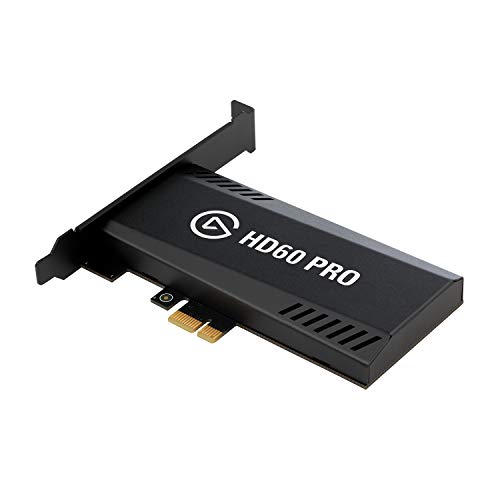
- 1080p60 capture with true passthrough
- Instant Gameview for low-latency monitoring
- Flashback Recording for saved moments
Best For: Console gamers and 1080p streamers
Portable USB-C High-FPS Pick

- 4K60 capture with HDR10 support
- 1440p120 or 1080p240 passthrough
- Near-zero latency and analog audio in
Best For: High-FPS users wanting USB-C flexibility
Elite 4K PCIe Capture

- Up to 2160p60 4K capture
- Ultra-low latency workflow
- Works with OBS, Streamlabs, and XSplit
Best For: Serious creators wanting premium 4K60 internal capture
Reliable 1080p PCIe Streamer

- Full HD 1080p60 capture and recording
- Low-latency HDMI pass-through
- RECentral 4 with live editing tools
Best For: Windows streamers who only need reliable 1080p60 capture
Value 4K Internal Capture

- 4K capture with 4K60 passthrough
- 1080p240 high-speed recording support
- Works with OBS, Zoom, and Teams
Best For: Windows users wanting versatile 4K60 internal capture
Ultra-HD Plug-and-Play Pick
AVerMedia Live Streamer Ultra HD GC571
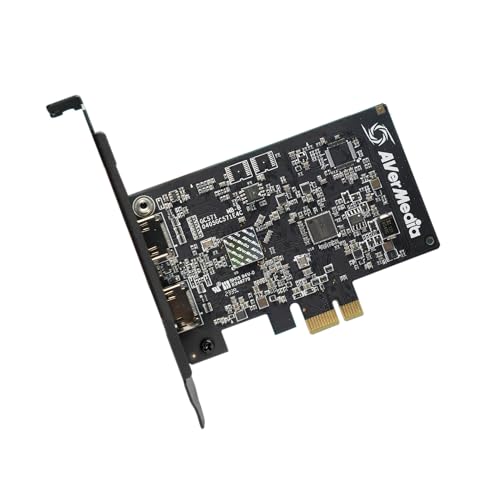
- 4K60 pass-through, 4K30 capture
- VRR support and 1080p120 capture
- Drive-free PCIe plug-and-play setup
Best For: Streamers who want easy internal installation and strong console pass-through
HDR4K Performance Choice

- 4K60 HDR10 capture with zero-lag pass-through
- Up to 240 fps high-frame-rate capture
- Works with OBS, Streamlabs, Twitch, and YouTube
Best For: Creators who want HDR capture and high-frame-rate recording flexibility
HDMI 2.1 Future-Ready Pick
AVerMedia Live Gamer 4K 2.1 GC575

- HDMI 2.1 with 4K144 HDR pass-through
- Up to 240Hz support and ultra-wide resolutions
- 1080p240 and 1440p120 capture modes
Best For: Next-gen console users who want HDMI 2.1 pass-through and high refresh rates
Elite 4K HDMI 2.1 Choice – Elgato 4K Pro Internal Capture Card
If you want a premium internal capture card for a modern streaming or dual-PC setup, the Elgato 4K Pro is built around high-end passthrough and low-latency capture. It supports 8K60 passthrough, 4K60 HDR10 capture, VRR passthrough, and up to 1080p240 recording, so it suits players who care about both image quality and responsiveness.
Best For: Streamers and gamers who want top-tier passthrough, HDR support, and very high frame-rate recording.
Pros:
- 8K60 passthrough with 4K60 HDR10 capture
- HDMI 2.1 in/out with up to 1080p240 recording
- VRR passthrough helps prevent screen tearing
- Ultra-low latency and dual PC setup compatibility
Cons:
- Windows 10 and PCIe slot required
- Capture resolution is listed as 1080p in the product details
- Best fit for users who can use its high-end feature set
This is the strongest pick in the roundup if your priority is a premium internal capture card with the most advanced passthrough and recording specs in the group.
Budget PCIe Streaming Option – HDMI PCI-E 4K 30fps Capture Card
If you need a more affordable premium internal capture card alternative for streaming or recording, this PCIe HDMI capture card focuses on compatibility and simple setup. It captures up to 4K 30fps, supports zero-delay HDMI loop-out, and works with a wide range of software and operating systems.
Best For: Budget-minded users who want PCIe capture with broad device and software support.
Pros:
- 4K 30fps capture from HDMI sources
- Zero-delay HDMI loop-out for live play
- PCI-E high-speed transmission up to 500MB/S
- Works with Windows, Linux Ubuntu, and Mac OS
Cons:
- Only captures up to 4K 30fps
- Product details list 1080p capture resolution
- More basic than higher-end HDMI 2.1 options
This card makes sense when you want a straightforward internal option for OBS, streaming, or general HDMI capture without paying for premium high-frame-rate features.
Reliable 1080p Console Recorder – Elgato HD60 Pro
The Elgato HD60 Pro is a practical premium internal capture card choice if you want smooth 1080p60 recording with low-latency passthrough. It is designed for console gameplay capture and keeps the workflow simple with Instant Gameview, unlimited capture, and Flashback Recording.
Best For: Console players and creators who want dependable 1080p60 capture with easy recording tools.
Pros:
- 1080p60 capture and passthrough
- True passthrough with zero lag
- Instant Gameview for ultra-low-latency monitoring
- Flashback Recording and unlimited capture
Cons:
- Does not target 4K capture
- Older feature set than newer HDMI 2.1 models
- Best for users focused on 1080p workflows
If you want a proven internal capture solution for 1080p60 content, this model stays appealing because it balances low latency, passthrough, and recording convenience.
Portable USB-C High-FPS Pick – Elgato 4K S Capture Card
The Elgato 4K S is a strong premium internal capture card alternative if you want modern capture features in a USB-C form factor. It records at 4K60, supports 1440p120 or 1080p240 passthrough, and adds HDR10 support plus near-zero latency for a flexible streaming or recording setup.
Best For: Users who want high-frame-rate passthrough and cross-platform capture in a compact USB-C design.
Pros:
- 4K60 capture with HDR10 support
- 1440p120 or 1080p240 passthrough
- Near-zero latency for responsive play
- Analog audio input for chat or commentary
Cons:
- Uses USB-C rather than an internal PCIe card
- Product details list 1080p as capture resolution
- Requires Windows 11 or macOS 13+ per the specs
For buyers who care more about flexibility than internal installation, this model offers a polished mix of high-FPS passthrough, HDR support, and modern device compatibility.
Elite 4K PCIe Capture – Elgato Game Capture 4K60 Pro
If you want a premium internal capture card for high-end gameplay recording, the Elgato Game Capture 4K60 Pro is built around 4K60 capture, ultra-low latency, and broad software compatibility. It is aimed at creators who want a clean PCIe x4 internal card that can work with OBS Studio, Streamlabs OBS, and XSplit out of the box.
Best For: High-end PC-based creators who want 4K60 internal capture with very low latency.
Pros:
- Captures gameplay in up to 2160p60 for true 4K recording.
- Ultra-low latency technology helps keep preview and workflow responsive.
- Works with OBS Studio, Streamlabs OBS, and XSplit out of the box.
- Supports multi-feed capture and multiple 4K60 Pro cards in one PC.
Cons:
- Requires a PCIe x4 slot, so installation depends on available motherboard space.
- Minimum system requirements include an Intel Core i5-class CPU, 8 GB RAM, and a capable GPU.
For a premium internal capture card focused on 4K60 performance, this Elgato model is the most feature-rich option here. It makes the most sense if you are building a serious Windows, macOS, or Linux capture setup and want strong integration with popular streaming software.
Reliable 1080p PCIe Streamer – AVerMedia Live Gamer HD 2
The AVerMedia Live Gamer HD 2 is a practical premium internal capture card if your priority is smooth 1080p60 recording and streaming rather than 4K. It offers low-latency HDMI pass-through, Windows support, and software tools designed to make live editing and recording more manageable.
Best For: Streamers and console players who want dependable 1080p60 internal capture on Windows.
Pros:
- Records and captures Full HD 1080p60 gameplay in real time.
- Low-latency HDMI pass-through supports console play while capturing.
- Includes RECentral 4 for live editing, overlays, and quality settings.
- Multi-card support lets you expand a gaming PC setup up to 4 cards.
Cons:
- Capture resolution is limited to 1080p rather than 4K.
- Windows-focused compatibility may not suit non-Windows setups.
If you do not need 4K, this AVerMedia card is a strong internal choice for straightforward 1080p60 capture. It is especially appealing for Windows users who want plug-and-play operation, pass-through support, and flexible software controls.
Value 4K Internal Capture – VIXLW PCIe 4K60 Card
The VIXLW 4K Internal Capture Card is a feature-packed premium internal capture card for users who want 4K60 passthrough, low latency, and high-speed recording support. It is positioned for creators and gamers using OBS, YouTube, Zoom, Teams, or single- and dual-PC setups on Windows.
Best For: Windows creators who want 4K60 passthrough and flexible internal capture for streaming.
Pros:
- Supports 4K capture and 4K60 passthrough.
- Ultra-low latency and near-zero lag passthrough help gameplay stay responsive.
- Can record high-motion footage at 1080p240.
- Compatible with OBS and other platforms such as Zoom and Teams.
Cons:
- Windows-only compatibility limits cross-platform use.
- Software and setup details are more basic than some higher-end branded cards.
This VIXLW card stands out if you want 4K60 features and broad usage across streaming or meeting software. It is a practical internal option for creators who value passthrough performance, high frame rate recording, and lifetime warranty support.
Ultra-HD Plug-and-Play Pick – AVerMedia Live Streamer Ultra HD GC571
If you want a premium internal capture card that keeps setup simple, the AVerMedia GC571 is built around 4K60 pass-through and 4K30 capture for console streaming and recording. It also adds VRR support and 1080p120 capture, so it suits buyers who want smooth gameplay footage without diving into a complicated install process.
Best For: Streamers and gamers who want an internal PCIe card with easy installation, strong pass-through performance, and solid next-gen console support.
Pros:
- 4K60 pass-through with 4K30 capture for high-quality streaming.
- VRR support helps maintain a tear-free, responsive gaming experience.
- 1080p120 capture supports very smooth high-frame-rate footage.
- Drive-free plug-and-play PCIe installation keeps setup straightforward.
Cons:
- Capture tops out at 4K30 rather than 4K60.
- Requires a compatible PCIe slot and Windows 10 x64 / 11 x64 or later.
This is a practical pick if you value easy installation and reliable console capture over maximum capture resolution. It offers a balanced feature set for users who want premium internal capture card performance without unnecessary complexity.
HDR4K Performance Choice – AVerMedia Live Gamer 4K GC573
The AVerMedia GC573 is a premium internal capture card aimed at buyers who want 4K60 HDR10 capture with ultra-low latency for console streaming and recording. It is also built for high-frame-rate workflows, with support for capturing up to 240 fps, making it a strong fit for creators who care about both image quality and motion clarity.
Best For: Streamers and editors who want 4K60 HDR10 capture, low latency, and high-frame-rate options in one PCIe card.
Pros:
- 4K60 HDR10 capture with zero-lag pass-through.
- Supports high-frame-rate capture up to 240 fps.
- Works with OBS, Streamlabs, XSplit, Twitch, and YouTube.
- Includes RGB lighting and utility software for resolution/frame-rate control.
Cons:
- Requires a fairly specific Windows and hardware setup for 4K60 HDR or 1080p240.
- Uses PCIe x4, so it is not as universal as simpler USB options.
If your priority is clean 4K HDR capture and a proven streaming workflow, this model delivers a strong mix of performance and platform compatibility. It makes the most sense for users who want a premium internal capture card with deeper recording flexibility.
HDMI 2.1 Future-Ready Pick – AVerMedia Live Gamer 4K 2.1 GC575
For shoppers looking for a premium internal capture card with HDMI 2.1 support, the AVerMedia GC575 stands out with 4K144 HDR pass-through, ultra-low latency capture, and refresh-rate support up to 240Hz. It is designed for modern gaming setups and includes plug-and-play installation, making it a compelling option for PS5 and PC users who want more headroom for advanced displays.
Best For: Gamers and streamers who need HDMI 2.1 features, high refresh-rate support, and low-latency internal capture.
Pros:
- HDMI 2.1 input with 4K144 HDR pass-through.
- Supports refresh rates up to 240Hz and ultra-wide resolutions.
- Capture modes include 1080p240 and 1440p120.
- Plug-and-play PCIe Gen 3 x4 installation simplifies setup.
Cons:
- Windows 10 / 11 x64 is required.
- Capture resolution still tops out below 4K for recording modes listed.
This is the most future-facing option in the group if you want modern HDMI 2.1 capabilities and strong pass-through performance. It is especially appealing for buyers building a premium internal capture card setup around next-gen console output and high-refresh displays.
How We Picked the Best Premium Internal Capture Card
For a Premium Internal Capture Card, the most important factors are capture resolution and frame rate, passthrough performance, latency, HDR support, and platform compatibility. We also looked for PCIe-based designs with stable drivers, because internal cards are typically chosen for more consistent performance than many external options.
When comparing models, prioritize what you actually need to record versus what you only need to pass through to your display. That helps avoid paying extra for specs you may never use.
Quick Comparison
Some buyers need simple 1080p60 recording for console gameplay and streaming, while others want 4K60 capture with 4K or 8K passthrough for a higher-end setup. If you play fast shooters or competitive titles, higher passthrough refresh rates and low-latency monitoring matter more than headline capture resolution alone.
In general, entry-level PCIe cards are best for standard streaming setups, while higher-end options make sense for creators who want 4K HDR capture, modern HDMI 2.1 features, or multi-device flexibility.
Key Buying Factors for a Premium Internal Capture Card
Capture Resolution and Frame Rate
Match the card to your content. 1080p60 is still enough for many streamers, but 4K60 is a better fit if you record gameplay for editing, YouTube, or future-proofing. If you want smoother playback from a high-refresh display, look closely at passthrough limits too.
Passthrough and HDMI Support
Passthrough determines what you see on your gaming monitor. A Premium Internal Capture Card with HDMI 2.1 support is especially valuable for modern consoles and high-refresh PC gaming. Check whether the card supports 4K60, 1440p120, 1080p240, VRR, and HDR10 if those features matter in your setup.
Latency and Monitoring
Low latency is essential if you stream live or record while playing. The best cards minimize delay so your gameplay feels responsive and your audio-video sync stays dependable. This matters even more for rhythm games, shooters, and competitive esports titles.
Software and Driver Stability
A strong hardware spec sheet is only part of the story. Reliable software, solid OBS integration, and stable drivers can make a big difference in day-to-day use. If you plan to stream often, choose a card with a good reputation for long-term support.
Who Should Buy Which Premium Internal Capture Card?
If you want the best overall balance of modern features, look for a high-end Premium Internal Capture Card with HDMI 2.1 passthrough and 4K60 capture. If your setup is mainly for 1080p streaming, a simpler PCIe card can save money without sacrificing quality. Creators who edit gameplay or want the most flexibility should lean toward higher-resolution models, while casual streamers should focus on compatibility and ease of setup first.
The right choice is the one that fits your actual resolution, refresh rate, and workflow needs today, with enough headroom to handle your next upgrade.
