
If you want cleaner gameplay capture without opening your PC, a premium external capture card is the easiest upgrade. The best models balance resolution, latency, passthrough quality, and software support.
Below, we focus on options that make sense for streamers, console players, and creators who want dependable performance in 2026.
Best 10 Premium External Capture Card Picks for 2026
Elite HDR Game Capture
Elgato HD60 S+ 1080p60 HDR10 Passthrough

- 1080p60 HDR10 capture
- 4K60 HDR10 zero-lag passthrough
- Instant Gameview and Flashback Recording
Best For: Console gamers and streamers who want HDR capture with zero-lag passthrough.
Pro SDI Workhorse
Magewell USB Capture SDI Plus 2K 120fps
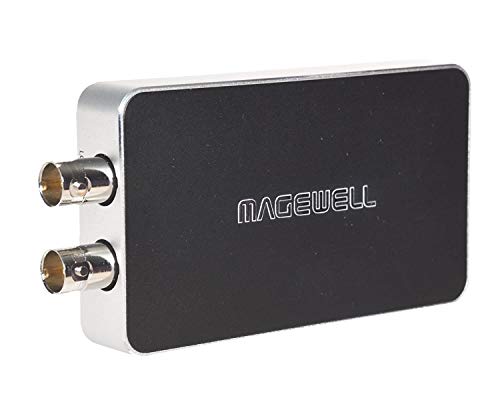
- Accepts SD/HD/3G/2K SDI input
- Loop-through monitoring and analog audio I/O
- Plug-and-play on Windows, macOS, Linux, and Chrome OS
Best For: SDI users, production setups, and long-running capture workflows.
Stream-Ready Classic
Elgato HD60 S 1080p60 Low-Latency

- 1080p60 capture with zero-lag passthrough
- Instant Gameview for low-latency monitoring
- Unlimited Capture and Flashback Recording
Best For: Streamers and console players who want a dependable 1080p60 capture device.
Compact HDMI Pro
Magewell USB Capture HDMI Gen 2 1080p60

- HDMI capture up to 2048×1080 at 60 fps
- FPGA-based processing reduces CPU load
- Plug-and-play on major desktop operating systems
Best For: HDMI capture users who want reliable plug-and-play operation.
Editors' Choice

- 4K60 capture with near-zero latency.
- 1440p120 and 1080p240 passthrough.
- HDR10 support and analog audio input.
Best For: Console streamers who want fast passthrough and compact USB-C capture.
Workhorse Pick
Magewell USB Capture SDI Gen 2

- SDI capture up to 2048x1080 60fps.
- On-device processing lowers CPU load.
- Works across Windows, macOS, Linux, and Chrome OS.
Best For: SDI production capture and long-running use.
Premium HDMI 2.1 Pick
AVerMedia Live Gamer Ultra 2.1

- 4K60 capture with 4K144 HDR/VRR passthrough.
- Low-latency design with party chat support.
- Includes 5.1 audio capture and RGB lighting.
Best For: High-end console and PC streamers who want HDMI 2.1 passthrough.
Professional 4K60 USB Capture
Magewell USB Capture HDMI 4K Pro

- True DCI 4K60 capture with HDMI 2.0 input
- HDMI loop-through for live source monitoring
- Analog audio in/out and hardware processing
Best For: Professional creators who need dependable 4K60 capture and monitoring
RGB Dual-Use Streamer Pick
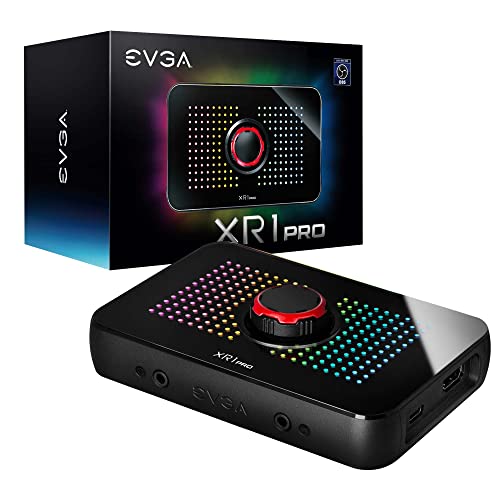
- Captures up to 1440p60 or 4K30
- HDR pass-through up to 1440p144 and 4K60
- Built-in audio mixer with control dial
Best For: Console and PC streamers who want easy setup and HDR pass-through
Portable Budget-Friendly Choice

- Plug-and-play USB 3.0 capture with no drivers
- 1080p60 recording with low-latency passthrough
- Works with consoles, PCs, cameras, OBS, and more
Best For: Budget-minded creators who need a compact, easy capture card
Elite HDR Game Capture – Elgato HD60 S+ 1080p60 HDR10 Passthrough
If you want a premium external capture card for console streaming, the Elgato HD60 S+ is built around simple setup, low-latency monitoring, and HDR-friendly capture. It records in 1080p60 HDR10 while also offering 4K60 HDR10 zero-lag passthrough, making it a practical choice for players who want to keep their gameplay looking native on a connected display.
Best For: Console gamers and streamers who want HDR capture with zero-lag passthrough.
Pros:
- 1080p60 HDR10 capture for clean gameplay recording.
- 4K60 HDR10 zero-lag passthrough keeps play on a connected display responsive.
- Instant Gameview is designed for ultra-low-latency monitoring.
- Unlimited capture and Flashback Recording support longer sessions and retroactive saves.
Cons:
- Capture resolution is 1080p, even though passthrough supports 4K60 HDR10.
- Depends on USB 3.0 and a compatible PC or Mac setup.
Overall, this is a strong premium external capture card option if you prioritize HDR capture, console passthrough quality, and a workflow that stays straightforward in OBS and similar software.
Pro SDI Workhorse – Magewell USB Capture SDI Plus 2K 120fps
The Magewell USB Capture SDI Plus is a premium external capture card for SDI-based workflows that need stable capture and flexible monitoring. It accepts SD/HD/3G/2K SDI input, captures up to 2K at 60 fps and up to 120 fps, and adds loop-through so you can monitor the signal while recording.
Best For: SDI users, production setups, and long-running capture workflows.
Pros:
- Supports SD/HD/3G/2K SDI input up to 2048×1080.
- SDI loop-through lets you monitor without capture latency.
- Flexible audio handling with embedded audio or analog line input/output.
- Plug-and-play USB 3.1 support across Windows, macOS, Linux, and Chrome OS.
Cons:
- Built for SDI sources, so it is not the right fit for HDMI-only devices.
- Requires a system that can handle SDI signals at the listed resolutions.
This is a solid choice when you need a premium external capture card for professional-style SDI capture, reliable monitoring, and a hardware-focused design that can run continuously.
Stream-Ready Classic – Elgato HD60 S 1080p60 Low-Latency
The Elgato HD60 S remains a practical premium external capture card for straightforward 1080p60 recording and low-latency console play. It is designed to stream and record gameplay while keeping passthrough responsive, making it a familiar fit for creators who want a simple, proven setup.
Best For: Streamers and console players who want a dependable 1080p60 capture device.
Pros:
- Captures gameplay in 1080p60 for clear recording and streaming.
- True Passthrough is designed for zero-lag console play.
- Instant Gameview supports ultra-low-latency monitoring.
- Unlimited Capture and Flashback Recording help with longer sessions and saved moments.
Cons:
- Limited to 1080p capture rather than HDR or 4K recording.
- Its Windows 10 system requirements are more specific than some newer alternatives.
If you want a premium external capture card with a long track record and no-frills performance, the HD60 S still covers the essentials well for OBS, Twitch, and YouTube workflows.
Compact HDMI Pro – Magewell USB Capture HDMI Gen 2 1080p60
The Magewell USB Capture HDMI Gen 2 is a premium external capture card for HDMI sources when you want stable, driver-light capture in a small form factor. It supports HDMI input up to 2048×1080 at 60 fps and records up to 1080p60 while handling processing on-device to reduce CPU load.
Best For: HDMI capture users who want reliable plug-and-play operation.
Pros:
- Captures HDMI input up to 2048×1080 at 60 fps, with 1080p60 recording.
- FPGA-based processing handles cropping, scaling, de-interlacing, and color conversion on-device.
- Works with Windows, macOS, Linux, and Chrome OS.
- Compact build with a 3-year limited warranty and 24/7 operation design.
Cons:
- Limited to HDMI sources, so it is not suited for SDI workflows.
- Capture output tops out at 1080p rather than higher-resolution recording.
For buyers who value reliability and simple compatibility over flashy extras, this premium external capture card is a strong HDMI-focused option with hardware-assisted processing.
Editors' Choice – Elgato 4K S
If you want a premium external capture card for modern consoles and mixed-platform setups, the Elgato 4K S is built around fast passthrough and strong capture support. It records at 4K60, supports 1440p120 or 1080p240 passthrough, and adds HDR10 support on Windows for sharper gameplay capture.
Best For: Console players and streamers who want high-refresh passthrough, HDR support, and a compact USB-C capture card.
Pros:
- 4K60 capture for detailed recording.
- 1440p120 and 1080p240 passthrough for high-refresh gameplay.
- HDR10 support on Windows for vivid HDR capture.
- Analog 3.5mm audio input for chat or commentary.
Cons:
- Full HDR10 support is noted for Windows, not every platform.
- Rated video capture resolution is listed as 1080p in the device details.
- Best feature set depends on compatible USB-C systems and OS requirements.
Overall, the 4K S is a strong pick if you want a modern, low-latency premium external capture card with flexible passthrough and broad console support. Its compact build and USB-C connection make it easy to slot into a clean streaming setup.
Workhorse Pick – Magewell USB Capture SDI Gen 2
If your premium external capture card needs are centered on SDI sources rather than gaming consoles, the Magewell USB Capture SDI Gen 2 is a practical pro-style option. It supports SDI input up to 2048×1080 at 60fps, with on-device processing that handles scaling, de-interlacing, color conversion, and more to reduce CPU load.
Best For: SDI workflows, production capture, and users who want a durable USB capture device for long-running use.
Pros:
- Supports SDI input up to 2048×1080 60fps 4:2:2.
- FPGA-based processing reduces CPU load.
- Plug-and-play compatibility across Windows, macOS, Linux, and Chrome OS.
- Built for 24/7 operation with thermal protection and a 3-year warranty.
Cons:
- Top capture output is 1080p60, not 4K.
- Designed for SDI devices, so it is not a general console-first capture card.
- USB 3.1 Type A connection may be less convenient for newer USB-C-only setups.
This is the most specialized card in the group, but that focus is also its strength. If your workflow depends on SDI and dependable day-to-day operation, the Magewell is a solid external capture choice.
Premium HDMI 2.1 Pick – AVerMedia Live Gamer Ultra 2.1
The AVerMedia Live Gamer Ultra 2.1 is a premium external capture card built for high-end console and PC setups that need modern HDMI 2.1 features. It captures in 4K60 and offers 4K144 HDR/VRR passthrough, plus low-latency performance for streaming and recording in OBS, Twitch, and YouTube workflows.
Best For: Gamers who want HDMI 2.1 passthrough, party chat support, and a feature-rich capture card for Mac or PC streaming setups.
Pros:
- 4K60 capture with 4K144 HDR/VRR passthrough.
- Low-latency design for real-time gameplay.
- Built-in party chat support with 5.1 channel audio capture.
- Customizable RGB lighting for a polished setup.
Cons:
- Windows 10/11 x64 or later is listed in the system requirements.
- Best features are centered on HDMI 2.1 and console/PC workflows.
- RGB lighting is cosmetic rather than performance-related.
For buyers who want premium external capture card features without giving up modern passthrough performance, this AVerMedia model is easy to justify. It combines strong capture specs, audio flexibility, and a clean accessory bundle.
Professional 4K60 USB Capture – Magewell USB Capture HDMI 4K Pro
If you want a premium external capture card for serious streaming, recording, or conferencing, the Magewell USB Capture HDMI 4K Pro stands out for true DCI 4K60 input and capture. It adds HDMI loop-through for real-time monitoring, flexible analog audio options, and hardware video processing to keep performance stable with less CPU load.
Best For: Creators, broadcasters, and professionals who need reliable 4K60 capture with advanced monitoring and audio flexibility.
Pros:
- True DCI 4K60 HDMI input and capture for high-end UHD workflows
- HDMI loop-through enables zero-hassle source monitoring
- Analog mic/line input plus headphone out for real-time audio control
- Hardware processing features help reduce CPU usage in demanding setups
Cons:
- Software requires support through Magewell SDK and is not standard UVC
- Premium feature set may be more than casual users need
Overall, this is a strong choice when reliability and workflow control matter more than budget. Its professional feature set and broad platform compatibility make it a solid fit for long-session use across streaming and production environments.
RGB Dual-Use Streamer Pick – EVGA XR1 Pro Capture Card
The EVGA XR1 Pro is a premium external capture card aimed at gamers who want strong HDR pass-through and straightforward setup. It records up to 1440p60 or 4K30, includes a built-in audio mixer and control dial, and is certified for OBS for easier integration into a streaming workflow.
Best For: Streamers and console players who want simple plug-and-play capture with HDR pass-through and audio controls.
Pros:
- Up to 1440p60 capture or 4K30 recording with HDR support
- 1440p144 HDR and 4K60 HDR pass-through for smooth gameplay viewing
- Built-in audio mixer and control dial for quick adjustments
- OBS certification and no-driver setup simplify installation
Cons:
- Windows-only platform support
- Capture ceiling is lower than some top-tier 4K-focused models
For users who value convenience and good-looking pass-through more than maximum capture resolution, the XR1 Pro is a practical pick. Its mix of HDR support, audio controls, and plug-and-play behavior makes it easy to recommend for everyday streaming.
Portable Budget-Friendly Choice – 4K HDMI Capture Card USB 3.0
This premium external capture card category option is built for creators who want a simple, portable way to stream or record from HDMI devices. It supports plug-and-play use over USB 3.0, works with common software like OBS Studio and Streamlabs, and offers low-latency passthrough for gaming and live content.
Best For: Creators who want an affordable, compact capture solution for basic streaming and recording across multiple devices.
Pros:
- Plug-and-play USB 3.0 setup with no driver installation
- Wide compatibility with PS5, Xbox, Switch, PCs, and cameras
- Low-latency passthrough helps keep gameplay responsive
- Compact and portable for travel or changing setups
Cons:
- Captures at 1080p60, not true high-end 4K capture
- Best suited for basic workflows rather than advanced pro features
As an entry-level option, this card focuses on ease of use and portability over advanced controls. If you mainly need reliable 1080p60 capture for casual streaming or recording, it covers the essentials without much setup friction.
How We Picked the Best Premium External Capture Card
We prioritized capture cards with strong real-world compatibility, stable USB performance, and the right mix of capture resolution and passthrough support. For a Premium External Capture Card, that means more than raw specs: low latency, reliable drivers, and workflow-friendly features matter just as much.
We also favored models that suit different use cases, from basic 1080p streaming to high-frame-rate 4K gaming and pro-level SDI workflows. Products with clear OBS support, solid console compatibility, and practical pass-through options ranked higher.
Quick Comparison
If you mainly stream at 1080p, a compact USB 3.0 model can be enough. If you play on PS5, Xbox Series X/S, or a high-end gaming PC, look for 4K60 capture and HDMI 2.1 passthrough. Creators working with cameras or broadcast gear may prefer SDI support and loop-through connections. In short, the best Premium External Capture Card is the one that matches your source device and your editing or streaming setup.
Key Buying Factors for a Premium External Capture Card
Capture Resolution and Frame Rate
Choose based on your output goals. 1080p60 remains the safest choice for live streaming, while 4K60 is better if you want sharper archival footage or a more future-proof setup. Some cards also support higher passthrough refresh rates, which helps when gaming on a fast monitor.
Passthrough and HDR Support
Passthrough lets you play on a display while the card captures in the background. If you care about visual quality, check for HDR support and make sure the passthrough spec matches your console or monitor resolution and refresh rate.
Latency and Driver Quality
Low latency is essential if you monitor through the card or use a single-display workflow. Well-supported drivers and OBS certification can reduce setup problems and improve long-term reliability.
Audio and Connectivity
Look for loop-through, analog audio I/O, or mixer integration if you handle commentary, camera audio, or external sound sources. USB 3.1 or newer is ideal for higher-bitrate capture and steadier performance.
Who Should Buy Which Premium External Capture Card?
Casual streamers and console players can usually save money with a 1080p60 card. Competitive players and 4K console owners should lean toward 4K60 capture with high-refresh passthrough. If you use SDI cameras, live production gear, or a more studio-like workflow, choose an SDI-based model instead of a gaming-first unit.
For most buyers, the best Premium External Capture Card is the one that balances image quality, passthrough, and software stability without adding unnecessary setup complexity.
