
When it comes to enhancing your workspace, choosing the right dual monitor arms can make all the difference. You want stability to support your heavy displays, but you also crave a stylish look that complements your setup. With options ranging from ergonomic adjustments to integrated cable management, these premium mounts offer a solution for every need. So, which models stand out with respect to performance and design? Let’s explore the top contenders.
HUANUO NITROGLIDE™ Dual Monitor Stand (HNDS7)

If you’re looking for a dual monitor stand that offers both stability and flexibility, the HUANUO NITROGLIDE™ Dual Monitor Stand (HNDS7) is an excellent choice. This stand supports monitors from 13″ to 40″, holding up to 26.4 lbs per arm. Its upgraded aluminum arms and larger base enhance stability, while the NITROGLIDE technology allows smooth height adjustments up to 21.1″. You’ll appreciate the full-motion capabilities, enabling swivel, tilt, and rotation for ideal viewing. Plus, it features a clamp or grommet mount for easy installation and integrated USB ports for charging, keeping your workspace organized and clutter-free.
Best For: Users seeking a stable and adjustable dual monitor stand for enhanced productivity and comfort in their workspace.
Pros:
- Supports a wide range of monitor sizes from 13″ to 40″ and holds up to 26.4 lbs per arm for versatile use.
- Smooth height and position adjustments with NITROGLIDE technology, allowing for optimal viewing angles.
- Includes integrated USB ports for convenient charging and a cable management system to keep the workspace organized.
Cons:
- Installation may require tools and some technical knowledge, which could be challenging for some users.
- Limited compatibility with certain desk thicknesses as it supports clamp and grommet mounting for desks up to 3.54″ thick.
- Higher price point compared to basic monitor stands, which may not be suitable for budget-conscious consumers.
ARES WING Dual Monitor Stand for Ultrawide Monitors

The ARES WING Dual Monitor Stand is perfect for gamers and professionals who need a versatile setup for ultrawide monitors. It supports screens from 17 to 49 inches, accommodating up to 44 lbs per arm. You can enjoy maximum adjustability with a height of 27.9 inches and an arm extension of 22.4 inches. The stand allows screen tilt, swivel, and rotation for ideal viewing angles. Plus, you’ll appreciate the USB ports for charging devices. Installation is a breeze with C-clamp and grommet options, and ARES WING offers one-on-one support to make sure everything runs smoothly. Enjoy your enhanced workspace!
Best For: Gamers and professionals looking for a versatile dual monitor setup that can accommodate ultrawide screens.
Pros:
- Supports a wide range of monitor sizes from 17 to 49 inches, making it versatile for different setups.
- Offers excellent adjustability with tilt, swivel, and rotation features for optimal viewing angles.
- Includes USB charging ports for convenient device charging while working or gaming.
Cons:
- Requires VESA mount adapter for monitors without VESA holes, which may be an additional cost.
- Max weight limit of 44 lbs per arm may not accommodate heavier monitors.
- Installation may require tools and some technical knowledge, which could be challenging for some users.
HUANUO Dual Monitor Stand – Fully Adjustable Desk Mount for 13 to 32 Inch Screens

Designed for professionals who demand flexibility and comfort, the HUANUO Dual Monitor Stand is perfect for anyone using 13 to 32-inch screens. This fully adjustable desk mount supports weights of 4.4 to 19.8 lbs per arm, ensuring stability with its unique structural design. You can easily install it using a C-clamp or grommet base on wooden desks between 0.59 and 3.54 inches thick. With smooth swivel, tilt, and rotation features, you can position your monitors at eye level, promoting better posture and reducing neck strain. Enhance your productivity by optimizing your workspace with this ergonomic solution.
Best For: Professionals and home office users seeking an ergonomic solution for dual monitors ranging from 13 to 32 inches.
Pros:
- Fully adjustable with smooth swivel, tilt, and rotation for optimal viewing angles.
- Supports a wide range of monitor sizes (13 to 32 inches) and weights (4.4 to 19.8 lbs).
- Enhances productivity by improving posture and reducing physical strain during extended work periods.
Cons:
- Limited to wooden desks, which may not accommodate all user setups.
- Requires specific VESA mounting hole sizes (75x75mm or 100x100mm), potentially excluding some monitors.
- Installation may be challenging for users unfamiliar with mounting hardware.
Dual Monitor Mount for Screens up to 43
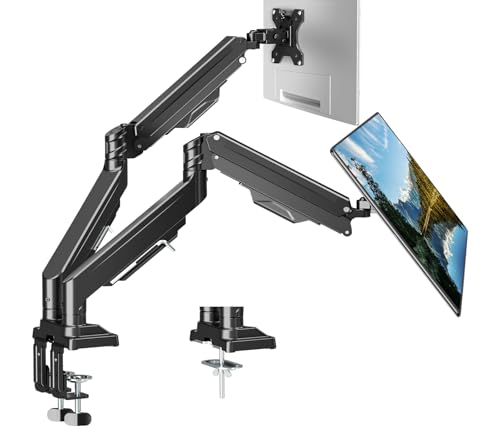
For those seeking a robust solution for their workspace, the Dual Monitor Mount for screens up to 43″ stands out with its heavy-duty construction that can support two monitors weighing between 2.2 and 33 lbs each. This mount fits a variety of screen sizes, including flat and curved displays, and offers dual mounting options. With an upgraded tilting head design and a tested internal gas spring, you can easily adjust your monitors for ideal viewing angles. Plus, it frees up 50% more desk space and features integrated cable management, ensuring your workspace remains organized and efficient.
Best For: Professionals and gamers seeking a sturdy and adjustable dual monitor setup to enhance productivity and comfort in their workspace.
Pros:
- Heavy-duty construction supports a wide range of monitor sizes and weights, ensuring stability.
- Flexible gas spring design allows for easy adjustments in tilt, swivel, and rotation for optimal viewing angles.
- Integrated cable management system helps keep your workspace tidy and organized, maximizing desktop space.
Cons:
- May require additional assembly time and effort, especially for those unfamiliar with mounting equipment.
- Larger monitors may take up significant desk space, even with a mount, depending on the desk’s configuration.
- Limited to desks within the specified thickness range for mounting options, which may not suit all setups.
ARES WING Dual Monitor Arm Desk Mount for 17-49 Inch Monitors

If you’re looking to elevate your workspace with enhanced ergonomics and flexibility, the ARES WING Dual Monitor Arm Desk Mount is the perfect solution for anyone using 17-49 inch monitors, including ultrawide and 1000R curved models. Each arm supports up to 44 lbs, ensuring stability for your heavy displays. You can easily adjust the height, tilt, and swivel for ideal viewing angles. Plus, it frees up valuable desk space while keeping your cables organized. With durable steel and aluminum construction, it promises reliability. Installation is straightforward, thanks to versatile mounting options and clear instructions. Get ready to transform your setup!
Best For: Those seeking an ergonomic and flexible dual monitor setup for work or gaming with large displays.
Pros:
- Supports a wide range of monitor sizes from 17 to 49 inches, including ultrawide and curved models.
- Adjustable features such as tilt, swivel, and height ensure optimal viewing angles for comfort.
- Durable construction from premium materials guarantees longevity and stability for heavy monitors.
Cons:
- Requires VESA compatibility for non-VESA monitors, which may necessitate additional adapters.
- Installation may vary in complexity depending on the desk setup and chosen mounting option.
- Weight capacity per arm is limited to 44 lbs, which may not accommodate all monitor combinations.
MSI MPG MT201DR V2 Dual Monitor Stand Arms

The MSI MPG MT201DR V2 Dual Monitor Stand Arms stand out as an excellent choice for gamers and professionals seeking a blend of functionality and aesthetics. Supporting screens from 17 to 35 inches and weighing up to 44 lbs each, these arms are built to last with a heavy-duty design. You’ll appreciate the VESA compatibility for various monitor types and the vibrant RGB lighting that elevates your workspace’s style. Installation is a breeze, thanks to clamp and grommet options. Plus, with full adjustability for tilt, swivel, and rotation, you’ll achieve the perfect ergonomic setup for comfortable viewing.
Best For: Gamers and professionals looking for a durable and aesthetically pleasing dual monitor setup.
Pros:
- Supports a wide range of monitor sizes (17-35 inches) and weight capacities (up to 44 lbs each).
- Fully adjustable tilt, swivel, and rotation for optimal ergonomic comfort.
- Vibrant RGB lighting enhances workspace aesthetics and personalization.
Cons:
- The installation may require additional tools for some users.
- RGB lighting may not appeal to everyone’s taste.
- Limited to VESA-compatible monitors only (75×75, 100×100 mm).
PUTORSEN Dual Monitor Arm for Ultrawide Screens

PUTORSEN’s Dual Monitor Arm is perfect for professionals who rely on ultrawide screens, such as programmers, streamers, and day traders. Supporting monitors from 17 to 49 inches, this arm holds up to 44 lbs per screen, accommodating two 35-inch monitors side-by-side or stacking two 49-inch monitors vertically. With full motion capabilities, you can easily tilt, swivel, and adjust heights using a gas spring system. Constructed from premium aluminum and steel, it’s durable and installs in about 15 minutes without tools. Plus, hidden cable channels keep your workspace tidy while elevating monitors to reduce neck strain.
Best For: Professionals who use ultrawide screens, such as programmers, streamers, and day traders, seeking an ergonomic and space-saving solution.
Pros:
- Supports a wide range of monitor sizes from 17 to 49 inches with a maximum weight capacity of 44 lbs per screen.
- Features full motion capabilities including tilt, swivel, and height adjustment for customizable viewing angles.
- Tool-free installation and durable construction ensure a quick setup and long-lasting performance.
Cons:
- Requires monitors to have VESA mounting holes; incompatible with non-VESA screens.
- The base does not include USB/Type-C ports for additional connectivity.
- May take up more desk space in certain configurations compared to single monitor setups.
Dual Monitor-Arm Ultrawide Heavy Duty Adjustable Stacked Double Monitor Mount

For professionals and gamers alike, the Dual Monitor-Arm Ultrawide Heavy Duty Adjustable Stacked Double Monitor Mount stands out with its ability to support both flat and curved screens ranging from 24 to 57 inches. With a maximum load of 59.4 lbs per screen, it’s built to handle heavy displays effortlessly. The stacked design optimizes small spaces, making it perfect for compact offices or apartments. You’ll appreciate the fully adjustable features, allowing for swivel, tilt, and rotation for the best viewing angles. Plus, the quick-release VESA plate simplifies installation, ensuring a hassle-free setup. Enjoy a cleaner workspace with its effective cable management system.
Best For: Professionals and gamers seeking an efficient and space-saving solution for dual monitor setups.
Pros:
- Supports a wide range of monitor sizes from 24 to 57 inches, accommodating both flat and curved screens.
- Fully adjustable features including swivel, tilt, and rotation for optimal viewing angles.
- Effective cable management system helps maintain a clean and organized workspace.
Cons:
- May require additional adapters for some ultrawide monitors to fit VESA mounting specifications.
- Installation may be tricky for users unfamiliar with mounting hardware and setup procedures.
- Limited to desk thicknesses between 0.39 to 1.97 inches, which may not fit all desk types.
MOUNTUP Dual Monitor Mount for 27 to 42 inch Screens

Looking to enhance your workstation with a versatile solution? The MOUNTUP Dual Monitor Mount is perfect for screens ranging from 27 to 42 inches, supporting up to 33lbs per arm. It accommodates both flat and curved displays from brands like Samsung and LG. With a full range of motion, you can tilt, swivel, and rotate your monitors for ideal viewing. Installation is a breeze with C-clamp or grommet mounting options, taking just 10 minutes. Plus, it helps declutter your desk by organizing cables. Experience stability and style, and transform your office or gaming setup efficiently.
Best For: Those looking to optimize their workspace with dual monitor setups, whether for office tasks or gaming.
Pros:
- Full range of motion: Allows for optimal viewing angles with tilt, swivel, and rotation capabilities.
- Easy installation: Quick assembly in just 10 minutes with flexible mounting options.
- Space-saving design: Organizes cables and frees up valuable desktop space.
Cons:
- Weight limit: Each arm only supports up to 33lbs, which may not accommodate heavier monitors.
- Size compatibility: Limited to screens between 27 to 42 inches, excluding smaller or larger monitors.
- Potential stability concerns: Heavier monitors may require additional support mechanisms to ensure stability.
MOUNTUP Dual Monitor Stand for Max 43 inch Screens

The MOUNTUP Dual Monitor Stand is ideal for professionals and gamers who utilize large screens, supporting monitors up to 43 inches. Each arm holds between 2.2 to 33 lbs, making it compatible with various brands like Samsung, Dell, and LG. You’ll appreciate the full motion articulation, allowing 360° rotation and 180° swivel, plus easy height and extension adjustments. With an upgraded anti-sag design and integrated cable management, it keeps your workspace clean and organized. Installation is quick and tool-free, with both C-clamp and grommet mount options, ensuring you’ll have your setup ready in no time.
Best For: Professionals and gamers who require a versatile and ergonomic dual monitor setup for large screens.
Pros:
- Supports a wide range of monitor sizes up to 43 inches, accommodating various brands and styles.
- Full motion articulation allows for easy adjustments, improving comfort and reducing strain during extended use.
- Quick and tool-free installation with multiple mounting options, making setup efficient and hassle-free.
Cons:
- Weight limit per arm may not be suitable for some heavier monitors, limiting compatibility.
- Requires desk space for mounting, which may not be ideal for all work environments.
- Gas spring mechanism could require occasional adjustments for optimal performance over time.
Factors to Consider When Choosing Premium Dual Monitor Arms for Heavy Displays
When you’re choosing premium dual monitor arms for heavy displays, you need to take into account several key factors. First, check the weight capacity and monitor size compatibility to ascertain a proper fit. Then, look at adjustability features, stability, durability, and installation options to find the best solution for your setup.
Weight Capacity Requirements
Choosing the right dual monitor arm hinges on understanding its weight capacity requirements, especially if you’re using heavy displays. First, verify the arm can support the combined weight of your monitors; many premium models range from 19.8 lbs to 44 lbs per arm. Check individual arm limits—some hold up to 26.4 lbs each, while others cater to heavier displays. Consider your entire setup’s weight, as heavier monitors need sturdier arms with reinforced designs to avoid sagging. Look for monitor arms tested for durability and stability through fatigue testing, confirming they’ll handle the required weight over time. Finally, pay attention to VESA mounting pattern compatibility, as this impacts your ability to securely attach those heavier displays.
Monitor Size Compatibility
Finding the right monitor size compatibility is essential for maximizing the effectiveness of your dual monitor setup. Most premium dual monitor arms support screens ranging from 13 to 49 inches, so you can choose the size that fits your needs. Be sure to check the weight capacity; many arms can hold between 4.4 to 44 lbs per arm, providing stability for heavier displays. VESA compatibility is also vital, as most arms accommodate standard mounting patterns of 75x75mm and 100x100mm for easy attachment. If you’re considering ultrawide monitors, look for arms designed to support screens up to 57 inches. Keep in mind the maximum height adjustment and arm extension, which can vary greatly to enhance your viewing experience.
Adjustability Features
To guarantee you get the most out of your dual monitor setup, consider the adjustability features of premium monitor arms. Look for arms that offer full motion capabilities, including tilt, swivel, and rotation adjustments. This flexibility helps you achieve ideal viewing angles and reduces neck strain. Evaluate the maximum height adjustment and arm extension to enhance comfort for users of varying heights and desk setups. Smooth adjustments through gas spring technology make repositioning effortless. Stacking options for vertical alignment of monitors provide additional flexibility in arranging your displays. Finally, verify the monitor arm is compatible with different VESA mounting patterns to accommodate various monitor sizes and styles effectively.
Stability and Durability
While you may be focused on adjustability and features, stability and durability are equally essential when selecting premium dual monitor arms, especially for heavier displays. Start by checking the weight capacity; many models can securely hold up to 44 lbs per arm. Look for arms made from premium-grade materials like steel and aluminum for long-lasting strength. Design matters too—dual C-clamps and robust grommet mounts can greatly enhance stability by firmly attaching the arm to your desk. Additionally, consider models that have undergone extensive testing, such as over 20,000 cycles, to guarantee reliability. An upgraded tilting head design helps prevent monitor sagging, providing ideal viewing angles while enhancing overall stability.
Installation Options
When choosing premium dual monitor arms for heavy displays, considering the installation options is critical to guarantee a secure and efficient setup. Look for mounting options like C-clamp or grommet mounts that fit your desk’s thickness, which can range from 0.39 to 3.54 inches. Make sure the installation process is straightforward, featuring quick-release VESA plates and clear instructions that eliminate the need for extensive tools. Verify that the mounting hardware includes all necessary components, as some models come with tools to simplify setup. Additionally, opt for designs that allow for flexible configurations, such as top-side mounting bases, to enhance accessibility and ease of use. This way, you’ll achieve a stable and functional workspace.
Cable Management Solutions
Effective cable management is vital for maintaining a clutter-free workspace, especially when using premium dual monitor arms for heavy displays. Many of these arms feature built-in cable management systems that conceal and route cables, preventing tangling and damage. This not only keeps your workspace organized but also enhances safety by reducing tripping hazards and protecting your cables from wear. Look for models with dedicated channels or clips designed for power and data cables, making it easier to maintain a tidy setup. Utilizing these solutions can also help you achieve a professional aesthetic, important in client-facing offices or during video conferencing. Fundamentally, good cable management enhances both functionality and appearance in your workspace.
Ergonomic Design Benefits
Choosing premium dual monitor arms for heavy displays can greatly enhance your workspace’s ergonomics, especially if you spend long hours in front of a screen. With height adjustment features, you can raise your monitors to eye level, reducing neck and shoulder strain. The ability to tilt and swivel screens allows you to find comfortable viewing angles, preventing eye fatigue and improving posture. Gas spring mechanisms make it easy to adjust your monitors with minimal effort, accommodating different tasks or preferences quickly. Additionally, integrated cable management keeps your workspace tidy, enhancing focus and reducing distractions. The flexibility to rotate screens from landscape to portrait mode further supports an ergonomic setup, boosting your comfort and productivity.
