
When you’re looking to maximize your AMD Threadripper’s performance, choosing the right CPU cooler is essential. With so many options on the market, it can be hard to narrow it down. You’ll want a cooler that balances efficiency, noise levels, and aesthetics. In this guide, we’ll explore ten top contenders that stand out in relation to compatibility and performance. Let’s see which ones might suit your needs best.
Noctua NH-U14S TR5-SP6 CPU Cooler for AMD Threadripper and Epyc 8004

If you’re an AMD Threadripper or Epyc 8004 user looking for a top-tier cooling solution, the Noctua NH-U14S TR5-SP6 CPU cooler is designed just for you. This premium 140mm cooler features six heatpipes and a quiet NF-A15 fan, ensuring efficient cooling even under heavy loads. With idle temperatures around 35°C and full load at 71°C, it keeps your processor stable without throttling. Installation is straightforward with the included mounting tool, although it requires a full-tower case. While some users find it less attractive, the cooling performance makes it a top choice for serious users seeking reliability.
Best For: Users of AMD Threadripper and Epyc 8004 processors who prioritize efficient cooling and quiet operation.
Pros:
- Excellent cooling performance, maintaining low temperatures under heavy loads.
- Quiet operation thanks to the NF-A15 fan and efficient airflow design.
- Easy installation process with a user-friendly mounting tool.
Cons:
- Requires a full-tower case due to size constraints.
- Some users report issues with bent fins on the heatsink.
- Aesthetics may not appeal to everyone, as it is considered less attractive by some.
Noctua NH-U9 TR4-SP3 Premium CPU Cooler for AMD

The Noctua NH-U9 TR4-SP3 Premium CPU Cooler is the ideal choice for AMD’s Ryzen Threadripper and Epyc users seeking exceptional cooling performance in a compact design. This award-winning cooler, tailored specifically for the sTRX4, TR4, and SP3 platforms, boasts a 92mm size that guarantees maximum case and PCIe compatibility. With two quiet NF-A9 92mm fans and PWM for automatic speed control, it delivers outstanding cooling while maintaining low noise levels. You can trust Noctua’s renowned quality and reliability, making this cooler a deluxe option for high-performance CPUs like the 3990X and Epyc 7003 series.
Best For: Users of AMD Ryzen Threadripper and Epyc CPUs seeking a compact, high-performance cooling solution.
Pros:
- Award-winning design with over 300 accolades for performance and reliability.
- Quiet operation thanks to two premium-grade NF-A9 92mm fans with PWM speed control.
- Compact size ensures optimal case and PCIe compatibility, making it ideal for space-constrained builds.
Cons:
- Limited to AMD platforms, specifically sTRX4, TR4, and SP3, which may not suit users with other CPU brands.
- 92mm fan size may not provide as much cooling capacity compared to larger coolers for extreme overclocking.
- Price premium compared to some budget coolers, which may deter cost-sensitive buyers.
Noctua NH-D9 TR5-SP6 CPU Cooler for AMD Threadripper and Epyc 8004

Designed specifically for AMD Threadripper and Epyc 8004 CPUs, the Noctua NH-D9 TR5-SP6 CPU cooler stands out with its compact 92mm size, making it an ideal choice for users who need excellent PCIe compatibility in tight spaces, such as 4U server environments. With a dual tower design and four heatpipes, it delivers impressive cooling performance. The push/pull fan configuration guarantees peak airflow, and the pre-applied NT-H2 thermal compound simplifies installation. While users appreciate its quiet operation, some report it struggles under heavy loads, suggesting it’s best suited for moderate workloads or noise-sensitive applications.
Best For: Users seeking a compact and quiet cooling solution for AMD Threadripper and Epyc 8004 CPUs, especially in 4U server environments.
Pros:
- Excellent PCIe compatibility due to its compact 92mm size.
- Quiet operation even under load, making it suitable for noise-sensitive applications.
- Easy installation with pre-applied NT-H2 thermal compound and included mounting tool.
Cons:
- May struggle to provide adequate cooling for high-performance CPUs under heavy loads.
- Mixed reviews regarding product condition, with reports of receiving used items sold as new.
- Some users transitioned to liquid cooling solutions due to inadequate performance for high-core-count CPUs.
Noctua NH-U12S TR4-SP3 Premium-Grade CPU Cooler for AMD

For those seeking exceptional cooling performance for their AMD Threadripper or Epyc processors, the Noctua NH-U12S TR4-SP3 stands out as a premium-grade solution. Designed specifically for sTRX4/TR4/SP3 platforms, this 120mm air cooler features a quiet NF-F12 fan with PWM, operating at a mere 22.4 dB. Its copper base and heat pipes, combined with nickel-plated aluminum cooling plates, guarantee efficient heat dissipation. Weighing just 1.76 pounds, it won’t weigh down your build. With over 200 awards and a solid 4.4-star rating, you can trust the NH-U12S TR4-SP3 for reliable, high-performance cooling.
Best For: Enthusiasts and professionals using AMD Threadripper or Epyc processors who require efficient and quiet cooling solutions.
Pros:
- Exceptional cooling performance tailored specifically for high-end AMD platforms.
- Low noise level at 22.4 dB, ensuring a quiet computing environment.
- Lightweight design at 1.76 pounds, making it easy to install without adding significant weight to the build.
Cons:
- Limited compatibility as it is designed exclusively for AMD sTRX4/TR4/SP3 platforms.
- May not fit in compact cases due to its dimensions (4.92L x 2.83W x 6.22H inches).
- Higher price point compared to standard air coolers, which might not suit all budgets.
Cooler Master Wraith Ripper CPU Cooling System

Engineered specifically for AMD Ryzen Threadripper CPUs, the Cooler Master Wraith Ripper CPU Cooling System stands out with its dual tower heatsink design and seven heat pipes, making it an ideal choice for gamers and content creators seeking reliable performance under heavy loads. The 120mm SERVO fan efficiently balances noise and airflow, maintaining CPU temperatures around 70°C during intense tasks. Installation is user-friendly, thanks to the TR4 mounting system, though verify your case has enough space. With customizable ARGB lighting, it adds visual flair, receiving positive feedback for both aesthetics and cooling performance compared to liquid solutions.
Best For: Gamers and content creators seeking reliable air cooling performance for AMD Ryzen Threadripper CPUs under heavy loads.
Pros:
- Dual tower heatsink design and seven heat pipes for efficient heat dissipation.
- Quiet operation with a 120mm SERVO fan, maintaining low noise levels even at high speeds.
- Customizable ARGB lighting adds aesthetic appeal and can be synchronized with compatible motherboards.
Cons:
- Installation may pose challenges due to size constraints in some PC cases.
- Mixed effectiveness compared to liquid cooling solutions, with some users finding it less satisfactory.
- Potential interference with motherboards or RAM due to its size.
Cooler Master MAM-D7PN-DWRPS-T1 AMD Wraith Ripper by
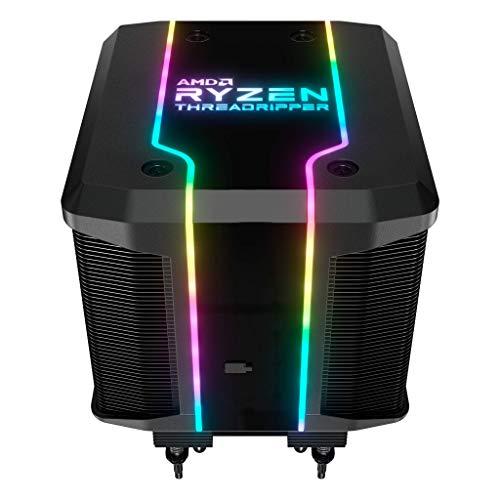
The Cooler Master MAM-D7PN-DWRPS-T1 AMD Wraith Ripper stands out as a top choice for those looking to maximize performance from their Ryzen Threadripper CPUs. Designed specifically for Socket TR4, it features a dual tower heatsink with a seven heatpipe array for exceptional thermal conductivity. You’ll appreciate the jet black paint that enhances cooling efficiency. With idle temperatures between 27-32°C and load temperatures around 56-60°C, it keeps your CPU cool under heavy loads. Installation is a breeze with its all-in-one mounting design, and customizable RGB lighting adds a stylish touch to your setup.
Best For: Enthusiasts and gamers seeking high-performance cooling solutions for their Ryzen Threadripper CPUs.
Pros:
- Dual tower heatsink with seven heatpipes enhances thermal conductivity for effective cooling.
- Easy installation with all-in-one TR4 mounting design eliminates the need for additional brackets.
- Customizable RGB lighting adds aesthetic appeal to any desktop setup.
Cons:
- Some users reported fan orientation issues affecting airflow at factory installation.
- Requires an open USB header for RGB lighting, which may limit compatibility.
- Noise level may reach 38 dB at maximum RPM, which could be noticeable in quiet environments.
Noctua NH-U9S, Premium CPU Cooler with NF-A9 92mm Fan (Brown)

Designed for compact builds, the Noctua NH-U9S is an ideal choice for users with HTPCs, ITX, or Small Form Factor setups who still demand exceptional cooling performance. Its single-tower design stands at just 125mm, allowing it to fit without overhanging RAM or PCIe slots. The optimized NF-A9 92mm fan offers PWM support and quiet operation, especially when using the included Low-Noise Adaptor. Installation is a breeze thanks to the SecuFirm2 mounting system, compatible with various Intel and AMD sockets. With a stellar 4.8-star rating and a 6-year warranty, you’ll enjoy quality and peace of mind.
Best For: Users seeking a compact and efficient CPU cooler for HTPCs, ITX, or Small Form Factor builds without compromising on cooling performance.
Pros:
- Excellent cooling performance in a compact design, suitable for tight spaces.
- Extremely quiet operation with PWM support and Low-Noise Adaptor.
- Easy installation with the SecuFirm2 mounting system, compatible with multiple Intel and AMD sockets.
Cons:
- Limited height clearance may not accommodate larger components or enhance overclocking potential.
- The 92mm fan size may not provide as much airflow as larger fans in more extensive cooling setups.
- Premium pricing compared to some budget alternatives in the market.
be quiet! Pure Rock Pro 3 Black CPU Air Cooler

For those seeking a powerful yet elegant cooling solution for their Threadripper CPUs, the be quiet! Pure Rock Pro 3 Black CPU Air Cooler stands out. Its six copper heat pipes and nickel-plated base guarantee exceptional cooling, even during intense overclocking. The 120mm PWM fan provides optimized airflow while maintaining a near-silent operation. Installation is straightforward thanks to a user-friendly mounting kit, compatible with various AMD and Intel sockets. Users report significant temperature drops, enhancing performance. With its sleek design and efficient cooling capabilities, the Pure Rock Pro 3 is an excellent choice for balancing aesthetics and functionality in your PC build.
Best For: Those looking for a high-performance CPU cooler that combines efficient cooling with a stylish design for their gaming or workstation builds.
Pros:
- Excellent Cooling Performance: Features six copper heat pipes and a 120mm PWM fan, effectively reducing CPU temperatures even under heavy loads.
- Quiet Operation: Operates near-silently, providing a quiet computing experience compared to stock coolers.
- User-Friendly Installation: Comes with a straightforward mounting kit compatible with various AMD and Intel sockets, making installation easy.
Cons:
- Size Limitations: While it has a compact double-tower design, it may still be too large for very small cases.
- Fan Speed Adjustments Required: Users may need to manually adjust fan speeds for optimal performance based on their specific setups.
- Limited RGB Options: Lacks RGB lighting features that some users may prefer for aesthetic customization.
Noctua NH-L9x65, Premium Low-Profile CPU Cooler (65mm, Brown)
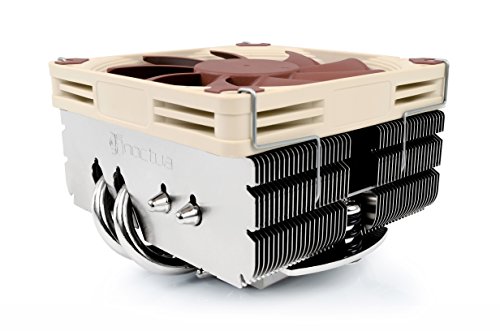
Looking for a compact solution that won’t overshadow your RAM or PCIe slots? The Noctua NH-L9x65 is your ideal choice. Standing at just 65mm tall, this premium low-profile cooler fits seamlessly into HTPCs and small form factor builds. It’s compatible with a variety of Intel and AMD CPUs, effectively managing low to moderate heat dissipation. The NF-A9x14 slim fan operates quietly at 23.6 dB, ensuring a peaceful computing experience. With a solid customer rating of 4.7 out of 5 stars, it also includes high-end thermal paste for peak performance. Enjoy reliable cooling without compromising space!
Best For: Users looking for a compact and efficient cooling solution for low to moderate heat dissipation CPUs in small form factor builds.
Pros:
- Compact Design: The 65mm height allows for compatibility with most RAM and PCIe slots.
- Quiet Operation: The NF-A9x14 fan operates at a low noise level of just 23.6 dB for a serene computing environment.
- High Customer Satisfaction: With a rating of 4.7 out of 5 stars from nearly 3,000 ratings, it reflects strong reliability and performance.
Cons:
- Limited Cooling Capacity: Not suitable for high heat dissipation CPUs, which may require more powerful cooling solutions.
- Brown Color: The unique color may not match all aesthetic preferences for custom builds.
- Weight: At 14.6 ounces, it may be heavier than some other low-profile coolers on the market.
Noctua NH-L9x65 chromax.Black, Premium Low-Profile CPU Cooler (65mm, Black)

The Noctua NH-L9x65 chromax.Black is an excellent choice for compact builds like HTPCs and ITX systems, where space is at a premium. Its low-profile design, standing just 65mm tall, guarantees compatibility with RAM and PCIe slots. You’ll appreciate the sleek all-black finish that blends seamlessly into modern setups. The optimized NF-A9x14 fan offers quiet operation while effectively cooling CPUs with low to moderate heat output. Plus, with the SecuFirm2 mounting system, you’ll find installation and maintenance hassle-free. It’s an ideal companion for CPUs like the AMD Ryzen 7950X3D and Intel LGA1700, assuring reliable performance in tight spaces.
Best For: Users looking for a compact and efficient cooling solution for low to moderate heat CPUs in small form factor builds.
Pros:
- Low-profile design fits easily in tight spaces without interfering with RAM and PCIe slots.
- Quiet operation thanks to the optimized NF-A9x14 fan and Low-Noise Adaptor for automatic speed control.
- Easy installation and maintenance with the SecuFirm2 mounting system.
Cons:
- Limited cooling capability for high-performance CPUs with higher heat dissipation.
- Height restriction of 65mm may not suit larger CPU cooling needs.
- All-black design might not appeal to users preferring more colorful or customizable aesthetics.
Factors to Consider When Choosing Premium CPU Coolers for Threadripper
When you’re choosing a premium CPU cooler for your Threadripper, you’ll want to reflect on several key factors. Cooling performance metrics, size compatibility, and noise levels are essential for ensuring peak performance. Don’t forget to take into account installation ease and aesthetic design options to match your build.
Cooling Performance Metrics
Choosing a premium CPU cooler for your Threadripper involves understanding key cooling performance metrics that directly impact your system’s efficiency and reliability. Effective coolers maintain idle temperatures around 35-45°C and keep full load temperatures below 85°C. Pay attention to the number of heat pipes and heatsink design, as more pipes and innovative designs enhance heat dissipation. Noise levels also matter; look for coolers operating quietly between 22-38 dB while providing sufficient airflow. Additionally, consider the fan’s maximum RPM, typically ranging from 1500 to 2500 RPM, which affects both cooling performance and noise output. Finally, during stress tests, confirm that the cooler can maintain stable temperatures below 70°C under heavy loads to prevent throttling and guarantee CPU reliability.
Size and Compatibility
Finding the right size and ensuring compatibility of your CPU cooler are essential steps in optimizing your Threadripper build. Larger coolers often require full-tower cases, so double-check your case dimensions before purchasing. You’ll also need to make sure the cooler fits your motherboard and doesn’t obstruct RAM or PCIe slots; both height and width matter here. Pay attention to the cooler’s orientation, as proper mounting aligns it with your chassis’ exhaust fans for effective airflow. If you’re working with a smaller form factor build, consider compact designs that enhance PCIe compatibility. Finally, keep in mind clearance requirements, as some models might block airflow to components like SSDs or GPUs without careful planning.
Noise Levels Consideration
While selecting a premium CPU cooler for your Threadripper, noise levels play a crucial role, especially if you’re aiming for a quiet computing environment. Noise levels are measured in decibels (dB), so look for coolers with lower dB ratings for quieter operation. Premium models often utilize advanced fan technologies like PWM, allowing for automatic speed adjustments that reduce noise during idle or low-load situations. Additionally, consider the cooler’s design; larger fans generally run more quietly than smaller ones at similar airflow rates. User feedback highlights the importance of balancing cooling performance with minimal acoustic output. Some coolers are engineered to minimize turbulence and vibration, making them ideal for silence-sensitive setups.
Installation Ease
How smoothly can you install a premium CPU cooler for your Threadripper? The ease of installation is vital. Look for coolers with user-friendly mounting systems that simplify the setup process, saving you time and effort. Many top-tier options come with pre-applied thermal compound, ensuring efficient thermal transfer without any extra hassle. Installation tools or guides can be incredibly helpful, especially if you’re not a hardware pro. Don’t forget to check your PC case’s space; some coolers are quite large and may interfere with other components like RAM or PCIe slots. Finally, consider coolers with an offset mounting design, as they offer better clearance for easier installation and future maintenance.
Aesthetic Design Options
Once you’ve tackled the installation of your premium CPU cooler for Threadripper, the next consideration is its aesthetic design. Many coolers now feature customizable RGB lighting, letting you personalize your setup to match your style. You can choose from various color schemes, like classic brown and beige or sleek all-black finishes, to complement your PC. Some models boast dual tower designs or unique fan structures that enhance visual appeal. Pay attention to the materials as well; polished aluminum or nickel-plated copper not only look great but also speak to the quality of craftsmanship. Finally, consider the size and shape—low-profile options lend a streamlined look, while larger models can become striking focal points in high-performance builds.
Thermal Compound Quality
When selecting a premium CPU cooler for your Threadripper, the quality of the thermal compound is vital for peak performance. High-quality compounds improve heat transfer efficiency between the CPU and cooler, directly impacting cooling performance and temperature management. Look for thermally conductive compounds with low thermal resistance, as they enhance contact and minimize air gaps. Many premium coolers come with pre-applied thermal compounds designed for ideal heat dissipation, which simplifies installation. Consider the temperature stability and longevity of the compound, as those that maintain effectiveness across a broader temperature range are significant for high-performance CPUs. Over time, some compounds may degrade, leading to higher temperatures and potential throttling during heavy loads, so choose wisely.
Airflow Directionality
Airflow directionality plays a critical role in the performance of your premium CPU cooler for Threadripper. It’s crucial that the cooler’s airflow aligns with your case’s exhaust fans to maximize heat dissipation. Ideally, you want airflow to be perpendicular to the socket’s long axis, enhancing the effectiveness of those exhaust fans. If the airflow is directed improperly, you risk heat buildup, which can negatively impact your CPU and other components. Some coolers are designed to mount in specific orientations to guarantee ideal airflow while preventing interference with components like GPUs and RAM. By confirming your cooler’s airflow complements your case’s design, you can achieve stable temperatures, especially during high-load scenarios.
Price-to-Performance Ratio
Choosing a premium CPU cooler for your Threadripper involves more than just considering airflow directionality; the price-to-performance ratio is a key factor that can greatly impact your build. You’ll want a cooler that effectively maintains ideal temperatures under load, ideally keeping idle temps around 35°C and full load below 85°C. Look for models that balance cost with noise levels; quieter coolers often justify a higher price when they deliver excellent thermal performance. Don’t overlook durability, as quality materials and a reputable brand can enhance long-term value. Features like automatic speed control, pre-applied thermal paste, and easy installation can also improve the perceived value, making them worth the investment for your high-core-count CPU.
