
The best premium computer trackballs make cursor control more comfortable without requiring constant wrist movement. They are especially useful for busy desktops, compact workspaces, and users managing long hours of browsing, design, or office work.
This roundup compares ten notable options across thumb-operated and finger-operated designs, wireless and wired connections, programmable controls, adjustable angles, and rechargeable power. Use the guide below to narrow the selection by comfort, compatibility, and workflow.
Best 10 Premium Computer Trackballs Picks for 2026
Best Ergonomic Upgrade

- 20-degree ergonomic tilt
- Bluetooth and Logi Bolt wireless
- USB-C quick charging
Best For: Medium- to large-handed productivity users
Best Ambidextrous Choice

- Ambidextrous low-profile design
- Bluetooth, 2.4GHz, and wired modes
- Four-month rechargeable battery
Best For: Shared desks and left- or right-handed users
Best Wired Value
- Ambidextrous stationary design
- USB and PS/2 wired connectivity
- Four programmable buttons
Best For: Simple, battery-free desktop setups
Best Streamlined MX Model

- Ergonomic trackball design
- Bluetooth wireless connectivity
- Eight-button control layout
Best For: Users wanting a black MX Ergo S with Bluetooth
Most Versatile Premium Trackball

- 52mm ergonomic ball with smooth, precise control
- Tri-mode connectivity for up to three devices
- 10 programmable buttons and up to five months per charge
Best For: Right-handed power users and multi-device workstations
Best Wired Comfort
- Large 55mm ball with optical tracking
- Scroll ring and detachable wrist rest
- Ambidextrous wired USB-A design
Best For: Shared desks and users who prefer reliable wired control
Best Adjustable Wireless Design

- Adjustable 0°, 20°, or 30° hand position
- Precision mode and tilt-enabled scroll wheel
- Easy-Switch and FLOW for two-computer workflows
Best For: Right-handed professionals managing multiple computers
Best Adjustable Premium Trackball

- Adjustable 0°/18° ergonomic tilt
- Three-device wireless connectivity
- Rechargeable, quiet, and up to 4800 DPI
Best For: Right-handed users seeking customizable ergonomics and multi-device flexibility
Best Business Premium Trackball

- Sculpted ergonomic right-handed design
- Up to 18 months from one AA battery
- Software support for tracking and shortcuts
Best For: Office users and business deployments prioritizing comfort and reliability
Best Value Premium Trackball

- Rechargeable multi-device wireless design
- Four DPI levels and six buttons
- Comfortable for tight or unusual workspaces
Best For: Users seeking simple rechargeable convenience and multi-device connectivity
Best Ergonomic Upgrade – Logitech MX Ergo S
The Logitech MX Ergo S is a strong choice among premium computer trackballs for users who want wireless flexibility, thumb-controlled precision, and an ergonomic tilted design. Its rechargeable battery, quiet clicks, and customizable controls suit demanding office workflows.
Best For: Medium- to large-handed users seeking a comfortable, feature-rich wireless trackball for work.
Pros:
- 20-degree tilt and sculpted grip support a more comfortable forearm position.
- Bluetooth and Logi Bolt connectivity offer flexible wireless setup.
- Six customizable buttons and Smart Actions can streamline repetitive tasks.
- USB-C charging provides up to 24 hours of use from a one-minute charge.
Cons:
- Right-handed design is not suitable for left-handed users.
- Charging cable is not included.
- Some advanced customization requires the Logi Options+ app.
With its combination of ergonomic shaping, quiet operation, and extensive customization, the MX Ergo S is a polished premium option for productivity-focused users.
Best Ambidextrous Choice – Kensington SlimBlade Pro
The Kensington SlimBlade Pro brings premium computer trackball versatility to shared workspaces and multi-device setups. Its ambidextrous low-profile body, large 55mm ball, and three connection modes make it adaptable for extended desktop use.
Best For: Right- or left-handed users who want rechargeable power and Bluetooth, wireless, or wired connectivity.
Pros:
- Ambidextrous, low-profile design supports extended use and saves desk space.
- Bluetooth, 2.4GHz wireless, and wired connections provide setup flexibility.
- Large 55mm ball and dual sensors are designed for accurate cursor control.
- Rechargeable battery lasts up to four months on a charge.
Cons:
- KensingtonKonnect software is required for button customization.
- Windows ARM-based computers are not currently supported.
- The supplied wireless dongle is USB-A, though an adapter is included.
The SlimBlade Pro is especially compelling when ambidextrous comfort and connection flexibility matter as much as tracking accuracy.
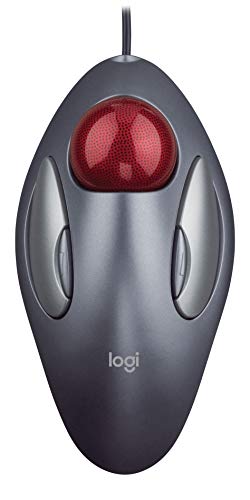
Best Wired Value – Logitech Trackman Marble
The Logitech Trackman Marble is a straightforward wired alternative in the premium computer trackballs category, emphasizing dependable plug-in operation and ambidextrous comfort. Its stationary design reduces arm movement while four programmable buttons add useful control.
Best For: Users who prefer a simple, corded trackball with left- and right-hand compatibility.
Pros:
- Ambidextrous shape supports either hand and stays stationary on the desk.
- Wired USB or PS/2 connectivity requires no battery charging.
- Four programmable buttons can be assigned to common tasks.
- Large Back/Forward buttons are convenient for browsing and documents.
Cons:
- Wired operation offers less desk flexibility than wireless models.
- The design is older and lacks modern rechargeable or Bluetooth features.
- Supplied compatibility notes mention older operating systems and a CD-ROM drive.
The Trackman Marble remains a practical pick for users who value uncomplicated wired reliability and ambidextrous ergonomics over newer wireless features.
Best Streamlined MX Model – Logitech MX Ergo S Black
The black Logitech MX Ergo S offers a streamlined premium computer trackball experience for users who want an ergonomic wireless design without a long list of setup details. It includes Bluetooth connectivity, eight buttons, and a rechargeable lithium-polymer battery.
Best For: Users seeking a compactly specified, right-hand-oriented MX Ergo S trackball in black.
Pros:
- Ergonomic design is intended to support comfortable trackball use.
- Bluetooth connectivity keeps the desktop free of a receiver.
- Eight buttons provide substantial control potential.
- Rechargeable lithium-polymer battery is included.
Cons:
- The supplied notes provide limited information about customization and charging.
- Bluetooth connectivity may be less suitable for setups requiring a USB receiver.
- Operating-system support listed in the notes is limited to ChromeOS and Windows 10.
This model is worth considering when the MX Ergo S form factor and black finish are the priority, but shoppers should confirm compatibility and included features before buying.
Most Versatile Premium Trackball – ELECOM Huge Plus
The ELECOM Huge Plus is a strong choice among premium computer trackballs for users who want a large, ergonomic ball, extensive customization, and flexible connectivity. Its 52mm ball, 10 programmable buttons, and tri-mode operation suit demanding office and multi-device setups.
Best For: Right-handed users who want maximum customization, quiet clicks, and Bluetooth, 2.4GHz, or wired connectivity.
Pros:
- Large 52mm ball supports precise, fluid control.
- Connects through Bluetooth, 2.4GHz wireless, or USB-C wired mode.
- Offers 10 programmable buttons and rechargeable battery life of up to five months.
- Swappable steel bearings and silent clicks add useful premium touches.
Cons:
- Its right-handed design is not ambidextrous.
- The large 291g body may take up substantial desk space.
- Full button customization is most relevant to users comfortable configuring software.
With broad device compatibility and unusually extensive controls, the Huge Plus is a feature-rich premium trackball for productivity-focused users who value flexibility over a compact footprint.
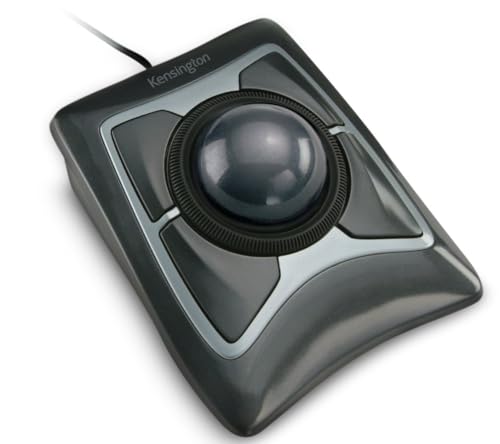
Best Wired Comfort – Kensington Expert Trackball
Kensington Expert Trackball Mouse (K64325), Black Silver, 5"W x 5-3/4"D x 2-1/2"H
Check Price On AmazonThe Kensington Expert Trackball is a dependable premium computer trackball for users who prefer a wired USB connection and an ambidextrous layout. Its 55mm ball, optical tracking, scroll ring, and detachable wrist rest emphasize controlled navigation and everyday comfort.
Best For: Shared workspaces and users who want an ambidextrous, wired trackball with a dedicated scroll ring.
Pros:
- Large 55mm ball and Diamond Eye optical tracking provide precise cursor control.
- Patented scroll ring makes long-page navigation convenient.
- Detachable wrist rest supports the hand and wrist.
- Four buttons and tracking settings can be customized through KensingtonKonnect on supported systems.
Cons:
- Wired USB-A connectivity offers no wireless option.
- ChromeOS users receive basic HID functions but cannot customize through KensingtonKonnect.
- Windows ARM-based computers are not currently supported by the software.
The Expert Trackball is a practical premium option when consistent wired performance, ambidextrous use, and ergonomic support matter more than wireless convenience or a large button count.
Best Adjustable Wireless Design – Logitech MX Ergo Plus
Logitech MX Ergo Plus Wireless Trackball | Extra 10-degree wedge, PC and Mac compatibility
Check Price On AmazonThe Logitech MX Ergo Plus is a premium computer trackball built around adjustable comfort and wireless productivity. Its adjustable hinge, precision mode, tilt-enabled scroll wheel, and multi-computer features make it well suited to users who spend long periods switching between systems.
Best For: Right-handed professionals who want adjustable hand positioning and an efficient two-computer workflow.
Pros:
- Adjustable hinge and wedge provide 0°, 20°, or 30° positioning options.
- Precision mode button quickly switches between speed and high-precision tracking.
- Easy-Switch and FLOW support work across two computers.
- Rechargeable battery lasts up to four months, with a one-minute quick charge providing up to a day of use.
Cons:
- Designed for right-handed use.
- Supports pairing with up to two computers rather than three.
- Its feature set is focused on personal-computer workflows and may be more than casual users need.
The MX Ergo Plus stands out for customizable tilt and seamless computer switching, making it a compelling premium trackball for comfort-focused desk setups and multi-computer users.
Best Adjustable Premium Trackball – SABLUTE MAM1 Pro
The SABLUTE MAM1 Pro stands out among premium computer trackballs for its adjustable 0° or 18° tilt, rechargeable design, and flexible wireless connectivity. Its thumb-operated ball keeps arm movement minimal, while five DPI settings accommodate different screens and tasks.
Best For: Right-handed users who want adjustable ergonomics, quiet clicks, and support for up to three devices.
Pros:
- Adjustable 0°/18° angle supports different wrist positions.
- Bluetooth and 2.4GHz connectivity allow switching among three devices.
- Rechargeable USB-C battery, adjustable DPI, and optional ambient backlight.
- Quiet-touch buttons suit offices and shared workspaces.
Cons:
- Right-hand design limits use for left-handed users.
- The driver is not compatible with Mac OS.
- New trackball users may need one to two weeks to adapt.
With eight buttons, up to 4800 DPI, and a built-in receiver compartment, this is a feature-rich choice for buyers prioritizing adjustability and multi-device convenience.
Best Business Premium Trackball – Logitech Ergo M575
The Logitech Ergo M575 is a practical premium computer trackball for office deployments and everyday productivity. Its sculpted right-handed shape, thumb control, and stationary design are suited to long work sessions and tight desks, while Logitech software adds cursor and shortcut customization.
Best For: Business users and employees who want a comfortable, dependable wireless trackball with long battery life.
Pros:
- Ergonomic shape is designed to encourage a relaxed hand and forearm posture.
- Works well on crowded desks because the mouse itself stays stationary.
- Up to 18 months of use from one included AA battery.
- Supports Logi Tune and Logi Options+ customization, plus Logitech Sync for deployment.
Cons:
- Only five buttons are provided.
- Maximum sensitivity is 2000 DPI.
- The design is intended for right-handed use.
The M575 favors proven office ergonomics and low-maintenance operation over rechargeable power or extensive hardware controls, making it a strong fit for business environments.
Best Value Premium Trackball – Nulea M501 Wireless Trackball
The Nulea M501 offers a straightforward premium computer trackball experience with thumb control, four DPI levels, and wireless support for up to three devices. Its rechargeable battery and compact-workspace design make it useful for desks, couches, beds, or other areas where moving a conventional mouse is difficult.
Best For: Right-handed users wanting a rechargeable multi-device trackball with dedicated back and forward buttons.
Pros:
- Thumb-operated ball reduces the need to move the wrist and arm.
- Bluetooth and USB dongle connections support up to three devices.
- Built-in rechargeable battery eliminates routine disposable battery replacement.
- Six-button layout includes convenient back and forward controls.
Cons:
- Buttons are not programmable.
- Charging requires the included cable and a standard USB port or 5V charger; fast chargers should not be used.
- Its listed wireless range is 10 meters.
The M501 is a sensible choice when multi-device switching and rechargeable convenience matter more than extensive button customization or advanced ergonomic adjustment.
How We Picked the Best Premium Computer Trackballs
We focused on the features that matter most in daily use: ergonomic shape, ball size and tracking behavior, connection options, button layout, software support, power design, and compatibility. The selection includes established models from Logitech, Kensington, and ELECOM alongside more affordable alternatives, so different users can compare premium features with overall value.
Because trackball comfort is highly personal, we considered both thumb-controlled designs and larger finger-operated layouts. We also gave weight to practical details such as Bluetooth and 2.4GHz support, wired fallback, rechargeable batteries, adjustable tilt, and programmable buttons.
Quick Comparison
| Best For | Look For |
|---|---|
| Office productivity | Comfortable thumb control, reliable wireless connectivity, and quiet operation |
| Large hands or precise control | Large central ball, broad palm support, and adjustable sensitivity |
| Multi-device work | Bluetooth, 2.4GHz wireless, device switching, or wired connectivity |
| Custom workflows | Programmable buttons and configuration software |
| Value-conscious buyers | Rechargeable power, usable DPI settings, and a stable ergonomic shape |
Key Buying Factors for Premium Computer Trackballs
Thumb or Finger Control
Thumb trackballs resemble conventional mice and are usually easy to learn. Finger-operated models place a larger ball near the center, which can offer smoother precision and reduce repetitive thumb movement. Choose based on hand comfort and the type of cursor work you do.
Shape, Tilt, and Hand Support
A good trackball should support the palm without forcing the wrist into an awkward position. Adjustable tilt can help users find a more natural angle, while larger bodies may suit broad hands but take up more desk space.
Connectivity and Power
Bluetooth is useful for laptops and tablets, while a 2.4GHz receiver can provide simple desktop reliability. A wired mode is valuable when charging, troubleshooting, or using a device without wireless support. Check whether the battery is rechargeable or replaceable and confirm the expected charging arrangement.
Buttons, DPI, and Software
Extra programmable buttons can streamline browser navigation, creative applications, and repetitive office tasks. Adjustable DPI or tracking sensitivity is helpful when switching between detailed selection and fast movement, but customization software may vary by operating system.
Who Should Buy Which Premium Computer Trackballs?
Choose a Logitech MX Ergo-style model if you want a familiar thumb-controlled design with strong office ergonomics and multi-device convenience. Consider a Kensington SlimBlade or Expert-style trackball if you prefer finger control, a central ball, and broad palm support for precise desktop work. ELECOM’s larger-ball approach is worth considering for users who want extensive button customization and multiple connection methods.
A wired Marble-style model suits buyers who value simplicity and do not need wireless charging or device switching. Adjustable-angle and rechargeable budget models can be practical for users testing the trackball format, while the Ergo M575 or Nulea M501 are sensible choices for straightforward everyday productivity. Before buying, verify hand fit, operating-system support, available desk space, and whether the button layout matches your most-used tasks.
