
Premium computer monitor arms can instantly improve posture, clear desk space, and make large screens feel easier to use day to day.
In this roundup, we focused on models built for heavier displays, wider adjustment ranges, and dependable mounting options.
Best 10 Premium Computer Monitor Arms Picks for 2026
Elite Ergonomics
Ergotron LX Single Monitor Arm

- Fits screens up to 34 inches and 25 lbs
- Clamp and grommet mounting included
- 13-inch lift with 360-degree rotation
Best For: Durable single-monitor setups with strong ergonomic adjustment
Ultra-Wide Control

- Supports large flat and curved monitors
- Mechanical spring with full adjustment range
- Clamp and grommet mounting available
Best For: Large-monitor setups that need precise movement and stability
Aluminum Motion
VIVO Premium Ultrawide Monitor Arm

- Fits most 17- to 40-inch ultrawide monitors
- Flat and curved support with strong load limits
- Clamp/grommet mounting and cable covers included
Best For: Ultrawide monitor users who want versatile full-motion adjustment
Precision Lift
HUANUO FlowLift Pro Monitor Arm

- Fits 13- to 32-inch VESA monitors
- Tool-free VESA plate speeds setup
- MechaSpring design aims for long service life
Best For: Ergonomic single-monitor workstations on compatible wood desks
Ultrawide Power
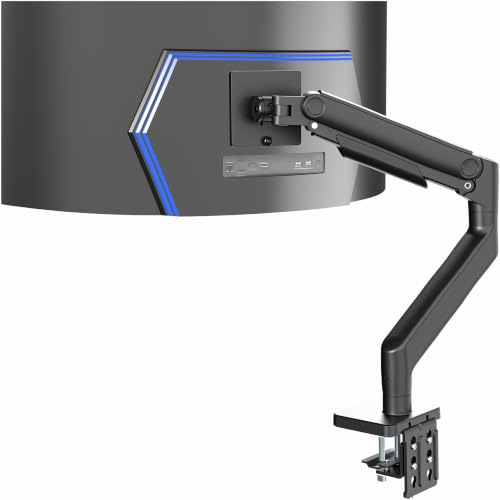
- Fits ultra-wide monitors up to 49 inches and 44 lbs
- Spring-assist tension arm supports ergonomic repositioning
- Includes cable management and detachable VESA plate
Best For: Ultra-wide monitor owners needing a heavy-duty single arm
Dual-Screen Flex

- Supports two monitors up to 35 inches and 44 lbs each
- Gas spring movement makes adjustments smooth
- Clamp or grommet mounting with reinforcement plate
Best For: Dual-monitor setups that need sturdy, easy repositioning
Sleek Single Mount

- Fits flat or curved monitors up to 34 inches and 22 lbs
- Tall pole provides up to 25 inches above the worksurface
- Built-in cable management and 10-year warranty
Best For: Single-monitor buyers wanting a refined, tall, space-saving mount
Premium RGB Pick
MSI MPG MT201R V2 Heavy-Duty Single Arm

- Supports up to 44 lbs for larger monitors
- Clamp and grommet mounting included
- RGB lighting adds a premium desk look
Best For: Users who want a sturdy single monitor arm with RGB styling and flexible mounting options.
Heavy-Duty Curved Option

- Fits flat and 1000R curved screens up to 49 inches
- Full-motion adjustments support ergonomic positioning
- Built-in cable management keeps wires organized
Best For: People who want a full-motion single arm for a large curved or ultrawide monitor.
Premium Aluminum Choice
VIVO STAND-V101G1 Ultrawide Arm

- Supports ultrawide screens up to 49 inches
- Pneumatic lift gives 13 inches of height adjustment
- Clamp and grommet mounting included
Best For: Users who want a premium aluminum arm with smooth height adjustment for ultrawide monitors.
Elite Ergonomics – Ergotron LX Single Monitor Arm
The Ergotron LX is a strong pick if you want premium computer monitor arms with a clean, sturdy feel and broad monitor support. It works with flat and curved screens up to 34 inches, includes both clamp and grommet mounting, and gives you a wide range of motion for a more comfortable desk setup.
Best For: Users who want a durable, highly adjustable single-monitor arm for everyday ergonomic work.
Pros:
- Supports monitors up to 34 inches and 25 lbs with VESA 75x75mm or 100x100mm.
- Offers 13 inches of lift, plus 360-degree rotation and 75 degrees of tilt.
- Includes both desk clamp and grommet mount options.
- Built-in cable management helps keep the setup tidy.
Cons:
- Only designed for a single monitor.
- Desk thickness limits may not fit every setup.
- Premium build may be more than basic users need.
Overall, the LX feels like a polished, reliable monitor arm built for long-term use and flexible positioning. If you want a premium monitor arm from a brand known for quality and warranty support, this is an easy one to consider.
Ultra-Wide Control – ROG Ergo Monitor Arm
The ROG Ergo Monitor Arm is aimed at premium computer monitor arms buyers who need serious adjustability and support for larger displays. With a mechanical spring design, VESA 100x100mm compatibility, and a high weight range for flat and curved monitors, it is built for flexible positioning on demanding setups.
Best For: Gamers and power users running large or ultra-wide monitors who want precise, full-range movement.
Pros:
- Supports flat screens up to 13.5 kg and curved screens up to 10.5 kg.
- Mechanical spring system provides height, tilt, swivel, pivot, rotation, and distance adjustment.
- Includes both desk clamp and grommet mounting options.
- Double-sided cable management helps keep the desk organized.
Cons:
- Requires VESA 100x100mm compatibility.
- Curved monitor support has a lower weight limit than flat screens.
- Mounting ranges may not suit every desk type or thickness.
This is a feature-rich monitor arm that prioritizes motion control and stability for large displays. If your workspace centers on a big monitor and you want premium adjustability, the ROG arm stands out.
Aluminum Motion – VIVO Premium Ultrawide Monitor Arm
The VIVO Premium Aluminum Full Motion Monitor Arm is a practical choice among premium computer monitor arms if you want wide ultrawide compatibility and smooth movement. It fits most 17- to 40-inch ultrawide screens, supports both flat and curved displays, and includes clamp and grommet mounting for flexible installation.
Best For: Ultrawide monitor owners who want a lightweight aluminum arm with broad motion and easy setup.
Pros:
- Fits most 17- to 40-inch ultrawide monitors.
- Supports up to 26.4 lbs for flat screens and 24.2 lbs for curved screens.
- Offers +90/-90 tilt, 180 swivel, 180 rotation, and 9.6 inches of height adjustment.
- Includes both clamp and grommet mounting plus cable management covers.
Cons:
- Listed maximum supported screen size is 32 inches in the details section.
- Best suited to users who specifically need ultrawide support.
- Manual weight tuning may take some setup.
For shoppers focused on ultrawide displays, this VIVO arm gives you a lot of movement in a relatively light aluminum package. It’s a solid pick if you want flexibility without losing the tidy look of a premium desk mount.
Precision Lift – HUANUO FlowLift Pro Monitor Arm
The HUANUO FlowLift Pro is built for buyers looking at premium computer monitor arms with a focus on precise adjustment and dependable everyday use. It supports 13- to 32-inch screens, uses a mecha-spring design, and offers tool-free VESA mounting for faster setup on compatible wood desks.
Best For: Users who want a compact, ergonomic monitor arm with easy setup and steady positioning.
Pros:
- Supports 13- to 32-inch monitors with VESA 75x75mm or 100x100mm.
- MechaSpring design is built for longer life than conventional gas-based mounts.
- Tool-free snap-in VESA plate simplifies installation.
- ACA-endorsed ergonomic design helps raise the screen to eye level.
Cons:
- Only recommended for wood desks within the stated thickness range.
- Weight limits are lower than some larger premium arms.
- Not recommended for irregular desk edges or other desk types.
This arm is a good fit if you want a tidy, ergonomic single-monitor solution with a more guided setup process. It’s especially appealing for focused workstations where the monitor stays mostly in place after adjustment.
Ultrawide Power – VIVO Heavy Duty Aluminum Arm
If you need premium computer monitor arms for a very large display, this VIVO tension arm is built for ultra-wide screens up to 49 inches. It pairs spring-assisted counterbalance with strong articulation, making it easier to position a heavy monitor for gaming or deep-focus work without constant readjustment.
Best For: Users with a 49-inch ultra-wide monitor who want a heavy-duty, ergonomic single-arm setup.
Pros:
- Supports ultra-wide monitors up to 49 inches and 44 lbs
- Spring-assist tension arm makes height changes smoother
- Offers +50° to -20° tilt, 180° swivel, and 360° rotation
- Includes integrated cable management and a detachable VESA plate
Cons:
- Single-monitor design only
- Requires VESA 75x75mm or 100x100mm compatibility
- Desk thickness limits apply for clamp or grommet mounting
This is a strong pick when size and stability matter more than compactness. If your setup centers around a large ultrawide, the combination of load capacity, smooth motion, and tidy cable routing makes it a practical premium upgrade.
Dual-Screen Flex – BenQ ErgoArm BDH01
For premium computer monitor arms on a dual-display setup, the BenQ ErgoArm BDH01 focuses on strength, adjustability, and desk efficiency. It supports two monitors up to 35 inches each, using gas spring movement to make height and position changes feel controlled and easy throughout the day.
Best For: Dual-monitor users who want a sturdy, flexible arm setup with strong adjustability.
Pros:
- Supports two screens up to 35 inches and 44 lbs each
- Gas spring mechanism enables smooth height adjustment
- Helps free up desk space by lifting monitors off the surface
- Includes clamp and grommet mounting with a reinforcement plate
Cons:
- Fits desktop thicknesses between 12mm and 45mm
- Maximum supported screen size is 35 inches
- Bulkier dual-arm hardware may be more than needed for simple setups
This model makes sense if you want a stable, premium-feeling dual arm for large screens and frequent repositioning. Its combination of heavy-duty support, workspace savings, and ergonomic range gives it a strong place in a serious office or creator setup.
Sleek Single Mount – Ergotron LX Pro Premium Arm
The Ergotron LX Pro is a polished choice in premium computer monitor arms for a single screen setup, especially if you want a clean look and broad adjustability. It supports flat or curved ultrawide monitors up to 34 inches and uses a tall pole design to raise your display well above the desktop.
Best For: Single-monitor users who want a premium, space-saving arm with a tall adjustment range.
Pros:
- Supports screens up to 34 inches and 22 lbs
- Offers 13 inches of lift and up to 25 inches above the worksurface
- Provides 360° rotation and 85° tilt
- Built-in cable management and a 10-year warranty
Cons:
- Single-monitor only
- Uses a grommet mount rather than a clamp
- Weight range tops out at 22 lbs
If you want a refined monitor arm that emphasizes long-term stability and a tidy desk, this Ergotron stands out. It is especially appealing for users who value a high lift range, modular expansion options, and a warranty that signals confidence in durability.
Premium RGB Pick – MSI MPG MT201R V2 Heavy-Duty Single Arm
If you want premium computer monitor arms with a stronger feature set, the MSI MPG MT201R V2 mixes heavy-duty support with a cleaner, more customizable desk setup. It handles larger displays, offers clamp or grommet mounting, and adds RGB lighting for a more distinctive workspace.
Best For: Users who want a sturdy single monitor arm with RGB styling and flexible mounting options.
Pros:
- Supports screens from 17 to 35 inches and up to 44 lbs.
- Includes both clamp and grommet base options for different desk types.
- VESA 75×75 and 100×100 compatibility covers common monitor setups.
- RGB lighting adds a visual upgrade beyond a standard desk mount.
Cons:
- Single-arm design means it is only for one monitor.
- Maximum desk thickness depends on the mounting method used.
- RGB styling may not suit minimalist workspaces.
Overall, this is a strong pick if you want a premium-looking arm that balances heavy-duty support with practical installation flexibility. It stands out most for users who value both performance and aesthetics in the same mount.
Heavy-Duty Curved Option – WALI 13-49" Ultrawide Arm
The WALI heavy-duty model is built for premium computer monitor arms shoppers who need broad compatibility and a lot of motion. It supports large flat or 1000R curved screens, includes cable management, and gives you a wide range of ergonomic adjustment for daily work or gaming.
Best For: People who want a full-motion single arm for a large curved or ultrawide monitor.
Pros:
- Supports flat or 1000R curved screens up to 49 inches and 44 lbs.
- Offers extend, height, tilt, swivel, and 360-degree rotation adjustment.
- Built-in cable management helps keep the desk tidy.
- Tested through 20,000+ cycles for long-term smooth movement.
Cons:
- Desk mounting is recommended only for wooden desks.
- Installation can be limited if a crossbeam blocks the underside.
- Best fit still depends on matching VESA pattern and monitor weight.
This is a practical choice if adjustability matters as much as strength. Its combination of wide screen support and full-motion flexibility makes it especially appealing for users with demanding setups.
Premium Aluminum Choice – VIVO STAND-V101G1 Ultrawide Arm
For buyers comparing premium computer monitor arms, the VIVO STAND-V101G1 is a polished aluminum option with strong support for ultrawide and curved screens. It combines a quick-release VESA plate, pneumatic height adjustment, and both clamp and grommet mounting for a flexible setup.
Best For: Users who want a premium aluminum arm with smooth height adjustment for ultrawide monitors.
Pros:
- Supports ultrawide monitors up to 49 inches and weighs up to 33 lbs.
- Pneumatic spring lift provides 13 inches of height adjustment.
- Quick-release VESA plate makes installation easier.
- Clamp and grommet options fit a range of desk layouts.
Cons:
- Lower weight capacity than some heavy-duty competitors.
- Requires VESA holes or a separate adapter.
- Single-screen design only.
It is a well-rounded option if you want an aluminum arm that feels premium without overcomplicating the setup. The combination of smooth adjustment and broad compatibility makes it a sensible pick for many ultrawide monitor owners.
How We Picked the Best Premium Computer Monitor Arms
We prioritized Premium Computer Monitor Arms that offer strong build quality, broad VESA compatibility, smooth movement, and enough load capacity for modern flat, curved, and ultrawide displays. We also looked for practical installation features such as clamp and grommet options, cable management, and adjustability that holds up in real use.
Quick Comparison
Single-arm models are best if you want maximum flexibility for one large display, while dual-arm designs make sense for productivity users who run two screens side by side. If you have an ultrawide or especially heavy monitor, pay close attention to the arm’s stated screen size and weight limits rather than the marketing alone.
Key Buying Factors for Premium Computer Monitor Arms
Weight and Screen Size Support
Always match the arm to your monitor’s actual weight, including accessories. Many premium arms look similar, but their real-world performance depends on whether the spring, gas, or tension system is designed for your screen class.
Desk Mounting Style
Clamp mounts are fast and convenient, while grommet mounts can feel more secure and cleaner on certain desks. If your desk has a thick edge, built-in lip, or cable channel, confirm the mounting range before buying.
Range of Motion
Look for height adjustment, tilt, swivel, and rotation if you want easy portrait mode or shared-screen positioning. For curved and ultrawide monitors, smooth depth control matters just as much as vertical lift.
Build Quality and Stability
Better Premium Computer Monitor Arms tend to use aluminum or reinforced steel construction, stronger joints, and more refined tension control. That usually translates into less sag, less drift, and fewer adjustments over time.
Cable Management and Desk Clearance
Integrated cable routing is a small detail that makes a big difference on a clean workspace. A well-designed arm should also free up enough room for a keyboard, speakers, dock, or notebook stand.
Who Should Buy Which Premium Computer Monitor Arms?
If you use a single ultrawide or heavy monitor, choose a heavy-duty single arm with a high weight ceiling and generous reach. If you run two displays for work, a dual arm is the more efficient layout. For users who value a clean, premium setup, look for models with smoother motion, tighter finish quality, and mounting hardware that fits your desk without compromise.
For most shoppers, the best choice comes down to three things: monitor weight, desk compatibility, and how much movement you actually need. Match those first, and your monitor arm will feel like an upgrade rather than just another accessory.
