
Running local LLMs is no longer just for custom builders. Today’s prebuilt systems can give you a faster path to private AI, with the memory, storage, and cooling needed for real model work.
Below, we’ve focused on options that balance ease of setup with practical performance, from compact mini PCs to workstation-class desktops built for heavier inference and multitasking.
Best 9 Prebuilt Computer for Local LLMs Picks for 2026
Best for Fast Local Deployment
Compact Local AI Server RTX 5060 Ti
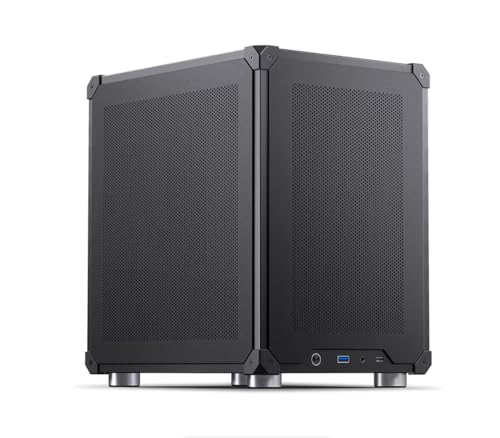
- Pre-installed local LLM, RAG, and OCR stack
- RTX 5060 Ti 16GB with Ubuntu and browser UI
- Compact case with WiFi 7 and good airflow
Best For: Teams or solo users who want a turnkey local AI server with minimal setup.
Best Value Starter

- 16GB RAM and 512GB SSD for easy setup
- RX 580 8GB handles light GPU tasks and gaming
- Includes Wi‑Fi 6, Bluetooth 5.0, and accessories
Best For: Beginners seeking an affordable prebuilt PC for light local AI experiments and general use.
Best for On-Desk AI Prototyping
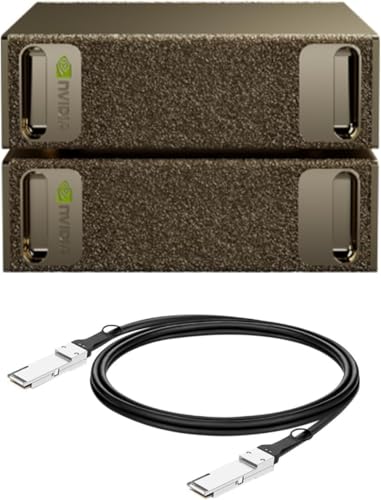
- Up to 1 petaFLOP of AI performance
- 128GB unified memory per unit
- Full NVIDIA AI software stack support
Best For: Researchers and developers who want a turnkey desktop system for local LLM prototyping and inference.
Best for Large-Model Workloads
MINISFORUM MS-S1 Max AI Workstation

- Ryzen AI Max+ 395 with strong AI-focused performance
- 64GB RAM and 2TB SSD included out of the box
- Dual 10G Ethernet and five display outputs
Best For: Power users running local LLMs, AI tools, and demanding multitasking in a compact prebuilt system.
Best for Plug-and-Play Starter Builds

- Ready-to-use prebuilt tower with minimal setup
- 16GB RAM plus NVMe SSD for responsive everyday use
- WiFi and HDMI simplify quick home or office deployment
Best For: Users who want an easy-to-set-up desktop for office work, general use, and light local LLM testing.
Best for Local AI
GMKtec EVO-X2 Ryzen AI Max+ 395 Mini PC

- 16-core Ryzen AI Max+ 395 with 50+ TOPS NPU
- 64GB LPDDR5X and roomy shared graphics memory
- Wi‑Fi 7, 2.5GbE, USB4, and quad-display support
Best For: People who want a compact prebuilt machine for local LLMs, multitasking, and light gaming.
Best Entry-Level Local LLM Starter
STGAubron i5 RX 560 Prebuilt PC

- Core i5, 16GB RAM, and 512GB SSD for light AI testing
- Windows 11, Wi-Fi 6, and Bluetooth 5.0 simplify setup
- Also usable for gaming, school, and everyday work
Best For: Beginners who want a low-cost prebuilt to experiment with local LLMs and general use.
Best for Big Local LLMs
GMKtec EVO-X2 Ryzen AI Max+ 395 Mini PC

- 128GB LPDDR5X memory is the big draw for large local models.
- Ryzen AI Max+ 395 targets demanding on-device AI and multitasking.
- 2TB SSD, Wi-Fi 7, USB4, and multi-display support round out the package.
Best For: People who want a compact, ready-to-run AI mini PC for local LLMs and heavy multitasking.
Best for Heavy Local LLMs

- 128GB RAM and 96GB VRAM allocation for local AI workloads
- Ryzen AI Max+ 395 packs CPU, GPU, and NPU power into a compact box
- Dual USB4, Wi‑Fi 7, and dual 2.5GbE suit advanced workstation setups
Best For: AI builders and creators who need a compact prebuilt for large local models and heavy multitasking.
Best for Fast Local Deployment – Compact Local AI Server RTX 5060 Ti
If you want a prebuilt computer for local llms that is ready to use quickly, this compact AI mini PC is built around a simple out-of-box setup and pre-installed models. It pairs Ubuntu, browser-based management, and an RTX 5060 Ti to make local inference, RAG, OCR, and model switching much easier for small teams or solo builders.
Best For: Users who want a turnkey local AI box for private LLM serving, document search, and lightweight AI workflows without assembling everything themselves.
Pros:
- Pre-installed stack includes LLMs, embeddings, rerankers, vLLM, TensorRT LLM, RAG, OCR, and databases
- Designed for quick setup through a browser UI, with model switching and chat ready out of the box
- RTX 5060 Ti 16GB plus Intel Core Ultra 5 and 32GB RAM gives solid local inference headroom
- Compact mini-tower case with WiFi 7 and mesh airflow for a space-saving deployment
Cons:
- Server only, so you still need your own monitor, keyboard, and mouse
- Storage and memory are adequate for many tasks, but power users may want more headroom
For buyers comparing a prebuilt computer for local llms, this stands out for convenience: it aims to remove the usual setup work while still offering a serious NVIDIA GPU and a broad software stack. That makes it a practical pick if you value fast deployment over building a custom AI rig from scratch.
Best Value Starter – STGAubron i7 RX 580 Gaming PC
If you want a budget-friendly prebuilt computer for local llms and general productivity, this STGAubron desktop is a practical entry point. It pairs an older Core i7 with 16GB of RAM, a 512GB SSD, and an RX 580 8GB, which makes it better suited to lighter local model testing, coding, and everyday use than to serious high-parameter inference.
Best For: Beginners who want an inexpensive prebuilt PC for light local AI experiments, plus gaming and everyday multitasking.
Pros:
- 16GB RAM and a 512GB SSD make setup and day-to-day use straightforward
- RX 580 8GB can help with entry-level GPU workloads and older games
- Wi‑Fi 6, Bluetooth 5.0, and plenty of USB ports simplify connectivity
- Includes Windows 11 Home, keyboard, mouse, and RGB extras out of the box
Cons:
- Older Intel Core i7 platform is not ideal for heavy local LLM workloads
- 16GB of system memory may feel tight for larger models or multitasking
- 512GB storage fills up quickly once models and datasets are added
As a prebuilt computer for local llms, this machine is more about getting started cheaply than future-proof performance. It is a sensible pick if you want to experiment with smaller models while also using the PC for gaming and everyday desktop tasks.
Best for On-Desk AI Prototyping – NVIDIA DGX Spark 2-Pack
If you want a prebuilt computer for local llms that feels closer to a compact AI lab than a normal desktop, the NVIDIA DGX Spark 2 Pack is built for exactly that kind of workflow. It combines high-end Grace Blackwell hardware, a unified memory pool, and NVIDIA’s AI software stack so you can prototype, fine-tune, and run inference locally with far less setup friction.
Best For: Researchers, developers, and AI teams who want desktop-based local model testing, rapid iteration, and a turnkey NVIDIA ecosystem.
Pros:
- Up to 1 petaFLOP of AI performance for local inference, fine-tuning, and analytics
- 128GB of unified memory per unit helps with larger local models and smoother experimentation
- Full NVIDIA AI software stack support makes setup and deployment more streamlined
- Compact, energy-efficient desktop design fits an office or lab without a rack
Cons:
- Far more expensive than mainstream desktop PCs
- Overkill if you only need light chatbot use or small local models
- Less of a general-purpose workstation value play than a standard high-end PC build
For buyers focused on a prebuilt computer for local llms, this stands out for its specialized AI-first design and massive memory headroom rather than raw everyday desktop value. It makes the most sense when you care about local experimentation speed, NVIDIA tooling, and a compact system that can handle serious model work on your desk.
Best for Large-Model Workloads – MINISFORUM MS-S1 Max AI Workstation
If you want a prebuilt computer for local llms without piecing together a custom rig, the MINISFORUM MS-S1 Max stands out for its Ryzen AI Max+ 395 chip, 64GB of LPDDR5 memory, and fast 2TB SSD. It is built like a compact workstation, but the real appeal is the combination of strong CPU throughput, integrated AI acceleration, and serious I/O for multi-monitor or network-heavy setups.
Best For: Developers, power users, and small teams running local LLMs, AI tools, and multitasking workloads in a compact prebuilt system.
Pros:
- 16-core/32-thread Ryzen AI Max+ 395 with up to 126 TOPS total AI performance
- 64GB RAM and 2TB SSD included, so it is ready for demanding local AI use out of the box
- Five display outputs plus dual 10G Ethernet for advanced workstation or lab setups
- Strong cooling design and quiet operation for sustained workloads
Cons:
- More expensive than typical mini PCs aimed at general productivity
- Integrated graphics are capable, but not a substitute for a high-end discrete GPU for training-heavy tasks
- Compact design may limit upgrade flexibility compared with a full tower
This is a compelling choice if you want a prebuilt computer for local llms and other AI workflows in a small footprint, especially when networking, display support, and memory capacity matter as much as raw compute.
Best for Plug-and-Play Starter Builds – suevery Core i7 16GB Tower PC
If you want a prebuilt computer for local llms without dealing with a custom build, this suevery tower offers a simple starting point: a Core i7 processor, 16GB of RAM, and NVMe SSD storage in a ready-to-use desktop. It’s better suited to light local model experiments, productivity, and multitasking than heavy AI workloads.
Best For: Buyers who want an easy-to-set-up desktop for office tasks, general use, and light local LLM testing.
Pros:
- Prebuilt tower arrives ready to use, which is ideal if you want minimal setup.
- 16GB RAM and NVMe storage help with everyday responsiveness and faster boot times.
- Built-in WiFi and HDMI make it easy to connect and get working quickly.
- Compact desktop format fits well in home or office environments.
Cons:
- 16GB RAM and a 256GB SSD are modest for larger local LLMs.
- Integrated graphics and the listed 4-core CPU limit heavier AI performance.
- Storage may fill up fast if you keep multiple models and datasets locally.
For a prebuilt computer for local llms, this is more of a practical entry-level option than a true model-running powerhouse. It makes sense if you want a convenient desktop for experimenting, but serious local inference or bigger models will likely need more memory, storage, and GPU headroom.
Best for Local AI – GMKtec EVO-X2 Ryzen AI Max+ 395 Mini PC
If you want a prebuilt computer for local llms without building a desktop from scratch, the GMKtec EVO-X2 is one of the most interesting compact options right now. Its Ryzen AI Max+ 395, 64GB of fast LPDDR5X memory, and strong integrated graphics make it well suited for running models locally, multitasking, and keeping a small footprint on the desk.
Best For: Buyers who want a compact, ready-to-use mini PC for local AI workloads, light gaming, and high-end multitasking.
Pros:
- Ryzen AI Max+ 395 brings 16 Zen 5 cores, 32 threads, and a 50+ TOPS NPU for local AI tasks
- 64GB LPDDR5X memory and a large shared GPU pool are a strong fit for running LLMs like LM Studio
- Fast connectivity and I/O, including Wi‑Fi 7, 2.5GbE, USB4, and quad-display output
- Compact prebuilt design with upgraded cooling for sustained workloads
Cons:
- Premium pricing compared with typical mini PCs
- Integrated graphics are strong for an iGPU, but still not a substitute for a dedicated high-end GPU
For a prebuilt computer for local llms, the EVO-X2 stands out because it combines serious CPU power, a large memory pool, and a capable iGPU in a tiny chassis. It is especially appealing if you want an AI-focused machine that can run local models today and still handle everyday productivity or gaming.
Best Entry-Level Local LLM Starter – STGAubron i5 RX 560 Prebuilt PC
If you want a prebuilt computer for local llms without jumping straight into workstation pricing, this STGAubron build is a basic starting point. The Core i5, 16GB of RAM, and 512GB SSD make it fine for light experimentation, small models, and general everyday use, but the RX 560 is not meant for demanding GPU workloads.
Best For: Beginners who want an affordable prebuilt to test local LLMs, learn the workflow, and also handle gaming, school, or general home use.
Pros:
- 16GB RAM and a 512GB SSD give it a usable baseline for light local AI tasks
- Wi-Fi 6, Bluetooth 5.0, and Windows 11 Home make setup straightforward
- Works as a general-purpose PC for gaming, streaming, and productivity too
Cons:
- RX 560 4GB is very limited for serious local LLM inference or larger models
- Likely needs upgrades if you plan to do more than basic AI testing
- Not the strongest value if local LLMs are your main priority
As a prebuilt computer for local llms, this model is more about affordability and convenience than raw AI horsepower. It makes sense if you want an entry-level box to learn on first, then upgrade later once your model and performance needs are clearer.
Best for Big Local LLMs – GMKtec EVO-X2 Ryzen AI Max+ 395 Mini PC
If you want a prebuilt computer for local llms with serious headroom, the GMKtec EVO-X2 is built around AMD’s Ryzen AI Max+ 395, 128GB of LPDDR5X memory, and a fast 2TB PCIe 4.0 SSD. That combination makes it a strong pick for running larger models locally, multitasking in LM Studio, and keeping the system responsive while you work.
Best For: Buyers who want a compact, ready-to-run AI mini PC for local LLMs, heavy multitasking, and some high-end gaming on the side.
Pros:
- Huge 128GB unified memory is ideal for larger local models and demanding AI workloads.
- Ryzen AI Max+ 395 with XDNA 2 NPU gives it unusually strong client-side AI performance.
- Fast 2TB SSD, Wi-Fi 7, USB4, and 2.5GbE make it well-rounded for modern setups.
- Supports multiple 4K/8K displays for productivity and creator workflows.
Cons:
- Premium specs mean a premium price.
- Powerful integrated graphics are good for an iGPU, but still not a replacement for a top discrete GPU.
- Overkill if you only plan to run small models or basic office apps.
This is one of the most compelling prebuilt computer for local llms options if you want workstation-class memory in a compact box without building your own system. It stands out more for raw AI capacity and convenience than for value.
Best for Heavy Local LLMs – GEEKOM A9 Mega AI Workstation
If you want a compact prebuilt computer for local llms, the GEEKOM A9 Mega stands out for raw memory capacity, integrated GPU resources, and AI-focused silicon. It is aimed at developers and creators who want to run large models locally, keep multiple tools open, and still have a machine that can handle demanding graphics work.
Best For: AI builders, power users, and creators who want a compact workstation for local model inference, coding, and 3D or video workloads.
Pros:
- 128GB of LPDDR5X memory with unusually large 96GB VRAM allocation for demanding local AI tasks
- Ryzen AI Max+ 395 platform delivers strong CPU, NPU, and GPU performance in a small desktop
- Dual USB4, dual HDMI 2.1, Wi‑Fi 7, and dual 2.5GbE make it easy to build a capable workstation setup
- 2TB SSD and dual-slot storage support leave room for large datasets and model files
Cons:
- Premium pricing and limited chip supply may make availability unpredictable
- Compact form factor is less flexible than a full tower for future internal upgrades
This is a serious niche pick rather than a general-purpose desktop, but for a prebuilt computer for local llms it offers an unusually strong mix of memory, AI acceleration, and connectivity. If you value dense performance in a small chassis, it is one of the more compelling all-in-one options.
How We Picked the Best Prebuilt Computer for Local LLMs
For a Prebuilt Computer for Local LLMs, the most important factors are memory capacity, sustained compute, storage speed, and overall thermal design. We prioritized systems that can handle modern quantized models, support comfortable context windows, and avoid the bottlenecks that make AI workloads frustrating.
We also looked for configurations that make sense out of the box: enough RAM for model loading, SSD capacity for models and datasets, and ports or expandability for external drives, displays, and accessories.
Quick Comparison: What Matters Most
Think in tiers. Mini PCs are best for lighter experimentation, compact setups, and efficient everyday use. Midrange towers can serve as flexible home or office machines with some local AI capability. High-memory workstation models are the best fit when you want smoother multitasking, larger models, and fewer compromises.
If your goal is responsive local inference, prioritize RAM first, then SSD size, then sustained CPU/GPU throughput. For many buyers, a strong integrated-graphics workstation can be more useful than an older gaming desktop with limited memory.
Key Buying Factors for a Prebuilt Computer for Local LLMs
Memory Capacity
RAM is often the main limiter. Smaller models and aggressive quantization can run on 16GB, but 32GB is a more comfortable baseline, and 64GB or 128GB is far better for larger models, longer prompts, and multitasking.
Storage
Local LLM workflows quickly consume space. A 1TB SSD is a practical starting point, while 2TB is preferable if you plan to keep multiple models, embeddings, datasets, and project files on the same machine.
Compute Headroom
For a Prebuilt Computer for Local LLMs, newer high-performance APUs and AI workstations tend to offer the best balance of speed and efficiency. Older gaming PCs can still be useful for entry-level experimentation, but they are less ideal for heavier workloads.
Thermals and Noise
AI inference can run for long stretches, so cooling matters. Look for systems with robust airflow, sensible chassis design, and enough power delivery to sustain performance without throttling.
Who Should Buy Which Prebuilt Computer for Local LLMs?
If you want the simplest path into local AI, compact mini PCs are a smart starting point. If you need a machine that can also handle gaming or general productivity, a mainstream prebuilt desktop may offer better value. If your work involves larger models, heavier multitasking, or more serious experimentation, choose a workstation with high RAM and fast storage.
Ultimately, the best choice depends on model size, budget, and how much setup you want to avoid. Match the machine to your workflow, not just the headline specs.
