
In today’s fast-paced world, having a reliable portable webcam can greatly improve your video calls. Whether you’re working remotely or connecting with family, the right device can make all the difference. With options featuring 4K resolution, noise-canceling microphones, and sleek designs, you’ll want to know which models stand out in 2025. Let’s explore the top choices that can elevate your video conferencing experience.
Owl Labs Meeting Owl 3 Conference Room Camera

If you’re looking to elevate your remote meetings, the Owl Labs Meeting Owl 3 Conference Room Camera is a game-changer. This 360° 1080p HD camera features AI-driven speaker tracking and an 18-foot mic pickup, ensuring everyone’s voice is heard. Its plug-and-play setup takes just six minutes, making it user-friendly for all tech levels. While it captures great audio and video, some users wish for a 4K option. With its durable design and reliable performance, the Meeting Owl 3 enhances hybrid collaboration, making remote participants feel included and engaged in discussions. It’s a solid choice for any conference room setup.
Best For: Businesses and teams looking to enhance their hybrid meetings with a user-friendly, high-quality conference camera that captures audio and video from all participants.
Pros:
- Easy plug-and-play setup that can be completed in just six minutes.
- 360° audio and video capabilities improve engagement and inclusion for remote participants.
- Durable design with reliable performance, making it suitable for various conference room environments.
Cons:
- Some users express disappointment in the 1080p video quality, suggesting a need for a 4K option.
- Occasional issues with autofocus can affect video clarity during meetings.
- Warranty concerns highlight the importance of purchasing from authorized dealers for adequate support.
EMEET C960 4K Webcam for PC

The EMEET C960 4K Webcam for PC stands out as an ideal choice for professionals and educators who demand high-quality video and audio for remote meetings and online teaching. With its true 4K resolution and PDAF auto focus, you’ll enjoy ultra-clear visuals, while dual AI noise-cancelling microphones guarantee crisp sound. The plug-and-play setup makes it easy to use across various platforms like Zoom and Teams. Plus, the built-in privacy cover adds an extra layer of security. Compact and versatile, this webcam is perfect for enhancing your video calls and boosting productivity, making it a reliable choice for your setup.
Best For: Professionals and educators seeking high-quality video and audio for remote meetings and online teaching.
Pros:
- True 4K resolution for ultra-clear video conferencing.
- Dual AI noise-cancelling microphones ensure crisp audio quality.
- Easy plug-and-play setup compatible with multiple platforms.
Cons:
- Occasional audio drop issues reported by some users.
- Durability concerns with plastic components.
- Limited adjustment angles compared to some competitors.
EMEET 1080P Webcam with Microphone and Privacy Cover

For those seeking a reliable webcam for online meetings and content creation, the EMEET 1080P Webcam with Microphone and Privacy Cover stands out as an excellent choice. It delivers crisp 1080P video at 30FPS, ensuring your visuals are sharp. The built-in noise-canceling microphone enhances audio quality by filtering out background noise, making your calls clearer. Plus, the physical privacy cover lets you secure your camera when not in use, protecting your privacy effortlessly. Compatible with various platforms like Zoom and Microsoft Teams, this webcam is versatile and easy to use, making it a smart addition to your laptop setup.
Best For: Those looking for an affordable and high-quality webcam for online meetings, content creation, and enhanced privacy protection.
Pros:
- High-Quality Video: Delivers 1080P resolution at 30FPS for clear visuals.
- Noise-Canceling Microphone: Filters out ambient noise for improved audio clarity during calls.
- Privacy Cover: Features a physical privacy cover to protect your camera when not in use.
Cons:
- Fixed Focus: Limited flexibility for varying distances beyond the recommended range.
- Optimal Lighting Required: Best performance is in well-lit environments, which may not suit all settings.
- Not Wireless: Requires a USB connection, limiting placement options compared to wireless alternatives.
Logitech Brio 101 Full HD 1080p Webcam

Elevate your video conferencing experience with the Logitech Brio 101 Full HD 1080p Webcam, perfect for professionals and streamers alike. This webcam delivers sharp, clear video with its Full HD 1080p resolution, ensuring you look your best. The Auto-Light Balance feature enhances brightness by up to 50% and minimizes shadows, making every call more vibrant. With a built-in microphone, your audio will be crystal clear, too. Its plug-and-play functionality allows easy integration with platforms like Microsoft Teams, Zoom, and Google Meet. Plus, the integrated webcam cover offers peace of mind when you’re not on a call.
Best For: Professionals and streamers seeking high-quality video and audio for online meetings and broadcasts.
Pros:
- Full HD 1080p resolution provides clear and sharp video quality.
- Auto-Light Balance enhances video brightness and reduces shadows for better visual clarity.
- Built-in microphone ensures clear audio during video calls.
Cons:
- May require additional software for advanced settings and features.
- Limited zoom or pan functionality compared to higher-end models.
- Integrated webcam cover might feel flimsy to some users.
Full HD Webcam with Built-in Microphone and Tripod

Looking to enhance your video calls and streaming experience? The Full HD Webcam with Built-in Microphone and Tripod is a fantastic choice. With 1080p video at 30 frames per second and a wide-angle lens, you’ll capture every detail during meetings or streaming sessions. Its noise-canceling microphone guarantees crystal-clear audio, even in noisy environments. Plus, the detachable tripod allows for flexible positioning, while the privacy cover keeps your lens safe. Plug and play compatibility means you can set it up in seconds on various devices. Rated 4.3 stars by users, it’s a reliable and affordable option for quality video communication.
Best For: Users seeking a reliable and affordable webcam for video calls, remote work, and streaming.
Pros:
- High-quality 1080p video at 30 frames per second for clear visuals.
- Built-in noise-canceling microphone for enhanced audio clarity in noisy environments.
- Easy setup with plug and play compatibility across multiple devices and operating systems.
Cons:
- Some users reported performance issues with specific devices.
- The flexible tripod may not be sturdy enough for all setups.
- Limited advanced features compared to higher-end models.
Anker PowerConf C200 2K Webcam for PC/Laptop/Mac
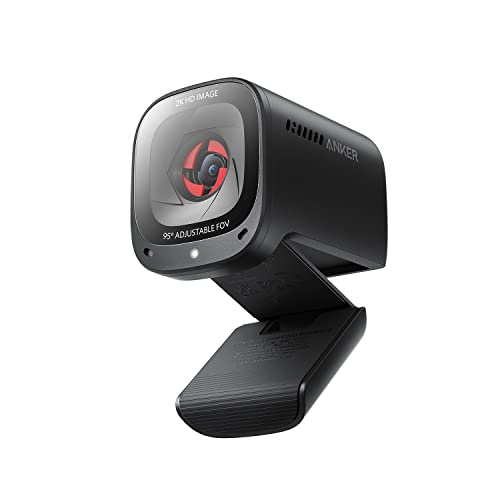
The Anker PowerConf C200 2K Webcam stands out as an excellent choice for professionals and students seeking high-quality video calls. With its 2K Ultra-Clear Resolution, you’ll enjoy sharp, detailed video, even in dim lighting thanks to superior low-light performance. The advanced audio clarity, featuring AI noise cancellation and dual microphones, guarantees your voice comes through loud and clear, regardless of background noise. You can easily customize your viewing angles to 65°, 78°, or 95° for perfect framing. Plus, the integrated privacy cover gives you peace of mind when the camera’s not in use, making it a top pick for seamless connectivity.
Best For: Professionals and students seeking high-quality video calls with excellent audio clarity and customizable viewing options.
Pros:
- 2K Ultra-Clear Resolution provides sharp and detailed video quality.
- AI Noise Cancellation ensures clear audio even in noisy environments.
- Customizable Viewing Angles allow for optimal framing during video calls.
Cons:
- Limited to compatibility with Windows 7 or later and macOS 10.11 or later.
- May be overkill for casual users who don’t require 2K resolution.
- Integrated privacy cover may be seen as unnecessary by some users.
ToLuLu 1080P Webcam with Microphone

For professionals seeking a reliable and high-quality video calling solution, the ToLuLu 1080P Webcam with Microphone stands out with its impressive 1080p full HD glass lens and automatic light correction. Enjoy a 110-degree widescreen view and crisp audio from the built-in digital stereo microphone, effective up to 10 feet. Installation is a breeze with plug-and-play functionality and a tripod-ready adjustable clip. While video quality receives high marks, some users note mixed feedback on microphone clarity. Overall, with an average rating of 4.2 stars, this webcam offers excellent value for budget-conscious users looking to enhance their video calls.
Best For: Professionals and budget-conscious users seeking a reliable webcam for video calling, streaming, and conferencing.
Pros:
- High-quality 1080p video resolution with automatic light correction for optimal image quality.
- Easy plug-and-play installation with tripod-ready adjustable clip for versatile camera placement.
- Affordable price point with a strong average rating of 4.2 stars from over 25,000 users.
Cons:
- Mixed feedback on microphone clarity, with some users experiencing background noise interference.
- Distortion noted in the wide-angle view, affecting video quality.
- Inconsistent audio quality, especially in noisy environments.
NexiGo N60 1080P Webcam with Microphone

Meet the NexiGo N60 1080P Webcam with Microphone, a standout choice for anyone needing high-quality video and audio for online meetings. With Full HD 1080P resolution at 30fps, you’ll enjoy sharp and clear visuals. Its built-in noise-canceling microphone guarantees your voice comes through crisp, minimizing background noise. The adjustable field of view (up to 110°) and digital zoom via NexiGo software add versatility. Plus, the privacy cover provides peace of mind. Plug-and-play compatibility with various operating systems makes setup a breeze. With an average rating of 4.3 stars, this webcam is a smart investment for your video conferencing needs.
Best For: Individuals and businesses seeking a reliable and high-quality webcam for professional video conferencing and online meetings.
Pros:
- High-quality video and audio: Full HD 1080P resolution and built-in noise-canceling microphone for clear visuals and sound.
- Easy setup: Plug-and-play functionality with compatibility across various operating systems, requiring no additional drivers.
- Versatile features: Adjustable field of view and digital zoom capabilities enhance user experience.
Cons:
- Camera mount stability: Some users report concerns about the durability of the camera mount over time.
- Limited advanced features: Lacks some premium features found in higher-priced webcams.
- Software dependency for zoom: Digital zoom functionality requires the use of NexiGo software, which may not appeal to all users.
GUSGU G910 2K Quad HD Webcam for PC

Looking for a high-quality webcam that delivers crystal-clear video quality? The GUSGU G910 2K Quad HD Webcam is your answer, offering stunning 2560x1440P resolution. With its advanced 5-megapixel sensor, you’ll enjoy vibrant images and sharp detail. The built-in microphone reduces background noise, ensuring your voice comes through clearly during calls. Plus, its adjustable ring light helps improve visibility in low-light settings. Weighing only 4.8 ounces, it’s easy to transport, while the privacy cover keeps you secure when not in use. Enjoy hassle-free plug-and-play compatibility with both Windows and MacBook, making it perfect for remote work or streaming.
Best For: The GUSGU G910 2K Quad HD Webcam is ideal for remote workers, online learners, and streamers seeking high-quality video and audio performance.
Pros:
- High Resolution: Outputs stunning 2560x1440P images and videos for clear visuals.
- Adjustable Ring Light: Enhances video quality in low-light conditions with customizable brightness settings.
- Built-in Privacy Cover: Provides reliable security when the camera is not in use.
Cons:
- Audio Quality: Some users report that the sound quality could be improved.
- Weight: Although lightweight, it may feel less sturdy compared to heavier webcams.
- Limited Compatibility: While it supports plug-and-play for Windows and Mac, it may not work seamlessly with other operating systems.
2K Webcam for PC with Microphone & Privacy Cover
The PixelForge 2K Webcam stands out as an exceptional choice for remote workers and professionals who want high-quality video calls without the hassle of complicated setups. With a stunning resolution of 2560 x 1440p HD, you’ll notice the crisp image quality, thanks to advanced autofocus. The noise-canceling microphone guarantees clear audio, while the built-in adjustable ring light provides perfect lighting in low-light environments. Plus, the integrated privacy cover adds a layer of security for peace of mind when the camera’s not in use. Its plug-and-play design makes it compatible with all major platforms, guaranteeing a seamless experience for every meeting.
Best For: Remote workers and professionals looking for high-quality video calls with easy setup and enhanced security features.
Pros:
- High-resolution 2K video quality with advanced autofocus for sharp images.
- Built-in adjustable ring light with multiple brightness levels, ideal for low-light conditions.
- Integrated privacy cover for added security and peace of mind when not in use.
Cons:
- May be heavier than some other webcam models, which could affect portability.
- Limited to specific color options, as it is only available in silver.
- Some users may prefer additional features like 360-degree rotation or more extensive software controls.
Factors to Consider When Choosing Portable Webcams for Laptops
When choosing a portable webcam for your laptop, you’ll want to contemplate several key factors. Video resolution and audio quality can greatly impact your streaming experience, while portability and design will affect how easily you can use it on the go. Don’t forget to check compatibility with your software and any privacy features that might be important to you.
Video Resolution Options
Choosing the right video resolution for your portable webcam can greatly impact your overall experience during video calls. Most options range from 720p (HD) to 4K (Ultra HD), with 1080p being the standard for quality video conferencing. A 1080p webcam captures video at 1920 x 1080 pixels, delivering clear images suitable for professional settings. If you want sharper video quality, consider a 2K webcam, which offers 2560 x 1440 pixels. For those needing superior detail, 4K resolution at 3840 x 2160 pixels is ideal, but keep in mind that it demands more bandwidth and processing power. Always balance your chosen resolution with your internet connection capabilities to guarantee smooth streaming during your calls.
Audio Quality Considerations
While selecting a portable webcam, don’t overlook the importance of audio quality, as clear sound can make or break your video calls. Look for webcams with advanced noise-canceling microphones that filter out background noise, guaranteeing crisp audio. Dual microphones are a great choice too; they utilize spatial sound technology to capture your voice more clearly. It’s also wise to take into account models with adjustable audio settings, allowing you to optimize sound based on your environment. Confirm the built-in microphone is correctly positioned, ideally 1-1.8 meters away, to reduce distortion. Finally, pay attention to user reviews regarding audio performance, as real-world feedback can reveal issues like audio dropouts or clarity challenges that may affect your experience.
Portability and Design
Portability and design are essential factors to take into account as you look for the perfect webcam for your laptop. Ideally, you want a compact, lightweight model measuring around 4 to 5 inches in width and weighing about 5 to 7 ounces for easy transport. Look for adjustable mounting options like tripods or clips, which provide flexible positioning and secure attachment. An integrated privacy cover enhances security, allowing you to maintain discretion when the webcam isn’t in use. Plug-and-play functionality is also vital, enabling quick setup without extra drivers or software. Finally, a wide field of view (FOV) between 73° and 110° will capture larger groups effectively, making your video calls more inclusive and collaborative.
Compatibility With Software
Ensuring your portable webcam is compatible with popular software can make a significant difference in your video conferencing experience. Look for webcams that support platforms like Zoom, Microsoft Teams, Google Meet, and Skype for seamless integration. Compatibility with operating systems like Windows, macOS, and Linux is vital, ensuring your webcam works across various devices. Many models offer plug-and-play functionality, allowing for immediate recognition without additional drivers or software installation. Some webcams even come with dedicated software for customizable settings, enhancing video and audio quality. Be sure to check specifications that highlight ease of use across multiple platforms, as this versatility minimizes the need for technical support during setup, making your experience smoother and hassle-free.
Privacy Features Offered
When choosing a portable webcam, privacy features should be a top consideration to protect your personal space during video calls. Many models come with integrated privacy covers, allowing you to physically block the lens when not in use. This feature guarantees peace of mind against unauthorized access. Look for sliding covers that are easy to operate, giving you a quick way to safeguard your privacy without complicated settings. Some webcams even offer advanced security options, like built-in AI that can detect your absence and enhance privacy further. Opting for models with robust privacy features is vital, especially if you work from home or in shared spaces. User feedback often highlights privacy covers as essential for maintaining confidentiality during calls.
Ease of Setup
Choosing a webcam that’s easy to set up can make all the difference in your video conferencing experience. Look for models with plug-and-play technology, which lets you start using them right away without installing drivers. This is especially important if you’re not tech-savvy. Webcams that automatically recognize your operating system enhance usability, making your life easier. Adjustable mounting options or built-in tripods provide flexibility for the perfect angle, simplifying your setup. Additionally, models with integrated privacy covers eliminate the hassle of external solutions. Quick setup times, often just minutes, are essential for those who need efficient solutions for remote work or online meetings. Opt for ease, and you’ll enjoy a smoother, stress-free video call experience.
