
The best portable USB power meters make it easier to diagnose slow charging, verify USB-C Power Delivery output, and compare cables, chargers, and power banks. These compact testers show useful electrical readings without requiring a full bench setup.
Our 2026 roundup includes simple USB-A meters, dual-interface testers, and advanced USB-C models rated for high-power connections. Use the buying guide below to match features, power limits, and display preferences to your charging setup.
Best 10 Portable USB Power Meters Picks for 2026
Rugged All-Rounder
Klein Tools ET920 USB Power Meter

- Tests USB-A and USB-C voltage and current
- Stores 10 readings and monitors long-term data
- Rugged design with overload detection
Best For: Technicians and DIY users testing everyday USB connections
High-Power USB-C Specialist

- Monitors USB-C power up to 240W
- Supports EPR voltage from 5–48V
- Passes through USB data and Alt Mode video
Best For: Testing high-wattage USB-C chargers and laptop accessories
Feature-Rich Color Tester

- Measures up to 30V and 5.1A
- Offers eight color-screen display interfaces
- Includes charging protection and alarm features
Best For: Detailed USB-C charging and power-bank diagnostics
Dual-Port Charging Monitor

- Measures up to 30V and 5A
- Provides seven selectable display modes
- Supports USB-A, USB-C, PD, and QC 3.0
Best For: Monitoring chargers, power banks, and compatible solar sources
Easy USB-A Checks
Compact USB Voltage and Current Tester
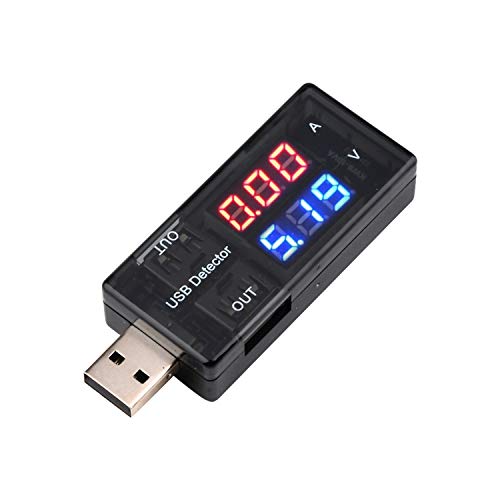
- Measures 3.0–7.5V and up to 2.5A
- Clear red-and-blue LED readout
- No separate power source required
Best For: Basic USB-A charger, cable, and port testing
Multi-Mode Monitoring

- Seven modes cover voltage, current, power, and capacity
- Tests 3.2–30V and up to 5A
- Dual outputs with PD and QC 3.0 support
Best For: Broad USB-A charging and power-bank diagnostics
USB-C Protocol Testing
High-Current Type-C Power Meter

- Measures 4–30V and up to 12A
- Detects multiple USB-C fast-charge protocols
- Adds curve recording and detailed color readouts
Best For: Advanced USB-C charger and high-current diagnostics
Best for Protocol Checking

- Supports USB-C PD and QC2.0–4.0 protocols
- Rotating 1.44-inch LCD with alarm reminders
- Measures chargers, cables, and power banks
Best For: USB fast-charge and charger troubleshooting
Best for High-Current Testing

- Measures up to 8A and 32V
- Supports PD, QC, and BC1.2 protocols
- IPS display shows multiple charging metrics
Best For: Detailed USB-C charging and power-bank checks
Best for Comprehensive Readouts

- Displays voltage, current, temperature, and resistance
- Measures up to 8A and supports 32V
- Includes USB-A OTG adapter and safety protections
Best For: Multi-metric charger, cable, and power-bank testing
Rugged All-Rounder – Klein Tools ET920 USB Power Meter
The Klein Tools ET920 is a practical choice among portable USB power meters when you need to check both USB-A and USB-C connections. It measures voltage, current, capacity, energy, and calculated resistance, while its overload detection and jobsite-ready construction add useful protection for routine testing.
Best For: Technicians and DIY users testing common USB ports, chargers, and cables.
Pros:
- Supports USB-A currents up to 3A and USB-C currents up to 5A.
- Monitors readings for up to 1,000 hours and stores up to 10 measurements.
- Includes overload detection, a high-resolution LCD, and 6.6-foot drop protection.
Cons:
- Voltage measurement is limited to 3–20V DC.
- Resistance is calculated rather than directly measured.
Choose the ET920 if broad USB compatibility and durable construction matter more than advanced USB-C power delivery testing. Its simple inline setup and stored readings make it especially useful for repeated comparisons.
High-Power USB-C Specialist – Plugable USB C Power Meter
The Plugable USB C Power Meter is one of the more capable portable USB power meters for modern USB-C charging systems. It monitors power up to 240W, supports USB-C EPR voltage ranges, and passes through USB data and Alt Mode video while showing voltage, amperage, and current direction.
Best For: Users troubleshooting high-wattage USB-C chargers, docks, laptops, and accessories.
Pros:
- Monitors USB-C charging up to 240W with an operating range up to 6.5A.
- Works in either connector orientation and includes a screen-rotation button.
- Supports USB data pass-through and USB-C Alt Mode video.
Cons:
- Not compatible with Thunderbolt 3 devices.
- Designed for USB-C rather than USB-A connections.
For USB-C equipment, the Plugable stands out through its high power ceiling and bidirectional design. It is a strong fit for newer charging setups, provided Thunderbolt 3 compatibility is not required.
Feature-Rich Color Tester – Eversame 2-in-1 USB-C Meter
The Eversame 2-in-1 is a versatile option among portable USB power meters for checking charging performance, cable quality, and power-bank output. Its color display presents multiple measurement screens, while support for QC and PD-related charging scenarios broadens its usefulness with USB-C devices.
Best For: Users who want detailed charging diagnostics and multiple display views in a compact meter.
Pros:
- Measures 3.6–30V and up to 5.1A.
- Displays voltage, current, capacity, energy, power, impedance, and D+/D− voltage.
- Includes over-voltage, over-current, under-voltage, and low-energy protection with an alarm.
Cons:
- Primarily intended for USB-C-enabled devices.
- Its many display interfaces may feel more complex than a basic meter.
- The supplied note says a small included adapter may be needed to trigger PD charging.
The Eversame is appealing when you want more than basic voltage and current readings. Its broad measurement range and safety features make it useful for investigating charging behavior, though setup can require attention when testing PD connections.
Dual-Port Charging Monitor – DROK USB Tester
The DROK USB Tester combines portable USB power meters functionality with dual-port charging support. Its color LED display shows voltage, current, power, and capacity across seven selectable modes, while USB-A and USB-C input options make it suitable for chargers, power banks, and compatible solar setups.
Best For: Users comparing USB charging sources while retaining convenient output and protocol support.
Pros:
- Supports devices and sources from 3.2–30V and up to 5A.
- Offers seven display modes for voltage, current, power, and capacity.
- Supports PD and QC 3.0 fast-charge protocols from 3.6–12V at 3A.
Cons:
- Output activation may require a long button press in certain USB-C-to-USB-A setups.
- One output supports charging only and does not provide data transfer.
- The listed fast-charge output range is narrower than the meter’s overall measurement range.
The DROK is a practical pick for monitoring and powering devices from several USB sources. Its display modes are easy to change, but users should note the different behavior of the two outputs and the occasional need to manually activate output.
Easy USB-A Checks – Compact USB Voltage and Current Tester
For basic portable USB power meters, this diymore tester focuses on the essentials: measuring USB voltage and current without requiring its own power source. Its color-coded display makes quick charger, cable, and USB-port checks easy to read.
Best For: Everyday testing of USB-A chargers, cables, phone chargers, and other USB-powered equipment.
Pros:
- Measures 3.0–7.5V and 0–2.5A.
- Uses red numerals for current and blue numerals for voltage.
- Compact, plug-in design requires no separate power source.
- Designed to check chargers, cables, USB ports, and device operating current.
Cons:
- Its 2.5A current range is narrower than the other meters in this roundup.
- It is intended for USB-A testing rather than broad USB-C protocol analysis.
This is a straightforward choice when you want a small USB-A diagnostic tool for routine voltage and current checks, rather than capacity tracking or advanced fast-charge monitoring.
Multi-Mode Monitoring – DROK USB-A Power Meter
Among portable USB power meters, the DROK stands out for showing more than voltage and current. Its seven display modes add power and capacity readings, while dual USB outputs and fast-charge protocol support make it useful for broader charging diagnostics.
Best For: Users testing power banks, chargers, USB cables, solar panels, and other equipment across several voltage and current ranges.
Pros:
- Displays voltage, current, power, and capacity in seven selectable modes.
- Supports testing from 3.2–30V and 0–5A.
- Includes USB-A input and dual USB 2.0 outputs.
- Supports PD and QC 3.0 fast-charge protocols, with protection alarms for several fault conditions.
Cons:
- Output II is intended for charging only and does not support data transfer.
- The feature set may be more than needed for simple voltage-and-current checks.
Choose this model if you want a versatile USB-A meter with capacity monitoring and a wider test range. It is especially practical for comparing chargers, power banks, and solar-panel outputs.
USB-C Protocol Testing – High-Current Type-C Power Meter
This Type-C model is one of the more advanced portable USB power meters for USB-C charging setups. It combines a 4–30V, 0–12A measurement range with fast-charge protocol detection, real-time curves, and a color display that tracks power, capacity, energy, and related readings.
Best For: USB-C chargers, power banks, cables, and devices where fast-charge compatibility and higher-current monitoring matter.
Pros:
- Measures 4–30V and up to 12A through a high-current terminal.
- Supports PD, QC, FCP, SCP, AFC, DASH, VOOC, and Super VOOC protocols.
- Color display shows voltage, current, power, capacity, energy, time, peaks, and CPU temperature.
- Curve mode records real-time voltage and current over selectable periods from five minutes to two hours.
Cons:
- It is designed for USB-C devices and compatible charging protocols, not general USB-A testing.
- The broader feature set may be unnecessary for simple charging checks.
For USB-C-focused troubleshooting and performance testing, this meter offers the widest current range and deepest monitoring feature set here. The included storage case is also useful for keeping the tester and manual together.
Best for Protocol Checking – MakerHawk USB Multimeter
For shoppers comparing portable USB power meters, the MakerHawk USB Multimeter is a compact option focused on broad charger and fast-charge compatibility. Its 1.44-inch LCD, rotating display, multiple ports, and alarm reminders make everyday voltage and current checks easier to read.
Best For: Checking USB chargers, cables, power banks, and PD or QC fast-charging setups.
Pros:
- Supports USB-C PD and Qualcomm QC2.0, QC3.0, and QC4.0 protocols, along with MTK.
- Measures USB devices including chargers, computers, power banks, car chargers, and cables.
- Offers 360-degree screen rotation, four operation buttons, and five connection ports.
- Flashing alerts indicate temperature above 45°C, voltage outside 3.8–30V, or current above 3A.
Cons:
- Its stated current alarm threshold is above 3A, while the product is not presented as an 8A tester.
- PD testing requires the correct Type-C connection and may not power the display until the connector is flipped or the appropriate interface is used.
This is a practical pick when protocol support and flexible viewing matter more than maximum current range. Pay close attention to the Type-C connection instructions when testing PD equipment.
Best for High-Current Testing – YEREAD USB-C Power Meter
Among portable USB power meters, the YEREAD USB C Tester stands out for its 0–8A current range and color display. It is designed for monitoring USB-A and USB-C charging performance, checking power-bank capacity, and viewing several electrical measurements in one interface.
Best For: Users who want a broad current range, fast-charge protocol support, and detailed charging data.
Pros:
- Measures 3.6–32V voltage and 0–8.0A current.
- Supports PD3.0/2.0, QC3.0/2.0, and BC1.2 across USB-A and Type-C devices.
- Eight IPS color-screen interfaces display voltage, current, capacity, power, and load impedance.
- Includes over-voltage, over-current, under-voltage, and low-energy protection, plus data retention after power loss.
Cons:
- Power-bank capacity testing requires a full charge and calculation using the displayed watt-hours and battery voltage.
- The supplied details do not specify a temperature measurement range or screen-rotation feature.
Choose this model if you need more current headroom than a basic USB meter and value a colorful, information-rich interface. The included Micro USB adapter and storage case add flexibility for testing setups.
Best for Comprehensive Readouts – YOJOCK USB-C Tester
The YOJOCK USB C Tester is one of the more feature-focused portable USB power meters in this roundup. It combines 3.6–32V and 0–8A measurement with readings for temperature, resistance, charging time, capacity, and power, while its eight IPS display views help organize the data.
Best For: Testing charging quality, cable performance, and power-bank capacity across USB-A and USB-C equipment.
Pros:
- Tracks voltage, current, capacity, electric quantity, power, temperature, resistance, and charging time.
- Measures 3.6–32V and 0–8.0A.
- Supports PD3.0/2.0, QC3.0/2.0, and BC1.2, with an included A OTG adapter.
- Provides over-voltage, over-current, under-voltage, and low-energy protection with automatic output cutoff.
Cons:
- The power-bank capacity procedure requires clearing data, maintaining continuous discharge, and applying the stated voltage-based calculation.
- The supplied details list compatibility examples and protocols but do not identify a storage case or broad accessory kit.
This model suits buyers who want the widest set of displayed measurements without moving to a larger instrument. Its protection features and protocol coverage make it useful for systematic charger and power-bank testing.
How We Picked the Best Portable USB Power Meters
We focused on meters that provide practical readings for everyday troubleshooting and electronics testing, including voltage, current, power, capacity, and energy. We also considered connector compatibility, USB-C Power Delivery support, maximum rated input, display readability, measurement modes, and portability.
The selection spans straightforward USB-A voltage and current testers through dual-port meters and higher-power USB-C models. Because specifications and included functions can vary by version, confirm the listed voltage, amperage, and protocol limits before connecting expensive equipment.
Quick Comparison
| Best For | Look For | Typical Features |
|---|---|---|
| Basic charger checks | USB-A compatibility | Voltage, current, and power readings |
| Modern USB-C setups | USB-C PD support | PD negotiation and higher power ratings |
| Power-bank testing | Capacity and energy tracking | mAh, Wh, elapsed time, and mode memory |
| Frequent field use | Compact body and clear screen | Color display, durable connectors, and simple controls |
Key Buying Factors for Portable USB Power Meters
Connector and Protocol Compatibility
Start with the ports you actually use. A USB-A tester may be sufficient for older chargers and cables, while USB-C users should choose a meter designed for USB-C connections. If you test modern laptops, phones, or high-output chargers, look for explicit USB Power Delivery support rather than assuming every USB-C meter can measure the connection correctly.
Power and Measurement Range
Check the meter’s maximum voltage and current ratings against your charger. A model rated for only low-power USB devices may not be suitable for 100W or 240W USB-C equipment. Useful readings include voltage, amperage, instantaneous wattage, accumulated capacity, and energy. Capacity estimates are most meaningful when the test runs through a complete, consistent charging cycle.
Display and Usability
A color LCD can show more information at once, but a basic digital display may be easier to read at a glance. Consider whether the meter rotates its display, stores readings, cycles through modes, or requires a button press for each value. Compact plug-in designs are convenient, but avoid placing excessive mechanical strain on the meter or device port.
Who Should Buy Which Portable USB Power Meters?
Choose a simple USB-A tester if you mainly troubleshoot standard chargers, cables, and power banks. Pick a dual-port model if your devices use both USB-A and USB-C. For newer phones, tablets, laptops, and high-wattage chargers, prioritize a USB-C tester with verified PD support and an adequate power rating. Capacity-focused models are best for comparing power banks or measuring charging sessions, while advanced users may prefer broader voltage, current, and energy tracking.
Whichever model you choose, treat these meters as diagnostic tools rather than precision laboratory instruments. Stay within the manufacturer’s limits, use correctly rated cables, and stop testing if a connector becomes hot, loose, or damaged.
