
Portable ultrawide gaming monitors can expand your field of view without tying you to a single desk. This roundup compares compact USB-C displays with larger curved ultrawides, covering refresh rates, resolution, connectivity, and portability.
Whether you need a travel-ready second screen or a cinematic desktop monitor for racing and PC gaming, the right choice depends on your device, available space, and preferred balance of speed, image quality, and convenience.
Best 10 Portable Ultrawide Gaming Monitors Picks for 2026
Premium Ultrawide Pick
Alienware AW3425DWM 34-inch Curved Monitor

- 34-inch 3440x1440 ultrawide display
- 180Hz refresh rate with 1ms response
- FreeSync Premium and DisplayHDR 400
Best For: Immersive desktop gaming
Travel-Friendly Value
COOLHOOD 18.5-inch 120Hz Portable Monitor

- 18.5-inch FHD IPS screen
- 120Hz refresh rate and 125% sRGB
- USB-C, mini HDMI, and VESA mounting
Best For: Portable laptop and console use
High-Refresh Ultrawide
SANSUI 34-inch 240Hz UWQHD Monitor

- 3440x1440 curved 21:9 VA display
- 240Hz refresh rate with 1ms MPRT
- HDMI 2.1, DisplayPort, FreeSync, and HDR400
Best For: Fast-paced desktop gaming
Compact QHD Companion
ARZOPA Z3FC 16.1-inch 180Hz Monitor

- 2560x1440 QHD portable display
- 180Hz refresh rate in a 780g design
- USB-C and mini HDMI connectivity
Best For: Travel gaming and second-screen use
Best for Easy Setup
SANSUI 34-Inch 200Hz Curved Monitor

- 3440 x 1440 UWQHD resolution
- 200Hz refresh rate with VRR
- Dual HDMI 2.1 and DisplayPort
Best For: Desk-based ultrawide gaming
Best Super-Ultrawide Workspace

- 5120 x 1440 resolution on a 49-inch 32:9 screen
- 120Hz gaming with HDR400 and Adaptive-Sync
- USB-C 65W, PIP/PBP, and extensive ports
Best For: Immersive desktop gaming and multitasking
High-Refresh 16:10 Pick
InnoView 16-inch 144Hz Portable Monitor

- 144Hz refresh rate with FreeSync
- 1920×1200 16:10 display
- Lightweight design with USB-C and HDMI
Best For: Mobile gaming and multitasking
Vivid Gaming Value
ARZOPA Z1FC 16.1-inch 144Hz Monitor

- 144Hz 1080p IPS display
- 106% sRGB color coverage
- Kickstand with portrait and landscape modes
Best For: Colorful portable gaming and second-screen use
Color-Centric Travel Screen
AOC V50 15.6-inch Portable Monitor
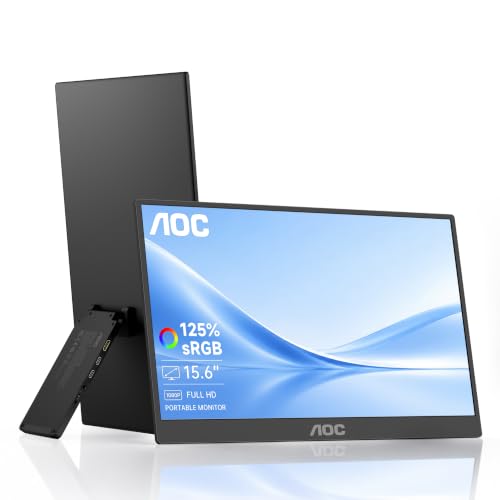
- 125% sRGB IPS display with HDR
- Ultra-slim 1.5-pound design
- Up to 45W USB-C pass-through charging
Best For: Traveling creators and casual gamers
Premium Ultrawide Pick – Alienware AW3425DWM 34-inch Curved Monitor
If you want an immersive desktop setup rather than a truly travel-sized display, this Alienware model is a strong ultrawide gaming monitor option. Its 34-inch 3440×1440 panel, 1500R curve, 180Hz refresh rate, and 1ms response time are aimed at smooth, detailed gaming.
Best For: Gamers who prioritize a large curved ultrawide screen and high refresh rate for desktop play.
Pros:
- 34-inch WQHD ultrawide panel with a 1500R curve
- 180Hz refresh rate and 1ms gray-to-gray response time
- AMD FreeSync Premium and VESA AdaptiveSync support
- DCI-P3 95% coverage and DisplayHDR 400 certification
Cons:
- At 21 pounds, it is less portable than compact USB-C monitors
- Its large 34-inch footprint requires a suitable desk
The AW3425DWM emphasizes immersion, smooth motion, and color coverage. It is better suited to a permanent gaming station than travel, but its dedicated console mode and low-blue-light solution add flexibility for longer sessions.
Travel-Friendly Value – COOLHOOD 18.5-inch 120Hz Portable Monitor
The COOLHOOD is a practical choice among portable ultrawide gaming monitors alternatives when portability and easy connectivity matter more than a 21:9 aspect ratio. Its 18.5-inch FHD IPS screen, 120Hz refresh rate, USB-C ports, and mini HDMI input make it suitable for travel gaming and second-screen use.
Best For: Travelers, laptop users, and console gamers who want a larger portable screen with straightforward connections.
Pros:
- 18.5-inch FHD IPS display with 120Hz refresh rate
- 125% sRGB coverage and 8-bit color depth
- Dual full-function USB-C ports plus mini HDMI
- 9mm-thin design with a 1.2kg weight
Cons:
- 16:9 FHD resolution is not ultrawide
- Some devices may require power through USB-C
- The 120Hz refresh rate is lower than the fastest models here
With its included smart cover, 75x75mm VESA compatibility, and broad device support, the COOLHOOD is easy to position at home or on the road. It is a sensible portable display, though buyers specifically seeking an ultrawide aspect ratio should look elsewhere.
High-Refresh Ultrawide – SANSUI 34-inch 240Hz UWQHD Monitor
For fast-paced desktop gaming, the SANSUI combines an expansive 21:9 screen with a particularly high 240Hz refresh rate. This portable ultrawide gaming monitors roundup pick uses a 34-inch 3440×1440 VA panel, Adaptive Sync, HDR400, and multiple HDMI 2.1 and DisplayPort connections.
Best For: Competitive-minded desktop gamers who want a high-refresh ultrawide with extensive connectivity.
Pros:
- 34-inch UWQHD 3440×1440 ultrawide resolution
- 240Hz refresh rate and 1ms MPRT response time
- FreeSync, VRR, and HDR400 support
- Two HDMI 2.1 and two DisplayPort 1.4 inputs
Cons:
- Its desk-mounted design is not genuinely travel portable
- No built-in speakers
- VRR for consoles requires HDMI 2.1
The SANSUI is built around speed and flexibility, with gaming features such as AI crosshair, sniper scope, and game modes. Its metal stand supports tilt adjustment, while 100x100mm VESA compatibility allows alternate mounting.
Compact QHD Companion – ARZOPA Z3FC 16.1-inch 180Hz Monitor
The ARZOPA Z3FC is a compact second-screen solution for gamers who need a display that travels easily. While it is not ultrawide, this portable monitor delivers 2560×1440 resolution, a 180Hz refresh rate, USB-C connectivity, and mini HDMI support in a 780g design.
Best For: Laptop and handheld gamers who want a lightweight QHD screen for travel, gaming, or multitasking.
Pros:
- 2560×1440 QHD resolution on a 16.1-inch display
- 180Hz refresh rate for smoother motion
- Two full-function USB-C ports and mini HDMI
- Built-in stand, speakers, and included sleeve bag
Cons:
- 16:9 aspect ratio is not ultrawide
- 9ms response time is slower than the listed desktop ultrawide models
- Its 400-nit brightness and 1000:1 contrast ratio are more modest
At 0.39 inches thick and 780g, the Z3FC is easy to pack alongside a laptop or handheld. Its landscape-to-portrait flexibility also makes it useful for productivity, while the 180Hz refresh rate keeps gaming responsive on compatible devices.
Best for Easy Setup – SANSUI 34-Inch 200Hz Curved Monitor
For shoppers comparing portable ultrawide gaming monitors and compact gaming setups, the SANSUI ES-G34C8 offers a spacious 34-inch 21:9 display with UWQHD resolution and a fast 200Hz refresh rate. Its curved VA panel, VRR support, and multiple HDMI 2.1 inputs make it suited to smooth PC and console gaming, although its desk-oriented size is less travel-friendly than a true portable monitor.
Best For: Gamers who want high-refresh ultrawide performance for a fixed desk setup.
Pros:
- UWQHD 3440 x 1440 resolution on a spacious 34-inch 1500R curved screen
- 200Hz refresh rate, OD 1ms response time, and FreeSync/VRR support
- Two HDMI 2.1 ports plus DisplayPort 1.4, with PIP/PBP support
- VESA compatibility and tilt-adjustable stand
Cons:
- Large desk monitor rather than an easily portable display
- No built-in speakers
- 300-nit brightness may be less suitable for very bright rooms
The SANSUI is a strong choice when refresh rate and immersive ultrawide gaming matter more than portability. Its broad connectivity and 21:9 format also support multitasking, but travelers should consider a smaller USB-C-powered model instead.
Best Travel-Friendly Pick – UPERFECT 16-Inch 144Hz QLED Monitor
The UPERFECT 16-inch QLED is the most travel-ready option here for shoppers seeking portable ultrawide gaming monitors, though its 16:9 aspect ratio is not technically ultrawide. It combines 2560 x 1600 resolution, a 144Hz refresh rate, USB-C and mini HDMI connectivity, and a lightweight design with a built-in kickstand and included sleeve case.
Best For: Laptop, console, and mobile gamers who need a compact second screen for travel.
Pros:
- Portable 16-inch design weighing about 1,200 grams
- 2.5K 2560 x 1600 resolution with a 144Hz refresh rate
- QLED panel with 100% DCI-P3 color gamut and 400-nit brightness
- Built-in kickstand, VESA support, and included sleeve case
Cons:
- 16:9 aspect ratio is narrower than a true ultrawide display
- Only one HDMI port
- Listed specifications conflict on response time, citing both 0.1ms and 5ms
This is the practical choice when portability outweighs ultrawide immersion. Its high refresh rate, strong color coverage, and flexible USB-C connectivity make it useful for gaming away from a desk, but buyers specifically needing a 21:9 or wider workspace should choose another model.
Best Super-Ultrawide Workspace – INNOCN 49-Inch 5K2K Monitor
The INNOCN 49C1R is a super-ultrawide option for shoppers comparing portable ultrawide gaming monitors but prioritizing screen space over portability. Its 49-inch 32:9 curved VA panel delivers 5120 x 1440 resolution at up to 120Hz, while USB-C power delivery, PIP/PBP, and extensive ports support gaming, multitasking, and connected laptop setups.
Best For: Desktop gamers and creators who want one expansive screen for gaming and multitasking.
Pros:
- Large 49-inch 32:9 display with 5120 x 1440 resolution
- 120Hz refresh rate, 1ms response time, Adaptive-Sync, and HDR400
- USB-C with 65W power delivery, DisplayPort, HDMI 2.1, USB-A, and RJ45
- PIP/PBP support, built-in speakers, and adjustable stand
Cons:
- Very large and heavy for portable use
- Glossy screen finish can be less convenient in bright environments
- Only a 1-year manufacturer warranty is listed
The INNOCN delivers the most expansive workspace in this group and can replace multiple monitors for compatible workflows. It is an excellent fixed-desk solution, but its 49-inch footprint makes it a poor match for anyone who needs a genuinely portable display.
High-Refresh 16:10 Pick – InnoView 16-inch 144Hz Portable Monitor
The InnoView INVPM401 is a strong choice for shoppers comparing portable ultrawide gaming monitors, especially if you want a fast refresh rate and extra vertical workspace. Its 1920×1200 IPS display runs at up to 144Hz, while USB-C and HDMI connectivity support laptops, consoles, and handheld gaming devices.
Best For: Gamers and multitaskers who want a lightweight 16:10 second screen with high refresh rate performance.
Pros:
- 144Hz refresh rate with FreeSync for smoother gameplay; HDMI supports up to 120Hz.
- 1920×1200 resolution and 16:10 aspect ratio provide more vertical space than standard 16:9 displays.
- Lightweight 1.73-pound design with IPS viewing angles, HDR support, and low-blue-light technology.
- Dual USB-C ports, HDMI, built-in speakers, and a three-millisecond response time support varied setups.
Cons:
- Power adapter is not included.
- Its 45% color gamut is less suited to color-critical creative work.
Choose this InnoView model if smooth gaming and a little more vertical room matter more than a wider-than-16:9 panel. The included protective sleeve and 18-month warranty add practical value for travel.
Vivid Gaming Value – ARZOPA Z1FC 16.1-inch 144Hz Monitor
The ARZOPA Z1FC offers a fast 144Hz display in a travel-friendly format, making it a practical option among portable ultrawide gaming monitors for players who prioritize fluid motion and vivid color. Its 16.1-inch 1080p IPS screen, built-in kickstand, and USB-C connectivity suit both gaming and second-screen work.
Best For: Gamers who want a colorful 144Hz portable display with flexible positioning and broad device compatibility.
Pros:
- 144Hz refresh rate improves motion clarity and can reduce perceived input latency.
- 106% sRGB coverage delivers vibrant color on the 16.1-inch 1080p IPS screen.
- Built-in kickstand supports adjustable tilt and landscape or portrait viewing.
- Two full-function USB-C ports and Mini HDMI enable plug-and-play use with laptops and consoles.
Cons:
- No adaptive sync or FreeSync support.
- It uses a standard 16:9 aspect ratio rather than a truly wider ultrawide format.
The Z1FC is a straightforward pick when refresh rate and color coverage are more important than adaptive sync. Its kickstand and orientation flexibility also make it useful beyond gaming.
Color-Centric Travel Screen – AOC V50 15.6-inch Portable Monitor
The AOC V50 is designed more for versatile travel and productivity than high-refresh gaming. For shoppers reviewing portable ultrawide gaming monitors, its strengths are the 125% sRGB IPS panel, ultra-slim build, 45W reverse charging, and compatibility with laptops, phones, and consoles.
Best For: Travelers, creators, and casual gamers who value color, portability, and device charging over high refresh rates.
Pros:
- 125% sRGB coverage and HDR support provide vibrant color for creative work and media.
- At 1.5 pounds and 0.27 inches thin, it is easy to carry.
- USB-C pass-through charging can provide up to 45W while displaying content.
- Supports landscape and portrait use, with low-blue-light, flicker-free technology and built-in speakers.
Cons:
- 60Hz refresh rate is less suitable for competitive gaming.
- Its 15.6-inch 16:9 display is not an ultrawide format.
- Mini HDMI and USB-C connections may require checking cable and power needs for each device.
The AOC V50 makes the most sense when portability, color accuracy, and charging convenience outweigh gaming speed. It is a flexible travel monitor, but competitive players should consider one of the 144Hz alternatives instead.
How We Picked the Best Portable Ultrawide Gaming Monitors
We focused on the specifications that matter most for gaming and mobile use: screen size, aspect ratio, resolution, refresh rate, response time, adaptive-sync support, color coverage, connectivity, and portability. The selection includes compact 15.6- to 18.5-inch displays for laptops and consoles, as well as larger 34- and 49-inch ultrawide monitors for immersive desktop setups.
Because “portable” can mean different things, we separated genuinely travel-friendly monitors from desktop ultrawides that offer an expansive viewing area but require a more permanent setup. Product claims and specifications should be verified before purchase, particularly regarding USB-C video support, power requirements, and included accessories.
Quick Comparison
| Type | Best For | Typical Strength | Potential Trade-Off |
|---|---|---|---|
| 15.6–16.1-inch portable | Laptops, handhelds, travel | Lightweight, easy to pack | Smaller image and fewer built-in features |
| 18.5-inch portable | More workspace on the go | Larger mobile viewing area | Less compact than standard travel monitors |
| 34-inch ultrawide | Desktop gaming and productivity | Immersive 21:9 field of view | Needs substantial desk space |
| 49-inch super ultrawide | Sim racing and multitasking | Very wide 32:9 workspace | Large, heavy, and demanding on the GPU |
Key Buying Factors for Portable Ultrawide Gaming Monitors
Portability and Power
Check the monitor’s weight, thickness, protective cover, stand design, and power requirements. USB-C displays are convenient, but a single cable may not provide enough power for every laptop. Some setups need a second USB-C connection or a wall adapter.
Resolution, Size, and Aspect Ratio
Full HD is practical for compact screens and modest hardware, while 2.5K improves sharpness on 16-inch displays. Desktop ultrawides commonly use 3440×1440, whereas 5120×1440 super ultrawides require significantly more graphics performance. Confirm that your laptop, console, or graphics card supports the desired resolution and refresh rate.
Refresh Rate and Adaptive Sync
A 120Hz or higher refresh rate can make fast games feel smoother, but the benefit depends on your system’s frame rate. AMD FreeSync, AdaptiveSync, or similar support can help reduce tearing. Also check whether high refresh rates work over every input, since HDMI and USB-C bandwidth may differ.
Connectivity and Image Quality
Look for the ports you actually need, including USB-C with DisplayPort Alt Mode, HDMI, headphone output, and USB pass-through. For creative work, prioritize color coverage and calibration; for competitive gaming, response time and motion handling may matter more than HDR branding alone.
Who Should Buy Which Portable Ultrawide Gaming Monitors?
- Frequent travelers: Choose a lightweight 15.6- or 16.1-inch USB-C monitor with a sleeve or built-in cover.
- Laptop gamers wanting more speed: Look for a portable 144Hz or 180Hz model, provided your laptop can output the required refresh rate.
- Desktop ultrawide gamers: A 34-inch curved display is a strong fit for immersive gaming, multitasking, and everyday productivity.
- Sim racers and power users: A 49-inch 32:9 monitor offers the broadest workspace, but make sure your desk and GPU can handle it.
- Console players: Verify console resolution, refresh-rate, HDMI, and power compatibility before prioritizing peak specifications.
