
A second screen can make working from a laptop easier, but the right travel setup depends on more than screen size. A standalone monitor, clip-on extender, and foldable stacked display each solve a different workspace problem.
These 10 options cover compact 14-inch extenders, larger 15.6-inch displays, and multi-screen designs. Use the buying guide below to narrow the field by laptop compatibility, connection type, and how you actually work.
Best 10 Portable Monitor for Laptop Dual Screen Picks for 2026
Lightest Clip-On Pick
14.2-Inch Laptop Screen Extender

- 1.87 lb, 0.27-inch-thin design
- 1080p IPS screen; 226-degree adjustment
- USB-C or HDMI plus USB-A connection
Best For: Travelers wanting a slim, attachable second screen
Flexible 14-Inch Pick

- Fits listed 13- to 17-inch laptops
- 1080p IPS; 180-degree rotation
- HDMI use needs separate USB power
Best For: Users wanting an attachable screen with flexible viewing modes
Standalone Display Pick
MNN 15.6-Inch Portable Monitor

- Separate 15.6-inch 1080p display
- 1.5 lb; cover doubles as stand
- Single-cable USB-C needs video-capable port
Best For: Travel desks with room for a freestanding second screen
Stacked-Screen Pick
InnoView Foldable Dual Monitor

- Two stacked 15.6-inch 1080p panels
- Foldable with 315-degree adjustment
- Mac extension needs driver; HDMI cannot extend
Best For: Multiwindow work needing two vertically stacked screens
Best Stacked Design
InnoView 15.6-Inch Dual Portable Monitor
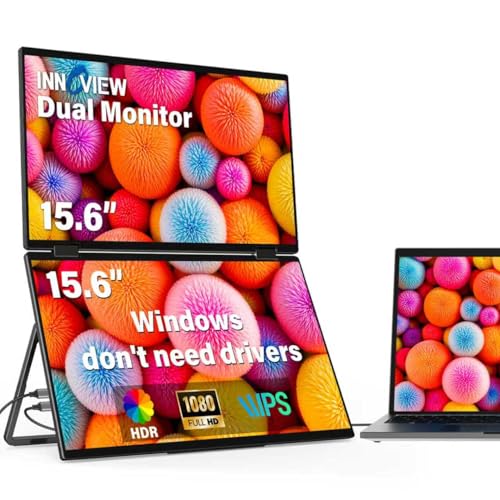
- Two stacked 15.6-inch FHD IPS screens
- Foldable frame with adjustable stand
- Mac extension requires a driver
Best For: Space-saving vertical multitasking on a Windows laptop
Best Large-Screen Extender
ZUMWALT P7 15.6-Inch Laptop Extender

- Adds two 15.6-inch FHD screens
- Two-cable setup with compatible USB-C ports
- About 4 pounds; some laptops need extra hardware
Best For: Large-screen triple-display work while traveling
Best Lightweight Attachment
Vixtan 14-Inch Triple Laptop Extender

- Two 14-inch FHD IPS panels
- Listed weight of 3 pounds
- M-series MacBooks need an adapter for dual-screen use
Best For: Portable triple-screen work with smaller side panels
Best for Fewer Cables
APILDELLA 15.6-Inch Triple Screen Extender
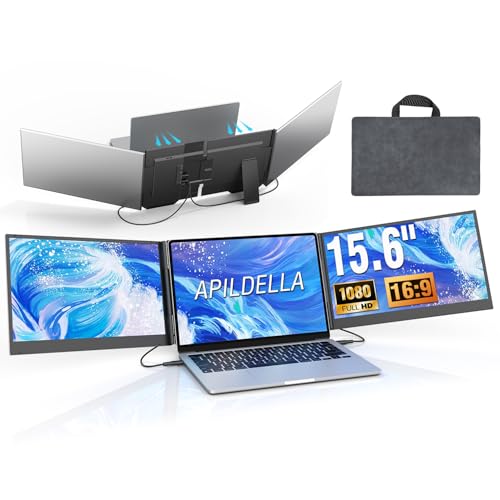
- Two 15.6-inch IPS displays
- Two-cable video setup
- 4 lb; check laptop ports
Best For: Travelers wanting larger side screens with fewer cables
Best Compact Triple-Screen Setup
FEZOBR 14-Inch Screen Extender

- Two matte 14-inch FHD screens
- 0.3 inches thick; 3 lb
- Some MacBooks need DisplayLink
Best For: Commuters seeking a compact triple-screen setup
Best Stacked Display
15.6-Inch Foldable Dual Monitor

- Two stacked 15.6-inch FHD screens
- 75 × 75 mm VESA compatible
- 30W+ USB-C power recommended
Best For: Vertical multitasking at a desk or on the go
Lightest Clip-On Pick – 14.2-Inch Laptop Screen Extender
If you want a portable monitor for laptop dual screen work without carrying a separate desk display, this 14.2-inch extender attaches to 14- to 17.3-inch laptops. At a stated 1.87 pounds and 0.27 inches thick, it is built with travel in mind.
Best For: Frequent travelers who want a lightweight, attachable second screen.
Pros:
- 1080p IPS panel with a matte finish and stated 300-nit brightness.
- Supports extended, mirrored, and portrait viewing, with an adjustable angle up to 226 degrees.
- Driver-free connection via full-featured USB-C or HDMI plus USB-A; required cables are included.
Cons:
- USB-C video requires a full-featured port; other laptops need both HDMI and USB-A connections.
- The 14.2-inch display offers less screen area than the larger monitors in this roundup.
Its main advantage is a slim, laptop-attached setup. Check your laptop’s ports before buying so you know whether the single-cable USB-C connection will work.
Flexible 14-Inch Pick – KEFEYA Laptop Screen Extender
The KEFEYA is a portable monitor for laptop dual screen workflows that fits 13- to 17-inch laptops. Its 14-inch 1080p IPS panel adds space for documents or calls, while the listed display modes accommodate both private multitasking and screen sharing.
Best For: Laptop users who want a clip-on display with several viewing modes.
Pros:
- 1920-by-1080 IPS display with stated 300-nit brightness and 72% NTSC color coverage.
- Supports mirror, extended, landscape, and portrait modes, plus 180-degree rotation.
- Driver-free setup with USB-C, HDMI, and USB-A cables included.
Cons:
- An HDMI connection also requires a USB-A-to-USB-C cable for power.
- At a listed 1.04 kg, it is heavier than the 1.87-pound extender in this roundup.
Choose this one if its 13- to 17-inch laptop fit and rotating screen suit your setup. For HDMI use, plan on connecting both the video and power cables.
Standalone Display Pick – MNN 15.6-Inch Portable Monitor
For a portable monitor for laptop dual screen use that does not attach to the laptop, the MNN provides a separate 15.6-inch 1080p display. Its included protective cover doubles as a stand, making it practical for a desk or travel workspace.
Best For: People who prefer a larger, freestanding second screen for work and entertainment.
Pros:
- 15.6-inch IPS display with 1080p resolution and wide stated viewing angles.
- Two full-featured USB-C ports support single-cable video and power with compatible devices; mini HDMI is another connection option.
- Listed at 1.5 pounds, with a protective cover that serves as a stand.
Cons:
- Single-cable USB-C use requires a device with Thunderbolt 3 or USB-C DisplayPort Alt Mode support.
- Unlike a clip-on extender, it needs its own placement beside the laptop.
The larger panel and stand make this a good fit when you have desk space. Confirm USB-C video compatibility if avoiding a separate video connection matters to you.
Stacked-Screen Pick – InnoView Foldable Dual Monitor
If your portable monitor for laptop dual screen setup needs more room than one added panel provides, this InnoView unit stacks two 15.6-inch 1080p screens in a foldable design. It is a different choice from a side-mounted extender: the vertical layout puts multiple windows in view without spreading them across the desk.
Best For: Spreadsheet-heavy work, coding, or shared workspaces that benefit from two stacked displays.
Pros:
- Two 15.6-inch IPS panels, each with 1920-by-1080 resolution.
- Foldable design with up to 315-degree screen adjustment and adjustable stands.
- Supports extended, split-screen, and duplicate modes, subject to connection and operating-system limits.
Cons:
- Mac extended mode requires driver installation; HDMI does not support extended mode on any system.
- At a listed 3.5 pounds, it is heavier than the other monitors here.
- Requires suitable external power; the maker recommends its included adapter and a 30W-or-higher source.
The two-panel layout offers the most display area of these picks, but it also demands more careful setup. Check the mode restrictions and power requirements before choosing it for travel.
Best Stacked Design – InnoView 15.6-Inch Dual Portable Monitor
If you want a portable monitor for laptop dual screen work without spreading displays across your desk, this InnoView model stacks two 15.6-inch, 1080p IPS panels in a foldable frame. Its vertical layout is useful for keeping documents, code, or spreadsheets visible at once.
Best For: Windows laptop users who want a space-saving, stacked workspace.
Pros:
- Two 15.6-inch FHD screens support extended, spliced, and mirrored layouts.
- Foldable design and adjustable stand make the setup easier to position and carry.
- Windows extension works without a driver.
Cons:
- Mac extended-display mode requires driver installation.
- Requires the included power cable and adapter; a 30W or higher supply is recommended.
Choose this one for vertical screen space rather than a laptop-mounted attachment. Check your Mac setup and power connections before relying on it away from your desk.
Best Large-Screen Extender – ZUMWALT P7 15.6-Inch Laptop Extender
For shoppers seeking a portable monitor for laptop dual screen expansion, the ZUMWALT P7 adds two 15.6-inch, 1080p displays alongside a laptop screen. It is a practical choice when you want a triple-screen workspace with larger panels for multiple open apps.
Best For: Travelers who prioritize large side screens and have a laptop with suitable full-featured USB-C ports.
Pros:
- Two 15.6-inch FHD displays provide generous workspace.
- Connects with two USB-C cables when the laptop supports the required functions.
- Includes a carrying bag, cables, and power adapter.
Cons:
- Weighs about 4 pounds, adding noticeable weight to a travel kit.
- Laptops without full-featured USB-C and M1/M2/M3 MacBooks need an additional H5-T cable and driver-based setup.
The larger screens are the main reason to pick this extender. Confirm your ports and any required adapter before buying, since the simple two-cable setup does not apply to every laptop.
Best Lightweight Attachment – Vixtan 14-Inch Triple Laptop Extender
If portability matters most in a portable monitor for laptop dual screen setup, the Vixtan extender adds two 14-inch, 1080p IPS panels while weighing a listed 3 pounds. Its adjustable rear stand is designed for laptops from 13 to 17.3 inches.
Best For: Commuters and remote workers who prefer a lighter laptop-mounted triple-screen setup.
Pros:
- Two 14-inch FHD IPS screens add workspace in a compact attachment.
- Listed 3-pound weight and slim design suit frequent carrying.
- Includes USB-C, USB-A, and HDMI cables; supports extended, mirrored, and portrait modes.
Cons:
- M1/M2/M3 MacBooks support only a single external screen without a DisplayLink adapter for dual-screen use.
- Flickering or low brightness may require a separate 5V/3A or higher power adapter.
This is the more compact option if 14-inch panels give you enough room. MacBook chip limitations and possible extra power needs are worth checking before a trip.
Best for Fewer Cables – APILDELLA 15.6-Inch Triple Screen Extender
If you want a portable monitor for laptop dual screen use without a tangle of connections, this APILDELLA extender adds two 15.6-inch displays using two cables for video while sharing power. Its fold-out design supports 13- to 17.3-inch laptops.
Best For: Travelers who want two larger side screens and a simpler cable setup.
Pros:
- Two 15.6-inch IPS screens support independent displays, mirroring, and extended mode.
- Includes a travel bag, connection cables, and a power adapter.
- Clip-free design avoids attaching screens to the laptop lid.
Cons:
- Weighs 4 pounds, so it is less convenient for minimal packing.
- Requires two USB-C ports with DisplayPort support, or a suitable USB-C and HDMI combination; M1–M4 MacBooks require an additional H5-T device.
The reduced cable count is its main draw, but check your laptop’s ports and MacBook requirements before buying.
Best Compact Triple-Screen Setup – FEZOBR 14-Inch Screen Extender
For a portable monitor for laptop dual screen setup that takes up less space in a bag, the FEZOBR adds two 14-inch 1080p displays. It weighs 3 pounds and has a built-in adjustable stand for use with 13- to 17-inch laptops.
Best For: Commuters and remote workers who prioritize a compact triple-screen workstation.
Pros:
- Two matte 14-inch FHD screens support extended, mirrored, and portrait layouts.
- Measures 0.3 inches thick and weighs 3 pounds.
- Includes USB-C, USB-A, and HDMI connection cables; supported devices need no drivers.
Cons:
- M1/M2/M3 MacBooks need a DisplayLink adapter to run both external screens.
- Flickering or dim screens may require a separate 5V/6A or higher power adapter.
Its smaller screens make it a practical travel choice, provided you confirm your laptop’s display support and power needs.
Best Stacked Display – 15.6-Inch Foldable Dual Monitor
If side-mounted screens are not your preference, this portable monitor for laptop dual screen use stacks two 15.6-inch 1080p displays vertically. The foldable design also supports a 75 × 75 mm VESA mount for a more permanent desk setup.
Best For: People who want two external screens stacked above their laptop for documents, coding, or meetings.
Pros:
- Two matte IPS displays are specified at 100% sRGB, 330 nits, and 60Hz.
- Supports extended, portrait, and duplicate display modes.
- VESA compatibility provides an option for a monitor arm or desktop stand.
Cons:
- A 30W or higher USB-C power adapter is recommended for best performance.
- The vertical layout may not suit buyers who want screens flanking their laptop.
Choose this model for its stacked layout and mounting flexibility, while allowing for its recommended power setup.
How We Picked the Best Portable Monitor for Laptop Dual Screen
We organized these 10 products by the decisions that matter most for a mobile workspace: display layout, stated laptop-size fit, screen size, connection options, and portability. The selection includes standalone monitors, side-mounted extenders, foldable stacked displays, and triple-screen kits. Product names and listings can be inconsistent, so treat specifications as a starting point and confirm the current listing and your laptop’s ports before buying. We did not assume that similar-looking InnoView models or generic extenders have identical accessories or power requirements.
Quick Comparison: Which Layout Fits Your Desk?
Standalone monitor: The MNN 15.6-inch display sits separately from your laptop, giving you flexibility in placement but requiring desk space and a way to prop it up. Side-mounted extender: Compact options such as the KEFEYA 14-inch and the 14.2-inch ultra-slim model attach near your laptop screen for a more integrated travel setup. Stacked or foldable display: The InnoView 15.6-inch models and the foldable 15.6-inch dual monitor favor vertical or adjustable layouts. Triple-screen extender: The Vixtan, APILDELLA, and other triple-display kits target people who need two additional screens and can accommodate the extra size and connections.
Key Buying Factors for a Portable Monitor for Laptop Dual Screen
Check Video Output Before Anything Else
A USB-C port does not necessarily send video. Look for DisplayPort Alt Mode or Thunderbolt support on your laptop if you expect a one-cable USB-C connection. HDMI may carry the picture but still require separate USB power. For a triple-screen setup, confirm how many independent external displays your laptop supports; a splitter does not automatically create separate desktops.
Match the Mount to Your Laptop
For a clip-on Portable Monitor for Laptop Dual Screen use, compare the maker’s supported laptop-size range with your actual display size, lid thickness, and hinge design. An extender can add weight to the lid and may feel less stable on a small table. A standalone display avoids lid loading but takes more desk space.
Balance Screen Area Against Travel Weight
A 14-inch screen is easier to fit in a bag or on a narrow desk, while a 15.6-inch screen gives documents and spreadsheets more room. The listed displays are primarily 1080p models, so focus on usable size, viewing position, and text comfort rather than assuming every panel has the same brightness or color quality. Check total packed weight, including cables and any stand.
Who Should Buy Which Portable Monitor for Laptop Dual Screen?
Frequent travelers: Start with a lighter 14- to 14.2-inch side extender if your laptop meets its fit requirements. People who switch between laptops or want flexible positioning: Consider the standalone MNN monitor. Users with limited desk width: Compare the stacked InnoView designs. Spreadsheet-heavy multitaskers: Look at the triple-screen extenders, but verify display support, power needs, and packed bulk first. If you need only one extra screen, a simpler setup is usually easier to connect and carry.
