
A 4K portable monitor can give your laptop more room for detailed spreadsheets, creative work, and side-by-side windows without committing to a desk setup. The right choice depends on more than resolution: screen size, brightness, power needs, and how it connects all matter when you travel.
These 10 options range from compact displays to larger second screens, with touchscreen and brighter-panel choices for different workflows. Use the buying guide below to narrow down what will work with your laptop and where you plan to use it.
Best 10 Portable Monitor for Laptop 4K Picks for 2026
Best Touchscreen
EVICIV 15.6-Inch 4K Touch Monitor

- 15.6-inch 4K matte display
- 10-point capacitive touch
- USB-C, Mini HDMI, and VESA support
Best For: Touch-enabled laptop workspaces
Best Protective Cover

- 15.6-inch 4K IPS panel
- Magnetic protective cover included
- USB-C, Mini HDMI, and VESA support
Best For: Travel with the option to desk-mount
Best Extra Workspace
UPERFECT 14.5-Inch 4K 16:10 Monitor
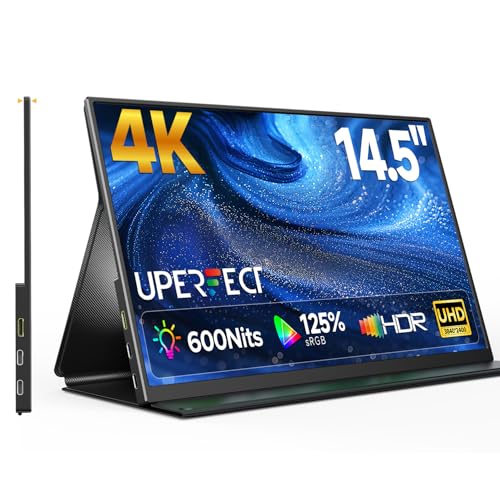
- Taller 3840 × 2400 display
- Rated 600-nit matte IPS panel
- Smart cover serves as a stand
Best For: Portable editing and multitasking
Best Built-In Stand

- Integrated kickstand and VESA support
- Dual USB-C, HDMI, and speakers
- Matte 4K screen with travel sleeve
Best For: Quick setups at temporary desks
Best Large Screen
InnoView 18.5-Inch 4K Portable Monitor

- 18.5-inch 3840 x 2160 IPS screen
- Built-in stand with 180° tilt
- Signal cable and power adapter needed
Best For: Larger desk-to-desk 4K workspaces
Best for Bright Spaces
UPERFECT 16-Inch 4K 1200-Nit Monitor

- 16-inch 3840 x 2400 IPS display
- Advertised 1200-nit conditional peak
- Smart cover and VESA mounting
Best For: Bright workspaces and taller 16:10 screen space
Best Compact 4K Pick
Upperizon 15.6-Inch Portable Monitor

- 15.6-inch 4K IPS screen
- 2.05 lb without cover
- Cover, cables, and adapter included
Best For: Travelers wanting a compact 4K second screen
Best for Touch Controls
Newsoul 15.6-Inch 4K Touchscreen

- 15.6-inch 4K IPS display
- 10-point touch for compatible devices
- USB-C and Mini HDMI inputs
Best For: Windows laptop users seeking touch interaction
Best Large-Screen Option
Upperizon 18.4-Inch 4K Monitor

- Spacious 18.4-inch 4K screen
- Up to 470 nits with adapter
- Kickstand and VESA mounting
Best For: Mobile workspaces needing more screen area
Best Touchscreen – EVICIV 15.6-Inch 4K Touch Monitor
If you want a portable monitor for laptop 4k setups with touch control, this EVICIV combines a 15.6-inch 3840 × 2160 display with 10-point capacitive touch. Its matte screen is rated at 450 nits and covers a stated 125% sRGB gamut.
Best For: Travelers who want a sharp second screen with intuitive touch navigation.
Pros:
- 10-point touch supports tapping, swiping, and zooming.
- USB-C and Mini HDMI provide connection options.
- Thin 0.27-inch body weighs a stated 1.8 pounds.
Cons:
- 60Hz refresh rate is not aimed at high-refresh gaming.
- Check your laptop’s touch and video compatibility before buying.
Pick this one when touch interaction matters as much as 4K detail; its 75 × 75 mm VESA compatibility also helps if your portable setup becomes a desk setup.
Best Protective Cover – KYY K5 15.6-Inch 4K Monitor
For a portable monitor for laptop 4k work that travels regularly, the KYY K5 pairs a 15.6-inch 3840 × 2160 IPS screen with an included magnetic protective cover. Its listed 400-nit brightness and 100% sRGB coverage suit detailed everyday viewing.
Best For: Frequent travelers who want a protected 4K screen that can also be VESA-mounted.
Pros:
- Magnetic PU leather cover protects the screen in transit.
- Two full-function USB-C connections and Mini HDMI offer flexible hookups.
- 75 × 75 mm VESA holes support landscape or portrait mounting.
Cons:
- VESA mount is not included.
- Listed monitor weight increases when carrying the cover.
The cover and aluminum-alloy construction make this a practical travel choice, while VESA support gives it a useful role back at your desk.
Best Extra Workspace – UPERFECT 14.5-Inch 4K 16:10 Monitor
This portable monitor for laptop 4k setups stands out for its taller 16:10 screen: the UPERFECT fits 3840 × 2400 pixels into a 14.5-inch matte IPS panel. That extra vertical space is handy for documents, timelines, and editing panels.
Best For: Mobile multitaskers and creators who favor vertical workspace and a bright screen.
Pros:
- 3840 × 2400 resolution provides more vertical pixels than a 3840 × 2160 display.
- Rated 600-nit brightness and stated 125% sRGB gamut.
- Dual USB-C and Mini HDMI ports; included smart cover doubles as a stand.
Cons:
- 14.5-inch screen is smaller than the 15.6-inch options here.
- Its 16:10 format is less conventional for 16:9 video.
Choose it for its compact, taller canvas rather than maximum screen size. The matte finish and high stated brightness are particularly appealing for varied work locations.
Best Built-In Stand – cocopar 15.6-Inch 4K Monitor
For a portable monitor for laptop 4k use that sets up quickly, this cocopar has an integrated kickstand instead of relying on a folding cover for support. The 15.6-inch 3840 × 2160 matte display runs at 60Hz and is rated for 145% sRGB coverage.
Best For: People who move between temporary desks and want a built-in stand plus speakers.
Pros:
- Integrated kickstand and VESA compatibility provide setup choices.
- Two USB-C ports, HDMI, and built-in dual speakers.
- Metal body comes with a protective sleeve for travel.
Cons:
- USB-C video requires a host port with Thunderbolt or DisplayPort Alt Mode support.
- Listed 25 ms response time may be less appealing for fast-paced gaming.
Its stand, sleeve, and speakers make it a convenient all-in-one travel screen. Confirm your laptop’s USB-C video support before counting on a single-cable connection.
Best for Easy Setup – UPERFECT 15.6-Inch 4K Touch Monitor
If you want a portable monitor for laptop 4k work that also accepts touch input, this 15.6-inch UPERFECT pairs a 3840 x 2160 display with 10-point touch. Its matte screen, slim frame, and listed 1.8-pound weight suit a mobile setup.
Best For: Laptop users who want a compact 4K second screen with touch controls.
Pros:
- 10-point touchscreen adds direct control.
- 3840 x 2160 resolution and advertised 125% sRGB gamut.
- USB-C and mini HDMI connections support a range of devices.
Cons:
- Mini HDMI use requires separate power and a USB-A-to-USB-C connection for touch.
- 60 Hz refresh rate is not aimed at high-refresh gaming.
Choose this one for touch interaction in a relatively small travel screen. Check your laptop’s ports and power setup if you plan to use mini HDMI.
Best Large Screen – InnoView 18.5-Inch 4K Portable Monitor
For buyers seeking a portable monitor for laptop 4k multitasking with more screen space, this InnoView offers an 18.5-inch 3840 x 2160 IPS display. Its built-in stand tilts up to 180 degrees, so you can adjust the viewing angle without adding a separate stand.
Best For: Desk-to-desk users who prioritize a larger 4K workspace and an adjustable stand.
Pros:
- 18.5-inch 4K screen provides room for multiple windows.
- Advertised 100% sRGB coverage, 10-bit color, HDR, and 400-nit brightness.
- Two USB-C ports, HDMI, and an included 30W power adapter.
Cons:
- Setup calls for both a signal cable and the included power adapter.
- Its 18.5-inch size takes up more space than smaller travel monitors.
This is the roomy option for a portable workstation, especially if an integrated, adjustable stand matters more to you than minimizing screen size.
Best for Bright Spaces – UPERFECT 16-Inch 4K 1200-Nit Monitor
If you need a portable monitor for laptop 4k use in bright surroundings, this 16-inch UPERFECT stands out for its advertised 1200-nit peak brightness and matte, anti-reflective screen. Its 3840 x 2400 resolution uses a 16:10 aspect ratio, giving you more vertical room than a 16:9 display.
Best For: Laptop users working in bright spaces who want a taller 4K-class display.
Pros:
- Advertised 1200-nit peak brightness and anti-reflective coating.
- 3840 x 2400 IPS panel with a 16:10 aspect ratio.
- Includes a protective smart cover and supports 75 x 75 mm VESA mounting.
Cons:
- Peak brightness requires external power and a white background, according to the listing.
- 60 Hz refresh rate limits its appeal for high-refresh gaming.
Its brightness specification makes it worth considering for well-lit workspaces, but treat 1200 nits as a conditional peak rather than an always-on setting.
Best Compact 4K Pick – Upperizon 15.6-Inch Portable Monitor
If you want a portable monitor for laptop 4k work without moving up to a larger screen, this 15.6-inch Upperizon offers a 3840 × 2160 IPS display in a 2.05 lb body. Its matte screen, included cover, and 75 × 75 mm VESA mounting give you options for travel and desk setups.
Best For: Travelers who want a compact, high-resolution second screen with a protective cover.
Pros:
- 4K resolution, 380-nit rated brightness, and a claimed 144% sRGB gamut.
- Two USB-C ports and HDMI support laptop and console connections.
- Includes a cover, three cables, and a 30W power adapter.
Cons:
- Single-cable USB-C video requires a full-featured USB-C or Thunderbolt port.
- Insufficient power can cause flickering, making the adapter necessary in some setups.
This is the more packable Upperizon option here. Choose it when the included travel accessories and smaller footprint matter more than having an expansive workspace.
Best for Touch Controls – Newsoul 15.6-Inch 4K Touchscreen
For shoppers seeking a portable monitor for laptop 4k use with direct on-screen control, this Newsoul pairs a 15.6-inch 3840 × 2160 IPS display with 10-point touch support. Its slim body and USB-C or Mini HDMI inputs make it a practical option for a mobile workstation.
Best For: Windows laptop users who want to tap, swipe, and zoom on a portable second display.
Pros:
- 10-point touch supports gestures such as dragging, swiping, and zooming.
- 4K resolution and a claimed 125% sRGB gamut.
- Full-function USB-C and Mini HDMI connection options, plus built-in speakers.
Cons:
- Touch is not supported with iPhone or iPad, and Mac laptops support only single touch.
- Mini HDMI setups need separate power and a USB-A-to-USB-C connection for touch.
The touch panel is the reason to choose this model. Check your device and connection plan before buying, since its gesture support depends on the host and cabling.
Best Large-Screen Option – Upperizon 18.4-Inch 4K Monitor
If your priority is more room for windows, this 18.4-inch Upperizon is a portable monitor for laptop 4k setups built around a larger 3840 × 2160 IPS screen. An adjustable kickstand makes temporary workstations straightforward, while VESA mounting offers a more permanent option.
Best For: Mobile professionals who want a larger second screen for spreadsheets, coding, or side-by-side windows.
Pros:
- 18.4-inch 4K display provides more viewing area than a 15.6-inch model.
- Rated up to 470 nits with the included power adapter; matte finish helps limit reflections.
- Built-in kickstand, 75 × 75 mm VESA support, two USB-C ports, and HDMI.
Cons:
- Brightness is limited to 300 nits when powered through a single USB-C cable.
- Single-cable video requires a full-featured USB-C or Thunderbolt port; VESA screws are not included.
Pick this one when screen area outweighs the convenience of a smaller display. Plan to use its adapter if you want its maximum stated brightness.
How We Picked the Best Portable Monitor for Laptop 4K
We focused on the practical differences among the 10 selected displays: screen size, stated brightness and color specifications, touch support, aspect ratio, and connection options. Those details help distinguish a compact travel screen from one better suited to a temporary desk setup. Manufacturer specifications are useful starting points, but they do not establish real-world color accuracy, battery drain, or outdoor visibility. Check current listings and independent measurements if any of those are essential to your work.
Quick Comparison: Which Type Fits Your Setup?
The 14.5-inch UPERFECT is the smallest listed option and has a 16:10 aspect ratio, which can provide more vertical room for documents. The 15.6-inch models, including EVICIV, KYY, cocopar, UPERFECT, and Upperizon options, offer a middle ground between workspace and packability. The 16-inch UPERFECT lists 1,200 nits for buyers prioritizing a brighter screen; verify how that rating is specified before relying on it for outdoor use. The 18.5-inch InnoView and 18.4-inch Upperizon provide more physical workspace but take up more bag and table space. Touchscreen listings are worth comparing if you annotate, navigate by hand, or use touch-friendly apps.
Key Buying Factors for a Portable Monitor for Laptop 4K
Size, Scaling, and Aspect Ratio
At 14.5 to 16 inches, 3840 × 2160 pixels look sharp, but text may be too small at native scaling. Expect to use your operating system’s display scaling, which makes text comfortable while reducing the amount of usable desktop space. A 16:10 screen can be helpful for reading and editing; a larger 18-inch-class display may be more comfortable if you have room to set it up.
Connections and Power
Before ordering, confirm that your laptop’s USB-C port supports video output through DisplayPort Alt Mode or Thunderbolt. A USB-C port used only for data or charging will not necessarily drive the display. HDMI is another option, but the monitor may still need separate USB power. Check the included cables, power adapter requirements, and whether your laptop can reliably power the screen at your preferred brightness.
Brightness, Color, and Touch
A higher stated nit rating can be valuable near windows, although glare and screen finish also affect visibility. Wide-gamut claims expressed as a percentage of sRGB do not guarantee accurate color; creative professionals should look for measured accuracy and calibration support. If touch matters, confirm compatibility with your operating system and whether touch requires an additional USB connection. Also check how the monitor stands up: an adjustable stand or compatible mount may make longer sessions more comfortable.
Who Should Buy Which Portable Monitor for Laptop 4K?
Choose a smaller 14.5- or 15.6-inch model if it will spend most of its time in a laptop bag. Consider the 16-inch brighter-screen option for well-lit rooms, while keeping your power source in mind. An 18-inch-class monitor makes more sense for a movable workstation than frequent lightweight travel. Buy a touchscreen model only if your workflow will use it; otherwise, put your budget toward the size, connections, and visibility you need. For any Portable Monitor for Laptop 4K use, confirm your laptop’s video output and the seller’s return terms before purchasing.
