
Portable live streaming computers need to do more than just run a broadcast app. They have to juggle camera inputs, overlays, chat, recording, and platform connections without slowing down.
This roundup focuses on compact, creator-friendly picks that balance performance, connectivity, and portability for streaming on the go or from a small studio.
Best 10 Portable Live Streaming Computers Picks for 2026
All-in-One Portable Live Studio
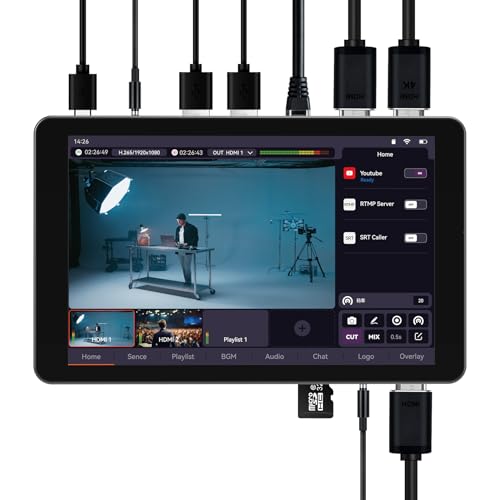
- All-in-one switcher, encoder, recorder, and monitor
- Supports dual HDMI, UVC, USB, and remote streams
- 8000mAh battery and built-in app streaming
Best For: Mobile creators and event teams needing a laptop-free live streaming studio
Mini PC Workstation Pick
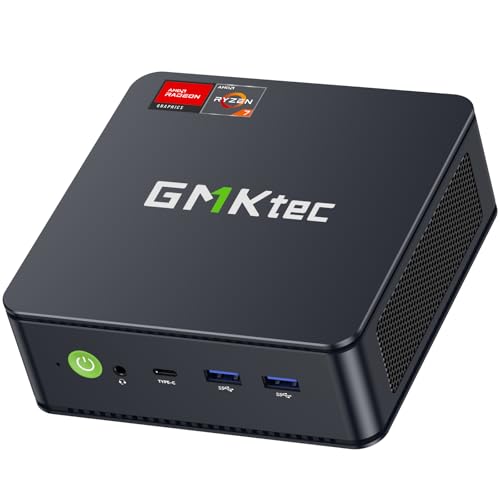
- Ryzen 5 7640HS with 16GB DDR5 and 1TB SSD
- Dual 2.5G LAN and WiFi 6E for networking
- USB4 plus triple-display support for workflow setups
Best For: Creators who need a compact PC for streaming support and production tasks
Wireless Camera Choice

- 1080p HD streaming and recording in a compact body
- Wi-Fi, Ethernet, and LTE connectivity for mobile use
- App-controlled multicam support with up to three cameras
Best For: Solo and small-team creators wanting an easy wireless streaming camera
Compact Triple-Display PC

- Ryzen 7 6800H with Radeon 680M graphics
- Triple 4K display support for multitasking
- Dual LAN plus WiFi 6 for flexible connectivity
Best For: Creators who need a compact mini PC for multi-monitor streaming workflows
Ultra-Portable Engineering Pick
GPD MicroPC 2 7-inch Mini Laptop
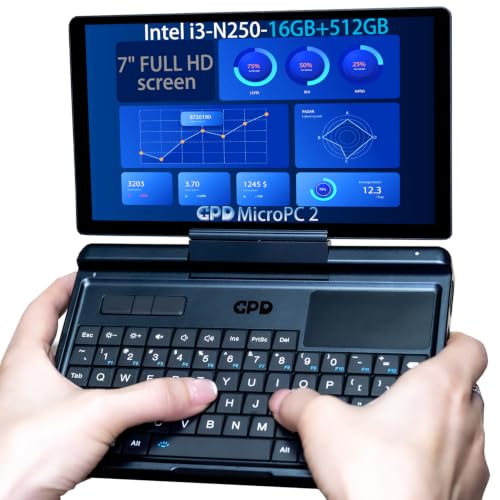
- 7-inch 1080P display in a 490g body
- 2.5Gbps Ethernet, Wi-Fi 6, Bluetooth 5.2
- 16GB RAM, 512GB SSD, triple 4K support
Best For: Mobile technicians and engineers
Quiet Triple-Display Value Pick
KAMRUI Pinova P2 Ryzen 7330U Mini PC

- Ryzen 7330U with 4 cores and 8 threads
- Triple 4K@60Hz output for multitasking
- 16GB RAM, 256GB SSD, quiet cooling
Best For: Quiet multi-display streaming workspaces
Budget Triple-Display Choice

- Ryzen 5 3501U with 4 cores and 8 threads
- 16GB RAM and 512GB PCIe NVMe SSD
- WiFi 6 plus triple-display support
Best For: Affordable compact streaming and office setups
Balanced Home Office Mini PC
Getorli Ryzen 5 7430U with Dual 2.5G LAN

- Ryzen 5 7430U with 6 cores and 12 threads
- Triple 4K display support with HDMI, DP, and Type-C
- Dual 2.5G LAN, WiFi 6, and Bluetooth 5.3
Best For: Home office users who need steady performance and strong networking
All-in-One Portable Live Studio – SPROLINK NeoLIVE MD8
If you want portable live streaming computers that can replace a laptop-based setup, the SPROLINK NeoLIVE MD8 is built as an all-in-one live studio. It combines switching, encoding, recording, and monitoring in a single 8-inch touchscreen unit, while also supporting dual HDMI input, UVC cameras, USB storage, and remote network feeds for flexible productions.
Best For: Creators, churches, schools, and field producers who want an all-in-one portable streaming switcher with built-in app support.
Pros:
- Built-in switcher, encoder, recorder, and 8-inch touchscreen in one portable device
- Supports dual HDMI, UVC camera, USB drive, and up to 4 remote network streams
- Built-in apps for vertical or horizontal streaming to platforms like TikTok, Instagram, YouTube, and Facebook
- 8000mAh battery with Type-C fast charging helps keep it mobile for outdoor use
Cons:
- HDMI output is 1080p rather than 4K, so output is optimized for HD streaming
- Best fit is for live production workflows, not general-purpose computing
This is a strong choice if your priority is an integrated streaming workstation instead of assembling separate gear. Its combination of built-in software, wireless source integration, and battery power makes it especially practical for mobile productions.
Mini PC Workstation Pick – GMKtec M6 Ultra
For buyers comparing portable live streaming computers, the GMKtec M6 Ultra is a mini PC that can serve as a compact streaming workstation. It is powered by a Ryzen 5 7640HS, includes 16GB DDR5 memory and a 1TB SSD, and offers USB4, triple-display support, dual 2.5G LAN, and WiFi 6E for a flexible desk-based setup.
Best For: Streamers and creators who want a compact Windows-style mini PC for streaming support, editing, or general production work.
Pros:
- Ryzen 5 7640HS with Radeon 760M graphics for multitasking and light content creation
- 16GB DDR5 RAM and 1TB SSD provide fast everyday responsiveness
- Dual 2.5G LAN ports are useful for stable wired networking in streaming workflows
- USB4, HDMI, and DisplayPort support triple displays for a multi-window setup
Cons:
- It is a mini PC, so it does not include built-in capture or live switching features
- More suited to a stationary or semi-portable workstation than an all-in-one field streaming unit
If you need a small computer to power a streaming desk rather than a dedicated live switcher, this model fits that role well. Its networking and display options make it practical for production, monitoring, and general creator workflows.
Wireless Camera Choice – Logitech Mevo Start
The Logitech Mevo Start stands out among portable live streaming computers because it is a wireless streaming camera designed for simple mobile production. It records and streams in 1080p HD, connects over Wi-Fi, Ethernet, or smartphone LTE, and can be managed from a smartphone with features like Auto-Director.
Best For: Solo creators and small teams who want an easy wireless live streaming camera with multicam potential.
Pros:
- Streams and records in 1080p HD with compact, travel-friendly hardware
- Works over Wi-Fi, Ethernet, or a smartphone LTE connection for flexible locations
- App control with Auto-Director makes operation simple from a phone
- Supports multicam setups with up to three Mevo Start cameras and RTMP/NDI|HX support
Cons:
- Only captures 1080p, so it is not a 4K option
- Best for camera-based streaming rather than a full computer replacement
This is a strong pick if you want an approachable wireless camera that fits into a portable streaming workflow without a lot of complexity. It is especially appealing for users who value mobile control and quick setup.
Compact Triple-Display PC – Glorlin Ryzen 7 Mini
For shoppers looking at portable live streaming computers, this Glorlin mini PC is a compact desktop-style option that can support a creator setup at home or in a small studio. It uses a Ryzen 7 6800H, 16GB LPDDR5 memory, a 512GB NVMe SSD, and triple 4K display output for multitasking across streaming tools, chat, and monitoring.
Best For: Users who want a small, capable mini PC for streaming-related multitasking and multi-monitor setups.
Pros:
- Ryzen 7 6800H with Radeon 680M graphics handles everyday computing and light media work
- Triple 4K display support via HDMI, DisplayPort, and Type-C improves multitasking
- Dual LAN and WiFi 6 provide flexible connectivity for wired or wireless networking
- Compact format works well as a small workstation for creator or office use
Cons:
- It is not a dedicated live streaming switcher or encoder
- 512GB storage is modest compared with larger creator workstations
This mini PC makes sense if you want a small system that can support streaming workflows without taking much desk space. Its real value is in display flexibility, network options, and balanced everyday performance.
Ultra-Portable Engineering Pick – GPD MicroPC 2 7-inch Mini Laptop
If you want portable live streaming computers that prioritize connectivity over size, the GPD MicroPC 2 is built for highly mobile work. Its 7-inch 1080P display, Intel i3-N250 processor, 16GB of RAM, and broad port selection make it a practical choice for field use, remote monitoring, and compact on-the-go setups.
Best For: Engineers, technicians, and mobile professionals who need a tiny Windows machine with strong wired and wireless connectivity.
Pros:
- 2.5Gbps RJ45, Wi-Fi 6, Bluetooth 5.2, and multiple USB ports give you flexible connection options.
- 16GB LPDDR5 RAM and a 512GB NVMe SSD provide solid everyday responsiveness.
- HDMI 2.1 plus USB-C with DP 1.4 support can drive up to three 4K external displays.
- Compact 490g design makes it easy to carry for travel or field work.
Cons:
- The 7-inch screen is very small for extended desktop use.
- Intel UHD Graphics is fine for utility work, but it is not meant for demanding creative or gaming loads.
- Best suited to practical tasks rather than high-end production workflows.
The MicroPC 2 stands out when portability and ports matter more than raw performance. For live streaming support roles, monitoring, or troubleshooting, it offers a very capable compact footprint with a lot of connectivity.
Quiet Triple-Display Value Pick – KAMRUI Pinova P2 Ryzen 7330U Mini PC
For portable live streaming computers that stay compact on a desk or behind a monitor, the KAMRUI Pinova P2 is a straightforward mini PC option. Its Ryzen 7330U chip, 16GB of LPDDR4X memory, triple 4K output, and quiet cooling make it a useful fit for home setups, conference rooms, and light production stations.
Best For: Users who want a small, quiet mini PC for streaming support, multitasking, and multi-display setups.
Pros:
- Ryzen 7330U offers 4 cores and 8 threads for smooth everyday multitasking.
- Triple 4K@60Hz display support is helpful for monitoring and multi-window workflows.
- 16GB LPDDR4X RAM and 256GB SSD give you a responsive starting point.
- Compact case, VESA mount, and quiet cooling suit clutter-free setups.
Cons:
- Storage starts at 256GB, so larger media libraries may need expansion.
- It is a mini desktop, not a battery-powered portable computer.
- Best for efficiency and flexibility rather than heavy content creation.
The Pinova P2 is a sensible choice if you want a small machine that can support multiple displays without taking much room. It is especially appealing for quiet workspaces where streaming dashboards and monitoring windows need to stay organized.
Budget Triple-Display Choice – Getorli Ryzen 5 3501U Mini PC
If you are comparing portable live streaming computers for an affordable compact setup, the Getorli Mini PC gives you the essentials in a small footprint. It pairs a Ryzen 5 3501U processor with 16GB of RAM, a 512GB SSD, WiFi 6, and support for up to three displays, making it practical for everyday streaming support and home office use.
Best For: Budget-conscious buyers who want a compact mini PC for streaming, office work, and light multitasking.
Pros:
- Ryzen 5 3501U with 4 cores and 8 threads handles everyday productivity well.
- 16GB DDR4 RAM and 512GB PCIe NVMe SSD provide a solid baseline.
- Dual HDMI plus full-function USB-C support up to three displays.
- WiFi 6, Bluetooth 5.3, and Gigabit Ethernet cover modern connectivity needs.
Cons:
- DDR4 memory at 2400 MHz is not as fast as newer memory types.
- Integrated graphics are aimed at basic media and light gaming, not demanding workloads.
- It is better for utility and office tasks than serious content production.
Getorli’s mini PC is a balanced entry-level option when you need a small system without overpaying for extra performance you may not use. It fits well in simple multi-monitor setups where reliability and storage matter more than speed.
Budget Productivity Mini PC – GMKtec G10 Ryzen 5 3500U for Everyday Use
If you want portable live streaming computers for basic production, office work, or casual multitasking, the GMKtec G10 is a practical entry-level mini PC. Its Ryzen 5 3500U, 16GB dual-channel DDR4, and 256GB SSD give it more headroom than many ultra-basic mini PCs, while the compact build and Type-C power help keep a workspace clean and easy to move.
Best For: Home office users, students, and light streamers who want a compact PC with stronger-than-basic everyday performance.
Pros:
- Ryzen 5 3500U with 4 cores and 8 threads for smoother multitasking than many N-series mini PCs
- Supports up to three displays for monitors, meetings, and streaming-style workstation setups
- 16GB DDR4 memory and a fast 256GB SSD for quick startup and responsive everyday use
- Type-C power keeps the setup cleaner and more portable
Cons:
- 256GB storage may feel limited if you keep lots of media or project files locally
- Designed for light gaming and everyday productivity, not heavy creative workloads
Overall, the G10 is a sensible pick if you want a small desktop that can handle streaming-adjacent tasks, web-based work, and basic home entertainment without taking up much room.
Performance Pick Mini PC – KAMRUI Ryzen 7 7735HS for Heavy Multitasking
For portable live streaming computers that need more muscle, the KAMRUI mini PC stands out with a Ryzen 7 7735HS, 16GB LPDDR5 memory, and a 512GB SSD. It is built for sustained multitasking, content creation, programming, and light gaming, with triple 4K display support and fast wired and wireless networking to keep demanding workflows moving smoothly.
Best For: Creators, power users, and streamers who want a compact PC with stronger sustained performance.
Pros:
- Ryzen 7 7735HS with 8 cores and 16 threads for fast, sustained multitasking
- 16GB LPDDR5 memory and 512GB SSD, with storage expandable up to 4TB
- Supports three 4K@60Hz displays for multitasking and content workflows
- 2.5GbE Ethernet, WiFi 6, and Bluetooth 5.2 for flexible connectivity
Cons:
- More performance-focused than budget-focused, so it may be more than casual users need
- Built-in storage is good, but serious media libraries may still require expansion
In short, this is the strongest all-around option here if your portable streaming or production setup benefits from better multitasking, more display space, and faster connections.
Balanced Home Office Mini PC – Getorli Ryzen 5 7430U with Dual 2.5G LAN
If you are comparing portable live streaming computers for dependable everyday use, the Getorli mini PC offers a balanced mix of performance and connectivity. Its Ryzen 5 7430U processor, 16GB DDR4 memory, and 512GB SSD are aimed at steady home office work, light entertainment, and smooth 4K multi-screen output, while dual 2.5G LAN helps support stable wired networking.
Best For: Home office users and multitaskers who want a compact PC with strong networking and triple-display support.
Pros:
- Ryzen 5 7430U with 6 cores and 12 threads for stable daily performance
- Triple 4K display output through HDMI, DisplayPort, and Type-C
- Dual 2.5G RJ45 LAN plus WiFi 6 and Bluetooth 5.3 for solid connectivity
- Expandable up to 64GB RAM and 4TB storage
Cons:
- Best suited to daily use and light gaming rather than demanding creative workloads
- Includes DDR4 rather than newer LPDDR5 memory
For buyers who want a compact desktop that balances speed, display flexibility, and reliable networking, the Getorli is an easy-to-understand middle ground.
How We Picked the Best Portable Live Streaming Computers
We focused on Portable Live Streaming Computers that can handle real-world creator workloads: stable multitasking, fast storage, enough memory for smooth switching, and the right mix of ports for cameras, capture devices, displays, and wired networking. We also favored systems with modern CPUs and graphics support that can keep streams responsive during long sessions.
Quick Comparison
For the fastest all-around performance, Ryzen 7 and Ryzen 5 HS-class mini PCs are the strongest options. Midrange U-series systems are better for lighter streaming, simple overlays, and travel-friendly setups. Dedicated live streaming switchers and compact camera-based solutions are best when you want an all-in-one production workflow rather than a general-purpose PC.
Key Buying Factors for Portable Live Streaming Computers
Processing Power
Look for a CPU that can handle encoding, scene switching, browser sources, and chat tools at the same time. More cores and stronger sustained performance help when you stream in higher resolutions or run multiple apps.
Memory and Storage
16GB of RAM is the practical baseline for most streamers. If you plan to run heavier production software, multiple browser tabs, or local recording, faster SSD storage and upgradeable memory can make a noticeable difference.
Connectivity
Good input/output matters as much as raw speed. Prioritize USB ports for capture gear, HDMI for monitors, and Ethernet for stable uploads. Dual LAN and high-speed networking are especially useful for reliable livestreaming.
Display and Form Factor
Smaller systems are easier to transport, but some Portable Live Streaming Computers trade screen size or expandability for convenience. Decide whether you want a mini PC for a desk setup, a touchscreen switcher for direct control, or a small laptop-style device for field work.
Video Workflow
If your content depends on multi-camera production, look for support for multiple displays or external capture sources. Streamers who rely on platform apps may benefit from devices built specifically for live control rather than general computing.
Who Should Buy Which Portable Live Streaming Computers?
Choose a high-performance mini PC if you want the most flexible streaming workstation for OBS, editing, and multitasking. Pick a lower-power mini PC if your broadcasts are simple and portability matters most. Go with a dedicated streaming switcher if you want fast, touch-based live control. Creators who travel often or need on-location reliability may prefer a compact laptop-like option with built-in networking and a self-contained screen.
In short, the best Portable Live Streaming Computers depend on how complex your production is, how often you travel, and how much headroom you want for future streaming tools.
