
The best portable ergonomic computer mice make laptop work more comfortable without taking up much room in your bag. This roundup compares compact designs, foldable travel models, quiet-click options, and mice with multiple connection modes.
Whether you need a mouse for commuting, hybrid work, or extended use away from a desk, the right choice depends on comfort, portability, battery life, and device compatibility.
Best 10 Portable Ergonomic Computer Mice Picks for 2026
Quiet Everyday Comfort

- Quiet clicks for shared or late-night spaces
- Bluetooth 5.0 needs no USB receiver
- Three DPI settings and a compact build
Best For: Students and professionals seeking a quiet travel mouse
Foldable Travel Pick

- Folds flat for pockets and compact bags
- Quiet clicks and Bluetooth multi-device support
- Up to 4000 DPI with USB-C quick charging
Best For: Frequent travelers and multi-device mobile workers
Rechargeable Workhorse

- Full-sized grip with thumb rest and soft sides
- Programmable controls and adjustable DPI
- Dual-device Bluetooth with a two-to-three-month battery life
Best For: Right-handed professionals needing comfort and customization
Budget Folding Value
TECKNET Folding Wireless Mouse
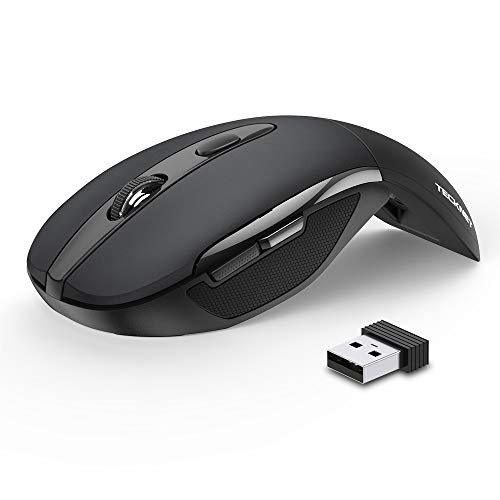
- Folds flat with a soft ambidextrous grip
- 2.4GHz receiver offers plug-and-play setup
- Up to 24 months of stated battery life
Best For: Budget-conscious laptop users who want simple travel portability
Best Mini Travel Pick
elec Space Wireless Mini Finger Mouse
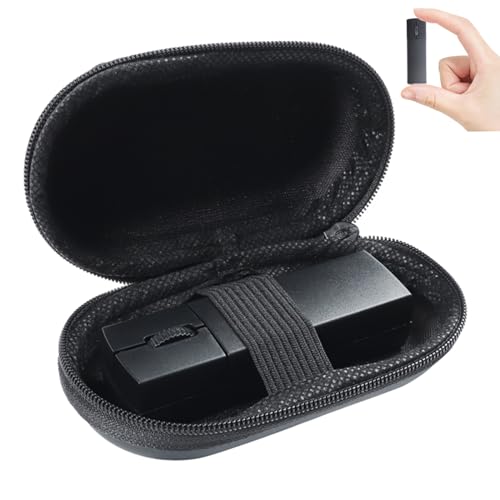
- Bluetooth 5.1 and 2.4GHz dual-mode connectivity
- 40 g design with case and stored USB receiver
- Rechargeable, quiet, and adjustable up to 1600 DPI
Best For: Travelers and compact laptop workspaces
Best Everyday Portable Option

- Bluetooth switching across up to three devices
- Silent Touch reduces click noise by about 90%
- Slim design with up to two years of battery life
Best For: Multi-device work, school, and office use
Best Vertical Comfort Pick
Anker 2.4G Wireless Ergonomic Mouse

- Vertical handshake design for right-handed use
- Five buttons with next and previous controls
- 800/1200/1600 DPI tracking with USB wireless
Best For: Right-handed users seeking vertical wrist support
Snap-to-Carry Pick

- Magnetic base and case simplify transport
- USB-C charging supports up to 160 hours
- Bluetooth and 2.4 GHz connectivity
Best For: Mobile workers needing a rechargeable, ambidextrous mouse
Best Heavy-Duty Pick
UGREEN Ergonomic Wireless Mouse

- Vertical handshake design reduces wrist rotation
- Quiet five-button layout for productivity
- Connects to up to three devices
Best For: Medium- to large-handed right-handed users
Fold-Flat Travel Pick

- Rotates flat for pocket-friendly storage
- Tri-mode connection supports three devices
- Rechargeable battery lasts up to about 30 days
Best For: Travelers needing a slim, quiet multi-device mouse
Quiet Everyday Comfort – Lenovo WL310 Silent Mouse
The Lenovo WL310 is a practical choice among portable ergonomic computer mice for users who want a comfortable right-handed shape, quiet operation, and simple Bluetooth connectivity. Its compact, lightweight design fits easily into a laptop bag, while adjustable DPI settings support everyday work and more precise tasks.
Best For: Students and professionals who need a quiet Bluetooth mouse for laptops, shared workspaces, or travel.
Pros:
- Ergonomic right-handed design intended to reduce wrist strain during extended use
- Silent clicks suit offices, shared spaces, and late-night work
- Bluetooth 5.0 connects without a USB receiver and supports Windows, Mac, and Chromebook devices
- Three DPI settings—1000, 1200, and 1600—provide useful cursor-speed flexibility
Cons:
- Right-handed design may not suit left-handed users
- Maximum sensitivity is 1600 DPI, lower than some performance-oriented mice
- Requires a battery rather than a rechargeable design
Choose the WL310 if quiet clicks and straightforward Bluetooth pairing matter more than advanced customization. It is a lightweight travel companion with enough adjustability for general productivity and occasional precision work.
Foldable Travel Pick – Logitech Mobi Fold Mouse
The Logitech Mobi Fold stands out among portable ergonomic computer mice with a slim folding design that slips into a pocket or bag. It powers on when unfolded, offers quiet clicks, and connects over Bluetooth to multiple operating systems and up to three devices.
Best For: Frequent travelers and mobile workers who prioritize maximum portability, quiet use, and multi-device switching.
Pros:
- Ultra-thin, foldable design is convenient for pockets and small laptop bags
- Quiet clicks help minimize distractions in public and shared environments
- Supports Bluetooth connections across Windows, macOS, Chrome OS, Android, and iPadOS
- Offers up to 4000 DPI tracking, adaptive touch scrolling, and fast USB-C charging
Cons:
- USB-C charging cable is not included
- Compact foldable construction may provide less traditional hand support than a full-sized ergonomic mouse
- Logi Bolt support requires a separately sold receiver
The Mobi Fold is a strong fit when packability is the main concern. Its folding mechanism, quiet operation, long stated battery life, and three-device switching make it especially useful for people who work across locations and platforms.
Rechargeable Workhorse – Lenovo Yoga Pro Mouse
The Lenovo Yoga Pro is a full-sized option among portable ergonomic computer mice, combining a contoured right-handed grip with a thumb rest, programmable buttons, and dual-device Bluetooth. It is less pocket-focused than a folding model, but its rechargeable battery and customizable controls make it well suited to extended work sessions.
Best For: Right-handed professionals who want ergonomic support, programmable controls, and long battery life.
Pros:
- Full-sized ergonomic shape includes soft side grips and a thumb rest
- Programmable side and top buttons support workflow customization
- Dual-device Bluetooth 5.1 pairing enables quick switching between systems
- Rechargeable battery can last two to three months after a charge of under two hours
Cons:
- Full-sized shape may take more bag space than a folding travel mouse
- Right-handed design limits suitability for left-handed users
- Some software-based customization may be oriented toward Windows systems
The Yoga Pro is a sensible compromise between portability and long-session comfort. Consider it when you want a travel-capable Bluetooth mouse with a more supportive shape and richer controls than an ultra-compact model.
Budget Folding Value – TECKNET Folding Wireless Mouse
The TECKNET Folding Wireless Mouse is a practical budget-minded choice among portable ergonomic computer mice. It folds flat for travel, uses a USB nano receiver for plug-and-play setup, and combines an ambidextrous soft-rubber grip with long stated battery life.
Best For: Laptop users who want an inexpensive folding mouse with broad computer compatibility and minimal maintenance.
Pros:
- Folds flat and includes a soft rubber grip designed to fit either hand
- USB receiver provides simple plug-and-play 2.4GHz wireless connectivity
- Three DPI settings—1000, 1500, and 2000—accommodate different cursor speeds
- Auto-sleep mode and two AAA batteries provide up to 24 months of stated use
Cons:
- Two AAA batteries are not included
- Side buttons are not supported on macOS
- Folding mechanism requires care to avoid pinching fingers
The TECKNET is a useful pick for shoppers who favor low-maintenance wireless operation and compact storage over Bluetooth convenience. Its receiver-based connection and broad Windows, macOS, Chrome OS, and Linux compatibility make it versatile for everyday laptop use.
Best Mini Travel Pick – elec Space Wireless Mini Finger Mouse
For shoppers seeking portable ergonomic computer mice, the elec Space Mini Finger Mouse emphasizes compact travel, quiet operation, and flexible connectivity. It supports Bluetooth 5.1 or 2.4GHz wireless connections, includes a protective case, and weighs just 40 g.
Best For: Travelers, compact laptop setups, and quiet workspaces where rechargeable power and dual-device connectivity are useful.
Pros:
- Dual-mode Bluetooth 5.1 and 2.4GHz connectivity can connect with two devices.
- Small 3.2-inch design, included case, and stored USB receiver make it easy to pack.
- Rechargeable battery, three DPI settings, and approximately 90% less click noise.
Cons:
- Its mini size may not suit users who prefer a full-size mouse.
- It has three buttons and a maximum sensitivity of 1600 DPI.
This is a practical space-saving option for mobile users who want quiet clicks and the choice of Bluetooth or USB wireless operation. Its compact shape favors portability over a traditional larger ergonomic profile.
Best Everyday Portable Option – Logitech M350s Pebble 2 Mouse
The Logitech M350s Pebble 2 is a slim, lightweight choice among portable ergonomic computer mice. Its Bluetooth connection supports up to three devices across several operating systems, while Silent Touch technology helps reduce click noise for everyday work.
Best For: Students, office users, and multi-device setups that prioritize a slim design, quiet clicks, and long battery life.
Pros:
- Connects to and switches between up to three Bluetooth devices.
- Silent Touch technology removes about 90% of click noise.
- Includes a battery rated for up to two years and an auto-sleep power-saving mode.
- Uses a slim, lightweight design with a minimum of 58% certified post-consumer recycled plastic in plastic parts.
Cons:
- Bluetooth-only operation is provided; the Logitech Bolt receiver is not included.
- It uses a replaceable AA battery rather than a rechargeable battery.
The Pebble 2 is a straightforward choice for users who move between devices and want minimal desk clutter. Its rounded, compact design and quiet operation make it especially suitable for shared offices, classrooms, and travel.
Best Vertical Comfort Pick – Anker 2.4G Wireless Ergonomic Mouse
The Anker 2.4G Wireless Vertical Ergonomic Mouse takes a different approach to portable ergonomic computer mice with a right-handed vertical shape. Its handshake-style design is intended to support a more neutral wrist and arm position, while the USB receiver provides 2.4GHz wireless operation.
Best For: Right-handed users who want a vertical mouse shape, browser navigation buttons, and adjustable tracking for extended computer use.
Pros:
- Vertical ergonomic structure promotes a neutral handshake wrist and arm position.
- Five buttons include next and previous controls for convenient web browsing.
- Three DPI settings—800, 1200, and 1600—support adjustable tracking sensitivity.
- Power-saving mode activates after eight minutes of inactivity, and the receiver stores in the mouse.
Cons:
- Designed for right-handed use rather than ambidextrous operation.
- Uses 2.4GHz USB wireless and does not offer Bluetooth connectivity.
- Requires two AAA batteries, which are not included, and clicks are not silent.
This model is the strongest fit for shoppers specifically seeking a vertical grip rather than the smallest possible travel mouse. It is less flexible for left-handed users or Bluetooth-only devices, but its added navigation buttons and wrist-oriented shape can suit desk-based productivity.
Snap-to-Carry Pick – ESR MagMouse
The ESR MagMouse is a practical choice among portable ergonomic computer mice for students, teachers, and mobile office users. Its magnetic base, built-in USB-C charging cable, and dual wireless connectivity make it easy to carry and use across laptops and workspaces.
Best For: Mobile workers who want a rechargeable, ambidextrous mouse with flexible connectivity and compact carrying features.
Pros:
- Magnetic base and included mouse case support convenient transport.
- Built-in USB-C cable provides up to four hours of use after one minute of charging.
- Bluetooth 5.0 and 2.4 GHz connectivity work with a wide range of devices.
- Six DPI settings and four-way scrolling add control for documents, spreadsheets, and images.
Cons:
- The magnetic base uses reusable residue-free adhesive, which may not suit every setup.
- Its ergonomic design is described generally rather than as a specialized vertical shape.
With up to 160 hours of use from a full charge, quiet clicks, and support for Windows, macOS, iPadOS, Linux, and Android, the MagMouse balances portability with everyday versatility.
Best Heavy-Duty Pick – UGREEN Ergonomic Wireless Mouse
The UGREEN Ergonomic Wireless Mouse stands out among portable ergonomic computer mice with a vertical handshake design intended to reduce wrist rotation and muscle strain. It combines quiet clicks, five buttons, adjustable DPI, and dual wireless connectivity for office and laptop use.
Best For: Medium- to large-handed users who prefer a right-handed vertical mouse for quiet productivity.
Pros:
- Vertical design promotes a natural handshake position.
- Five-button layout and quiet clicks support efficient, discreet work.
- Bluetooth and 2.4 GHz wireless modes can connect with up to three devices.
- PTFE glide feet and four DPI settings provide smooth, adjustable tracking.
Cons:
- The design may not fit small hands well; users should check the hand-size guide.
- It requires one AA battery rather than a built-in rechargeable battery.
- It is right-handed only.
Smart sleep mode helps extend battery life, while compatibility with Windows, macOS, Linux, ChromeOS, and Android makes this a flexible option for multiple computers and tablets.
Fold-Flat Travel Pick – Bluetooth Wireless Arc Mouse
The Bluetooth Wireless Arc Travel Mouse is a space-saving option among portable ergonomic computer mice. Its rotating foldable body snaps flat for pockets or bags, while silent clicks, tri-mode connectivity, and a rechargeable battery make it suited to travel between a laptop, tablet, and desktop.
Best For: Travelers who prioritize a slim, foldable mouse that can switch among three devices.
Pros:
- Rotating design folds flat and slips easily into a pocket or bag.
- Supports Bluetooth 5.0, Bluetooth 4.0, and 2.4 GHz connections across three devices.
- Silent, soft clicks help maintain a quiet work environment.
- Built-in rechargeable battery lasts up to about 30 days on a charge.
Cons:
- The three-button layout offers fewer controls than productivity-focused mice.
- Its right-handed design may not suit left-handed users.
- The compact travel shape may provide less support than a full-size ergonomic mouse.
Automatic shutoff when the receiver is disconnected or the computer powers down helps conserve power. The included portable bag and broad Windows, Mac, Linux, and tablet compatibility further reinforce its travel-focused design.
How We Picked the Best Portable Ergonomic Computer Mice
We focused on features that matter when a mouse travels frequently: compact or foldable construction, reliable wireless connectivity, comfortable hand positioning, quiet operation, and straightforward power management. The selection includes Bluetooth models, USB-receiver mice, and tri-mode options so you can match the mouse to your laptop, tablet, or desktop setup.
We also considered adjustable DPI settings, rechargeable batteries, programmable buttons, ambidextrous or right-handed shapes, and practical extras such as carrying cases or magnetic storage. Because “ergonomic” means different things to different users, the list includes both slim travel mice and more supportive designs.
Quick Comparison
- Best for quiet everyday use: Lenovo WL310 or Logitech M350s Pebble 2.
- Best for foldable portability: Logitech Mobi Fold, TECKNET Folding Mouse, or the Bluetooth Wireless Arc Mouse.
- Best for multi-device flexibility: Lenovo Yoga Pro, UGREEN, or the tri-mode Arc Mouse.
- Best for vertical support: Anker’s right-hand vertical mouse.
- Best for compact storage: ESR MagMouse or the elec Space Wireless Mini Finger Mouse.
Key Buying Factors for Portable Ergonomic Computer Mice
Shape and Hand Support
A slim mouse is easy to pack but may provide less palm support during long sessions. Vertical and fuller right-handed designs can reduce wrist rotation, while compact low-profile shapes are often better for small hands or occasional travel. Check the stated handedness and dimensions before buying.
Connectivity and Compatibility
Bluetooth saves a USB port and works well with modern laptops, tablets, and Macs. A 2.4GHz receiver can offer simple plug-and-play pairing, but it may require an adapter on USB-C-only computers. Dual-mode and tri-mode mice are useful if you switch between several devices.
Power, Clicks, and Controls
Rechargeable USB-C batteries reduce disposable-battery waste and are convenient for frequent travel. Replaceable batteries may last longer between changes. Quiet clicks suit libraries, offices, and shared rooms. Adjustable DPI helps you balance precise control with faster cursor movement, while extra programmable buttons are valuable for productivity.
Who Should Buy Which Portable Ergonomic Computer Mice?
Frequent travelers should prioritize foldable or magnetic designs that protect the mouse and reduce bulk. Remote workers may prefer a quiet Bluetooth model with a comfortable palm shape. Power users should look for programmable buttons, adjustable DPI, and multi-device switching. Users with wrist discomfort should consider a vertical design, while minimalists may prefer a small, low-profile mouse that slips easily beside a laptop.
Before ordering, confirm operating-system support, connection requirements, mouse handedness, and whether the package includes the required receiver or charging cable.
