
The best portable drawing display tablets make digital art easier to take from a studio desk to a classroom, café, or client meeting. This roundup includes standalone Android models and screen tablets that connect to a computer.
We compare screen size, pressure sensitivity, portability, connectivity, color performance, and included features so you can choose a tablet that fits your creative workflow and budget.
Best 10 Portable Drawing Display Tablets Picks for 2026
Best Standalone Beginner Pick

- Standalone 10-inch Android drawing tablet
- Includes pen, apps, tutorials, and accessories
- Expandable storage up to 1TB
Best For: Beginners and students who want computer-free drawing
Best Compact Computer-Connected Option

- 11.6-inch Full HD IPS display
- 8192-level battery-free stylus
- Six shortcut keys plus programmable touch bar
Best For: Computer-based artists and online educators
Best Color and Control Upgrade

- 13.3-inch laminated display with 99% sRGB
- 16384-level pen with PenTech 4.0
- Dual dial, shortcut keys, and adjustable stand
Best For: Creators needing color accuracy and workflow controls
Best Premium All-in-One Option

- Standalone Android 14 tablet with 8GB/128GB
- Matte etched-glass, paper-like drawing surface
- Lightweight 588 g body with Pro Pen 3
Best For: Mobile artists wanting a polished sketching tablet
Portable Precision Pick
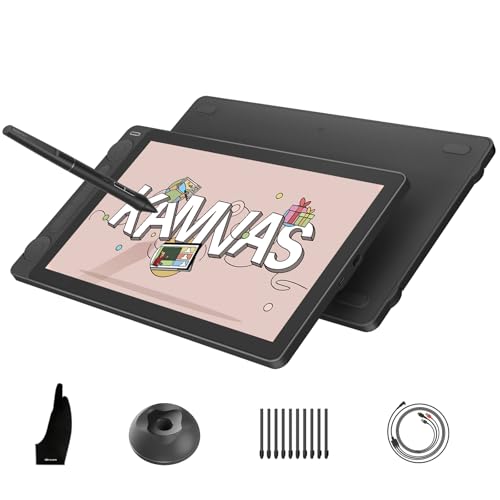
- Lightweight 13.3-inch pen display for computer-based creation
- 16K pressure pen with full-laminated Canvas Glass 2.0
- Accurate color with dual dials and five shortcut keys
Best For: Mobile creators who already work with a compatible computer
High-Resolution Workspace

- 16-inch QHD display with a spacious 16:10 workspace
- 16K stylus, full lamination, and anti-glare etched glass
- Foldable stand, wireless remote, and wrist rest included
Best For: Creators who want a larger computer-connected drawing display
Standalone Travel Studio

- All-in-one Android 14 tablet that needs no computer
- 10.95-inch 90Hz FHD+ display with 99% sRGB coverage
- 8GB/128GB configuration and 8000mAh battery for mobile use
Best For: Artists and students who want computer-free sketching on the go
Best for Precision and Portability

- 16K pressure-sensitive battery-free stylus
- Fully laminated 13.3-inch FHD display
- USB-C, shortcut dial, and foldable stand
Best For: Artists and students needing precise, portable on-screen drawing
Best for a Larger Laminated Workspace

- 15.6-inch FHD anti-glare laminated display
- 120% sRGB and 92% AdobeRGB gamut volume
- Touch bar, six keys, and adjustable stand
Best For: Creators wanting a larger screen and ergonomic desktop setup
Best for Wide-Gamut Color
UGEE UE16 15.4-inch Drawing Display

- 143% sRGB with four selectable color spaces
- 16K pressure-sensitive battery-free stylus
- Eight keys and multifunction control wheel
Best For: Artists and students prioritizing vivid color and broad compatibility
Best Standalone Beginner Pick – PicassoTab A10
The PicassoTab A10 is a practical choice among portable drawing display tablets for beginners who want to draw without carrying a computer. Its 10-inch laminated display, included active pen, preloaded creative apps, and tutorial access make it ready for sketching, learning, and light everyday tablet use.
Best For: Beginners, students, and travelers who want an all-in-one drawing tablet.
Pros:
- Standalone Android 14 design requires no computer.
- 10-inch laminated screen and 4096-level pressure-sensitive pen support a natural drawing experience.
- Includes creative apps, lifetime tutorial upgrades, case, glove, adapter, and screen protector.
- 6GB RAM and expandable storage support drawing apps and multitasking.
Cons:
- Its 10-inch display is smaller than the screen on several dedicated pen displays.
- At 1.5 kg, it is heavier than some similarly portable tablets.
The A10 stands out because it combines drawing hardware, Android functionality, and beginner-focused instruction in one package. It is a strong fit when portability and independence from a laptop matter more than professional desktop software compatibility.
Best Compact Computer-Connected Option – XP-PEN Artist12
The XP-PEN Artist12 is a compact option among portable drawing display tablets for artists who already work on a Windows, Mac, or Linux computer. Its 11.6-inch Full HD screen, customizable controls, and battery-free pen suit digital drawing, animation, photo editing, and online instruction.
Best For: Computer-based artists, students, teachers, and creators who need a small pen display.
Pros:
- 11.6-inch 1920×1080 IPS display with 100% sRGB coverage.
- Battery-free stylus provides 8192 pressure levels and includes a digital eraser.
- Six customizable shortcut keys and a programmable touch bar can speed up workflows.
- Works with major creative software and common video-conferencing platforms.
Cons:
- Must be connected to a computer to work.
- Requires available HDMI and USB-A ports or suitable adapters.
The Artist12 offers useful screen real estate and workflow controls without taking up as much space as a larger display. It is best for buyers who prioritize software compatibility and portability but already have a suitable computer setup.
Best Color and Control Upgrade – HUION Kamvas 13 Gen 3
The HUION Kamvas 13 Gen 3 is a feature-rich choice among portable drawing display tablets for creators who want a larger workspace and advanced controls. Its 13.3-inch laminated display, accurate color coverage, high-resolution pressure sensitivity, dual dial, and included stand are aimed at serious desktop or laptop-based work.
Best For: Illustrators, animators, and designers seeking strong color performance and customizable controls.
Pros:
- 13.3-inch fully laminated display with Canvas Glass 2.0 for reduced glare and improved accuracy.
- 16384 pressure levels and 2g initial activation force support responsive pen input.
- 99% sRGB coverage, Rec.709 support, and factory calibration report aid color consistency.
- Five shortcut keys, dual dial controls, and an adjustable stand support flexible workflows.
Cons:
- Not standalone; it must connect to a computer or compatible Android device.
- Some setups may require the included 3-in-1 cable or a separately sold full-featured USB-C cable.
The Kamvas 13 Gen 3 is a compelling step up for users who value display accuracy and physical controls. Its compatibility with Windows, macOS, Linux, and select Android devices adds flexibility, but buyers should confirm their device supports the required video connection.
Best Premium All-in-One Option – Wacom MovinkPad 11
The Wacom MovinkPad 11 is a premium all-in-one choice among portable drawing display tablets, combining Android 14, built-in storage, and Wacom’s Pro Pen 3 in a lightweight body. Its matte etched-glass screen and instant sketching shortcut make it well suited to mobile drawing, notes, and on-the-go creative work.
Best For: Artists and students who want a lightweight standalone sketching tablet with a paper-like surface.
Pros:
- No computer is required, with 8GB memory and 128GB storage built in.
- 11.45-inch 2200×1440 display uses matte etched glass to reduce glare and fingerprints.
- Pro Pen 3 offers 8192 pressure levels, three buttons, and stored replacement nibs.
- At 588 g, it is easy to carry in a bag or backpack.
Cons:
- Its standalone Android design may not provide the same desktop software environment as a connected pen display.
- The listed connectivity is Bluetooth, while charging and data accessories include a USB-C cable.
The MovinkPad 11 is especially appealing for artists who want to open a sketchbook-like device and start creating immediately. Its low weight, textured screen, and included creative software make it a polished portable option, particularly for sketching and writing away from a desk.
Portable Precision Pick – HUION Kamvas 13 (Gen 3)
For artists seeking portable drawing display tablets that connect to a computer, the HUION Kamvas 13 (Gen 3) balances a travel-friendly design with professional color and pen performance. Keep in mind that it is a pen display, not a standalone tablet, so it requires a compatible computer or laptop.
Best For: Digital artists, designers, editors, and students who want a lightweight, color-accurate display for computer-based work.
Pros:
- Thin 11.7mm profile and 865g weight support on-the-go use.
- Full-laminated Canvas Glass 2.0 provides a paper-textured, anti-glare drawing surface.
- PenTech 4.0 offers 16,384 pressure levels, tilt auto-alignment, and a 2g initial activation force.
- 99% sRGB coverage, 90% Adobe RGB coverage, and factory calibration to ΔE<1.5 support accurate color work.
Cons:
- Requires connection to a computer or laptop; it does not operate independently.
- Compatibility depends on supported USB-C, operating system, and Android display requirements.
Its dual dials, five press keys, symmetrical design, and broad Windows, macOS, Android, and Linux compatibility make it a flexible choice for creators who prioritize portability without giving up display-focused controls.
High-Resolution Workspace – XPPen Artist Pro 16 Gen2
The XPPen Artist Pro 16 Gen2 is one of the portable drawing display tablets to consider when a larger workspace and sharper resolution matter. It connects to a computer or laptop, and the included 3-in-1 cable is stored separately in a small white box within the package.
Best For: Illustrators, editors, and 3D creators who want a spacious 16-inch QHD display with dedicated shortcut controls.
Pros:
- 16-inch 2560×1600 QHD screen delivers a spacious 16:10 workspace.
- Full lamination and anti-glare etched glass help reduce parallax and reflections.
- X3 Pro stylus provides 16,384 pressure levels and 60° tilt support.
- Includes a foldable stand, wireless shortcut remote, and ergonomic wrist rest.
Cons:
- Requires a compatible computer or laptop and is not standalone.
- At 3.88 kg, it is substantially less convenient to carry than smaller pen displays.
- Its larger footprint may require more desk or travel-bag space.
With 99% sRGB coverage, ΔE<2.2 color accuracy, and support for popular creative software, this model is a strong fit for users who value screen area and workflow accessories more than minimum carry weight.
Standalone Travel Studio – HUION Kamvas Slate 11
Unlike many portable drawing display tablets, the HUION Kamvas Slate 11 works without a computer. Its Android 14 operating system, built-in storage, long-lasting battery, and included H-Pencil make it suited to sketching, notes, and creative work away from a desk.
Best For: Artists, students, and note-takers who need an all-in-one drawing tablet for travel and everyday mobile use.
Pros:
- Standalone design needs no computer connection for drawing.
- 10.95-inch FHD+ display has 99% sRGB coverage, 207 PPI, and a smooth 90Hz refresh rate.
- Full-laminated nano-etched anti-glare surface helps reduce glare and parallax.
- Includes 8GB RAM, 128GB storage expandable to 1TB, an 8000mAh battery, and pre-installed Clip Studio Paint and ibisPaint X.
Cons:
- The 4,096-level stylus offers fewer pressure levels than the pen displays in this roundup.
- Its 10.95-inch screen provides less workspace than a 13.3-inch or 16-inch display.
- Some drawing apps or memberships may have separate availability or subscription conditions.
The Kamvas Slate 11 is the most independent option here, combining tablet functionality with drawing-focused hardware. Choose it when mobility and no-computer convenience are more important than a larger canvas or higher pen-pressure specification.
Best for Precision and Portability – XP-PEN Artist 13.3 Pro V2
The XP-PEN Artist 13.3 Pro V2 is a strong choice among portable drawing display tablets for artists who want a compact, color-focused screen with advanced pen sensitivity. Its fully laminated 13.3-inch display, USB-C connectivity, and included foldable stand make it practical for home, classroom, or mobile creative work.
Best For: Digital artists, animators, manga illustrators, and graphic design students who want precise on-screen drawing and flexible connectivity.
Pros:
- 16,384 pressure levels, low activation force, tilt support, and a built-in pen eraser.
- Fully laminated 1920×1080 display with 95% P3 and 99% sRGB color coverage.
- USB-C and legacy HDMI connectivity, plus compatibility with Windows, Mac, Chromebook, and Android devices.
- Red dial, eight shortcut keys, pen-tablet mode, and included foldable stand.
Cons:
- It is not standalone and must be connected to a compatible computer or device.
- Single-cable USB-C use requires a device with USB 3.1 DP 1.2 support.
- A 3-in-1 cable for traditional HDMI setups is sold separately.
With its high-resolution pen input, laminated screen, and creator-friendly controls, the Artist 13.3 Pro V2 is especially appealing if portability and detailed line control matter more than having a larger display.
Best for a Larger Laminated Workspace – HUION Kamvas Pro 16
The HUION Kamvas Pro 16 gives portable drawing display tablet shoppers a larger 15.6-inch workspace with a fully laminated, anti-glare screen. Its adjustable stand, touch bar, shortcut keys, and battery-free pen are well suited to users who want an organized desktop drawing setup that can also be transported.
Best For: Illustrators, teachers, and designers who prefer a larger screen, adjustable viewing angle, and broad Windows, Mac, and Linux compatibility.
Pros:
- 15.6-inch 1920×1080 fully laminated display with anti-glare glass and a lightly textured drawing surface.
- 120% sRGB color gamut volume, 92% AdobeRGB, and a 1000:1 contrast ratio.
- Six customizable express keys and a touch bar for shortcuts, zooming, and brush adjustment.
- Battery-free pen with 8,192 pressure levels, 60-degree tilt recognition, and an adjustable 20- to 60-degree stand.
Cons:
- It is not a standalone device and requires a computer or laptop.
- The listed 3-pound weight and 15.6-inch size may be less convenient for frequent travel than smaller models.
- Its connectivity uses a 3-in-1 USB-C cable with HDMI signal rather than a simple single-cable setup on every device.
The Kamvas Pro 16 balances screen space and ergonomic adjustability, making it a practical pick for extended drawing sessions when color coverage and a larger work area are priorities.
Best for Wide-Gamut Color – UGEE UE16 15.4-inch Drawing Display
The UGEE UE16 stands out among portable drawing display tablets for its unusually broad stated color gamut and support for multiple color modes. Its 15.4-inch fully laminated screen, 16K pressure-sensitive stylus, shortcut controls, and compatibility with computers, Android devices, and Chrome OS make it a versatile option for drawing and design.
Best For: Students, teachers, and digital artists who want vivid color options, a medium-large screen, and compatibility across several operating systems.
Pros:
- 143% sRGB color gamut with selectable sRGB, Adobe RGB, DCI-P3, and black-and-white modes.
- 15.4-inch 1920×1080 fully laminated display with anti-glare glass.
- 16,384 pressure levels, 60-degree tilt support, and a battery-free stylus with programmable keys and eraser.
- Eight shortcut keys and a wheel with four preset functions.
Cons:
- It is not standalone and must be connected to a compatible computer or mobile device.
- The 3-in-1 cable is packed separately, so the parcel should be checked carefully for it.
- The listed dimensions and 15.4-inch screen may be less compact for highly mobile use.
The UE16 is a compelling choice when color flexibility and cross-platform support are more important than minimal size, while its physical controls help keep common drawing actions close at hand.
How We Picked the Best Portable Drawing Display Tablets
We focused on the features that most affect everyday drawing: display size and resolution, pen responsiveness, pressure sensitivity, parallax, viewing comfort, portability, and device compatibility. We also separated standalone tablets from pen displays that require a computer, because they serve different types of artists.
Models with shortcut keys, dials, touch controls, adjustable stands, or useful accessories received extra consideration when those features improved practical workflow. Color gamut and screen finish were also important for illustrators, designers, and anyone preparing work for print or professional review.
Quick Comparison
- Best for computer-free drawing: PicassoTab A10, Wacom MovinkPad 11, and HUION Kamvas Slate 11.
- Best for compact computer-based setups: XP-PEN Artist12 and HUION Kamvas 13 Gen 3.
- Best for larger workspaces: XPPen Artist Pro 16 Gen2, HUION Kamvas Pro 16, and UGEE UE16.
- Best for color-focused work: the models with wider-gamut displays, including the Kamvas Pro 16 and UGEE UE16.
Key Buying Factors for Portable Drawing Display Tablets
Standalone or Computer-Connected?
Standalone tablets have their own operating system, battery, and apps, so they are the most convenient for travel. They may have less desktop software flexibility than a connected pen display. Computer-based models can use professional applications such as Photoshop, Clip Studio Paint, and Blender, but require compatible cables and a laptop or desktop.
Screen Size, Resolution, and Portability
Smaller 10- to 13-inch displays are easier to carry and work well for sketching, notes, and limited desk space. A 15- or 16-inch screen provides more room for panels, detailed linework, and broad brush strokes, but adds weight and usually needs a larger bag. A QHD display can make fine artwork and interface text look sharper than a standard Full HD panel.
Pen Performance and Controls
Higher pressure sensitivity can provide more nuance, but pen calibration, low initial activation force, tilt support, and surface texture matter just as much. Battery-free pens reduce maintenance. Dials, shortcut keys, and touch controls can speed up repetitive tasks, especially in illustration and photo-editing software.
Connections, Compatibility, and Color
Check whether the tablet uses USB-C, HDMI, or a proprietary cable, and confirm compatibility with your operating system, Chromebook, Android device, and preferred software. For color-sensitive work, prioritize a broad color gamut and a display that can be calibrated. A laminated screen and anti-glare coating can reduce reflected light and improve the drawing experience.
Who Should Buy Which Portable Drawing Display Tablets?
Choose a standalone model if portability and independence from a computer are your top priorities. Pick a compact 11- or 13-inch pen display if you already own a laptop and want a balanced travel setup. Artists who need extensive workspace, detailed rendering, or multiple open panels should consider a 15- or 16-inch model. If you are a student or beginner, prioritize reliable compatibility, comfortable pen feel, and included accessories over maximum pressure-level specifications.
