
As an IP camera installer, having the right PoE tester is vital for your projects. These tools can save you time and enhance your setup quality by accurately monitoring power and connectivity. With various models available, each offering unique features, it’s important to know which ones stand out. Let’s explore the top options that can elevate your installation process and improve your diagnostic capabilities.
Triplett IPAS10-N Byte Brothers IP Answer Stick IP Camera and PoE Tester

The Triplett IPAS10-N Byte Brothers IP Answer Stick is a must-have for IP camera installers who need a reliable tool to streamline their setup process. This versatile device allows you to align and focus IP cameras using your laptop and camera software, ensuring precision in every installation. You can also configure routers and access points at their respective locations easily. Plus, it monitors power over Ethernet (PoE) voltage, wattage, and link activity without needing a battery. With detailed product insights and specifications, this tester enhances your efficiency, making your IP camera setups quicker and more effective.
Best For: IP camera installers looking for an efficient tool to streamline their setup process and enhance installation precision.
Pros:
- Versatile functionality for aligning and focusing IP cameras using a laptop and camera software.
- Power over Ethernet (PoE) monitoring capabilities, providing insights on voltage, wattage, and link activity.
- No battery required, making it a convenient and low-maintenance tool for fieldwork.
Cons:
- May be overkill for casual users or those with minimal IP camera setup needs.
- Requires a laptop and compatible camera software for full functionality, which may not always be accessible.
- Limited to IP camera installations, so it may not be useful for other types of networking setups.
CCTV Camera Tester with 7″ IPS Touch Screen and WiFi

For those seeking a reliable and efficient testing solution, the RAINLEOTI CCTV Camera Tester stands out with its impressive 7″ IPS touch screen and built-in WiFi capabilities. You can test up to 6K 32MP IP POE cameras alongside CVBS analog cameras effortlessly. With features like IP detection, RTSP playback, and UTP cable testing, it makes your job easier. The multiple power output options guarantee versatility, while the robust 7000mAh battery enhances portability. Plus, you’ll appreciate the one-year warranty and responsive customer support for any technical inquiries. This tester is a must-have for any serious IP camera installer.
Best For: The RAINLEOTI CCTV Camera Tester is best for professional IP camera installers seeking a reliable tool for testing both IP and analog cameras.
Pros:
- High-resolution 7″ IPS touch screen for clear visuals and easy navigation.
- Versatile testing capabilities support both advanced IP cameras and standard CVBS analog cameras.
- Multiple power output options enhance flexibility in various installation scenarios.
Cons:
- Limited support for AHD/TVI/CVI cameras, restricting use to standard analog models.
- Potential learning curve for users unfamiliar with comprehensive network testing tools.
- Portability may be compromised by the device’s larger size compared to simpler testers.
VCELINK Network Cable Tester with PoE Finder

Designed specifically for IP camera installers, the VCELINK Network Cable Tester with PoE Finder stands out with its high sensitivity chip that dramatically speeds up detection during wire checks. You’ll appreciate its ability to accurately identify PoE power sources from both endspan and midspan setups. Its compact design makes it easy to carry, fitting right in your pocket. With dual bright LED indicators, you’ll quickly grasp the network line status. Plus, it comes with a testing patch cord and an 18-month customer service guarantee, ensuring reliable support. Streamline your installations with this essential tool for faster, safer results.
Best For: The VCELINK Network Cable Tester with PoE Finder is best for IP camera installers and network engineers who require efficient testing and PoE detection.
Pros:
- High sensitivity chip for faster detection speeds during wire checks.
- Compact and portable design for easy use on job sites.
- Dual bright LED indicators for clear visibility of network line status.
Cons:
- Not a PoE injector, limiting its functionality to detection only.
- May require additional tools for comprehensive network testing.
- Limited to RJ45 Ethernet cables, which may not suit all networking needs.
Triplett 8150 CamView IP Pro CCTV Security Camera Tester
With its impressive 5″ touchscreen display and support for 4K and 1080P resolutions, the Triplett 8150 CamView IP Pro CCTV Security Camera Tester stands out as an essential tool for IP camera installers. It’s compatible with IP, analog, TVI, CVI, and AHD cameras, supporting H.264 and H.265 formats. You’ll appreciate its versatile connectivity options, including HDMI, BNC, and RJ45 ports, plus PoE output. The tester auto-recognizes HD coax cameras and features extensive cable testing capabilities. Lightweight and compact, it also includes Ookla speed test functionality, making it a must-have for efficient installations and troubleshooting.
Best For: The Triplett 8150 CamView IP Pro CCTV Security Camera Tester is best for professional IP camera installers seeking a versatile and efficient testing tool.
Pros:
- Supports a wide range of camera formats including IP, analog, and HD coax, ensuring compatibility with various systems.
- Features comprehensive cable testing capabilities, making it easier to diagnose and troubleshoot installation issues.
- Compact and lightweight design enhances portability, allowing for convenient use on job sites.
Cons:
- The 5″ touchscreen may be considered small for users who prefer larger displays for detailed viewing.
- Limited to 24W PoE output, which may not be sufficient for certain high-power cameras.
- Some users may find the price point higher compared to basic camera testers with fewer features.
WANLUTECH 8K IP Camera Tester (IPC-9800CADH Pro)

The WANLUTECH 8K IP Camera Tester (IPC-9800CADH Pro) stands out as an essential tool for installers who need to guarantee first-rate performance in high-resolution camera setups. With its 7-inch touchscreen and support for up to 8K resolutions, it’s perfect for testing a variety of IP and analog cameras. You can easily modify IP addresses and passwords for DH and Hik cameras, making setup a breeze. Plus, its cable testing features assure you can identify and troubleshoot connections quickly. Built-in network testing tools and PoE capabilities enhance your efficiency, making this tester a must-have for serious IP camera installers.
Best For: The WANLUTECH 8K IP Camera Tester is best for professional installers and technicians who require a reliable tool for testing and configuring high-resolution IP and analog cameras.
Pros:
- Versatile Testing: Supports a wide range of camera resolutions, including up to 8K and 32MP, making it suitable for various installation needs.
- Comprehensive Cable Testing: Includes features to identify and troubleshoot BNC, RJ45, and RJ11 cables efficiently, ensuring quick resolution of connectivity issues.
- Built-in Network Tools: Offers robust network testing capabilities, such as Ping and IP scanning, which streamline the installation process.
Cons:
- Learning Curve: May require time to fully understand and utilize all features, especially for users new to camera testing equipment.
- Size and Weight: The 7-inch touchscreen and overall design might be less portable compared to smaller handheld testers.
- Cost: Higher price point compared to basic testers, which may not be justified for casual users or small-scale installations.
WANLUTECH 4K IP Camera Tester (E88)

For IP camera installers seeking reliability and efficiency, the WANLUTECH 4K IP Camera Tester (E88) stands out with its robust 90W PoE power output, supporting IEEE 802.3af/at/bt standards. Its 8-inch touchscreen makes navigation easy, while features like IP discovery and rapid video viewing streamline your workflow. You can batch activate DH and Hik cameras, modify IP addresses, and perform factory resets effortlessly. The tester also includes essential network tools like Ping and DHCP server checks. With cable testing capabilities for various connections, this device guarantees you’ve got everything you need for a successful installation.
Best For: The WANLUTECH 4K IP Camera Tester (E88) is best for IP camera installers who require a versatile and efficient tool for testing and installation.
Pros:
- High power output: Offers 90W PoE power support for various camera standards.
- User-friendly interface: Features an 8-inch touchscreen for easy navigation and operation.
- Comprehensive testing capabilities: Includes network, camera, and cable testing tools for thorough installations.
Cons:
- Requires setup: Users must remove the battery isolating paper before first use.
- Limited manufacturer support hours: Support is available within 12 hours, which may not be immediate in urgent situations.
- Potential learning curve: The wide array of features may require time to master for new users.
WANLUTECH 8K IP Camera Tester (IPC-5200C Plus)

Equipped with a 5.4-inch IPS touchscreen, the WANLUTECH 8K IP Camera Tester (IPC-5200C Plus) stands out as an essential tool for IP camera installers looking to streamline their workflow. It supports various camera formats, including 8MP TVI, CVI, AHD, SDI, and CVBS. You’ll appreciate its auto HD recognition and PTZ control capabilities, which work seamlessly with over 30 protocols. The built-in 3350mAh battery guarantees portability, while powerful network tools like Ping and DHCP server enhance efficiency. Plus, with features like digital cable testing and multiple camera previews, you’ve got everything required for quick and effective installations.
Best For: The WANLUTECH 8K IP Camera Tester (IPC-5200C Plus) is best for IP camera installers and technicians looking for a comprehensive tool to enhance their installation and testing processes.
Pros:
- Supports a wide range of camera formats including 8MP TVI, CVI, AHD, SDI, and CVBS.
- Portable design with a built-in 3350mAh battery and powerful network tools for efficient operation.
- Features multiple camera preview capability, allowing synchronous viewing of up to 32 cameras.
Cons:
- The device may require some time to learn all its features and functions for new users.
- Limited playback capability of 2 to 3 frames per second may not be sufficient for all applications.
- The need to remove paper isolating the battery before use could be a potential oversight for some users.
Rsrteng IPC-9310 Plus IP Camera Tester
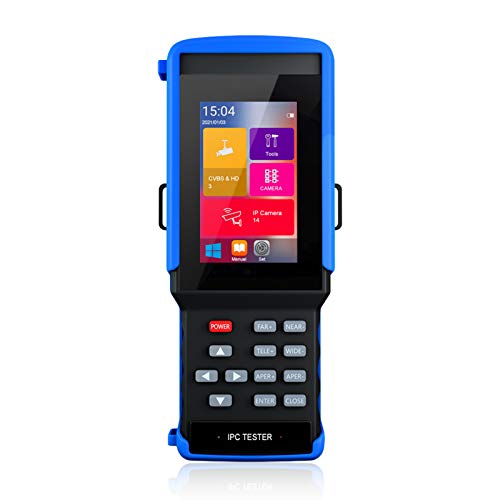
Designed specifically for IP camera installers, the Rsrteng IPC-9310 Plus offers powerful testing capabilities that streamline the installation process. With support for up to 8MP resolution, you can easily test various camera types, including AHD, TVI, and CVI, thanks to its built-in Auto HD APP. The 4-inch touch screen provides a clear interface for quick navigation, and the device supports PoE, ensuring you can power your cameras effectively. Additionally, it’s compatible with most brands, simplifying your setup. Weighing just under a pound, this tester is portable and ideal for on-the-go professionals.
Best For: The Rsrteng IPC-9310 Plus is best for professional IP camera installers who require a versatile and portable testing solution for a variety of camera types.
Pros:
- Wide compatibility: Supports multiple camera types including AHD, TVI, CVI, and CVBS, making it versatile for different installations.
- High-resolution testing: Capable of testing up to 8MP resolution, ensuring high-quality image evaluation.
- User-friendly interface: The 4-inch touch screen and built-in Auto HD APP facilitate easy navigation and quick setup.
Cons:
- Limited screen size: The 4-inch display may be too small for detailed viewing or complex setups.
- Weight: While portable, it may still be heavier than some ultra-light alternatives on the market.
- Operating System: Running on Android may limit the availability of specific camera testing applications compared to proprietary systems.
WANLUTECH 4K IP Camera Tester (IPC-1800ADH Plus)

The WANLUTECH 4K IP Camera Tester (IPC-1800ADH Plus) stands out as an essential tool for IP camera installers, especially those working with a variety of camera formats. With its 4-inch IPS touchscreen, it supports testing for up to 8MP AHD, TVI, CVI, and CVBS cameras. You’ll appreciate features like IP Discovery, quick ONVF testing, and PTZ control with RS485. Its cable testing capabilities verify connection status and provide detailed reports. Plus, with network tools like PING tests and built-in Wi-Fi, it simplifies your workflow. Powered by a robust battery, it guarantees reliable performance on every job.
Best For: The WANLUTECH 4K IP Camera Tester (IPC-1800ADH Plus) is best for professional IP camera installers who need a versatile and efficient tool for testing various camera formats.
Pros:
- Supports a wide range of camera formats up to 8MP, enhancing testing versatility.
- Features advanced cable testing capabilities for thorough connection verification.
- Equipped with useful network tools like PING tests and a built-in Wi-Fi hotspot for improved workflow.
Cons:
- The 4-inch display may be small for some users during detailed inspections.
- The battery life may vary depending on usage intensity and features utilized.
- Compatibility with only specific PTZ protocols could limit functionality with some cameras.
WANLUTECH 4K 12MP IP Camera Tester (E89)

For IP camera installers seeking a versatile testing solution, the WANLUTECH 4K 12MP IP Camera Tester (E89) stands out with its impressive 90W PoE power output. Its 8-inch touchscreen features a 1920×1200 resolution, making it easy to navigate. You can test up to 4K 12MP IP and various analog cameras, thanks to the AUTO HD app that automatically recognizes camera types. Plus, its cable testing capabilities guarantee accurate diagnostics for RJ45 and BNC cables. With multifunctional network tools like IP scanning and PoE detection, this tester enhances your installation efficiency and effectiveness—making it an essential addition to your toolkit.
Best For: Professionals in the IP camera installation industry seeking a comprehensive testing solution for both IP and analog cameras.
Pros:
- Versatile Testing: Supports up to 4K 12MP IP cameras and various analog camera formats, enhancing compatibility.
- User-Friendly Interface: The 8-inch touchscreen with high resolution allows for easy navigation and operation.
- Advanced Cable Testing: Features robust cable testing capabilities, ensuring accurate diagnostics and efficient troubleshooting.
Cons:
- Portability: The device may be less portable due to its size, making it less convenient for on-the-go installations.
- Price Point: Higher initial investment compared to basic camera testers, which may deter budget-conscious users.
- Learning Curve: Some users may require time to familiarize themselves with all the features and functionalities.
Factors to Consider When Choosing Poe Testers for Ip Camera Installers
When choosing a PoE tester for your IP camera installations, you’ll want to contemplate several key factors. Think about the power output capacity, testing compatibility, and display quality that best suit your needs. Additionally, portability and cable testing features can greatly impact your efficiency on the job.
Power Output Capacity
Choosing a PoE tester that meets your needs is essential, especially since power output capacity directly impacts the devices you can support. You’ll find typical outputs ranging from 15W to 90W, with higher capacities important for powering high-resolution IP cameras and demanding network equipment. When selecting a tester, look for one that supports multiple PoE standards like IEEE 802.3af, at, and bt, ensuring compatibility with a wide range of devices. Additionally, the ability to monitor real-time voltage and power status is critical, helping you verify that the PoE source delivers adequate power. Opting for a compact and portable tester with high power output capacity enhances convenience, allowing you to efficiently power devices on-site while conducting tests.
Testing Compatibility
Power output capacity is just one aspect to evaluate; compatibility with your specific equipment is equally important. When choosing a PoE tester, make certain it supports the types of cameras you’ll be using, like IP, CVBS, AHD, TVI, or CVI models. This guarantees seamless testing. Check the maximum resolution the tester can handle, especially since many modern IP cameras reach 8MP or even 12MP. Look for features that automatically detect camera types and resolutions to speed up your setup process. Additionally, confirm that the tester offers thorough cable testing capabilities, including RJ45 TDR testing, for evaluating cable quality and potential faults. Finally, verify it provides adequate power output options, such as PoE 802.3af/at or higher, to power your cameras effectively.
Display Quality
Display quality plays an essential role in the effectiveness of PoE testers for IP camera installers. High-resolution displays, like 1920×1200 or 4K, provide clearer images and video, allowing for accurate assessments of your setups. A touchscreen interface enhances usability, making it easier for you to navigate settings quickly compared to traditional button-operated displays. While a larger screen can improve visibility in various lighting conditions, it might also make the device bulkier, so consider that balance. Some testers even offer zoom capabilities, enabling you to inspect video feeds or camera settings closely. Ultimately, good display quality is crucial for real-time monitoring and playback, ensuring you can troubleshoot issues effectively on-site.
Portability and Design
When working in the field, having a PoE tester that’s both portable and well-designed can greatly enhance your efficiency. Opt for compact, lightweight models that fit easily in your pocket, ideally around 2.09 x 0.98 x 0.79 inches. Built-in batteries with capacities like 7000mAh provide flexibility, especially in locations lacking power outlets. An ergonomic design featuring touchscreens ranging from 4 to 8 inches improves usability, allowing you to navigate the interface effortlessly on the go. Additionally, consider testers with durable construction to withstand the challenges of fieldwork, ensuring they remain reliable even in tough conditions. Prioritizing portability and design will make your installations smoother and more efficient.
Cable Testing Features
Choosing the right PoE tester means considering essential cable testing features that guarantee your IP camera installations run smoothly. Look for testers that assess cable pair status, length, and attenuation, as these factors are crucial for peak performance. Many testers come with RJ45 TDR capabilities, allowing you to identify cable faults and measure lengths up to 3000 meters. Confirm it can conduct UTP cable tests to verify connection status and pinpoint faults at various points. Testers with digital cable tracer functions add versatility by identifying BNC, network, and telephone cables. Advanced features like saving testing reports help you document results and maintain records of cable integrity, assuring you can always provide quality service to your clients.
Network Functionality
Understanding network functionality is essential for selecting the right PoE tester, as it guarantees compatibility with various IP camera types and their respective power protocols, such as IEEE802.3af/at/bt. Advanced testers often offer features like DHCP server support, IP scanning, and ping testing, which help you perform thorough network diagnostics during installation. Real-time monitoring of voltage and power outputs is vital for verifying that connected devices receive adequate power. Additionally, cable testing capabilities, including TDR, enable you to assess cable quality and identify issues like attenuation or miswiring. Some testers also come with built-in Wi-Fi functionality, allowing wireless connectivity and remote monitoring, enhancing your installation’s flexibility and efficiency.
User Interface
A user-friendly interface in PoE testers can make a notable difference during your installations, especially when maneuvering through complex setups. Look for testers with a touchscreen display, as they enhance navigation and ease of use. High-resolution screens, like those with 1920×1200 or 1280×800, provide clear visuals, allowing you to monitor and adjust camera settings effectively. Intuitive menu layouts and quick access features streamline operations, enabling you to switch between testing functionalities efficiently. Real-time feedback through visual indicators or graphs helps you diagnose issues related to Power over Ethernet (PoE) and camera performance swiftly. Additionally, built-in applications for automatic camera recognition and configuration simplify setup processes, reducing your installation time notably.
Warranty and Support
When evaluating PoE testers for your IP camera installations, warranty and support play an essential role in your decision-making process. A warranty period typically ranges from one year to 18 months, giving you peace of mind against manufacturing defects. Look for manufacturers that offer reliable customer support, ideally promising responses within 12 to 24 hours for troubleshooting or technical inquiries. Thorough user manuals and documentation can greatly enhance your experience by guiding you through product usage and troubleshooting steps. Additionally, some manufacturers provide ongoing product optimization, ensuring you receive updates based on feedback and technological advancements. Always review warranty and support policies, as they can vary considerably between manufacturers, influencing your overall satisfaction and success.
