
Adding cameras, access points, VoIP phones, or other powered devices to a compact workspace does not require a rack full of networking hardware. The best PoE network switches for small desks combine a small footprint with reliable Gigabit connectivity and enough power for the devices you actually plan to run.
This roundup compares 10 desktop-friendly options, from simple plug-and-play models to managed switches with VLAN and QoS controls. Use the buying guide below to match port count, PoE budget, management features, and mounting options to your setup.
Best 10 PoE Network Switches for Small Desks Picks for 2026
Compact Gigabit PoE Pick

- Four PoE+ ports with a 65W total budget
- One extra non-PoE Gigabit port
- Fanless metal enclosure with QoS and IGMP Snooping
Best For: Small desks needing simple, quiet PoE connectivity
Quiet Plug-and-Play Choice

- Four PoE+ ports with a 63W power budget
- Dynamic allocation redistributes unused PoE power
- Fanless metal design supports desktop or wall mounting
Best For: Low-maintenance small-office and desktop networks
Smart Management on a Small Desk

- Managed or unmanaged operation with VLAN and QoS
- Four PoE+ ports with a 52W total budget
- Fanless metal design with desktop or wall mounting
Best For: Small networks needing VLANs and traffic management
Extra Ports for Growing Setups

- Eight PoE+ Gigabit ports with a 65W budget
- Extend Mode reaches up to 820 feet
- PoE Auto Recovery restarts unresponsive devices
Best For: Expanding desktop or small surveillance installations
Best for Multiple PoE Devices

- Eight gigabit PoE+ ports plus two uplinks
- 60W budget with overload protection
- Extend mode reaches up to 820 feet
Best For: Small camera systems and desks with several powered devices
High-Capacity Pick
YuanLey 16-Port Gigabit PoE+ Switch

- 16 Gigabit PoE+ ports plus two uplinks
- 250W total PoE budget
- VLAN isolation and desktop/rackmount design
Best For: Larger small-office networks with multiple powered devices
Quiet Desk Pick
Sinotchous 4-Port Fanless PoE+ Switch
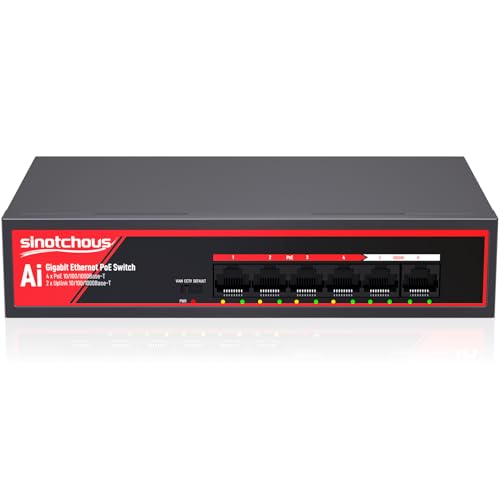
- Four Gigabit PoE+ ports with two uplinks
- Fanless metal design for silent operation
- 65W budget with VLAN and CCTV modes
Best For: Quiet desktop networks with cameras or standard 48V PoE devices
Compact Gigabit PoE Pick – TP-Link TL-SG1005P
For small desks that need dependable wired connectivity, the TP-Link TL-SG1005P is a straightforward choice among PoE network switches for small desks. It provides four Gigabit PoE+ ports, one additional non-PoE Gigabit port, and a 65W total power budget in a compact, fanless metal enclosure.
Best For: Home offices, small workspaces, and users powering up to four compatible PoE devices without configuring a managed network.
Pros:
- Four 802.3af/at PoE+ ports with up to 30W per port
- 65W total PoE budget plus a non-PoE Gigabit port
- Fanless metal design supports quiet desktop operation
- Includes QoS and IGMP Snooping for traffic handling
Cons:
- Unmanaged design does not provide VLAN or web-based controls
- Only five total ports are available
This switch balances simple setup with useful traffic features. Its desktop or wall-mounting design and quiet operation make it particularly practical where desk space and noise matter.
Quiet Plug-and-Play Choice – NETGEAR GS305P
The NETGEAR GS305P keeps the setup process simple while providing five Gigabit Ethernet ports. For PoE network switches for small desks, its four PoE+ ports, 63W power budget, compact metal housing, and fanless operation make it a practical everyday option.
Best For: Small offices and desktop setups that need automatic PoE power allocation with minimal configuration.
Pros:
- Five 1Gbps ports, including four PoE+ ports
- 63W total PoE budget with dynamic power allocation
- Fanless design supports silent operation
- Desktop or wall mounting with a metal enclosure
Cons:
- Unmanaged switch offers no advanced network configuration
- Provides only four PoE-capable ports
Automatic speed detection, plug-and-play installation, and Energy Efficient Ethernet make this a low-maintenance choice. It is well suited to users who want PoE without adding software or network-management complexity.
Smart Management on a Small Desk – STEAMEMO 5-Port PoE+ Switch
The STEAMEMO 5-port switch stands apart from basic options by adding smart management features. Among PoE network switches for small desks, it offers four PoE+ ports, a 52W budget, VLAN and QoS support, and the flexibility to operate in managed or unmanaged mode.
Best For: Home offices and small businesses that need VLANs, traffic monitoring, or remote configuration in a compact switch.
Pros:
- Web, desktop, and mobile management options
- Supports 802.1Q VLAN, QoS, DHCP Snooping, and port mirroring
- Four PoE+ ports provide up to 30W per port
- Fanless metal design includes desktop and wall mounting
Cons:
- 52W total PoE budget is lower than some alternatives here
- Port speeds are mixed, including two 100Mbps PoE ports
- Warranty coverage is listed as one year
This model is the better fit when a small desk network needs more control than an unmanaged switch can provide. Its dual-mode operation also allows simple deployment first, followed by more detailed management as the network grows.
Extra Ports for Growing Setups – TP-Link LS108GP
When four PoE ports are not enough, the TP-Link LS108GP provides eight PoE+ Gigabit ports and a 65W total power budget. It is a strong expansion option among PoE network switches for small desks, especially for setups that may add cameras or other powered devices.
Best For: Small offices and surveillance-oriented setups that need more PoE connections and longer cable runs.
Pros:
- Eight PoE+ Gigabit ports with up to 30W per port
- Up to 16Gbps switching capacity
- Extend Mode supports PoE transmission distances up to 820 feet
- PoE Auto Recovery can reboot unresponsive powered devices
Cons:
- Unmanaged design does not include VLAN or web-management controls
- 65W total budget must be shared across the eight PoE ports
- Larger enclosure than the five-port alternatives
The LS108GP is the most expandable option in this group. Its extra ports, Extend Mode, and Auto Recovery features are useful for installations where devices may be spread out or require occasional automatic recovery.
Best Compact Smart PoE Switch – 5-Port Goalake Easy Smart PoE+
For small desks that need both connectivity and device power, this 5-port Goalake is a practical choice among PoE network switches for small desks. It combines four PoE ports with one gigabit uplink, a fanless metal design, and smart management features in a desktop- or wall-mountable chassis.
Best For: Small offices, home networks, IP cameras, and wireless access points that need manageable PoE connectivity without a noisy fan.
Pros:
- Four PoE ports support IEEE 802.3af/at and up to 30W per port, with a 52W total budget.
- Offers VLAN, QoS, bandwidth control, port mirroring, storm control, and other management features.
- Fanless metal housing supports quiet desktop use and wall mounting.
- Supports PoE transmission distances up to 250 meters and includes 4KV lightning protection.
Cons:
- Only four ports provide PoE, while the fifth is a gigabit uplink.
- Non-PoE or passive-PoE devices will receive data but not power without separate equipment.
- The 52W total PoE budget may limit simultaneous high-power devices.
This is a strong fit when compact size, silent operation, and configurable network controls matter more than having a large number of ports. Its limited total PoE budget is the main consideration for larger camera or access-point installations.
Best for Multiple PoE Devices – UGREEN 10-Port PoE+ Switch
When a small desk supports several cameras, phones, or access points, this UGREEN model stands out among PoE network switches for small desks with eight PoE+ ports and two gigabit uplinks. Its one-touch operating modes and automatic recovery features are designed to simplify everyday deployment.
Best For: Small security-camera systems and workspaces needing more PoE ports, port isolation, or extended cable runs.
Pros:
- Provides eight gigabit PoE+ ports and two gigabit uplinks, with up to 30W per PoE port.
- 60W power budget includes overload management and independent shutdown for short-circuited ports.
- Extend mode supports PoE distances up to 820 feet and enables automatic device recovery on ports 1–6.
- One-touch switching offers Standard, Port Isolation (VLAN), and Extend modes.
Cons:
- The 60W total power budget can constrain the number of devices operating at maximum draw.
- Extend mode is limited to ports 1–6 for automatic recovery.
- Its 10-port footprint may be more hardware than a very minimal desk setup requires.
UGREEN is the most expandable option here for a compact surveillance or access-point setup. The combination of eight PoE ports, long-distance Extend mode, and automatic recovery is useful when reliability and port count outweigh the need for advanced web-based configuration.
Best PoE-In Powered Desk Switch – STEAMEMO 5-Port Gigabit
This STEAMEMO switch is a useful alternative among PoE network switches for small desks when the switch itself can receive power through Ethernet. Its five gigabit ports, VLAN support, dual management modes, and compact mounting options suit temporary offices and surveillance installations.
Best For: Temporary offices, outdoor surveillance setups, or compact networks with an upstream PoE switch available.
Pros:
- Five 10/100/1000BASE-T gigabit ports support straightforward network expansion.
- PoE-in operation can power the switch over one Ethernet cable, avoiding a separate 12V adapter in suitable installations.
- Supports 802.1Q VLAN, MTU VLAN, port VLAN, QoS, rate control, port mirroring, and storm prevention.
- Can switch between managed and unmanaged modes and supports desktop or wall mounting.
Cons:
- PoE-in requires an upstream PoE switch; the notes do not identify this unit as providing PoE power to downstream devices.
- Its five-port layout offers less capacity than the 10-port UGREEN option.
- Management features may be unnecessary for users seeking only a basic plug-and-play switch.
The STEAMEMO is best viewed as a compact, configurable network expansion switch rather than a conventional multi-port PoE power source. Its PoE-in design is especially convenient where cable-based power delivery and flexible VLAN controls are more important than powering devices locally.
High-Capacity Pick – YuanLey 16-Port Gigabit PoE+ Switch
For larger small-office setups, this YuanLey model is one of the more capable PoE network switches for small desks. It provides 16 Gigabit PoE+ ports, two Gigabit uplinks, and a 250W power budget for cameras, access points, phones, and other compatible devices.
Best For: Small offices or workspaces that need to power many PoE devices from one switch.
Pros:
- Sixteen Gigabit PoE/PoE+ ports with up to 30W per port.
- Two Gigabit uplinks help connect routers, NVRs, or other network equipment.
- Supports VLAN isolation on PoE ports 1–16 to reduce congestion and separate device traffic.
- Metal desktop/rackmount construction and a built-in power supply.
Cons:
- Its 18-port layout and 10.6-inch length may be more hardware than a very small desk requires.
- The built-in industrial fan may be less quiet than a fanless switch.
Choose this YuanLey switch when port count and PoE capacity matter more than the smallest footprint. It is a practical fit for a growing surveillance or office network, but smaller setups may be better served by a compact four-port model.
Compact Security Pick – NICGIGA 4-Port Gigabit PoE+ Switch
The NICGIGA GS0410P is a compact choice among PoE network switches for small desks, with four Gigabit PoE+ ports and one Gigabit uplink. Its 78W power budget is suited to a handful of cameras, access points, or other compatible devices without requiring configuration.
Best For: Small desk, wall, or security setups with up to four PoE devices.
Pros:
- Four Gigabit PoE+ ports provide up to 30W per port.
- One-key VLAN mode isolates ports 1–4 while keeping uplink communication available.
- Unmanaged plug-and-play operation requires no software or configuration.
- Metal housing supports desktop or wall installation and includes 4KV lightning protection design.
Cons:
- Only four PoE ports are available, limiting expansion.
- The 78W total budget may not be enough for several high-power devices operating together.
This NICGIGA model keeps the setup simple while adding useful VLAN and protection features. It is a sensible match for a small desk or wall-mounted network where four powered endpoints are enough.
Quiet Desk Pick – Sinotchous 4-Port Fanless PoE+ Switch
With a fanless metal design, this Sinotchous switch is a quiet option among PoE network switches for small desks. It combines four Gigabit PoE+ ports with two Gigabit uplinks, making it useful for a few powered devices plus a router, NVR, or computer.
Best For: Quiet desktop or office installations needing four PoE ports and two uplinks.
Pros:
- Fanless design supports silent operation.
- Four Gigabit PoE+ ports offer up to 30W per port within a 65W budget.
- Two Gigabit uplinks provide flexible connections to routers, NVRs, or PCs.
- Includes VLAN, CCTV, and default modes, plus a built-in power supply.
Cons:
- The 65W total budget is lower than the NICGIGA and YuanLey options.
- The supplied notes specify that 24V wireless access points are not supported directly.
- CCTV mode can prioritize longer transmission distance over standard network operation.
This Sinotchous model stands out when low noise and two uplinks are more important than maximum PoE capacity. Check device voltage and power requirements carefully, especially for nonstandard or passive PoE equipment.
How We Picked the Best PoE Network Switches for Small Desks
We focused on compact Gigabit switches suitable for home offices, small businesses, security systems, and networked workspaces. The selection includes unmanaged models for straightforward installations and smart-managed options that add VLAN, QoS, or related controls. We also considered PoE+ support, total power budgets, uplink capacity, fanless operation, metal housings, and desktop or wall-mount flexibility.
Because product specifications can vary by seller and revision, verify the listed power budget, port arrangement, and management features before purchase—especially when choosing a model for several high-draw devices.
Quick Comparison
| What to Compare | Best For |
|---|---|
| 5-port switch | Small desks with up to four powered endpoints |
| 6- to 8-port switch | Extra expansion room without a large footprint |
| 10- to 16-port switch | Multiple cameras, access points, or future growth |
| Unmanaged design | Plug-and-play installations with minimal configuration |
| Smart-managed design | VLANs, traffic prioritization, and greater control |
Key Buying Factors for PoE Network Switches for Small Desks
Port Count and Uplinks
Count both powered devices and ordinary wired devices. A five-port model may be ideal for a compact setup, but it can become restrictive quickly. Separate uplink ports are useful when you want to preserve PoE ports for cameras, phones, or access points.
PoE Standard and Power Budget
802.3af PoE supports many phones, cameras, and basic access points, while 802.3at PoE+ provides more power for demanding hardware. Compare the switch’s total wattage—not just the rating of an individual port—with your devices’ combined requirements. Leave headroom for startup loads and future additions.
Management and Network Control
Unmanaged switches are easiest to deploy, while smart-managed models can separate traffic with VLANs, prioritize voice or video through QoS, and simplify troubleshooting. Choose management features only if you will use them; otherwise, they add complexity without much benefit.
Noise, Heat, and Placement
Fanless metal switches are often well suited to desks because they run quietly and help dissipate heat. Check airflow requirements and avoid placing the unit inside a tightly enclosed cabinet. Wall-mount capability can free valuable desk space.
Who Should Buy Which PoE Network Switches for Small Desks?
Choose a compact five-port unmanaged switch for a basic office or home setup with one uplink and a few PoE devices. Select a smart-managed five-port model if you need VLAN or QoS controls but still want a small footprint. An eight- or ten-port switch is a better fit for growing workspaces, several cameras, or an access point plus phones and computers.
For larger surveillance installations or businesses expecting substantial expansion, a 16-port model offers more capacity and a higher power budget, though it may take up more space and require more careful heat management. Whichever format you choose, confirm Gigabit performance, PoE compatibility, total wattage, and the physical dimensions before ordering.
