
Choosing the right PoE switch affects far more than how many devices you can connect. Power budget, uplink speed, VLAN support, management features, and physical capacity all determine whether a switch can support cameras, wireless access points, VoIP phones, and other business-critical hardware reliably.
We selected 10 professional-grade options spanning compact offices, growing businesses, surveillance deployments, and demanding network environments. The guide below explains how to compare them and match features to your installation.
Best 10 PoE Network Switches for Professionals Picks for 2026
Enterprise UniFi Backbone

- 48 Gigabit PoE+ ports
- Four 10G SFP+ uplinks
- Managed Layer 2/3 UniFi control
Best For: Large UniFi deployments with cameras, access points, and VoIP devices
High-Density Etherlighting
UniFi Pro Max 48-Port PoE Switch
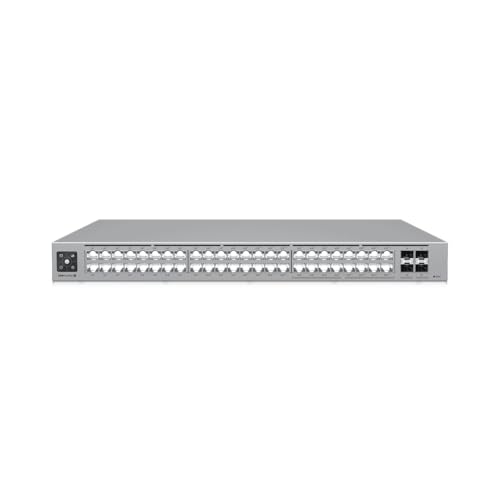
- 16 2.5 GbE ports
- 720W total PoE availability
- Four 10G SFP+ ports
Best For: Dense UniFi networks using 2.5 GbE and PoE++ devices
High-Power Business Switching
Linksys 48-Port 740W PoE+ Switch

- 48 Gigabit PoE+ ports
- 740W maximum power
- Four 10G SFP+ uplinks
Best For: Business surveillance, access-control, and wireless deployments
Compact Multi-Gig Edge
UniFi Pro Max 16-Port PoE Switch

- Four 2.5 GbE PoE++ ports
- 180W total PoE availability
- Fanless desktop, wall, or rack mounting
Best For: Quiet small-office, camera, and wireless deployments
Quiet Plug-and-Play Pick

- 16 Gigabit PoE+ ports
- 183W shared PoE budget
- Fanless desktop or wall-mount design
Best For: Quiet, simple PoE deployments
Managed Layer 3 Choice

- Layer 3 managed switching
- Two 10G SFP+ ports
- 120W PoE availability
Best For: Compact managed networks with fast uplinks
High-Power Rackmount Option

- 16 PoE+ ports with 250W budget
- Two combo SFP slots
- QoS and IGMP Snooping
Best For: Larger rackmount PoE deployments
Professional UniFi Core

- 24 Gigabit ports for larger deployments
- PoE+, SFP, and RJ45 interfaces
- Metal chassis with 1-year warranty
Best For: Professional networks with many PoE endpoints
Compact Smart Choice

- Four 802.3af PoE ports
- 57W total PoE budget
- VLAN, QoS, and IGMP Snooping
Best For: Small offices and compact camera or VoIP setups
Long-Range Security Pick
10-Port PoE+ Switch with Extend Mode

- Eight PoE+ ports plus two uplinks
- 60W budget and 30W per port
- Isolation, Extend mode, and auto recovery
Best For: Security cameras and long-distance access-point deployments
Enterprise UniFi Backbone – UniFi Pro 48-Port PoE+ Switch
For professionals building a centrally managed network, this UniFi Pro switch combines 48 Gigabit PoE+ ports with four 10G SFP+ uplinks. It is a strong fit for deployments that need substantial device capacity, VLAN controls, and integration with the UniFi Network application.
Best For: UniFi-based offices, surveillance systems, wireless access points, and VoIP deployments requiring rack-mounted connectivity and 10G uplinks.
Pros:
- 48 RJ-45 Gigabit ports support IEEE 802.3af/at PoE and PoE+.
- Four SFP+ 10G uplinks support high-speed backbone connections.
- Managed Layer 2/3 features include VLAN, spanning tree, 802.1x, RADIUS, DHCP, and port mirroring.
- Integrates with centralized UniFi Network management.
Cons:
- Its 48-port rack-mount format may be more capacity than smaller installations need.
- Operating temperature is listed as -5 to 40°C, so placement requires suitable environmental conditions.
This is a practical choice among PoE network switches for professionals who value UniFi ecosystem management, broad PoE coverage, and 10G uplink capacity in a 1U rack design.
High-Density Etherlighting – UniFi Pro Max 48-Port PoE Switch
The USW-Pro-Max-48-PoE is designed for professional networks that need 48 ports, mixed Gigabit and 2.5 GbE connectivity, and higher-power PoE options. Its Etherlighting indicators can also make port location, speed/link status, and native network identification easier to see.
Best For: High-density UniFi environments with newer 2.5 GbE devices, PoE++ endpoints, and centralized UniFi Network management.
Pros:
- Provides 16 2.5 GbE ports and 32 Gigabit ports.
- Includes both PoE+ and PoE++ output across the port groups.
- Offers four 10G SFP+ ports and 720W total PoE availability.
- Supports DC power backup readiness and UniFi Network 8.0.24 or later.
Cons:
- Requires UniFi Network 8.0.24 or later for management.
- The 48-port chassis may be excessive for compact networks.
With 2.5 GbE access ports, PoE++ support, and substantial power availability, this model suits professionals modernizing a dense UniFi network while retaining 10G uplink options.
High-Power Business Switching – Linksys 48-Port 740W PoE+ Switch
The Linksys LGS352MPC gives professional installations 48 Gigabit PoE+ ports and a 740W power budget for connecting cameras, access points, and access-control equipment. Its managed features add traffic prioritization, VLAN support, static routing, IGMP, and MAC-based port security.
Best For: Business networks needing high PoE capacity, 10G SFP+ uplinks, managed access controls, and a metal enclosure.
Pros:
- 48 Gigabit ports provide broad PoE+ device capacity.
- 740W maximum power supports demanding deployments.
- Four 10G SFP+ uplinks support dedicated core-network connections.
- Includes QoS, VLAN, static routing, IGMP, and MAC-based port security features.
Cons:
- Access ports are Gigabit rather than 2.5 GbE.
- The high-power, 48-port design may be oversized for smaller offices.
This Linksys model is a compelling option for professionals prioritizing PoE headroom, practical managed-switch controls, and long-term support through its stated 5.5-year warranty and 24/7 technical support.
Compact Multi-Gig Edge – UniFi Pro Max 16-Port PoE Switch
The USW-Pro-Max-16-PoE is a compact choice for professionals who need multi-gig access, PoE++ support, and flexible installation. It combines four 2.5 GbE PoE++ ports, 12 Gigabit PoE+ ports, two 10G SFP+ ports, and a silent fanless cooling system.
Best For: Smaller professional networks, security-camera systems, and wireless deployments where quiet operation and desktop, wall, or rack mounting matter.
Pros:
- Four 2.5 GbE PoE++ ports support newer high-speed endpoints.
- Twelve Gigabit PoE+ ports provide additional powered connections.
- Two 10G SFP+ ports support fast uplinks.
- Offers desktop, wall, and rack mounting with fanless cooling.
Cons:
- Its 180W total PoE availability is lower than the larger switches in this roundup.
- Only 16 total ports are available for connected devices.
For professionals who do not need a 48-port chassis, this switch delivers a useful mix of 2.5 GbE, PoE++, 10G uplinks, and quiet installation flexibility in a smaller footprint.
Quiet Plug-and-Play Pick – NETGEAR GS316PP
For professionals who want straightforward PoE network switches for professionals, the NETGEAR GS316PP provides 16 Gigabit PoE+ ports without requiring software or configuration. Its fanless metal design and flexible mounting make it practical for quiet offices, small deployments, and wall- or desktop-mounted installations.
Best For: Quiet, uncomplicated networks with multiple PoE devices and a moderate power requirement.
Pros:
- 16 Gigabit PoE+ ports deliver up to 30W per port.
- 183W shared power budget with dynamic PoE allocation.
- Fanless operation, metal construction, and desktop or wall mounting.
- Plug-and-play setup with a 3-year limited hardware warranty.
Cons:
- Unmanaged design does not provide advanced network configuration.
- Offers no listed SFP or higher-speed uplink ports.
The GS316PP is a sensible professional option when ease of deployment and silent operation matter more than management features. Confirm that its 183W total budget covers the combined demand of your connected devices.
Managed Layer 3 Choice – Ubiquiti Professional 8 PoE
The Ubiquiti Professional 8 PoE is aimed at professionals who need managed Layer 3 capability in a compact PoE network switch. It combines six Gigabit PoE+ ports, two Gigabit PoE++ ports, and two 10G SFP+ ports for deployments that benefit from faster uplink connectivity.
Best For: Managed networks needing 10G SFP+ uplinks and a mix of PoE+ and PoE++ connections.
Pros:
- Layer 3 managed switching capability.
- Two 10G SFP+ ports support high-speed uplinks.
- Six PoE+ ports and two PoE++ ports accommodate different powered devices.
- Provides 120W of total PoE availability.
Cons:
- Eight total Ethernet ports may be limiting for larger installations.
- Its 120W PoE availability is lower than the larger 16-port alternatives here.
- Listed manufacturer warranty is one year.
Choose this Ubiquiti model when network management and 10G uplinks are priorities. Its smaller port count and 120W power budget make it better suited to focused deployments than large device clusters.
High-Power Rackmount Option – TP-Link TL-SG1218MP
The TP-Link TL-SG1218MP is a strong candidate for professionals comparing PoE network switches for professionals across larger installations. It offers 16 PoE+ ports, a 250W power budget, two additional Gigabit non-PoE ports, and two combo SFP slots, while QoS and IGMP Snooping help support voice and video traffic.
Best For: Rackmount deployments with many PoE devices, higher power needs, and traffic-prioritization requirements.
Pros:
- 16 PoE+ ports provide up to 30W per port with a 250W total budget.
- Includes two Gigabit non-PoE ports and two combo SFP slots.
- 802.1p/DSCP QoS and IGMP Snooping support voice and video traffic.
- Metal rackmountable chassis with a limited lifetime warranty.
Cons:
- Its 17.3-inch width and rackmount-oriented design require more installation space.
- Gigabit Ethernet is the listed data transfer rate; no 10G uplink is specified.
- Plug-and-play operation does not offer the management depth of a managed switch.
With its larger power budget, uplink flexibility, and traffic features, the TL-SG1218MP fits professional surveillance, voice, or access-point deployments. It is the better choice here when capacity and rack integration outweigh compactness.
Professional UniFi Core – 24-Port PoE Layer 2 Switch
The Ubiquiti UniFi USW-24-POE is a strong fit for professionals building a larger wired network with PoE-powered cameras, access points, VoIP phones, and storage devices. Its 24 Gigabit ports, PoE+ interface, metal chassis, and SFP connectivity provide a practical foundation for office and infrastructure deployments.
Best For: Professional networks that need 24 ports and support for multiple PoE-enabled devices.
Pros:
- Provides 24 ports for larger installations.
- Supports Gigabit data transfer and PoE+ connectivity.
- Includes SFP and RJ45 interfaces and a durable metal case.
Cons:
- Its 6.6-pound, 17.4-inch-wide chassis may require dedicated rack or shelf space.
- The supplied notes identify it as a Layer 2 switch, so advanced Layer 3 routing features should not be expected.
- Warranty coverage is listed as one year.
Choose this model when port capacity matters more than compact size. It is especially suitable for professional deployments that combine PoE endpoints with conventional wired devices and need SFP connectivity.
Compact Smart Choice – 8-Port Easy Smart PoE Switch
The TP-Link TL-SG108PE is a compact option for professionals who need PoE network switches for professionals in a small office, camera system, or voice deployment. Four PoE ports provide up to 15.4W each, while web-based management, VLAN features, QoS, and IGMP Snooping add useful control without requiring a complex setup.
Best For: Small installations needing four PoE ports, basic management, and a compact fanless design.
Pros:
- Four 802.3af PoE ports provide up to 15.4W per port.
- Offers VLAN, QoS, IGMP Snooping, rate limiting, and traffic monitoring.
- Compact metal enclosure with plug-and-play setup and a limited lifetime warranty.
Cons:
- Only four ports provide PoE power.
- The total PoE budget is limited to 57W.
- PoE support is listed as 802.3af rather than PoE+.
This switch balances straightforward installation with useful smart-management features. It is a sensible choice for smaller professional networks where four powered endpoints are sufficient and a quiet, compact chassis is valuable.
Long-Range Security Pick – 10-Port PoE+ Switch with Extend Mode
The UGREEN 10-Port PoE Switch is designed for professional security and connectivity deployments that need eight powered ports plus two Gigabit uplinks. Its 60W power budget, port isolation, Extend mode, and PoE auto recovery make it particularly practical for cameras and access points installed across longer cable runs.
Best For: Security-camera and access-point systems needing PoE+, isolation, and extended-distance support.
Pros:
- Provides eight PoE+ Gigabit ports and two Gigabit uplink ports.
- Supports up to 30W per PoE port with a 60W total budget.
- Offers Port Isolation and Extend mode with PoE auto recovery on ports 1–6.
Cons:
- The 60W total budget can limit simultaneous maximum-power use.
- Its one-touch operating modes provide less configuration depth than a fully managed switch.
- Extend mode is specified for ports 1–6 rather than all PoE ports.
For surveillance-focused installations, the automatic recovery and long-distance Extend mode are useful differentiators. This model is a good match when simple deployment features matter more than extensive manual management controls.
How We Picked These PoE Network Switches for Professionals
We evaluated the selected models against the requirements common to business and commercial networks: available PoE power, port count, PoE and Ethernet standards, uplink capacity, management options, VLAN support, security controls, installation flexibility, and overall suitability for the intended workload. The list includes managed and unmanaged switches because the best choice depends on whether you need centralized configuration and traffic control or straightforward plug-and-play deployment.
We also considered practical scale. Compact eight-port switches can suit small offices and remote installations, while 16- and 48-port models provide more room for access points, IP cameras, phones, computers, and future expansion.
Quick Comparison
| Best suited for | Recommended characteristics |
|---|---|
| Small offices and remote rooms | 8 ports, smart management, compact installation |
| Growing businesses | 16 ports, stronger power budget, VLAN and QoS support |
| Large deployments | 48 ports, high PoE capacity, 10G SFP+ uplinks |
| Simple camera or phone installations | Unmanaged operation and a generous PoE budget |
| UniFi-managed environments | UniFi compatibility and centralized network visibility |
Key Buying Factors for PoE Network Switches for Professionals
PoE Budget and Port Requirements
Calculate the maximum wattage required by every powered device, then add headroom for startup demands and future additions. PoE+ generally supports more demanding equipment than standard PoE, but the switch’s total budget matters just as much as its per-port rating. A high port count is not useful if the shared power supply cannot run your devices simultaneously.
Management and Network Control
Unmanaged switches are easy to deploy, but managed models provide VLANs, QoS, traffic monitoring, port isolation, link aggregation, and security controls. These features are valuable when separating guest, voice, camera, and employee traffic or when troubleshooting remotely. Layer 3 features may also help with routing and larger network designs.
Uplinks and Expansion
Gigabit uplinks are adequate for many small installations, but busy access points, surveillance systems, and multiple switches can create bottlenecks. SFP+ 10G uplinks are a strong choice for larger networks or installations expected to grow.
Reliability and Installation
Check rack-mounting options, cooling, power-supply design, noise, warranty coverage, and the manufacturer’s management ecosystem. Confirm that the switch supports the cable lengths, device standards, and environmental conditions of your installation.
Who Should Buy Which PoE Network Switches for Professionals?
Choose a compact managed switch such as an eight-port model for a small office, conference room, remote cabinet, or limited camera installation where VLANs and basic controls matter. An unmanaged 16-port switch is better for a straightforward deployment where simplicity is more important than monitoring or segmentation.
For growing offices, wireless networks, and mixed device installations, a 16-port managed PoE+ switch with a stronger power budget offers useful flexibility. Choose a 48-port model when you need many powered endpoints, centralized management, or high-speed uplinks between network closets. High-budget options are particularly appropriate for dense camera systems and larger access-point deployments.
Finally, stay within one management platform when possible. A switch that integrates cleanly with your existing network controller can reduce setup time, simplify updates, and make long-term troubleshooting easier.
