
The right PoE switch can simplify a content studio by powering cameras, access points, microphones, control surfaces, and other networked gear through a single Ethernet cable. The best choice depends on more than port count: uplink speed, total power budget, management controls, and noise level all affect daily production.
We selected 10 switches ranging from compact 2.5GbE and 10GbE models to higher-capacity Gigabit options. Use the guide below to match your network infrastructure to your current setup and future expansion plans.
Best 10 PoE Network Switches for Content Creators Picks for 2026
Best 10Gb Upgrade
GigaPlus 6-Port 2.5G/10G PoE Switch
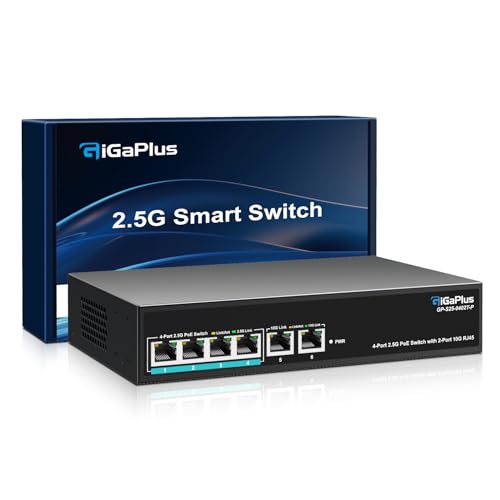
- Four 2.5Gb PoE ports
- Two 10Gb RJ45 uplinks
- Fanless plug-and-play design
Best For: Compact creator networks with a fast NAS or editing workstation
Best High-Power Multigig Option
TRENDnet 8-Port 2.5G PoE++ Switch

- Eight 2.5Gb PoE++ ports
- 230W PoE power budget
- Fanless with jumbo-frame support
Best For: Studios powering multiple 2.5Gb network devices
Best Managed Studio Network

- 16 Gigabit PoE+ ports
- 250W PoE budget
- Omada cloud and VLAN features
Best For: Larger studios needing managed, segmented networking
Best Simple High-Port Switch
NETGEAR GS316PP 16-Port PoE+ Switch

- 16 Gigabit PoE+ ports
- 183W shared power budget
- Silent plug-and-play operation
Best For: Gigabit-based studios with many powered devices
Best Managed Capacity

- 16 Gigabit ports with 8 PoE+ ports
- 150W total PoE budget
- VLAN, QoS, IGMP, and LAG features
Best For: Creators managing multiple powered devices and segmented studio traffic
Best Compact Plug-and-Play Option

- 8 PoE+ ports plus 2 Gigabit uplinks
- 60W total PoE budget
- Standard, Isolation, and Extend modes
Best For: Small studios needing simple PoE connectivity for cameras or access points
Best Full-PoE Port Count

- 16 Gigabit PoE+ ports
- 120W total PoE budget
- Priority, Isolation, and Extend modes
Best For: Studios where many connected devices need power from the switch
Best Silent Streaming Hub
Tenveo 8-Port Gigabit PoE+ Switch

- 8 PoE+ ports with 120W total power
- Two non-PoE Gigabit uplinks
- Fanless metal design with VLAN support
Best For: Quiet studios and compact live-streaming networks
Best for Larger Creator Setups

- 16 PoE+ ports and a 250W power budget
- Two Gigabit ports plus two combo SFP slots
- QoS and IGMP Snooping for video traffic
Best For: Expanding studios and multi-camera installations
Best Managed Compact Option

- Eight PoE+ ports with a 120W budget
- Web, desktop, and mobile management
- VLAN, QoS, mirroring, and protective features
Best For: Small studios needing flexible managed networking
Best 10Gb Upgrade – GigaPlus 6-Port 2.5G/10G PoE Switch
For content creators moving large video files between a NAS, workstation, and networked devices, this unmanaged switch combines four multigigabit PoE ports with two 10Gb RJ45 uplinks. Its 60Gbps switching capacity makes it a practical choice for a compact, high-speed creator network.
Best For: Creators who need 2.5GbE device connections and 10GbE links for NAS or editing PCs.
Pros:
- Four PoE ports support 100Mbps, 1Gbps, and 2.5Gbps connections.
- Two 10Gb RJ45 ports support high-speed NAS and workstation uplinks.
- Fanless, metal design supports quiet desktop or wall-mounted operation.
- Plug-and-play setup requires no configuration or software.
Cons:
- Only four ports provide PoE.
- Unmanaged design does not provide VLAN or cloud-management features.
- Its 2.5G/10G capability may exceed the needs of basic Gigabit networks.
This is the most suitable option here for a small creator setup where fast local file transfers matter. It also supports Wi-Fi 6 access points and 2.5G/10G devices without adding fan noise.
Best High-Power Multigig Option – TRENDnet 8-Port 2.5G PoE++ Switch
Content creators powering several access points, cameras, or other network devices can benefit from this eight-port 2.5GbE switch. Its 230W PoE budget and 40Gbps switching capacity provide substantial headroom while retaining a quiet, fanless design.
Best For: Small studios needing multiple 2.5Gb PoE connections and a generous shared power budget.
Pros:
- Eight 2.5GBASE-T PoE++ ports provide faster connections over Cat5e or better cabling.
- 230W shared PoE budget supports power-hungry connected equipment.
- 40Gbps switching capacity and jumbo-frame support are suited to busy local networks.
- Metal, fanless housing supports quiet wall-mounted installation.
Cons:
- All ports are limited to 2.5Gbps rather than 10Gbps.
- Unmanaged operation lacks advanced traffic controls.
- The listed operating temperature range is 32°F to 104°F.
Choose this TRENDnet model when PoE capacity and port count are more important than 10GbE uplinks. It is a strong fit for a growing studio with multiple powered network endpoints and compatible cabling.
Best Managed Studio Network – TP-Link Omada ES220GMP
For creators who need more control than a plug-and-play switch provides, the TP-Link Omada ES220GMP offers 16 PoE+ Gigabit ports, two additional RJ45 ports, and two SFP ports. Its cloud management, VLAN support through Omada SDN, and port-separation features make it suited to organized studio networks.
Best For: Larger studios that need centralized management, network segmentation, and many powered Gigabit devices.
Pros:
- Provides 16 Gigabit PoE+ ports plus two RJ45 and two SFP ports.
- 250W power budget allows up to 30W per PoE port.
- Omada SDN enables cloud access and remote management.
- PoE auto recovery and transmission distances up to 250m add installation flexibility.
Cons:
- Gigabit ports are slower than the 2.5GbE and 10GbE options in this roundup.
- Managed features require more setup than an unmanaged switch.
- Its rack-mountable metal design may be more equipment than a small desktop setup needs.
This is the practical choice when your content workflow includes many access points, computers, printers, or other powered endpoints and you want centralized oversight. It prioritizes port density and management rather than maximum file-transfer speed.
Best Simple High-Port Switch – NETGEAR GS316PP 16-Port PoE+ Switch
If your content-creation setup uses standard Gigabit equipment and you want straightforward PoE expansion, the NETGEAR GS316PP offers 16 plug-and-play PoE+ ports. Its 183W shared budget, silent fanless operation, and desktop or wall-mount installation keep the setup practical.
Best For: Creators with many Gigabit devices who want silent, configuration-free PoE networking.
Pros:
- Sixteen Gigabit Ethernet ports provide plenty of wired connections.
- Each PoE+ port can deliver up to 30W from a 183W shared budget.
- Dynamic PoE allocation redistributes unused power to devices that need it.
- Fanless metal housing supports quiet desktop or wall-mounted use.
Cons:
- It does not provide multigigabit or 10GbE connectivity.
- Unmanaged operation offers no VLAN or remote-management controls.
- The shared power budget may limit simultaneous maximum-power operation across all ports.
The GS316PP is a sensible budget-conscious foundation for a Gigabit studio network with several powered endpoints. It is less appropriate for high-speed NAS editing workflows, but its simplicity and port count are useful for established Cat5e or Cat6 installations.
Best Managed Capacity – TP-Link TL-SG1016PE
For content creators building a multi-device studio network, the TP-Link TL-SG1016PE combines 16 Gigabit ports with eight PoE+ ports and a 150W power budget. Its web management, VLAN support, QoS, IGMP snooping, and LAG features make it a practical choice when you need more control than a basic plug-and-play switch.
Best For: Creators with several PoE devices, wired workstations, access points, or production-network equipment who want managed traffic and VLAN features.
Pros:
- Eight PoE+ ports support up to 30W each, with a 150W total budget.
- Eight additional Gigabit non-PoE ports provide room for computers, servers, and other network devices.
- QoS, IGMP snooping, VLAN features, and automatic PoE recovery support organized, reliable traffic handling.
- Metal construction and a three-year warranty suit a permanent studio setup.
Cons:
- The 150W budget can disable lower-priority ports when the total load reaches the limit.
- Its 1.73-inch height and metal design may be less convenient for compact desktop placement.
The TL-SG1016PE is the strongest fit here for creators who need port capacity and network segmentation rather than the simplest possible switch. Its managed features are useful for separating production traffic, while the PoE budget supports a moderate collection of powered devices.
Best Compact Plug-and-Play Option – UGREEN 10-Port PoE Switch
The UGREEN 10-port switch is a straightforward option for content creators who need PoE power without a complex setup. It provides eight PoE+ Gigabit ports, two Gigabit uplinks, and one-button Standard, Port Isolation, and Extend modes for flexible small-network deployment.
Best For: Small creator studios using cameras, access points, or other PoE devices that need simple installation and basic isolation or long-distance options.
Pros:
- Eight PoE+ ports deliver up to 30W each, backed by a 60W total power budget.
- Two Gigabit uplink ports leave dedicated connections for the router or core network.
- PoE Auto Recovery can detect and restart unresponsive devices in Extend Mode on ports 1–6.
- Port Isolation and Extend modes are selectable with one button, with Extend supporting PoE up to 820 feet.
Cons:
- The 60W total budget is substantially lower than the larger switches in this roundup.
- It has only 10 ports, limiting expansion for larger production networks.
- Extend Mode is focused on ports 1–6 for automatic recovery.
This UGREEN model makes sense when ease of use matters more than advanced management. Its modest power budget suits a compact setup, while the uplinks, isolation mode, and long-distance Extend mode add useful flexibility for cameras and access points.
Best Full-PoE Port Count – TP-Link TL-SG116P
The TP-Link TL-SG116P gives content creators PoE+ capability on all 16 Gigabit ports, making it useful when many studio devices need both data and power. Its plug-and-play design includes Extend, Priority, and Isolation modes, plus QoS, IGMP snooping, and PoE Auto Recovery.
Best For: Creators who want a high port count with PoE available throughout the switch for cameras, access points, phones, or other compatible equipment.
Pros:
- All 16 Gigabit ports support PoE+ with up to 30W per port and a 120W total budget.
- Priority mode for ports 1–4 helps protect video or voice traffic.
- Isolation mode helps separate ports and reduce broadcast-storm concerns.
- Fanless metal design and automatic PoE recovery support quiet, low-maintenance operation.
Cons:
- The 120W total budget is shared across all powered devices.
- Extend Mode reaches up to 250 meters but reduces speed to 10 Mbps.
- PoE Auto Recovery requires configuration.
The TL-SG116P is a strong match for a creator workspace where nearly every connected device may need PoE. It offers more PoE-enabled ports than the UGREEN switch, while its priority and isolation modes provide useful control for video-heavy or shared networks.
Best Silent Streaming Hub – Tenveo 8-Port Gigabit PoE+ Switch
For creators building a multi-camera, access-point, or live-streaming setup, this Tenveo model is one of the more practical PoE network switches for content creators. It combines eight full-Gigabit PoE+ ports, a 120W total budget, two non-PoE uplinks, VLAN support, and a fanless metal enclosure.
Best For: Quiet studios, live-streaming rigs, small camera systems, and creators who need straightforward PoE expansion with optional VLAN segmentation.
Pros:
- Eight PoE+ ports provide up to 30W per port, with a 120W total budget.
- Two dedicated Gigabit uplinks help connect the switch to a router or another switch without using PoE ports.
- Fanless operation and a metal case suit noise-sensitive recording environments.
- Plug-and-play setup is paired with VLAN support for more advanced network organization.
Cons:
- It has fewer PoE ports than larger rack-oriented switches.
- The notes do not indicate web-based smart management beyond VLAN capability.
This is a strong fit when quiet operation and simple deployment matter as much as power capacity. Its 120W budget should work well for a compact creator network, while the uplinks and VLAN mode leave room for a more organized setup.
Best for Larger Creator Setups – TP-Link TL-SG1218MP
The TP-Link TL-SG1218MP is designed for content creators who need more connected devices and a higher power ceiling. With 16 PoE+ ports, a 250W budget, two Gigabit non-PoE ports, and two combo SFP slots, it provides useful capacity for expanding production or camera networks.
Best For: Larger studios, multi-camera installations, streaming spaces with several access points, and users who may need fiber-capable uplink options.
Pros:
- Sixteen PoE+ ports support up to 30W per port, with a 250W total PoE budget.
- Two Gigabit non-PoE ports and two combo SFP slots offer flexible high-speed connections.
- Port-based 802.1p/DSCP QoS and IGMP Snooping can help prioritize video or voice traffic.
- Its metal, rack-mountable design is suited to structured installations.
Cons:
- The rack-mountable form factor is larger than a typical desktop switch.
- Its feature set and port count may be excessive for a small creator setup.
Choose this model when your network is growing beyond a few powered devices. The combination of 16 PoE+ ports, 250W of available power, traffic-prioritization features, and SFP connectivity makes it the most scalable option in this group.
Best Managed Compact Option – STEAMEMO 8-Port PoE+ Switch
The STEAMEMO 8-port switch suits creators who want more control than a basic plug-and-play hub. It offers eight Gigabit PoE+ ports, a 120W budget, web, desktop, and mobile management, plus VLAN, QoS, port mirroring, and security controls in a compact fanless enclosure.
Best For: Home studios, remote production setups, and small businesses that want managed networking features without giving up plug-and-play or desktop installation.
Pros:
- Eight PoE+ ports deliver up to 30W each within a 120W total budget.
- Management tools support VLANs, QoS, traffic monitoring, port mirroring, and bandwidth control.
- Managed and unmanaged modes provide flexibility during setup or expansion.
- Fanless desktop/wall-mount design includes overcurrent, overload, short-circuit, and 4KV lightning protection.
Cons:
- It has only eight PoE ports and a lower total budget than the TP-Link option.
- The listed replacement warranty is one year.
This is a compelling middle ground for creators who need to troubleshoot and organize network traffic themselves. Its dual-mode operation keeps installation approachable, while the management features provide useful control for streaming, gaming, cameras, and IoT devices.
How We Picked the Best PoE Network Switches for Content Creators
We compared these switches using the specifications that matter most in a production environment: PoE standard, total power budget, port count, uplink capacity, switching bandwidth, management features, installation flexibility, and likely studio noise. We also considered whether each model suits a compact desk setup, a dedicated creator workspace, or a growing multi-room network.
Because creator workloads vary, the list includes unmanaged plug-and-play switches as well as easy-managed models with VLAN, QoS, monitoring, and recovery features. Higher-speed 2.5GbE and 10GbE options are especially relevant for large media transfers and high-resolution network storage.
Quick Comparison
| Priority | Look For | Best Fit |
|---|---|---|
| Simple setup | Unmanaged PoE or PoE+ operation | Solo creators and small studios |
| Multiple powered devices | 8–16 PoE ports and a generous power budget | Studios with cameras, access points, and peripherals |
| Fast file transfers | 2.5GbE or 10GbE ports and high switching capacity | Video editors using NAS or shared storage |
| Network segmentation | VLAN, QoS, and managed controls | Advanced or expanding production networks |
Key Buying Factors for PoE Network Switches for Content Creators
PoE Standard and Power Budget
Most creator equipment uses 802.3af PoE or 802.3at PoE+. Check the individual device requirements, then add their wattages together. Leave headroom rather than sizing the switch exactly to the combined load, particularly if you may add cameras or wireless access points later.
Port Speed and Uplinks
Gigabit Ethernet is adequate for many cameras and peripherals, but 2.5GbE or 10GbE can reduce bottlenecks when moving large video files to a NAS. A fast uplink is valuable even when the PoE ports themselves remain Gigabit, since it connects the switch to your workstation, router, or storage server.
Managed Versus Unmanaged Operation
Unmanaged switches are easiest to install and work well for straightforward setups. Managed or easy-managed models add VLANs for separating cameras and guest devices, QoS for prioritizing important traffic, status monitoring, and sometimes automatic recovery. These controls are worthwhile for larger studios or livestreaming workflows.
Noise, Heat, and Placement
Fanless designs are attractive for recording rooms, while fan-cooled switches may handle heavier loads in a rack or equipment closet. Check the enclosure, mounting options, ventilation requirements, and operating noise before placing a switch near microphones.
Who Should Buy Which PoE Network Switches for Content Creators?
Choose a compact 2.5GbE or 10GbE model if fast media transfers and high-speed storage are central to your workflow. Choose an 8-port PoE+ switch for a small studio with a few cameras, access points, or powered accessories. Choose a 16-port model if you want room for several cameras and future expansion without replacing the switch. Choose an easy-managed switch if you need VLANs, QoS, troubleshooting tools, or more control over a complex production network.
Before buying, inventory every powered device, confirm its PoE requirement, identify your fastest network connection, and reserve unused capacity for growth. That approach will help you select PoE Network Switches for Content Creators that remain useful as your studio and file-storage demands expand.
