
If you’re looking to enhance your MacBook’s connectivity, plug-and-play 2.5GbE adapters are a game changer. They offer high-speed internet access with minimal setup, making them ideal for both work and play. With several options available, it’s essential to find the right fit for your needs. Let’s explore the top contenders that promise seamless performance and reliability, so you can make an informed choice for your next upgrade.
TP-Link USB C to Ethernet Adapter (UE302C)

If you’re looking to supercharge your MacBook’s internet connection, the TP-Link USB C to Ethernet Adapter (UE302C) is an excellent choice. With a blazing 2.5 Gigabit connection, you’ll enjoy seamless 4K/8K streaming, quick large file transfers, and lag-free online gaming. It’s compatible with various devices, including MacBook Pro and iPad Pro, working effortlessly across multiple operating systems. Plus, its plug-and-play functionality means you won’t waste time on software installations. Made from durable aluminum, it’s built to last and easily portable. With advanced security features, you can connect with confidence and stay protected online.
Best For: Users seeking an enhanced internet experience on USB-C and Thunderbolt devices, particularly those who stream, game, or transfer large files.
Pros:
- High-speed connection with up to 2.5 Gbps for smooth streaming and gaming.
- Wide compatibility with various devices and operating systems, ensuring versatility.
- Durable design crafted from aluminum, making it portable and resistant to wear.
Cons:
- Limited to USB-C and Thunderbolt devices, which may not suit all users.
- No option for wired power, meaning it relies solely on the connected device for power.
- Potentially higher cost compared to basic USB to Ethernet adapters.
ASUS USB-C2500 V2 Type-C Wired Network Adapter

The ASUS USB-C2500 V2 Type-C Wired Network Adapter stands out as an ideal choice for MacBook users seeking ultra-fast and reliable internet connectivity. With its 2.5Gbps speed, it’s 2.5 times faster than standard Gigabit adapters, perfect for lag-free gaming and smooth streaming. Its USB Type-C design guarantees easy compatibility with modern devices, including desktops and NAS systems. Plus, the lightweight, compact build makes it travel-friendly. Plug-and-play functionality means you can connect instantly without any driver hassle. Backed by a 3-year warranty, this adapter is a smart investment for enhancing your connectivity experience.
Best For: MacBook users and other modern device owners looking for ultra-fast and reliable internet connectivity.
Pros:
- Supports speeds up to 2.5Gbps, providing significantly faster connections than standard Gigabit adapters.
- Plug-and-play functionality allows for easy installation without the need for drivers.
- Compact and lightweight design makes it portable for travel, perfect for users on the go.
Cons:
- Limited to USB Type-C connectivity, which may not be compatible with older devices lacking this port.
- Performance may vary based on the quality of the network and cables used.
- Higher price point compared to standard Gigabit adapters, which may not be justifiable for all users.
Cable Matters USB C to 2.5Gb Ethernet Adapter
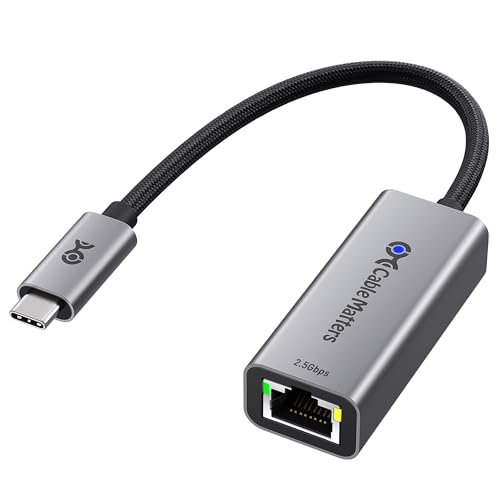
For MacBook users who crave lightning-fast internet speeds, the Cable Matters USB C to 2.5Gb Ethernet Adapter is a standout choice. With a blazing-fast network speed of 2.5Gbps, you can enjoy seamless UHD streaming, online gaming, and quick file transfers. Its aluminum housing guarantees durability, while the braided pigtail cable adds flexibility. Installation is a breeze—just plug it in, and you’re good to go! This adapter is compatible with various systems, including macOS and Windows, making it a versatile addition to your setup. Plus, it boasts a solid 4.6-star rating from satisfied customers.
Best For: Users seeking a high-speed internet connection for streaming, gaming, and file transfers, particularly on MacBook and other compatible devices.
Pros:
- Blazing-fast network speed of 2.5Gbps for seamless connectivity.
- Durable aluminum housing and braided cable design for enhanced longevity and flexibility.
- Easy plug-and-play installation compatible with multiple operating systems.
Cons:
- Not compatible with Android devices.
- Requires the latest driver for optimal performance on older systems.
- Limited to USB-C and Thunderbolt connections, which may not suit all users.
Belkin USB Type C to 2.5 Gb Ethernet Adapter

Designed with versatility in mind, the Belkin USB Type C to 2.5 Gb Ethernet Adapter is perfect for anyone using a MacBook Pro or Air who needs a reliable and fast wired internet connection. This USB-IF certified adapter connects effortlessly to various USB-C devices, including iPad Pro and Surface. With a 90mm tethered cable, you’ll enjoy a seamless connection. Experience lightning-fast speeds up to 2,500Mbps, making it ideal for streaming, file transfers, and gaming. Plus, the built-in LED indicator keeps you informed about your connection status, ensuring a smooth online experience every time.
Best For: Users of MacBook Pro, Air, iPad Pro, and other USB-C devices who require a fast and reliable wired internet connection.
Pros:
- High-speed performance: Offers network speeds up to 2,500Mbps for smooth streaming and quick file transfers.
- Versatile compatibility: Works with a wide range of devices including Thunderbolt 3 & 4, Chromebook, and Surface.
- Convenient connection status indicator: Built-in LED light provides easy monitoring of connection status.
Cons:
- Limited cable length: The 90mm tethered cable may restrict placement options for some setups.
- Not wireless: Requires a wired connection, which may not be suitable for users who prefer wireless solutions.
- Potential compatibility issues: While designed for many devices, some specific USB-C models may have limited functionality.
SABRENT USB-C to 2.5Gbps Ethernet Adapter (NT-25GA)
Adding a 2.5 Gigabit Ethernet port to your MacBook has never been easier with the SABRENT USB-C to 2.5Gbps Ethernet Adapter (NT-25GA). This adapter connects seamlessly to your MacBook Pro or Air, providing speeds up to 2.5Gbps over distances exceeding 100 meters using Cat5E cables. Its aluminum construction guarantees durability and effective heat dissipation, making it travel-friendly with its integrated USB-C cable. You won’t need an external power source thanks to its bus-powered design. Plus, it supports Wake-On-LAN and PXE boot, guaranteeing compatibility with various systems. Check the manual for technical details and warranty information.
Best For: Users looking to enhance their device with a fast and reliable 2.5 Gigabit Ethernet connection, particularly those with MacBook Pro/Air and other compatible systems.
Pros:
- High-speed performance: Supports up to 2.5Gbps speeds over distances exceeding 100 meters.
- Durable design: Made of aluminum for improved durability and heat dissipation.
- Travel-friendly: Integrated USB-C cable and bus-powered design eliminate the need for external power sources.
Cons:
- Limited to USB-C devices: Not compatible with devices lacking a USB-C port.
- Potential compatibility issues: May require driver installation for certain operating systems.
- Dependent on cable quality: Performance may vary based on the Ethernet cable used (must be Cat5E or better).
ASUS USB-C 2.5G Ethernet USB Adapter

The ASUS USB-C 2.5G Ethernet USB Adapter stands out for gamers and professionals seeking a reliable wired connection on their MacBooks. With hyper-fast 2.5Gbps networking, you’ll enjoy a stable connection that eliminates weak network issues. It’s compatible with Mac OS, Linux, and Windows, offering easy plug-and-play installation. Plus, it’s backward compatible with 1G and 100Mbps, making it a versatile choice. Its compact, lightweight design suits travel, while the stylish aluminum case guarantees durability. The high-quality nylon-braided cable prevents wear and tear, making this adapter a perfect upgrade for your laptop or desktop, enhancing your overall connectivity experience.
Best For: Gamers and professionals seeking a reliable and high-speed wired connection for their laptops or desktops.
Pros:
- Hyper-fast 2.5Gbps networking ensures a stable and efficient connection, ideal for gaming and large file transfers.
- Easy plug-and-play installation for Mac OS and Linux, with automatic driver installation for Windows, making it user-friendly.
- Compact and lightweight design makes it perfect for travel, while the aluminum case adds durability and style.
Cons:
- Limited to USB-C ports, which may require an adapter for older devices.
- Performance may depend on the quality of the existing network infrastructure.
- Slightly higher price point compared to standard Ethernet adapters.
Plugable 2.5G USB-C and USB to Ethernet Adapter

For MacBook users seeking enhanced internet speeds, the Plugable 2.5G USB-C and USB to Ethernet Adapter stands out with its dual-connector design. This versatile adapter easily converts between USB-C and USB-A, allowing you to connect without needing new cables. It delivers speeds faster than traditional Gigabit Ethernet, achieving up to 2.5Gbps with compatible setups. You’ll enjoy true plug-and-play functionality across various operating systems, including macOS and iOS. Plus, with a 2-year warranty and dedicated North American support, you can trust Plugable to have your back whenever you need assistance. Upgrade your network experience effortlessly!
Best For: MacBook users who want to enhance their internet speeds with a versatile and easy-to-use adapter.
Pros:
- Dual-connector design allows for seamless switching between USB-C and USB-A.
- Faster than Gigabit speeds with up to 2.5Gbps performance on compatible setups.
- True plug-and-play functionality across multiple operating systems, including macOS and iOS.
Cons:
- Performance may vary based on internet service provider and network conditions.
- Requires USB 3.0 for full performance, limiting older USB connections.
- Limited to Cat 5e cabling or better for achieving maximum speeds.
Thunderbolt Gigabit Ethernet Adapter

Designed specifically for MacBook users, the Thunderbolt Gigabit Ethernet Adapter offers seamless connectivity to high-performance Gigabit Ethernet networks. Compact and lightweight, this adapter measures just 2.64 x 0.79 x 6.1 inches and connects effortlessly via your MacBook’s Thunderbolt port. Compatible with both MacBook Air and MacBook Pro models, it supports 10/100/1000BASE-T networks, ensuring you enjoy fast and reliable internet speeds. With a customer rating of 4.4 out of 5 stars, it’s a popular choice among users. Plus, you can return it within 30 days for a full refund if it arrives damaged or dead on arrival.
Best For: Users seeking a reliable and high-speed Ethernet connection for their MacBook Air or MacBook Pro.
Pros:
- Compact and lightweight design for easy portability.
- Supports high-speed 10/100/1000BASE-T networks for fast internet connectivity.
- Positive customer feedback with a high rating of 4.4 out of 5 stars.
Cons:
- Limited compatibility, only works with MacBook models that have a Thunderbolt port.
- Return policy includes a restocking fee for misrepresented conditions.
- May not be suitable for users needing wireless connectivity options.
BrosTrend 2.5Gb USB C to Ethernet Adapter

Need a reliable connection to elevate your streaming and gaming experiences? The BrosTrend 2.5Gb USB C to Ethernet Adapter delivers ultra-fast 2.5 Gbps speeds, perfect for your MacBook, iPad, or iPhone. Its Plug & Play functionality means you can connect it easily to any USB-C or Thunderbolt port for instant internet access. Constructed with durable aluminum housing, this adapter resists wear while maintaining peak performance. Compatible with various operating systems, it guarantees seamless connectivity for all your devices. Just remember to use a Cat5e or higher Ethernet cable to maximize your speed potential. Enjoy lag-free streaming and gaming!
Best For: Users looking for a high-speed, reliable Ethernet connection to enhance their streaming, gaming, and file transfer experiences on USB-C or Thunderbolt devices.
Pros:
- Ultra-fast speeds: Supports up to 2.5 Gbps, significantly enhancing streaming and gaming experiences.
- Plug & Play functionality: Easy to set up with instant internet access on compatible devices.
- Durable design: Premium aluminum housing and braided nylon cable ensure long-lasting performance and resistance to wear.
Cons:
- Compatibility limitations: Not compatible with gaming consoles; only works with devices that have USB-C or Thunderbolt ports.
- Speed requirements: To achieve maximum speed, must use a Cat5e or higher Ethernet cable and ensure router/switch supports 2.5 Gbps.
- Operating system constraints: Limited compatibility with certain OS versions; requires specific updates for optimal use.
TP-Link 2.5GB PCIe Network Card (TX201)

The TP-Link 2.5GB PCIe Network Card (TX201) stands out as an excellent choice for gamers and content creators who demand high-speed internet connectivity. Delivering speeds up to 2.5 Gbps, it’s 2.5 times faster than standard Gigabit adapters. Compatible with various operating systems, including Windows and Linux, it also features 2.5G Base-T technology, ensuring smooth performance. With Quality of Service (QoS) prioritizing your gaming experience, and Wake on LAN (WOL) for remote management, it’s incredibly user-friendly. Plus, the card comes with low-profile and full-height brackets to fit any case, backed by a two-year warranty and reliable support.
Best For: Gamers and content creators seeking high-speed internet connectivity for optimal performance.
Pros:
- Delivers speeds up to 2.5 Gbps, significantly faster than standard Gigabit adapters.
- Compatible with multiple operating systems, ensuring versatility for users.
- Includes low-profile and full-height brackets for easy installation in various computer cases.
Cons:
- Requires a compatible motherboard with PCIe slots, which may not be available in older systems.
- Higher performance may not be fully utilized without a compatible network setup (e.g., router).
- Some users may experience limited benefits if their internet speed is below 2.5 Gbps.
Factors to Consider When Choosing Plug and Play 2.5gbe Adapters for Macbook
When choosing a plug and play 2.5GbE adapter for your MacBook, you should consider several key factors. Think about the connectivity options, speed and performance metrics, and whether your device is compatible. Additionally, don’t overlook design, portability, durability, and build quality to guarantee you get the best fit for your needs.
Connectivity Options Available
While selecting a plug and play 2.5GbE adapter for your MacBook, you’ll want to take into account the connectivity options available to guarantee compatibility with your devices. Most adapters utilize USB-C, making them suitable for a variety of modern gadgets, including laptops, tablets, and smartphones. Many also support Thunderbolt 3 and 4, assuring high-speed data transfer while remaining compatible with USB 3.0 and USB 2.0. Some models feature dual-connectivity options, allowing connections via both USB-C and USB-A ports for added versatility. These adapters typically require no extra drivers, enabling quick and efficient wired network connections. By considering these factors, you can assure seamless connectivity and a hassle-free experience.
Speed and Performance Metrics
Choosing the right 2.5GbE adapter for your MacBook involves understanding speed and performance metrics essential for your needs. With speeds up to 2,500Mbps, these adapters remarkably outperform standard Gigabit options, which max out at 1,000Mbps. This increased bandwidth is perfect for high-demand tasks like 4K/8K streaming, online gaming, and large file transfers, ensuring you enjoy a lag-free experience. To achieve the full 2.5Gbps speed, make sure you use Cat5e cables or better, as older cables may limit performance. Many 2.5GbE adapters also offer plug-and-play functionality for easy setup. Keep in mind that your network infrastructure, including switches and routers, must support 2.5GbE speeds to optimize performance fully.
Device Compatibility Requirements
Finding the right 2.5GbE adapter for your MacBook hinges on a few key compatibility factors. First, verify the adapter fits your MacBook’s USB-C or Thunderbolt ports for peak performance. It’s also wise to look for adapters that support multiple operating systems, especially macOS, for seamless integration. Make sure the adapter meets the 2.5 Gbps speed standard to enhance your network performance beyond older Gigabit connections. Additionally, check if it’s backward compatible with 1 Gbps and 100 Mbps networks to keep your connections intact with legacy devices. Finally, consider a plug-and-play adapter; this feature simplifies setup by eliminating the need for extra driver installations, making your experience hassle-free.
Design and Portability Features
When you’re on the lookout for a plug-and-play 2.5GbE adapter for your MacBook, considering design and portability features is essential. Focus on compact and lightweight options that enhance your mobility, especially if you’re often on the go. Look for adapters with durable construction, like aluminum housing, to withstand the rigors of travel while offering heat dissipation. A braided nylon cable can also improve flexibility and longevity, helping to prevent fraying. Integrated cables are a smart choice, reducing the chances of misplacing them during trips. Finally, opt for designs that include LED indicators, so you can easily monitor your connection status and troubleshoot any network issues that arise.
Durability and Build Quality
Durability and build quality are essential factors to evaluate in your quest for a reliable 2.5GbE adapter for your MacBook. Look for adapters made from aluminum or similar materials, as they provide enhanced durability and effective heat dissipation during long use. A braided nylon cable design can greatly improve strength and flexibility, making your adapter more resistant to daily wear and tear. Make certain the connector is robust to withstand frequent plugging and unplugging, protecting it from damage. Opt for compact and lightweight models for easy portability without sacrificing quality. Finally, consider adapters that have undergone rigorous testing for durability to guarantee they can handle the rigors of travel and everyday usage.
Installation and Setup Process
Plug and play 2.5GbE adapters simplify your MacBook’s connectivity, allowing you to get online without hassle. These adapters typically require no additional software or driver installation, enabling instant connection. Simply plug the adapter into a USB-C or Thunderbolt port, then connect an Ethernet cable, and you’re ready to go. Most adapters automatically configure their settings when connected to compatible devices, further streamlining the process. Look for models with LED indicators; they provide visual confirmation of a successful connection at a glance. It’s also essential to guarantee compatibility with macOS to avoid manual configuration or troubleshooting, making your installation experience smooth and efficient. Enjoy seamless connectivity with minimal effort!
Warranty and Support Services
Ensuring your 2.5GbE adapter comes with solid warranty and support services is essential to a hassle-free experience. Look for products that offer a warranty of 1 to 3 years, providing coverage against defects or failures. Many adapters also have a 30-day return policy, allowing you to return the product if it’s damaged or doesn’t function correctly. Customer support availability is vital; some brands offer lifetime support or dedicated teams to help with setup and troubleshooting. You can often request warranty details directly from the manufacturer for added peace of mind. Higher Best Sellers Rank and positive reviews can signal better warranty and support services, as satisfied customers tend to emphasize effective post-purchase assistance.
Price and Value Comparison
When you’re choosing a 2.5GbE adapter for your MacBook, pricing typically falls between $25 and $60. Look for a balance between performance and cost; sometimes, higher-priced models offer better durability or advanced features. Warranties can range from 1 to 3 years, adding value through long-term support. Always check customer reviews and ratings, as similarly priced adapters can differ markedly in performance, with some scoring above 4.5 stars. Additionally, consider compatibility with your current devices and network setup. An adapter that enhances connectivity options or supports a broader range of devices could provide greater value. Taking these factors into account will help you make an informed decision that fits your needs and budget.
