
Phone camera grips can make remote work setups easier to manage, especially when you record video calls, create presentations, scan documents, or capture product footage with a smartphone.
This roundup compares 10 options with different combinations of magnetic mounting, Bluetooth remotes, cold shoes, wrist straps, tripods, and ergonomic controls so you can choose a grip that fits your workflow.
Best 10 Phone Camera Grips for Remote Work Picks for 2026
Steady Rig Pick

- Padded aluminum handle for steadier filming
- Cold shoe and three 1/4-inch accessory threads
- Fits many phones with cases attached
Best For: Remote video with microphones, lights, or a tripod
Portable Remote Pick

- Detachable Bluetooth remote reaches 32.8 feet
- Cold shoe and 1/4-inch tripod thread
- Can serve as a portrait tabletop stand
Best For: Portable remote shooting and desk recordings
Lighting Pick

- Built-in removable light with three brightness levels
- 1000mAh battery supports up to 120 minutes of lighting
- Cold shoe, remote shutter, and 1/4-inch mount
Best For: Brighter video calls and on-camera presentations
MagSafe Pick
JJC Magnetic Phone Camera Grip

- Magnetic grip rated for up to 5.1 pounds of force
- Rotates between portrait and landscape
- Includes rechargeable remote and metal ring
Best For: MagSafe iPhone users making desk videos and calls
Best All-in-One Pick

- Detachable multifunction Bluetooth remote
- Adjustable head and 18.9-inch tabletop height
- Folds compactly with magnetic ring included
Best For: Remote workers needing a versatile desk stand and handheld grip
Best Lightweight Stand-Style Grip
SmallRig Magnetic Phone Grip 6694
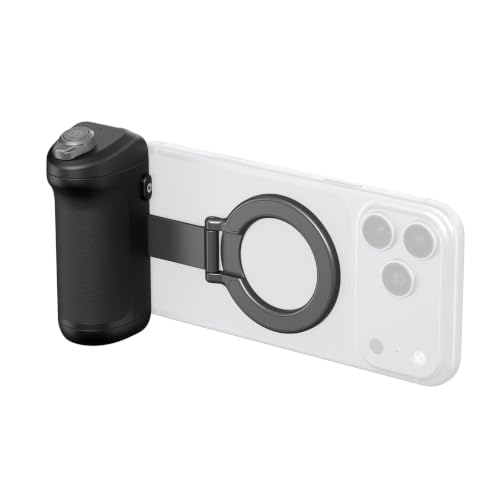
- Converts between handheld grip and tabletop stand
- Lightweight 105 g foldable design
- 10-meter remote with camera and zoom controls
Best For: Portable video calls and fixed desk recording
Best for Expandable Accessories
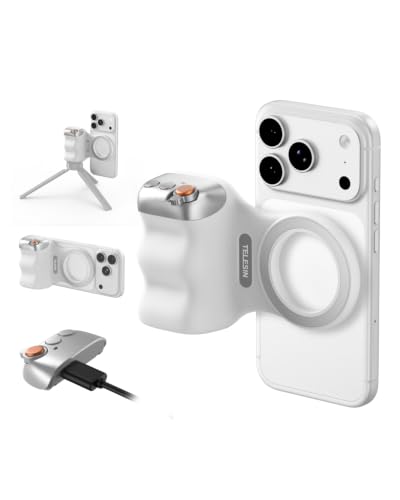
- Lightweight 109 g ergonomic finger-hook grip
- Detachable 10-meter wireless remote
- 1/4-inch tripod socket for added accessories
Best For: Remote workers adding tripods, lights, or microphones
iPhone Pro Max Comfort Pick

- Thumb-rest design for extended handheld use
- Detachable remote with native Camera controls
- 1/4-inch tripod thread for desk setups
Best For: iPhone Pro Max users needing comfortable, app-free camera control
Universal Remote-Work Pick

- Works with iOS, Android, and HarmonyOS
- Detachable remote for key camera controls
- Built-in stand and accessory mounting thread
Best For: Mixed-device users building flexible desk and travel setups
Compact iPhone Carry Pick

- Designed for iPhone 17 with native Camera control
- Lightweight silicone handle and built-in keychain
- Detachable remote plus 1/4-inch tripod thread
Best For: Portable iPhone 17 video calls and quick recordings
Steady Rig Pick – Movo PR-1 Phone Camera Grip
For phone camera grips for remote work, the Movo PR-1 is a practical choice when you want a steadier handheld setup for presentations, walkthroughs, or talking-head video. Its padded aluminum handle provides a camera-style hold, while the adjustable clamp fits phones from 2.2 to 3.6 inches wide, including many phones with their cases still attached.
Best For: Remote workers who need a durable handheld grip with mounting options for a microphone, LED light, or tripod.
Pros:
- Padded aluminum handle helps reduce hand strain during handheld filming.
- Cold shoe and three 1/4-inch threads support microphones, LED panels, and other accessories.
- Adjustable clamp fits phones with cases, and the base mounts to a standard tripod.
- Includes an adjustable wrist strap for added security.
Cons:
- It does not include a microphone, light, or tripod.
- It is not water resistant.
The PR-1 stands out as a straightforward, expandable grip for remote-work video. Choose it if stability and accessory compatibility matter more than having a built-in light or wireless shutter.
Portable Remote Pick – KIWIFOTOS Phone Camera Grip
Among phone camera grips for remote work, the KIWIFOTOS model is useful for mobile presentations, quick recordings, and hands-free desk shots. It combines an ergonomic grip with a detachable Bluetooth remote, a cold shoe, and a 1/4-inch tripod thread in a compact design.
Best For: Remote workers who want a lightweight grip with wireless shutter control and basic mounting flexibility.
Pros:
- Detachable Bluetooth remote works from up to 32.8 feet without an app.
- Cold shoe supports an external microphone or LED light.
- Bottom 1/4-inch thread allows mounting on a compatible mini tripod.
- Grip can function as a tabletop stand in portrait orientation.
Cons:
- Phones up to 0.49 inches thick may need the case removed if the fit is too tight.
- A mini tripod is not included.
- The remote uses a replaceable CR2025 battery.
This is a versatile, travel-friendly option for remote workers who want to start and stop shots from a distance. Its main trade-off is that thicker phones or cases may not fit the clamp comfortably.
Lighting Pick – UURig CG-02 Phone Grip
The UURig CG-02 adds built-in illumination to the phone camera grips for remote work category, making it useful for video calls, online presentations, and recordings in uneven lighting. Its removable ring light offers three brightness levels, while the grip also includes a Bluetooth remote, cold shoe, and 1/4-inch screw hole.
Best For: Remote workers who want a phone grip with integrated fill light for brighter on-camera video.
Pros:
- Three-level removable fill light helps brighten the image.
- 1000mAh battery provides up to 120 minutes of continuous lighting according to the supplied notes.
- Telescoping clamp fits phones from 2.3 to 3.4 inches wide.
- Cold shoe and 1/4-inch mount support accessories and handheld tripods.
Cons:
- It is not water resistant.
- The integrated light adds components compared with a basic grip.
The CG-02 is the most self-contained choice here for improving lighting while keeping a secure one-handed hold. It makes sense for remote work setups where a separate LED panel would be inconvenient.
MagSafe Pick – JJC Magnetic Phone Camera Grip
For remote workers using a compatible iPhone or MagSafe case, the JJC magnetic grip offers a fast way to turn a phone into a more stable camera or video-call setup. It attaches magnetically, rotates between portrait and landscape, doubles as a tabletop stand, and includes a detachable wireless remote.
Best For: MagSafe iPhone users who want quick attachment, hands-free desk positioning, and remote shutter control.
Pros:
- Magnetic attachment is rated for up to 5.1 pounds of force in the supplied notes.
- Rotates between portrait and landscape orientation.
- Functions as a tabletop stand for video calls, live streams, and recordings.
- Includes a rechargeable remote, safety string, lanyard, and adhesive metal ring.
Cons:
- Best suited to MagSafe-compatible phones or devices using the included metal ring.
- The remote does not support zoom.
- Magnetic LED lights and tripods are sold separately.
The JJC is a convenient choice when your remote-work workflow involves frequent switching between handheld filming and desk-based calls. Its magnetic design is particularly appealing if you already use a MagSafe iPhone or case.
Best All-in-One Pick – AMAZEAR Phone Camera Grip
For shoppers comparing phone camera grips for remote work, the AMAZEAR stands out as a versatile desktop and handheld option. It combines a magnetic phone mount, detachable Bluetooth controller, adjustable head, selfie stick, and tabletop tripod in one portable design.
Best For: Remote workers who want one grip for video calls, desktop streaming, selfies, and hands-free group shots.
Pros:
- Detachable remote can control shutter, focus, shooting modes, camera selection, zoom-related functions, and screen wake features.
- Adjustable head and swiveling magnetic base support portrait, landscape, overhead, and low-angle positioning.
- Extends to 18.9 inches for tabletop video calls and live streaming.
- Folds to about 4.3 inches and weighs 180 g, with a magnetic ring included for non-MagSafe phones or thick cases.
Cons:
- At 180 g, it is heavier than the SmallRig and TELESIN alternatives.
- Some iPhone controls require enabling Zoom and changing the side-button Wallet setting.
The AMAZEAR is the most feature-rich choice here if your remote-work setup needs both a stable desk stand and a handheld grip. Its extra controls and greater adjustability add convenience, though the setup is more involved than a basic grip.
Best Lightweight Stand-Style Grip – SmallRig Magnetic Phone Grip 6694
The SmallRig 6694 is a practical choice among phone camera grips for remote work when portability and quick setup matter. Its detachable grip converts into a tabletop stand, while the magnetic mount supports fast portrait or landscape changes.
Best For: Remote workers who want a lightweight grip for walking presentations, video calls, and fixed desk recording.
Pros:
- 2-in-1 design switches between a handheld grip and tabletop stand.
- Weighs approximately 105 g and folds for easy storage in a bag or pocket.
- Detachable wireless remote works up to 10 meters and controls photos, zoom, and front/rear camera switching.
- Textured anti-slip surface and curved shape are designed to reduce hand fatigue.
Cons:
- Its feature set is more focused on gripping and basic remote control than the AMAZEAR’s multifunction controls.
- Magnetic mounting requires the included metal ring for phones or cases without magnetic attachment.
- iPhone users must enable Full Screen Zoom for the remote functions.
SmallRig keeps the design simple and travel-friendly while still covering the core needs of remote presentations and desk recording. It is a strong fit if low weight and a foldable stand matter more than an extendable selfie-stick design.
Best for Expandable Accessories – TELESIN Fun Shot Zoom Grip
The TELESIN Fun Shot is a compact option for phone camera grips for remote work, especially if you plan to add lights, microphones, or a tripod. Its ergonomic finger-hook shape, detachable remote, and 1/4-inch tripod socket make it adaptable for calls, live broadcasts, and mobile video.
Best For: Remote workers and creators who want a lightweight magnetic grip with support for extra accessories.
Pros:
- Lightweight 109 g body with an ergonomic finger-hook design for added balance and stability.
- Detachable 10-meter wireless remote works with iOS and Android using the phone’s native camera app.
- 1/4-inch tripod screw supports tripod mounts, microphones, and other accessories.
- Double magnetic mounting is rated to support up to 3 kg and works with MagSafe-compatible phones or cases.
Cons:
- It does not include a built-in tabletop stand or selfie-stick extension.
- The product is not water resistant.
- Accessory expansion may require purchasing additional lights, mounts, or microphones separately.
TELESIN is the most accessory-friendly pick of the three, offering a straightforward grip with a tripod connection and detachable remote. Choose it when modular expansion is more important than an integrated desk stand or extended height.
IPhone Pro Max Comfort Pick – MOCA ARCO Phone Camera Grip
If you need phone camera grips for remote work, the COMITOK MOCA ARCO is a focused option for iPhone Pro Max users who want steadier video calls, desk recording, and one-handed camera control. Its thumb-rest design, detachable remote, and tripod thread make it practical for both handheld and desktop setups.
Best For: iPhone Pro Max users who prioritize long-session comfort and native Camera control.
Pros:
- Extended holder with thumb-rest and thumb-web support for more comfortable use.
- Detachable remote controls camera modes, lenses, exposure, focus, and camera launching.
- Built-in 1/4-inch thread supports tripods and desktop positioning in portrait or landscape.
- Works with the native iPhone camera without an additional app.
Cons:
- Designed primarily for iPhone Pro Max models; older iPhones require the included magnetic plate.
- Initial Accessibility setup is required, and some iOS 26 users may need to adjust a Camera setting.
- It is not water resistant.
MOCA ARCO stands out when comfort matters during extended remote meetings or recording sessions. It is less universal than some alternatives, but its dedicated iPhone controls and supportive grip design can make repeat use more convenient.
Universal Remote-Work Pick – 7RYMS 7RIG G1 Grip
Among phone camera grips for remote work, the 7RYMS 7RIG G1 is the most flexible choice for mixed-device households or teams using iPhone, Android, and HarmonyOS phones. Its detachable wireless remote, dual-sided magnets, stand function, and accessory thread support calls, live streams, and fixed-angle recording.
Best For: Users who need broad phone compatibility and a versatile desk-to-travel setup.
Pros:
- Wireless remote supports shutter, zoom, mode switching, front/rear cameras, and exposure.
- Compatible with iOS, Android, and HarmonyOS smartphones without requiring an app.
- Unfolds into a portrait or landscape stand for desk viewing, streaming, or recording.
- Dual magnets and a 1/4-inch thread support compatible accessories such as tripods, lights, and microphones.
Cons:
- Magnetic mounting is intended for compatible devices or cases; compatibility should be checked before purchase.
- The supplied notes do not specify battery details for the remote.
- Its larger feature set may be more than needed for simple video calls.
The 7RIG G1 is a strong all-around option when remote-work gear must serve multiple phones and recording styles. Its integrated stand is especially useful for desk calls, while the accessory mounting options leave room to build a more complete mobile setup.
Compact iPhone Carry Pick – COMITOK MOCA Grip
The COMITOK MOCA is a compact option among phone camera grips for remote work, particularly for iPhone 17 owners who want direct native Camera control without another app. Its removable remote, built-in keychain, silicone handle, and tripod thread suit portable video calls, quick recordings, and occasional desk use.
Best For: iPhone 17 users who want a lightweight, portable grip with native camera controls.
Pros:
- Designed for iPhone 17 models and compatible with iOS 17, iOS 18, and iOS 26.
- Remote can switch modes, change lenses, adjust exposure and focus, and launch the native Camera.
- Lightweight silicone handle is easy to hold and includes a built-in keychain.
- 1/4-inch thread supports tripod mounting and desktop positioning in either orientation.
Cons:
- Its primary design focus is iPhone 17; iPhone 11 and earlier models need the included magnetic plate.
- Accessibility setup is required before use, and some iOS 26 users may need to enable a Camera setting.
- It is not water resistant.
MOCA makes the most sense for iPhone 17 owners who value portability and app-free control. The keychain adds convenience for carrying it between workspaces, though the model-specific design makes it a less universal choice.
How We Picked the Best Phone Camera Grips for Remote Work
We focused on the features that matter when a phone is part of a home office or mobile work kit: secure mounting, comfortable one-handed handling, dependable remote shutter control, compatibility with common phones, and easy storage. We also considered whether each grip adds useful accessories such as a cold shoe for a microphone or light, a tripod function, a wrist strap, a built-in keychain, or native camera controls.
Compatibility deserves particular attention. Magnetic models may require a MagSafe-compatible iPhone, case, or magnetic adapter, while Bluetooth remotes generally need pairing and periodic charging or battery replacement. Product listings can also use different naming for similar features, so confirm the exact phone, case, and operating-system support before buying.
Quick Comparison
| Feature | Best For | What to Check |
|---|---|---|
| Magnetic mounting | Fast desk-to-hand transitions | MagSafe or adapter compatibility and holding strength |
| Bluetooth remote | Self-recording and presentations | Pairing, range, controls, and battery type |
| Cold shoe | Adding a microphone or light | Accessory clearance and overall balance |
| Tripod or selfie-stick design | Hands-free calls and filming | Stability, height, and folded size |
| Ergonomic handle | Long recording sessions | Grip texture, thumb rest, and wrist strap |
Key Buying Factors for Phone Camera Grips for Remote Work
Mounting Security and Phone Fit
Choose a magnetic grip for the quickest setup if your phone or case supports the required magnetic standard. A clamp-style or enhanced mount may be more flexible if you switch between phones or use a thick protective case. The phone should remain centered and stable when you tilt or move the handle.
Remote Controls and Camera Access
A wireless shutter is useful for recording training videos, joining a standing presentation, or taking hands-free photos. Look for a removable or clearly positioned remote if you want to use the grip independently. If native camera control is advertised, verify which phone models and camera functions are supported.
Accessories and Portability
A cold shoe is valuable for a compact microphone or fill light, but added hardware can make the setup front-heavy. Tripod and selfie-stick features improve flexibility, while a slim magnetic handle is usually better for commuting and quick desk use. A wrist strap adds inexpensive protection during handheld shooting.
Who Should Buy Which Phone Camera Grips for Remote Work?
Choose a compact magnetic model if your priority is quickly switching between video calls, desk recording, and handheld shots. Pick a grip with a cold shoe if audio or lighting quality matters more than minimum size. A tripod or selfie-stick combination suits solo presenters who need hands-free framing without carrying a separate stand.
Buyers who use multiple phones should favor an adaptable mount and confirm Android support rather than assuming every magnetic grip works universally. For frequent filming, prioritize a comfortable handle, thumb rest, wrist strap, and reliable remote over decorative extras. Finally, check charging or battery requirements before purchasing so the grip is ready when your next remote-work recording begins.
