
The right phone camera grip can make a home-office setup more stable, comfortable, and capable. Whether you record video calls, product demos, tutorials, or quick social clips, a dedicated handle gives you more control than holding your phone by its edges.
This roundup covers magnetic iPhone grips, universal smartphone stabilizers, remote shutters, tripod-compatible handles, and desk-friendly mounts. Use the guide below to match the grip style, compatibility, and features to the way you create.
Best 10 Phone Camera Grips for Home Offices Picks for 2026
Best Magnetic Grip

- MagSafe grip with up to 5.1-lb magnetic force
- Rotating grip converts to a tabletop stand
- Rechargeable remote works up to 32.8 feet
Best For: MagSafe iPhone users recording calls, livestreams, and desk content
Best Multi-Accessory Rig

- Rig-style cage with two side handles
- Three cold-shoe mounts for lights or microphones
- Includes a removable wireless smartphone shutter
Best For: Home-office creators building an accessory-heavy recording setup
Best Flexible Desk Mount

- 33.46-inch arm rotates 360 degrees
- Clamps to desks, tables, or bed frames
- Supports phones approximately 4.0 to 6.3 inches
Best For: Hands-free calls, document views, and fixed desk recording
Best Simple Camera Handle

- Lightweight 1/4-inch handheld camera grip
- Bottom thread supports tripod or monopod mounting
- Includes wrist strap and anti-slip platform
Best For: Users who already have a compatible phone or camera adapter
Best All-in-One Pick

- Adjustable 2.3–3.3-inch phone holder
- Detachable Bluetooth remote
- Cold shoe and 1/4-inch tripod mount
Best For: Home-office recording, calls, and accessory-ready setups
Best Modular Handle
ChromLives Universal Camera Grip

- Universal 1/4-inch mounting screw
- Metal body with rubber surface
- Handle only—accessories sold separately
Best For: Existing mounts and modular home-office rigs
Best Magnetic Option
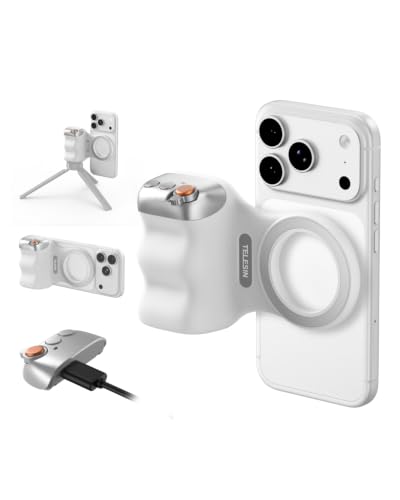
- Strong magnetic phone attachment
- Detachable iOS and Android remote
- 1/4-inch tripod connection
Best For: Magnetic phones and quick desk recording setups
Best iPhone Controls

- Native iPhone camera control without an app
- Remote adjusts modes, lenses, focus, and exposure
- Lightweight handle with keychain and tripod thread
Best For: iPhone users recording at a desk
Best All-in-One Setup
AMAZEAR Grip, Selfie Stick and Tripod

- Combines grip, selfie stick, and tripod
- Detachable remote with multiple camera controls
- Extends to 18.9 inches for desktop shooting
Best For: Video calls, livestreams, and flexible desk angles
Best Magnetic Grip – JJC MagSafe Camera Grip
For shoppers comparing phone camera grips for home offices, the JJC Magnetic Phone Camera Grip is a compact option for steadier handheld shooting, video calls, livestreams, and tabletop recording. It combines a one-hand grip, adjustable stand, and detachable wireless remote.
Best For: MagSafe iPhone users who want one accessory for handheld stability, hands-free desk recording, and remote selfies.
Pros:
- Magnetic attachment provides up to 5.1 pounds of holding force when properly compatible.
- Rotates between portrait and landscape and doubles as a tabletop stand.
- Includes a rechargeable remote with up to a 32.8-foot range and no extra app requirement.
- Supports a 1/4-inch tripod connection and additional magnetic accessories.
Cons:
- Designed primarily for MagSafe iPhones; other phones require the included metal ring.
- The remote does not support zoom control.
- It is not water resistant.
This is the most desk-friendly choice here if your phone supports MagSafe. Its integrated stand and remote make it especially practical for home-office calls and content creation without adding a separate tripod or shutter.
Best Multi-Accessory Rig – Zeadio Smartphone Stabilizer
The Zeadio handheld stabilizer takes a rig-style approach to phone camera grips for home offices. Its phone cage, two side handles, removable handle, and three cold-shoe mounts can support a more elaborate setup for recorded presentations, tutorials, or product demonstrations.
Best For: Creators who need multiple mounting points for lights, microphones, or other video accessories.
Pros:
- Includes a smartphone video rig with two side handles and a removable handle.
- Three cold-shoe mounts can hold lights, flashes, LEDs, or microphones.
- Works with cameras and camcorders using a standard 1/4-20 thread.
- Includes a removable wireless shutter for smartphones.
Cons:
- At 350 g, it is bulkier than a simple phone grip.
- The supplied details state that image stabilization is false, so it does not electronically stabilize footage.
- It is not water resistant.
Choose this model when expandability matters more than minimal desk clutter. It can help build a more controlled home-office filming station, but its rig format is less convenient for quick calls than a basic grip or stand.
Best Flexible Desk Mount – SAIJI Gooseneck Phone Holder
The SAIJI Gooseneck Bed Phone Holder is a useful alternative to handheld phone camera grips for home offices when you want fixed, hands-free positioning. Its 33.46-inch flexible arm rotates 360 degrees and clamps to a desk, small table, or bed frame.
Best For: Video calls, document-camera views, and desk recording where adjustable hands-free positioning is the priority.
Pros:
- Long telescopic arm adjusts distance and rotates 360 degrees.
- Compatible with phones measuring approximately 4.0 to 6.3 inches.
- Adjustable fixed section accommodates different mounting heights.
- Anti-slip silicone protection is designed to help avoid furniture damage.
Cons:
- The firm metal arm requires relatively strong force to adjust.
- It is a holder and stand rather than a handheld camera grip.
- Phone-size compatibility should be checked before purchase.
This SAIJI holder makes the most sense when your home-office setup benefits from a repeatable camera angle. It reduces the need to hold the phone during calls or demonstrations, though it is less portable and less suited to moving footage.
Best Simple Camera Handle – ChromLives 1/4-Inch Grip
The ChromLives Camera Handle Grip is a straightforward choice among phone camera grips for home offices when your phone or accessory already has a compatible 1/4-inch mount. Its lightweight handle adds a more secure handheld hold and can also attach to a tripod or monopod.
Best For: Buyers who want an inexpensive, lightweight handle for a compatible phone mount, camera, light, or action-camera setup.
Pros:
- Universal 1/4-inch threaded connection fits compatible cameras, lights, phones, and action-camera accessories.
- Bottom thread allows mounting to a tripod or monopod.
- Finger-shaped anti-slip handle is designed for comfortable holding.
- Includes a wrist strap and a wide anti-slip rubber platform.
Cons:
- Phone clip, camera, smartphone, and GoPro adapter are not included.
- Requires a device or mount with a 1/4-inch thread hole.
- It does not provide a built-in remote or tabletop stand.
This is a good modular foundation rather than an all-in-one phone solution. It works best if you already own the required phone adapter and want a simple grip that can move between handheld and tripod use.
Best All-in-One Pick – KIWIFOTOS Phone Camera Grip
For shoppers comparing phone camera grips for home offices, the KIWIFOTOS model is a practical option when you want a phone holder, detachable remote, and accessory mounting points in one compact design. Its adjustable clamp fits phones from 2.3 to 3.3 inches wide and can also serve as a small tabletop stand.
Best For: Home-office video calls, desk recording, selfies, and casual vlogging with added microphone or light support.
Pros:
- Adjustable holder supports a wide range of smartphones and up to 0.49-inch thickness.
- Includes a detachable Bluetooth remote with a stated 32.8-foot range.
- Cold shoe and 1/4-inch-20 thread support an external light, microphone, or mini tripod.
- Can rest upright as a portrait-oriented tabletop stand.
Cons:
- Mini tripod is not included.
- Large phones may need to be used without their cases for a proper fit.
- The remote uses a replaceable CR2025 battery.
The KIWIFOTOS is the most complete choice here for a home-office setup because it combines handheld support, desk standing, wireless shutter control, and accessory expansion. It is especially useful if you want one grip that can move between calls, content creation, and travel.
Best Modular Handle – ChromLives Universal Camera Grip
Among phone camera grips for home offices, the ChromLives handle is a straightforward choice for users who already own a compatible phone mount or camera accessory. Its 1/4-inch male screw works with devices and mounts that have a matching thread, while the rubberized body provides a more secure handheld feel.
Best For: Home-office creators who want a durable basic handle for an existing phone mount, camera, light, or action-camera setup.
Pros:
- Universal 1/4-inch screw connects to compatible cameras, lights, phone mounts, and GoPro accessories.
- Metal construction with a durable rubber surface is designed for comfortable handling.
- Anti-slip ergonomic design helps provide a steadier grip.
- Lightweight at approximately 3.63 ounces.
Cons:
- Only the handle grip is included; the phone mount, camera, and lanyard are not supplied.
- Requires a compatible 1/4-inch-threaded accessory to hold a phone.
- It is not water resistant.
The ChromLives is best viewed as a building block rather than a complete phone-grip kit. It makes sense for a home office with existing mounting hardware, but first-time buyers should budget for a separate smartphone mount.
Best Magnetic Option – TELESIN Fun Shot Zoom Grip
The TELESIN Fun Shot Zoom is a convenient pick for phone camera grips for home offices if your phone or case supports magnetic mounting. It attaches without a traditional clamp, includes a detachable wireless remote, and adds a 1/4-inch tripod connection for a desk stand or other compatible accessories.
Best For: MagSafe-compatible iPhone users and Android users with compatible magnetic cases who want quick attachment for desk recording or live streaming.
Pros:
- Double magnetic mounting design supports direct use with compatible magnetic devices or cases.
- Detachable Bluetooth remote works with iOS and Android without requiring an app.
- Compact 109-gram design with an ergonomic finger hook for added handling stability.
- 1/4-inch tripod screw supports tripods, microphones, and other accessories.
Cons:
- Magnetic mounting requires a compatible phone or Mag-compatible protective case.
- It is not water resistant.
- Additional magnetic accessories, such as a selfie light, are not stated to be included.
The TELESIN stands out for quick, cable-free setup and a compact shape that suits a desk drawer or small home-office workspace. Its main buying consideration is compatibility: users without a suitable magnetic phone or case may prefer a clamp-style grip.
Best with Extra Features – Magnetic Phone Camera Grip with Remote
For shoppers comparing phone camera grips for home offices, this magnetic model is a practical choice for video calls, desk recording, and hands-free viewing. Its ergonomic handle, fold-out stand, tripod thread, and detachable wireless remote cover everyday shooting needs, though a tripod and phone mirror are not included.
Best For: Home-office creators who want a comfortable grip, remote shutter control, and flexible desktop positioning.
Pros:
- Strong 17-magnet mount supports MagSafe phones and cases.
- Included adhesive metal ring accommodates many non-MagSafe phones.
- Detachable remote works up to 32.8 feet and recharges via USB-C.
- Grip folds into a portrait or landscape phone stand and includes a 1/4-inch tripod thread.
Cons:
- Tripod and phone mirror must be purchased separately.
- Non-MagSafe users need to apply the included adhesive metal ring.
This is a versatile all-rounder for a home office, especially if you already own a tripod or plan to add magnetic accessories. The stand and remote make it useful for calls and self-recording, while the magnetic compatibility broadens its appeal across phones.
Best iPhone Controls – COMITOK MOCA Camera Grip
Among phone camera grips for home offices, the COMITOK MOCA stands out for native iPhone control without an additional app. It is designed around iPhone camera functions, making it useful for desk recording, video calls, and quick camera access when you want physical controls in a compact handle.
Best For: iPhone users who want native camera controls, a lightweight grip, and a built-in keychain.
Pros:
- Remote can launch the native camera, switch modes, flip lenses, and adjust exposure and focus.
- Designed for iPhone 17 and compatible with iOS 17 and iOS 18 without an additional app.
- Lightweight 116-gram silicone handle is easy to hold for extended periods.
- Built-in 1/4-inch thread supports tripod mounting and desktop use.
Cons:
- Initial Accessibility setup is required before use.
- Older iPhones and non-MagSafe phones require the included magnetic plate.
- Its feature set is primarily tailored to iPhone users.
The MOCA is a focused option rather than a universal camera accessory. Its native-control approach is appealing for iPhone-based home-office workflows, but buyers should be comfortable completing the setup steps and checking compatibility with their specific model.
Best All-in-One Setup – AMAZEAR Grip, Selfie Stick and Tripod
If you want phone camera grips for home offices that can also function as a stand, the AMAZEAR combines a magnetic grip, selfie stick, and tripod in one compact accessory. Its adjustable head and extended height are suited to video calls, desktop livestreaming, timed shots, and overhead or portrait recording.
Best For: Home-office users who want one portable accessory for handheld shooting, video calls, and tabletop tripod use.
Pros:
- Works with MagSafe-compatible phones and includes a magnetic ring for other phones or thick cases.
- Detachable Bluetooth remote controls shutter, focus, modes, camera wake, screen, and lens selection.
- Three-in-one design works as a grip, selfie stick, and tripod.
- Head adjustments and 18.9-inch maximum tripod height support varied shooting angles.
Cons:
- Some iPhone functions require enabling Accessibility Zoom and changing a side-button setting.
- The 180-gram design is heavier than the lighter COMITOK MOCA.
- It is not fully waterproof; the listed water-resistance level is not water resistant.
The AMAZEAR is the most complete desk-to-handheld option in this group. Choose it when adjustable height and tripod functionality matter as much as grip comfort, while keeping the required iPhone settings changes in mind.
How We Picked the Best Phone Camera Grips for Home Offices
We focused on the practical needs of home-office creators: stable handling, straightforward phone compatibility, useful mounting options, and controls that reduce the need to touch the phone while recording. The selection includes magnetic grips for compatible iPhones, universal handles for smartphones and cameras, flexible desk mounts, and models that combine a grip with a tripod or selfie-stick function.
We also considered whether each design is useful beyond occasional snapshots. A good office grip should be comfortable during longer takes, secure enough for portrait or landscape shooting, and easy to store near a desk. Remote shutters, cold-shoe mounts, wrist straps, and standard tripod connections can add meaningful value when building a compact content setup.
Quick Comparison
| Grip type | Best suited to | Features to look for |
|---|---|---|
| Magnetic phone grip | Compatible iPhone users and quick handheld clips | Strong MagSafe connection, shutter remote, tripod thread |
| Universal camera handle | Phones, action cameras, and cameras | Secure clamp or screw mount, wrist strap, cold-shoe expansion |
| Desk or gooseneck mount | Hands-free calls, tutorials, and overhead views | Clamp range, arm stiffness, viewing-angle adjustment |
| Grip with tripod or selfie stick | Creators who switch between handheld and stationary shooting | Bluetooth control, stable base, compact folding design |
Key Buying Factors for Phone Camera Grips for Home Offices
Compatibility and Attachment
Check whether the grip is designed for MagSafe, requires a magnetic ring, uses a phone clamp, or attaches through a standard screw. Magnetic models are fast and convenient, but universal clamps are generally more flexible across phone brands and case styles. Verify that your case does not weaken the connection or prevent proper alignment.
Stability and Comfort
Look for a shaped handle, textured surface, wrist strap, or balanced design if you record for extended periods. A grip that feels secure is less likely to introduce shake or cause hand fatigue. For desk recording, a rigid clamp and stiff arm matter more than portability.
Controls and Expansion
A remote shutter is useful for starting recordings, taking photos, or avoiding camera shake. Tripod threads let you move from handheld shooting to a fixed setup, while cold-shoe mounts can support a compact microphone or light. Confirm that accessories will not block buttons, ports, or the phone’s camera array.
Who Should Buy Which Phone Camera Grips for Home Offices?
- Choose a magnetic grip if you use a compatible iPhone and want the fastest setup for handheld photos, video calls, or short-form content.
- Choose a universal stabilizer if your household uses different phones, cameras, or action cameras and you want one adaptable handle.
- Choose a gooseneck holder if your priority is hands-free desk recording, recipe demonstrations, online teaching, or overhead camera angles.
- Choose a grip with a tripod or selfie-stick mode if you frequently alternate between walking shots, desk videos, group photos, and stationary recording.
- Choose a camera-style handle if you already use a tripod workflow or need a more substantial grip with standard mounting hardware.
Before buying, match the attachment method to your phone case, measure your available desk space, and decide whether you need true stabilization or simply a more comfortable way to hold and trigger the camera. Those checks make it easier to choose among the best Phone Camera Grips for Home Offices without paying for features you will not use.
