
Choosing your first pen display can feel overwhelming, especially when specs like pressure levels, color gamut, and pen tech all sound similar. The good news: the best starter models make drawing feel natural without demanding a pro-level budget.
Below, we focus on pen display monitors for beginners that balance ease of use, reliable performance, and solid value, so you can pick a screen tablet that fits your desk, software, and art goals.
Best 10 Pen Display Monitors for Beginners Picks for 2026
Starter-Friendly Compact Pen Display
GAOMON PD1161 11.6" Portable Drawing Tablet

- 11.6-inch Full HD IPS display
- Battery-free pen with tilt and 8192 levels
- 8 shortcut keys and lightweight 866 g build
Best For: Beginners and students who want a compact, portable screen tablet
Premium Color-Critical Portable Display
ASUS ProArt PA169CDV 15.6" 4K Pen Monitor

- 15.6-inch 4K UHD IPS display
- Wacom EMR pen with 10-point multitouch
- Factory-calibrated, 100% sRGB, Delta E < 2
Best For: Beginners who prioritize professional color accuracy and premium build
Feature-Packed Portable Pen Display
XP-Pen Artist 12 3rd 11.9" 16K Tablet

- 11.9-inch Full HD display with AG etched glass
- 16K X4 pen with tilt support
- Dual X-Dial wheels and 8 shortcut keys
Best For: Beginners who want a compact display with more advanced controls
Reliable Entry-Level Drawing Monitor
XP-PEN Artist12 11.6" FHD Pen Display

- 11.6-inch Full HD IPS screen
- Battery-free pen with eraser and 8192 levels
- 6 shortcut keys plus programmable touch bar
Best For: Beginners, teachers, and students needing a dependable starter display
Compact Color-Accurate Starter Pick
HUION Kamvas 13 (Gen 3) 13.3" Pen Display

- 13.3-inch fully laminated screen
- 16,384 pressure levels with PenTech 4.0
- 5 shortcut keys plus dual dials
Best For: Beginners wanting a compact, color-accurate pen display
Budget Classroom-Friendly Option
GAOMON PD1561 15.6" Drawing Monitor

- 15.6-inch IPS Full HD display
- 10 shortcut keys and 2 pen buttons
- Battery-free pen with tilt support
Best For: Students and beginners who want a larger, versatile pen display
Best Feature-Rich Starter Display
XP-Pen Artist 13.3 Pro 13.3" Tablet

- Fully laminated 13.3-inch FHD screen
- Red dial with 8 shortcut keys
- 16,384 pressure levels and 60° tilt
Best For: Beginners who want a compact display with pro-style controls
Best Value Large-Format Starter Display
Monoprice Creator 22 Graphic Pen Display

- 21.5-inch IPS screen with Full HD resolution
- 8192 pressure levels and 5080 LPI detail
- Battery-free wireless pen and adjustable stand
Best For: Beginners wanting a big, simple drawing display
Workflow-Focused Beginner Pick
XPPen Artist 16 3rd Drawing Tablet with Screen
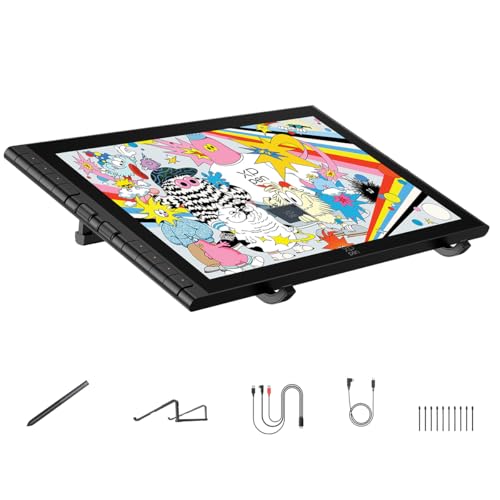
- 16K pressure stylus with low activation force
- Laminated anti-glare screen with near-zero parallax
- Two scroll wheels, 8 hotkeys, and included stand
Best For: Beginners who want accuracy plus helpful shortcut controls
Feature-Rich Compact Starter Display
Artisul SP1603 Drawing Tablet with Screen

- 15.6-inch full-laminated screen with tempered glass
- 8192 pressure levels, tilt support, and battery-free pen
- 14 shortcut keys plus a dial for faster control
Best For: Beginners who want a slim display with extra shortcuts
Starter-Friendly Compact Pen Display – GAOMON PD1161 11.6" Portable Drawing Tablet
If you’re comparing pen display monitors for beginners, the GAOMON PD1161 is a practical small-screen option that keeps the basics simple. It pairs an 11.6-inch Full HD IPS display with 8192 levels of pressure sensitivity, tilt support, and a battery-free pen, so new artists can focus on drawing without extra setup complexity.
Best For: Beginners, students, and hobbyists who want a lightweight pen display for drawing, note-taking, and basic creative work.
Pros:
- 11.6-inch 1920×1080 IPS screen with pre-applied anti-glare film
- Battery-free pen with tilt support and 8192 pressure levels
- 8 customizable shortcut keys for quicker workflow
- Lightweight 866 g design for portable use
Cons:
- Must connect to a Windows, Mac, or Chromebook computer to work
- Smaller screen size may feel tight for some workflows
- Basic feature set compared with more premium pen displays
For beginners who want an affordable, portable entry into drawing on a screen, this model covers the essentials well. It’s especially appealing if you value a simple setup, shortcut keys, and a pen that feels ready to use right away.
Premium Color-Critical Portable Display – ASUS ProArt PA169CDV 15.6" 4K Pen Monitor
Among pen display monitors for beginners, the ASUS ProArt PA169CDV sits at the premium end and is better suited to users who want a tablet-style portable monitor with serious color accuracy. Its 15.6-inch 4K IPS panel, bundled ProArt Pen with Wacom EMR technology, and factory calibration make it appealing for creative work where visual precision matters.
Best For: Beginners who want a premium portable pen display for color-accurate creative projects and multimedia use.
Pros:
- 15.6-inch 4K UHD IPS display with anti-glare finish
- Bundled ProArt Pen with Wacom EMR technology
- 100% sRGB, Calman Verified, and factory pre-calibrated to Delta E < 2
- USB-C connectivity plus built-in speakers and dual kickstands
Cons:
- Likely more than many beginners need for basic sketching
- Positioned as a professional-grade option rather than an entry-level one
- May be overkill if you only want a simple starter drawing display
This is a strong choice if your beginner purchase is really a long-term investment in color accuracy and portable creative work. It offers more polish and precision than most starter displays, but that premium focus also makes it less budget-oriented.
Feature-Packed Portable Pen Display – XP-Pen Artist 12 3rd 11.9" 16K Tablet
If you want pen display monitors for beginners but also want room to grow, the XP-Pen Artist 12 3rd adds a lot of useful extras in a compact body. It combines an 11.9-inch Full HD screen, a 16K X4 pen, AG etched glass, and dual X-Dial wheels, giving new users a feature-rich setup without jumping to a huge display.
Best For: Beginners who want a portable, modern drawing display with extra control tools and strong pen precision.
Pros:
- 11.9-inch Full HD display with full lamination and AG etched glass
- X4 pen with 16,384 pressure levels and 60-degree tilt support
- Dual X-Dial wheels and 8 customizable keys for faster control
- Wide compatibility across Windows, macOS, Android, ChromeOS, and Linux
Cons:
- More advanced control features may feel unnecessary for absolute beginners
- Still requires a connected device rather than working standalone
- Many included cables and options may take time to sort out at first
This model stands out if you want a beginner-friendly display that still feels future-ready. The combination of paper-like glass, strong pen specs, and extra control dials makes it a versatile pick for learning and progressing.
Reliable Entry-Level Drawing Monitor – XP-PEN Artist12 11.6" FHD Pen Display
For shoppers looking at pen display monitors for beginners, the XP-PEN Artist12 keeps things straightforward with a familiar 11.6-inch Full HD setup and a battery-free stylus. It offers 8192 levels of pressure sensitivity, a slim programmable touch bar, and customizable shortcut keys, making it a solid first step into screen-based drawing.
Best For: Beginners, teachers, and students who want a dependable first pen display for drawing, writing, and remote work.
Pros:
- 11.6-inch 1920×1080 IPS screen with pre-installed anti-reflective protector
- Battery-free pen with eraser end and comfortable grip
- 6 customizable shortcut keys plus a programmable touch bar
- Works with Windows, Mac, and Linux, and supports common creative apps
Cons:
- Must be connected to a computer to function
- Requires HDMI and USB-A ports or an adapter
- Smaller display may feel limited for more complex projects
This is a practical, no-frills choice for first-time pen display buyers. It covers the key drawing basics well and adds useful productivity features for homework, remote teaching, and simple creative editing.
Compact Color-Accurate Starter Pick – HUION Kamvas 13 (Gen 3) 13.3" Pen Display
If you’re comparing pen display monitors for beginners, the HUION Kamvas 13 (Gen 3) is a practical place to start because it keeps the size manageable while still adding a fully laminated 13.3-inch screen and anti-sparkle Canvas Glass 2.0. It must be connected to a computer or laptop, so it fits best if you want a true pen display rather than a standalone tablet.
Best For: Beginners who want a compact, feature-rich pen display with strong color accuracy and simple shortcut controls.
Pros:
- Fully laminated 13.3-inch display with anti-sparkle Canvas Glass 2.0 for reduced glare and improved accuracy
- PenTech 4.0 offers 16,384 pressure levels and 2g initial activation force for a responsive drawing feel
- Strong color specs with Avg. ΔE<1.5, 99% sRGB, and Rec.709 coverage, plus factory calibration report
- Useful workflow controls including 5 programmable shortcut keys and dual dial buttons
Cons:
- Not a standalone device; it must connect to a computer or laptop
- 13.3-inch size may feel compact if you want a larger workspace
- Full-featured USB-C cable is sold separately
This is a solid beginner option if you want a smaller pen display with polished screen quality and a thoughtful control layout. The included stand and broad compatibility make it easy to set up and grow with.
Budget Classroom-Friendly Option – GAOMON PD1561 15.6" Drawing Monitor
For buyers searching for pen display monitors for beginners, the GAOMON PD1561 offers a larger 15.6-inch screen and a very straightforward feature set. It’s aimed at digital drawing, annotation, online teaching, and remote meetings, making it a flexible pick if you want one device for both creative work and everyday productivity.
Best For: Beginners, students, and teachers who want an affordable-style pen display with a bigger workspace and useful classroom features.
Pros:
- 15.6-inch IPS HD display with 1920 x 1080 resolution and 178° viewing angle
- 10 shortcut keys and 2 customizable pen buttons for faster workflow
- 8192 levels of pressure sensitivity with tilt support and a battery-free pen
- Useful for digital art, annotation, signatures, and online education or meetings
Cons:
- Requires connection to a Windows or macOS computer
- Lower pressure sensitivity than 16K-level competitors
- Bulkier than 13.3-inch models if desk space is tight
The PD1561 makes sense if you want a beginner-friendly pen display with a larger drawing area and practical shortcut controls. Its education and meeting support also make it more versatile than a pure art-only display.
Best Feature-Rich Starter Display – XP-Pen Artist 13.3 Pro 13.3" Tablet
If you want pen display monitors for beginners with a more premium control layout, the XP-Pen Artist 13.3 Pro is a strong contender. It combines a fully laminated 13.3-inch FHD screen, a tilt-support stylus, and a red dial with shortcut keys, so new users get a setup that feels creative without being overly complicated.
Best For: Beginners who want a compact display with pro-style controls, strong color, and broad software support.
Pros:
- Fully laminated 13.3-inch display with high color gamut and wide viewing angle
- Red dial plus 8 customizable shortcut keys for efficient workflow control
- Battery-free stylus supports 60° tilt and 16,384 pressure levels
- Broad compatibility with Windows, Mac, Chrome OS, Linux, and major creative software
Cons:
- Must be used with a computer or laptop
- 13.3-inch workspace is smaller than full-size alternatives
- More feature-packed controls may take some getting used to for true first-time users
This model stands out for beginners who want a display that can grow with them. The dial, shortcut keys, and laminated screen create a smooth workflow while keeping the footprint compact.
Best Value Large-Format Starter Display – Monoprice Creator 22 Graphic Pen Display
If you’re comparing pen display monitors for beginners, the Monoprice Creator 22 is a straightforward way to get a roomy 21.5-inch canvas without moving into a very premium tier. It pairs a Full HD IPS panel with 8192 pressure levels, 5080 LPI resolution, and a battery-free wireless pen, so it covers the core drawing essentials while staying easy to set up for home use.
Best For: Beginners who want a larger screen and simple, reliable pen input for drawing, animation, or design practice.
Pros:
- 21.5-inch IPS display with 16.7 million colors and 178-degree viewing angles
- 8192 pressure levels and 5080 lines per inch for detailed strokes
- Battery-free wireless pen helps keep the pen lighter during longer sessions
- Included adjustable stand supports easier positioning while you learn
Cons:
- Lacks the advanced shortcut-wheel workflow found on some rivals
- Bigger 21.5-inch size may take up more desk space
- Focuses on the essentials rather than premium color-management features
Overall, this is a practical beginner-friendly pen display if you want a larger working area and dependable pen performance without extra complexity. It is a solid fit for first-time digital artists who value screen size and straightforward features.
Workflow-Focused Beginner Pick – XPPen Artist 16 3rd Drawing Tablet with Screen
For beginners shopping pen display monitors for beginners, the XPPen Artist 16 3rd stands out because it combines a compact 15.4-inch laminated screen with a feature set that helps you learn faster. Its 16K pressure stylus, anti-glare etched glass, and near-zero parallax make drawing feel controlled and precise, while the shortcut wheels and hotkeys help you work more efficiently as your skills grow.
Best For: New digital artists who want an easy-to-manage display with strong pen accuracy and helpful workflow controls.
Pros:
- 16,384 pressure levels with very low activation force for precise line control
- Fully laminated display with anti-glare etched glass to reduce parallax and reflections
- Two scroll wheels plus 8 hotkeys for faster brush, zoom, and layer control
- Includes a foldable stand and supports USB-C single-cable connection on compatible devices
Cons:
- Smaller 15.4-inch screen may feel less spacious than larger pen displays
- Feature set can be more than a complete beginner strictly needs
- Compatibility depends on the device and connection method you use
This model makes sense if you want beginner-friendly accuracy now and room to grow later. The bundled stand and workflow controls are especially useful if you expect to spend a lot of time sketching, coloring, or editing.
Feature-Rich Compact Starter Display – Artisul SP1603 Drawing Tablet with Screen
The Artisul SP1603 is a strong option if you want pen display monitors for beginners that offer a compact size but still include productivity features you can grow into. Its 15.6-inch full-laminated screen, battery-free stylus, and 14 customizable shortcut keys plus a dial make it a practical choice for learning digital art workflows without feeling stripped down.
Best For: Beginners who want a slim, portable pen display with lots of shortcuts and a pen that feels easy to handle.
Pros:
- 15.6-inch full-laminated display with tempered glass for clearer cursor placement
- Battery-free stylus with 8192 pressure levels, tilt support, and 5080LPI resolution
- 14 customizable shortcut keys and a dial for faster workflow control
- Thin aluminum body and broad PC, macOS, and Android compatibility
Cons:
- Requires connection to a PC, laptop, or compatible Android device
- USB-C full-feature cable is not included
- Smaller screen may feel limiting if you prefer a bigger drawing area
For beginners who value shortcuts and portability, the SP1603 gives you a lot of practical tools in a slim format. It is a sensible pick if you want to build good habits with a pen display that stays manageable on a desk or in a mobile setup.
How We Picked These Pen Display Monitors for Beginners
We prioritized models that are approachable for first-time buyers, with dependable stylus performance, comfortable screen sizes, and features that reduce friction during setup and daily use. For Pen Display Monitors for Beginners, the most important factors are not just pressure sensitivity, but also driver stability, display quality, and whether the tablet feels comfortable for longer sketching sessions.
We also favored displays that offer useful entry-level extras such as anti-glare surfaces, battery-free pens, shortcut keys, and USB-C connectivity where available. These features can make a noticeable difference when you are learning digital art and do not want to fight your hardware.
Quick Comparison: What Usually Matters Most
If you are comparing options quickly, think in terms of screen size, pen feel, and workspace. Smaller displays are easier to carry and often cost less, while 13- to 16-inch models usually give beginners more room to draw and less on-screen crowding. Larger 21.5-inch displays are better for desk setups but are less portable and can be more expensive.
Also compare whether the display is fully laminated, how strong the anti-glare treatment is, and whether the pen is battery-free. These details often matter more in real-world use than headline pressure numbers alone.
Key Buying Factors for Pen Display Monitors for Beginners
Screen size: An 11.6- to 13.3-inch display is a practical starting point for most beginners. Choose larger only if you have enough desk space and want a more open canvas.
Pen experience: A responsive, battery-free stylus with low tilt lag is ideal. Beginners usually benefit from predictable line control more than advanced shortcut-heavy tools.
Display quality: Look for full HD or better on smaller models, plus decent color coverage and brightness if you plan to draw, edit, or color accurately.
Surface and comfort: Anti-glare glass, good parallax handling, and a comfortable stand or angle can reduce fatigue and help you draw more naturally.
Compatibility: Make sure your chosen model works cleanly with your operating system, art apps, and available ports. USB-C is convenient, but not mandatory if the included cabling is straightforward.
Extras that help: Shortcut keys, dials, and included accessories can speed up your workflow, but they should not outweigh basics like reliable pen tracking and stable drivers.
Who Should Buy Which Pen Display Monitors for Beginners?
If you want the simplest path into digital drawing, choose a compact 11.6- or 12-inch model that keeps costs and setup complexity down. If you sketch often and want more room to work, a 13- to 16-inch display is usually the sweet spot for most beginners.
Artists who care about desk presence, color work, or multitasking may prefer a larger 15.6-inch or 21.5-inch display, especially if they plan to keep the tablet in one place. On the other hand, students, hobbyists, and travelers will usually get more value from lighter, more portable Pen Display Monitors for Beginners that are easy to pack and easy to learn.
