
A riser cable can make a vertical GPU build possible—but the wrong length or connector angle can leave the cable strained, the card misaligned, or the side panel too close to the fans.
These ten options cover compact and full-size layouts, with PCIe 4.0 and 5.0 choices. Use your case’s mounting position and cable route to narrow the field before deciding which specification to pay for.
Best 10 Pcie Riser Cables for GPU Setups Picks for 2026
Mid-Tower Pick
GLOTRENDS 200mm PCIe 4.0 Right-Angle Riser

- 200mm reach for mid-tower routing
- 90-degree female connector
- Shielded PCIe 4.0 x16 design
Best For: Mid-tower vertical GPU builds needing a right-angle connection
White Gen5 Pick
TRYX STRING 200mm PCIe 5.0 Riser

- White 200mm cable for vertical mounting
- PCIe 5.0 x16 specification
- Flexible TPE with EMI shielding
Best For: White-themed builds with a measured 200mm cable route
Gen5 Layout Pick

- PCIe 5.0 x16 specification
- Right-angle connector for vertical layouts
- 20cm listed span; 24cm total length
Best For: Measured Gen5 builds requiring a right-angle riser
Best for PCIe 5.0 Builds
Corsair Premium 175mm Riser Cable

- PCIe 5.0 x16 interface
- Flexible, tidy 175mm length
- Two-bolt right-angle case mount
Best For: Compact vertical GPU builds with a compatible mounting point
Best for Tight Routing
NZXT PCIe 4.0 x16 200mm Riser Cable

- Thin, flexible 200mm cable
- Stress relief at PCB junction
- Backward-compatible PCIe 4.0 x16
Best For: Tight builds needing flexible GPU cable routing
Best for Long Cable Runs
GLOTRENDS 300mm Right-Angle Riser Cable

- 300mm for larger layouts
- 90-degree female connector
- Individually foil-shielded signal pairs
Best For: Full-tower or custom-loop builds needing extra reach
Gen5 ITX Pick
LINKUP AVA5 19cm Double-Reverse Riser

- PCIe 5.0 x16; backward-compatible with Gen4
- 19cm double-reverse route for select ITX layouts
- Multilayer shielding for signal integrity
Best For: Gen5-ready builds with a compatible ITX or vertical-mount route
Right-Angle Pick

- 90-degree, 20cm PCIe 4.0 x16 design
- EMI-shielded 30 AWG copper wiring
- Flexible TPE sleeves for tight routes
Best For: Builds needing a measured 20cm right-angle GPU connection
Short-Run Pick
100mm PCIe 4.0 Vertical GPU Riser
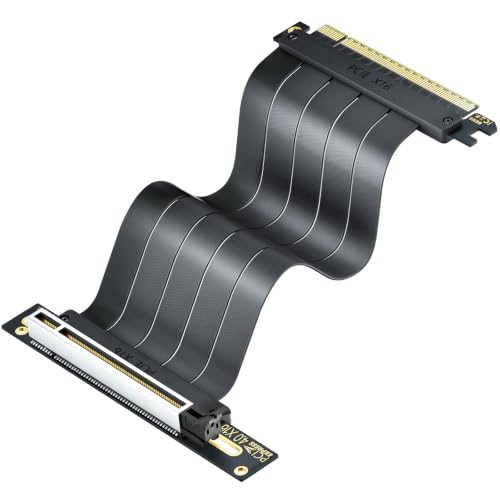
- 100mm PCIe 4.0 x16 cable
- Triple-layer EMI shielding
- Flexible flat design for vertical mounts
Best For: Vertical GPU builds with a measured 100mm route
Mid-Tower Pick – GLOTRENDS 200mm PCIe 4.0 Right-Angle Riser
For pcie riser cables for gpu setups in standard mid-tower and ATX cases, this 200mm GLOTRENDS cable offers routing room for a vertical mount. Its female connector is angled 90 degrees, so check which direction your GPU bracket needs.
Best For: Mid-tower builders who need a 200mm, right-angle PCIe 4.0 x16 connection.
Pros:
- Supports PCIe 4.0 x16 when connected to compatible CPU, motherboard slot, and GPU hardware.
- Individually foil-wrapped signal pairs help protect against interference.
- Works with PCIe 3.0 hardware at Gen3 speed; no drivers or external power required.
Cons:
- The 90-degree orientation may not suit every bracket or case layout.
- A PCIe 3.0 system will not gain Gen4 speeds.
This is a practical fit when a shorter run would be awkward, but measure the route and confirm the connector orientation before ordering.
White Gen5 Pick – TRYX STRING 200mm PCIe 5.0 Riser
Among pcie riser cables for gpu setups, the white TRYX STRING stands out for builds that need a 200mm PCIe 5.0 x16 cable to match a light-colored vertical GPU display. Its flexible TPE construction is intended to ease routing in tight spaces.
Best For: White-themed builds using a compatible PCIe 5.0 GPU and vertical mount.
Pros:
- Specified for PCIe 5.0 x16 and up to 128GB/s bidirectional bandwidth.
- Includes electromagnetic shielding and gold-plated connectors.
- Flexible TPE cable and six-layer PCB base are designed for installation and durability.
Cons:
- The 200mm length needs to match your case and mounting bracket.
- The supplied notes do not specify a right- or left-angle connector orientation.
Choose it for its white finish and Gen5 specification, but verify the physical connector layout before committing to a tightly planned build.
Flexible Gen4 Pick – OwlTree 200mm PCIe 4.0 Riser
The OwlTree is a 200mm, 90-degree option among pcie riser cables for gpu setups where the path from motherboard to graphics card calls for a flexible extension. It supports PCIe 4.0 and is backward-compatible with PCIe 3.0 systems.
Best For: Desktop builders needing a flexible, right-angle Gen4 cable for a measured 200mm route.
Pros:
- Flexible TPE sleeves help with tight cable routing.
- Cable protector is designed to reduce damage during bending or twisting.
- Gold-plated PCI pins and plug-and-play installation.
Cons:
- Its 90-degree connector may point the wrong way for some mounts.
- Gen4 performance requires compatible PCIe 4.0 hardware.
Its flexible sleeve and protective design are useful when routing is the main challenge; check the bend path, length, and angle before purchase.
Gen5 Layout Pick – LINKUP 20cm Right-Angle Riser
For pcie riser cables for gpu setups that need Gen5 support, this LINKUP right-angle model is listed at 20cm, with a 24cm total length. Its product notes cover vertical mounts and a range of tower, compact, open-bench, and water-cooled layouts.
Best For: Builders planning a right-angle PCIe 5.0 route who can confirm case and bracket fit.
Pros:
- Specified for PCIe 5.0 x16 and backward-compatible with PCIe 4.0.
- Uses tuned impedance and multilayer shielding to address signal interference.
- Product guidance recommends measuring the slot-to-GPU route before choosing a cable.
Cons:
- The 20cm listed span and 24cm total length should not be treated as interchangeable when measuring.
- Case fit depends on the bracket, connector angle, and available clearance.
This is a strong candidate when Gen5 capability and layout options matter, provided you measure from the motherboard slot to the GPU connector and verify the right-angle orientation.
Best for PCIe 5.0 Builds – Corsair Premium 175mm Riser Cable
Corsair Premium PCIe 5.0 x16 175mm Riser Cable – Black | Ultra-Flexible, Durable, Easy to Install
Check Price On AmazonAmong PCIe riser cables for GPU setups, this Corsair PCIe 5.0 x16 cable is a compact option for showing off a vertically mounted graphics card. Its flexible 175mm length helps keep a compatible case build tidy.
Best For: Vertical GPU builds that need a short PCIe 5.0 cable and a clean cable run.
Pros:
- PCIe 5.0 x16 interface supports the latest stated standard.
- Flexible 175mm length limits excess cable.
- Right-angle connector mounts to compatible cases with two bolts.
Cons:
- 175mm may be too short for builds needing a longer route.
- Case mounting depends on compatibility with the two-bolt connector.
Choose this one when the short route and mounting arrangement fit your case; measure the path before buying.
Best for Tight Routing – NZXT PCIe 4.0 x16 200mm Riser Cable
If you are comparing PCIe riser cables for GPU setups with limited routing space, the NZXT AB-RC200-B1 offers a thin, flexible 200mm cable. Its PCIe 4.0 x16 interface is backward compatible with earlier PCIe generations.
Best For: Tight builds that need a flexible 200mm GPU riser with junction stress relief.
Pros:
- Thin construction allows folding and bending for easier routing.
- Plastic cover helps relieve stress where the cable meets the PCB.
- PCIe 4.0 x16 interface supports backward compatibility.
Cons:
- Does not offer a PCIe 5.0 interface.
- 200mm length may not suit layouts requiring a longer run.
This is the practical pick when maneuverability matters more than getting a longer cable; check your intended route before installation.
Best for Long Cable Runs – GLOTRENDS 300mm Right-Angle Riser Cable
For builders shopping PCIe riser cables for GPU setups that need extra reach, this GLOTRENDS PCIe 4.0 x16 model provides a 300mm run and a 90-degree female connector. That length is aimed at full-tower layouts, custom loops, and angled GPU mounts.
Best For: Full-tower or custom-loop builds needing a longer route to an angled GPU mount.
Pros:
- 300mm length provides routing slack for larger builds.
- Individually foil-wrapped signal pairs add EMI shielding.
- Backward compatible with PCIe 3.0 at Gen3 speed.
Cons:
- Gen4 speed requires compatible CPU, GPU, and CPU-direct PCIe 4.0 x16 slot.
- Hot swapping is not supported.
The extra length solves a specific layout problem, but confirm your slot connection and measure the route if PCIe 4.0 speed is important to your build.
Gen5 ITX Pick – LINKUP AVA5 19cm Double-Reverse Riser
Among pcie riser cables for gpu setups, this LINKUP PCIe 5.0 x16 model is a strong fit when a compact case calls for a 19cm double-reverse route. It is designed for vertical mounts and ITX layouts, with PCIe 4.0 backward compatibility.
Best For: Builders planning a Gen5-ready GPU installation in a compatible ITX sandwich case or vertical-mount layout.
Pros:
- PCIe 5.0 x16 support with a stated 128GB/s transfer rate.
- Multilayer shielding and low-loss design target signal stability.
- Double-reverse configuration suits specific compact-case routing paths.
Cons:
- The double-reverse connector layout will not suit every case; check the route before ordering.
- A bracket or standoffs may be needed, depending on the chassis.
This is the forward-looking choice of the three, but fit matters more than bandwidth on a short ITX run. Measure from the motherboard slot to the GPU PCB and confirm the connector orientation before buying.
Right-Angle Pick – 20cm PCIe 4.0 Shielded Riser
For pcie riser cables for gpu setups that need a 90-degree connection, this 20cm PCIe 4.0 x16 extender offers a flexible route for a displaced graphics card. Its stated compatibility includes RTX 40- and 30-series cards and PCIe 3.0 systems.
Best For: Gaming PCs or workstations with a measured 20cm path that calls for a right-angle riser.
Pros:
- Supports PCIe 4.0 and is backward-compatible with PCIe 3.0.
- EMI-shielded 30 AWG copper wiring targets interference.
- Flexible TPE sleeves help with tight cable routing.
- Gold-plated PCI pins are designed for durable connections.
Cons:
- Limited to PCIe 4.0 rather than Gen5 operation.
- The 90-degree orientation and 20cm length need to match your case layout.
Choose this one for its specified connector angle and flexible sleeving, not simply because your GPU appears on its compatibility list. Check clearance at both ends before installation.
Short-Run Pick – 100mm PCIe 4.0 Vertical GPU Riser
When comparing pcie riser cables for gpu setups with little room between the slot and a vertical mount, this 100mm PCIe 4.0 x16 cable is the compact option here. It is intended for vertical GPU installations and supports PCIe 3.0 backward compatibility.
Best For: Vertical GPU builds with a measured 100mm cable route and PCIe 4.0 requirements.
Pros:
- Short 100mm design fits layouts that do not need a longer extension.
- Triple-layer EMI shielding targets interference and signal degradation.
- Flexible flat cable, six-layer PCB, and gold-plated contacts support durable routing.
- Specified for RTX 40/30-series and RX 7000/6000-series GPUs.
Cons:
- 100mm may be too short for cases with a longer slot-to-GPU path.
- Does not offer PCIe 5.0 signaling.
The main reason to pick this cable is its short, shielded run. Measure the actual mounting path first; a compact riser is useful only if it reaches without straining the connectors.
How We Picked the Best Pcie Riser Cables for GPU Setups
We focused on the differences that matter when choosing Pcie Riser Cables for GPU Setups: stated PCIe generation, cable length, connector orientation, shielding claims, and the space each design needs inside a case. The selection includes short 100 mm and 175 mm runs, several 200 mm options, a 300 mm option, standard right-angle connectors, and an ITX-oriented double-reverse design. Product listings alone cannot establish signal stability in every build, so check your case and motherboard requirements before ordering.
Quick Comparison: Match the Cable to the Route
Start by measuring the path from the motherboard’s x16 slot to the GPU’s mounted position, following the bends the cable will actually take. A 100 mm cable suits a very short, direct route; 175–200 mm gives many vertical mounts more routing room; 300 mm is worth considering when the slot and mount are farther apart. These are starting points, not universal fit rules. The GLOTRENDS options illustrate the 200 mm versus 300 mm choice, while the short 100 mm cable serves tighter layouts.
Next, compare connector geometry. A 90-degree right-angle end and a double-reverse design route in different directions; neither is interchangeable simply because the length matches. For generation, this list includes PCIe 4.0 and 5.0 options, including LINKUP, TRYX, and Corsair 5.0 models. Choose based on your system’s needs rather than the largest number on the package.
Key Buying Factors for Pcie Riser Cables for GPU Setups
Compatibility and Performance
Check the motherboard slot, GPU, and riser generation. A PCIe 5.0-rated cable is the more appropriate choice if you intend to maintain a Gen 5 link; a PCIe 4.0 cable may be sufficient for a Gen 4 system. Link speed depends on the entire connection, not the riser label alone. If a newly installed system fails to display or negotiate a stable link, consult your motherboard’s PCIe speed settings and the cable maker’s troubleshooting guidance.
Fit, Bends, and Airflow
Confirm that your case has a compatible vertical mounting position or bracket, then check GPU thickness and side-panel clearance. Measure the cable route without pulling it taut, and avoid sharp folds near either connector. Shielding and flexible construction are useful features to look for, but they do not compensate for a poorly fitted cable or strained connection.
Who Should Buy Which Pcie Riser Cables for GPU Setups?
Choose a short riser if the mount sits close to the motherboard and you can verify the route before purchase. Look at 175–200 mm models for a typical vertical mount that needs moderate slack, or the 300 mm option for a longer path—provided you have space to manage the extra cable. Pick the ITX double-reverse design only if its connector direction matches your compact layout. If you are building around a Gen 5 connection, prioritize a PCIe 5.0-rated option; otherwise, a correctly fitted PCIe 4.0 model may be the more practical buy. In every case, fit comes before brand or advertised bandwidth.
